1214 comments found.

any reason why i am not getting the notification for the update in the admin section? My site still shows I am on 7.9.2 and says no update is available. I tried to manually update but it broke my site and gave me a 500 error. Any help would be great.
Hi,
We did provided free direct upgrade help via email when v8 was released, which is now closed.
You can send us your control panel credentials via profile page here – https://codecanyon.net/user/thehp and we will check the issue you’re facing and upgrade your TMail to v8.
Hi, i sent you the details, was wondering if you had a chance to check on it… no rush thanks
Hi,
We’ll be looking into this in the first half of next week.
Hi,
You should be able to see the update message now.
I went through the update process again and now both the main domain and admin dashboard so a ‘500 | Server Error’ message. Any ideas?
Could it be easier for me in the long run to just replace the install with a clean version of the latest version?
Hi,
Updates requires database changes as well, just changing the file might corrupt the scripts. We’re working on an alternative update approach as well, that will be soon out. In case your FTP details are same, we can re-look into it. Let us know.
Yes, FTP details are the same. thank you for helping
Hi,
Your TMail is successfully upgraded to v8. Please do check it out and let us know if you see any issues.
Working great. I noticed the bottom says v8.0.0 – is there anything i need to do to get it to prompt for update the latest version v8.0.4? Or will it prompt after a bit of time? Thanks again for the help!
Hi,
Yes, you should receive the notification for the update by now. Let us know in case you haven’t received the notification as yet.
No notification yet. You can take another look, or i can try the manual update if that is an option too
Hi,
Have you setup the CRON as explained on the Admin Dashboard?
No, I have a different method setup for deleting emails so didn’t need to.
Hi,
I see. Please setup the CRON job as that will be required to check for Backups periodically. However, after you update to the latest version, you will get a button to manually check for update which you can use in future.
I’ve set it up. thanks
Hi,
According to the CodeCanyon product page, v8.0.4 – 11 November 2025 has been released. I downloaded and installed the update, but the admin panel still shows “Powered by TMail v8.0.3”.
I want to ensure that all the new features and fixes (e.g., Browser Language Detection, Theme fixes, hCaptcha UI fixes, etc.) are applied and visible in the admin panel.
It seems that either:
The update package did not fully apply, or
The mechanism that updates the version number in the admin panel is not working.
Could you please advise on how to resolve this?
Thank you, [KAMBOC]
Hi,
Can you explain how did you installed the update?
Hi;
I downloaded the latest version from CodeCanyon and uploaded it to my server, but the admin panel still shows “Powered by TMail v8.0.3” instead of v8.0.4. When I check the .zip file, the modification date shows 11.11.2025.
The update came through the Auto Updates section, and the admin panel now shows “Powered by TMail v8.0.4”. Thank you!
Hi,
Thank you for the confirmation.
I wasn’t able to upgrade from version 7.9.2 to version 8 through the admin panel. Can I download the ZIP file and upload it via my hosting cPanel to replace the existing files, or should I do a fresh installation instead?
Thank you
Hi,
No, you won’t be able to simply upload and replace the existing files. You can do a fresh installation for upgrade.
Can you elaborate on what is the issue you’re facing?
I get a 500 Server Error and nothing happens.
Hi,
You can either re-install the script OR send us the control panel login via the form here – https://codecanyon.net/user/thehp and we will look into it.
Cannot install
Migration failed: SQLSTATE42000: Syntax error or access violation: 1071 Specified key was too long; max key length is 1000 bytes (Connection: mysql, SQL: create table `password_reset_tokens` (`email` varchar(255) not null, `token` varchar(255) not null, `created_at` timestamp null, primary key (`email`)) default character set utf8mb4 collate ‘utf8mb4_unicode_ci’)
Hi,
Please check and confirm if you’re using the latest version 8.0.3.
I have a questions, does that script has the following features:
Connect own custom domain
Dedicated premium domains
Up to 10 addresses at the same time
100% Private address with full ownership
Extended 100MB storage for email messages
Hi,
1. Yes, you have to connect your own domains.
2. Can you elaborate what you mean by premium domains?
3. There is no limit of the addresses at the same time
4. You have the full ownership of all the content including the email messages
5. There is no limit on the data. It all depends upon your hosting server capacity.
last points: - does there any method to use it as SaaS model? - are there APIs should I pay to use the script
Hi,
No, TMail is not dependent on any external APIs. However, as a IMAP alternative, we have launched TMail Delivery, as there a lot of customers preferred our servers for receiving the emails instead of relying on their own email servers. TMail Delivery is a paid service. You can check out why TMail Delivery is required here – https://tmail.delivery
Hey!!! I’m waiting for your reply on the support ticket since last 3 day. Please reply fast.
Hi,
You must have received a response by now.
Hi, I appreciate your reply and again I have replied you regarding the issue I am facing now. Also have raised a support ticket regarding the same.
Hi,
Great, you should receive response soon if not already received.
Theme meta data ‘canonical’ missing please tell me theme folder location & add ‘canonical’
<link rel=”canonical” href=”https://mydomain.com<?php echo htmlspecialchars($_SERVER[‘REQUEST_URI’], ENT_QUOTES, ‘UTF-8’); ?>”>
Hi,
You will find the theme folder in resources/views/frontend/themes
On which page you’re looking for a canonical tag?
What is your refund policy?
Hi,
You can read the policy here – https://codecanyon.net/page/customer_refund_policy
Can you add the function to set the prefix for username: prefix-xxxx@domain.com
Hi,
Please submit your feature request via this form – https://forms.gle/jize7tyxd7E8m11d7
Can u please check Nebula theme as after the update Copy, Refresh and god knows what stopped working
also the blod content is bugged , it always shows an error
https://imgur.com/a/kb4r13IHi,
We’re working on the fix for the buttons on the Nebula theme, it should be fixed in upcoming version. Regarding the blog content, please try editing the content in a fresh browser session as that is not a reported bug and could be temprorary issue on the browser you’re running on.
for me same issue, for Domains list not showing all domains, i have 15 domains but api showing 10 domians
API fetch domains from Settings > domains database not from domains database
Hi,
Thank you for sharing your feedback, we will surely look into it and resolve.
Hi there, I want to know How auto suspend works in users. https://prnt.sc/0U8DZdNdmGYu
what mistakes or activies users will perform to system Auto suspend that user. Thanks
Hi,
There is no auto suspend mechanism. Admin can suspend the user if required.
understand, for user management very less controls. like for unverified user’s can’t send reminder to verify or auto system to delete unverified users after some time set by admin. or not option for admin to manage each user seprate, change password, unverifed to verify you know in Users management you can add lot of defualts options for admin
Hi,
Sure. You can submit your feature request using this link – https://forms.gle/jize7tyxd7E8m11d7
there is a bug in IMAP Engine, the emails are not deleting with CRON. i tried with direct url but its still not deleting
Hi,
What is the time limit you’ve kept for the IMAP for deletion of emails?
Also, make sure your CRON is configured to be run every minute.
Its been 4 days mail are not deleting. I set the timer to 12 hours. Also i tried manually running the cron url but its not working. When i was on tmail.delivery it was working, but on imap its not working
Hi,
Please set your CRON to run every minute and share your FTP via the contact form so we can check – https://codecanyon.net/user/thehp
i have sent you the FTP credential
also there is issue with api List Domains, https://example.com/api/domains/cvdjhnfsdkndf its returning [] its not showing domains. please fix this also
I have update the domains API to read from the domains table instead of settings and the api is working now. please fix the IMAP Engine bug
Hi,
https://prnt.sc/wSySCSHkuJhWBased on above cron logs, it looks like your CRON is set to run every hour and not every minute. Also, based on the logs, your messages are getting deleted.
thanks, btw how you check that?
Hi,
You can go to PHPMyAdmin to check that. Navigate to cron logs table.
Nice
In TMail Delivery there are options like Min, Hour, Day, Week, Month and when i switch to IMAP Engine then there is only Day, Week and Month, why Min and Hour is missing from IMAP? i want the option for Min and Hour in IMAP
Yes, because IMAP doesn’t provide search option for minutes or hours, it is a technical limitation set by PHP IMAP extension.
so there is no other way?
No, there is no way to delete by minutes or hours on IMAP.
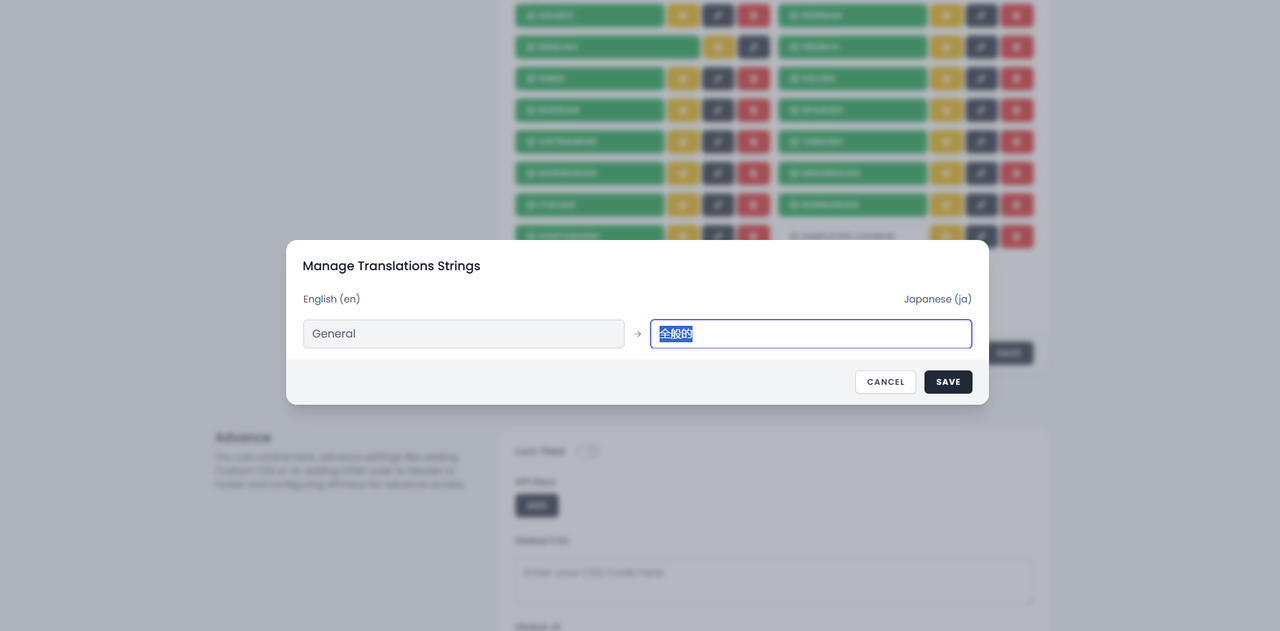
thanks for update. import export fixed and language is also fixed but when i add new language then its showing all option. but when i add Japanese language which i added in tmail 8.0.2 its still showing only general like this -> https://i.postimg.cc/L5n05bMB/Capture.png and also the data is prefilled of General japanese language even tough i deleted and create once again.
i clicked Update Language Files but still the issue is not solved. i think may be the issue is with Laravel Cache? can you tell me how can i clear the cache?
Hi,
Can you try removing the Japanese language file and re-add it later?
Ok, when i was on tmail 8.0.2 i added the japanese language and it didn’t worked so i removed it. Its been 2 weeks and yesterday i applied new update but old language which i created in tmail 8.0.2 is not working. When should i re-add it later? Its already 14 day which i added later
Hi,
It should not take that long. Please send us your control panel or FTP login via contact form here – https://codecanyon.net/user/thehp
i have sent you my ftp login via the contact form. please check and fix the issue
Hi,
We have manually deleted the file. Can you try adding the language now? Let us know if you’re able to see other strings now.
Can you tell me what you have delete? I mean which files you have deleted
thanks the issue is fixed now.
Hi,
Glad to know. FYI, the language files are located in lang folder followed by the shortcode of language, eg. lang/ja.json
Can you please update our application, Already saturday filles this form https://docs.google.com/forms/d/e/1FAIpQLScmcqUUeeAcmIoz-PsrcxYWBD5ppRAhrpD04OJeagHBJxndBg/viewform
our website is https://tempmail.pw
Hi,
You should receive a response via email soon regarding the update.
{
    "Get back to MailBox": "Επιστροφή στο MailBox",
    "Enter Username": "Εισαγωγή ονόματος χρήστη",
    "Select Domain": "Επιλογή τομέα",
    "Create": "Δημιουργία",
    "Random": "Τυχαίο",
    "Custom": "Προσαρμοσμένο",
    "Menu": "Μενού",
    "Cancel": "Ακύρωση",
    "Copy": "Αντιγραφή",
    "Refresh": "Ανανέωση",
    "New": "Νέο",
    "Delete": "Διαγραφή",
    "Download": "Λήψη",
    "Fetching": "Ανάκτηση",
    "Empty Inbox": "Κενά Εισερχόμενα",
    "Error": "Σφάλμα",
    "Success": "Επιτυχία",
    "Close": "Κλείσιμο",
    "Email ID Copied to Clipboard": "Το ID του email αντιγράφηκε στο πρόχειρο",
    "Please enter Username": "Παρακαλώ εισαγάγετε όνομα χρήστη",
    "Please Select a Domain": "Παρακαλώ επιλέξτε έναν τομέα",
    "Username not allowed": "Το όνομα χρήστη δεν επιτρέπεται",
    "Your Temporary Email Address": "Η προσωρινή σας διεύθυνση email",
    "Attachments": "Συνημμένα",
    "Blocked": "Αποκλεισμένο",
    "Emails from": "Emails από",
    "are blocked by Admin": "αποκλείονται από τον Διαχειριστή",
    "No Messages": "Κανένα μήνυμα",
    "Waiting for Incoming Messages": "Αναμονή για εισερχόμενα μηνύματα",
    "Scan QR Code to access": "Σαρώστε τον κωδικό QR για πρόσβαση",
    "Create your own Temp Mail": "Δημιουργήστε το δικό σας προσωρινό email",
    "Your Temprorary Email": "Το προσωρινό σας email",
    "Enter a Username and Select the Domain": "Εισαγάγετε ένα όνομα χρήστη και επιλέξτε τον τομέα",
    "Username length cannot be less than": "Το μήκος του ονόματος χρήστη δεν μπορεί να είναι μικρότερο από",
    "and greator than": "και μεγαλύτερο από",
    "Create a Random Email": "Δημιουργήστε ένα τυχαίο email",
    "Sender": "Αποστολέας",
    "Subject": "Θέμα",
    "Time": "Ώρα",
    "Open": "Άνοιγμα",
    "Go Back to Inbox": "Επιστροφή στα Εισερχόμενα",
    "Date": "Ημερομηνία",
    "Copyright": "Πνευματικά δικαιώματα",
    "Ad Blocker Detected": "Εντοπίστηκε αποκλεισμός διαφημίσεων",
    "Disable the Ad Blocker to use ": "Απενεργοποιήστε τον αποκλεισμό διαφημίσεων για να χρησιμοποιήσετε",
    "Your temporary email address is ready": "Η προσωρινή σας διεύθυνση email είναι έτοιμη",
    "You have reached daily limit of MAX ": "Έχετε φτάσει το ημερήσιο όριο του MAX",
    " temp mail": " προσωρινό email",
    "Sorry! That email is already been used by someone else. Please try a different email address.": "Συγγνώμη! Αυτό το email χρησιμοποιείται ήδη από κάποιον άλλο. Παρακαλώ δοκιμάστε μια διαφορετική διεύθυνση email.",
    "Invalid Captcha. Please try again": "Μη έγκυρο Captcha. Παρακαλώ προσπαθήστε ξανά",
    "Invalid Password": "Μη έγκυρος κωδικός",
    "Password": "Κωδικός",
    "Unlock": "Ξεκλείδωμα",
    "Your Name": "Το όνομά σας",
    "Enter your Name": "Εισαγάγετε το όνομά σας",
    "Your Email": "Το email σας",
    "Enter your Email": "Εισαγάγετε το email σας",
    "Message": "Μήνυμα",
    "Enter your Message": "Εισαγάγετε το μήνυμά σας",
    "Send Message": "Αποστολή μηνύματος"
}
Hi,
Sure, thanks a lot.
When I click on “Check for Updates” in version v8.0.3, I get ERROR 500
Hi,
Can you check the /storage/logs/laravel.log for more details? What is the error message you see in the logs?
[2025-10-14 11:35:43] production.ERROR: Undefined array key "available" (View: /home/admin/web/tmail.***********.at/public_html/resources/views/backend/updates/auto.blade.php) {"userId":1,"exception":"[object] (Illuminate\\View\\ViewException(code: 0): Undefined array key \"available\" (View: /home/admin/web/tmail.***********.at/public_html/resources/views/backend/updates/auto.blade.php) at /home/admin/web/tmail.***********.at/public_html/storage/framework/views/b2c7268036cb460abba305c17823ce47.php:20)
[stacktrace]
#0 /home/admin/web/tmail.***********.at/public_html/vendor/livewire/livewire/src/Mechanisms/ExtendBlade/ExtendedCompilerEngine.php(58): Illuminate\\View\\Engines\\CompilerEngine->handleViewException(Object(ErrorException), 0)
#1 /home/admin/web/tmail.***********.at/public_html/vendor/livewire/livewire/src/Mechanisms/ExtendBlade/ExtendedCompilerEngine.php(40): Livewire\\Mechanisms\\ExtendBlade\\ExtendedCompilerEngine->handleViewException(Object(ErrorException), 0)
#2 /home/admin/web/tmail.***********.at/public_html/vendor/laravel/framework/src/Illuminate/View/Engines/CompilerEngine.php(76): Livewire\\Mechanisms\\ExtendBlade\\ExtendedCompilerEngine->evaluatePath('/home/admin/web...', Array)
#3 /home/admin/web/tmail.***********.at/public_html/vendor/livewire/livewire/src/Mechanisms/ExtendBlade/ExtendedCompilerEngine.php(16): Illuminate\\View\\Engines\\CompilerEngine->get('/home/admin/web...', Array)
#4 /home/admin/web/tmail.***********.at/public_html/vendor/laravel/framework/src/Illuminate/View/View.php(208): Livewire\\Mechanisms\\ExtendBlade\\ExtendedCompilerEngine->get('/home/admin/web...', Array)
Hi,
It could be a temporary issue with the update which happens when too many request are sent between servers.
In case you’re not able to update, please send us the FTP details via the contact form here – https://codecanyon.net/user/thehp
I have sent you the access data
Have you checked it yet? When I click the “Check for Updates” button, I get a “500 Server Error”
Hi,
We tried logging in but it seems like the login credentials are incorrect – https://prnt.sc/JPzVRfLuWsFA
Can you recheck and share the correct credentials?
Please try again. Only one server snap was applied.
Hi,
You should not receive error when trying to check for update, it will be fixed in the next version v8.0.4
Thanks!
this time really frustating to update the applcation.
Hi,
What is the issue you’re facing with update?
500 error and database issue, Now i give database access, kindly check email
Hi,
Did you manage to update the site?