1215 comments found.
this time really frustating to update the applcation.
Hi,
What is the issue you’re facing with update?
500 error and database issue, Now i give database access, kindly check email
Hi,
Did you manage to update the site?
Download from Codecanyon but nothing inside the folder.
Hi,
Yes, we are facing some challenges with the product uploaded, we’re working on this with Envato. You can try now, it should be working fine.
During upgrade 500 Error
Hi,
We are providing a limited time upgrade support for all the customers by filling out the form here – https://forms.gle/YvoQwpRFxvYqBr948

There are still lots of bugs in the latest updated.
1. When i go to the setting then scroll and toggle on the “Show Advance Random Email Configuration” then save changes and refresh it still turned off.
2. i set the custom min length 15 and custom max length 20 but still the random emails that are generated is 6 character. In TMail 7.9.2 there was also option for random email character.
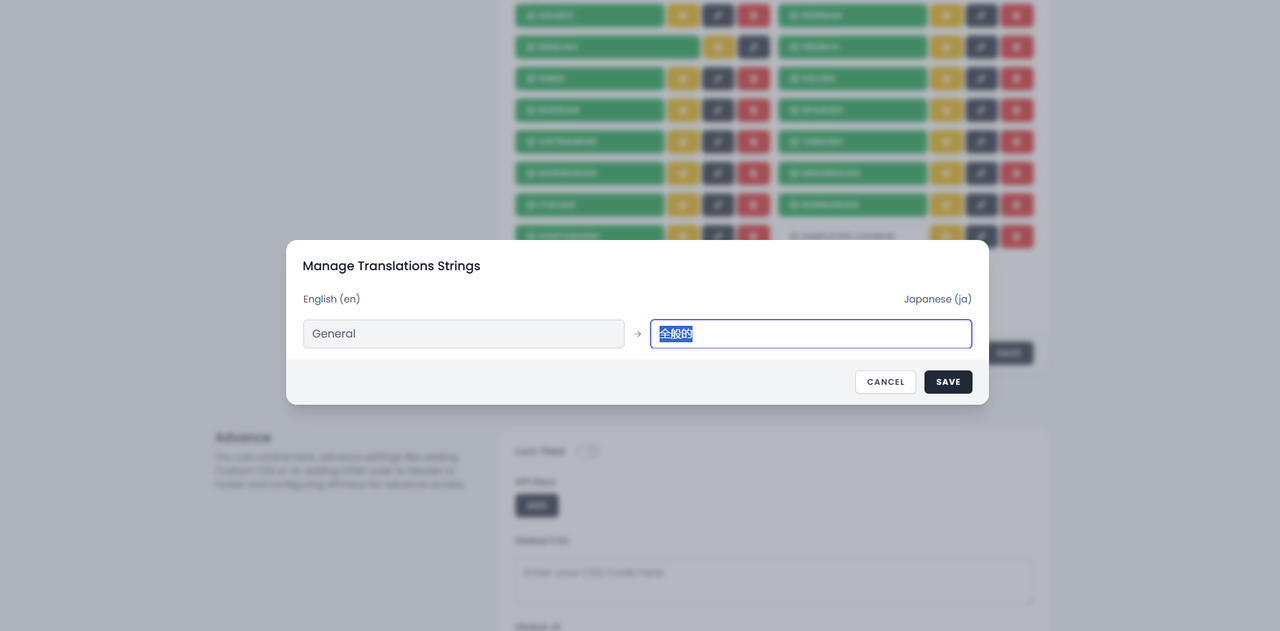
3. When i add language then there is only one option showing to Translate which is only General here is the image -> https://i.postimg.cc/L5n05bMB/Capture.png
4. Also, from day one of Tmail 8.0.0 release Export Import feature is not working
Hi,
Custom min max length are for emails that are created manually via your user, so that won’t affect your random emails settings. For random emails, you will need to set “Show Advance Random Email Configuration”, however, we’re looking into the issue of that option not being enabled when turning the toggle on. We’re looking into all the reported issues and will release a fix soon.
Changing Languages does nothing , how to customize them correctly ?
Hi,
Can you please share your website URL so that we can check?
Hi there, are you updated the Tmail API based on users registration and authentication, i already developed android App and extensions, so my app and extension users will use all domains because currently Tmail API give normal responses
Hi,
No, there is no change in the TMail API for v8.
bug in the language switch doesn’t work when you select one
Hi,
Can you share some more details? Do you see any error message?
check on your demo try to select another language it doesn’t change when you select it
Hi,
Content for pages won’t be auto-translated, we have not added the translation to every page in the demo, however, you will see the translations on the static areas like Mailbox in text like “Generate”, “Random”, etc.
That’s great a user system.
Can you add Paypal so that user can access paid features? Also include paid users can write/send emails?
Thanks. Best regards.
Hi,
Thank you for the suggestions.
You can use our Google Form to submit any feature request – https://forms.gle/jize7tyxd7E8m11d7
there is also no option available for Theme Options (Mailbox Page).
In TMail 7.9.2 this option was there in Settings when i scroll all down
Hi,
It was not removed, you will still get the Theme Options if you’ve Groot or Drax theme installed.
The ZIP file for version 8.0.2 does not contain any script! It only contains unusable temporary files.
Hi,
We’re aware of the product download issue, we’re working on with Envato to understand this better.
Hi,
We’ve uploaded the ZIP via a different mechanism, request you to re-download and check.
My Server Requirements all ok but When i try to upgrade show below error.
This page isn’t working mydomain com is currently unable to handle this request. HTTP ERROR 500
Please solve this problem as soon as possible
Hi,
Please fill out this form – https://docs.google.com/forms/d/e/1FAIpQLScmcqUUeeAcmIoz-PsrcxYWBD5ppRAhrpD04OJeagHBJxndBg/viewform and we will look into it.
The ZIP file for version 8.0.2 does not contain any script! It only contains unusable temporary files.
Once I have downloaded version 8.0.2 completely, will I need to perform a complete reinstallation? Is it not sufficient to simply replace the files? Has anything changed regarding MySQL? Restoring all my pages and settings in version 7 was very time-consuming. I don’t want to go through that again. Please provide me with detailed instructions on how to update from version 8.0.1 to 8.0.2.
I’ve left your FTP access open for you.
Download date: October 2, 2025, 10:26 AM v8.0.2 ZIP file contains: Folder: .tmp.driveupload Folder: __MACOSX Folder: Projects
The ZIP file is unusable!
Please also provide detailed instructions on how to update from version 8.0.1 to 8.0.2 without having to reinstall the entire script.
I have been a fan of your script for a long time. However, you released version 8 too prematurely and before it was fully developed.
Download date: October 3, 2025, 01:28 PM v8.0.2 ZIP file contains: Folder: .tmp.driveupload Folder: __MACOSX Folder: Projects
The ZIP file is unusable!!!
Please also provide detailed instructions on how to update from version 8.0.1 to 8.0.2 without having to reinstall the entire script.
Hi,
We’re aware of the product download issue, we’re working on with Envato to understand this better.
Hi,
We’ve uploaded the ZIP via a different mechanism, request you to re-download and check.
Your description doesn’t say how to update from v8.0.1 to v8.0.2! In your Readme.txt file, there’s a link that leads to Error 404: Documentation is available here – https://tmail.hp.gl/docs
Will I need to perform a complete reinstallation? Is it not sufficient to simply replace the files? Has anything changed regarding MySQL? Restoring all my pages and settings in version 7 was very time-consuming. I don’t want to go through that again. Please provide me with detailed instructions on how to update from version 8.0.1 to 8.0.2.
I’ve left your FTP access open for you.
Hi,
You don’t need to reinstall completely, you can use the Auto Updates. There are no changes in database end so you can replace the files as an alternative for this version upgrade, however, we recommend you do auto updates.
We used the FTP access to check and confirm. v8.0.2 is available for you to upgrade.
Are you facing any issues in upgrading using that?
Only in version 8.0.1 there is no update button in the admin area like there was in version 7!
If I overwrite all files except the .env via FTP, then in the admin area below it still says v8.0.1
Hi,
Yes, version is stored in the database and doesn’t get updated on manual update.
You’re not able to update via Auto Updates shown in your Admin Dashboard?
the latest version also doesnt fix Export / Import. i have fill the form but i didnt receive any help. i know that i am out of service support, but fixing the features is important. please fix Export / Import feature. after clicking the button nothing happens. i am on TMail v8.0.2
Hi,
No worries, bug reporting and fixing the bugs doesn’t require service support. We take it on our responsibility to make sure TMail remains bug free and we do appreciate you taking out time to help us with reporting this bugs.
We’re looking into the import/export feature and will release a bug fix in case any issue is identified.
question: So i know i’m out of service support, no biggy, but it seems like the last few updates haven’t worked right. The last one i had to completely reinstall the site, this one is trying to forward me to site.com/upgrade but it’s saying page can’t be found. Until you guys get hte auto updater working properly can you include manual files in the zips you guys put here for download that will allow us to upgrade manually at least until the autoupdater works properly?
Hi,
If you plan to do manual update, it works very similar to auto update, so if auto updates are not working for you the chances of manual update will work fine for you is slim to none.
If you can share more clarity on what is not working, we will be in a better position to respond on how to take it forward.
simple as soon as i click on the Start Upgrade, with address mysite.com/admin/update i click on start upgrade, it opens a new page same mysite.com/upgrade only. it then says this page isn’t working, err_too_many_redirects thats’ it. doesn’t upgrade anything doesn’t do anything just errors out.
I have sent a form, i have 2 different licences with you, i have included both for each site. One site is giving me the above, the other site is saying that it must b e upgraded to 8.3 but doesnt’ give me a option to do that. The above site is at Version 8.0.0 and then the other starts with bum. its on version 7.9.2 and says to upgrade but again no option to do that.
Hi,
Thank you for providing the access, we will look into it and get back soon.
Even in version 8.0.1, a new email is constantly being generated. This cannot be disabled in the admin panel! The language settings now work correctly. The update function is no longer available in the admin panel!
Require Email Verification It doesn’t work. No email is sent, and users can log in normally without any confirmation.
The reCAPTCHA 3 widget is covering the social media icons. This is because both are located in the bottom right corner. I want to move the social media icons back to the top row.
Cron job call results in a 404 error.
The external link masking service automatically adds ” /? ” to the custom URL.
Because of this, my service no longer works in version 8. Please change this back!
Hi,
Please send your control panel or FTP login via the contact form here and we will check it out – https://codecanyon.net/user/thehp
My cron job call produces the same error as the link you provided: https://tmail.hp.gl/docs
Hi,
Please upgrade to the latest version and those issues should be sorted out, please let us know incase you still face them.
Your description doesn’t say how to update from v8.0.1 to v8.0.2! In your Readme.txt file, there’s a link that leads to Error 404: Documentation is available here – https://tmail.hp.gl/docs
Will I need to perform a complete reinstallation? Is it not sufficient to simply replace the files? Has anything changed regarding MySQL? Restoring all my pages and settings in version 7 was very time-consuming. I don’t want to go through that again. Please provide me with detailed instructions on how to update from version 8.0.1 to 8.0.2.
I’ve left your FTP access open for you.
Hi,
You don’t need to reinstall completely, you can use the Auto Updates. There are no changes in database end so you can replace the files as an alternative for this version upgrade, however, we recommend you do auto updates.
We used the FTP access to check and confirm. v8.0.2 is available for you to upgrade.
Are you facing any issues in upgrading using that?
About adding a new ticket when clicking on submit It doesn’t work
https://helpdesk.thehp.in/hc/tickets/newHi,
I can see that customers are creating the ticket. Please continue with your existing ticket and then later we can look into the new ticket issue.
update was not working so i had to remove everything and install fresh. but now import and export is not working
Hi,
Please fill out this form – https://forms.gle/2Fso93yD8JvxewUs6
i have submitted the form. please check
have you checked the issue? can you please tell me?
Hi,
If you’ve not received any response via email, it might be possible that purchase code shared is not valid. Please share a valid TMail purchase code via this form – https://docs.google.com/forms/d/e/1FAIpQLScmcqUUeeAcmIoz-PsrcxYWBD5ppRAhrpD04OJeagHBJxndBg/viewform
I face the issue relate to installiation 500 error
500 Internal Server Error An internal server error has occured.
With a new license and 6 months for the script TMail I don’t see any update to the support service, but on the CodeCanyon website it appears normal.
When I create a new ticket, I am not allowed to open a new ticket.
Hi,
I can see that customers are creating the ticket. Please continue with your existing ticket and then later we can look into the new ticket issue.
This automatic update process failed and resulted in a blank page! I’ve restored my system to the previous version (v7.9.1.1). At the same time, I installed v8. There are so many things that simply don’t work, or the settings aren’t saved properly in the admin panel. A new email is constantly being generated, and there’s no way to disable this in the admin panel. The language setting always defaults to English, regardless of what I select. You released this version too early.
Hi,
It has been tested thoroughly, however, a issue with cache & cookies can cause the issues that you’re reporting. I suggest, try going through a private/incognito window and check again. Let us know if you still face the issue. If you need help with update, please fill out this form – https://forms.gle/2Fso93yD8JvxewUs6
I’ve sent you the login details. I reinstalled version 8 there for testing purposes, because the update wasn’t working.
I tried the update again today. Now, version 7.9.2 suddenly became available. I installed that update; the site worked fine. Then the update to version 8.0 came out, so I installed that as well. Now the site no longer works properly and keeps generating numerous errors. I can’t change the language settings. A new email is generated every time the site is accessed, even though the setting is correct in the admin panel. I’ve rolled back to version 7.9.1.1 – that’s the most stable version. What a shame!
Hi,
Thanks for sharing your experience with the update. I understand how frustrating it can be when things don’t work as expected after an upgrade.
However, we can act more productive if you can share specific details.
Anyways, if you’re planning to upgrade again, please make sure to submit your response through the Google form. Kindly note that support via the form will only be available for a limited period and may be discontinued in the near future.
I can’t request ticket as support time ended It’s problem need to fix not extra support so please we need to solve it
Hi,
In case you have issues with upgrade, please fill out this form – https://forms.gle/2Fso93yD8JvxewUs6