8473 comments found.

I’m a bit confused about the distinction between functionality and support. Does purchasing this license make it usable for a lifetime, with support being what’s only available for 6 months? Or do I need to renew the license every 6 months in order to keep its functionality on my website?
Use and get updates forever, only support is limited. I don’t make a clear distinction between presales and customer support though 
I have a problem with Photoswipe, I’m using it as my desktop and mobile lightbox. Basically when I open it from link like say from a facebook share, and the user closes the lightbox, there’s like a ghost element that remains and the UI is unclickable. Basically I found them talking about it here but I don’t understand the solution. What should I do? I’m using the photoswipe because I can right click on image to save and also I like the menu. Please help  thanks!
Also the mobile version works fine. It’s just the desktop version that’s the problem. So not even sure where I should start troubleshooting.
Please send me a link to where this happens. Does it also happen on my site for you? https://justifiedgrid.com/lightboxes/photoswipe/#!jig%5B1%5D/ML/8952
Thanks for responding. I sent the URL via PM. I checked out that link and yours works fine!
Still waiting for your response. It seems like Photoswipe is indeed being loaded twice. See here: https://stackoverflow.com/questions/31127896/photoswipe-pswp-class-not-clearing-after-closing-image
But I still don’t know how to fix it exactly.
Holy shit I fixed it myself again.
Could it be that there is/was a second photoswipe on your site loaded by another plugin? Last time I checked your link, the issue wasn’t happening. Did you customize the lightbox with that Download button?
Hi, may I ask if your plugin supports horizontal scroll ? Thank you very much!
Hi, may I ask if your plugin supports horizontal or not? Thank you very much!
Is there a way to set the website’s social media thumbnail only for when a lightbox is not open? Basically I’d still like the deeplinking thumbnail to work, but also want a default one.
I solved this thanks.
With SEO plugins like yoast, the featured image of the page will be used in case a lightbox was not open at the time of sharing.
Yes also I had to change the default setting on my SEO setting to featured image not the default image on the SEO setting. Thanks
My JIG is not centered, it’s left aligned? It looks like when I change css margin:0 to auto on #jig1 it fixes it, but I can’t find where to edit the css.
Do you mean the whole grid, or images in an incomplete or less-than-full-width row? The latter would be influenced by the “incomplete last row” setting and its “center” option. The whole grid’s position on your site is probably better influenced by your theme/builder. JIG aims to take max available space for it, most likely the positioning is not in its control. Margin 0 auto would only work if you limit the max width of the grid, but your site layout has more space available for it.
Thank you I found a way to fix it through your custom css option
Great!
Need to auto add category to images uploaded to media library from my Form.
Using GravityForms to upload images and Gravity Wiz Add-On that puts the images in Media Library. Gravity Wiz support is writing custom function for me that will add a category to any image uploaded with my form but I need this info for them. 1.) How is the Category data for the image stored? post meta on the image object ?
Hi,
It’s standard wordpress taxonomy feature, extended to images. No matter how you add the extra info to the images, it can even be post meta, you can make JIG pull those images.
Ok I’ll pass on this message to the developer.
I told him I wanted to use image “Category” taxonomy so he’s trying to get that to work.
Here is what his second comment was: “Getting close but I don’t think that’s the ticket. I saw in that thread the post meta key “_jig_image_link”. I’m assuming that is for the “JIG Link” setting from your screenshot.
Could you ask the developer about the “Categories” and “Tags” settings? Also, what format are those fields expecting? Assuming the JIG Link is expecting just a string.”
JIG Link is only for custom links, they expect a string that is a full URL.
The cats and tags just does this:
if ('enable' == $this->settings['post_tags_categories']) {
    $taxonomies = ['category', 'post_tag'];
    foreach ($taxonomies as $tax) {
        register_taxonomy_for_object_type($tax, 'attachment');
    }
}
This site I’ve been asked to fix is missing its gallery. I’ve been trying various combinations of settings for hours and I can’t figure out how to restore it (I took over the site from someone else who built it).
The site is using (I assume) JIG and RML in tandem (it also has Foobox installed), under a Ronneby theme.
Previously (I’m told) it displayed a gallery of 19 images of dental clients. If you click on one of the images (say, client 6), it displayed images only of client 6 in a lightbox, and not the other client images in the top-level gallery.
Can you point me to any documentation that explains how to (re-)achieve this?
Thanks!
The doc pdf doesn’t have a step by step to create this exact scenario. I’ll write various tutorials that combine parts of the plugin instead of dissecting features individually.
1. Basically you create the whole structure in RML (JIG is just a display). I guess you already have this. Folders in Folders, or Galleries in Collections, it doesn’t matter which.
2. In JIG (preferably on the grids interface – create new grid). Choose a high-level RML folder/collection that contains the 19 clients (each client is a subfolder or gallery).
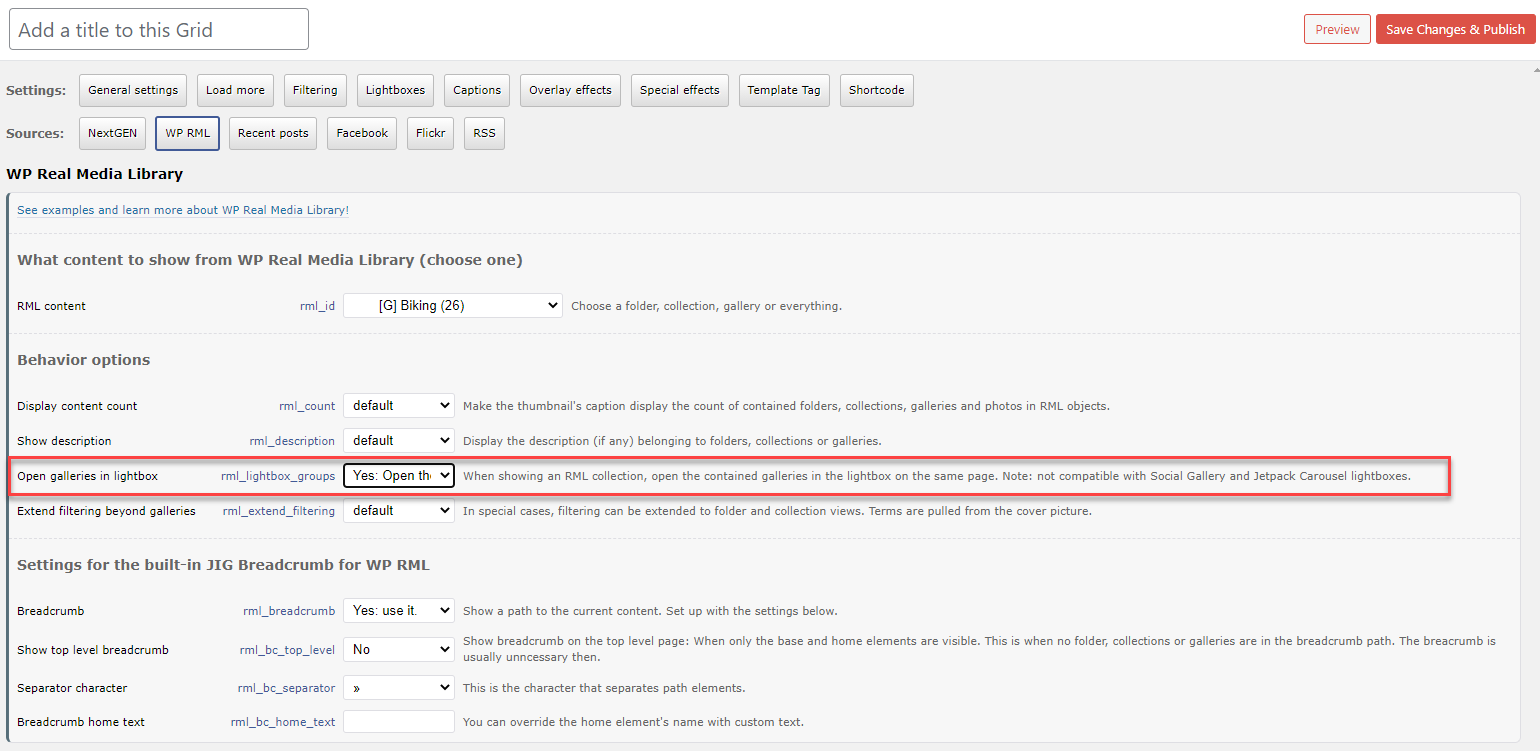
3. This setting is key. https://i.justifiedgrid.com/2opnzoko.png When clicking a client, the browser won’t navigate away. A lightbox group for photos of just that client will open (say, a handful of photos of that person only).
4. FooBox is picked on the Lightboxes tab of JIG. Use it for both desktop and mobile, it’s a solid lightbox.
That helped. I was on the right track – I had the JIG set up correctly, but I didn’t have the RML folders right.
Thanks, Firsh!
Hey, me again. I’ve got an issue with the CDN on my site using this plugin, and in particular it looks like timthumb images not being served?
I use Amazon CDN on multiple sights and it works with your plugin fine, but for some reason in this case at http://www.paulpetch.co.nz the images are not being served by the CDN at all.
This is causing issues with intermittent load times from 3 s to 11. Clearly this is an issue that needs resolving ASAP. If you use GT Metrix https://gtmetrix.com/reports/paulpetch.co.nz/sp0TjVmt/ you will see the results and it states I’m not using a CDN – when I am. The images not being served are from the plugin.
The previous plugin I used for the grid served images via the CDN OK on this domain- so I’m not sure what’s happening. Any help would be appreciated.
Thanks, Paul.
There is a setting in JIG which lets you rewrite the hostname to the CDN ’s. Also in Cloudfront there is a setting that will differentiate resources with a query string (else all the images will be the same in a gallery). You can also just disable timthumb so the WP media library thumbnail sizes will be used in JIG.
Thanks, where is that ‘hostname’ setting in JIG please? How do I disable TIM thumb too? FYI I have it on the other site that works with the same CDN and had to do nothing to make it work in the plugin or Cloudfront.
All of these are on the Plugin Settings -> TimThumb tab.
Thanks. Turning off timthumb never resolved the issue unfortunately
OK. If I setup a page with the grid plugin and run a GTmetrix test the CDN fails to serve images.
https://gtmetrix.com/reports/paulpetch.co.nz/spAeiuFG/If I setup a page with images within the page the CDN works
https://gtmetrix.com/reports/paulpetch.co.nz/UMlkY9Yd/Unfortunately your plugin does not serve images via the CDN. Turning of TimThumb does nothing, and why would I want to serve images scaled by the browser anyway, as that just adds a massive load time to the page.
Do you have any idea how to make your plugin serve images via CDN please?
Thanks,
Paul
I did a search here and discovered a good explanation of setting up in timthumb setting (sorry your explanation was quite poor) and once setup runs slower using the CDN than without?
WITH
https://gtmetrix.com/reports/paulpetch.co.nz/ZjyEHGJM/4.5s
vs
WITHOUT
https://gtmetrix.com/reports/paulpetch.co.nz/NRGxW6Nh/1.1
Im confused to why it would be slower?
Use the one that’s faster 1s is quite good. Yes even if they are served from the CDN, they are large so their file size is 4x. With disabled timthumb you also need to choose a WP media library thumbnail size (on that same tab), so less scaling is done by the browser. If you don’t have a size that’s close to your “target row height + deviation” value (what TimThumb does), you need to register a new thumbnail size and re-generate them with a 3rd party plugin. This is partly why JIG has TT so it saves you this step and to only host thumbnails in the size you need and only for those images you actually show through JIG.
I’m exploring options for integrating various image optimization CDNs into JIG to solve this.
All really good plans. Thanks. Please do follow through and implement the suggestions I’ve made and the solutions you insist will be included in this great plugin in the future. For now I guess I’ll just use my site minus a CDN for your plugin as it does a good job at serving scaled images vs the browser doing that. I guess that’s the saving grace Things seem to be loading fast for now at https://forever1995.com
Stay tuned for thumbnail-related improvements!
Hello, I wanted to integrate a Modulo Lightbox which I just purchased here. Modulo states that it is compatible with JIG and I have activated in the Modulo Justified Image Grid the option to attach the Modulo Light box to Jig. However, when I am in JIG lightbox settings, I am not seeing Modulo as an option. Modulo currently does not provide support so if you please could steer me in the right direction, I would really appreciate it. Thank you very much for your help.
I never heard of it or doesn’t ring a bell, so its compatibility must be one way. Contact me from my profile I’ll take a look what can be done about it. JIG has a handful of settings that help conecting 3rd party lightboxes.
Hi, we’re using JIG so that when an user clicks on an image, they go to a leaf page containing the image they clicked on, plus some extra info. Is there a way to implement a forward <-> backward navigation in those pages? i.e. a couple links that would take me from image A forward to B forward to C forward to D back to C back to B …. and so on?
example of leaf page where we would like to add this forward / back navigation:
https://syrian-heritage.org/sahl-hawran-hawran-plain-the-traditional-operation-of-threshing-wheat/Thanks
Try this: https://codex.wordpress.org/Next_and_Previous_Links Standard WP feature, not sure if it works for attachment pages. It’s currently not in scope of JIG to change your attachment page. Some argue that individual pages for single images are bad for SEO, I don’t know. From JIG’s standpoint it makes sense and would make social sharing better too. So yours is a nice usage and I agree it needs arrows. That line of code goes into the theme’s template file for attachment pages. This: attachment.php see: https://developer.wordpress.org/files/2014/10/Screenshot-2019-01-23-00.20.04.png
Hi Firsh. By looking at what I have “inherited”, the original developers have put the template for the page linked above in an image.php file within their theme, I guess that that’s where I’ll need to put the code. I am working on how to make JIG “filterable” to the needs of the site owner, in 2 main points
1) Having a drop down style for filters. I know that your roadmap will eventually include them, but to provide the functionality to the client in the meanwhile, I am in the process of implementing it myself atm. I have been able to filter to an arbitrary number of parameters by adding a jig_media_library_query_args filter into JIG, as you suggested in a reply to an earlier query. I am also able to pass those parameters via $_GET so that takes care of the filtering, but I still need to reload the page. I was about to look into the JIG code to see what call prompts the reloading of the gallery once the user clicks on the tag or button, I still haven’t found the method that I should call. Could you tell me which method to call? I’ll take care to pass the right values to it so as to not break JIG.
2) With regards to the forward / backwards … agreed, pure image pages are not good for SEO by themselves. What I have “inherited” by the previous developers is a theme which uses an image.php file which is used as template for the example link I posted above. They do display a lot of other info and users once there cannot go anywhere so I will transform that info into clickable search links, and of course the forward / back functionality. Actually, since the gallery will be filtered, while simple forwards / backwards is better than nothing, I would like to keep them within the set returned by the currently selected filters. It’s quite an endeavor which requires some parameter or session persistence, and I need to figure out how not to make it too heavy on the DB. Just putting out the end game for the back / forward, in case it suggests you an extra feature for future versions.
Maybe you know that already, but by fiddling with the filter, I discovered that I can pass named keys to query_args, such as
‘attachment_tag’ => [‘taxonomy’ => ‘attachment_tag’, ‘field’ => ‘slug’, ‘terms’ => [‘gallery’]]
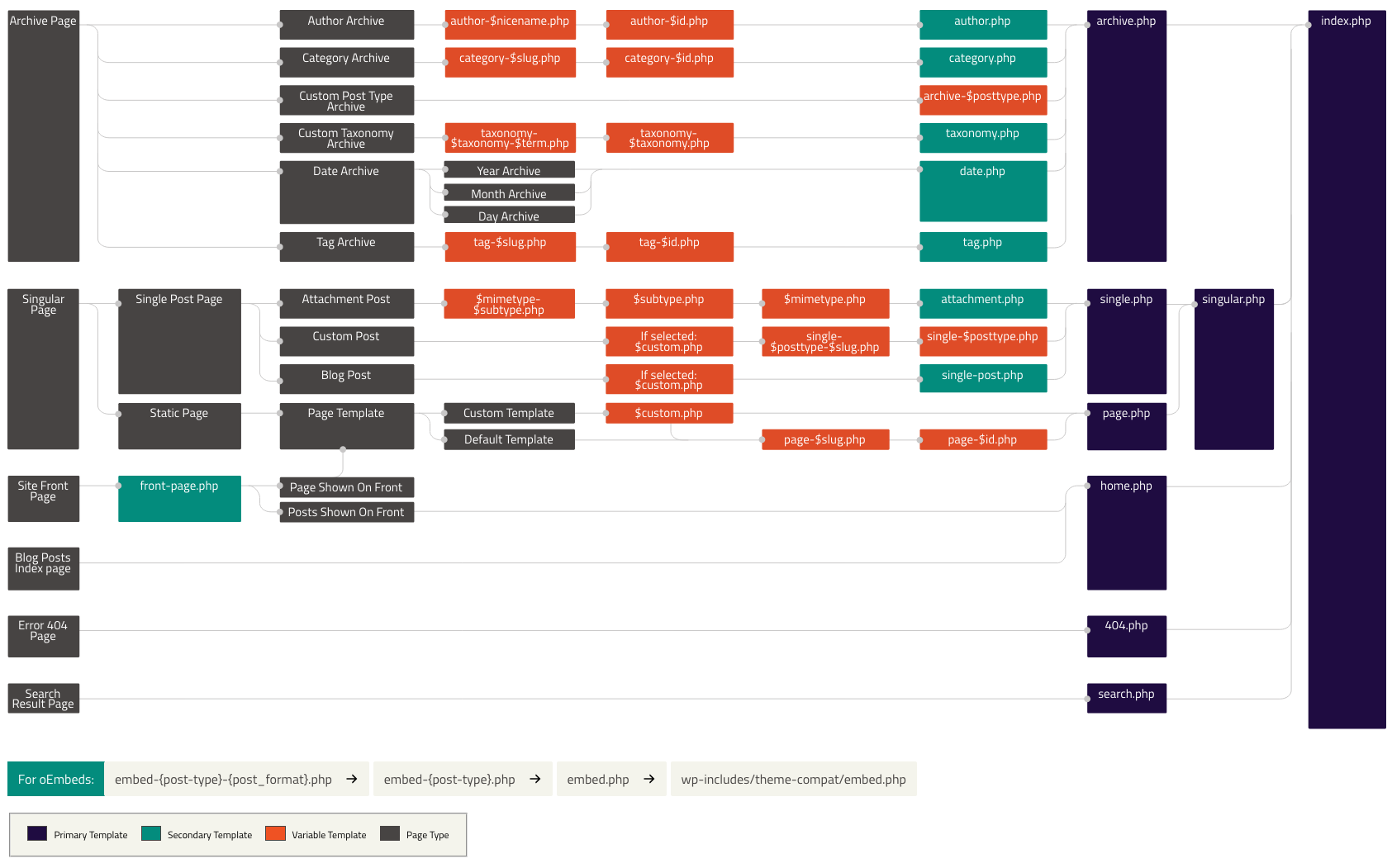
and it seems to work fine, that helps me in constructing the final query_args array no matter the cardinality! so far, WP does not seem to complain. And thanks for the template dependency schematic!
Best,
MB
Hi,
1. You likely can’t extend the JS the way you need, there is no public function to call regards to filtering. The best way would be modifying the wp query, so it’ll need a reload unfortunately. However, the dev plugin zip has the unminified source justified-image-grid.js and you can rebuild the plugin with grunt.
2. Instead of session, you can just slap additional parameter at the end of the URL as a wp permalink, set up with a flag that affects the attachment pages. like example.com/your-image/filtered-by/your-filter
The link rel canonical will preserve the original page for robots, so it won’t count as duplicate content. It’ll be up to you to hand the the parameter accordingly.
Good day Firsh, we are wondering if we can adapt photos in the gallery making the vertical ones occuping two rows. Thank you!
Hi, thumbnails currently can’t extend beyond 1 row.
My apologies. I actually have purchased this plugin and noticed when I log into my site there is an update. I guess you have now added the ability to display images uncropped!!!! THANK YOU. One problem, I add my purchase code and it states it is being used at http://www.shop.paulpetch.co.nz – that domain no longer exists. The domain I wish to use this plugin on is now https://christchurchphotographer.co.nz – How do I un associate the domain to then allow me to use at https://christchurchphotographer.co.nz?
THANKS
p.s. being able to display uncropped has really made the best grid plugin the ultimate WP plugin. Thanks again!
I think it has always known that, or what is your old version? I’ve reset your license.
Thanks I’m not sure what’s happening then as my mobile layout is super cropped using this plugin
The other plugin I use simply stacks the images onto of eachother
https://christchurchphotographer.co.nz/wp-content/uploads/2021/05/IMG_3574.pngp.s. I’m looking to buy two more licences for this plugin if it works how I want it too!
Use the “disable cropping” setting for mobile. Also you might want to decrease the thumbnail spacing for mobile devices only (with a mobile preset).
Thank you. I disabled cropping on mobile and that helps. I’m not sure what you mean about decreasing thumbnail spacing. Could you please alaborate? THANK YOU.
Also, setting number of images. I set to 5 across and each page simply adds as many as it wants. I guess this is to avoid different sized images. The page in question (that has 7 across even though I species 5) is https://paulpetch.co.nz/headshot-photography/
Any ideas about these questions? I just purchased another licence. So now runs on two websites. Thanks.
The thumbnail spacing setting normally only applies on all devices. But if you create a custom preset and choose a lower value in it for such setting, you can choose that preset only for mobile devices. So you can make a setting mobile-only that way, but it’s entirely optional.
Have you used the limit setting on the general tab to limit the number of pics you see? There are different soft limits like load more or the max rows. Have you tried to combine these settings?
Thanks. Ive had a look at trying to set the images to 5 across, but it looks like the plugin only supports limiting number of ROWS and actual number of images. Maybe I’m missing something?
As for creating a preset. As I mentioned, I see what you are suggesting but I have no idea how to do it? Do you have a video I could watch or could you please log in and set it up please? Having less space on mobile would be great. It looks odd at 40px.
Having all images default to a single image in a single row would really be the best option for mobile TBH. Have you considered adding this feature?
Thanks, Paul
https://christchurchphotographer.co.nz https://paulpetch.co.nzJust following up on this I’ve also noticed the images on mobile are being cropped pretty dramatically even though I’m telling them not to be cropped. As a photographer I compose the images in a way that does not require or ask to be changed with cropping. This is an issue. Can you help with my query please.
Your best best is to start with this: https://justifiedgrid.com/support/faq/one-image-per-row-one-column-possible/ Yes I’ll make a preset out of it to be easier, but not everyone wants this layout automatically on mobile. If the images are full width 1 column, the lightbox might not make much sense unless for the zooming.
Separating the thumbnail spacing setting to a mobile-only variation is currently cumbersome and I don’t have a video. I plan to rework the preset system to make it much easier to use. I recently started using my own plugin in production and this is one of the key points for ease of use improvement.
Making mobile a 1-column layout doesn’t require a custom /mobile/ preset, however. The large thumbnail spacing will not squish the images from side to side (since it won’t be applied at all horizontally, just between the images). Vertically, even the 40px may be ok, but try reducing that universally for all devices to something like 20.
Cropping may be because of the large thumbnail spacing as it could throw off the calculations.
Yes, there is no “across” or “images per row” setting. The starting point is the row height and is the base of everything, that coincides with the x per row approach: https://justifiedgrid.com/support/faq/id-like-n-images-per-row-and-all-thumbnails-the-same-xy-size-possible/
The disable cropping works by allowing the row height to drop down (to 50 if really needed), it is not enabled for desktop for you (only mobile). If you check on desktop resized to mobile size, you won’t see this in effect as it currently uses server side mobile detection. There is not much downside to enabling it for all devices, especially if you want to avoid cropping anywhere.
Nice. Thank you. Simply setting the target row height to 400 and also row height max deviation to 400 seemed to get the best results on desktop and mobile. I’m going to add this plugin to another 2 projects now so will be these licences soon (4 in total!). Thanks for your help. I look forward to the updates you are going to add though…. clicking a tick box for these settings would be great. Cheers, Paul.
Good, thank you for your continued support! Not necessarily a tickbox but a preset that just does this (as part of an easier to use presets system).
Note that it’ll make an exception to the one row thing if the browser height is so small that an image can’t fit in its entirety (portrait image on landscape mobile comes to mind). The max height of any thumbnail is set to the height of the device. This can’t be turned off but maybe I’ll add a setting so you can turn it off in the future.
Pre purchase question Ive been using a plugin over at https://paulpetch.co.nz/portrait-photographer/ for years now and it has not been updated. I need another solution. What I’m after is exactly the same operations as the existing one. No text appearing on rollover- rather a fade. Also on mobile devices the images are not cropped in anyway. You see a grid or individually stacked images vs cropped. Also when clicked the image ops up in a clean Lightbox with a X to close and that’s it. Does this plugin offer what I’m looking for? fingers crossed THANK YOU.
Yeah it can do these, but the layout will be horizontal not vertical.
Lightbox PhotoSwipe 4 worked ok, but it stopped working. After click nothing happens. Another lighbtoxes are ok, but PhotoSwipe was my favorite. I hope you will fix it.
Send me a link to your usage please.
For example this: https://www.ewaipiotr.pl/portfolio-4/szkocja/ or any other gallery on my site. I changed to PhotoSwipe for desktop and mobile again for your testing.
I have a hard time finding what it could be. The HTML source indicated you have some kind of caching solution that could affect some scripts, but do you know what else changed? Maybe you installed another plugin? Have you tried with every other thing disabled?
Hi, I changed lightbox to PhotoSwipe and turned off one plugin after another. It doesn’t helped. Here is a list of plugin, which were turned off (and obviously didn’t interfere with JIG): Cache Enabler
Broken Link Checker
Contact Form 7
Easy Google Fonts
Easy Social Share Buttons for WordPress
Easy WP SMTP
Envato Market
GDPR Cookie Consent Banner
HTTP Headers
iThemes Security
Classic Editor
Let’s Info Up
Let’s Social Count
LH HSTS
Loco Translate
Login With Ajax
Visitor’s map
Regenerate thumbnails
Official StatCounter Plugin
OneSignal Push Notifications
Page Links To
Stop Spammers
TotalPoll – Pro
Twenty20 Image Before-After
Ultimate Google Analytics
UpdraftPlus
WordPress RSS Feed Retriever
WP-Optimize – Clean, Compress, Cache
Yoast SEO
Zapier for WordPress
Enter a -1 to PhotoSwipe JS settings and hit save, that’ll reset if there is anything wrong with its custom config. Also, briefly try with a default theme then switch back.
Didn’t help. -1 to PhotoSwipe JS settins disappears gallery at all.
If you send me temporary wp-admin (contact me from my profile), I can investigate. But just by looking at your site it remains a mystery (while you had PS lightbox). Magnific popup is the best lightweight lighbox though, from the same developer. Unless you need zooming and the sharing menu, it’s on par. Some themes customized it for nice animations I think I could dig up some of that code if you are interested and PS remains stubborn.
Did you disable all of those plugins temporarily and the problem still occurred? Was the caching by wp-optimize paused during testing?
I disabled cache (cachify, not wp-optimize) and disabled one plugin after another.
Thanks for your care, let it stay as is. Magnific popup is almost as nice. I still love JIG.
Hi! Pre-sales question, we only need to import showcases from vimeo to a private pages and then view the showcase as a grid with lightbox, is that possible with your plugin?
Let me explain a little more, the private pages are created already, we only need to import/view the videos from selected showcases. Thank you!
Is the showcase public or private? As far as I know showcases don’t have the RSS feed feature so with the current version of JIG it can’t be automated. You can link to individual videos using their thumbnail though, but that’s a manual approach.
I found this: https://vimeo.zendesk.com/hc/en-us/articles/360026953671
JIG needs what Amazon Fire TV needs, that MRSS feed URL. Are you able to generate that? It doesn’t seem to come with a free account.
Hi Firsh. Still using your plugin on our site and it has been working perfectly. I have a question about a new project. We need a gallery of medical Xrays (will be 1000’s). The only thing is that for some Xray cases there will be 2 or 3 images. So people should be able to click on this and then see the further images related to it. Is this possible with your plugin and what would be the best way please?
Yes possible but needs some thinking ahead and a 3rd party tool. Ideally you’d put all related images (even if there are just 2 or 3) is their own gallery/folder of WP real media library, then show the collection/folder that contains these via JIG. The key is the “straight to lightbox” mode.
Downside is that if not all are 2s and 3s, the standalone images won’t be grouped with anything in a lightbox. I’ll need to test whether a mixed folder (a bunch of single images + some subfolders) would work.
Thanks for your quick response. That would be appreciatedt if you can test it with the mixed folders and let me know. If the standalone images just open on their own that should be fine. The thing is we also need to be able to tag and cetegorise the images (the grouped images will come under the same tags). Similar to how we do here: https://dftbskindeep.com/description-gallery/. Also if we use a new domain we require another license? Cheers
If it’s a brand new site on a different domain = new license yes. If you are transferring a site or testing the plugin = no new license.
The idea works just fine, all standalone images are grouped together, while those that are 3s are grouped separately.
Filtering is okay, just put the tags and cats on the cover / first picture in the RML folder.
This needs RML folders with folders, NOT galleries/collections (!).
Video for you: https://www.youtube.com/watch?v=1aPy6hye-tY
One caveat: the grouped ones are always first, then come the standalone ones. Besides that, the order is drag and drop.
The video you made is really helpful We will purchase the new license when we are ready to go ahead with the new site. Many thanks
Just wanted to check so I know what to do about it – is Instagram ever coming back?
I haven’t given up on it yet, maybe with scraping it’ll be possible. But support for popular builders and performance improvements are more important for now.
Ok, I understand. But I’ll keep my hopes up still!
Youtube feed stopped working? I get “YouTube scraping failed.” everywhere it used to work.
Seems to work for me, but please post your shortcode (if used via the grids, post the full shortcode from the shortcode tab) so I can check with your content.
[justified_image_grid rss_url=https://www.youtube.com/channel/UCPD8UVyMIBfn6GzBJS84UuQ] www.ar-sandbox.eu
Try this:
[justified_image_grid rss_url=https://www.youtube.com/channel/UCPD8UVyMIBfn6GzBJS84UuQ/videos]
With this /videos at the end.
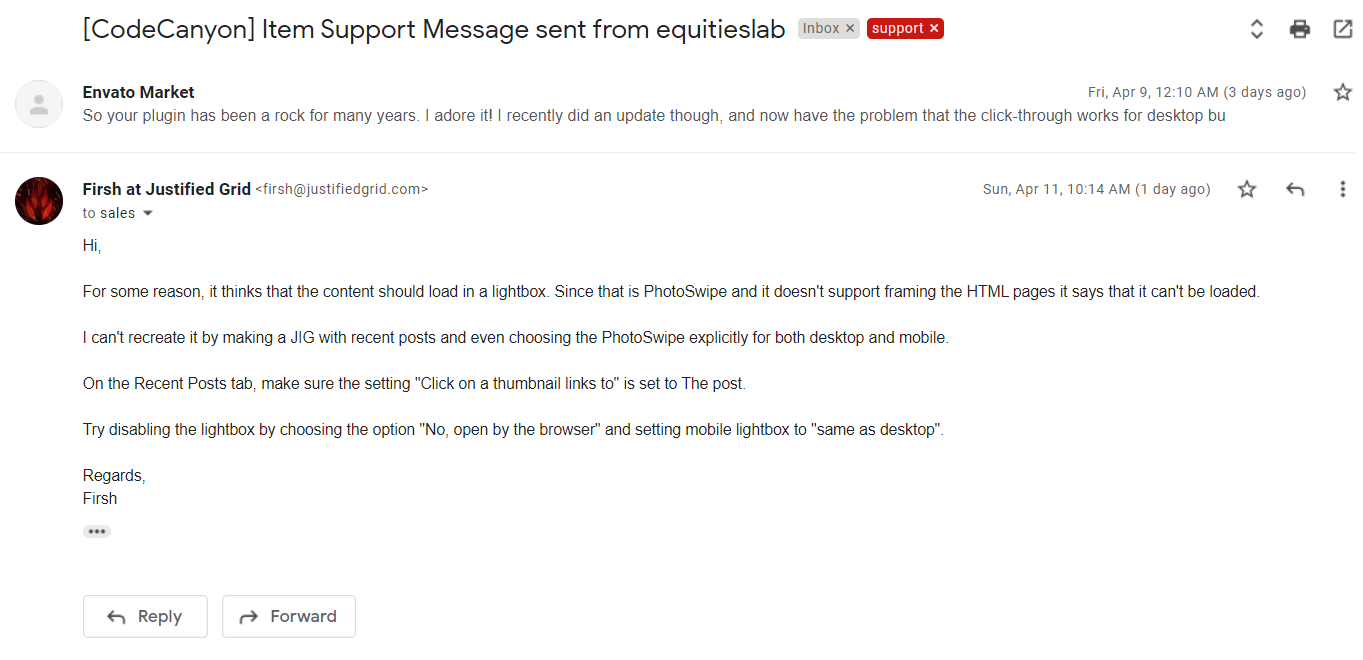
I tried to leave a comment via the email contact form (I bought extended support), but I think something went wrong, because I haven’t heard back from you, so leaving the same (approximate) message here instead:
So I’ve loved your plugin for years, and it has held up well with a very popular real estate site, but the most recent update of it + wordpress + divi theme somehow has broken click through links for mobile.
You can see the problem on the staging link below. I’ve turned all other plugins off, to ensure that there is no plugin incompatibility.
Oddly enough, you can’t use Chrome’s adaptive screen, you need to actually browse it with an actual phone (I’ve confirmed the behavior on an IPhone, an LG V60 and a One Plus Six). In all those cases, when a user clicks on an image, it does not click through to the linked page, instead it tries to go to some type of gallery view which then fails to load.
https://townhomes.staging.wpengine.com/atlanta-areas/buckhead/Could it have landed in spam?
https://i.justifiedgrid.com/2ontzx37.pngYep, that’s exactly what happened. Changing the mobile from Photoswipe fixed it.
For anyone else with similar problem, one extra mistake I made was that since the plugin has been working so well for so long, I didn’t remember that originally the options were passed in by shortcode, so my shortcodes were overriding the pretty UI configuration.