8473 comments found.

I’m such an idiot. I forgot to disable the plugin on my other sites. Please reset my licenses once more. Thank you so much.
Done.
Please reset both of my licenses.
Done.
Thank you.
Hello.
I am trying to figure out how to bring forward the woocommerce products by recently modified date. (Specifically not by created date but modified). Do you think this could be done?
Greetings, Krislyn
Probably, by modifying the query that gets those product posts: https://justifiedgrid.com/support/faq/recent-posts-query-args/
Ok, I see, this is not going to happen via JIG shortcode editor.
No, but this is the PHP custom code:
add_filter('jig_recent_posts_query_args', 'change_jig_recent_posts_query', 10, 2);
function change_jig_recent_posts_query($args, $atts)
{
    if ($atts['gallery'] === "2020") {
        $args['orderby'] = 'modified';
        $args['order'] = 'DESC';
    }
    return $args;
}
Change 2020 to the ID of the grid.
I’ll consider adding this as an option to the order by setting.
Oh, thank you, you are very kind!
I don’t know of course if this has been asked more than just by me – I personally would find the orderby setting very useful.
I think you are the first one to ever request this, but the option kinda make sense.
Ok, just for information then if someone wonders about this:
I use woocommerce as kind of ordering system, not for stocked products. And as I craft new goods that are similar to previous orders, I update woocommerce product photo. So I don’t create new products very often. And this is why I was looking for to order them by last modified – to showcase new product images better.
Anyway – the code you provided works (of course) and everything looks better now!
Can you please help me change my license from Bershatsky.com to Bershatsky.net? I am using that as my URL now.
Done.
Sorry to bug you… I just changed it back to .com
Would you please change it back one more time?
Done. Sorry for the delay.
Hello everyone, I just ran some test on Sistrix,
I get a many hundred
HTTP 403
Errors on the Page. All coming from the:
plugins/justified-image-grid/timthumb.phpThe full link is this:
https://www.arve-einrichtung.de/wp-content/plugins/justified-image-grid/timthumb.php?src=https://www.arve-einrichtung.de/wp-content/uploads/2019/04/DSC04844.jpg&h=340&q=90&f=.jpgI only receive a tiny Image, quoting:
No Hotlinking
Can anyone help to under this error? On the page everything seems to work.
I also went through this tutorial:
https://justifiedgrid.com/support/fix/all-of-the-images-have-failed-to-load/Turned off timthumb in the settings, but no change so far… I also disabled my wordfence…. no effect though
anyone knows more about this?
The 3rd party tool might be trying to load your images directly, which makes timthumb think it’s a hotlinking scenario. The protection is set up in the timthumb-config.php file but I woulnd’t recommend turning hotlinking protection off.
If you turn off timthumb and choose a WP-generate thumbnail as fallback, it will get rid of those 403s. If you have caching plugin make sure to purge all pages.
When are you guys going to implement a proper Elementor solution? I’ve been following these comments and I see that for YEARS people have been asking for an Elementor widget.
I used to use this product with a company I used to work for, now I’m working independently and want to use this plugin, but the lack of Elementor integration is a REAL headache for me.
How hard would it be to just create a simple button to generate a shortcode somewhere in the Dashboard if not directly on the Elementor interface.. it’s so frustrating having to bounce around various versions of WordPress editors until getting this to work.
Please can you just make end this chapter so that I can buy this plugin, until then, shows very little consideration on your part as a plugin developer to listen to your clients and potential clients.
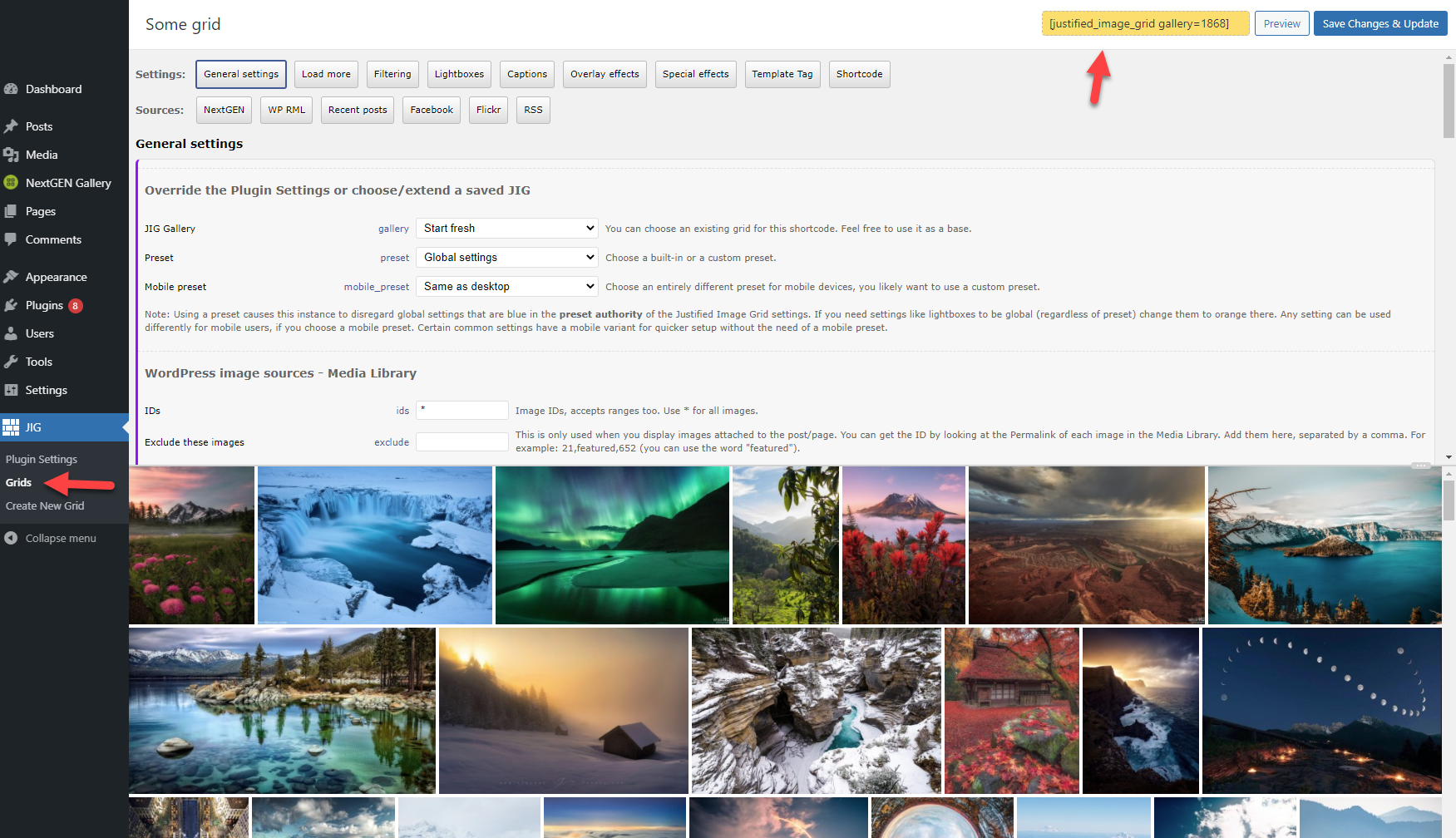
Hi, the relatively new “grids” feature makes it so that you create the JIGs with a live preview separately, then copy a shortcode that has just an ID in it. Have you seen that? The screenshots on the site doesn’t show this feature. https://i.justifiedgrid.com/2omgkc2a.png This does just that: a button in the dashboard for generating (short) shortcodes. You can still access the “long” shortcode too.
If there were an Elementor block, it would just have a single dropdown in it, allowing you to choose a grid you created previously. So the Elementor block would only save you a copy-paste, not revolutionize creating JIGs. Of course, Elementor would preview the selected grid instantly. But otherwise no re-implementing the 300+ settings in an Elementor interface. I used Elementor in the past but can no longer recommend it (Oxygen builder is far better), nevertheless a block for it might come to JIG, but not sure when.
I was sidetracked by another project that I canceled and now returned to JIG, so meaninful updates can finally come, stay tuned.
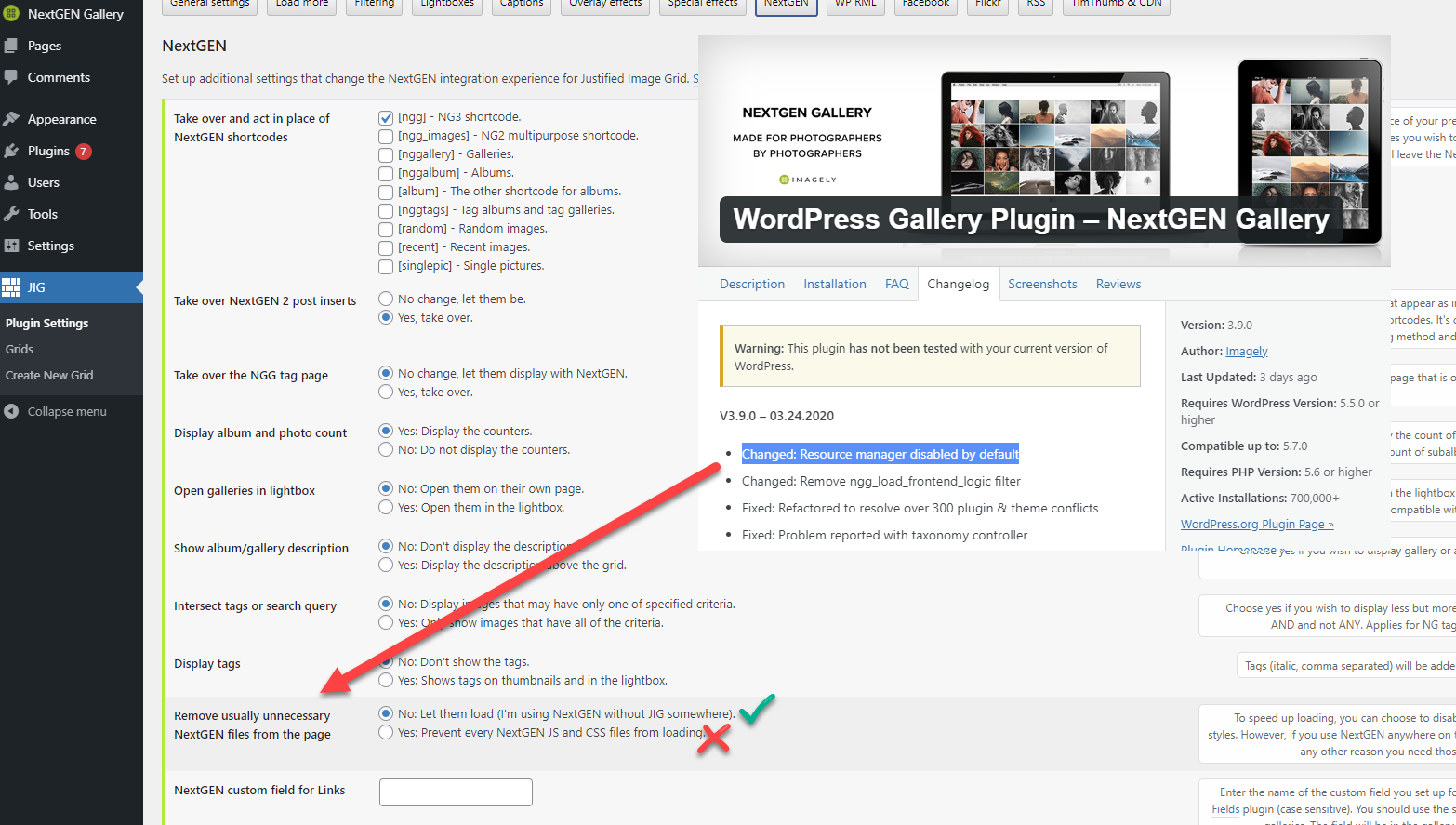
NexGEN brought a change that affects how a JIG option prevents loading unnecessary NextGEN assets. It only affects users that turned on this option (it’s off by default). https://i.justifiedgrid.com/2omfc60v.png It’ll be fixed for the next JIG version, until then just turn off this settings and your galleries will re-appear (along with 3 CSS files from NextGEN that are unused when JIG is the display).
Hi, after the recent NextGen update (3.9.0), this setting: “Remove usually unnecessary NextGEN files from the page” when turned on started crashing my site when using BeTheme (not sure if with other themes it would do the same). (JIG v 4.1)
Yes, thank you for the notice. https://i.justifiedgrid.com/2omfc60v.png It’ll be fixed for the next JIG version, until then just turn off this settings and your galleries will re-appear (along with 3 CSS files from NextGEN that are unused when JIG is the display).
since a few days I have the problem that most of my posts are no longer displayed when JIG is active. Strangely, not all. The message “CONTRIBUTION NOT FOUND.” appears, but it is not a 404 message. It also doesn’t matter if there is a JIG on the page or not. If I deactivate the JIG plugin, all pages are displayed normally.
The word contribution doesn’t exist in JIG source code so that part would be something specific to your site. Do you use NextGEN? Contact me from my profile, I might need to log in with temporary wp-admin access to check it out.
Hi,
the word may also be a translation error. Anyway, the problem is solved, it is the NextGen problem that you described below.
Stupidly, in my case, it not only caused articles with JIG to stop showing, a good 95% of the page reported “this post does not exist”
Thanks for the great support.
Stay tuned, there will be an update soon (about a week) that addresses the NextGEN problem. Hopefully their resources can be still prevented from loading, without any breaking errors.
Is there any way to have an incomplete last row resized to fill the grid width? Like when there are only 1 or 2 images in the last row, I’d like them to get displayed big enough to fill the grid width.
This feature is not supported.
Hi,
I have trouble wrapping my head around filtering. I “inherited” a website which has a lot of images, each tagged with different tag groups. say: tag group place (some place), tag group time period (some time period), and so on. It already uses JIG.
1) I would like to find a way to make the gallery searchable by the content of those tags. I was able to make a JIG which filters by 2 of those tag groups, but the number of tags is huge so they do not display well on the screen. Is there a way to be able to implement a search box and have JIG return the results that match the inputted term, somehow?
2) Alternatively. Can I have a page with a JIG which gets the filters dynamically from the URL?
e.g: (picturesearch is a page with this “parametric” JIG)
https://mywebsite.com/picturesearch?place=london&time_period=1960&...... ?That might be cool. at the moment I am somewhat overwhelmed with the features of JIG and its interactions with other plugins and I would not want to reinvent the wheel.
Any quick feedback esp on point 2 would be much appreciated, thanks
For 1. No not yet, but a drop-down filtering layout is on the todo, for compacting many filter buttons. Also the realtime user-typed input search is planned.
2. would be the way to go, you can grab the things you want from the URL with 1-2 lines of PHP then pass it to JIG in form of a template tag. You can use a “grid” for this, so you can keep the styling controls in the admin area but only expose the setting that builds the gallery from a tag. That will be dynamic. This needs a little custom work, though.
Do you only have time period and place, or are there 3rd or 4th or more taxonomies enabled (tags) on the pics?
There is also a way to use 3rd party search, let it generate the results, and hijack its id-list-based output to be shown with JIG.
Hi, thanks for your quick answer.
I think that we can separate point 1 as client side filters and 2 as server side ones
1. understood. Yes, the tags in this website make it so that the tags themselves cover more than one screenful, so a dropdown / search box where filters may be added and then removed through an ‘x’ button would improve the ui. I was planning to do one myself but I can wait, if think you will release that “shortly”. Answering here your question for point 2, no, this website has about 8 different tag categories… like collection, author, theme, and so forth.
2. Yes, yesterday I felt like delving into it and not knowing extensively the wordpress architecture yet, I went the way that I thought would work. So I created a page, where I inserted a custom shortcode. The code for that shortcode gathers the data from the URL, then constructs a JIG shortcode string, which is then invoked through do_shortcode(.....)this is the code, no checks are in place yet
function wpb_url_params() {
$beta = $_GET[‘ids’] ? “ids=”.$_GET[‘ids’] : ($_GET[‘filter_tag’] ? “filterby=”.$_GET[‘filter_tag’] : “filterby=tag_places”);
$theta = “[justified_image_grid ${beta} image_taxonomy=attachment_tag image_tax_term=gallery]”;
return do_shortcode($theta); }
function shortcodes_init(){ add_shortcode(‘url_params’, ‘wpb_url_params’); } add_action(‘init’, ‘shortcodes_init’);
I am not sure if it’s the most efficient way to do it. For sure it felt like the least disruptive to what is already in place!
So if I pass a comma separated set of IDs, I get a gallery with those picture IDs, which is good. if I pass as filter_tag a tag taxonomy, I get a gallery with that tag taxonomy on top as clickable buttons.
I am looking for a way to only get the pictures with a specific tag from a specific tag taxonomy , with no filters on top, I have not been able to yet. This is because on the leaf pages (the pic pages), those tags are displayed and I want to make them clickable, so that they take the user to a JIG containing all and only the pics with that tag value. Also, trying to find a way to add forward / back navigation to the leaf page withing a gallery …. hm. in general, to be able to be able to properly configure the JIG via url params (or post ….)
So here is what I am at. I’ll try and experiment a bit more with JIG, but again if you could point me in the right direction, it’ll be much appreciate. thanks for the awesome plugin!
1. It won’t be shortly, there is no ETA, but it’s definitely something I want to add eventually.
2. Those things you receive from GET should not have anything to do with “filtering”, instead put that value into image_tax_term and set the image_taxonomy to what that term is.
hi,
re 2. – got it. I was using image_taxonomy and image_tags instead of image_tax_term. I need to make sure to get only the images that have both image_taxonomy=attachment_tags image_tax_term=gallery AND image_taxonomy=tag_time image_tax_term=(any_valid_tag_slug)
(the content team manually tagged quite a few pics with “gallery” to differentiate them from those who have restricted usage rights but are still in the media gallery due to automated imports)
If you’ll need to create galleries based on more taxonomies than what’s available from the admin panel you might benefit from this hook: https://justifiedgrid.com/support/faq/media-library-query-args/
I’ll have a look at it, thanks!
Hi, a few quick presales questions:
I want my visitors to be able to download pixtures, is there a way to mark and download multiple pictures?
Is there a way to add a live search which filters all images by keywords?
Kind regards J0schi
There is an undocumented, in-development feature that shows a link to a zip that contains the entire shown gallery. It does not include marking individual images. However, there is a feature that puts a download link in the lightbox that downloads an image individually (prompts the browser save dialog or makes them go straight to downloaded).
Live search based user typing input: no not yet. Live filtering with pre-defined categories, tags: yes.
Alright thank you, might be just enough for us to buy it, i will re check this soon 
does that plugin support galleries with 1000-5000 images for a single gallery?
Some customers have done that but I can’t recommend to load that many in one go. Make sure your server/CDN is ready for those concurrent connections. You can play around with load more and infinite scrolling, but I’m aiming to boost the performance along with the eventual inclusion of pagination. As always, feel free to try and I’ll refund if it’s not good enough for your use case.
I have pretty many POSTS at my wordpress website and just want to use your plugin to create a gallery from existing content posts…
(it is about POSTS not pages)
and how about if I could assign a GRID to a category to be able to use different GRIDS…
Posts and pages are almost the same thing for WP and JIG. Do you have a featured image for each post? Or would you like to show the grids inside the posts?
The grids feature has a “Recent Posts” tab to begin with. If you wish to replace the lists of posts that your theme shows, a few lines of PHP code will be necessary to replace the loop with JIG. That can affect any or all the category archives as well.
I want to show the GRIDs inside the POSTS… it is only about POSTS with images, no text content, no other content inside any POST…
I just want to DISPLAY the post images with JIG to use your rich features to make it look better and have lazy loading and so on for galleries with 100and more images…
how to change single.php to get JIG inside my posts?
(I think single.php is the right one)
regards
You just place an othewise empty
do_shortcode('[justified_image_grid']); wherever you need to. The images will need to be attached to the post (as in uploaded to that post). If they weren’t, there are tools that can attach free-standing images to particular posts (perhaps with Media Library Assistant plugin).
I have no idea how to use that codeline !?
can you please send an example?
posts look like… please see https://thighdeology.net/sakura-and-hinata-from-naruto-by-sia-siberia-and-purple-bitch-photos/
sorry?
Place it into the theme’s or child theme’s appropriate file, this could be single.php near the content. Wrapped between <?php and ?> if those are not already present there.
when adding that line near the content wrapped between <?php and ?> it brings an error:
“There has been a critical error on this website.”
do I have to activate anything at JIG plugin settings?
It’s possible you are adding it the wrong way. Sorry but theme customization is out of scope of the support.
<?php echo do_shortcode('[justified_image_grid]'); ?>
or
echo do_shortcode('[justified_image_grid]');
I’m working on making a website that needs a really robust front-end filterable gallery. It will have product images, product use images, product color images, and product pattern images for all the client’s products, so I’ve been trying to figure out how to link all these images back to the correct product pages since many of these images will NOT be the featured image in a post/page..
I’m thinking the easiest way would be to pull all images from specific media folders into a robust front-end gallery.
- Images would be tagged inside the media gallery for filtering inside the robust front-end gallery.
- Images would each be custom linked inside the media gallery to a product page - and that link would be clickable from the robust front-end gallery
Is this possible with this plugin? And if so, how could I make this happen?
Thanks!
Custom links from images yes, filtering yes. You’ll find the custom link input field in the media library while JIG is active. Filtering is currently 2-levels only, this is what visitors click above the grid. You can also just use the tags to create a gallery based upon them.
I bought it, but now as I’m looking at setting it up, it looks like I can only link to a page OR open it in a lightbox. I’d like to be able to do both. Have a button/icon on the image that allows one to open it bigger, and another button/icon on the image that allows one to click to view more details (and be directed to the product page).
Is this possible..or am I correct in thinking it is not?
The thumbnail itself is a single giant link, any icon on it is not separately clickable, so yes it does 1 thing at a time. What you can do is have the thumbnail click open the lightbox, and from the lightbox captions provide a link (automatically in case of Recent Posts) to the page. This can be a “buy now” or “learn more” or similar link.
Ughhh….that won’t work for my needs! Really bummed! Could you refund my purchase please?
Processed!
You’re awesome. Thank you!!
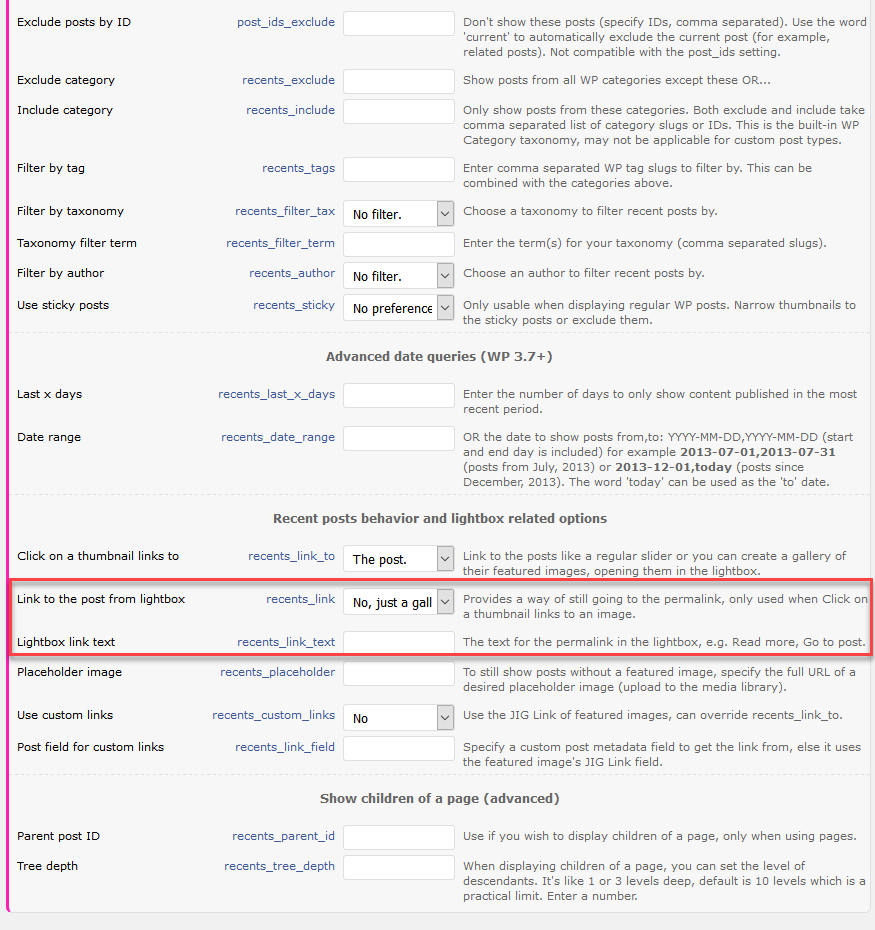
Still great! Used this for years! I am now using it for my woocommerce. Works great for that also. But, is it possible to make a product link in a lightbox? like a “shop now” something.
Yup with these 2 https://i.justifiedgrid.com/2om56rbh.png
Hi,
your galleries look fantastic at your demo site. However, I run a pageinsight test on this page: https://justifiedgrid.com/presets/preset-1-out-of-the-box/ and the mobile results are terrible (23/100). Are these results this bad because of the plugin itself or due to something else?
Many are attributable to the several years old Avada theme (can’t wait to get rid of it in favor of Oxygen Builder), Revolution slider (used only for the Hero), WooCommerce (used only for the custom post type demo). You can see that the caching plugin is not used to its full extent as it was breaking the site repeatedly because of the many plugins used to show compatibility. There is no script combination and minification. We’ll re-create the site to show the true speed, probably via a statically-hosted snapshot of the site. JIG also needs some improvements of course, thanks for noticing. Feel free to buy and try, if you are not happy with performance or getting similar score we’ll refund. Performance of both the plugin and its site is going to be a priority with further developments, much more than new features.
Hi, is there a way to have lke a full size feature video on top of a video gallery?
It’s currently not possible to make a tile more prominent than the other. If you meant in the lightbox, Magnific Popup could show a video full size, the others not so much.
Hi, on this beautiful plugin i found this error after update
Notice: Undefined variable: atts in /public_html/wp-content/plugins/justified-image-grid/justified-image-grid-core.php on line 15539
Please help
I can send you a google drive link with the latest beta if you contact me from the profile’s contact form. That has this fixed.
Hi, thank you for your response, i will contack you after this
Thank you so much
Great plugin! How can I hide the counter ‘xx/xx’ that comes on the right bottom side of any photo once you click it (lightbox opened up). I use Magnific Popup mode. I added ‘counterEl: false’ in the JIG settings everywhere too and it still shows the numbers. Please help
This custom CSS gets rid of it:
.mfp-counter { display: none; }
Not sure why the JS option doesn’t work for you.
Thanks. But where am I supposed to enter the custom CSS? Which CSS file ?
On the General tab of JIG plugin settings, there is a Custom CSS input, but WP’s customizer and also likely your theme/builder has such an input.
I have created a custom hierarchical taxonomy in WP and named it ‘collections’. When I create my Woocommerce products, I assign them to subcategories inside ‘collections’ – e.g. dresses>maxi dresses. I want to create a grid on my main page, consisting of these main categories in my collections. ie. dresses, jumpers, trousers etc. These collections do not have an image assigned to them. I should be able to assign an image, an overlay custom title, a link to the collection, and a custom sort order. = Is this possible? = Also I would like to be able to do the same with my product-categories. = Finally, is it possible to just create a completely custom grid with any number of pictures of my choice, each with its own custom link, custom overlay title/text, and sort order?
Yes of course you can just create a gallery from WP media library, with custom drag n drop order, set up the overlay text and point them to a custom link.
Are those just woocommerce taxonomy archives? Thought you needed this automated somehow. If you got these “dresses, jumpers” on their own pages (or custom post types) that list these products, with featured images, there is a way to automate.
Thanks for confirming my 3rd question – if what I say below is not possible, then I can achieve what I want manually using this manual way. My 2 previous questions are regarding 1. woocommerce product categories. 2. custom taxonomy created using CPT UI and attached to the Products post type. It would be nice if I could pull my Major WC product categories (not the subcategories) into a masonry gallery and their images, titles & links should come with them. Similarly, I could pull my Major WC product taxonomy (not the subcategories) into a masonry gallery and the title and links should come with them. Since the taxonomies do not have an image, I should be able to assign an image to them. What do you think?
Just to be completely clear about my earlier questions… I am not looking to pull posts from my categories…I am looking to display the actual category/taxonomy entries themselves… e.g. Dresses, Trousers, Skirts. I basically want to show a grid of all my major product categories and collections(taxonomy).
Currently you’d need to do that manually as the WP posts option in JIG is for posts, pages, products, but not the taxonomy term lists themselves. It can pull products from your custom taxonomy though.
Look at this (I know your usage is not NextGEN but the end result is similar): https://justifiedgrid.com/sources/nextgen-gallery/tag-albums/ These are tags in NextGEN (basically taxonomies), and JIG auto picks a picture for them. But they don’t exist as pages nor posts. This kind of thing could be done for WP taxonomies, something that your comment made me realize. There is no ETA on this yet.
If this were to be developed, users could just create an album-gallery relationship Grid without any 3rd party plugins. For the index view you’d choose a taxonomy as the base of the gallery. If it’s hierarchicel, it would generate a multi-level deep gallery with just 1 shortcode. If it’s flat, it would just show each term as a gallery, allowing you to enter each for a single gallery view. Or just open them in a straight to lightbox group if they are just photos not products.
What would be the best way to set a manual cover picture for a term? There is a “description” field for taxonomy terms, some themes make use of it, but no picture.
Taxonomy descriptions are used by my theme to show a description below the category title. This is the same thing as for product categories. So I think the image would have to be added manually for each taxonomy term.
If JIG were to have this feature, it needs a way to get an image for each term. Hopefully, there is an option for developers to add an extra field below the taxonomy description, to allow choosing an image there. I’ll update this comment thread if such a feature gets added.
is there a video that shows how I can do a grid with custom images and links? Thanks
Not yet but upon creating a grid you’ll see the “add images” which is exactly the same as creating a normal WP gallery. The custom link part is also found in the library (same screen) under the fields where you set image title/captions. That’s about it.