2001 comments found.

Hello can we set a special Currency for a special category or some prodoucts?
Hello
I think yes/
You can add code in functions.php
Example:
add_filter(‘wp_head’,function(){ if(is_product_category( ‘shirts’ )){ global $WOOCS; $WOOCS->set_currency(‘USD’); } });
Hello
Also use conditional woocommerce tags https://docs.woocommerce.com/document/conditional-tags/
hi there presales question pls i am using elementor to display the product pricing how can the price be dynamically changes to the user’s local currency in this case?
e.g.
i showing in elementor’s USD197 how it can detects the users country and show e.g. UK$xxx?
do i replace the text box with ur shortcode?
and further
if the user are UK based, and they see UK currency pounds when checkout, in woocommerce via stripe/ paypal, is the currency also shown in pounds?
thx!!
Hello
Yes it is possible.
in woocommerce via stripe/ paypal, is the currency also shown in pounds? - Yes, but you can customize different behaviorPlease watch a video – https://currency-switcher.com/video-tutorials#video_1
Read this – https://currency-switcher.com/shortcode/woocs_price/
Try a free version – https://wordpress.org/plugins/woocommerce-currency-switcher/
hi there i watched the 21 mins video but i want to know how to make the elementor pricing table shows the users location pricing automatically?
right now i added text is , e.g. USD97 i want this to replaced with shortcode or something of ur plugin so that it will changes to the price the users based on
and when clicked add to cart, the cart and checkout page showing the users local currency too
Hello
Ok! Сreate an product with fixed prices – https://currency-switcher.com/video-tutorials#video_PZugTH80-Eo AND https://currency-switcher.com/video-tutorials#video_YHDQZG8GS6w AND https://currency-switcher.com/video-tutorials#video_Yn7QQaJ21aQ
And paste shortcode [woocs_price id=X] where X id of this product
i watched so in short, i can show the local price to my visitors based on their local currency so that they dont have to choose anything yes??
hi there one last question before purchase i see it requires user to add each individual currency manually is there import functions to add like 30 countries major countries currency to save time?
Hello
their local currency so that they dont have to choose anything yes?? - yesit requires user to add each individual currency manually - Unfortunately noHii team,
I have presale question for WOOCS – WooCommerce Currency Switcher. The purchase of this plugin includes lifetime updates ?
Hello
Yes, as by Envato rules
Updating from v.2.3.2 to v.2.3.3.1 broke the switching functionality for us (downgrading again fixed it) Are there any special measures that have to be taken after the update?
Hello
We met troubles with Welcome Currency for some customers, and looking for site with the troubles https://wordpress.org/support/topic/update-to-v-2-3-3/ – please create now request here https://pluginus.net/support/forum/woocs-woocommerce-currency-switcher-multi-currency-and-multi-pay-for-woocommerce/ with exact description what doesn work and wp-admin access to the site (or its clone)
Hi, the countries I added to the Euro field on the GeoIP tab are not registered when I click the save button. what I do?
Hello
Please write me here – https://pluginus.net/support/forum/woocs-woocommerce-currency-switcher-multi-currency-and-multi-pay-for-woocommerce/
Paste your license key here – https://c2n.me/43SC6rb.png -> https://c2n.me/42HBIt7.png and wp-admin access – https://c2n.me/42BAoj4.png I will check it
Hi, what does today’s plugin update contain? I just update our site with this yesterday, don’t want to repeat again unless important. Pls let me know what was updated today or add to your updates page and provide link for us to see it. Thanks
Hello
There was a small fix of a new feature – https://c2n.me/49DBP7M.png – If you do not use this function you can not update the plugin
I would like to confirm that the plugin will allow for a product to display a unique price depending on the customers country/location.
For example: USA site visitor sees “Product A” @ $100 in US Currency Canadian site visitor sees “Product A” @ $300 in CAD Currency
If so, can the price/currency be automatically detected based on site visitor location?
Hello
Please watch a video -https://currency-switcher.com/video-tutorials#video_PZugTH80-Eo
Try a free version – https://wordpress.org/plugins/woocommerce-currency-switcher/
The latest version seems to be problematic. It displays payments in EUR in TRY on the order. How do I revert to the old version?
sorry, problem my site. no problem extention.
Hello Ok! I understood
Hi, is there an option to add some text, e.g. saying that prices are approximate or whatever, next to the switcher?
Hello Unfortunately the plugin does not have this feature. But it may depend on your current theme. Where you added the switcher?
Hello
If to add in usual text widget shortcode [woocs] you can write above or below of the switcher any text
Hi, Geo Ip not working for UAE. Its showing USD when users from UAE are viewing the website. Please Help.
Hello
Please read this – https://currency-switcher.com/using-geolocation-causes-problems-doesnt-seem-to-work-for-me/
Hi,
I have integrated maxmind license key as per the documentation but still no luck. UAE users can see USD as their default currency.
Can you please check : https://studiokalaniketan.com/collection/
Hello
Please write me here -https://pluginus.net/support/forum/woocs-woocommerce-currency-switcher-multi-currency-and-multi-pay-for-woocommerce/
Paste your license key here – https://c2n.me/43SC6rb.png -> https://c2n.me/42HBIt7.png and wp-admin access – https://c2n.me/42BAoj4.png
I will check it
Ok, have sent you the details.
please check https://pluginus.net/support/topic/geo-ip-not-working-for-uae/#postid-18219
Hello Ok! Thank you/! I will check it
A question, what option is to show 2 currencies in one item at the same time?
Hello
Unfortunately the plugin does not have this feature
Hello
I have an idea and want to ask you: here is shortcode [woocs_price] https://currency-switcher.com/shortcode/woocs_price/ – if it will be possible to add another currency prices directly into a product description like woocs_price currency=USD [woocs_price currency=GBP] it will be exact feature you are looking for?
Plugin does not work with new Woocommerce and standard plugin with Woocommerce https://woocommerce.com/ and author steal your money and don’t do refund even that it does not work as described. We informed the plugin owner in 7 days as the company policy for refund but they give a unpeasent answer that is really bad support and company beahvor! Going to go as far with this. Its only like 36 dollar but it’s the thing here! A serious company does not do like this.
So big WARNING for Plugin https://currency-switcher.com/ and https://pluginus.net !!!!
Hello Viktor
Your support request is here: https://pluginus.net/support/topic/woo-commerce-product-bundle-discount-gets-overwrited/ – we helped as we can with your another plugin incompatibility and suggested adaptation – nobody ON CodeCanyon suggest to customer make adaptations for FREE, except of us!
Not as described: compatibility with your another plugin is not promoted and we could simply reject your request (by Envato rules) but we did not and tried to help. Answer of the support is “I will add this to the adaptation queue”,
Steal money: Free version created just for such cases – testing, for testing all scripts before buying, but you did not.
Also read: - https://codecanyon.net/page/customer_refund_policy – Envato Market Refund Rules - https://www.dictionary.com/browse/steal
not serios company, if not refund you have 100 more reviews
Request is under review
Hello, is there an instant different price or exchange rate display depending on the country of entry, or does the customer need to choose?
Hello
please watch a video – https://currency-switcher.com/video-tutorials#video_1
Plugin can switch currencies depending on the visitor’s country
Try a free version – https://wordpress.org/plugins/woocommerce-currency-switcher/
Pre-sales question: I have one shop who have 5 languages, i want PT only (WPML translation) to have the currency change. The other 4 language i want to only euro, is this possible?
Hello
By default, the plugin does not have this feature. You need code customization
example – https://currency-switcher.com/switch-currency-with-language-change/
add_filter(‘wp_head’, function() { $lang = ICL_LANGUAGE_CODE; global $WOOCS; if ($lang!=’pt’) { $WOOCS->set_currency(‘EUR’); } });
Try a free version – https://wordpress.org/plugins/woocommerce-currency-switcher/
Hello
Just apply code here https://currency-switcher.com/switch-currency-with-language-change/ to functions.php file
My payment system support CAD but whenever im trying shop with CAD it broke the site and move forward to payment!!! https://prnt.sc/uzqab8
what can i do? how we can fix it?
Hello
I answered you on forum – https://pluginus.net/support/topic/not-support-cad/
Hello Please, help me asp.
I bought this plugin and installed very well.
But when I use it, I have to see about error messages on my site.
Warning: Division by zero in /host/home3/qataso77/html/wp-content/plugins/woocommerce-currency-switcher/classes/woocs_after_33.php on line 5146
Warning: Division by zero in /host/home3/qataso77/html/wp-content/plugins/woocommerce-currency-switcher/classes/woocs_after_33.php on line 5149
I don’t know how to fix this issue on my site. Please, answer me asap.
Hello
Check the rates, they shouldn’t be zero
if no luck – write me here – https://pluginus.net/support/forum/woocs-woocommerce-currency-switcher-multi-currency-and-multi-pay-for-woocommerce/
Paste your license key here – https://c2n.me/43SC6rb.png -> https://c2n.me/42HBIt7.png and FTP+ wp-admin access – https://c2n.me/42BAoj4.png I will fix it
Many thanks! it’s works!!
But I have some questions again. If WooCommerce sets dollar as the payment currency, Can’t people pay in Korean won using this plugin?
Hello
I’m not sure if I understood you correctly. In what currency users can make a purchase depends on the payment system. Does your payment system support these currencies
Hi,
I fount the WOOCS Currency Switcher conflict with my another plugin that run in backend for creating Purchase Order to suppliers. After enabled the currency switcher, all currency using same single ”$” dollar sign in my PO plugin. https://prnt.sc/uo7j50Is there any way or code snippets can work to prevent the currency switcher to affect in backend?
Please help
Million thanks
Best, Chris
Hi, Just purchased your plugin. We’re now trying to move it from development site to live site, but we have one BIG problem, we manually added all country currencies (around 26 currencies) and cannot see a way to save these settings to export it to our live site. Can you tell us the best way to copy all these currencies and settings from development site to our live site?? It would be painful to have to spend a long time inputting them again on the live site! Pls respond here as it’s very urgent. Thanks!
Hello
unfortunately the plugin does not have a data export import function
You can get data by SQL in $wpdb->options options name(currencies) is – woocs
To get all data ” WHERE option_name LIKE ‘woocs’”
Hi, That procedure seems to complex. Any chance you’ll be adding settings section that allows user to copy settings some time soon? Pls let us know. Also, we need Russian “currency symbol/sign” but cannot find it, looks like you forgot to add this to the plugin. Can you kindly add and update the plugin immediately as our site is live, or else our customers will pay wrong prices for items. Will appreciate a fast response. Thanks!
Hello
Any chance you’ll be adding settings section that allows user to copy settings some time soon? – Maybe. I’ll give your idea to the developers. But it will definitely not be in the next version.
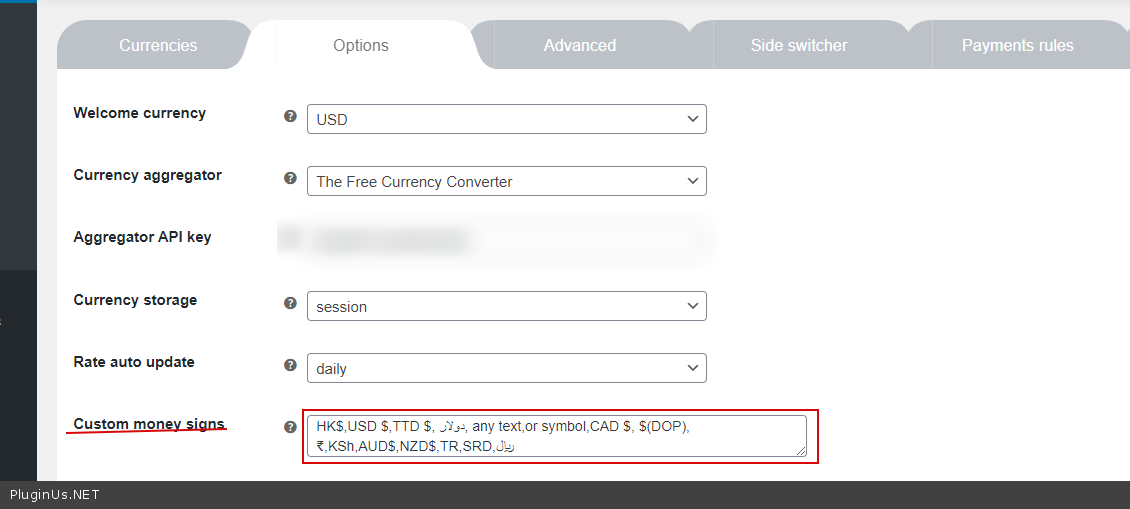
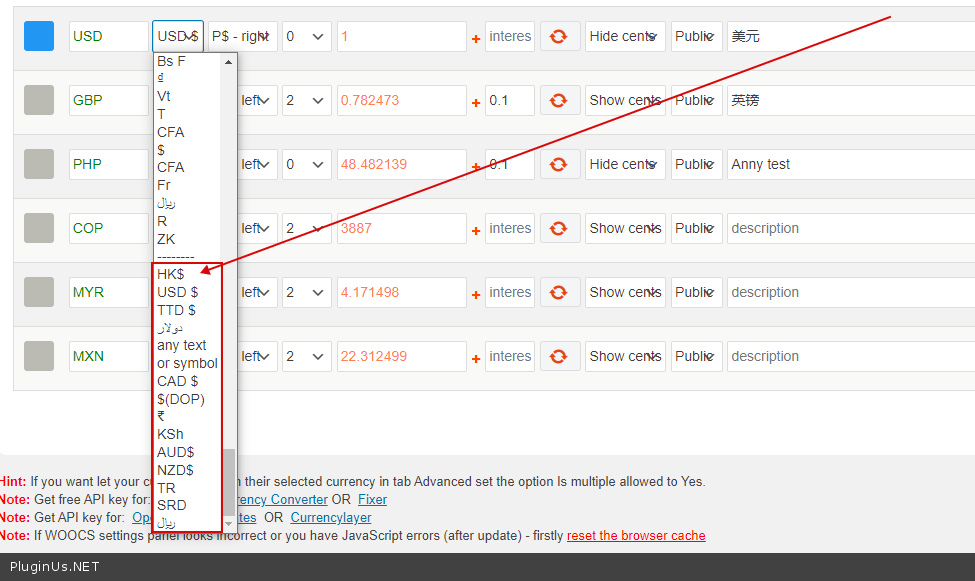
Also, we need Russian “currency symbol/sign” – You can add any sign – https://c2n.me/49eJv4y.png – https://c2n.me/49eJzvE.png
Hello Support, i have instal the free V. is there a function for round? when CHF 10.67 up to 10.70? regards MIke
Hello
Please read this – https://currency-switcher.com/hook/woocs_raw_woocommerce_price/
Hello support, i have buy now pro version, and have read this link but dont work. where i have to fill in this (CSS) ?: add_filter(‘woocs_raw_woocommerce_price’, function($price) { return round($price * 2, 0) / 2; });
i like to round up to the next 0.50 cent, that in CHF and $
Hello
Add in to functions.php of your current theme
Pre-buy question: For example where you get de currency conversion for ARS (Argentine peso) because want to check if is the central bank of argentina o google currency converter (has a really change low price and is not official)
Hello
Please watch a video – https://currency-switcher.com/video-tutorials#video_1
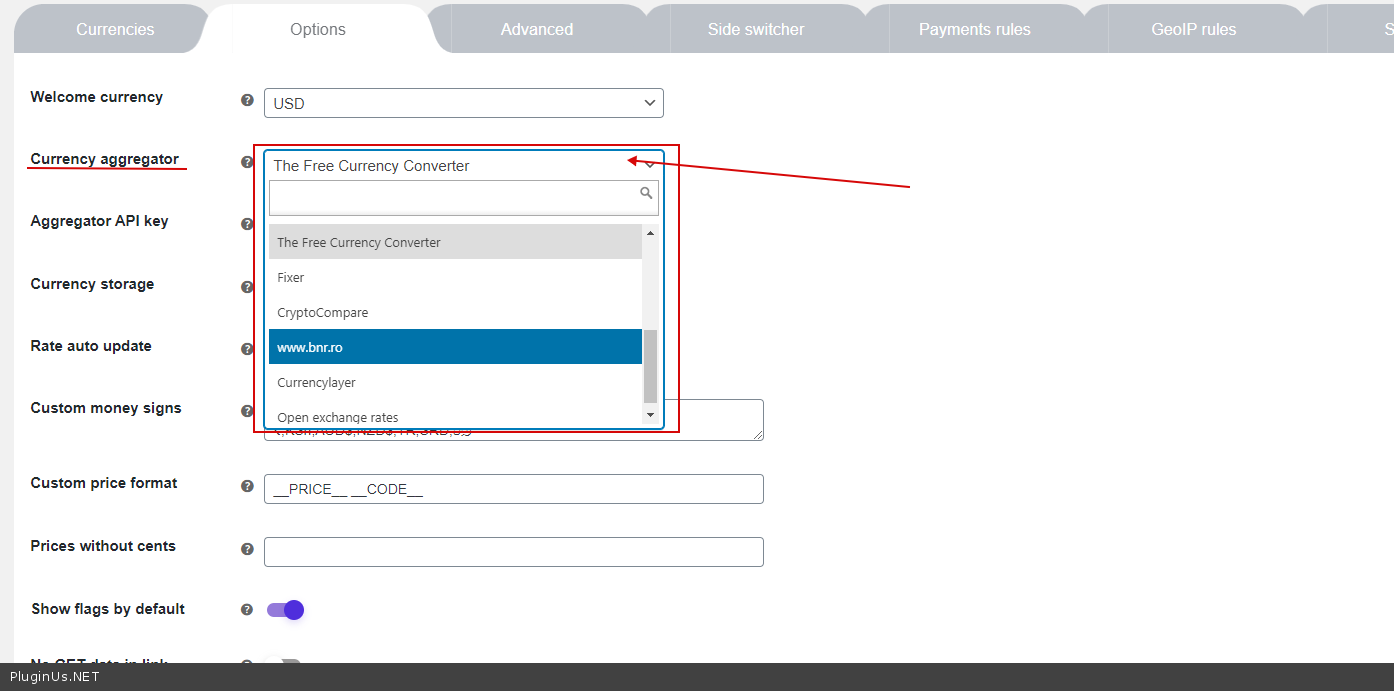
You yourself can choose an available aggregate in the list – https://c2n.me/49btp3s.png
the central bank of argentina - Unfortunately, the plugin does not have such an aggregator.You can try a free version of the plugin – https://wordpress.org/plugins/woocommerce-currency-switcher/

This item was featured on CodeCanyon

Power Elite Author
Contact the Envato Market Help Team