2001 comments found.
Hi, I have a problem with the plugin… when I activate it, inthe report page, it does not show me the right values… apart from this always in the reports, when I try to change the currency (from € to £), it does not convert me. .. always remains in €
thanks
Hello
Please write me here – https://pluginus.net/support/forum/woocs-woocommerce-currency-switcher-multi-currency-and-multi-pay-for-woocommerce/
Paste your license key here – https://c2n.me/43SC6rb.png -> https://c2n.me/42HBIt7.png and wp-admin access – https://c2n.me/42BAoj4.png
I will check it
Hi, I’m on the forum support page but I don’t see the button for the Private Area when creating the new topic. Could you tell me where it is?
Ok… found it… Done! 
Hello
oK! Great!

Hi, We have a pre-sale question and would like to buy this plugin right now, it’s kind of urgent:
Can you confirm whether this plugin can help us achieve the following 3 important things automatically, without manual selection?:
1. URL will be different for each country for example US currency URL will be www.domain.com/us etc, Germany will be www.domain.com/us
2. Visitors must be automatically redirected/routed to their URL and currency 9as mentioned above), they do not need to select it manually from a switcher.
3. How does currency conversion works when we set 10 different currencies in our store. ALSO, how can we connect these currencies to PayPal so that currencies appear throughout PayPal checkout process?
Please confirm whether your plugin has the correct features to achieve this. Thanks.
Best regards
hello Plugin does not redirect users to another page
how can we connect these currencies to PayPal - https://developer.paypal.com/docs/api/reference/currency-codes/please watch a video – https://currency-switcher.com/video-tutorials#video_1
Hi Team,
I am using free version of your plugin but my GEO IP is not working with the free version. Is it not working due to free version or there is some other issue because no such thing is mentioned in your documentation.
It is also giving me trouble with the price conversion of different categories. It is just changing currency sign but not converting price.
Thanks
Hello
This should work for all versions
Read this please – https://currency-switcher.com/using-geolocation-causes-problems-doesnt-seem-to-work-for-me/ AND https://currency-switcher.com/currency-recounts-wrong-double-zero-and-others/
For preloader price, After I enable this,
1. it will show waiting sign at price about 2-4 sec , sometimes it shows more than 5 sec, why sometimes it’s so long?
2. For preloader price, your plugin fire ajax in background?
3. If I don’t enable preloader price, it will not fire ajax?
4. For preloader price, it help to solve problem about cache, right?
5. Do you have solution that increase speed of preload price to show price more quickly? Maybe plugin or doing something.
Thanks
Hello
1) looks like your page is loading slowly. Plugin redraws prices only after full page load
2) Yes
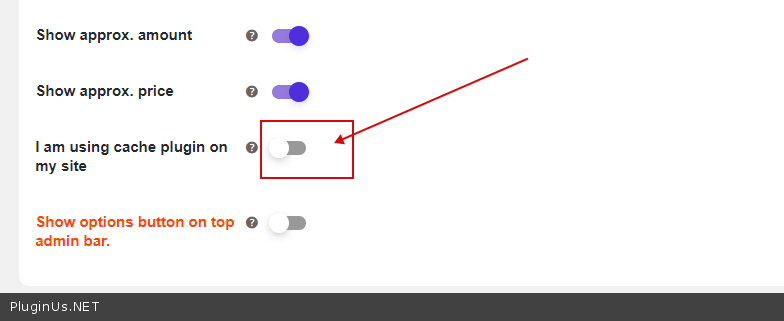
3) Check option please – https://c2n.me/494Eo5O.png
4) yes
5) Optimize page loading. Try to use third party caching and optimization plugins
Hello,
I bought this plugin yesterday (woocommerce-currency-switcher) via codecanyon.net
I have added many countries to the plugin for GeoIP location of currency change but among them, some are working and some are not working, as I have added it in the same way as other countries.
See below example
US – working Canada – Still showing US dollars instead of CAD or C$ India – Working UK – Working Kenya – showing Pounds instead of Kenyan Shillings (KSh) Nigeria – Working Ghana – Not working showing dollar instead of Cedi ( GH₵) South Africa – Showing pounds instead of Rand® France – Not working Showing USD instead of euro Germany – working Norway – Not working Showing USD instead of euro China Not working Showing USD instead of (¥) UAE – Not working Australia – Not working Showing USD instead of AUD Spain – Working Belgium – not working
Looking forward to your feedback
Regards
Hello
Please read this – https://currency-switcher.com/using-geolocation-causes-problems-doesnt-seem-to-work-for-me/
1. Does your plugin support nginx fast cgi caching?
2. Do you have customer that use with this type of cache?
Hello
1) No matter what the server, but better to test with free version to avoid incompatibilities https://currency-switcher.com/
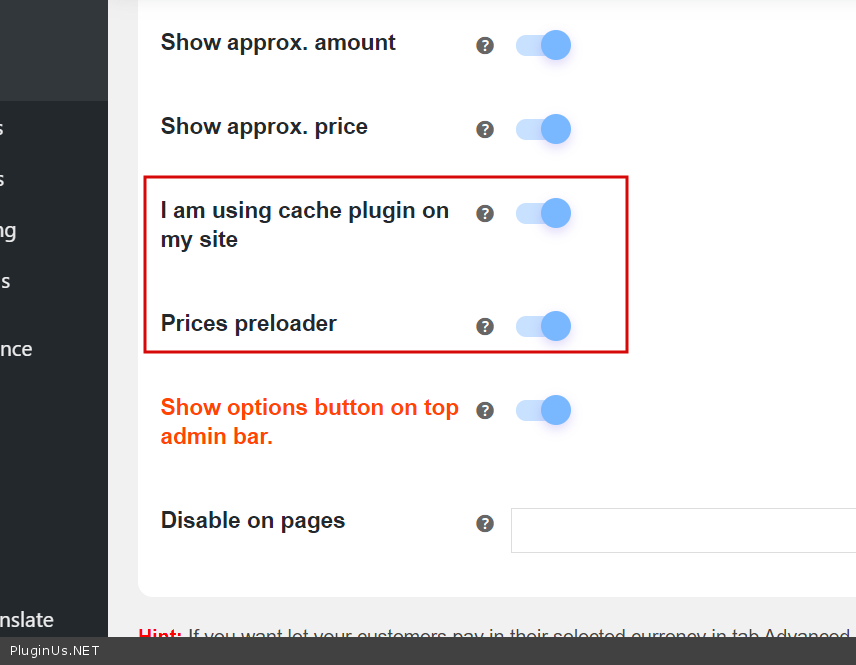
2) I not know about it, but for cache in tab Options activate option ‘I am using cache plugin on my site’ and maybe ‘Prices preloader’ https://c2n.me/493ojaK.png on page wp-admin/admin.php?page=wc-settings&tab=woocs
Hello Realmag777!
Is there a specific shortcode to display price on Elementor for a specific product that changes dynamically according to the geo-ip detected?
Example:
Product A has price in USD of $9.99 and in MXN of 299 (according to the specifc pricing for that currency inside the product currency options)
Then when a customer from the US visits the website they will see $9.99 and when a customer from Mexico visits the website they will see 299MXN
Currently using [woocs_show_custom_price value=$PRICE] but it works with the curency exchange and not the actual product so it is a little bit difficult to use.
Any ideas or help? This would be really useful!
Thank you and fantastic plugin, I recommend it to everyone, stop looking, just buy this one!!
Would need to be something like [woocs_show_custom_price value=$PRODUCTID] for example
Hello
No such feature, but idea is good: [woocs_price id=337] – value should be taken from the rules which already exists
How I undertood you need to insert somwhere in the on the page builder price of real product, but this product out works trought Elementor?
By the way: maybe WPCS which is going as gift will help you https://wordpress.currency-switcher.com/shortcode/wpcs_price/ – this plugin similar to WOOCS but works in usual content for non-woocommerce content
Yes exactly [woocs_price id=337]! That would work perfectly on Elementor using the shortcode function and would make website pricing much more dynamic referencing the the rules that already exist on price!
Hopefully this can be done in the near future!
Hello Doblezzeta
I passed this to the developers. Thank you for the idea
No problem! I hope it gets implemented soon, looking forward to using it 
Hello
Ok! We will try to update as soon as possible.
Hello Team! Has there been any update on this? Looking forward to it!
Hello
We’ve already added this to the plugin! In the next release, you can use this functionality.
Or write me on forum – https://pluginus.net/support/forum/woocs-woocommerce-currency-switcher-multi-currency-and-multi-pay-for-woocommerce/
Paste your license key here – https://c2n.me/43SC6rb.png -> https://c2n.me/42HBIt7.png I can give you a test version of the plugin\
Hello Pabloborysenko! I have created a ticket here https://pluginus.net/support/topic/cache-issues-with-dynamic-pricing-kinsta-wp-rocket/#postid-17871
Please check, and thank you!
class-wc-name-your-price-cart.php – https://pastebin.com/f1qkK8Pq class-wc-name-your-price-helpers.php https://pastebin.com/WFF34afx
Hello
Write new request please https://currency-switcher.com/woocs-labs/ if you not did it already
did. Thanks
Hello there, does this plugin allow admin to change their price and can deduct the customers location based on the IP so they can pay using their country’s currency? They also have the option to choose other currency to pay.
Hello
Sure, pay rules also exists, try free version please: https://currency-switcher.com/
- https://currency-switcher.com/wp-content/uploads/2019/07/screenshot-7.png - https://currency-switcher.com/wp-content/uploads/2019/07/screenshot-6.png
Hey – just checking if anyone else is experiencing an issue with WOOCS 2.3.2 enabled with just woocommerce plugin and default twenty twenty theme enabled. Seems that the woocommerce widget/dashboard on the main admin page is reporting incorrect data….listing zero shipping costs, wrong sales amount, etc and the net versus gross sales is identical – rather than tax being removed from one. Running; Wordpress 5.5.1 Woocommerce 4.3.3 PHP 7.4.3
This issue doesnt exist in version 2.3.1
Hello
Please create request here: https://pluginus.net/support/ with more details and screens you mean, if you think previous version is more correct roll back to it from codecanyon bundle
HI there. My client is using the Gututor plugin as well as Paypal, they require the price change from $ to South African Rand.. is this possible with your plugin?
Hello
Test it please with free version – https://wordpress.org/plugins/woocommerce-currency-switcher/ – if it works there it will work with the premium version also
Hi, please could you update the changelog box?
This unfortunately crashes my cart when you use it with Woocommerce Subscriptions and Variable payments. It refuses to save variable options. Once plugin was disabled, all worked fine.
Please test and fix this bug, great system but I can’t use it with Variable Virtual Subscriptions.
All other payments work fine.
Hello
This is incompatibility with a third party plugin. Read this please – https://currency-switcher.com/woocs-labs/
Correct link: https://currency-switcher.com/woocs-labs/
Hi, does this work with WP Rocket. I tried a different currency switcher plugin but it has conflict with WP Rocket. Cache does not work for first visit, only after reload or second page browse. I have no time to test the free plugin, so if I purchase it and it cant work, do I get a refund?
Hello do I get a refund? – No! Unfortunately incompatibility with a third party plugin is not a reason for the refund. So please do test with the free version
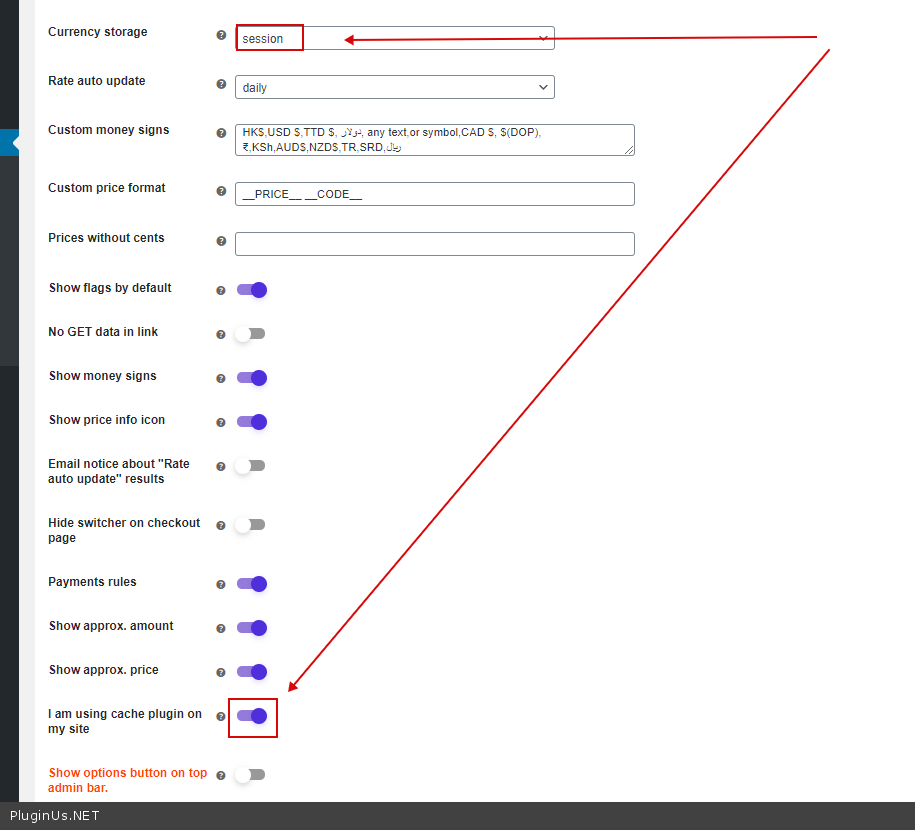
Check options – https://c2n.me/48R5k4T.png
How do I locate the place to enter purchase code?
Hello
You don’t need to enter the code. Just install the paid version of the plugin and use it
Can i select the currency for checkout without having to set it as default. I want usd as default because all our 900+ products have their prices in usd but we want customers to pay in mxn. But we dont want to change all those prices to mxn.
Hi there, I have a quick question, I need to set currency by GEOIP, and that works, but also, I would like to force currency by the address (country) of the billing address…. is this possible to have both ? thanks, Francois
Hello
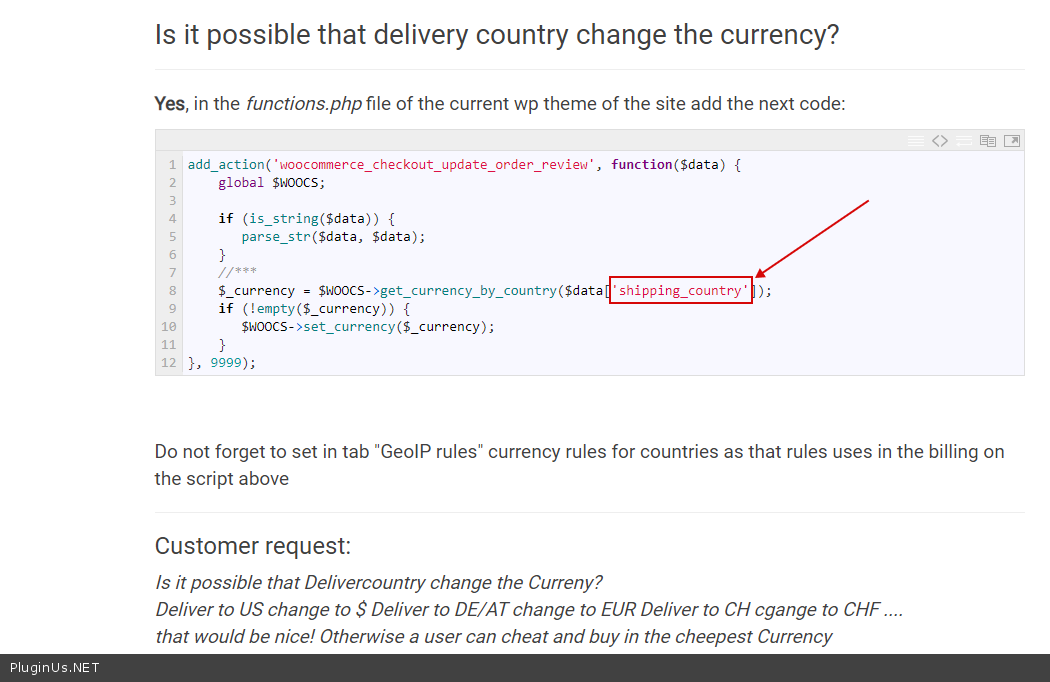
Yes. try to use this code – https://currency-switcher.com/possible-delivery-country-change-currency/
Try to use as key( https://c2n.me/48Oe9Bx.png ) – “billing_country”
I submitted the ticket yesterday and I cannot see any feedback yet? Here are the ticket URL https://pluginus.net/support/topic/based-on-ip-price-are-not-changing/#postid-15171
Please review it and hope you will resolve the issue ASAP.
Hello
I answered you!
I have install the plugin. I did the settings exactly as per the video. But still the price is not changing as per the IP based. Please let me know what its needs to required?
If you have any support ticket system than let me know, I will send you the wp credentials over there.
Hello
Please read this – https://currency-switcher.com/using-geolocation-causes-problems-doesnt-seem-to-work-for-me/
If no luck – please write me here – https://pluginus.net/support/forum/woocs-woocommerce-currency-switcher-multi-currency-and-multi-pay-for-woocommerce/
Paste your license key here – https://c2n.me/43SC6rb.png -> https://c2n.me/42HBIt7.png and wp-admin access – https://c2n.me/42BAoj4.png
I cannot see anything as per the screen shot you provided in your support. I sent you email using contact us page. Let me know if you get it.
Hello
To get support please write here – https://pluginus.net/support/forum/woocs-woocommerce-currency-switcher-multi-currency-and-multi-pay-for-woocommerce/
Hi, This plugin is updated to woocommerce 4.3.1 version?
Hello
Yes, Compatible With WooCommerce 4.3.x

This item was featured on CodeCanyon

Power Elite Author
Contact the Envato Market Help Team