2798 comments found.
Hello, is WOOF only WooCommerce compatible or does it work with posts, taxonomies, tags and custom fields too?
Hello
This plugin only works with woocommerce products.
For posts – https://wordpress.org/plugins/wp-meta-data-filter-and-taxonomy-filter/
Hello
For posts, pages and custom post types you can try: https://wp-filter.com/demo-sites/

Hallo, i am searching for a products filter, where i need to filter parquet products after image. for example like this page: where i can filter products after image.
https://www.kahrs.com/de-de/produkte/vinylboden/#color=2Hello
This plugin can make a similar filter.
Please watch video – https://products-filter.com/video-tutorials#video_beGT6p_look
Try free version – https://wordpress.org/plugins/woocommerce-products-filter/
Hi,
I am using Yith Ajax Search and when I am searching for a term and trying to sort the result I am getting the shop page sorted, not the search results sorted.
How can I solve that?
Thanks.
Hello
Unfortunately, the plugin is not compatible with third-party search plugins.
Hello, I want to use a custom taxonomy filter on one page of my website, and a different custom taxonomy filter for another page. Can be? Thank you!
Hello
1) In category pages use shortcode – [woof_products] with attribute : taxonomies=product_cat:X Where X id your product category. ( if you use custom page )
2) In widgets use shortcode [woof] with attribute : * taxonomies=product_cat:X + tax_only – write taxonomies or products slug using comma + by_only – write any by-filter-elements there using comma: by_text,by_price,by_sku,by_author,by_insales,by_instock. Of course firstly user should enable extensions for that by-filter-elements *- Do not forget set the same condition in [woof_products]
3) For show or hide widgets on different pages – http://www.woocommerce-filter.com/how-to-show-or-hide-widget-only-on-selected-site-pages/
You can read more about shortcodes – http://www.woocommerce-filter.com/documentation/#!/section_3_1
Can you give me a complete example of point 2)? Thanks
Hello
Read this please – https://products-filter.com/documentation/#section_3_2
Hello
You need to make changes in the Js-file for the reset button in the Ajax mode to work. file: path/to/domain/wp-content/plugins/woocommerce-products-filter/js/front.js in line 320 your must change word “on” to “life” It was: jQuery(’.woof_reset_search_form’).on(‘click’, function () { Should become: jQuery(’.woof_reset_search_form’).life(‘click’, function () {
thank you 
Multiple Sidebars The Divi Theme lets me have custom sidebars. I would like to have a sidebar for specific product filters on different pages. For example category 41 is “Smart TVs”. I would like the sidebar filter to show only Smart TVs and it’s sub-categories for user filtering. I have tried “by-only” and “tax_only” shortcodes in the sidebar with no success. The “woof_products” shortcode is in the document. Two examples:
[woof by_only=’by_product_cat:41’ tax_exclude=’pa_tvvod-channels,pa_genre,pa_device-apps,pa_device-os-by-apps’ autohide=0 autosubmit=0]
[woof_products per_page=12 columns=6 is_ajax=0 taxonomies=product_cat:41]
[woof tax_only=’product_cat:41’ tax_exclude=’pa_tvvod-channels,pa_genre,pa_device-apps,pa_device-os-by-apps’ autohide=0 autosubmit=0]
[woof_products per_page=12 columns=6 is_ajax=0 taxonomies=product_cat:41]
What would be the right code? Thank you!
Hello
This code is correct:
[woof tax_exclude=’pa_tvvod-channels,pa_genre,pa_device-apps,pa_device-os-by-apps’ autohide=0 autosubmit=0 taxonomies=product_cat:41 ]
[woof_products per_page=12 columns=6 is_ajax=0 taxonomies=product_cat:41]
Thank you! Is there a way to limit in the short-code which categories appear in each of the different sidebars? Right now all categories are showing except for those excluded in the main settings. Thanks!
Hello
For show or hide widgets on different pages – http://www.woocommerce-filter.com/how-to-show-or-hide-widget-only-on-selected-site-pages/
Thank you. Yes, I am familiar with the plugin. With the Divi Theme I am able to show or hide widgets on different pages without the plugin. What I would like to do is show or hide different product categories in the user selection list in the sidebar widget. From what I am experiencing, taxonomies=, by_only and tax_only limit visible attributes, but ALL categories are still visible (except those excluded in the general settings). I would like only one or two categories to be visible and selectable on different pages. I wish I could send you an image of what I am trying to do.
Please know that I really like your plugin. It is awesome! And I really appreciate your trying to help.
Hello
Please drop me the images and exact link to the issue.
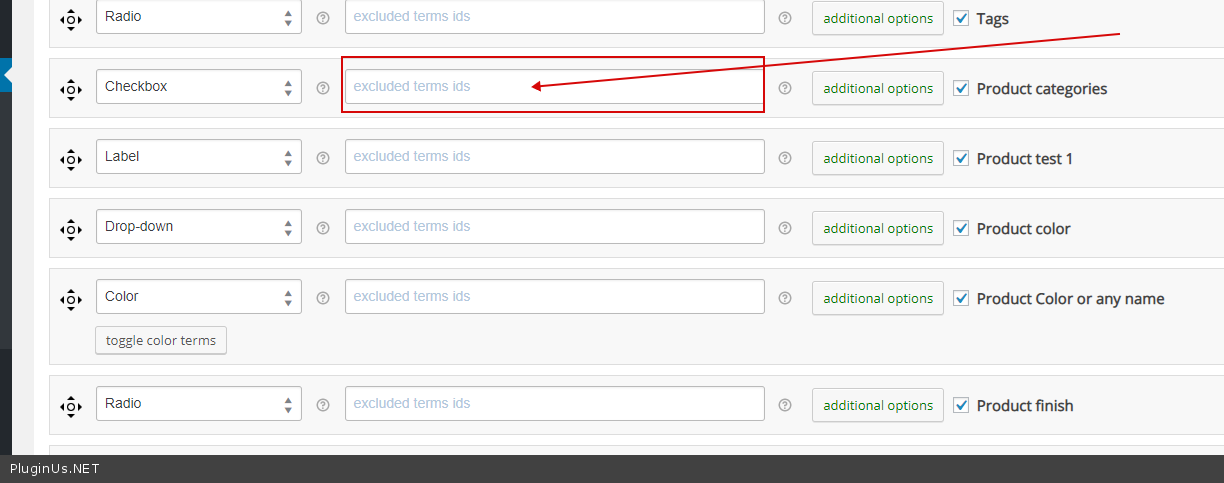
But this plugin can hide terms only here – https://c2n.me/433Q610.png
Otherwise, you need customization of the code.
Hi! Can i change design for view count brackets when using checkbox? Like this for example https://ibb.co/PYRLbDn
Hello Unfortunately not. The counter does not have its container; this is part of the string. And for this you can’t apply styles
Ok Thanks. One more question! Can size filter be set to show different size attributes for category pages. For example Kids category page would show only kids size filter and mens only mens sizes. Thanks
Hello Check options please – https://c2n.me/430DMER.png
Simple question, I can see there’s a hook for when the filter has completed – but I can’t see a hook for when a user clicks to start a filter, what I need is a ONCLICK, but can’t seem to run some JS when they click on any filter option. Is this possible without editing your core code? Thanks. Awesome plugin BTW.
Hello
unfortunately the plugin does not have such a feature
You need to create JS code that will catch these events. We do not have a ready-made solution
Presales: Can this be used horizontally site wide across the top of the website?
Hello
Yes. Try free version – https://wordpress.org/plugins/woocommerce-products-filter/
Check option please – https://c2n.me/42VJqIp.png
Hi, its possible to use your plugin to set up an ajax based search with filters on normal pages which have no products included like home page or as global site element like on this page https://www.ladebordwand-ersatzteile.com/?
Hello
Yes. To show/filter products on any page use [woof_products] – https://products-filter.com/shortcode/woof_products/
You can try free version – https://wordpress.org/plugins/woocommerce-products-filter/
Good day!
Just purchased this plugin, and so far t’was good. But I have encountered some issues with the following:
1. I have toggled Product categories filter, but unfortunately, this filter does not show on the page.
2. Quick Search extension is enabled, but this also does not show on the filters.
Kindly help me with this. Thank you.
Hmm I think I got it working right now. Thanks btw.
Hello
Great! Welcome;)
Hi i just downloaded the free version and wanted to know if i want to add an extra product category in the filter bar is it possible in structure tab like a single filter having 2 different ptroduct category
Hello
not sure I understood you correctly.
One filter can work with only one taxonomy.
Hi!
My client has an endless spinner when trying to add some elements to a page with Elementor.
This solution doesn’t help: https://gist.github.com/PavloBorysenko/4ed8a33b44a38bd35baca2d0ecc3ffed#file-gistfile1-txt
Can you please help to resolve the issue?
Hello
Please write on support – https://codecanyon.net/item/woof-woocommerce-products-filter/11498469/support
Paste your license key here – https://c2n.me/42HBIt7.png and wp-admin+FTP access – https://c2n.me/42BAoj4.png
Already did. Let’s chat there!
I added the screenshot and the purchase code to the support ticket I created. Please take a look!
Hello
Ok!
Hello. How to translate the plugin into Russian?
Hello Yes. As any standard plugin. Try to use this tool – https://wordpress.org/plugins/loco-translate/
Hello, I have a problem with price filter on category page on a new site I am setting up with the Divi theme. The price filter alone works just fine, but it doesn’t seem to work together with the other filters of the plugin. For example, if I select a category filter + price filter, I always get a ” no products match your selection” result , even though there actually are products that should match the selection. Can you help me figure out if I’m doing something wrong or if there’s a plugin or theme issue?
Hello
Please write me on support – https://codecanyon.net/item/woof-woocommerce-products-filter/11498469/support
Paste your license key here – https://c2n.me/42HBIt7.png and wp-admin access – https://c2n.me/42BAoj4.png
Hi, nice plugin! I have a question with shop page about pagination… is there a way when I click on page 2, the page starting from above and not staying at the bottom?
thanks
Hello
Please read this -https://products-filter.com/auto-scroll-to-element-after-ajax-is-done/
Hi, nice plugin!
Is it possible to show toggle button on “search by price”? (as radio button)
Hello
Unfortunately the plugin does not have this feature.
Is this plugin still maintaned? I dont see updates since 13 November 18…. not a good sign. WooCommerce and WPML have updated several times… are you sure it’s all still compatible and without errors?
Hello
Yes, compatible with WPML – https://www.facebook.com/pluginusnet/ (second message) – all is actual… Big update is under testing
Code is created in the way that woocommerce should serious changing in API to affect WOOF functionality
Hello
I have some questions before buying the plugin:
- In the free version we are only able to select a few options for our fields in the frontend: checkbox, dropdown, radio – Will we be able to use sliders when we buy premium? Our products have meta fields that we want to filter by using a slider (the meta field contains a number).
- if the plugin doesn’t work as we expected, is there a refund policy?
Thanks a lot
Hello
Read this please – Read rules please: http://themeforest.net/page/author_refund_policy
You can try slider for meta data in free version
Thanks for the quick response, however I am already using the free version and when I take a look at the extensions and find the slider for product attributes, then it says this is only available for premium.
I said ‘metadata’ in my earlier comment, but I’m talking about product attributes in specific.
Thanks
Hello
Yes. slider for attribute only for paid version.
hello, when will you update the plugin?
I have some problems on my site with the free version, I would like to be sure that buying it I will have no more problems
Hello
Please drop me exact link to the issue
Describe what I have to do to get this error.