2798 comments found.
Hi, I just wanted to quickly check if upgrading from free to pro version requires anything special to preserve my settings or should I just deactivate, delete and replace? Thanks!
Hello
Just delete the free version and install the paid version. All settings will be saved
Thanks, you are the man!!
Hello
Welcome;)

Code for tax_only and by_only for specific attribute
I have multiple product categories and attributes. On a specific page I would like to filter only by one of the attributes “Product Device OS by Apps” and exclude all the others in this one instance from selection and results. Is this code corrrect?
[woof tax_only=’pa_device-os-by-apps’ by_only=’pa_device-os-by-apps’ autohide=0 autosubmit=0]
[woof_products taxonomies=’pa_device-os-by-apps’ per_page=12 columns=6 is_ajax=0]
Apologies – code did not display correctly in comment the first time. Edited.
Hello
Your shortcodes are not correct.
read this please – http://www.woocommerce-filter.com/documentation/#!/section_3_1
Example to show only pa_device-os-by-apps :
[woof tax_only=’pa_device-os-by-apps’ by_only=’none’ autosubmit=0]
[woof_products per_page=12 columns=6 is_ajax=0]
Thank you!
when using hierarchical category drop downs – when you select a category, can it direct to the actual category page? Instead of directing to the URL /shop?swoof=1&product_cat=1994-1997 I need it to go to the actual category page (which I have set to display Subcategories)
Hello
Write me please from account where you bought the plugin
this is a presale question, i have not purchased the plugin yet. i want to make sure the plugin will work for my needs before purchasing
Hello
plugin does not have this feature
Can we choose amount of product levels, dropping down?
Hello
I’m not sure I understood you correctly.
Please describe it in more detail. You can create screenshots
can i display the top 3 levels of product categories as dropdowns? there are 6 levels of product categories on my site but i only want the top 3 levels shown. example: https://i.imgur.com/JirFP0A.png
Hello
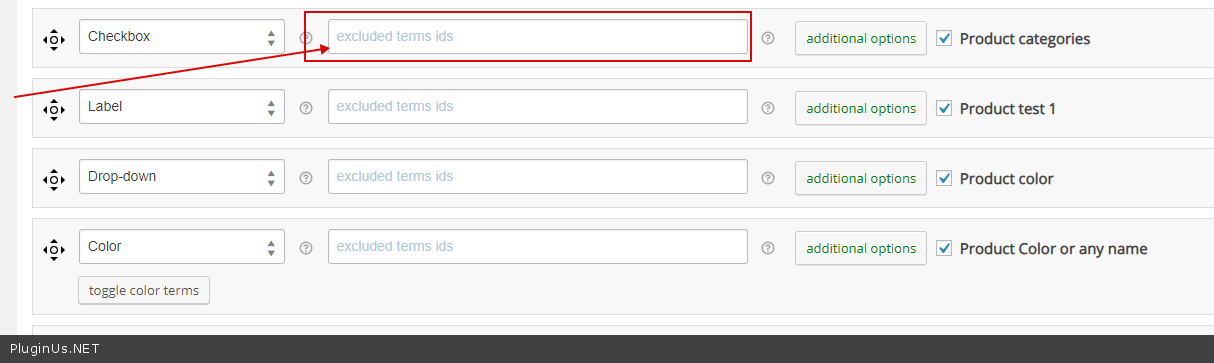
You can exclude this terms – https://c2n.me/42HUTpC.png
Hi, I’m trying to run a script after selecting a filter (after each “Loading…”).
I tried with jQuery(document).ajaxComplete(hideUnused());
to run the hideUnused() function but it’s not working. Is there any way to do this? Run a function or script after each reload of the product grid? Thanks!
Hello
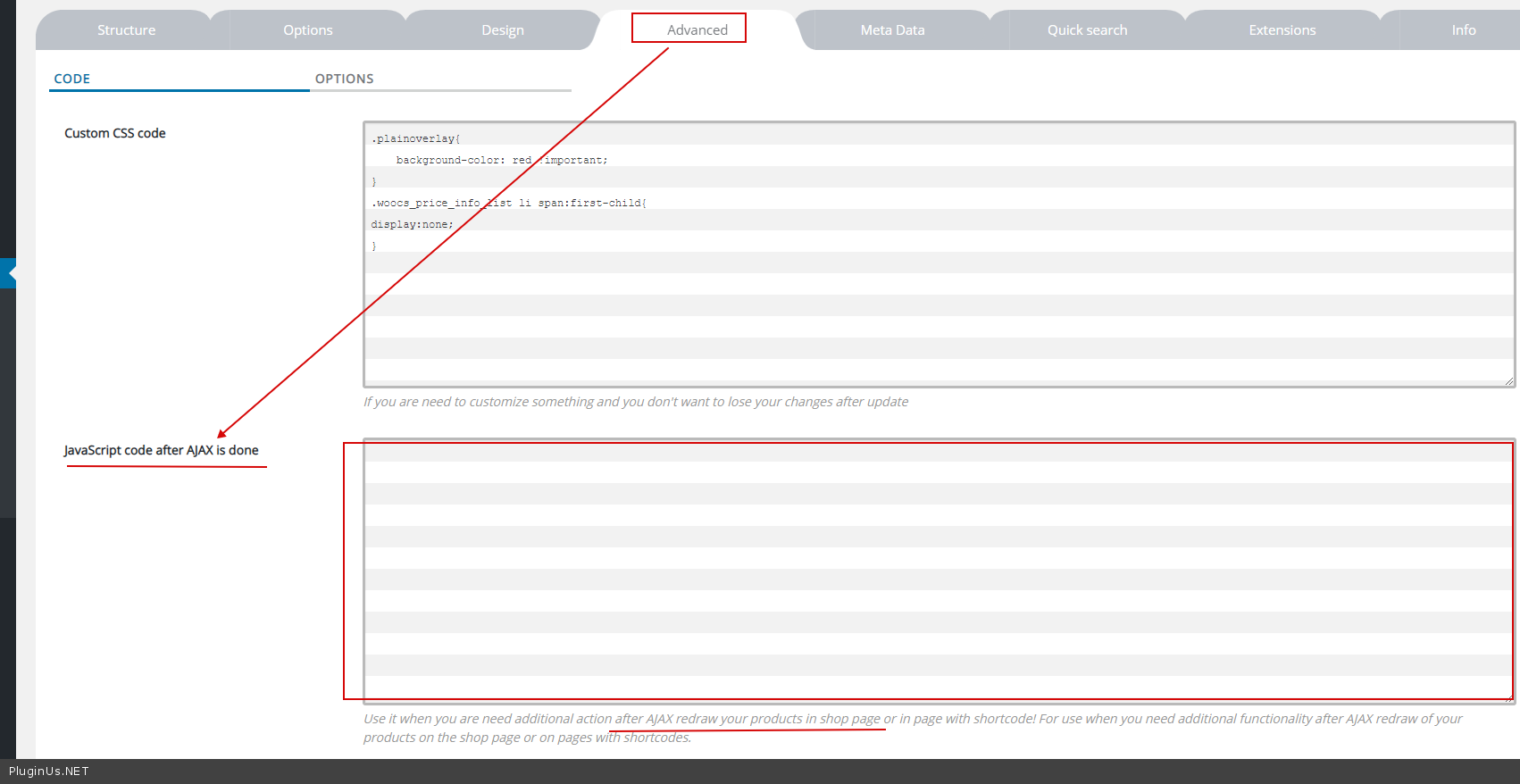
Plugin settings->Advanced – https://c2n.me/42FrtV1.png
Hello, that was it! Thanks 
Hello
Welcome;)
Hello
this is not a filter – https://c2n.me/42Fr8mV.png This is the functionality to replace the product image.
This plugin does not have this feature.
Do u make plugin witch function? How much is cost?
Hello
Unfortunately now we do not have time to do customization. you should hire a developer
Hello – i have problem – when i check count and dynamic recount and then check hide empty terms – the atributes filter from sidebar just dissapear there is only categories in hierarchy dropdown (i want to be in that) and price filter. Do you know what is wrong? Recount is working very well but when i check hide empty terms it is not working.
Hello
Please write me on support – https://codecanyon.net/item/woof-woocommerce-products-filter/11498469/support
Paste your license key here – https://clip2net.com/s/42Aqbg6 and wp-admin access – https://c2n.me/42BAoj4.png I will check it
Hi, I am testing the free version, seems easy to use. I just have 3 questions.
1. Will all categories with 0 items listed be hidden once I buy the full version? 2. At the end of my url I get ”?swoof=1” can this be removed or changed? 3. When I select my products menu, it shows 3 columns which is correct, once I use any filter or click on the page numbers it changes to 4 columns. If I remove WOOF it works fine. I am using Storefront as theme
(CORRECT) http://mercury.wpdevelopment.co.za/products (NOT CORRECT) http://mercury.wpdevelopment.co.za/products/?swoof=1&paged=2Hello
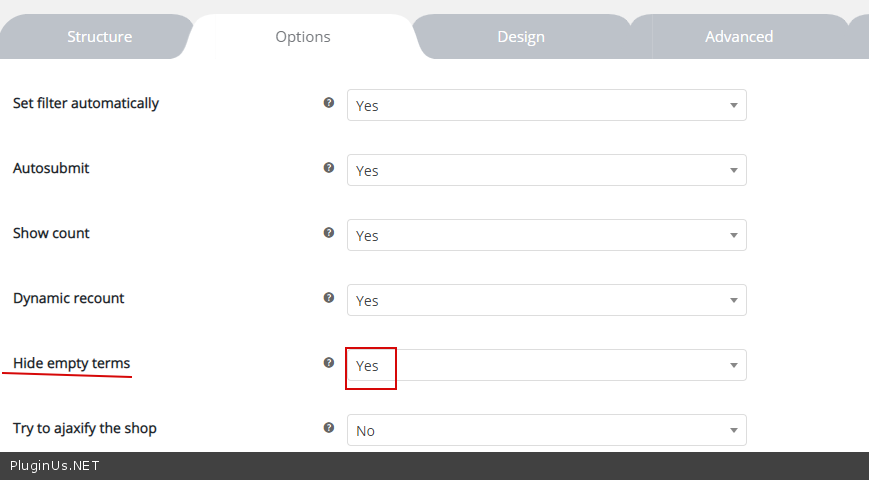
1) Yes. Option – https://c2n.me/42D8wM4.png
2) You can change it – https://c2n.me/42D8DKm.png
3) Read this please – https://products-filter.com/force-filtered-results-show-three-columns/
Hi there I need filter in this form https://prnt.sc/ofrba8
I have some other plugin but the support seem to be nonexistent
I need different filter for each category (I need shortcodes for that as I will create those pages manually) Taxonomies that don’t exist should be removed For instance on the screenshot I have subcategories for different typse of carpets If theres no “green” colour in that subcategory, once I click that subcategory the colour should disappear from the other dropdown list
Also, as this is carpets category, all the other products should disapper too
The plugin I purchased earlier apparently should do it, but the documentation seem not to be explaining this all, or I just don’t get this. Waiting too long for the support to get back to me (9 days now)
Can this be achieved with your plugin?
Hello
I think yes. Try free version – https://wordpress.org/plugins/woocommerce-products-filter/
1) In category pages use shortcode – [woof_products] with attribute : taxonomies=product_cat:X Where X id your product category. ( if you use custom page )
2) In widgets use shortcode [woof] with attribute : * taxonomies=product_cat:X + tax_only – write taxonomies or products slug using comma + by_only – write any by-filter-elements there using comma: by_text,by_price,by_sku,by_author,by_insales,by_instock. Of course firstly user should enable extensions for that by-filter-elements *- Do not forget set the same condition in [woof_products]
3) For show or hide widgets on different pages – http://www.woocommerce-filter.com/how-to-show-or-hide-widget-only-on-selected-site-pages/
You can read more about shortcodes – http://www.woocommerce-filter.com/documentation/#!/section_3_1
Hi, Price filter not working for multicurreny with base currency in USD and other few currencies. I have woof currency switcher installed for both compatible purpose. Can i need to add short code to solve that.
Hello
Please drop me exact link to the issue.
Describe what I have to do to get this error.
Hi, Please check this price filter link.
https://jlineartsandsilks.com/product-category/bronze-sculptures/?swoof=1&min_price=199&max_price=1369&pa_bronze-idol=lakshmi&really_curr_tax=118-product_cat¤cy=INR1. Product filter Price: Price slider Not give exact currency conversion other than base currecny USD. Price filter gives wrong selection.
2. When Price filter applied then other filters not working or No products were found matching your selection.
Hello
This happened after the update of woocommerce
Just update your DB as woocommerce recommended ( a notice on plugins page )
Hello,
I have the following issue. The WOOF filter appears in the footer section and not in the shop sidebar…?
see screenshot: https://prnt.sc/of893k
Hello
This plugin does not affect the location of the widgets.
It depends on your current theme.
A weird Issue then becasue the theme builder says that the problem lies with the Woof Filter. How can this be solved?
Hello
Send request here https://pluginus.net/support/forum/woof-woocommerce-products-filter/ please with wp-admin access (you can create site clone) + exact link on the front with wrong WOOF position
how can i create site clone?
How can i create site clone?
Òke, i just make a copy of my the wordpress site with duplicator install and archive package
Hello
Ok! Please write me on support – https://codecanyon.net/item/woof-woocommerce-products-filter/11498469/support
Paste your message
Pre-sales query:
Product filter that will allow the customer to access a list of products by filtering all the products by answering the following questions:
Q.1 computer type: personal, Workstation, Storage
Q.2 Computer usage: if someone select personal to show these filter [Personal (Gaming, Business or home)] if someone select workstation to show these filter [Workstation (pro GFX or Non Pro GFX)] and if someone select storage to show these filter [Storage (storage or computer)].
Q3. Price: 500-1000, 1000 – 2000 etc
By answering question 1 the answers to question 2 dynamically change for selection.
Hello Yes filter has similar functionality. read this please – https://products-filter.com/extencion/woocommerce-step-by-step-filter/
Try free version – https://wordpress.org/plugins/woocommerce-products-filter/
Hello, presale questions: 1) how to set many different filters individually for each product category? 2) if at WooC shop settings set to show at categories only sub-categories without products – can WOOF auto-setup-filter be removed because there is no any product?
Hello 1) 1) In category pages use shortcode – [woof_products] with attribute : taxonomies=product_cat:X Where X id your product category. ( if you use custom page )
2) In widgets use shortcode [woof] with attribute : * taxonomies=product_cat:X + tax_only – write taxonomies or products slug using comma + by_only – write any by-filter-elements there using comma: by_text,by_price,by_sku,by_author,by_insales,by_instock. Of course firstly user should enable extensions for that by-filter-elements *- Do not forget set the same condition in [woof_products]
3) For show or hide widgets on different pages – http://www.woocommerce-filter.com/how-to-show-or-hide-widget-only-on-selected-site-pages/
You can read more about shortcodes – http://www.woocommerce-filter.com/documentation/#!/section_3_1
2) please describe it in more detail
Hello Realmag777,
The auto submit is not working. It just loops endlessly without move to sorting and filtering out what’s being selected.
And without the Auto Submit, the Hierarchy dropdown filter is not working as it ought to, user will have to click filter to get to the next level. And in all it makes the entire site so slow.
Like said, I am using the premium version that is included in a theme (ShopMe). I seriously don’t what to do. I have disabled all the plugins that is part of the theme, the only one left out that is not disabled is the WooCommerce Currency Switcher
Please, I don’t what next to do. I don’t if am to switch to another theme or what? Or buy your plugin to get support.
Realmag777, I really need your assistance on this.
I will be waiting for your response soonest.
Kind regards
Hello
By Envato rules support is there where you bought the plugin, please write on support of wp theme you bought …
To get support please buy license.
Alright. This is coming a little late. I am using another theme entirely now. And now have bought a license. Yet, is still not responding.
So, I’ve sent you the email as requested in the email you sent to me..
Now, I’m patiently awaiting your response in no distant time.
Kind regards.
Hello
I answered you on email
Hi pablogorysenko,
Thanks, I have your email, is working now. Please, there is one more thing. Which, I have stated in the email sent you some minutes ago.
Awaiting your response soonest.
Hello
I answered
Hello, I would like to buy the plugin, I am French, and I would like to know if it is possible to translate all the texts into French? Thank you. Thank you.
Hello
You can translate this plugin like any standard plugin.
Try free version – https://wordpress.org/plugins/woocommerce-products-filter/
Hello
Maybe it will be useful: https://www.wpbeginner.com/wp-tutorials/how-to-translate-a-wordpress-plugin-in-your-language/
This is an AWESOME plugin and it’s worked on my site for ages. But now I’ve added a new generic product search (/?s=string) my filters are showing EVERYTHING for all products on search results page, can this be resolved? i.e. do a search on T-Shirts, and it will show filters for shoes because it can’t seen to correlate which category we’re in because it’s a search result.
Hello
Please activate this extension – https://c2n.me/42ymLNH.png
Thanks, I’ve tried that – but it doesn’t make any difference, and in fact breaks part of my site. A shame.
Hello
Please drop me exact link to the issue(with activated this extension https://c2n.me/42ymLNH.png )
Sorry, I aborted the idea of having filters on the search page now as I could not get it to work. But works on all other pages. But thanks for reaching out to help. If I buy your plugin for another project which isn’t live, I’ll do that test again. All the best.
Hello
Ok!
Hello Realmag777, I’ve been using your plugin (excellent!!) for some time now in the free version, now I need to create some custom taxonomies but the plugin does not work with AJAX, my question is: with the premium license help me solve the problem?, thank you very much.
Hello
This should work in all versions. Please drop me exact link to the issue
Hi, I am interested in your plugin. But before I buy, I need to know, if it fulfills all of the following requirements:
1. Placement: Is it possible to place the filter manually wherever I want? For Desktop it should be left of the products, for mobile above. The shop uses wp bakery builder.
2. Is it possible to create two different versions of the filter, one for Desktop, one for mobile?
3. Is it possible for the mobile filter to show certain filter options, but hide others and only make them available with a click on a button “more”?
4. Is it possible to translate the filter to german?
5. VERY IMPORTANT: Our products have a lot of attributes like size, country of origin etc. Is it possible to create filter options out of this product attributes?
Thank you!
Hello
1) use shortcode – https://products-filter.com/shortcode/woof/ 2) Yes. Use different attributes of the shortcode 3) No 4) Yes. like any standard plugin 5) yes. but the filter does not work with text attributes – https://c2n.me/42x2RUA.png
try free version – https://wordpress.org/plugins/woocommerce-products-filter/
Pre-sales query:
Does this plugin allow customizing colors? Will the plugin inherit theme design?
Hello
To change the filter styles you need CSS customization. You can try free version – https://wordpress.org/plugins/woocommerce-products-filter/