352 comments found.
Hi. Your plugin work with svg (animated with css+js)?
Hi,
Thanks for your interest in our plugin. Sorry but currently the plugin doesn’t support the feature to insert SVG code into the loading screen. We will consider adding this feature in future updates (priority depends on whether there are other similar feature requests).
Thank you very much.
Best regards,
The Loft.Ocean Team
I use SVG Support plugin. In your example 10, drawing frame can be modified to be closer to image and the animation go just 1 loop? You have an option or I need do it later myself from keyframe css or js?
Hi,
1. SVG Support Plugin:
We have tested this plugin, but the SVG Support plugin seems to work only when inserting SVG into the WordPress editor (and the Image Widget). It cannot convert SVG images to SVG code in the loading screen created by LoftLoader Pro.
2. Example 10 – Drawing Frame
- The width and height of the drawing frame are editable.
- The maximum width and maximum height of the in-frame image are respectively 80% of the width and height of the frame.
- This animation doesn’t support “Loop Once”.
3. Loader Animations that support “Loop Once”
For those animations that support the “Loop Once” effect, users can activate the “Loop Once” effect with just a click.
Please check our online documentation for more information: http://loftocean.com/doc/loftloader/loader/
-
Thank you very much.
Best regards,
The Loft.Ocean Team
Thanks for your reply. To bad that Drawing frame don’t support Loop Once effect. I will keep an eye on your plugin for future uptades 

Hi,
Is there a way to prevent/block scrolling the page while the animation is displayed? Some of my visitors have complained to me that my page is already scrolled down when it finishes loading, but most of the time it was because they swiped the animation by mistake while waiting for it to finish on their mobile device, and it would make the page underneath scroll down.
Thanks in advance,
Charles
Hi Charles,
Thanks for contacting us. No problem, we will add this feature in the next update.
Thank you for bringing it up.
Best Regards,
The Loft.Ocean Team
Hi,
Thanks a lot!
Any ETA on the next update?
Hi Charles,
Currently we are still in the middle of another project. Updating LoftLoader Pro will be our next task and will begin very soon.
However, we are not be able to provide any sort of timeline because product development can be unpredictable.
We will let you know when it’s released.  Thank you very much for your understanding.
By the way, if you’d like to get this feature on your site before we release the next update, please send the following login credentials to us (via email to: general@loftocean.com ) so that we can add this feature for you:
- Please create a temporary admin account for us and let us log into your WordPress site.
- Please also send your FTP login details so that we can modify the plugin code.
Thank you very much.
Best regards,
The Loft.Ocean Team
One of the most important features for me was a static responsive logo in the centre of the screen. Somehow when I bought the plugin the responsiveness does not work any more (compared to the free version). Can someone please help?
Hi,
Thanks for purchasing and contacting. Please see below:
1. Actually there is no “static image” option in the free version. There are 7 loading animation effects in the free version, 2 of them support custom image: Drawing Frame & Custom Image Loading.
2. In the free version, the custom image has a maximum width which is 90% of the screen width. In the pro version, the custom image also has a maximum width but it’s 100% of the screen width. We made the change because we got a few requests from users of the pro version – some users would love to add a fullwidth image in the loading screen.
3. We will add an option in the next update so users can control the maximum width of the custom image. Thank you for bringing this up.
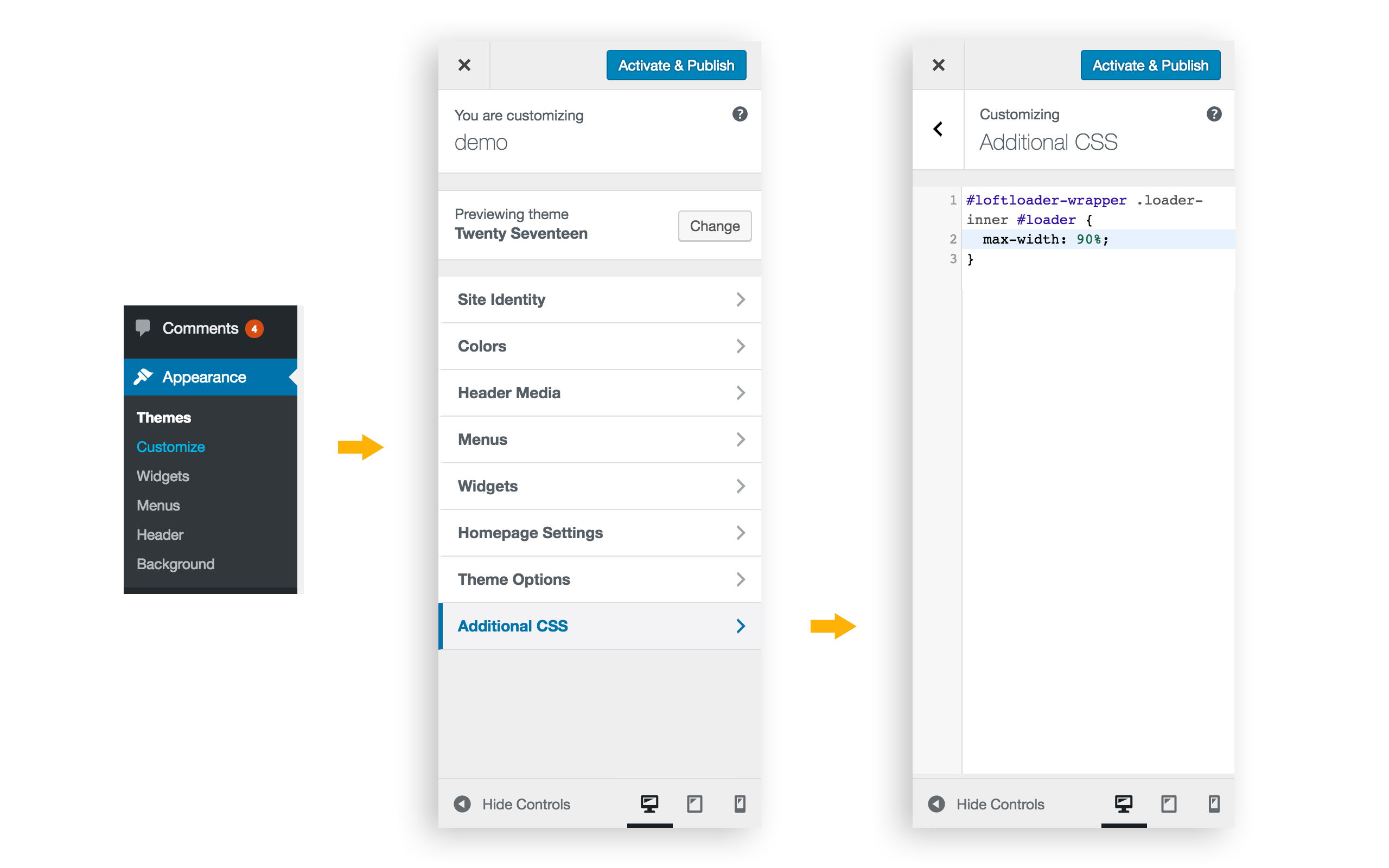
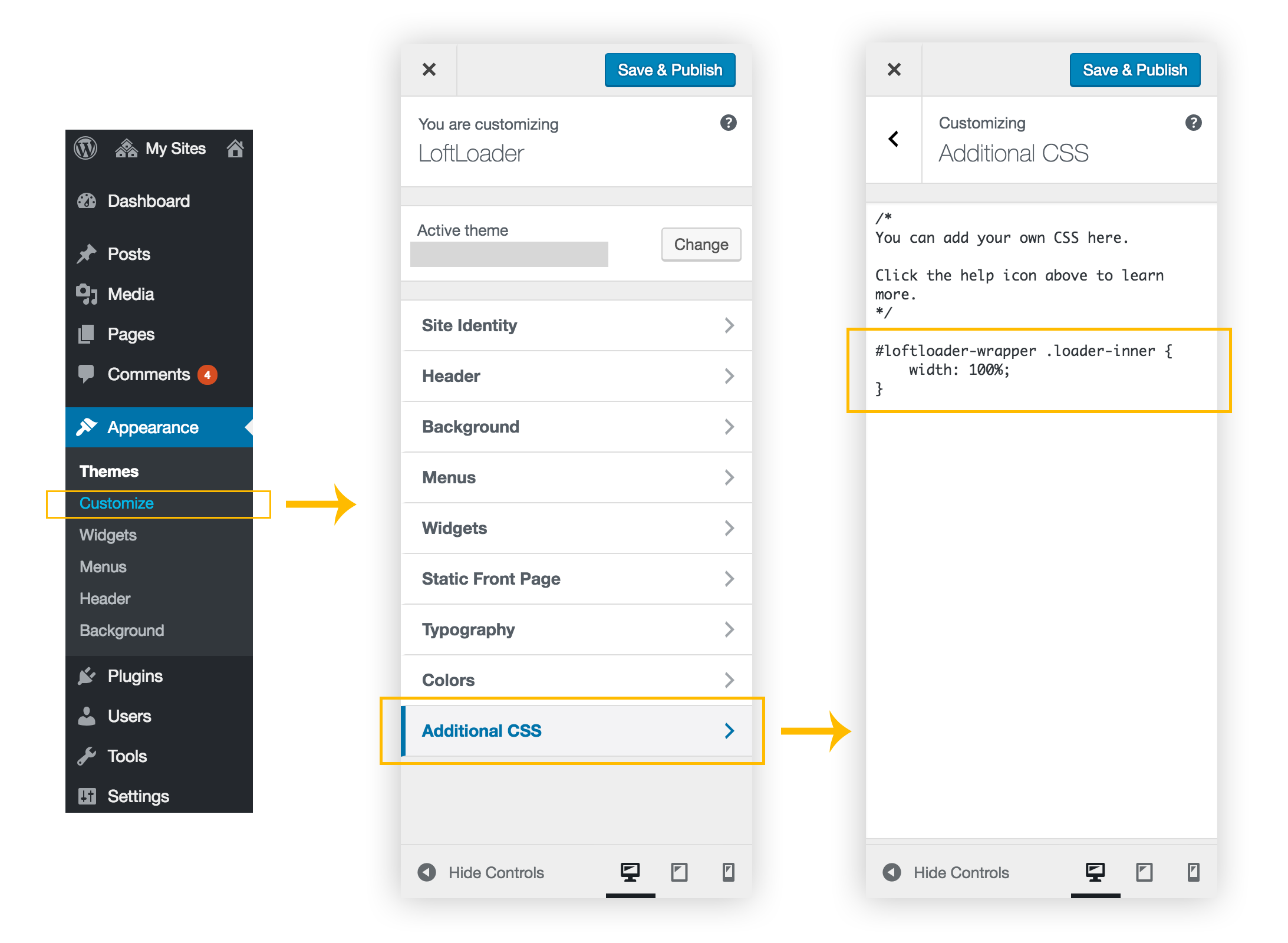
For now, you can try to add simple custom CSS to your site to change the custom image’s width limitation. Please copy and paste the following CSS code to your site, via Appearance > Customize > Additional CSS. You might like to see this screenshot as reference.
#loftloader-wrapper .loader-inner #loader {
    max-width: 90%;
}
Thanks.
Best regards,
The Loft.Ocean Team
Hello Small suggestion, which would be great!
I’d like to slow down, the loading time of the page, and the scrolling time of the cursor (currently max 10 seconds) it would be nice to allow us to lengthen, all this up to 50 seconds
Is it possible ? Thank you
Hi,
Thanks for contacting us. However, we don’t think it’s a good idea – 50 seconds is too long for page load time.
Loading time is a major contributing factor to page abandonment. The average user has no patience for a page that takes too long to load.
According to surveys done by Akamai and Gomez.com, nearly half of web users expect a site to load in 2 seconds or less, and they tend to abandon a site that isn’t loaded within 3 seconds.
You might like to read some articles about this topic:
- How Fast is Fast Enough? Page Load Time & Your Bottom Line
- Speed Is A Killer – Why Decreasing Page Load Time Can Drastically Increase Conversions
Thank you very much.
Hi
I understand,
But it’s for a specific need.
It should still offer this option. After free, users to put 10 seconee, or 20 seconds or 50 seconds.
The goal, would it be proposed anyway?
Is it possible ?
It is very important for me
Thank you
Hi,
We understand it is an important feature for you. However, please note that there are some differences between “feature requests” and “item customization”.
1. “Feature Requests” vs “Item Customzation”
What kind of request is related to item customization?
- Modify or extend the item beyond the original features, style and functionality described on the item page.
- It will help you tailor the item to your specific requirements.
Feature Requests:
A user has a new feature request and we will add it, only if:
- It’s a useful and important feature for many users and our potential target users, and our team also sees it as a must-have feature. We will add it in a recent update.
- It could be a useful feature for some users. We will consider adding it in a future update. But will not take action until enough customers ask for the same feature.
A user has a new feature request but we will not add it, because:
- It’s a customization related request.
- It’s a feature request that is against our product philosophy.
According to Envato/CodeCanyon support policy, item customization is not included in item support. Please read CodeCanyon Support Policy for more information.
As the author of Envato Market we have to comply with Envato’s support policy. It is sustainable both for authors and the marketplace.
And you might like to read Examples of Support Requests written by Envato Team.
2. Sorry but we will not add this feature into our plugin because:
- Until now, LoftLoader has more than 5000 users (Lite version and Pro version), but we haven’t received the same or a similar feature request from other users. So we can only treat your request as an item customisation request.
- This plugin is designed to keep visitors entertained while server operations finish processing, not to force visitors to wait longer before they can access content. It’s also a feature request that is against our product philosophy.
- Too long loading time will cause some animation effects to not be smooth, for example, the progress bar.
3. What we can do for you:
However, we understand that this is important to you. After discussing with team members, we decided to provide limited help for you this time. The only thing we can do for you is to guide you in modifying the code. It’s easy, you just need to change one value. Please follow the instructions below:
- You will need to login into your site via FTP. If you don’t know how to do it, please search on Google, or contact your hosting provider.
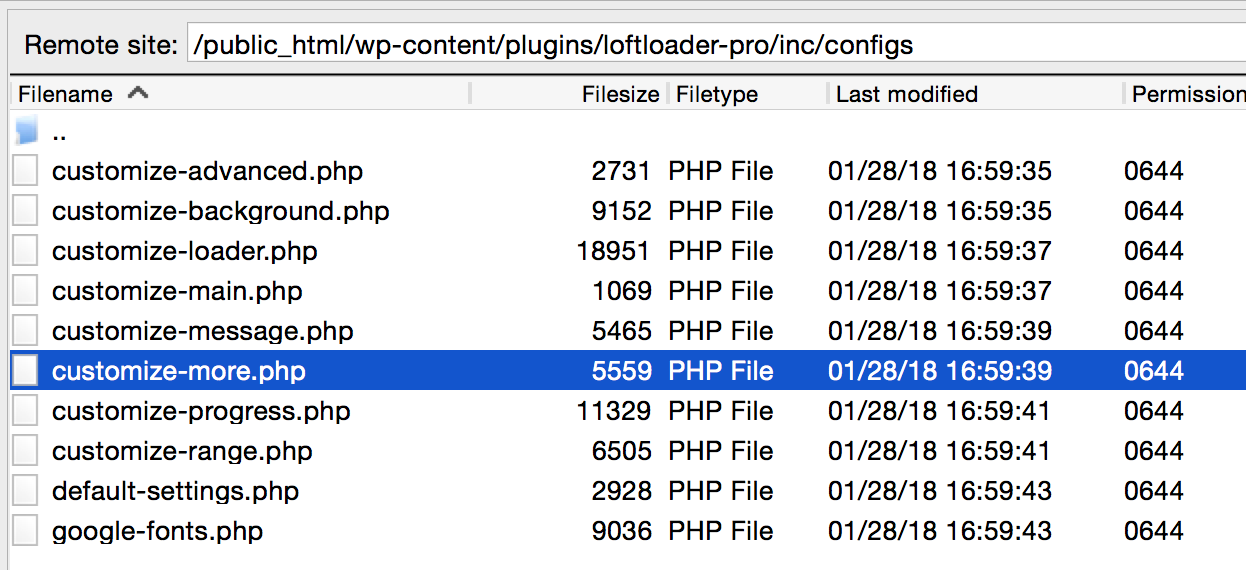
- Then please get into the folder of LoftLoader Pro on your site, and find the php file you will need to modify: “customize-more.php”. The path should be: (your site root)/wp-content/plugins/loftloader-pro/inc/configs Please see this screenshot as reference.
- Please edit the php file in a text editor.
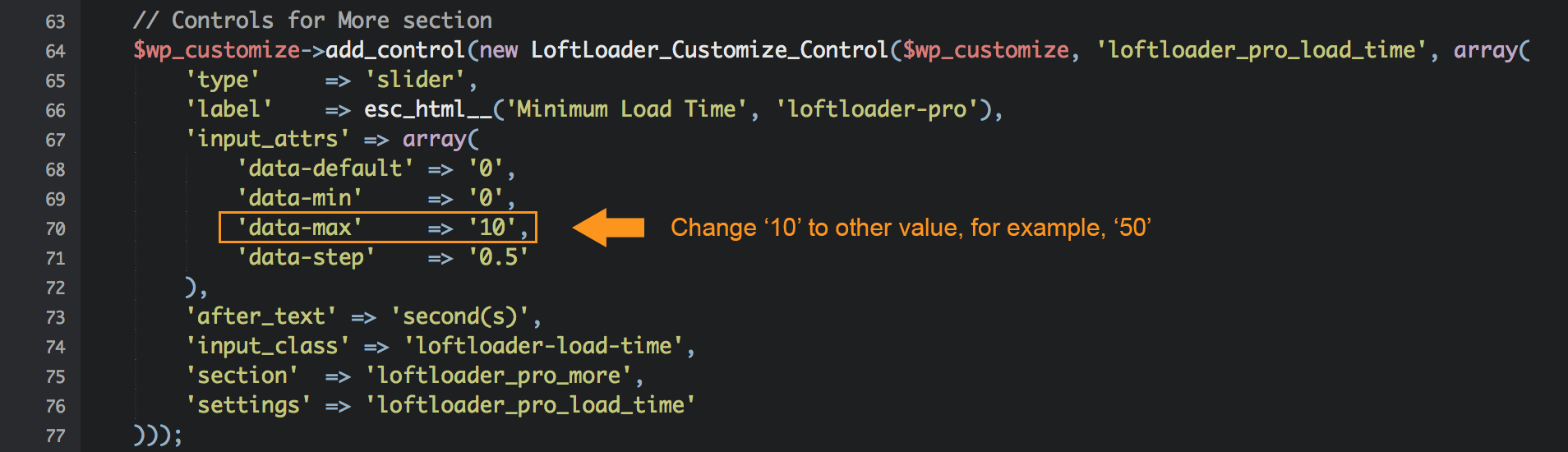
- Please find the paragraph of “Controls for More section”, then change value of the ’data-max. The default value is ’10’, you can change it to ’50’ for 50 seconds. Please see this screenshot as reference.
- Save the modified php file.
Please note:
- Every time you update the plugin, you will need to modify the code again because any code customisation will be lost after updating the plugin.
- We will not be able to help to solve any problems caused by this code customization.
- As we have mentioned, too long loading time will cause some animation effects to not be smooth. Please use it carefully.
-
Thank you very much.
Best regards,
The Loft.Ocean Team
Hi. So, apparently there is a conflict with my theme. Can I get a refund and you pull the license? I Literally just bought it.
Hi,
Thanks for purchasing and contacting. Could you provide more information about your problem, please?
- Please send us your site URL so we can take a look at it.
- Please describe the problem in detail.
- Please also send us some screenshots of the problem you see.
- Is there any notices or error messages?
- Please also include any other information that you find useful.
Please send those details to us via email: general@loftocean.com .
Thank you very much.
I will. Thanks.
Great Plugin! Is there a way to have multiple loaders that can be assigned to specific pages or is it limited to one loader?
Thank you! Yes, you can assign different loaders to different pages. Please check our online documentation for more details: http://loftocean.com/doc/loftloader/advanced/#display-different-loaders-on-different-pages
Hello,
I wanted to check that this plugin works with multisite networks. I have my network setup with subdirectories (mydomain.com/sitename). Would your plugin have to be set up manually for each subsite or can I universally control its functionality network-wide?
Hi there,
The plugin is compatible with multisite networks. However, because the plugin settings panel is based on WordPress customizer, users will need to set up the preloader manually for each subsite.
Thanks for your interest in our plugin.
Best regards,
The Loft.Ocean Team
I have a problem with site. First i see part of site, than loader starts – same when going threw the site, always some part of site appear before loader start works.
Hi,
Thanks for contacting us.
Please check our FAQ section – “My page content appears before the preloader”.
If the problem can’t be fixed by following the instruction described in the FAQ, please create a temporary admin account for us and let us log into your site to look into it for you. Please send login credentials via email to general@loftocean.com .
Thanks.
Best regards,
The Loft.Ocean Team
Hi, love the plugin, I’m having an issue, I tested it on my old site and it worked perfectly, I’m now using it on my new site, or want to:
https://soberworx.com/tester/I’ve set it to only work on this page. The theme I am using is Listify, and in order to create a cool looking page I have used smart slider 3 to add some content to this page, in fact the page is made up of sliders. The sliders work perfectly if I deactivate your plugin.
When I activate your plugin the entire page is a complete mess. I read in your comments someone else had this issue also.
The page https://soberworx.com/tester/ will be set as the home page so its important this works without any errors.
Thank you for your time,
Regards
Adam
This is what the page should look like https://soberworx.com/new-home-page
Hi,
Thanks for contacting us. We have tested Smart Slider 3 on our testing site, but the slider is working properly when LoftLoader is activated on that page.
Could you please provide the information listed below so we can look into this for you?
1. Please create a temporary admin account for us and let us log into your site. Because every user might have a different site environment, that would be the best method to find out the exact cause of the problem.
2. We also need your FTP login details so we can modify code if needed.
Please send details via email to general@loftocean.com .
Thank you very much.
Best regards, The Loft.Ocean Team
Hi All, Does this work on wp menu external links
Hi,
Thanks for contacting us. Please see below:
1. No, this plugin only works on internal links on a WordPress website. No matter the links are in the menu or in page content.
2. If you mean the smooth page transition feature (the loading screen’s background shows again when clicking on a link), sorry but the feature is only for creating a smooth transition effect when loading another internal page on the same website.
(You might like to read more about Smooth Page Transition in our online documentation.)
Thank you very much.
Pre-purchase question. Is it possible to activate the loader on the homepage, and then activate it on posts – if possible via shortcode (I’m using elementor and anywhere elementor on my site) Thanks!
Hi,
If your homepage is a static page (on your WordPress site admin panel > Settings > Reading > Your homepage displays > A static page), then you can choose to display the loader on all posts (in LoftLoader settings panel > Display On > choose “Selected Post Types” > then choose “Posts”), and add a shortcode of the loader to your homepage.
You might like to check our online documentation for more details:
LoftLoader Display On Options: http://loftocean.com/doc/loftloader/display-on/
How to display different loaders on different pages: http://loftocean.com/doc/loftloader/advanced/#display-different-loaders-on-different-pages
Hope this can help. Thanks for your interest in our plugin.
Best regards,
The Loft.Ocean Team
Hello, Is there a <?php … ?> code to place this directly in a custom bootstrap template page?
Hi Larry,
Thanks for contacting us.
Sorry but it’s not possible to use PHP code to insert this plugin into any file. Please see below:
1. If it’s a custom page template for WordPress, when you set the loader to display on a page that uses that custom page template, the loader will display on that page.
2. If it’s a page outside of your WordPress site, then the loader can’t be displayed on it because it’s not a WordPress page.
Thanks.
Best regards,
The Loft.Ocean Team
Pre-purchase question, does the animation only play once at the initial website load or does it play every time you visit a specific page? I’ve used other preloader’s but they all keep playing when you visit a specific page (which gets kind of annoying).
Was wondering if this plugin has the ability to play the preloader animation only once at the initial load.
Hi,
Thank you for your interest in our plugin.
Yes, the animation can be set to only play once during a visitor session. Please see our documentation for the “Once Per Session” setting:
Global Settings: http://loftocean.com/doc/loftloader/display-on/
When displaying different preloaders on different pages: http://loftocean.com/doc/loftloader/advanced/#display-different-loaders-on-different-pages
Hope this can help. Thanks.
Best regards,
The Loft.Ocean Team
Hi LoftLoader,
Congratulations on such an awesome pageloader! We are loving your plugin for livingwaters.com. Everything is working well, I just have one quick possible customization question:
Question: Is there a way to make the page animation not fade out so quickly when we use the “Smooth Page Transition” option?
It fades away just barely too fast for us and this would probably help.
Also, the transition goes to 100% opacity, so in our case, it goes to “white” very quickly, the user wonders if something broke – ha! – then the pageloader appears, the 85%transparency we set, and the page loads.
I hope that makes sense! If you can teach me where to go to edit the speed at which the page first transitions/disappears upon click, that would be our main hope. Thank you!
Hi,
Thanks very much for your kind words! Please see below:
1. To slow down the fade out animation:
Sorry but LoftLoader doesn’t provide an option to change the animation duration. Because there might be several elements on a loading screen (the loader, the background, progress indicator and custom message), we tested and tweaked the animation duration (and animation delay) of each element on the loading screen so that they can work properly together.
And according to Envato Support policy – What’s not included in item support: “item support does not include services to modify or extend the item beyond the original features, style and functionality described on the item page”, sorry but we can’t provide the customization service. Thanks for your understanding.
Our suggestions:
- If you need item customization, we suggest hire a developer to do the code customization work for you. Maybe you can try Envato Studio – there are many developers providing WordPress plugin customization service. You can search with keywords “Plugin Customzation” and find the suitable developers for you.
- Or, maybe you can try to set a longer “Minimum Load Time” for the preloader so it can stay longer before it fades out (we see that currently your setting is 1 second).
2. To change the background opacity when it fades in (when smooth page transition feature is triggered):
Yes, when smooth page transition feature is triggered by clicking an internal link, the preloader background’s opacity is 100% before leaving the current page. In our documentation, we suggest that “To get the best result of this feature, it would be better not to use a semi-transparent loader background”.
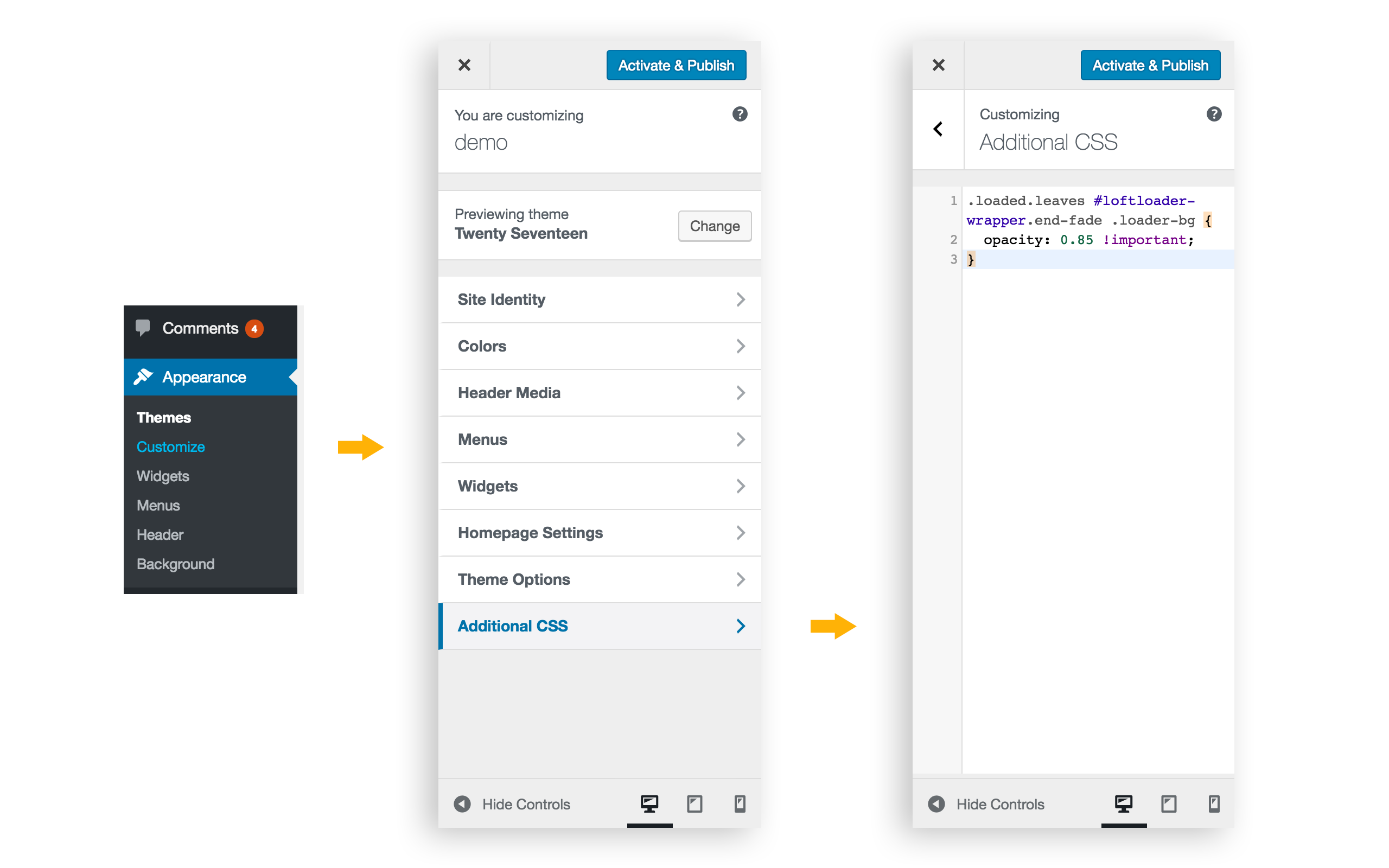
But for your case, you can add simple custom CSS to change it. Please copy and paste the following CSS code to your site (via your site dashboard > Appearance > Customize > Additional CSS)
.loaded.leaves #loftloader-wrapper.end-fade .loader-bg {
    opacity: 0.85 !important;
}
Please also check this screenshot as reference.
After adding the custom CSS code, please clear your site cache and browser cache, then go to site front-end and check again.
(The “Additional CSS” section in Customizer is a default feature for WordPress since v4.7. If you can’t find the section in your customizer, you might need to check the version number of your WordPress, and update it to the latest version.)
-
Thank you very much.
Best regards,
The Loft.Ocean Team
Thank you, Loft.Ocean Team – that was all very helpful (and usable)! Your screenshot was excellent, and I appreciate your quick reply Thank you, again, for a great item – keep up the good work!
Thank you for your positive feedback, we are so glad to hear that!
Hello
I managed to configure!
I now have a problem, I put a custom loader on my homepage, another on a donation form.
I did not configure or put any shortcode on this page: https://soutenir.fnagd.org/about_plateforme_/
It still shows me the loader ….
It is not normal !
A help
Thank you
Hi,
Thanks for purchasing and contacting. And we are glad to hear that you have sorted it out.
We have checked the “about_plateforme_” page on your site, there is no loader showing on that page. We have also checked the source code of that page, and there is no any code related to LoftLoader.
If you still see a loader on that page, please clear your site cache and browser cache, then refresh that page and check again.
Please feel free to let us know if you have any problems or questions. Thanks.
Best regards, The Loft.Ocean Team
Hello
I do not find, and I do not know how to put different preload, on different pages.
I need help thanks
Hi,
Glad to hear that you managed to configure this on your site.
When you download the whole package of LoftLoader Pro (not just the installable plugin zip file) from CodeCanyon, there is a PDF version of documentation included in the Documentation folder.
Just in case you haven’t found the PDF documentation, here is the new online documentation site we have created recently: http://loftocean.com/doc/loftloader/
And this is the link to the section “Display different loaders on different pages” : http://loftocean.com/doc/loftloader/advanced/#display-different-loaders-on-different-pages
Thank you very much.
Best regards, The Loft.Ocean Team
I am French and demanding client
I find this plugin remarkable!
The new features, still more bring to this plugin are really good.
I use the plugin, only since 12h, and it’s great, I’m happy.
I had a little trouble initially, but after an hour of use and tests, I managed to do everything I want!
The support and quite responsive too.
The small + “You can add images animated .gif, it’s excellent!
Thank you very much, I recommend
Thank you so much for your positive feedback and the 5 star rating! Have a nice weekend~
Hello Loft Ocean,
Great Plug in!!!! i really love it!
I use an own image as a preloader which i simply fade out. Is it possible to make the fade out slower?
Thanks in advance!
Hi Sebastian,
Thanks a lot for your kind words!
For your question:
1. Do you mean: you’d like to control the load time duration so the preloader can stay longer before it fades out?
If yes, please go to “More” section of LoftLoader’s settings panel and find the option “Minimum Load Time” and set the minimum value of the preloader’s load time duration.
2. Or, do you mean: you’d like to make the fading out animation of the preloader slower?
If yes, then sorry but LoftLoader doesn’t provide an option to change the animation duration. Because when the loading screen fades out, the loader, progress indicator and custom message fade out first, then the background. We tested and tweaked the animation duration (and animation delay) of each element on the loading screen so that they can work properly together.
Changing the loader’s fading out animation duration only might cause some weird problems, for example, the background already disappears but the loader is still on the screen.
-
Thank you very much.
Best regards,
The Loft.Ocean Team
hi there, im setting the image size on my loader to be 2000px but the image will only go a certain size? am i missing something? cheers
Hi,
Thank you for pointing it out. We have checked the plugin and found out it’s an issue of the loader image width that may only occur in certain special situations.
Could you please try the following to fix the issue:
Please add the following CSS code to your site:
#loftloader-wrapper .loader-inner {
    width: 100%;
}
Because LoftLoader is using minified version of CSS, we suggest add custom CSS using WordPress Customizer. Please copy and paste the CSS code into your site Customizer (Customizer > Additional CSS). Please see this screenshot as reference.
If you can’t find the ”Additional CSS” section in your Customizer, maybe the theme you are using doesn’t support the feature. We don’t know which theme you are using, but many themes support “custom CSS” feature, you might need to check your theme’s “Theme Options” panel as well (if there is the panel). Or you may like to check some custom CSS plugins.
Thank you very much.
Best regards, The Loft.Ocean Team
Hi,
I sent a request earlier about my site nvelupredesign but I just want to add that the loader runs again when click the back button go back to the home page. I don’t want that to happen either. Thanks
Hi,
When choosing “Homepage only + Once per session” for “Display” Option, the loader will not run again when click the back button to go back to the homepage.
We will look into this for you when we have the login credentials.
Thanks.
This is my site http://nvelupredesign.wpengine.com/
I have your plugin enabled. I selected the homepage only with once per session option. However, the loftloader is shown when I click on the logo to go to homepage, even thought it already runs once when I first enter the site home url. I have deactivated all plugins, switch themes, and the same thing happens. Do you know what might cause this and how can I prevent it from happening? I only want it to show once per session when I first enter the website. Thanks
Hi,
Thanks for contacting.
Could you please create a temporary testing account for us, and let us log into your site and look into this issue? Because every user might have a different site environment (using different themes and plugins, and different settings for the same plugin/theme), that would be the best method to find out the exact cause of the problem.
Please send details via email to general@loftocean.com. Thanks.