352 comments found.

there will be no adding support to use ” Display different loaders” but on portfolio items? it would be so damn neat to get that.
Hi,
Currently the “display different loaders” feature is only available for pages. We will consider adding this feature for posts/portfolios in a future update.
Thank you for your suggestion!
Hi, Everything Working Fine for me. I am using Custom Image Loading with Vertical Animation. All ok But I want Vertical Animation starting from UP to Down. Which I didn’t found on your documentation. Please Help me. Thanks
Hi,
Thanks for purchasing and contacting.
Sorry but currently when choosing the “Custom Image Loading” with “Vertical” the animation will only start from bottom to top. We will add an option for this feature (from top/up to bottom/down) in the next update. Thank you for bringing this up!
Cheers, The Loft.Ocean Team
Hi,
I have the free version and I noticed it does not work with Woocommerce. The basic wordpress loader still shows on Woo pages such as adding and removing cart items. Does the paid version work here or is this going to be added as it is an important aspect for my sites and clients
Hi Brian,
Thanks for contacting.
Actually it’s not a problem. LoftLoader will show when the page refreshes. But when we add or remove products on WooCommerce Cart page, WooCommerce uses ajax refresh to update the cart without having to refresh the page. The loader you saw is the WooCommerce ajax loader.
And if you ticked the option “enable AJAX add to cart buttons on archives” in WooCommerce settings, then when you click “add to cart” button on shop/products archives pages, LoftLoader will not show either (because WooCommerce only refreshes part of page, not the entire page).
You might like to check this article: AJAX refresh for quantity update on cart page. This feature has been included as a part of WooCommerce since May 2016.
Thanks.
Hi!
I would like to get this but want to check whether the following is possible or not?
- Can the page split/transition be diagonal instead of being vertical or horizontal?
- Can the preloader accurately determine the actual loading time and then sync the logo animation along the with the percentage loaded properly without there being a disconnect?
Thanks.
Hi,
Thanks for your interest in our plugin.
1. Sorry but the split ending animation can’t be diagonal.
2. We provide 18 types of loading animations. 6 of them support custom images (so you can upload and use your logo). And when choose “Custom Image Loading” animation, it will allow you to set the animation to “Loop Once”. You may like to check the following 2 examples:
And the following is quoted from our documentation about the loading animation’s Looping feature:
“Looping – All loading animations are looping forever by default. Some support Loop Once. When you select an animation supporting Loop Once, this option will show. If choose Loop Once, the animation will play along with the loading progress, and end when preloading is completed.”
Cheers, The Loft.Ocean Team
Hello! I am using version 1.1.2 of LoftLoader. How do update it to 1.1.3 without deleting the plugin and starting new? The auto update isn’t initiated. Thanks
Hi,
Thanks for purchasing and contacting. Please see below:
1. You can delete the plugin and install version 1.1.3, the settings will not be lost.
2. Have you installed Envato Market plugin? It can install WordPress themes and plugins purchased from ThemeForest & CodeCanyon by connecting with the Envato Market API using a secure OAuth personal token. Once your themes & plugins are installed WordPress will periodically check for updates, so keeping your items up to date is as simple as a few clicks.
3. By the way, we are about to upload an update (v1.1.4). Maybe you’d like to wait for a bit and then update directly to the latest version.
Thanks.
Hello! I purchased your product over 6 months ago and I LOVE it! I get a LOT of compliments on my website because of you guys (see it at work at www.delaRivaBrands.com).
So, quick question. Upon first visiting my site, there is a split second of the page loading that shows up before LoftLoader pops up. This just started happening after the most recent update.
Is there something in the update that’s made your preloader a postloader, so to speak?
Any info would be appreciated. Thank you!
Hi Tony,
Thanks for your kind feedback! Please see below:
1. As your support just expired (5 days ago), after a discussion within the team, we decided to provide support for you this time. If you need our help later, please consider renewing item support.
2. We checked your site and found the cause:
We imporved the code since LoftLoader v1.1.2 so LoftLoader won’t show by default, the code will first check if the site has enabled JavaScript or not. If yes, then display LoftLoader. That will prevent LoftLoader displaying forever when a browser disables JavaScript. We put LoftLoader’s JavaScript in the header of a page to make sure it can be executed as soon as possible.
But, because there is some cache/performance optimization plugin on your site, it moves all JavaScript to the footer of the page, LoftLoader won’t show until its script has been excuted.
3. How to fix:
We don’t know which cache/performance optimization plugin you are using on your site, but many of this kind of plugins have the “exclude” feature which allows to skip some code/files from being aggregated and minimized. We suggest check your plugins and exclude LoftLoader so LoftLoader can be excuted in the early stage while the page is loading.
Thank you very much.
I have an SSL on my site. For some reason this plugin loads an external style sheet over http (I found it in the source code) and breaks the security lock in the URL bar (goes from green lock to yellow exclamation mark). I tried selecting the option to load the styles in a <style> tag in the header and got the same result.
Hi,
Could you please leave your site URL so we can take a look at it? Or you can send it to us via email to general@loftocean.com .
Thanks.
I sent an email.
is it possible to make different loader for each page have different loader
Hi,
Yes it is. Please check our documentation to know more details: http://www.loftocean.com/loftloader-doc/documentation.pdf (Chapter 2.9 Advanced – 2.9.2 Display different loaders on different pages).
Thanks!
I have enabled the any page extension option and generated a shortcode and placed it on 3 pages. I have the display set to once per session. I want to only display the loader when you first visit these 3 pages due to image load time (or clear your browser cache). But this isn’t working. When I refresh the page I still see the loader. Is what I’m wanting to do not possible? Or am I doing it wrong?
Hi,
Thanks for purchasing and contacting.
Sorry but currently it’s not possible to set “once per session” for Any Page Extension feature. Because “once per session” is one of the global Display options, and when use Any Page Extension on a specific page, it will ignore the Display option.
For example, if a site has a global loader A which displays on “Site-wide” (every page/post of the site). Then we change some settings, including choose “Homepage only” for Display option, and then export the shortcode for this loader B, add it to another page (not the homepage). The loader B will only show on that page, but not on the homepage.
And we think this feature does make sense so we will consider adding it in a future update. Thank you for bringing it up!
Okay great. I’d love to see that as an option in a future update. So are there any options or work arounds to achieve what I am wanting to do?
Sorry but unfortunately there is no workaround for this for the moment. The working system will be different from “once per session” Display option we have now. Thanks.
hi there, when i load this into my website it breaks the layout on my product pages (woocommerce), the image slider in product page does not work and all the fields for product options are broken
Hi,
Thanks for purchasing & contacting!
Sorry to hear the problems you’ve encountered while using our plugin. Could you please provide the information listed below so we can look into this issue for you?
1. Please create a temporary admin account for us and let us log into your site. Because every user might have a different site environment, that would be the best method to find out the exact cause of the problem.
2. We also need your FTP login details so we can modify code if needed.
Please send details via email to general@loftocean.com .
Thank you very much.
Can I set the preloader to only show on my home page and a few other specific pages and not any where else? So it wont display on any product pages, post, etc. Can you use a specific preloader for the home page and different for another page? Also, how does this process work? Do you have to type in the page id’s specifically to add or exclude them? Is it a global option for all pages? Just want to make sure I understand fully.
Hi,
1. Yes you can set the preloader to only show on your homepage and a few other specific pages.
In “Display” section, you can choose “Handpick” and then select some pages or posts to show the preloader. Or you can choose “Site-wide – Selected Types” to display the preloader on your whole site except the post types (blog posts, products, portfolios and etc) you have selected in the list.
2. Yes you can have a preloader for the homepage and a different one for another page. You can take a look at our online documentation – “sub chapter 2.9.2 – Display different loaders on different pages” for more details.
3. There is global options for the default preloader, and you can change settings and export the preloader’s shortcode and add to another page.
You may like to check our online documentation to know more information about this plugin.
Thank you very much.
We just purchased LoftLoader Pro for WordPress but are unable to download it. Can you send us a simple link? Our purchase validation code is… 8f5376f7-7102-46ef-b902-051fc4c2aafe – 21 Sep 2017
Hi,
Thanks for purchasing.
Sorry but we don’t have a direct link for download. Please check your download page: http://codecanyon.net/downloads you should see your purchased items.
And here are some useful resources:
1. Please read this article to know how to download a purchased item from CodeCanyon: https://help.market.envato.com/hc/en-us/articles/202501014-How-To-Download-Your-Items
2. Please read this article and check if you can find a solution to the download problem: https://help.market.envato.com/hc/en-us/articles/202821520-Problems-Downloading-A-File
If you still experience problems, please contact Envato support: https://help.market.envato.com/hc/en-us They will help you out.
Thank you very much.
Olá!
Acabei de comprar o plugin para meu site. www.aiofotoevideo.com.br
O plugin ao ser ativado ele deixa o site sem menu, sem minhas galerias.. ou seja, todo com bugs.
gostaria de receber o extorno do meu pedido e devolver a licença.
Hi,
Thanks for purchasing & contacting!
Sorry to hear the problems you’ve encountered while using our plugin. It seems to be an incompatibility issue with some third party plugins using on your site. Could you please provide the information listed below so we can look into this issue for you?
1. Please create a temporary admin account for us and let us log into your site. Because every user might have a different site environment, that would be the best method to find out the exact cause of the problem.
2. We also need your FTP login details so we can modify code if needed.
Please send details via email to general@loftocean.com .
Thank you very much.
Obrigado, Vou enviar os dados para acesso.
Obrigado, Vou enviar os dados para acesso.
Acabei de Enviar.
Thank you!
We have found the cause and fixed the incompatibility issue on your site. And we have replied to your email.
Please just let us know if you have any problems/questions. Thanks.
Obrigado! Já verifiquei e melhorou esse problema. Mas enviei outro email. Pedindo para verificar porque o plugin demora a aparecer no loading. Gostaria que assim que desse um click em um link no site abrisse rapidamente o loading e ele carregasse de forma fluida.
using the plugin with the theme enfold does not save the configuration of the plugin. Can you help me
Hi,
Thanks for purchasing & contacting!
Could you please provide the information listed below so we can look into this issue for you?
1. Please create a temporary admin account for us and let us log into your site. Because every user might have a different site environment, that would be the best method to find out the exact cause of the problem.
2. We also need your FTP login details so we can modify code if needed.
Please send details via email to general@loftocean.com .
Thank you very much.
hi, can you set different loading times for different pages?
Hi,
Yes, you can set different loading times, different loaders, different messages, and more, for different pages.
Thanks.
Sadly it seems that this breaks my site when used with cache enabler. I’ve had to disable it for now, which seems a waste of money 
Hi Mark,
Sorry to hear that. We have installed the plugin Cache Enabler on our testing site, and LoftLoader is working properly with Cache Enabler on our testing site.
Could you please create a temporary testing account for us, and let us log into your site and look into this issue? Please send details via email to general@loftocean.com. Thanks.
Cheers, The Loft.Ocean Team
Thank you for your reply.
For the way my site works, I would like to have the loader showing in the middle of the page as soon as someone clicks on any link. I would like the loader to stop once the body starts. Would you be able to help me with modifying the code slightly to achieve this?
Thank you
Hi Billy,
Thanks for your explanation.
Sorry but LoftLoader doesn’t provide the feature. And according to Envato Support policy – What’s not included in item support: “item support does not include services to modify or extend the item beyond the original features, style and functionality described on the item page”. Sorry but we can’t provide the customization service.
And you will need to modify a lot of code to achieve the result you need, because LoftLoader is coded in a different working system. We suggest hire a developer to do the code customization work for you. Maybe you can try Envato Studio – there are many developers providing WordPress plugin customization service. You can search with keywords “Plugin Customzation” and find the suitable developers for you.
Thanks for your understanding.
Cheers, The Loft.Ocean Team
Hi Billy,
Thanks for purchasing.
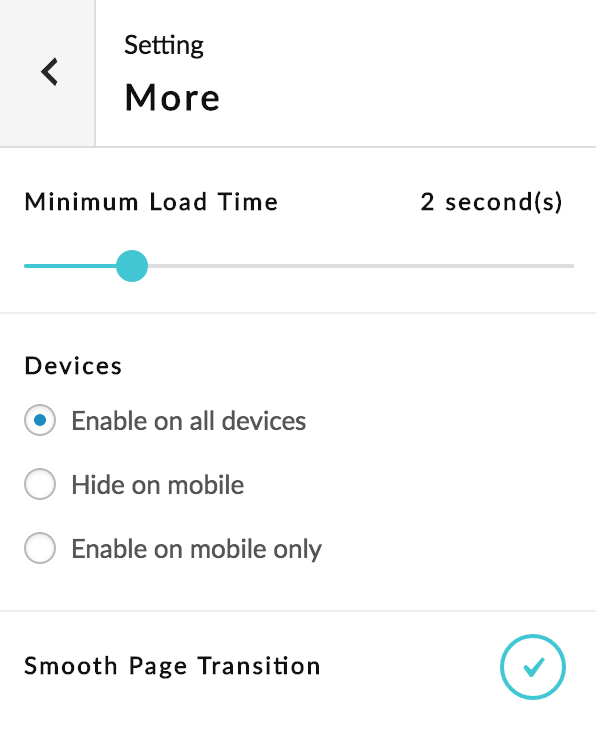
You may like to try to enable “smooth page transition” feature of the plugin, and see if it’s what you are looking for. You can find the option via your dashboard > “Settings” > “LoftLoader” > “More” > then tick the “Smooth page transition” option. Please see this screenshot.
And you can check this demo site to preview this feature: when click on the site menu or a link pointing to another page of the same site, before leaving the current page, the loading screen will show to create a smooth transition effect.
Thank you very much.
Cheers, The Loft.Ocean Team
Hello, Can you please tell me can i achieve this animation with your plugin?
http://preview.codecanyon.net/item/page-animator/full_screen_preview/12760947?_ga=2.126451021.1313899831.1503577328-1121723544.1492023320Hi,
Sorry but LoftLoader doesn’t support this feature. Yes you can use your site logo in the loading screen and make it rotate (like this example made by LoftLoader Pro), but we can’t make it move to site header when loading is complete.
Thanks.
Please help me fast… our plugin not working with the background image on any mobile – I used it now see http://www.pascalevandewalle.com/ on mobile its not working fine…
Hi,
Do you mean the background image on mobile looks like shown in this screenshot? You can see some parts of the background image is not in view within the screen, that’s because the background image size is “cover”: the background image will be scaled as large as possible so that the background area is completely covered by the background image.
We guess you would like the background image look like shown in this screenshot so all the text on the image will be visible. If yes, you can add simple custom CSS to get the result.
Because LoftLoader is using minified version of CSS, we suggest add custom CSS using WordPress Customizer. Please copy and paste the CSS code below into your site Customizer (Customizer > Additional CSS):
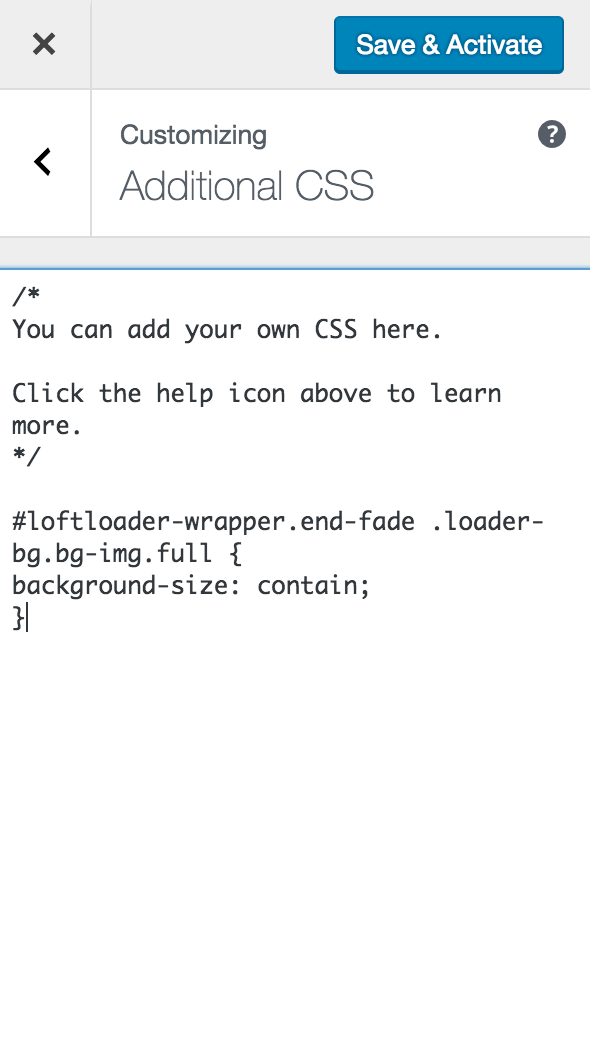
#loftloader-wrapper.end-fade .loader-bg.bg-img.full {
background-size: contain;
}
If you can’t find the “Additional CSS” section in your Customizer, maybe your WordPress version is lower than 4.7 (it is a new feature of WordPress Customizer since WordPress v4.7), or the theme you are using doesn’t support the feature. We don’t know which theme you are using, but many themes support “custom CSS” feature, you might need to check your theme’s “Theme Options” panel as well (if there is the panel). Or you may like to check some custom CSS plugins.
Hope this can help. Please feel free to let us know if you have any problems/questions. Thanks.
I am using 4.8.1 wordpress, still i dont know where to find the customizer… i am not able to see that in the website… tell me where is that…
with the theme Switty
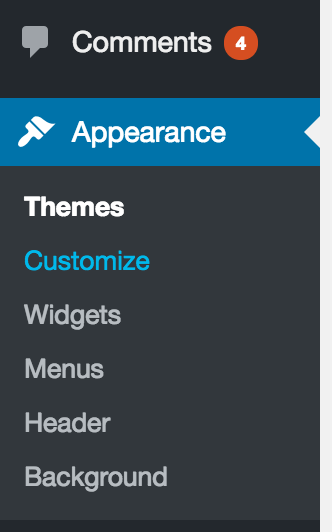
On your site dashboard, you can see “Appearance” in your sidebar, click on it, then you can find “Customize” below it, click on it to open your WordPress customizer. Please see this screenshot.
We use the default WordPress theme “Twenty Seventeen” as example, you can find “Additional CSS” section in the customizer, please see this screenshot.
Then copy and paste the CSS code into the box, please see this screenshot. And save changes.
If you still can’t find the customizer or the additional css section, please create a temporary admin account for us and let us log into your site so we can help to add the code for you. Please send the details via email to general@loftocean.com. Thanks.
I tried this… still there are some prob..
this code not worked
#loftloader-wrapper.end-fade .loader-bg.bg-img.full {
background-size: contain;
}
This code worked
loftloader-wrapper.end-fade .loader-bg.bg-img.full {
background-size: contain; }
Still open the website in desktop and mobile you will see the difference, Now its working in mobile but its its coming from somewhere big to small and its happening twice… when you open the site…
the above msg is showing the code differently, the code is showing 1st that is working
Still probleam is there – its working in mobile but its its coming from somewhere big to small and its happening twice… when you open the site…
We have checked your site again and find when it’s loading on mobile, the page outer size is changing twice during loading process, that might affect the loader screen’s size. We guess it might be caused by the theme or some plugins on your site. We have created a loader screen just like yours on our demo site, and it’s working without issue on mobile. Please check the demo page.
Could you please try to add the following CSS code as well and see if it fixes the problem?
#loftloader-wrapper {
width: 100vw;
height: 100vh;
}
If the code isn’t working, please create a temporary admin account for us and let us log into your site so we can look into it for you. Please send the details via email to general@loftocean.com. Thanks.
sorry but your latest code is making it like old prob, so i used your 1st code… let me know how can you help me now to fix ti
No, we mean add that code too, like this:
#loftloader-wrapper.end-fade .loader-bg.bg-img.full {
background-size: contain;
}

#loftloader-wrapper {
width: 100vw;
height: 100vh;
}