352 comments found.

Hi, I have bought the plugin, but the plugin is not working good on any mobile or tab, it’s working on desktop only…
What is the solution here, I bought it after reading the feature list that it’s responsive and retina ready but it’s not working as per that…
Help me out!
Anyone else having issues with the plugin failing OWASP testing? I even notice gmail won’t let me email the zip file. Bit odd
Hi,
Thanks for your comment. Please see below:
1. Gmail blocks .js file attachments since February 13, 2017. So any plugin or theme which contains .js files will be blocked by Gmail. And LoftLoader plugin of course contains .js files. Please check this article from G Suite Updates to know more details.
2. And every update of LoftLoader Pro version was checked and approved by CodeCanyon review team. They have strict standards for security.
3. As we don’t see a “purchased” label showing after your user name, we guess maybe you are a user of the lite version? If yes, please submit a ticket on LoftLoader Lite support forum on wordpress.org if you have any issue while using the lite version of LoftLoader. And maybe you can share some screenshots of the testing report you mentioned (you can post on LoftLoader Lite support forum or send them to us via email: general@loftocean.com) so we can check if we have missed anything.
4. And if you are a user of the lite version, LoftLoader Lite was checked and approved by WordPress review team. They have detailed Plugin Security requirements. And we coded the plugin (Lite and Pro) by following best security practices for WordPress plugins and themes which required by WordPress official review team.
Thanks very much.
Cheers,
The Loft.Ocean Team
I currently have the lite version of LoftLoader. If I purchase the full version, do I get to actually have the plugin forever or does it go after after 6 months and then I have to pay another 22 dollars?
Hi,
Thank you for using LoftLoader.
When purchase the pro version, you will have it forever. The 6 months is just for the item support period. And you can use the plugin and also get future updates for free after the support period has expired.
Thanks!
Hi, i have the Folie theme by codeless installed, and i tried the free plugin but it doesn’t seem to work with it. It works but i cannot access the settings to customize anything.
Hi,
Thanks for contacting us. Please see below:
1. LoftLoader works with all properly coded themes that following core WordPress coding standards.
2. As you are the user of the free version, we can only provide support on WordPress.org forum. Please submit a support ticket here, and please provide more information about the problem, and if we can also have some screenshots that’d be helpful.
Thank you very much.
Hello,
I’ve just purchased and implemented onto my site, I’m struggling to get the smooth transitions to load and also when it loads on the homepage the page flashes up before the loader kicks in, my site is – http://builtbysuperfly.co.uk/
Cheers,
Jack
Hi Jack,
Seems you have purchased the jQuery version, not the WordPress version. And please see below:
1. To enable “Smooth Page Transition” feature, please add the following code when call .loftloader( ):
smooth_page_transition: true, site_root_url: ‘http://builtbysuperfly.co.uk/'
You can find more details about how to set up “Smooth Page Transition” in the documentation (in the download package): sub chapter 2.7 Smooth Page Transition.
2. We have checked your site and found you put “loftloader.min.js” near the bottom of your site pages. Please put it in the head tag (and after “jquery.min.js” file) so LoftLoader can be executed as soon as possible.
Hope this can help. If you need our further help or if you have any other questions please leave comments on the jQuery version’s page. Thanks very much.
Best regards,
The Loft.Ocean Team
hello,
I want to know if you can display different loader on each page. for example : if I click on “contact” : I need a rose colour background with a contact logo and if i go to “about us” I need a a blue background color with another logo ! thanks a lot adrien
Hi Adrien,
Yes you can have different loader on each page, just like what we are doing on our demo site – display different loaders on different example pages.
And you may like to check the documentation about this part: sub chapter 2.9.2 Display different loaders on different pages.
Thanks for your interest.
Cheers,
The Loft.Ocean Team
Yet another comment, this is a very important issue ! I’m testing my website for accessibility. When javascript is disabled, your plugin breaks the site, because the background is never disappearing.
Could you include no-javascript compatibility for a next update ? (i’m not expecting the plugin to work without javascript, obviously, but just for it not to break the website for those users)
thank you again
Thanks very much for letting us know!
The background of LoftLoader will stay because when JavaScript is disabled, it doesn’t know if the loading is completed. We will add a fix for it in the next update.
Nowadays, a lot of sites have the feature to detect whether or not JavaScript support is enabled. If your site template does support the feature, you can also fix it on your site for now by adding simple custom CSS code:
.no-js #loftloader-wrapper {display: none;}
Thanks.
Thanks for the quick reply.
Yes, I was considering using Modernizr, but since everything was working fine without it, I didn’t want to add another library.
I’ll add it until you find a fix ! 
Hello again,
So I added Modernizr and your fix, and it works!
But… it creates a little bug. I assume that by default the class no-js is applied and then modernizr removes it.
When loading a new page, we can see a glimpse of the page before the loader covers it. it looks like a flash.
Might be a little more tricky than expected.
I hope you find a fix
Hi,
It sounds like Modernizr loads too late. We suggest put Modernizr in the head tag. Because in this case we will need Modernizr to download and execute as soon as possible to prevent the situation which is similar to a FOUC (flash of unstyled content).
Thanks!
Yes that’s what I thought. I load it just after the opening head tag though, so that’s a bit weird !
Hi,
Could you please send your site URL and FTP login details to us so we can look into it for you? Please send via email to general@loftocean.com.
Thanks very much.
Another matter ! Is it possible to have one type of loading on first page load (when someone enters the site) and then another one for the smooth transitions ? This would be really great for the UX !
Thanks
Sorry but LoftLoader doesn’t support this feature for now. We will take it into consideration. Thank you for the suggestion!
Thank you! Really hope we get this feature !
Hi, I just purchased this plugin, which works great for now. Now, I have a slight issue, or rather conflict, with the crisp chat plugin. The chat plugin has a z-index that’s too big (or loftloader one that’s too small), so the chat appears before the page has finished to load. Can you fix this? It shouldn’t be too hard as it’s just adding a bigger z-index
Hi,
Thanks for purchasing. Actually LoftLoader has a very large z-index which is 999999. We have checked the plugin “Crisp Chat” and found the z-index of it is 1000000 – just a little bit larger than LoftLoader z-index.
Because LoftLoader is using minified version of CSS, we suggest add custom CSS using WordPress Customizer. Please copy and paste the CSS code below into your site Customizer (Customizer > Additional CSS):
div#loftloader-wrapper {z-index: 1000001;}
Or you can change the z-index value to a larger one, for example, 9999999.
If you can’t find the “Additional CSS” section in your Customizer, maybe your WordPress version is lower than 4.7 (it is a new feature of WordPress Customizer since WordPress v4.7), or the theme you are using doesn’t support the feature. We don’t know which theme you are using, but many themes support “custom CSS” feature, you might need to check your theme’s “Theme Options” panel as well (if there is the panel). Or you may like to check some custom CSS plugins.
Thanks!
Ahh, i couldn’t find the proper div.
Thank you
No worries.
I really love this plugin, i’m using it on my homepage: http://ozlight.com However… I can’t get the ‘Smooth Page Transition’ feature to work. Can you help? I’d really like the animation to happen on page exits too. Cheers Dave
Hi Dave,
Thank you a lot for the 5 star rating!
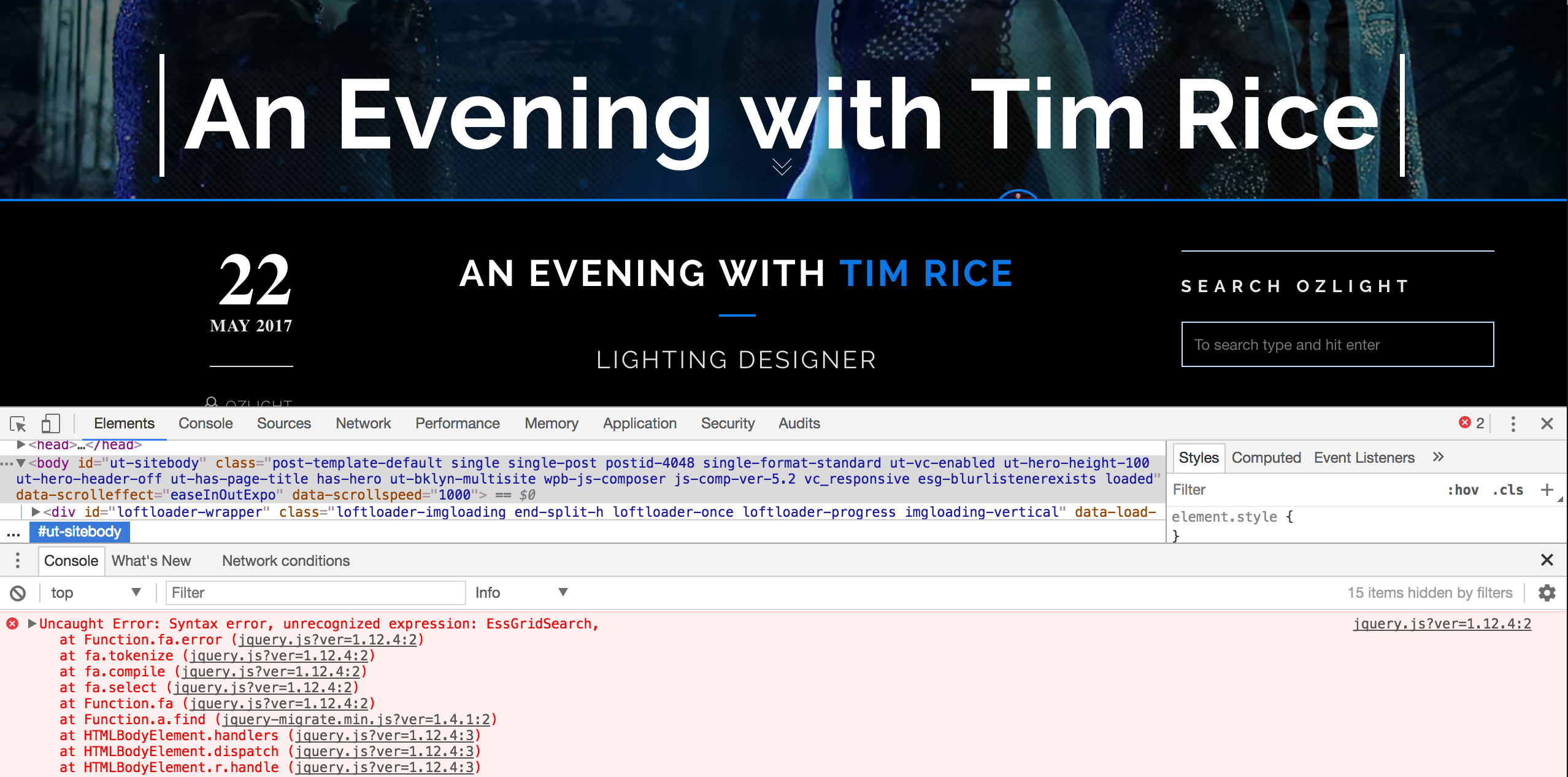
We have checked your site, and there is a JS error message – please see this screenshot.
The JS error might be caused by some cache plugins using on your site: JS error often happens when a cache plugin is trying to minify JS files. Please try to deactivate the cache plugins on your site, clear browser/site cache and check again.
If the “Smooth Page Transition” feature is still not working, please send these information to us (email: general@loftocean.com) so we can look into the issue for you:
1. Please create a temporary admin account for us and let us log into your site.
2. If we can also have your FTP account that would be helpful.
Thanks very much!
Best Regards,
The Loft.Ocean Team
Amazing same day support. Thank You!
You are welcome. And thank you for your patience and assistance.
hey there, nice plugin btw
I just bought it but somehow i am not able ti change the “minimum load time”, i selected my own Logo as a preloader. It is too fast for me so when selecting the little round button to change the time, nothing moves or changes.
http://stefanbakir.photography/Thanks in advance
Hi,
Thanks very much for purchasing and contacting.
We just checked our demo site and testing site again and it’s working on our sites. Could you please create a temporary testing account for us, and let us log into your site and look into this issue?
Please send details via email to general@loftocean.com.
Thanks a lot!
Hello – cool plugin
Is there a way to put this only on products?
Hi,
Thanks for purchasing!
Sorry but currently LoftLoader doesn’t have this feature. We will add it in the next update. Thank you very much.
Hello Pre-purchase question
1- I can put the preloader or I want in a specific page, not on the whole site?
2 – Can I customize the loading time? (Long, or shorter)
Hi,
1. Yes, you can choose to display the loader on specific pages.
2. Yes, you can set the minimal load time (0 to 10 seconds) to prevent the preloader from disappearing too fast.
You may like to check the online PDF documentation for more details: http://www.loftocean.com/loftloader/wp-content/uploads/sites/3/2017/06/documentation.pdf (Chapter 2.3.1 Display On Options & Chapter 2.8.1 Minimum Load Time)
Thanks for your interest in LoftLoader Pro.
Thank you I will look. I forgot a question. - Can I add a custom text, in addition to the image and loading bar?
Yes, you can. Please check the examples on the demo site:
http://www.loftocean.com/loftloader/example-14/ http://www.loftocean.com/loftloader/example-15/Thanks.
Dear Sir,
I’m having issues on my client’s website using Internet Explorer 11.
When a link ends with /# the body gets the class “leaves” , is there a way to solve this? Or is there a way to disable the “smooth page transition” just on Internet Explorer 11.
Thank you,
Federico
Hi Federico,
Could you please send more details to us so we can look into it? Including:
1. The page URL which has this issue on it.
2. Which link on that page triggers this issue.
3. If we can have a screenshot that would be helpful.
Please send via email to general@loftocean.com. Thanks very much.
Cheers,
The Loft.Ocean Team
Dear Sir,
I’m having issues on my client’s website using Internet Explorer 11.
When a link ends with /# the body gets the class “leaves” , is there a way to solve this? Or is there a way to disable the “smooth page transition” just on Internet Explorer 11.
Thank you,
Federico
can’t get this to work on my site sililoquy.com
Hi,
Thanks for purchasing & contacting!
We have checked your site, but seems your site is using some plugins which minified CSS/JS so we can’t find any useful information there.
Could you please create a temporary testing account for us, and let us log into your site and look into this issue? Please send details via email to general@loftocean.com.
Thank you very much.
Hi, sorry, one more thing that I forgot to add.
The broken posts all look fine when I’m logged in to my WP admin; they’re only broken when I’m logged out. Definitely strange.
Thanks again, looking forward to hearing from you!
Hello! I just purchased your product last week and am really excited about it.
However, it appears that there may be an intermittent issue with Loftloader Pro and the Avada theme.
It seems that Loftloader is preventing css from being loaded on blog posts, so the posts looks broken. However, it doesn’t break all blog posts, only some, and it only does it some of the time. For example, when I go into a post and hit ‘update,’ that automatically resets the css so the post is working properly again, but if I go back later, the post is broken again.
So far as I can tell Loftloader Pro is where the conflict is. Is there anything that can be done for this? Please let me know.
Thanks in advance!
Hi, sorry, one more thing that I forgot to add.
The broken posts all look fine when I’m logged in to my WP admin; they’re only broken when I’m logged out. Definitely strange.
Thanks again, looking forward to hearing from you!
P.S. – Please disregard and delete duplicate post from below. That was my bad…
Hi,
Thanks very much for purchasing and contacting!
Some of our users are using Avada theme but we haven’t received any similar bug report yet.
Could you please create a temporary testing account for us, and let us log into your site and look into this issue? Please send details via email to general@loftocean.com. Thanks very much.
And if we can have some screenshots of the broken posts and detailed steps to reproduce the issue that’d be very helpful.
Thanks.
Hi, it would seem the the loftloader plugin is maxing out my CPU on my website hosting and causing issues with the website. Can you tell me why?
Hi,
Thanks for purchasing and using LoftLoader. The issue might be caused by high frequency AJAX polling, please see below:
1. Please check the version number of the LoftLoader you have. If it’s not v1.0.10, please update to the latest version.
2. If you already have the latest version of LoftLoader, in the “Display” section of setting panel, do you choose “Once per session” or “Homepage + Once per session”? If yes, then have you enabled AJAX? If you have enabled AJAX, please increase the value of “Interval between AJAX Requests”, or choose to disable AJAX.
3. If you have tried the 2 methods but the issue still can’t be fixed, please send more details of your site to us via email: general@loftocean.com so we can look into it for you. Thanks very much.
Best Regards,
The Loft.Ocean Team
Hi there,
I wonder why when LoftLoader is activated, multiple request of admin-ajax.php are launched after the full DOM has been loaded?
Just go to my homepage here : https://www.les-alternatives.com and open the network tab of your browser inspector. These requests seems to come from keep-alive.min.js. I bet it’s not very SEO friendly, since it add a lot of requests which increase a lot the total loading time.
Hi,
It’s a bug in version 1.0.9. We have fixed it in version 1.0.10 (released on April 10th, and please see the changelog here: https://codecanyon.net/item/loftloader-pro-preloader-plugin-for-wordpress/17339671#item-description__changelog ).
Please update to the latest version to fix the issue on your site. Thanks very much!
Hi,
Thank you for the answer. I’m using the Envato wordpress plugin in order to get my CodeCanyon plugin up to date, but it seems yours isn’t taken into account by it. Whatever, I’ll update it manually.
Cheers.
Hi, thank you for letting us know. We will check and see if we missed anything for the Envato Market plugin. Thanks.