29 comments found.
Last Update: 13 December 2022, plugin development is still active?
Hi,
Thank you for your interest in our product – LoftLoader jQuery.
Plugin development is still active. But we don’t have a plan to release any update recently.
Thank you very much.
Best regards,
The Loft.Ocean Team
is there a planned update to support the latest jquery?
Hi,
Thank you for contacting us.
Yes, we plan to release an update to this plugin in the future.
Currently, our development team is still working on other projects. Updating the LoftLoader product line will be the next task in the plan.
As software development can be unpredictable, I cannot provide any timeline for this update at this time. But in the plan, all LoftLoader related products (WordPress version, jQuery version, Lite & Pro version) will be updated before the end of this year. Thank you.
Best regards,
The Loft.Ocean Team
Pre-purchase question. Any updates coming soon?
Hi,
Thank you for your interest in LoftLoader jQuery.
Sorry, we have no plans to update this product recently.
If you are running a WordPress site, you may like to check the WordPress version of this plugin: LoftLoader Pro. It is optimized for WordPress and very easy to use.
Best regards,
The Loft.Ocean Team

Hi, it is possible to set different messages to the preloader? For example if I want to set for every page another message text.
Thanks and best regards.
Hi,
Yes it is possible. Please read our documentation to know more details: Display different loaders on different pages.
Updated: Sorry we thought your question was about the WordPress version. In the jQuery version, it is also possible. We have included details in the documentation which is in the download package. You will need to use different JS calling parameters for each page.
Thanks.
Best regards,
The Loft.Ocean Team
Hello, is the preloader activated on URL click ? or when the page start loading ?
Hi,
It’s activated when the page start loading.
And if enable “Smooth Page Transition” feature, then the loader’s background will show on URL click (if it’s an internal link on the same site). But the other elements in the loading screen (loader, message, progress indicator) will only show when a page start loading.
You might like to check the “Smooth Page Transition” demo site .
Thanks.
Hello. I may have missed it in the documentation or perhaps it’s not an available feature. I have a vertical sidebar left hand menu (bootstrap based) and I really just want the loader to show on the right side of the screen, not full view port. Is there a way to assign this to a DIV only?
Thank you.
Hi,
Thanks for purchasing.
Sorry it’s not an available feature in LoftLoader (either in jQuery version or WordPress version). When add LoftLoader into your web pages, it inserts a fullscreen DIV which covers the original web page content while loading. LoftLoader was designed to work this way. Like all the examples on our preview site.
The feature you asked for is not a part of LoftLoader’s default functionality. But, it’s a piece of code and you can edit the code. Please kindly consider this is related to item customization which is outside of the scope of support policy. We are not able to provide support with item customization for you. Please check CodeCanyon Support Policy for more details.
Thank you very much.
Hello,
when comes the update for “Show it to visitors once per session” i need it in the jquery Version ( iam not using wordpress)
thx in advance
regards from Germany
Hi,
Thanks for your comment.
Currently we are still in the middle of another project, and will not be able to work on the update for LoftLoader jQuery recently.
You will be happy to know that this new feature is already in our to-do list for the next update. It won’t be long. However, we are not be able to provide any sort of timeline because product development can be unpredictable.
We will let you know when it’s released. 
Thank you very much for your understanding.
Best regards,
The Loft.Ocean Team
Hey there,
I have the problem that the background overlay of your Plugin also appears for a short period of time when I leave a page…
How can I deactivate that for leaving the page?
Best, Lukas
Hi Lukas,
There is no “purchased” icon showing after your user name. Could you please confirm that the product you have purchased is the jQuery version or the WordPress plugin? Because the solution will be different for different versions of the plugin.
If you are using WordPress version of LoftLoader, please post a comment on this page. Thanks.
Best regards, The Loft.Ocean Team
Hi!! quick question could you please tell me how can i specify the font like in the example 12 the welcome word???
Hi,
LoftLoader jQuery version is for deverlopers so you will need to write some custom CSS code for the Custom Message font. Users often use the site default font for the text. (BTW, no coding required with WordPress version.)
To customize the message font like in the example 12, please see below:
The font family used in the example 12 is “Alice” ( https://fonts.google.com/specimen/Alice?selection.family=Alice ).
To embed the font into your webpage, please copy this code into the <head> of your HTML document:
<link href="https://fonts.googleapis.com/css?family=Alice" rel="stylesheet">
or embed with @IMPORT:
<style>
@import url('https://fonts.googleapis.com/css?family=Alice');
</style>
You can set the following 4 options for custom message by JavaScript: message content, font size, font color and position.
$('#loftloader-wrapper').loftloader({
    message_text: 'WELCOME!',
    message_size: '50px',
    message_color: '#232323',
    message_position: 'middle'
});
So you will need to add the custom CSS code for its font family, font weight and letter spacing:
div#loftloader-wrapper .loader-message {
    font-family: Alice;
    font-weight: 800;
    letter-spacing: 0.2em;
}
Hope this can help. Please feel free to let us know when you have any problems/questions. And we will update the documentation to include the details about font customization. Thank you very much.
Best regards,
The Loft.Ocean Team
You should include all the the examples u.u
Thanks for the suggestion! We will add more examples in future updates.
hello, i don’t know why, but it look longer to display loaded screen than my previous loader, any idea? (i ve tryed with time on 0 but it’s still slower to load page)
Hi,
Thanks for purchasing and contacting. Please see below:
1. LoftLoader waits for all images to load, including regular images and background images. Some loaders might not detect load of background images.
2. And when the page has finished loading, it takes 1 second for LoftLoader’s ending animations: the loader/progress bar/message to fade out, then background color/image fade/slide out.
3. And there are many other reasons that might affect the loading time, like the internet speed, the content changes on your site, or changes of other plugins (new plugins have been installed or old plugins have been updated).
If you need our further help, could you please create a temporary testing account for us and let us log into your site so we can look into it for you. And please also send more details for the 2 loaders, including:
1. Which one is your previous loader, and what are the settings of it (does it have a custom image, progress bar, custom message, etc).
2. Have you tried switching between the 2 loaders and comparing the load time?
3. If we can have screenshots for the 2 loaders that would be helpful.
Please send via email to general@loftocean.com. Thanks very much.
Cheers,
The Loft.Ocean Team
Can you integrate with my joomla website,I can buy it if you can help to integrate
Hi,
Sorry but we are not familiar with Joomla and we don’t provide integration service.
Thanks very much for your interest in LoftLoader.
Hello loftloader team!
thanks again for this cool preloader, i got a question/feature .. i saw this on a other preloader: is it possible to set a cookie in options to “yes” then preloader comes only one time each page ? i mean when page is one time preloaded… then only fade the page in without the loader on next time! hope u understand what i mean.
thy in advance
regards from Germany
Hi, thank you for your kind feedback. Sorry but LoftLoader doesn’t support this feature. Thanks.
Hey! This is one epic piece of work. I cannot, however, get the preloader’s to work, even when I copy and paste your code. Please advise.
Hi,
Thanks for purchasing and contacting.
Could you please send your site URL (the link of a page you have added code of LoftLoader) to us so we can look into it for you? You can send it via email to general@loftocean.com or leave a comment here.
Thanks.
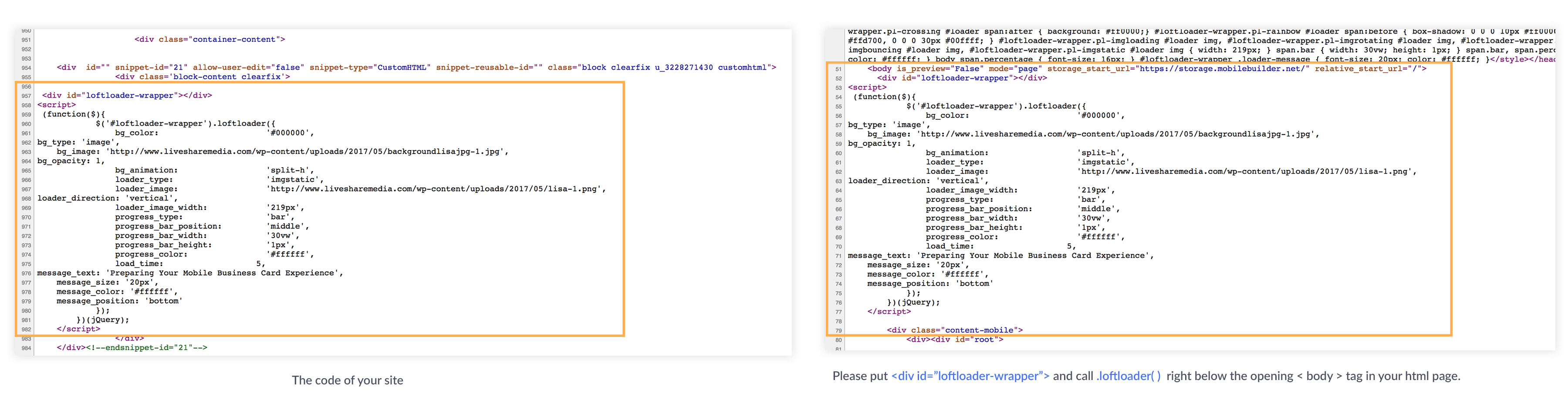
Quick Question…We got everything installed but it seems like the primary page loads for a second or two then the loader initiates. Are we doing something wrong as to why its showing the page first then the loader? Here is the link: http://mobilebusinesscards.inapp.mobi/mobile-demo
Hi,
Thanks for purchasing!
We have checked your site. Please put < div id=”loftloader-wrapper” > and call .loftloader( ) right below the opening < body > tag in your html page (see this screenshot: http://www.loftocean.com/loftloader/wp-content/uploads/sites/3/2017/05/code-structure.jpg ).
Thanks.
Hello, thank you very much for a Plugin. I try to build it in my PHP-Homepage with example-2. Unfortunetly, it looks very different as the Example. All needed files are inkluded – but something work not. Could you please help me? Here is my Link: http://schwerterschankhaus.de/contao-pbs-03-2017/index.php
Thank you!
Regards, Kateryna
Hi Kateryna,
Thanks for purchasing. We have checked your site page, and please try this:
1. Please add the JS file “loftloader.min.js” into the <head> of your page. And we see you have the JS file “jquery-1.11.3.min.js” in the <head>, please add “loftloader.min.js” after “jquery-1.11.3.min.js”.
2. You might need to remove class “animsition” from tag because it adds fading/sliding-up animation to the loading screen in the middle of loading process.
Hope this can help. If you have any questions/problems, please feel free to email us via general@loftocean.com . Thanks.
Best Regards,
The Loft.Ocean Team
Dear Loft.Ocean Team, thank you so much for your quick response! Anyway I’m coming forward I’ve found out, that jquery.min.js colidate with jquery-1.11.3.min.js. I I need this script (jquery-1.11.3.min.js) for my slider funktion. Does it give any way to avoid this problem?
Thank you,
Best regards, Kateryna
Hi Kateryna,
You only need one jquery script file for LoftLoader. So you can remove the script “jquery.min.js”, and only keep the script “jquery-1.11.3.min.js”. Thanks.
Best Regards,
The Loft.Ocean Team
Cool! Thanks, it works!
Best regards!
Kateryna
Glad to hear that!
Hello, nice script and how can get the “Ending Transition – Shrink & Fade” I was looking for everywhere and I can’t found it
Hi,
Some new features we have added to WordPress version recently haven’t been included in the jQuery version yet – “Ending Transition – Shrink & Fade” is one of them.
Currently our team is working on an update of jQuery version, all new features will be included in the next update.
Thank you very much.
Hi, just want to let you know that we have updated LoftLoader jQuery to version 1.0.2, and now the feature “Ending Transition – Shrink & Fade” is available. Thanks.
Thanks a lot