4333 comments found.

hello, i have bought your beautifull menu but i have a big problem when the wp-super-cache empty the cache my submenu disapear.
exemple :
my menu is :
categories >> categorie1 categorie2 categorie3
after empty the cache my menu is :
categories >> categorie1
the other menu disapear …..
the plugin is wp super cache
Hi neomail,
I don’t know why that would be happening – but WP Super Cache does tend to break a lot of things. I would try re-saving the menu, as that would likely rebuild the cache properly.
It’s also possible you could try adding some code like
add_cacheaction('plugins_loaded', 'wpmega_init');
Never tried it but that might be a good starting point for you at least.
Best,
Chris
the problem has in the wordpress 3.0 menu , without wp super cache i have the same problem the same problem here : http://wordpress.org/support/topic/30-rc2-custom-menu-disappears
you know that bug ? have you a hack for this ?
thank’s
I haven’t heard of that before. Doesn’t sound like it has anything to do with UberMenu – the link you posted indicates that the problem is with a theme filter that is messing with the menu. It’s possible that your theme has a filter like that.
I did a little research and the other thing I came across is that it could be a server configuration problem. See this ticket for more info: http://core.trac.wordpress.org/ticket/14134
Hope that helps,
Chris
The menus are being stacked rather than having a horizontal layout. I toyed with all of the settings and read the manual but am not having any luck getting this to work. Thoughts?
Can you send me a link to your site so I can look at the issue firsthand? Perhaps the div containing the menu isn’t wide enough in your theme, or your theme’s CSS is overriding the menu CSS ? Also, what browser are you using?
Hi,
I am attempting to upgrade to your latest version 1.1.1 from 1.1 and have followed the instructions exactly but the version never seems to update in my WP-admin. I am downloading from the link at the top of this page.
Any ideas what I’m doing wrong?
thanks,
Chris
Hi Chris,
Sorry for the confusion. I neglected to update the version number that is displayed in the Plugins area for UberMenu 1.1.1, so you have likely upgraded successfully already. The easiest way to tell that you are running the latest version is to check if you have a “Run jQuery in noConflict Mode” option under Appearance > UberMenu > Theme Integration (1.1.1 was a minor upgrade and that new option is the the only difference from 1.1 to 1.1.1).
Best,
Chris
I have installed this plugin on my site but the styling is applying to all my menus on the page rather than just to the one that i am selecting via the tick box in the widget on the menu’s page in the back end of my site.
url: http://armyrugbyunion.org.uk/
I need the styles to only apply to the one menu that i have selected the plugin to be affective on (the main one underneath the banner)
Hi icuk,
There is a simple solution for that. But you don’t have a purchase sash? Perhaps you can email me via my contact form so I can verify.
Thanks!
Chris
Hi! Bought ubermenu and was very happy for about 2 weeks.
Now i tried my site and your site with opera. Every submenu-1 is like 200px to much on the right side.
any ideas?
Greetings Max,
Thanks for reporting this. I’ve been looking into it and it seems like it’s an issue with the way Opera handles retrieving max-width in javascript, causing a negative value to be used in the positioning calculations.
Anyway, I’ve got a solution: in line 254 of wpmegamenu.dev.js (v1.1.1), you’ll see this line:
var maxMaxW = parseInt($u('#megaMenu > ul.megaMenu ul.sub-menu-1').css('maxWidth')) - subPad; // - subBorderW;
Add this line below it:
if(maxMaxW <= 0) maxMaxW = $u('#megaMenu > ul.megaMenu').outerWidth() - subPad - subBorderW;
You’ll need to put UberMenu into Debug mode in order to see the result, or move the changes into the minified production file. You can see the difference is now live on http://wpmegamenu.com
I’ll release a new version that includes the updated code as soon as I get a chance.
Thanks again for bringing this to my attention!
Best,
Chris
thanks Chris!
Gonna try it out now & Looking out for your new Version!
lg
Does anyone know if this will work with the optimizepress theme before purchasing. Reason I ask is because this theme has modules for pages and then content beneath the modules.. Did not know if that would be a problem…
OptimizePress ThemeThanks..
Hi Scott,
I’m not familiar with OptimizePress, but the first thing you’ll want to do is check if it supports WP3 Nav Menus – see http://wpmegamenu.com/help/#MEGA-wp3-compat for details.
Most themes that support WP3 Menus will be compatible with UberMenu. To be sure, you can look at the way the theme generates the menu and make sure that it calls the wp_nav_menu function with the theme_location parameter.
If it ends up that it’s not compatible out of the box, you can always add WP3 UberMenu support to your theme with a single line of PHP – see http://wpmegamenu.com/help/#MEGA-add-wp3-menu-support
Hope that helps! 
Chris
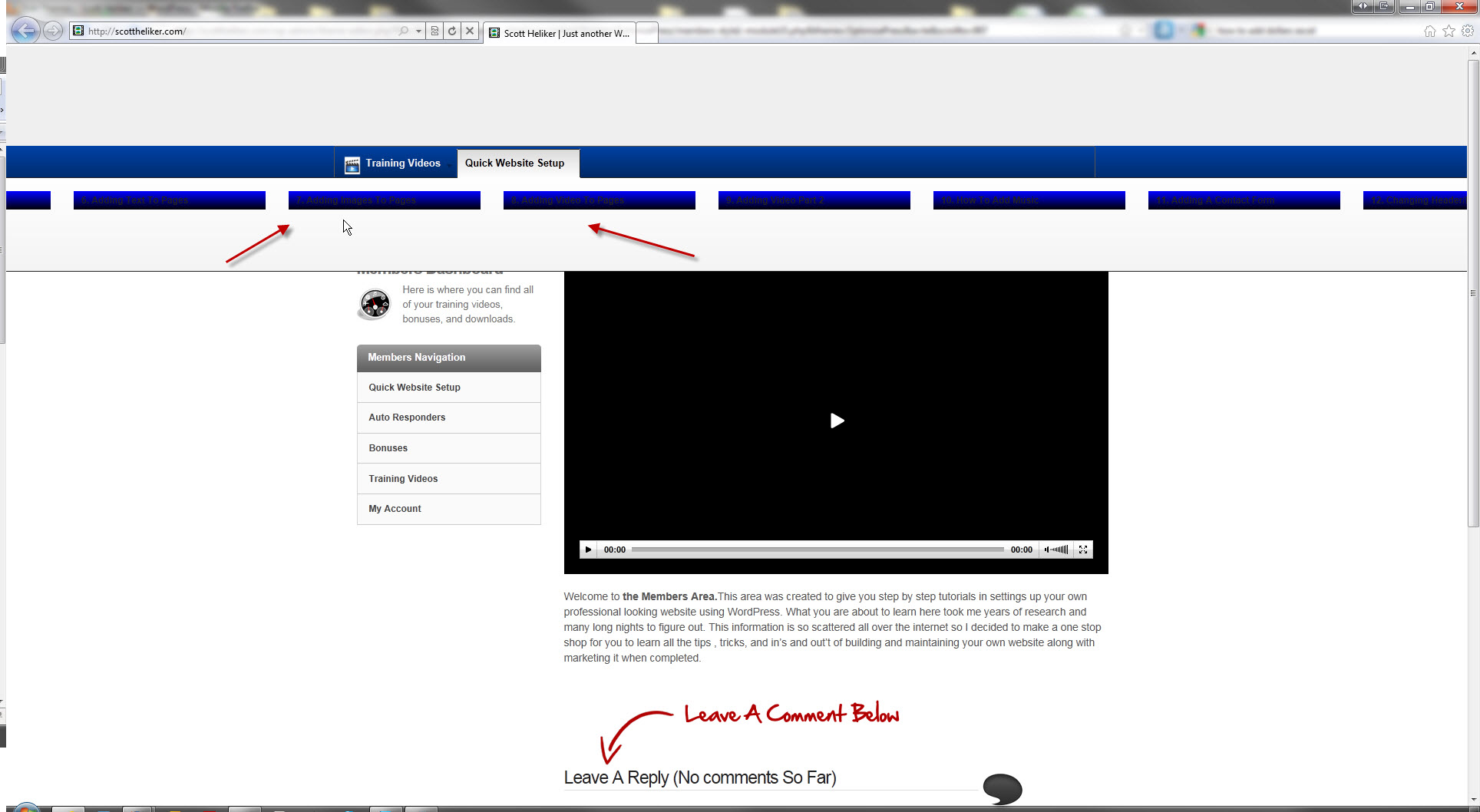
Hey Chris, thanks .. I went ahead and purchased today but am having a little problem.. I made a short recording here of the issues..
Appreciate any help http://www.screenr.com/2go
Ps.. Anymore screen recording that you could make on adding images / widgets ect.. would be helpful….
Hi Scott,
Took a look at your video. The issue you are having is almost definitely residual styling from your themes. First off, turn on “Minimize residual styling” in Appearance > UberMenu > Theme Integration > Minimize Residual Styling. If that doesn’t resolve the issue there are two ways to handle this: (1) remove the offending styles from the theme or (2) change the ID/class of the div encapsulating the menu. The second is usually a very simple quick solution. If you want to post the link here (or better yet, send me an email with the link), I can take a look first hand and better direct you as to what needs to be done.
Best,
Chris
Sent you and email thanks..
Hi Scott, got your email and just replied. Sorry for the brief delay but it’s Sunday morning here and I just finished breakfast
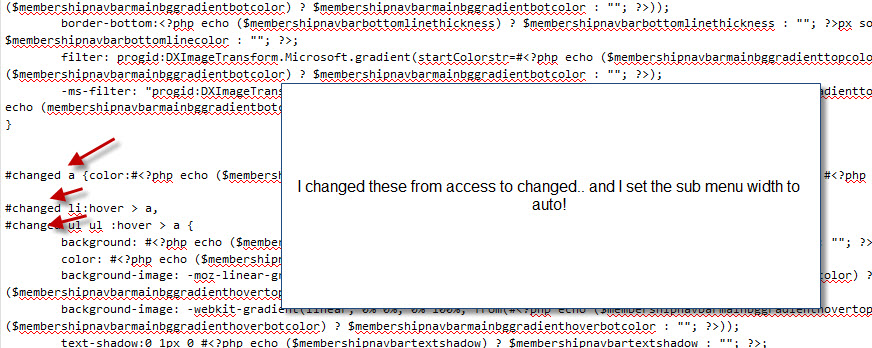
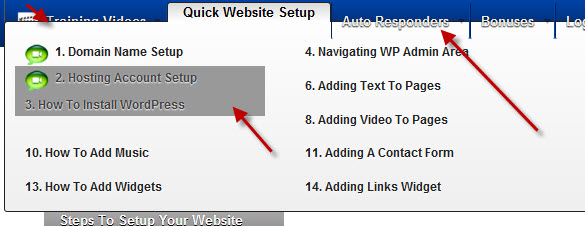
I changed the #access to #changes and set auto width for subs… I still have that dark background on the sub 3rd level menu I guess you would call it..
Looks like it tried to fix the left side little but selected items are still pushed up.. here are some screen shots..
I noticed IE9 really displays things funky.. hope they fix that .. I use firefox but IE9 beta has not been displaying things right at all
http://logoicons.s3.amazonaws.com/quickwebsetup.jpg
http://logoicons.s3.amazonaws.com/ie9uber.jpg
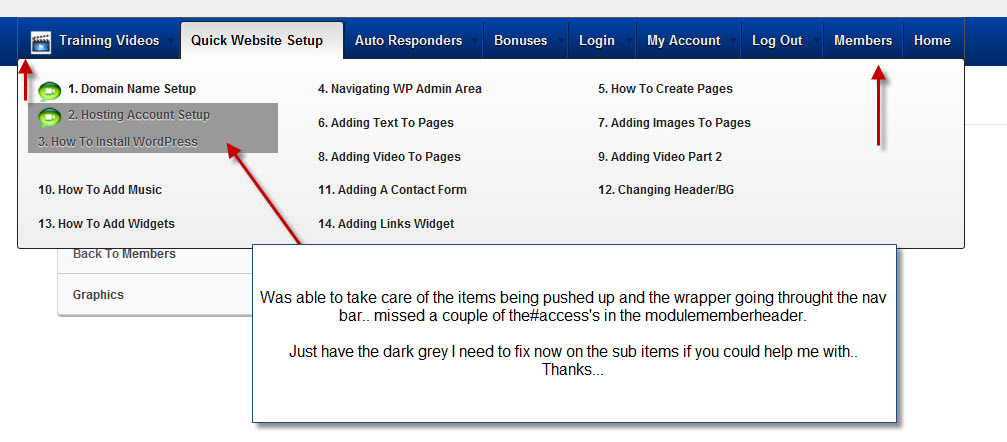
Udated missed a couple of the #access’s fixed the push up and the menu wrapper.. just have to take care of the dark area around the sub items.. thanks. if you can help me with that see screen shot below..
What I meant was you should change the ID of the div, not the ID of the selector in all the CSS files. I will reply in detail via email to keep the conversation in one place
Thank you pointing out the errors I have firebug but the javascript and jQuery is geek to me I just use what comes with the plugins
I would be grate full if you can please tell me exactly which plugin is causing the problem.
How do i run then noConflict Mode.
I will respond to your email in order to expedite this conversation and keep everything in one place.
Hello
I have bought the ubermenu and have set it up as per video but I want my articles to show columns and they do not so could you please check and advice on how I can display then in columns. My website is http://gbpcentral.com The articles are in wordpress at top.
Govpatel
Hi govpatel,
You have a few issues with your site. The first is that you have some javascript errors with a Google Wave Gadget that are stopping both UberMenu and NivoSlider from working (see http://i.imgur.com/AFsZe.png ). Those errors need to be resolved in order for UberMenu (or Nivo) to work properly. I suggest you use Firebug to debug this.
The second is that you have checked “Vertical Division” on the “Articles 1” and “Articles 2” menu items, which forces the columns to stack (vertically divide). You should uncheck those boxes.
Best,
Chris
Thank you looking at my problem I have deleted the plugin that I was not using any way for Google Wave and I have unticked Article 1 and Article 2 and still it does not set in columns
Gov Patel
You still have an illegal character javascript error in your non-UberMenu JS.
<script type="text/javascript">
$(?#signup-welcome).p(;:last-child').css('display', 'none');
</script>
Please use Firebug to debug your other scripts http://getfirebug.com
You also have two jQuery libraries included, which is causing additional errors. You should remove one of them while maintaining code dependencies or else set them up to run in noConflict mode.
thx chris
but the php version of my web server is 5
I should have said PHP5 .2 or later. If your server is running PHP5 .2+ and you’re still having that issue, send me an email via my contact form with a URL to your site and temporary WP and FTP credentials and I’ll take a look.
Best,
Chris
hy, why this error? Parse error: syntax error, unexpected T_STRING, expecting T_OLD_FUNCTION or T_FUNCTION or T_VAR or ‘}’ in /web/htdocs/www.*.org/home/wp-content/plugins/wp-uber-menu/wpMegaWalker.php on line 12
That error occurs when you are using PHP4 . UberMenu requires PHP5 . Upgrading should fix the issue.
Alternatively, you can delete that line in wpMegaWalker – you’ll lose a little bit of customization potential in UberMenu, but it’ll work with PHP4 that way if you can’t upgrade to PHP5
Best,
Chris
Your latest upgrade is a very nice improvement. It’s playing better with advanced themes like Dynamix and Striking. I have 2 questions: 1) I’m having a problem with the placement of an uber menu (here is the site: http://goo.gl/v1Pag). As you can see the menu is at the top of the page – is there anyway to change the placement short of hardcoding it?
There is a new theme that has a mega menu built in: PowerPlay. What I want to do is place the uber menu above the slider – similar to PowerPlay. Take a look. http://goo.gl/OKrvb
Thanks.
Hi Mark,
Thanks for your comment, glad you like the update.
For themes like Striking, the issue is simply that the theme elements in the header are absolutely positioned. That’s fine, but it means the layout is inflexible. When UberMenu replaces the default menu, it gets placed at the top because is is positioned relatively and there are no other elements for it to be positioned relative to. There is no general solution that would allow UberMenu to “automatically” position itself in this case. To properly position the menu, you can apply the CSS properties from the original menu container, and then customize to your liking. In the case of Striking + UberMenu, you’d apply this style based on Striking’s default menu:
#megaMenu {
   position:absolute;
   bottom:0;
   right:-15px;
}
To mimic the PowerPlay positioning, you could try a customized style like this instead:
#megaMenu {
   position:absolute;
   bottom:-40px;
   width:958px;
}
Here’s a screenshot of the result: http://i.imgur.com/ggDN3.png
Hope that helps!
Chris
yazo here.
Thanks for getting back to me soon. Appreciate the fix and looking forward to what future updates that you have in store for us.
Thanks again Chris!
yazo
ok but the Fade Transition in not acting & Descriptions is not showing up…??
i love how u made menu man it helped me a lot…
Glad you are enjoying the menu. You may want to read through the manual, especially http://wpmegamenu.com/help/#MEGA-mega-descriptions
Like I said, if you have a specific issue though, please send me an email through my contact form with a link to your site so I can see what’s going on firsthand.
Thanks.
Hi, I had a question, but I just accidentally figured it out. Nice Menu!
Thanks!
Hello! Is it possible to use in the dropdown area 50×50px big pictures and in the title area smaller ones, like 30×30px. Now all pictures have the same size. best regards, thomas
Hi Thomas,
Thanks for your purchase and your question. At this point, by default, all the icons will be the same size (this is intended for alignment purposes). I’ll consider this as an option for future versions of UberMenu. For now, I think you could use the larger size as your default and then override it using CSS for the smaller images. If you know your way around PHP you could play with the call on line 71 of wpMegaWalker.php.
Hope that helps
Chris
Thanks for the email reply. Sent you the login credentials that you are requiring.
Also a Video tutorial would be VERY benefical concerning the “workaround” that you have as an option for it to work.
Please
Thank you, yazo
Hi yazo,
Responded to the email you sent me, but the site you gave me didn’t have UberMenu installed on it.
Let’s continue the conversation in the email.
Chris
I can’t get this to work with my “Artisteer” addon for Wordpress.
I have the latest ver. of wordpress 3.1 and also using your latest plugin (ver. 1.1)
Nothing shows up on the vertical widget menu. The default Artisteer css style still is showing by default. Tried all sort of combos of changes on your ubermenu settings page but to no avail.
Please help
Hi yazo,
Thanks for your purchase. I don’t think Artisteer properly implements WP3 Nav Menus, so you’ll probably need to follow the instructions here: http://wpmegamenu.com/help/#MEGA-add-wp3-menu-support
I am currently traveling but if you are still having trouble send me and email via my contact form with site URL and WP login and FTP credential info and I’ll respond as soon as I can after I return home on Thursday.
Best,
Chris
Hello, from Bordeaux (France), congratulations for the last release, It’s great, and much better compatible with IE. Best Jeanloup
Hi jeanloup,
Thanks for your comment! Glad you’re enjoying UberMenu
Chris
I am having an issue. When I roll over the menu the subnav appears. But, when I roll off it and back on again, sometimes the subnav does not appear. Can you please help?
Hi yamaha,
Thanks for your purchase. Most likely the issue you are experiencing is occurring because the hover-close animation has not been completed before you hover back on to the menu item, or because of the hoverIntent algorithm. In this case, the hover event is ignored (otherwise you would have the menus bouncing up and down way too much if the events were queued up sequentially).
If that’s an issue for you you could try reducing the animation time (javascript edit), reducing the hover interval (in the UberMenu control panel), or removing animations altogether (use it in pure-css mode).
Hope that helps
Chris
i got it thank you it was this code: <?php /* We add some JavaScript to pages with the comment form * to support sites with threaded comments (when in use). / if ( is_singular() && get_option( ‘thread_comments’ ) ) wp_enqueue_script( ‘comment-reply’ ); ?>
/ Always have wp_head() just before the closing </hea?>
* tag of your theme, or you will break many plugins, which
* generally use this hook to add elements to such
* as styles, scripts, and meta tags.
*/
wp_head();Glad you got it sorted out

This item was featured on CodeCanyon

Power Elite Author
Contact the Envato Market Help Team