352 comments found.

I am having a conflict with Loft Loader. On all pages except home page the loader would hang. Then I selected display loader on home page only. However it would load on all other pages? (cache had been removed)
The issue would happen if I selected the home page > then select another page.
However if I selected project page and contact no issue.
regards Michael
Hi Michael,
Thanks for purchasing LoftLoader Pro. We are sorry to hear about your issue with our plugin. Could you please create a temporary testing account for us, and let us log into your site (or a testing site) and look into this issue? Please send details via email to general@loftocean.com. Thanks very much.
Best Regards,
The Loft.Ocean Team
Hi there, been testing the plugin for the past hours and really, congratulations! You did a fantastic job!
2 suggestions:
- Would be great to be able to choose the font for the “message”. The one available by default does not look great on all types of sites
- Would be great to be able to put the text message above or under the loader (and not only below)
Thanks,
Hi, thanks very much for your kind comment and 5 star rating! No problem, we will add more options for message in the next update. Thanks for your suggestion. 
Hi will this plugin work with WP theme Enfold?
Hi, LoftLoader Pro will work well with any WP theme following WordPress Coding Standards. And if you encounter any issue while using our plugin, just let us know and we will support to help you out.
BTW, as the version 1.0.3 has been approved and released, we will increase the price a little soon, about in 5 hours. If you are interested it’s a good time to purchase now.  Thanks.
Can we use this plugin with Enfold theme, WP default editor ?
Sorry but we are not very sure about your question. After install LoftLoader Pro, on your WordPress site dashboard, go to Settings > LoftLoader Pro, then you’ll access to the setting panel. You don’t need to use WP default editor to add a loading screen to your site.
And about Enfold theme, we can’t test our plugin with every theme, but as we said, LoftLoader Pro will work well with any WP theme following WordPress Coding Standards.
And our customers will get our support when they need help.
BTW, here is the online documentation of LoftLoader Pro: online doc. You may like to check the doc and get more information of this plugin.
Thanks.
Hello – I see that someone mentioned an issue with DIVI theme a few days ago. Have you been able to identify the issue and fix it? Your plugin looks really great!
Hi, thanks very much for your nice words!
We have fixed the issues with Divi theme on the customer’s website, and will release an update on CodeCanyon soon, which will include those fixes and some new features. Here is our update plan: https://codecanyon.net/item/loftloader-pro-preloader-plugin-for-wordpress/17339671#item-description__update-plan-v1_0_3
Thanks.
Thanks for your answer. Good to hear that! One more question: How heavy/what size is the plugin? (don’t want a loader that is slowing up my website)
The zip file for installation is about 140 KB. The whole package after unzipped is about 500 KB. We have included SCSS files and original JS files as well. But when running the plugin, it will only load CSS, minified JS and PHP, that will be about 200 KB.
So it won’t slow down your site.
Great, thanks for you answer!
Hi there – any ETA for v1.0.3? Waiting for this to buy the plugin. Tks
Hi Grek, we are going to upload v1.0.3 in a couple of hours. And when it’s released we will increase the price a little bit as new features added. So if you are interested we suggest purchase v1.0.2, and get free update to v1.0.3 in 1 or 2 days. Thanks very much.
Ok thanks
Hello, could we use a gradient in background ? Thanks a lot
Hi, actually this feature is in our new feature list. We will add it in the next update. Thanks very much.
Hi, just want to let you know that we have updated LoftLoader Pro to v1.0.3, and the feature to use a linear gradient in background has been included. Thanks.
I have problems to customize the loader doesn’t works well with Divi theme
Hi, sorry to hear about your issue with LoftLoader Pro. Could you please create a temporary testing account for us, and let us log into your site (or a testing site) and look into this issue? Please send details via email to general@loftocean.com. Thanks very much.
I am able to upload .svg files into wordpress. Does the loftloader pro version support custom .svg (logo)? Also, can I disable preloader on tablet/mobile? cheers
Hi, we have tested LoftLoader Pro with .svg files and yes it does support .svg logo. Sorry but currently we don’t have the feature to disable preloader on mobile devices. We will add it in the next update. Thanks!
Hi, just want to let you know that we have updated LoftLoader Pro to v1.0.3, and the feature to hide preloader on mobile has been included. BTW you can also choose to show preloader on mobile only. Thanks.
Thanks for the update. One other question – I hope i didn’t miss it in your documentation.. can I have a unique preloader for the home page and another preloader for other pages? cheers
That’s interesting. We are doing something similar on our demo site, to create different loading screen demos (for different pages on one site). But this feature is not included in the plugin, we wrote extra code for it. Would you mind describing in which situation you’ll need different pre-loaders on one site? We will take into account and see if add this feature in future updates. Thanks.
This is what I would love to be able to create. The website below has a intro animation and preloader. Perhaps it not a case of needing 2 preloaders? I would like to know if there is a work around? I would love to hear if you have any suggestions: http://www.castelfalfi.com/en/holidays-in-castelfalfi/explore-castelfalfi/ (thanks for your quick replies cheers
Hi, actually the pre-loader animations are the same, just the background ending effect on home page is different. The grey background just fades out on other pages while it scales first then fades out on home page. Yes you’ll need to create 2 loading screens.
Honestly we think it’d be better to get a web designer/developer to do custom design for yours site if you wish to create something exactly the same. Because the loading screen background on the home page will need to be scaled to a specific size to fit the home page design. And it’s not easy to do that in a plugin as the site layout/design is controlled by a theme.
We hope this will help. Thanks very much.
Hi, i would like a refund, good plugin but its not what i needed,
Purcahse code – 84a1b498-df2c-42b4-b633-044f35984db1
Hi,
Thanks for purchasing. However, according to Envato Refund Policy for Customers (https://codecanyon.net/page/customer_refund_policy), we will not give a refund because it’s not what you thought it was. Please check the link and you can find more details about the refund policy.
Why a refund may not be given (https://codecanyon.net/page/customer_refund_policy#not-refundable)
If the item is materially similar to the description and preview and works the way it should, there is generally no obligation to provide a refund in situations like the following:
you don’t want it after you’ve downloaded it; the item did not meet your expectations; you simply change your mind; you bought an item by mistake; you do not have sufficient expertise to use the item; you ask for goodwill; or you can no longer access the item because it has been removed (we advise you to download items as soon as you have purchased them to avoid this situation).
Thanks very much for your understanding. And maybe you can leave a comment and let us know what feature you need? Thanks.
Best Regards,
The Loft.Ocean Team
Hello. Great plugin! Thank you very much. I found everything i need:)
Oh, how can i change load time? Now it disappears too fast. I need to see my logo a little bit more before it’s gone.
Hi, thank you very much for purchasing LoftLoader Pro, and for your comment.
Sorry currently we don’t have the feature to change load time, but we see it’s useful and important. We will make a quick update to add the feature soon.
Thanks. Have a nice day!
Okay. Thank you. It would be nice!
Hi,
The feature of setting load time has been added to the version 1.0.2.
Now you can update LoftLoader Pro, and please find a new section called More, click on it and there is an option Minimum Load Time.
The documentation has also been updated.
If any further question please feel free to contact us. Thanks!
Yeah, i’m already:) Thank you for quick update! Now everything is awesome:)
Hi,
I bought this as I could see you can upload a brand image. This does not appear to be doable unless im looking in the wrong place? any pointers?
Thanks,
Kris
Hi Kris,
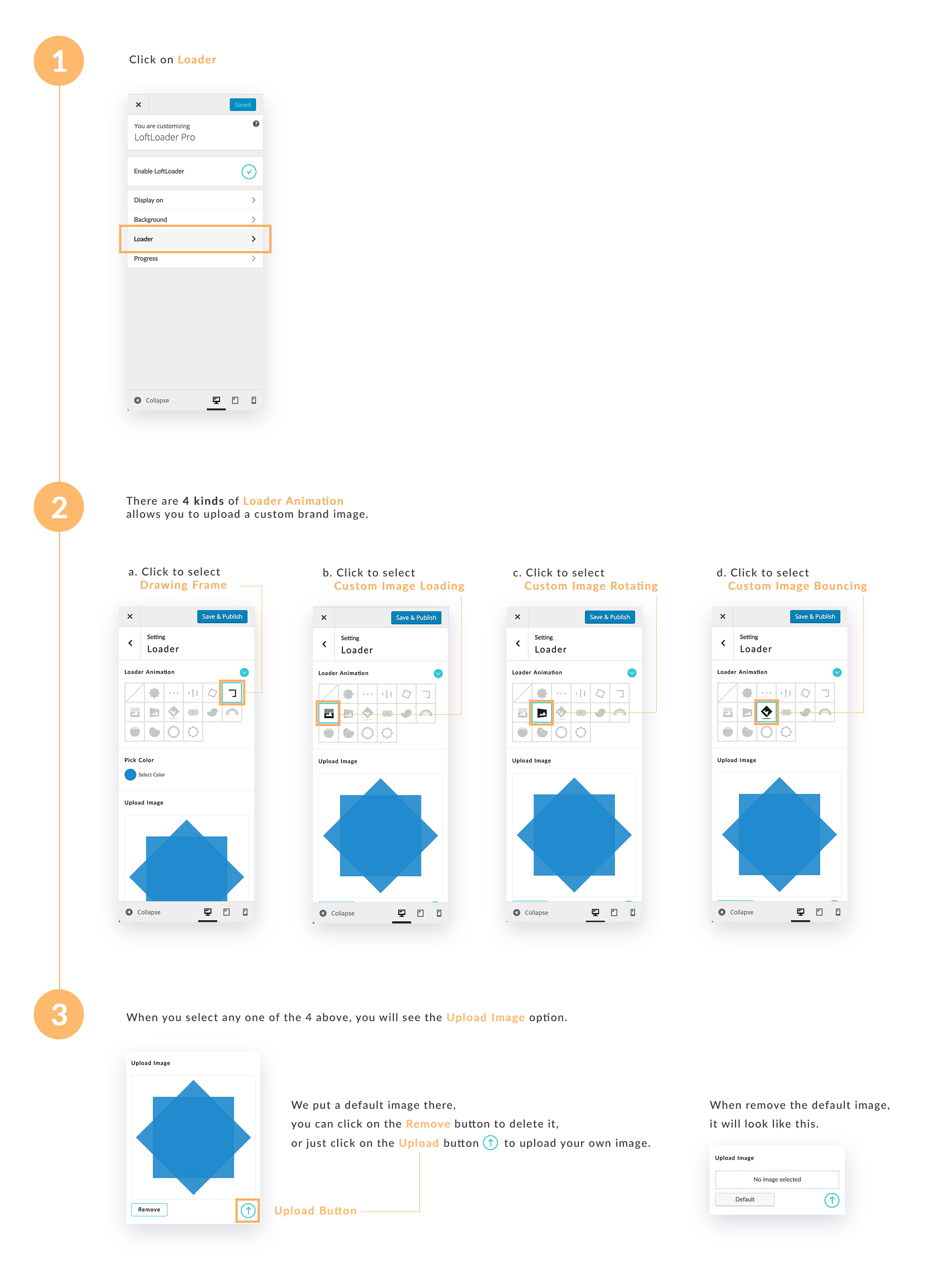
Thanks for purchasing LoftLoader Pro. Yes it does support custom image. On the settings panel, please click on Loader, then find Loader Animation. There are 4 of animations support custom brand image:
a. Drawing Frame
b. Custom Image Loading
c. Custom Image Rotating
d. Custom Image Bouncing
When you select any one of 4 above, you will see the Upload Image option.
Here is a link to the screenshots of adding custom brand image: http://www.loftocean.com/loftloader/wp-content/uploads/sites/3/2016/08/add-custom-brand-image.jpg
Hope this helps! If you have any further question, please feel free to contact us.
Thanks,
The Loft.Ocean Team
This is awesome!
Thank you.
Nice work GLWS!!!
Thank you!