477 comments found.
the demo looks like crap – is that how it is supposed to look?
What demo? Poster Spy?

Hi, I was wondering if this could be used for users to upload an image and than have that image approved by the admin, and then displayed in a gallery
So it would go
User uploads image, admin approves the image the image is displayed in a gallery accessible by all.
Really hope this done this so I can purchase, thanks!
Yes, this is how ImagePress works.
how to show stuff favorite images?
Here’s the code I use:
[imagepress-show category="featured" limit="7" count="7" type="random" size="imagepress_pt_sm"]
You have to create a category first, called “Featured”. You can use whatever name you want, just make sure you use the name in the shortcode.
Really appreciate all the help recently, especially with you developing a multi-upload function into the next release. From our point of view, the only other thing that is missing is a “view gallery in slideshow”. Not sure if this is at all possible? If it is then we’d start integrating your plugin into all our installations rather than NextGen. That is just one feature that is often needed by our clients.
Either way, great plugin and great support.
Thanks. 
You are welcome.
It is possible to have a slideshow, and I’ll add this to my TODO list.
Hi,
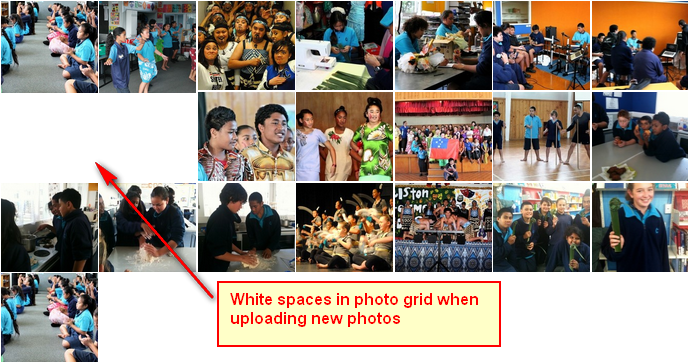
Me again! Is it possible for the photo gallery to look like a standard grid without the thumbnail spaces when new images are uploaded?
Image Ref: http://i249.photobucket.com/albums/gg240/Jennifer_B_Worthington/imagepress3grid.png
Why do you have white spaces? They shouldn’t be there. Are the images missing?
I just tested again, no, no images are missing, it just leaves a thumbnail sized space.
No, no, it’s not that. The first image is longer than the others, that’s why it pushes the second row. I’m not sure why this happens on your site, I’ll look into it and get back with an update.
Weird. Okay thanks, I’ll await the update.
Hi,
Not wanting to be a pain, but is there any news on this ‘glitch’ yet? Sorry, but I have clients on my back who want to get up and running with the website. Thanks.
I will release version 5.5 today with some fixes.
YAY!!! I’m almost there!
Just a few more queries:
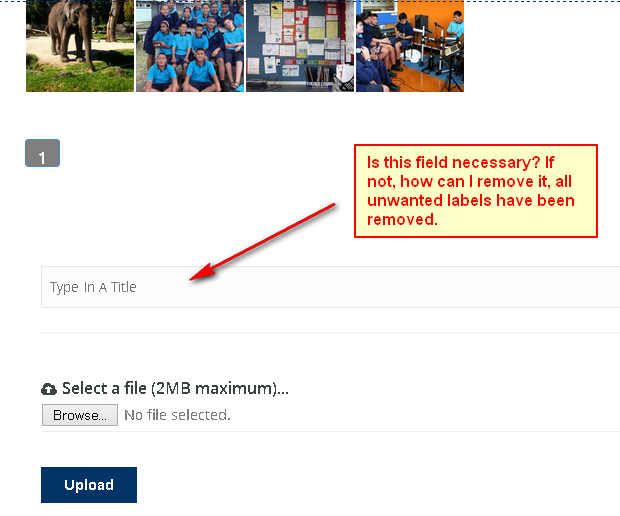
1. Is it possible to remove the label field as seen in the pic below? It seems to be a required field. If it cannot be removed, can a heading for it be placed above so clients know what it is used for?
http://i249.photobucket.com/albums/gg240/Jennifer_B_Worthington/imagepress1.png
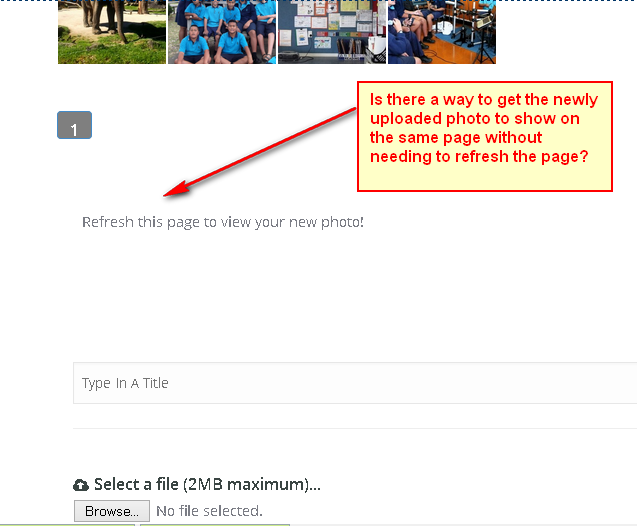
2. When an image is uploaded, the page needs to be refreshed before the thumbnail can be viewed on the page, is it possible for the page to refresh automatically? Please see image below:
http://i249.photobucket.com/albums/gg240/Jennifer_B_Worthington/imagepress2.png
Note: The above queries are purely for aesthetic reasons, I can still manage without them, though would prefer resolutions if possible.
Finally:
3. I absolutely LOVE this plugin, it’s far superior to any other front-end WP gallery plugin I have tried because it’s very fast and doesn’t slow down the server. I have other School Websites I’d love to purchase multiple licenses for, but unfortunately, they require a multiple uploading facility, is it possible for ImagePress to be able to supply this function or is there any other Public uploader that might be compatible with it?
Many thanks for your previous, fast, friendly and efficient support.
Hi, regarding #1, that label is not related to ImagePress, what is that field?
Regarding #2, it is not possible. A page refresh is required.
Regarding #3, thank you, I am keeping the plugin updated and I constantly add new features based on customer feedback. What do you mean by multiple uploading facility? Do you want to upload, say 50 images, and the plugin to generate 50 separate posts?
I have no idea what that empty form field is, it shows up on the uploading form when Image Press is activated. When I type into the ‘image Caption Label’ in Image Press settings: eg. Type In A Title, it shows up in the empty form field on the uploading form.
By multiple uploader, yes, an uploader where I could simultaneously select bulk images, (15 or more), and they would all show up on the gallery page when it is refreshed. I’m not linking any of my thumbnails to larger images on a separate post page.
That would be the title of the image, and you need that. It’s a WordPress feature. Do you want to upload images with absolutely no details? What would the name of the custom post type be? The image file name? Something like my-great-image-23.jpg?
Also, I am working on a multiple uploader, I have something working but it’s not production ready. Stay tuned for the next version, it might have a beta uploader.
Yep, I don’t mind images having no title, the less complex for the clients, who will be students, the better. I’ve just been naming the photos after the category they’re uploaded to, e.g. sports.
It would great if you could integrate a bulk uploader somehow, I’d then be able to purchase the plugin and use it on three other school websites, I find that Nextgen is very resource hungry and slows down my websites a fair bit, the other school sites are using this however, because the clients require a bulk uploader.
You’ll get the bulk uploader in the next version. I’ll try to push it next week. I also have some speed optimizations going on.
I’ll also add an option to completely hide the title and generate one from the filename.
Stay tuned.
Awesome! The galleries are looking great now, thanks for all of your help, A ++ support! I’m not finding your Gallery to be slow at all, they’re fast in comparison to the NextGen galleries I have running on my others websites.
You are welcome. People like you drive me to go forward and improve the plugin.
ImagePress Settings are invisible… I see nothing like that at the left menu, what’s happen?
Please help…
They should be there. What is your host?
I thought it was GoDaddy. Is your plugin active? Did you try deactivating all other plugins?
The plugin “contactform 7” is the problem, when it’s activated, but I need this plugin too..
any idear?
No ideas, but I will install Contact Form 7 and see where the conflict is. Stay tuned, I’ll have an answer soon.
Thanks
Another little thing: Can you help me with the “single.php” (image template)
Where do I need to overwrite the original code with the new content code?
See the original code in the Pdf-File: http://eykuwepap50.de/content/single-imagephp.pdf
Thanks
Find this line in your single.php:
<?php get_template_part('blog_single', 'loop'); ?>
and add these lines above it:
<?php
 // BEGIN IMAGEPRESS CODE // 5.4.1
if(function_exists('ip_main')) {
// main image display (required)
ip_main(get_the_ID());
// collections button (optional, can be placed in the sidebar)
ip_frontend_add_collection(get_the_ID());
// related images (optional, can be placed in the sidebar)
ip_related(get_the_ID());
}
 // END IMAGEPRESS CODE
 ?>
I can find 3 lines with this code, should I copy new code 3 times above it?
I did, and get an error: “Fatal error: Call to undefined function get_the_ID() in /www/htdocs/w01335eb/content/wp-content/themes/elision/single-image.php on line 3”
please help and see the Pdf-file on top… where to place the code?
Thanks
The first line.
However, your template looks weird, it should start with get_header().
I like this theme, very usefull, but now it works for me…
If you fix the problem with the contactform7 plugin, would be great…
Thanks, Great and fast SUPPORT!
I will definitely fix it. Can you, please, tell me what version of WordPress and Contact Form 7 are you using?
ContactForm7: 4.1.2, Wordpress: 4.2.2
Perfect, thank you.
Did you find a solution for the plugin “ContactForm7”?
This issue was fixed, I will release an updated version this weekend.
Great, thanks a lot
You’re welcome.
BTW THE SUPPORT THEY PROVIDE IS AMAZING! This is the best support Ive ever received. Thank you again
You are welcome and thank you for your comments!
Hi,
I have a few queries about the plugin.
1. I’ve added the following shortcodes to a page to add images to category.
[ imagepress-show category=”general-gallery” ]
[ imagepress-add category=”general-category” ]
(without spaces within the shortcode)
My thumbnails appear to have a grey space where the Title and Description are hidden (as per my option choice), please see:
http://kelstonint.school.nz/test/
2. When I upload an image to the page from the frontend, it doesn’t appear on the page with the category shortcode on.
3. Is there any way to remove the ‘Additional Options’ details from above the uploader?
Thanks!
Hi, for number 1, your theme overrides some styles. I will release an updated version today, and I’ll add some overrides.
For number 2, I’ll test it and see if it’s an issue introduced in version 5.4.
For number 3, if you remove the labels from the Labels tab inside ImagePress, the fields will no longer be displayed.
Cheers!
Great thanks! I look forward to the update.
I just removed every field label not wanted, leaving just ‘Select Image’ and ‘Upload’, but the following still show up on the page:
Main Details (required) (With text input field) Additional Details (optional) (Title only)
Is there a way of removing these too?
http://kelstonint.school.nz/test/It will be today, after I release version 5.4.1. Stay tuned, I’m working on fixing some bugs with another customer.
The update has been released, you will get a notification when it’s live.
Thank you, I’ll try it out!
Hi,
I’m working on multiple websites at the moment and think I’m going completely insane.
All I really want are category pages with gallery thumbnails on which open in a light-box, a simple browse and upload button on each page, and on submission, the page to remain on the same gallery page the submission was made to.
I don't have any need for all of the additional options.I’ve set up Categories and pages for each category, but am having trouble achieving the desire results.
Would it be possible to email you my login details for you to check things over for me? Your help would be greatly appreciated as I’m now at a loss!
Go ahead and send me your login details, however, for category pages you need to modify your theme.
In order for you to create custom category pages, you need to create standard pages, place the [imagepress-show category=”mycategory”] and an upload link pointing to your upload page (or even the upload form at the bottom).
Thanks for your prompt support, I’ll see what I can work out my end first, I’m having Permalink issues as well, so I think there may be a conflict with my theme. Argh!
I’m looking forward to see how your site will look after it’s finished. Let me know if I can help.
Thank you.
Im grateful for this plugin Im just having a hard time getting it started on my site. When I frist set it up I got almost got it working but couldnt style it because it wasnt reading the stylesheet even though I placed it in the right directory. Everything was shown working but that. So deactivated the plugin and deleted it thinking I need a fresh install and now when I install it, it doesnt show up on my sidepanel dashboard it shows its installed as a plugin but I dont have access to settings. Ive tried contacting you guys but nothing seems to work so Im forced to leave a comment
Okay, this is weird. Is there a way you could send me an email with your administration details? getbutterfly [at] gmail [dot] com
I sent an email and still no response? I know its probably a simple fix because you guys are great at what you do. I just got my deadline extended till monday. I just need this plugin to work please . all we want is users to be able to upload images to a community gallery
Mail received and answered.
Hey thank you, you guys are awesome.
Thank you!
Please I beg you, I am literally on my knees! My clients are on my neck to deliver this project on time. Please kindly help me fix the issues I have raised previously. I know there’s just something I am not getting right, and I believe if you kindly have a look you could help me get it sorted. 1. The subdomain hub doesn’t show user profile, it redirects to homepage instead 2. The single image display is messing elements around.
Please I am really interested in fixing No. 1 so that my client can launch his project while I work on fixing No. 2. Please help me 
Try contacting your host, maybe there is a mod_rewrite issue, or the .htaccess rules are conflicting with the mod_security module.
Here is my htaccess Please advise if it doesnt look right before I contact my host thanks:
- BEGIN WordPress <IfModule mod_rewrite.c> RewriteEngine On RewriteBase / RewriteRule index\.php$ – [L] RewriteCond %{REQUEST_FILENAME} !-f RewriteCond %{REQUEST_FILENAME} !-d RewriteRule . /index.php [L] </IfModule>
- END WordPress
- BEGIN Cinnamon Author Rewrite <IfModule mod_rewrite.c> RewriteCond %{HTTP_HOST} !www\.domain.com RewriteCond %{HTTP_HOST} ([^.]+)\.domain.com RewriteRule ^(.*)$ ?author_name=%1 </IfModule>
- END Cinnamon Author Rewrite
Did you replace domain.com with your domain name?
no 
I thought it was self-explanatory. I’ll add a bit of help to the documentation for the next version.
great!!!!! you are the best!!! thank you sooo much!!! you are a life saver!!! How long till the next update with gallery creation? Also, please kindly let me know what is the status on my No. 2 question. Thanks a million mate!!!
Number 2 will be (probably) fixed with the next release. I intend to release the next version this week, as the collections are almost done. I’d say by the end of this week.
Yaaaaaay! Well done mate! I look forward to a better look of my single image posts! Thanks for your help today
You are welcome.
Apologies for this one last question, my users hub is showing now, but the users images does not show up in my portfolio. Is there are setting for that?
Users need to check the “sticky” option for each image they want to appear in their portfolio.
Thanks, It works! Just as a suggestion for future updates, please could you make users able to create categories or better still create tags that are searchable. I could pay for that as an addon
I’ll have to think about that. I have a long list of features to work on and I’m not sure I could do it in time. I’ll add it to the list, though.
Ok, brilliant!
Hello again, quick question…will you be allowing users to have multiple galleries in their profiles in the future? And if so, do you have an idea when that might be released? It would be nice to be able to group images together into sets. I would happily pay for that as an addon!
I am working on a collections module, which is 80% ready. I want to release it into the wild this week, if testing is successful.
Awesome!
Collections are done and fixed in version 5.4.1.
Is there anyway to have a central page that shows what galleries are available, or is each gallery only available on the user profile page? If not I just wasted 20$ I guess
Use the [imagepress-show] shortcode to display all images.
Thankyou. I found that eventually. How does it decide the order to show them? My goal is to have user galleries in one place, but ideally they would each be a separate gallery on a list rather than a giant pile of photos ordered numerically by time or something
They are the latest images. You can sort them by date, author name, votes, comments and so on.
thanks for the quick answers. I havent gotten to the point where i have images in there to test. trying to make sure its worth all the work setting it up. DO far it seems spot on.
Cheers!
If possible can you give me template of posterspy. my email is jalgaonwala@gmail.com
Thanks
For free?
mail me details
Okay.
?
waiting for your mail?
Still no. Unfortunately, the client refused to share the template.
HI,
Thanks for Great plugin.I have one problem.
It’s Relating to the position of the photo stats/description
I want the layout to be like in posterspy (image on the left,descriptions and stats on the right with top buttons and image info). I don’t like the one you have in the demo.?
I tried it by creating single-image.php, then I have create one sidebar for Imagepress and place code (<?php // BEGIN IMAGEPRESS CODE ip_related(get_the_ID()); // END IMAGEPRESS CODE ?>)
in text widget and then assign that sidebar to single.php.
but this is show in all single post I want different sidebar for post and difference for Imagepress ,please help me as you have manage in posterspy.
That’s important to me because I want to have all the information to show in the page without scrolling up and down.
thanks once again.
You would need to modify the PHP code and the CSS code to achieve a layout similar to Poster Spy.
i did css changes my problem is how to call sidebar in single.image.php ? get sidebar function is taking default one.
You will need to create a custom sidebar and call that one.
Hi! Its me again, Please I am having some difficulties with the subdomain set up, I have set up a wildcard and have also modified my htaccess, however when I go to a user’s profile e.g http://umajosiah.briefdesignworkshop.com/ it shows the homepage instead of showing the specific user’s profile. Please kindly advice on how to fix this?
Thanks immensely
I wish I never bought this plugin!!! Non of the issues that I have raised here have been fixed even though promises have been made to fix them, still none!
Have you created an author.php template?
Yes I have. You can see my author here: http://briefdesignworkshop.com/author/umajosiah/
Hello??? Any help yet?
I am beginning to get really frustrated with my purchase of this plugin, no support is being rendered. Its been several weeks since I posted my issues with the plugin and no reasonable effort has been made to offer support! Is my case different from the rest of the users??? :’(
Hi, I love this plugin but there just one thing I wish was included…is there a way for users to add their own (comma separated) tags?
I notice that it is possible in the back end ‘Edit Image’ but isn’t possible in the front end where the user can only select from a dropdown (and therefore only add 1 tag) which won’t be very useful for how I want to run the site. Since I am not allowing dashboard access to users, I wonder if there is a quick fix or something that you could consider for a future update.
I’ve found the place in functions.php where you register imagepress_image_tag in the backend in functions.php and the dropdown box in imagepress.php which I would change to a text box but I’m not quite sure on how to pull the tags suggest function into the form.
Again I would like to say how awesome this plugin is, and I only post in case I have missed something and this is something that exists in the settings that I haven’t spotted.
Nevermind, I figured it out! Just had to do a bit more research and code diving!
No, there’s nothing you haven’t spotted. I tried adding a textbox with tag suggestions once but it didn’t work as expected. I will try it again in the future as I want to transition the plugin to a new JS framework.
Also, thank you for your kind words.
Heyas.
I think I implemented the latest version correctly, but now my users page is a bit messed up. When I click on a user to go see its profile, just gives me the code (the code doesn’t execute).
But when I go into my profile through my own user profile page, it is fine. Just doesn’t work through the user page.
hrm?
http://www.alteredartgallery.com/users/Advice?
Thanks!
The only thing I haven’t done is change my htaccess file. I think I will try that next.
Bleh, I figured it out. Now I am just trying to get the hub working =).
It looks good so far. The hub is easy to implement, you might need to set up a wildcard subdomain with your hosting server.
Hello. I think this plugin it’s exactly what i was searching. I just need some clarification: 1-Does the user accounts/management that your plugin uses fully integrates with wordpress? Ex. I have some pages that are blocked just to subscribers/ I have a proper modal login in my theme…will it work?
2- I want the layout to be like in posterspy (image on the left,descriptions and stats on the right with top buttons and image info). I don’t like the one you have in the demo. Is this manageable?
3- Can you provide some backoffice screenshots just to see what features can be manageable in admin page?
Thank You
Regards 
Hi,
1. Yes, it is fully integrated and third-party logins will work.
2. It’s not manageable unless you change the template. Poster Spy uses a custom template.
3. http://getbutterfly.com/imagepress-5-2-screenshots/
You are welcome. I am currently working on simplifying the image template and making it more modular.
OK, I also have member login/register with facebook and i don’t to have problems with that. GOOD!
Relating to the position of the photo stats/description I don’t need it to be modular or customized in the backoffice. I just need to know if its possible to have that type of display. even if some change in the code it’s needed , with your help will it be possible? -As I see it, all the information it’s in the sidebar. That’s important to me because I want to have all the information to show in the page without scrolling up and down.
thanks once again.
I’ll make it modular for me, in the backend. However, you can have it displayed just like Poster Spy, but I can’t help you as I’m stuck with some client projects and I don’t have time for any freelance work.
I can give you the template used for Poster Spy so you can check that and apply the positioning and styles.
Please I have just purchased this plugin and I am currently having a few issues. first, the likes and views count on photos are not clickable and therefore not increasing. I tried adding the code in the documentation to my single.php and it repeated the image and messed up my single image design from my theme, I had to remove it. However I need this likes, vote and views to work. Thanks in advance for your reply.
Please I am waiting for a reply on this. Thanks
Did you try to create a single-image.php? This is what the documentation says.
Yes, Thats the problem…the single-image.php messes with the design of my theme when uploaded
Howeverwhen I take it off, my theme’s design for single images looks perfect and i want to maintain that design, but then the views, likes etc do not work you can view site here http://briefdesignworkshop.com/
Views work for me, I visited the building image and they increased from 0 to 3. I can’t test the votes as I need to be logged in.
Yes, I know they work now, but what I am saying is that the single-image.php messes up my theme design, if I remove it, my design looks good but the downside would be that It wont work. However if I have it on, it works but my design looks bad. Any work around this please?
This sounds weird, how could that template mess up your theme’s design? That template is only used for images, how can it mess up the rest of the website? Can you send a screenshot of the messed up theme?
Where should I send it? Email?
I have sent the email. Please have a look and let me know. Thank you so much for your prompt assistance. Josh
Please, what is the update on this? Thanks
Still waiting for an update on this, Please
Computer was broken, got a new one. Will update plugin as soon as possible.