

478 comments found.

If you have ever setup a photo contest using imagepress can you share how you did it.
I have not.
But the way I would do it is below:
https://getbutterfly.com/support/documentation/imagepress-how-to-build-a-simple-photo-contest-website-with-wordpress-and-imagepress/Is there a way to allow anyone without a login to upload from the front end and have it uploaded directly to an already-created gallery that is visible on the front end? The upload page will be hidden from search engines. Only people who need to know about it will know the URL. I want them to be able to upload directly to an already-created gallery so the images are instantly added, appear on the front end, and are viewable immediately by anyone.
Is this already doable with your plugin?
Yes, you can. In Settings -> Upload -> User Registration, and select “Do not require user registration”.
Then create your “Upload” page and the upload shortcode – [imagepress-add category=”demo”]
Use your category name/slug instead of “demo”.
The latest version – 9.1.0 – speeds up the galleries exponentially, and brings the plugin in line with WordPress 7 and PHP 8.5+!
Update now from your Envato Downloads or from your WordPress -> Dashboard -> Updates page.
https://getbutterfly.com/wordpress-plugins/imagepress/How to assign award? I can only the option to assign an award on the admin account but not others users. Is there another way to assign an award to a user? Thanks
I think that feature has been retired. I’ll check why and if I can get it back.
Oh ok
The latest version – 9.1.0 – speeds up the galleries exponentially, and brings the plugin in line with WordPress 7 and PHP 8.5+!
Update now from your Envato Downloads or from your WordPress -> Dashboard -> Updates page.
https://getbutterfly.com/wordpress-plugins/imagepress/Is this still a valid shortcode
[imagepress-member-directory]
???
Hi,
That shortcode has been changed to [imagepress-authors].
Great thanks.
Can’t find the changelog for the latest version can you point me to one.
Check it here, please:
https://getbutterfly.com/wordpress-plugins/imagepress/#changelogThanks
My account page is blank. I have recreated the page using plug-in and also just pasting the shortcode for editing in a page and assigning it in the author configuration check to make sure it isn’t a hold of profile but the page is always blank. It’s the main thing that isn’t working right at the moment.
Hi there, I’m getting a strange glitch when using the “Next” or “Next Image”. When I click on a image from the image gallery, it brings me to a page with just that image on it. When I use the “Next” or “next image” button from there the next image is shows is not by the same user, and not even from the next user in the gallery. It seems to be completely random, except for I get the same random image each time. Starting with a different image gives a different unrelated image after it. Am I missing something? you can try it out live here: https://www.grandvalleyartists.org/gallery-2/ Just click on any image and then use the next link.
First of all, I like your website, and thank you for using ImagePress.
Second, the next/previous image is based on date. Would you like to only show next and previous images from the same author?
ah ok, the date makes sense. Yes I would like it to only show next and previous from the same author. Thanks!
Alright, I’ll see what I can do for the next release. Should happen by next week, or earlier.
Hi.
The latest version – 8.5.1 – is out. You should see an automated update notification. If not, go to Dashboard -> Updates and hit “Force Check”.
Next, in order to enable your desired setting, go to ImagePress -> ImagePress Settings -> Image Settings tab and enable the “Show navigation based on the current author” option.
That is all!
The latest version – 9.1.0 – speeds up the galleries exponentially, and brings the plugin in line with WordPress 7 and PHP 8.5+!
Update now from your Envato Downloads or from your WordPress -> Dashboard -> Updates page.
https://getbutterfly.com/wordpress-plugins/imagepress/Can keywords be used in a shortcode ex
[imagepress-loop keywords=”Diane”]
Any thoughts
Yes, now it is. Get version 8.6.2, which allows you to do this:
[imagepress-loop keywords=”keyword-here”]
Good deal! Thank you for this.
What is the shortcode for carousel
I had a carousel, but it wasn’t working properly. I might revisit it later.
Is there any difference to the one we can buy on your website versus the one here?
No, there is no difference, but I am slowly moving towards my own website, as the sales here have gone down.
Hi, I have a pre purchase question.
I used the free version of Imagepress, but I need if someone is uploading any image, then it should be approved by admin. So is that possible in purchase version?
And also, If not approve by admin, then it should not visible on Front end.
Kindly waiting for your reply asap.
Yes, it is possible. You can set images to be moderated, meaning an admin needs to approve them.
Is there a way for frontend users to bulk upload photos into a collection? I’m using it for family events and I want people to be able to upload photos into the collections but 1 by 1 is not very feasible
Also How do I enable frontend users to select a collection to upload to but hide the option to create a new collection?
Hi.
There is no way to bulk upload into a collection. I will put it on my list and see if I can do something for the next version.
You can hide the new collection field using CSS, there is no option.
Yes if I cant bulk upload then I wont be able to use this plugin and would appreciate a refund
How do we process refund?
You can wait until the next version.
Unfortunately, as per our terms of service, we cannot grant refunds, unless the plugin is incompatible with your version of WordPress, or it generates fatal errors.
Approx when will the next update be? just trying to determine if I need to find a bandaid or I can afford to wait
I’ll start researching tomorrow.
Do you want to have a “Browse” button and select multiple photos (10, 20, 50), set a generic title (“Image 1”, “Image 2”, “Image 3”), set a category and a collection?
Is the collection already created?
Yes the collection will already be created. They select the creation from a drop down. Then a browse button to select multiple photos or drag and drop also
Guess what! I did it last night!
I need to run some tests and see if I didn’t miss anything, and I’ll push it live as soon as possible. 1-2 days, max.
You are awesome!! Thank you so much!
Here is a beta version, before the final release. I have tested it, and it works fine, and I don’t think I missed anything.
https://getbutterfly.com/web/imagepress-8.3.2-bulk.zipUse this shortcode:
[imagepress_bulk_add hide-new-collection="1" hide-tags="1"]
Thanks again! I’ll Let you know if there are any issues!
This shortcode does not populate any form for me
i tried [imagepress_bulk-add hide-new-collection=”1” hide-tags=”1”] and just [imagepress_bulk-add] also
You mixed the underscores and dashes. It’s:
[imagepress_bulk_add]
I tried that originally and it didn’t work. That’s why I tried the other way
I have made some more tweaks and officially released version 8.3.3.
It’s definitely working. Make sure you installed the plugin correctly.
Use either:
[imagepress_bulk_add]
or
[imagepress-bulk-add]
Also check ImagePress Settings -> Upload tab -> “Upload features (bulk, multiple, front-end)” section for more help.
Ok everything is working great except one thing. When I upload an image on the front end it duplicates every photo – one photo keeps the file name and then the photo gets duplicate with a new file name resembling homeu355038006domainsjohnandagnesfamily.compublic_htmlwp-contentuploads202408nameIMAGENAME
Im on 8.3.3 I tried downgrading back to 8.3.2 but same issue
I will investigate. Thanks for helping me test this new feature.
Scenario 1 – I upload an image and its duplicated as discussed above. Both images show in the collection when viewed on a webpage. Scenario 2 – If I keep the files with the image name the same as the file name and put the images that were renamed “homeuxxxx” in the trash then the collection shows the single image with no duplication on the webpage. Scenario 3 – If I empty those images from the trash it breaks the display of the images on the webpage and show a place holder with the image name as if it were missing even though it is still in the “ALL Images” in image press
If I perform the opposite and empty the trash and keep the images labeld “homeuxxxx” then the collection just shows no photos – no placeholders and the collection count is zero
I trust what you’re saying, but I cannot replicate it myself. I upload 3 images, I have 3 image posts. I upload 10 images, I have 10.
Can you try this on a fresh WordPress + ImagePress installation?
Figured it out – there was an old plugin I deleted that had data left over that was causing some issues. I went into the DB and cleared the old data and Imagepress to be safe. Reinstalled Imagepress and all is working as it should. Thank you again
A few new questions – 1. If someone uploads photos to the wrong collection, is there a way to move them into the correct collection without delete and reupload?
2. The Maximum image upload size is being applied to the bulk upload. For instance my max image upload size is 4096. If I upload 10 photos and the total size of all 10 together are over 4MB it will not allow the upload. I assume this max should be per photo or am I incorrect?
3. When I bulk upload more than 3 or 4 photos it will hang for an infinite amount of time and only do a partial upload. For instance if I send 12 photos I may only get 8 that actually upload. I have tried 10 and only gotten 6. Its very random
I’m glad you found the issue.
Regarding your questions:
1. No, there is no way and it’s a mistake. I never coded it. I will do it today 
2. Well, you are right. But you can increase the max to allow for 40, for example, covering all 10 images. I will look into this and update the code.
3. This might be a server issue. PHP has some constants, such as max_upload_size, max_post_size. You need to make sure they are high enough. Also, the PHP timeout might be 30 seconds, or 60, or 90, and if it’s reached, the upload stops.
On my server, I have a timeout of 300 seconds (5 minutes), and that is usually enough for 10 images.
Go to your WordPress -> Tools -> Site Health and check out these 3 values:
1. max upload size 2. max_post_size 3. timeout
Max Upload and Post Upload are 256MB and PHP Timeout is 300
I see.
Might be a WordPress limitation, or something else on the server. There is nothing I can do in code.
Maybe you can ask your host and see if they have more insight.
The latest version – 9.1.0 – speeds up the galleries exponentially, and brings the plugin in line with WordPress 7 and PHP 8.5+!
Update now from your Envato Downloads or from your WordPress -> Dashboard -> Updates page.
https://getbutterfly.com/wordpress-plugins/imagepress/Discovered something quirky today. If you change the name of a category and it doesn’t match the category slug the images in the category won’t display. For example if name of a category in vintage and the slug is vintage-color the images in that category won’t display. But if the category name is vintage color then images display.
I cannot replicate this.
I had a category called “Urban” with a slug of “urban”. I changed the slug to “urban-explorers”, while keeping the name as “Urban” and it’s working.
I can see the images, both in the back-end and the front-end. Am I missing something?
Not sure but I tried with two category and got the same result the page only had the numbers 1/0 . Could it something with database
I’ll keep trying on my side, see if I can replicate it.
I will double check on my side as well and clean up db
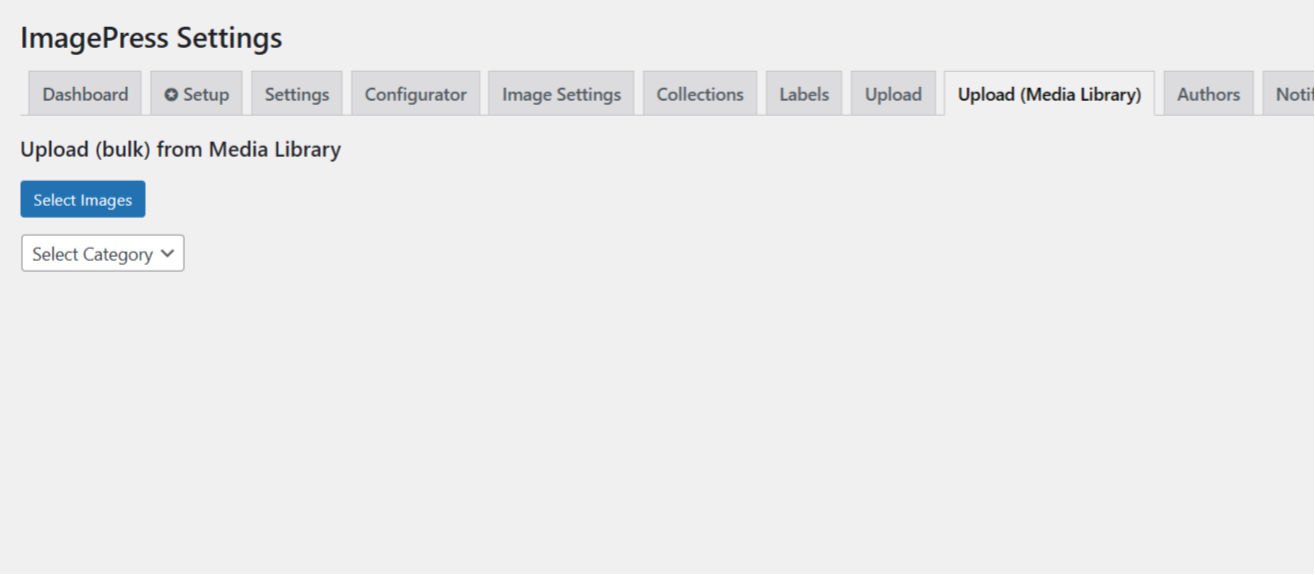
Thanks for the new plug-in update and feature. I installed the new version with bulk add from media library but the select images button doesn’t open the media library to select.
This was my mistake, I fixed it and I will release version 8.3 later today, Friday.
The new update opens the media library but bulk selection isn’t available only single. The rest of process works. The image is added to Imagepress
You need to hold CTRL to select multiple images.
Aah ok makes for a little challenge on touchscreen keyboards. Also on Mac Ipad keyboard it is Command click to select.
True, but this is how the Media Library works. Even when creating a gallery, you still need to hold CTRL. I am using the native functionality as it’s easier to maintain than a custom coded one.
Nope, that is not native WordPress. It looks like a feature added by the Rank Math plugin.
Nope that isn’t Rank Math.
See this https://wordpress.org/support/topic/bulk-media-cleanup-for-woocommerce-store-with-many-pictures-2/Alright, but that doesn’t solve the issue. What would you bulk select? The idea is that you select various images, unrelated by anything. That bulk select is “attached”, “unattached” and maybe other options.
I’ll investigate the Media Library popup, but I’m not promising anything 
Thanks for looking into it regardless.
Feature suggestion – bulk add from existing images in media library
This would be an admin-only feature, right?
Sounds like a good idea. I assume you already tried the existing bulk upload feature.
Oh, guess what? It’s done! It will go live in 1-2 days.
Cool thank you this just get better and better
Can’t get the select image button to work
This was my mistake, I fixed it and I will release version 8.3 later today, Friday.
Compliments to the author. I had a problem posted on this page. He reached out within a hour and have solved the bug the next day.
Superb service.
Thank you and you are welcome!
I might overlook something, but within the website I use Imagepress (a catalog of an upcoming exhibition) we need to update/replace some photo’s. Earlier in the building of the site you could see a link “author tools”. But somehow it is gone and I don’t know why. I looked at the function.php and I see that it must be the photo send in by the author and so on and as far as I know this is the case. Some tips would be welcome. I have version 8.2.6
Thanks.
The “Author Tools” section is still there, and it’s only visible to the author of the image.
You can do it as an admin and replace the Featured Image, if it’s easier for you.
I know this, it is not for me as an admin, Then I would use indeed feathured image. But it is for the person that has author credentials and is also the person that uploaded all the images. She has used the author tools in the past but does not see it anymore. And I have logged in under her name and cannot find it either. I have tried different settings but that did not help.
That is strange. It should be there. Let’s take this to email and you can show me a link.
Use the contact form on this page – https://getbutterfly.com/support/
Interactively solved within 24 hours. Was a omission in the plugin. Great service. Thanks Butterfly.
You are most welcome!
The latest version – 9.1.0 – speeds up the galleries exponentially, and brings the plugin in line with WordPress 7 and PHP 8.5+!
Update now from your Envato Downloads or from your WordPress -> Dashboard -> Updates page.
https://getbutterfly.com/wordpress-plugins/imagepress/Hi,
In the website demos using ImagePress on some Wordpress examples there are user comments alongside the images but I can’t find any mentions of this is the documentation. Is ImagePress using the native Wordpress page comments (if I understand how it works it creates custome post types)?
Thanks for your time
Yes, ImagePress is using the native theme comments. And yes, images are custom post types.
Hi, is it possible to change the sorting of the categories dropdown on the upload page?
Yes. I use a free plugin called “Taxonomy Order”. This plugin allows you to drag and reorder the categories.
The latest version – 9.1.0 – speeds up the galleries exponentially, and brings the plugin in line with WordPress 7 and PHP 8.5+!
Update now from your Envato Downloads or from your WordPress -> Dashboard -> Updates page.
https://getbutterfly.com/wordpress-plugins/imagepress/All Images disappeared after last upgrade.
Disappeared how? From the front-end? Are they still in the back-end?
WordPress database error: [You have an error in your SQL syntax; check the manual that corresponds to your MariaDB server version for the right syntax to use near ’`notifications`’ at line 1]SHOW TABLES LIKE `notifications`
WordPress database error: [You have an error in your SQL syntax; check the manual that corresponds to your MariaDB server version for the right syntax to use near ’`ip_collections`’ at line 1]SHOW TABLES LIKE `ip_collections`
WordPress database error: [You have an error in your SQL syntax; check the manual that corresponds to your MariaDB server version for the right syntax to use near ’`ip_collectionmeta`’ at line 1]SHOW TABLES LIKE `ip_collectionmeta`
This is very strange. I will investigate first thing in 2024.







