2001 comments found.

Hello, when switching from free to paid, do we lose all data? here https://www.templya.com/
Hello
No, all will stay the same
Read also please: - https://currency-switcher.com/i-just-bought-the-plugin-and-cant-install-it-error - https://currency-switcher.com/how-to-make-auto-update-for-wordpress-plugins-and-themes-bought-on-envato
- I’ve completed the purchase. Currently, my system operates with Turkish Lira denominated in US Dollars. How can I activate the new version without damaging my existing system?
- I want to enter prices in dollars and euros, but only Turkish lira should be displayed on the website. How should I configure this? (Currently, I’m entering dollar prices in the background and seeing them as Turkish lira on the website. So it was problem-free for a single currency. I’ve now purchased a plugin to define euro price lists using the same logic.)
Hello
Thank you!
Read please: https://currency-switcher.com/i-just-bought-the-plugin-and-cant-install-it-error
The shop can has only one basic currency – EUR or USD. As you entered in USD – select as basic currency in the plugin settings USD. If you want to enter prices in EUR:
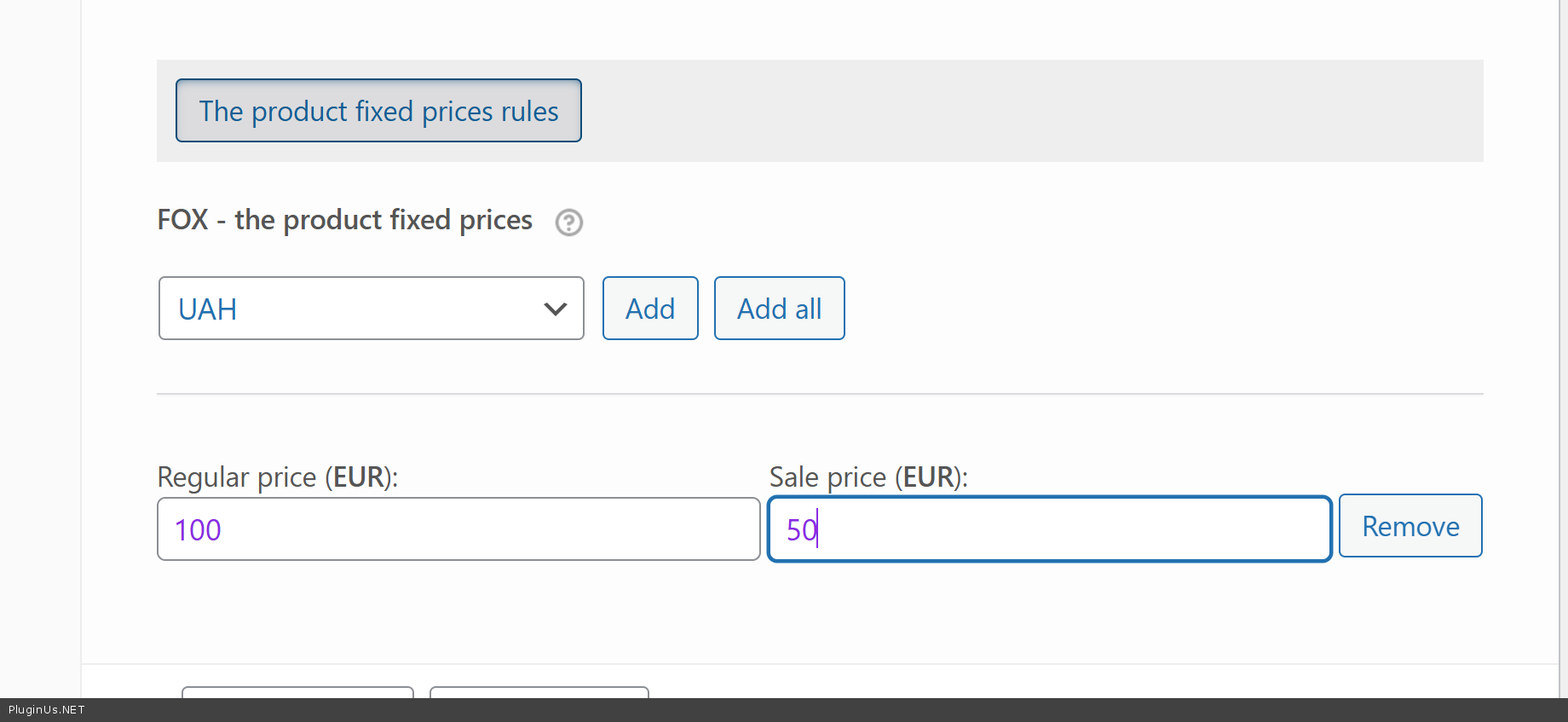
- add it as currency in tab Options of the plugin - in tab Advanced enable “Is multiple allowed” and click Save - in tab Advanced enable Individual fixed prices rules for each product(*) and click Save button - place into ptoducts your prices in EURs https://c2n.me/4nHsdpR.png - set as Welcome currency TRY - to let TRY ALWAYS will be on checkout use code https://currency-switcher.com/force-currency-on-checkout-page
If you need support create ticket here please: https://pluginus.net/support/forum/woocs-woocommerce-currency-switcher-multi-currency-and-multi-pay-for-woocommerce/
I have price lists in USD and EUR. I need to input product prices into WooCommerce in these currencies. However, the storefront must display prices in the local currency, Turkish Lira (TRY). Neither Geo-IP-based international sales nor payments in the selected currency are required.
Hello
Support has answered you here https://pluginus.net/support/topic/i-have-price-lists-in-usd-and-eur-i-need-to-input-product-prices-into-woocommerce-in-these-currencies/ , please collaborate with them there
The GeoIP is not working correctly. It keeps showing the main currency even when visiting from different IPs. I’ve set everything up properly, including adding the currencies and assigning the correct countries in the GeoIP settings.
Hello
Read this please: https://currency-switcher.com/using-geolocation-causes-problems-doesnt-seem-to-work-for-me
You can create ticket here: https://pluginus.net/support/
I don’t understand — should I buy a MaxMind license? I need more details on how to set it up. I bought your plugin to speed up the process.
MaxMind license is free
I have added the MaxMind license, but it’s still not working — it keeps showing the main currency for different country IPs.
Create ticket here: https://pluginus.net/support/
Hi….’m currently using the free version. It only has Turkish Lira and US Dollars. I need to add Euros now. I might need this and a few other currencies. Will just buying this extension solve my problem?
Hello
Yes, you can add more than two currencies in the premium version; that’s the only difference.
I’ve completed the purchase. Currently, my system operates with Turkish Lira denominated in US Dollars. How can I activate the new version without damaging my existing system?
Hello
Thank you!
Read please: https://currency-switcher.com/i-just-bought-the-plugin-and-cant-install-it-error
Does the PRO license allow using the plugin on multiple websites/domains, or is it limited to a single site?
Hello
Regular License – This allows you to use the plugin on a single website/domain for your own project or for a client project. Extended License – This is not for using the plugin on multiple domains. Instead, the Extended License is specifically designed for developers who want to incorporate the plugin as a component into a larger digital product that they will sell or distribute to end users. For example, if you’re developing a premium WordPress theme or a complete website solution that you plan to sell, and you want to include my plugin as part of that bundled product – that’s what the Extended License is for. According to Envato’s licensing terms:
Regular License = one end product, one domain Extended License = incorporating the item into a product you’re selling/distributing to multiple end users
So if you need to use the plugin on multiple separate websites for yourself or clients, you would need a separate Regular License for each site. If you’re building a product that includes my plugin and will be sold to others, then you’d need the Extended License.
Is it allowed to use one license to configure and test the plugin on a temporary/development domain, and then move everything to the final production domain later? I am developing the website on my own domain for a client, but the final site will be on their domain.
Yes
Hi, is this work with Learnpress? Courses added as Learnpress courses (not as Woocommerce products) . Payment gateway is Woocommerce.
Hello
Should work or need some code fixing: https://currency-switcher.com/learnpress-wordpress-lms-plugin – test free version please
Hi,
Hope you are doing well. We are using Dokan multi-vendor plugin and this currency switcher on our website with Is Multiple Allowed setting on. But no matter what currency is currently selected, Dokan dashboard shows the same price value with the currency currency symbol instead of the converted value for that currency. It doesn’t work on Products, Orders or even Withdrawal tab which is a major issue. Can you please tell me if you have a compatibility fix for this issue on the free plugin or the pro version? If the pro version has the fix, we are willing to purchase the pro version.
Let me know what you think. Thank you.
does it shows sales report in each active currency in admin dashboard ?
// Add this temporarily to clear the cache
    add_action('init', function () {
        if (current_user_can('manage_woocommerce')) {
            global $wpdb;
            $wpdb->query("DELETE FROM {$wpdb->options} WHERE option_name LIKE '%_wc_report_%'");
            $wpdb->query("DELETE FROM {$wpdb->options} WHERE option_name LIKE '%wc_admin_report_%'");
        }
    });

    // Disable Analytics cache
    add_filter('woocommerce_analytics_enable_cache', '__return_false');

    add_filter('woocommerce_analytics_orders_select_query', function ($results, $args) {

        if (!$results || !isset($results->data) || empty($results->data)) {
            return $results;
        }

        $base_currency = get_woocommerce_currency();

        foreach ($results->data as $key => $order_data) {
            $order_id = $order_data['order_id'];
            $order_currency = get_post_meta($order_id, '_order_currency', true);

            if ($order_currency && $order_currency !== $base_currency) {
                $exchange_rate = get_post_meta($order_id, '_woocs_order_rate', true);

                if (!$exchange_rate) {
                    $exchange_rate = woocs_get_exchange_rate($order_currency, $base_currency);
                }

                if (isset($order_data['net_total'])) {
                    $results->data[$key]['net_total'] = floatval($order_data['net_total']) * floatval($exchange_rate);
                }
                if (isset($order_data['total_sales'])) {
                    $results->data[$key]['total_sales'] = floatval($order_data['total_sales']) * floatval($exchange_rate);
                }
                if (isset($order_data['tax_total'])) {
                    $results->data[$key]['tax_total'] = floatval($order_data['tax_total']) * floatval($exchange_rate);
                }
                if (isset($order_data['shipping_total'])) {
                    $results->data[$key]['shipping_total'] = floatval($order_data['shipping_total']) * floatval($exchange_rate);
                }
            }
        }

        return $results;
    }, 10, 2);

    function woocs_get_exchange_rate($from_currency, $to_currency) {
        global $WOOCS;

        if (!isset($WOOCS) || !$WOOCS) {
            return 1;
        }

        $currencies = $WOOCS->get_currencies();

        if (isset($currencies[$from_currency]) && isset($currencies[$to_currency])) {
            $from_rate = floatval($currencies[$from_currency]['rate']);
            $to_rate = floatval($currencies[$to_currency]['rate']);

            if ($from_rate > 0) {
                return $to_rate / $from_rate;
            }
        }

        return 1;
    }
What does this code will do ?
I did install the purchased plugin but unable to display double currency under the products. Can i get any assistance
Hello
From the box it is possible to display only one, selected by the user, currency. In your case it is need customization. Please provide link to your site (on support forum https://pluginus.net/support/topic/double-currency-display-on-product/), maybe it will be possible do by CSS but no warranty.
Also read please: https://pluginus.net/support-conditions/
your plugin is not working with eduma / learnpress plugin !
Is there a new setting in the latest versions that requires the administrator to manually update exchange rates, because this is not happening automatically on a daily basis?
Hello
No, we haven’t changed that logic.
Please write me here – https://pluginus.net/support/forum/woocs-woocommerce-currency-switcher-multi-currency-and-multi-pay-for-woocommerce/
Please paste your license key here – https://share.pluginus.net/image/i20230222134241.png -> https://share.pluginus.net/image/i20230222134511.png
I will check it
Hello, I try your free version of this plugin. But the Currency aggregator for www.bnr.ro is no working. Why?
Hello
My test – https://share.pluginus.net/video/v20251001200709.mp4
Possible cause: Incorrect currency code or request restrictions from your current region
Hi, I am running a website with woocommerce and sumo subscription plugin. Is this plugin compatible with sumo subscription.
For example, I will set a fixed price for the annual subscription in two currencies. Currency 1 will be for a country, and Currency 2 will be for all other countries.
Will my client get the same currency on renewal in that they purchased the subscription?
Hello
Unfortunately, fixed prices are only compatible with standard product types.
For compatibility with standard prices, you can use these guidelines – https://currency-switcher.com/sumo-subscriptions-woocommerce-subscription-system
You can use the free version to test – https://wordpress.org/plugins/woocommerce-currency-switcher/
do you have feature like curcy plugin, switch user currency by shipping/billing address?
Hello
Please read this – https://currency-switcher.com/possible-delivery-country-change-currency
thanks, but i have only two currencies, PKR for pakistan and usd for rest of the world, suggest me the code. Thanks
Hello
First, set up GeoIP – PKR for Pakistan and USD as welcome currency
And just use the code from the article
can you alternate the code ? i am using PKR as welcome currency
Okay! You can set PKR as the welcome currency, but then you’ll need to assign all countries except Pakistan to USD.
When I try to contact support, it says 403 Forbidden. I want to put the slider style on the menu. How can I solve this problem?
Hello
I’m not sure I understood you correctly. This is a currency conversion plugin and does not have a menu or slider. Please describe this in more detail.
To add a currency switcher to the menu – https://currency-switcher.com/how-to-drop-woocommerce-currency-switcher-in-menu AND https://currency-switcher.com/how-to-insert-currency-switcher-into-site-menu
Hello
One is that when I submitted a support ticket on your website, it showed website 403. - I'll ask the site administrators about this.Can you drop me exact link to the issue?
Hello It is possible that the hosting has restricted access from certain countries to the site for security reasons. Can you try to do it with VPN?
Hello.
Can different countries share the same currency? Like how both Ecuador and El Salvador use the USD. I’d love to show both flags, each with USD.
Thanks!
Hello
Yes of course, you can simply assign any number of countries in the GeoIP settings for one currency
Yes, but I’d like to show the flags for each country. I don’t want to use the US flag or make people from El Salvador or Ecuador pick the US one, they should be able to pick their own flag. Basically, multiple flags for the same currency.
I just can’t figure out how to do it.
Thanks!
Hello That is, you want the currency switcher to show several flags, but at the same time several of them switch one currency. Am I right? The plugin does not have such a feature. In this case, you need code customization.
Yes, exactly.
For instance, there are several countries that use USD as their currency, but it doesn’t really make sense for them to have to choose the US flag instead of their own.
I’m actually surprised this hasn’t come up before. Would you be able to help with some custom code?
Thanks again!
Hello
Yes, you can read this – https://currency-switcher.com/how-to-create-currency-links-without-shortcode
Hi, do you have to have Woocommerce to use this plugin? I don’t have Woocommerce but have a new plugin Smart Creator Press which i sell courses and memberships with, it has Stripe and Paypal checkout functionality. I downloaded the free version of your plugin but then couldn’t see where to access settings so thought perhaps you have to have Woocommerce then you access it in there. Thanks for your reply.
Hello
Yes this plugin is designed for woocommerce You can try this plugin – https://wordpress.org/plugins/currency-switcher/
Thank you I will give it a try 
Welcome;)
Your item support is not working.
Please advise where I can set the “Payment Gateway Conditions”
Thank you
Hi
In tab advanced activate “Payments rules” https://share.pluginus.net/image/i20250730145103.png -> Save -> https://share.pluginus.net/image/i20250730145216.png
“support is not working” – please tell me what exactly is wrong
Not payment rules… I would like to select a different currency for a different payment method for example if you select PayPal you use USD and if you select Bank Deposit use Eur
For support page, I get this error:
Access denied The index file may not be loaded or the permissions for it are incorrectly specified.
So, I don’t want to just hide or show the methods that I am not using for a specific currency. I want to use different currency to make payments using different payment methods. eg when I select PayPal, the amounts change to USD and I make the payment. If I select Cash on Delivery, the amounts change to Eur and I make the payment etc
Hello
Unfortunately the plugin does not have such a feature.
I am using the free version as the pre purchase test, my woocommerce default currency in HKD, after I activate the plugin and set the basic Currency as HKD also, while it wont show HKD as the currency in any of the product page, but USD instead.
I have to use short code to place the currency switcher to change the currency, may I know how to make my default currency HKD as the first currency in the site?
Hello
Please watch this video – https://currency-switcher.com/video#NBEdOjuKDtk
Check this option – https://share.pluginus.net/image/i20250714133741.png
Hello
After enabling Welcome currency you will not see it as it works only on the same first visit, so to check it use another browser and IP, for example use VPS to check
I tested the free version and noticed it does not support woocommerce subscription plugin at the recurring renewal. It didn’t even work on recurring renewal meaning it doesn’t use the exact same amount for renewals, in the same currency and amount, regardless of exchange rate changes.
Does the pro version handle this before I buy the plugin?
Hello
No, paid and free version have the same code.
Please read this – https://currency-switcher.com/woocs-labs

This item was featured on CodeCanyon

Power Elite Author
Contact the Envato Market Help Team