1515 comments found.
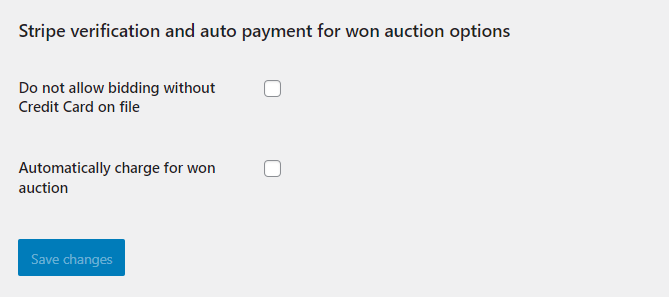
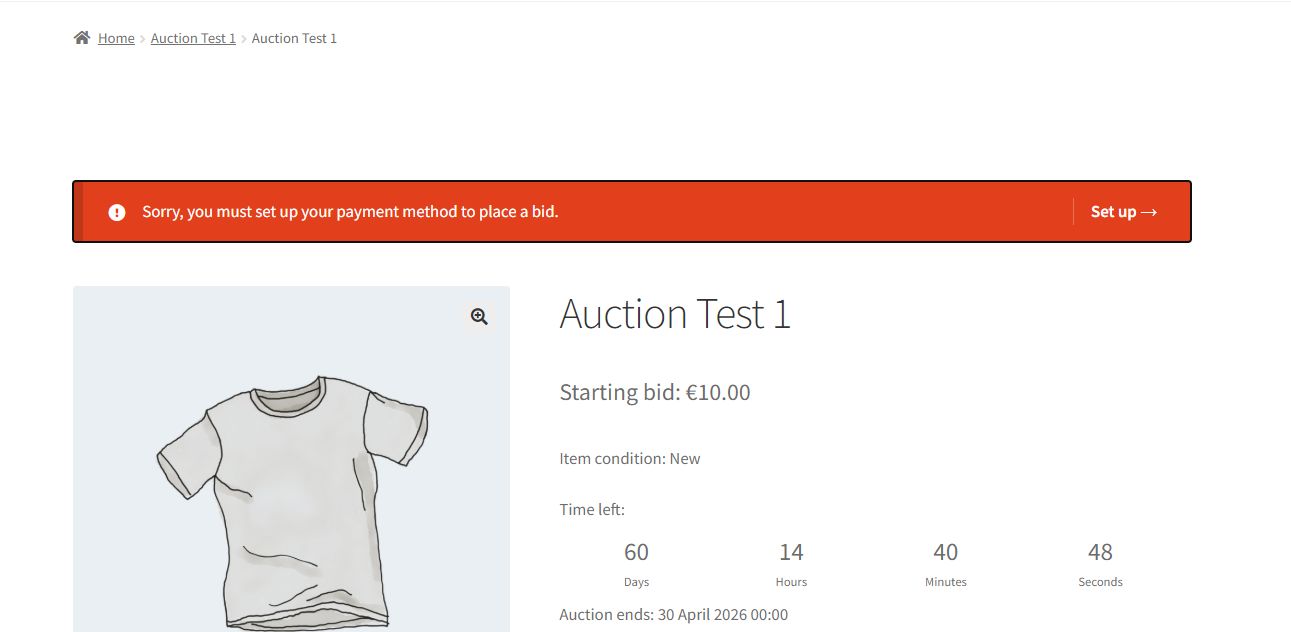
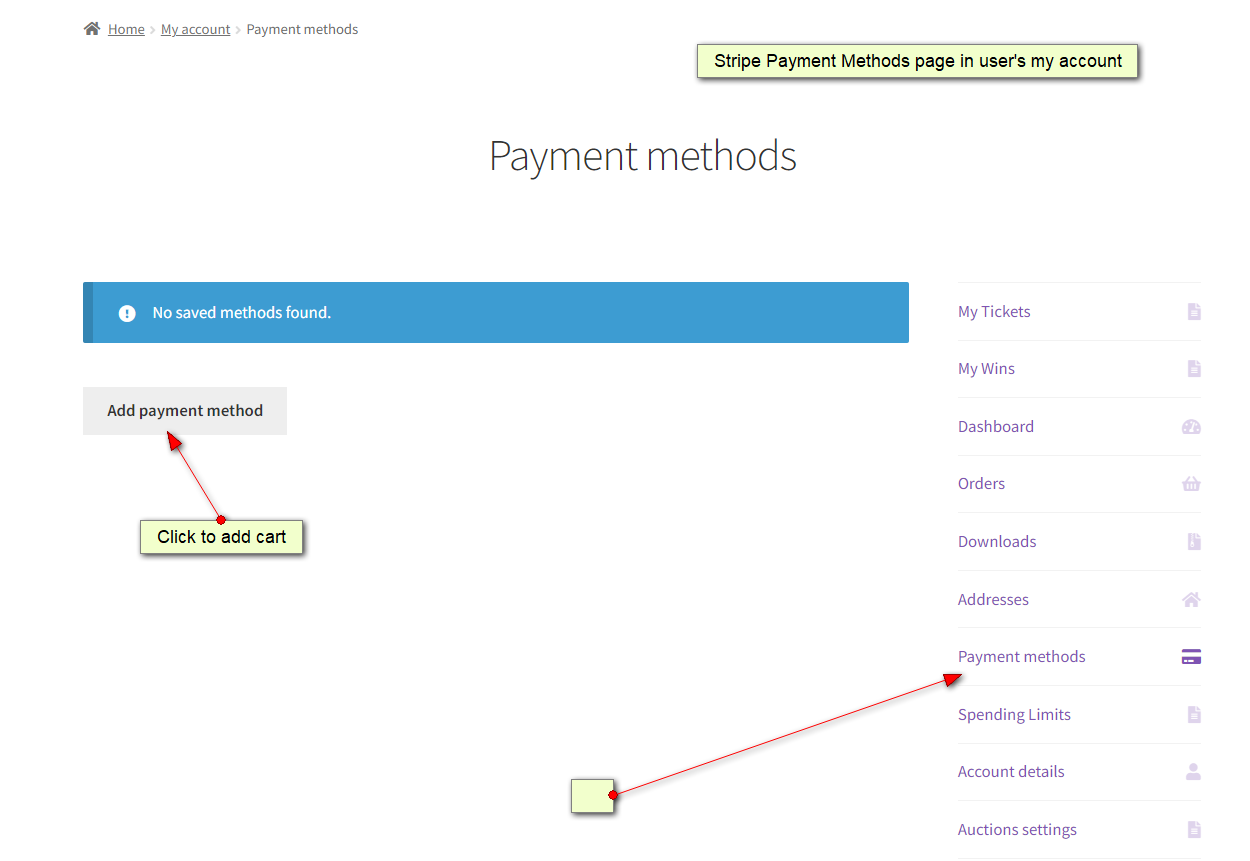
Hello! Pre-purchase question, when the setting for “Do not allow bidding without Credit Card on file” is active and the user wants to bid without credit card on file, how does the alert for the user look like? Is there any demo with this setting active? I tried the listed demo but couldn’t find an auction with the credit card needed setting active.
Hi,
first of all this works with Stripe payment gateway and you have to install it.
Then in settings you need to enable https://storage.wpgenie.org/scrn/screen-46113281602.png in Woo Settings > Auctions tab.
In frontend you get this – https://storage.wpgenie.org/scrn/screen-46219281902.jpg
Also https://storage.wpgenie.org/scrn/screen-46345281902.png
regards

Subject: +/− buttons increment not aligned with configured “min bid increment”
Hello, I am using your auction plugin on WooCommerce (product template built with Elementor) and I am experiencing an inconsistency between the configured bid increment and the increment shown in the bid input field.
Scenario / Settings
In the backend I set minimum bid increment = 100€ (example).
Current behavior
On the auction/product page, the “+” and “−” buttons next to the bid field always increase/decrease the value by 1€ (step=1).
However, when the user submits the bid by clicking “Place bid”, the bid is correctly validated/applied with a 100€ increment.
Issue
From a UX perspective this is misleading: the user sees the value increase by 1€ when pressing “+”, but after submission the bid jumps by 100€. The difference is only visible after confirmation.
Expected behavior
The “+ / −” buttons (and the input step) should respect the increment configured in the backend (e.g. step=100), so that the displayed value matches the actual bid that will be submitted/accepted.
Could you please advise how to align the +/− step with the configured bid increment (setting, hook/filter, or JS fix)?
Hi,
we have sorted access to ticket system, please open ticket there and we will help you with these things (you need a bit of CSS and that will do it).
Bid increment explanined from our FAQ item no 3
How to increase bid step for bid increment value to be more than 1?
Bidding increment is done so you can bid in increments of 1, because otherwise if you set bid step of say 5, you would be able to bid 5, 10, 15… instead you can bid 7, 13, 22, etc since all of these are valid bids since they are 5+2, 5+5+3 etc and min bid increase condition is met.
Bid increment of 1 in bid form allows you to place any bid that satifies min bid increment condition + additional amount.
hello is this plugin still supported
Hi, yes, we support and regularly update plugin.
I had a question before purchasing Can this plugin be used with the woocommerce subscription plugin, so that users can only participate in a certain number of auctions by purchasing a subscription? In fact, the business plan is the sale of the company in the auction, not the payment for the auction won. For example, by purchasing a silver subscription, one can participate in 10 auctions
Hi,
out of the box not possible, but it can be custom coded.
regards
Questions before buying: How do I extend the time (date) after the auction ends? ( and product was NOT been sale) Is this automatic for the next 7 days, (for example)? or I have to manually adjust the date of the next auction?
You can relist auction with new dates.
Thanks but Is this automatic or do you have to change the dates manually? Because if manually it’s a lot of work
There is option for auto relist… from plugin documentation – ” Auctions that are sold (finished but not paid) and failed can be relisted (auto relist option called “relist if not paid after n hours”).”
I see thank you please let me know: it si avto realist work only if product not paid or also if not sale?
Not sold / not paid for both.
Thanks
Last question; What happens to the stock when selling? Is the stock automatically released and the product ‘comes’ into ‘Proceed’? Thank you 2. and what about the warranty? Can you help if I can’t activate the plugin?
Each auction has stock 1. If auction is won and paid stock becomes 0.
We support our clients and in case of problems we can install plugin for you and setup example auction where you can see how it works.
If you can will be great Thanks
I go to pay now and if some problem I ask you for support
Sure, were are here to help.
I found one problem if I click on Auction setting – My account doesn’t work (link to 404 page )? and 2nd Where I can find Email of messages ( I need add my language) Thanks
Please open ticket for support inquries here https://wpgenie.org/support/
I can not open ticket as for purchase code 0df785cc-043d-40bb-ad7d- but do not accept ??
Please drop us email at info@wpgenie.org and we will sort your access to support.
Hi WPGenie team, We’re building a multivendor auction website and are considering your Simple Auctions plugin. Before purchasing, could you please confirm whether it works with the free version of WC Vendors? If not, does it support any other free multivendor marketplace plugins like Dokan Lite or WCFM Marketplace?
Also, one more thing — would it be possible to restrict vendors from adding any product types other than auctions? We’d like to ensure that vendors can only list auction items, not standard WooCommerce products.
Thanks in advance for your guidance!
Hi,
Yes, WC Vendors supports the WooCommerce Simple Auctions plugin through a dedicated integration add-on.
The product is called WC Vendors WooCommerce Simple Auctions (or sometimes WC Vendors Pro Simple Auctions).
Dokan and WCFM are also supported.
Hi, thanks for the clarification earlier. Just to be sure before purchasing, could you please confirm that we’ll need the following components to build the multivendor auction site:
(i) WooCommerce Simple Auctions (this plugin)
(ii) WC Vendors Marketplace (free or Pro)
(iii) A dedicated integration add-on — referred to as WC Vendors WooCommerce Simple Auctions or WC Vendors Pro Simple Auctions
I initially assumed this integration plugin was bundled or listed here on CodeCanyon, but I couldn’t find a separate listing for it. Could you kindly confirm:
a. Where can we get the integration add-on (a direct link would be helpful)?
b. Is it free and bundled with this plugin, or does it require a separate purchase?
Thanks again for your support — we’re excited to move forward once this is clarified.
WC Vendors Marketplace PRO probably has integration included, but that part (integration) was done not by us but by WC Vendors developers, so please for all details drop them email.
Is there an option for users having ot be logged in first or be forced to create an account first before making any bids?
Yes, you can’t make bid without account and being logged in. You can test that here https://wpgenie.org/woocommerce-simple-auctions/product/oaxaca-mexico-wood-carved-painted-animal-signed-arsenio-morales-2/
Hi, i have a WooCommerce site that sells a magazine. However, I’d like to know if I can share bids for an item that I don’t have to sell directly, as it will go to charity. Basically, I just need to manage the bids and find out, after a certain amount of time, who the winner is. Is that possible?
Thanks!
Hello, can you please drop us email at info@wpgenie.org
I was checking WooCommerce endpoints and while there is one for Auction settings, there isn’t one for listing a user’s auction activities. I see there are these other auction endpoints in the demo so I’m curious how to access them.
We have replied to your ticket since we do not provide support via comments here.
Not sure how this slipped my mind but will do as soon as I get a password reset e-mail from your site.
In case you don’t please contact us via email and we will sort your access.
Hi there, is it possible to add a countdown on products/shop page? I would like to display that already on that page for each product, not only inside de single product.
Hello, yes, replied to your email.
Has a method been created to connect WordPress Simple Auctions to google merchant?
Any tool that works with WooCommerce for such purpose will work with Simple Auctions too.
what happens when the winning bidder doesn’t pay for the product or place an order, and just leaves it as is?
Hi,
from FAQ:
What happens if winner does not want to pay for auction? – You can delete that winning bid and next highest bidder will be winner and will see pay now button for auction. There is auto relist option that can relist auction: “Relist if not paid after n hours”.
What happens when you manually delete winner (winning bid) and want next highest bidder to become winner? Is email automatically sent? When current highest bidder does not pay and you delete winning bid, mails are not sent automatically to the next highest bidder / winner. You would have to manually contact next higest bidder / winner and send auction url where they can see pay now button and make payment.
We’re currently experiencing a performance issue on our site where certain SQL queries generated by the Simple Auctions plugin appear to be causing timeouts. Our hosting provider (Cloudways) has advised that these queries are getting stuck due to the volume of rows in the database, and that the plugin may not be optimized for handling such a large dataset.
Could you please confirm whether the plugin has any known limitations when it comes to handling large volumes of auction products or if there are optimizations we can implement on our end to improve performance?
Hello, there are no limitations of any kind, and we can only offer you to open ticket and that we sort your hosting and setup it properly.
Depending on your cloudways plan it probably hit some of limits set on their end (probably cpu time). We have worked on and seen clients sites which handle hundreds of acounts and hundreds of concurrent bidders without any issues.
since update, i got getting error. if we put 1000 usd increment, it only increase by 1
and if we use ibid theme, the + and – sign does not work
not accesible due to no active support and we purchase via code canyon thus no purchase avaible on your website
When you have active CodeCanyon support it will work.
purchased support and still cannot open ticket
where can we get older version 3.0.4 ?
Hi, you can open ticket here https://wpgenie.org/support/ and we can send you in ticket.
not accesible due to no active support. any other way, you can send us
You will need to renew support, no other way.
purchased support and still cannot open ticket
Please drop us email at info@wpgenie.org
email sent.
Have there been any issues with Bid increments within the last 2 versions? I checked the change log but didn’t see anything listed there. Our product settings are set at $10 bid increments but people can do single dollar amounts.
Hi, no, this must be something related to your website. Please open ticket here https://wpgenie.org/support
The plugin seems to have a bud, since the new update, the – and + on bid has stop working? is it caused by theme or plugin itself?
Hello, please open ticket here https://wpgenie.org/support/ and we will check the probem.
unable to open ticket, it say, cookie failed
Hello, one after-sales question: Is it compatible with WP 6.7.2 version and with Woocommerce 9.4.3 version? Thanks.
Hi, yes, all our plugins are compatible with all latest versions of WordPress and WooCommerce.
How do we use the assets folder from the Evanto download? Theres a csv file and a bunch of other stuff outside of the core plugin zip.
Hello, please check https://wpgenie.org/woocommerce-simple-auctions/documentation/#installation
HI, I am looking at youyr plugin, looks great just wondering if the currency can be changed, the layout / syyling and if we can change the fields of items listed. The demo site is a little plain and not sure how much it can be changed. Is it very customisable?
Hi, yes currency can be changed in WooCommerce settings. Everything can be customized and modified, plugins work with Elementor so you can really make your auction website custom.