8473 comments found.

Not sure if this is since WP7 but for the first time ever JIG doesn’t load thumbnails until you clear caches and refresh, then when they do load, hovering over with the mouse causes them to disappear and dance around the page.
Can you send me a link to where that happens please?
DM sent
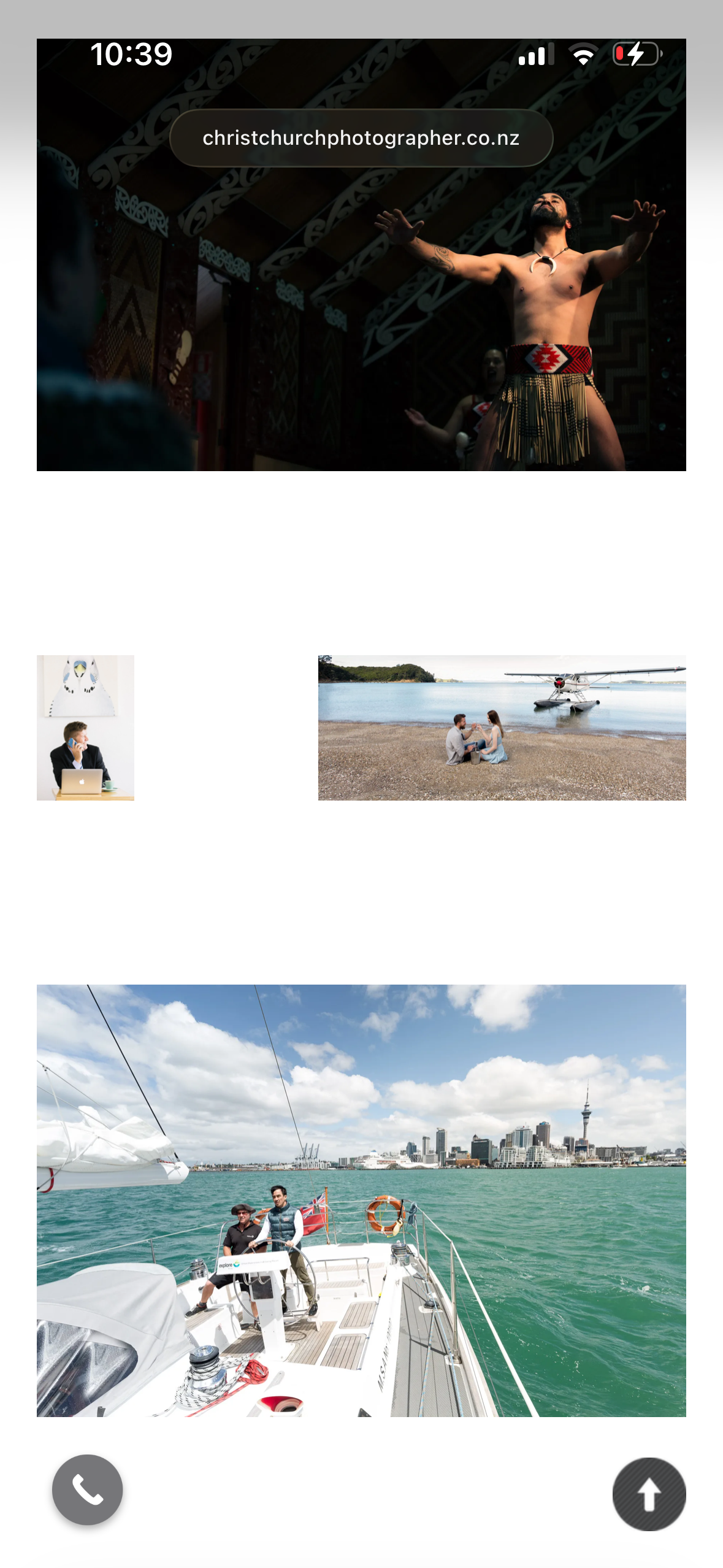
Hello again. As usual thanks for the best gallery plugin. I’m having issues with cropping go images on mobile after increasing the spacing between images.
I mean hard cropping. Any idea how to remedy this please so all images are displayed as intended? It’s pretty vital given I’m a working photographer!
Screenshot: http://christchurchphotographer.co.nz/wp-content/uploads/2026/04/IMG_3430.png
Website: http://christchurchphotographer.co.nz
Many many thanks!
-Sky
I’ve fixed it. Set target row height to 1000 and Row height max deviation (+-) to 100 and sae for mobile. Worked a treat. Thanks man!
The “disable cropping” setting will make that row height go down to 50 if it needs to. Yes, large spacing between thumbs reduces available space, normally resulting in more crop.
Hi
First of thank for this amazing software. I am using it on two websites and it helps me a lot.
I have an issue on ONE of the websites.
Although the photos are in high quality in the Media Library on the website the plugin shows them at a low quality in the front end.
On the second site with a similar set up shows them in high quality in the front end.
I am using the same short code code on both websites
[justified_image_grid preset=3 rml_id=.... mobile_caption=off caption=off rml_description=no disable_cropping=yes mobile_height_deviation=600 mobile_row_height=600]
Yet here I see high quality images
https://www.edumont.ro/albume-foto/poze-din-tura-de-iarna-pe-varful-omu-prin-hornurile-malaiesti-21-martie-2026/#! and here https://www.letsdance.ro/poze-cu-elevii-nostri-la-finalurile-de-curs-de-la-inceputul-lui-2026/#!I see low quality ones
How do I fix this?
Hi, both sites show equal-quality thumbnails for me. When viewed on a 200% dpi-scaled 4K screen their resolution is 620×620 (310 normal size) at 45% quality which is correct, but only when scaled (would be 90% at normal size). Can you share what is your definition of “quality”? Pixelation, low res, artifacts, bad color, or what exactly are you seeing?
There seems to be a new problem with PhotoSwipe 4 and Flickr Photos. The Flickr images show on the album on the page but an error of “The image could not be loaded.” where the photo should be in the lightbox. “The image” is a link to the flickr photo and that links works. It is not consistent as some images load on the desktop but not on mobile. When I turn off the lightbox and open the image in a new tab, the image loads correctly.
Please share a link to where this happens. Perhaps it has something to do with the photo itself. These work for me: https://justifiedgrid.com/sources/flickr/gallery/
That error in PhotoSwipe happens when it doesn’t detect it as a valid image, as far as I know, when passing it a video.
On mobile, do you use the same lightbox as well?
It seems to have resolved itself. The error no longer occurs. Nothing has changed on my site or with the images on Flickr.
I do use PhotoSwipe for desktop and mobile.
The problem has occurred again.
https://maconhockey.photos/mayhem/25-26/knoxville-vs-macon-03-27-26/Not sure if this is related but when I upload to Flickr, the uploader hangs near the end but the images are uploaded.
In the amount of time that it took me to write this, the images are working now. I assume that there should be no issues as soon as I upload the images to Flickr. It seems as thought there may be a delay before PhotoSwipe acknowledges that the images are valid.
It may be a caching problem. There is an internal cache in JIG for Flickr, which is seen as the “Flickr caching time” setting, with its corresponding purge option. Or another thing I could think of is that just freshly after uploading, Flickr was busy creating the transcoded or encoded image sizes to be propagated on its CDN, and the image files might not yet have existed at that point yet? All photos load fine in the lightbox for me too, btw.
I am having the trouble again. This time the photos have been uploaded for about a week. The photos work fine on desktop and mobile firefox, desktop chrome but not on mobile chrome. It also doesn’t work in the facebook mobile browser.
https://maconhockey.photos/?s=staff#!jig[1]/FL/55183418207I have manually cleared the flickr cache when troubleshooting and it has not helped now or in the past.
After trying a lot of things. I found that if I change the flickr setting for “Look for and allow hi-res photos” from “Yes and allow even the original image, if available.” to “Yes, look for image versions 1600px or 2048px.” then the issue goes away. The problem with this is I want to allow full resolution photos, at least for the download link option.
I did not forget, but this required more thorough investigation. I’ve found that some of your photos have the originals at a very high resolution: Original (5472 × 3648) which is not a problem when the browser is desktop, but it depends on how the browser implements image rendering (viewing the image on its own vs in an img tag in a page). Given that it’s part of a lightbox, the image renders as a GPU texture meaning the whole decoded image needs to fit in the memory (it’s not like a tiled panorma) running into limits on certain mobile browsers/devices.
It’ll be interesting to see if newer versions of Photoswipe render it differently, perhaps with a tiled renderer or something fast.
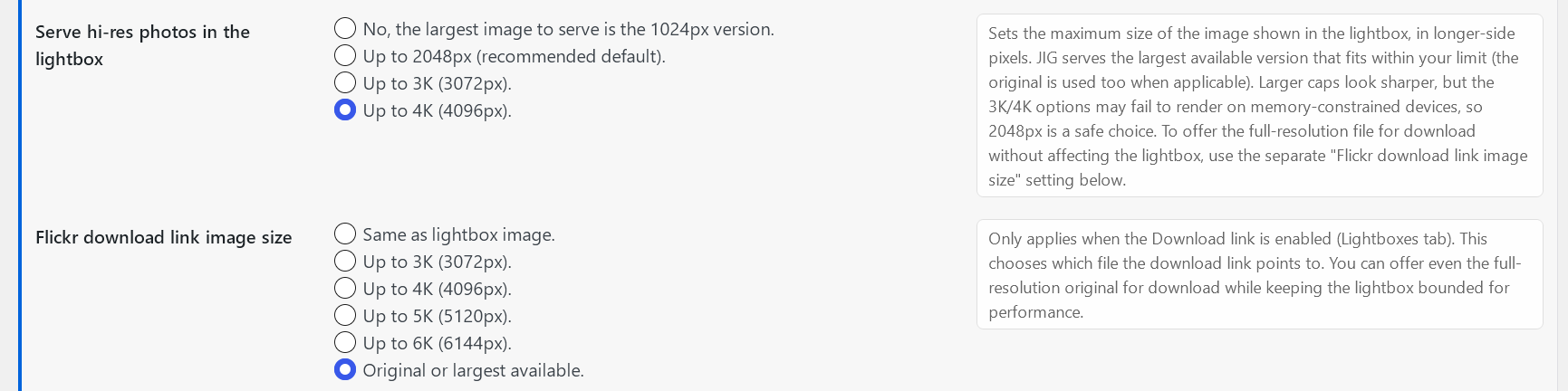
You are right that for display a smaller but still reasonably large image would suffice in the lightbox, while you want to still allow downloading the original, and these need to be separate choices. So I’m introducing 2 new changes: For the lightbox you’ll have an “Up to 3K” and an “Up to 4K” option, as well as a new setting that directs just the downloadable size (if the Download link is ON) to be “Same as lightbox” (how it was by default) + 3K/4K/5K/6K ladder + “Original or largest available.”
Same thing as it happens in WP media library (it also doesn’t “like” overly large photos) AND the word “original” means different things to people. A photographer who fully wants to retain rights to the original resolution might keep that under lock and key in Lightroom (and calls it raw), and by their definition, an “original” may be a watermarked, processed, 2.5K image and even that would not be downloadable. So some people upload pre-optimized images and those become the “original” on platforms.
So, the new version (still WIP) will carry these changelog entries among other, even Flickr-related things, based on your inputs:
- New setting, “Flickr download link image size” to offer even the full-resolution original separately for just download while keeping the lightbox bounded for performance.
- Flickr source’s setting that controls what resolution image to serve in the lightbox has gained 3K/4K options (which may still cover the original size). However, the setting lost the dedicated “original” option, as oversized Flickr photos failed to render in the lightbox on some mobile browsers when “original image” mode was enabled. Attempting to serve 2048px versions in the lightbox is the new recommended default (no change for existing installations, except the old original option now means 4K).
You can receive it as beta to install right now, if you ask me for a link privately through my profile’s contact form.
Amazing work!
I have slowly been trying different things to see if I could figure out what caused the “original” image problems. I was starting to think that Flickr was limiting original size images on my api account but I am no where near the advertised limits.
The problem was occurring more often and the only fix was to change the image size like previously mentioned.
The download original size link is the perfect solution. It allows the page to load fast and the original can still be obtained on the same lightbox.
Please allow us to set the text for the link to download the original size in the admin settings.
Thank you again for figuring this out.
Flickr limits size access for non-Pro accounts. If the target profile you add to JIG has Pro, even if you don’t, you can get up to original just fine. I don’t personally have pro but have been able to pull customers’ high res images while testing.
The text for the download link has always been configurable on the Lightboxes tab: “Text for the download link”.
The new/modified settings look like this: https://i.justifiedgrid.com/tg7btn.png (available privately in the beta).
I’m also adding new code right now that will pull and display thumbnails in appropriate smaller sizes straight from Flickr, letting you disable TimThumb. (Previously/currently it served lightbox-sized images as thumbnails, with that off, making it suboptimal to do so.)
Hello, nextGEN Gallery is now rebranded to Imagely. The old shordcodes, like [nggallery id=x] still work with JIG, but not the new ones, which the plugin automatically generates, like [imagely id=”x”]. We can still use the old shortcode form for the new galleries, but I suggest you to also add the new shortcodes to work with JIG if it is possible. You can find more information here: https://www.imagely.com/knowledge-base/imagely-shortcodes/
Hello, I’m aware and can send you the latest beta right away. Contact me from my profile for the link.
Hi there! I currently have an image grid set up with the filtering buttons activated. Is there a way to link to the different filtered grids using a URL?
IE: I want the Main Portfolio filter to be active when users go to the page on our website, but I also would like to be able to have a link that directly activates a different filter option, like Barn Weddings, while still having all the other filters there for them to look through and switch to. I don’t want a separate web page for each sub-category but I want people to be able to see only the Barn Weddings in our portfolio directly from an external link. I couldn’t tell from the documentation if this is possible or not, thank you if I’m just missing it!
What you describe is filtering deeplinking. I started working on it a few years ago but paused due to complexity with multi-level filters. It all depends on how simple you want it to be and how it should look like in the URL bar. /your-gallery-page/#barn-weddings would be the simplest, but this doesn’t take into account other #targets that might appear on your site (by other plugins, themes, some try to catch it and scroll to that “element” right away – missing it would throw an error, etc), if you use the second level of filtering, multiple filters at the same time, multiple JIGs on the same page (which one to filter), etc. So when I think about implementing it properly, there are lot of variables, but I could do something simple for you as a custom script that does just what you need and nothing else.
Loading a filter by default is done by turning off the “All” button, so the grid has no choice but to active the first category button.
Oh, yes I would love to talk more about that! What’s the best way to connect?
Let’s pick up the thread through the contact form on my profile please.
JIG has stopped loading on my site. If you’re logged in as admin it displays an error block with a link to troubleshoot the issue but this takes you to the justifiedgrid.com website which is failing to load and instead downloads an extensionless file – has JIG been hacked?
Hi, please send me a link to where this happens on your site. On JIG site, it’s just a caching plugin problem after I’ve moved the server, nothing has been hacked. I’m working on it.
https://justifiedgrid.com/support/fix/#all-of-the-images-have-failed-to-load It loads like this.can you help me reset my license
Done!
Hello, I have a folder set up in JIG Gallery, with 6 subfolders in which I place images. All images are displayed on the website at the same time, but they are sorted by category and from newest to oldest.
I would like them to now all be sorted at the same time from newest to oldest regardless of subfolder.
I’m confused about how to set it up.
Hello, what kind of solution do you use to put images into folders? That directs how to handle that with JIG.
I assume you have “Flatten hierarchy” in RML tab of JIG. Then you’d use the “Order by” on the General tab to take over whatever comes from RML. If it still still visually segments the overall gallery then you could have found a bug.
my shordcode grid Photogallery:
[justified_image_grid preset=16 gallery=21 link_title_field=off img_alt_field=caption photoswipe_theme=dark photoswipe_zoom=no prettyphoto_analytics=no download_link=no caption=off mobile_caption=same lightbox=magnific lightbox_max_size=full quality=100 orderby=menu_order load_more=click load_more_text=”Načíst další fotografie” load_more_count_text=count load_more_limit=58 rml_id=3,8,9,10,6,5,4,2 rml_flatten=contents]
I sent a question to support via email.
How do I use the “lightbox custom field”? I have the title but I’m trying to add the description and date that the photo was taken below the title. Is that possible? https://speleo.is/borgarhellir/#!jig[1]/ML/868
Would the date information be extracted from EXIF? Do you use other plugins such as MLA Media Library Assistant to enrich the media library?
Description is a selectable field, but some custom code would be needed to include data that is not readily available. There are various ways and I’ll help you out.
Yes, the date should be from the EXIF information. I’m currently not using MLA, but it looks like a very powerful plugin.
There is very little documentation on how to use “lightbox custom field”. Any assistance would be appriceated.
If we prefer to avoid custom code for extracting the EXIF, and since MLA does it well, using this feature: “IPTC, EXIF (including GPS), XMP and PDF metadata can be assigned to standard WordPress fields, taxonomy terms and custom fields.” then please install that too. It’ll be the one that creates a custom field, that you can supply to JIG.
WP has 4 built-in fields but you are not limited to these. The lightboxes often have 2 slots to display text in. When you supply a field name to the custom field setting, you have a 5th thing to place in any of the lightbox slots. With some custom code any of these can be combined so you will be able to display the title in one slot, then Desc+EXIF in the other.
Here is more info from the MLA side: https://davidlingren.com/assets/MLA-Metadata-Mapping.pdf
If you don’t wish to dive so deep I can help set it up, contact me from my profile, I’ll need to log in for that.
Hi, I love your plugin, though recently I got some errors reported by wordpress:
Deprecated: JustifiedImageGrid::jig_take_over_rml_shortcode(): Optional parameter $output declared before required parameter $attr is implicitly treated as a required parameter in /home//public_html/wp-content/plugins/justified-image-grid/justified-image-grid-core.php on line 8424
Deprecated: JustifiedImageGrid::jig_ng_image_search(): Optional parameter $order_by declared before required parameter $limit is implicitly treated as a required parameter in /home//public_html/wp-content/plugins/justified-image-grid/justified-image-grid-core.php on line 18672
Deprecated: JustifiedImageGrid::jig_ng_image_search(): Optional parameter $order_dir declared before required parameter $limit is implicitly treated as a required parameter in /home//public_html/wp-content/plugins/justified-image-grid/justified-image-grid-core.php on line 18672
Deprecated: Creation of dynamic property JustifiedImageGrid::$defaults is deprecated in /home//public_html/wp-content/plugins/justified-image-grid/justified-image-grid-core.php on line 12
Deprecated: Creation of dynamic property JustifiedImageGrid::$presets is deprecated in /home//public_html/wp-content/plugins/justified-image-grid/justified-image-grid-core.php on line 370
Deprecated: Creation of dynamic property JustifiedImageGrid::$custom_presets is deprecated in /home//public_html/wp-content/plugins/justified-image-grid/justified-image-grid-core.php on line 664
Deprecated: Creation of dynamic property JustifiedImageGrid::$default_settings is deprecated in /home//public_html/wp-content/plugins/justified-image-grid/justified-image-grid-core.php on line 666
Deprecated: Creation of dynamic property JustifiedImageGrid::$settings is deprecated in /home//public_html/wp-content/plugins/justified-image-grid/justified-image-grid-core.php on line 667
Deprecated: Creation of dynamic property JustifiedImageGrid::$settings_default_flexible is deprecated in /home//public_html/wp-content/plugins/justified-image-grid/justified-image-grid-core.php on line 670
Deprecated: Creation of dynamic property JustifiedImageGrid::$settings_protected is deprecated in /home//public_html/wp-content/plugins/justified-image-grid/justified-image-grid-core.php on line 808
Deprecated: Creation of dynamic property JustifiedImageGrid::$settings_default_override is deprecated in /home//public_html/wp-content/plugins/justified-image-grid/justified-image-grid-core.php on line 864
Deprecated: Creation of dynamic property JustifiedImageGrid::$settings_default_public is deprecated in /home//public_html/wp-content/plugins/justified-image-grid/justified-image-grid-core.php on line 865
Deprecated: Creation of dynamic property JustifiedImageGrid::$settings_override is deprecated in /home//public_html/wp-content/plugins/justified-image-grid/justified-image-grid-core.php on line 873
Deprecated: Creation of dynamic property JustifiedImageGrid::$settings_for_JS is deprecated in /home//public_html/wp-content/plugins/justified-image-grid/justified-image-grid-core.php on line 898
Deprecated: Creation of dynamic property JustifiedImageGrid::$class_for_noscript_img is deprecated in /home/*/public_html/wp-content/plugins/justified-image-grid/justified-image-grid-core.php on line 1036
I use 3.9.7 version.
best Piotr
Hello that’s a five-year-old version. Please update the plugin and you will see all of these errors being gone.
https://justifiedgrid.com/support/changelog-update-history/Hi, you are right! OMG, I don’t know how it happens, but I still had 3.9.7. I have envato plugin active, I regulary do all updates and for some reason JIG didn’t report it has newer version. Downloaded, installed, works! 
Using v4.8. 503 error when clicking image “Download” link. Error message: “Failed to retrieve the file”. Same error while using v4.7, where problem seemed to occur just after upgrading WP to v6.9. My WP site is hosted by Siteground.
That functionality was not affected by the update itself. Please send me the link to the site so I can take a look, it could be a number of other conflicts as it’s a server-side downloader not a HTML link-attribute-based one to keep it universal.
Thanks so much Firsh for quickly tracing this to a problem with the hosting site. Great plugin!
when will photoswipe be upgraded to v5?
I’ll likely add it next to v4, because v5 lacks the extra features such as deeplinking and social sharing. Therefore it would not be a default lightbox option (it’s a very light implementation of the same idea). I could add it to the next version if no significant incompatibility or barriers exist.
I am getting this error Invalid appsecret_proof provided in the API argument when I try to show Facebook page photos.
Does your app type align with the intended use, meaning business or consumer? Business is for pages, Consumer is for personal profiles. App ID and Secret, and the Type all need to be filled out correctly, then the page saved before adding a page or showing content from it.
It was an old app so it the App Type selection was “None”. I tried to create a new business page app but it gives this error Your app has standard access to public_profile. To use Facebook Login for Business, switch public_profile to advanced access.
It’s ok I got it working
Hello! I have just purchased your plugin, moving from Visual Portfolio. However, I have ecperinced a huge setback: while using SiteGround’s Lazy Load function, the galerry grid does not display at all. Some ideas?
It has its own lazy load solution as part of Load More with infinite scroll.
For the last few days, the gallery has been hidden. I can see the gallery loaded by inspecting the code, but it doesn’t show up!
Send me a link please to where this happens.
Hello, can you please reset my licence please ? We have removed the www. in the url of our website, and now it says we need to reset.
Done! It’s no longer tied to beprovence
Hi, I have a gallery with over 250 images, but JIG is displaying 200 images on my site. Is there a limit to the number of images per gallery? Thank you !
There are some meaningful default limits, it varies on the content source. If you set the limit setting to a higher value (it’s empty by default) than what’s seen it might unlock more than what’s shown currently.
Hi, I need to replace the grid plugin I currently use, but before I try this one I have some questions.
1. I have single rows of portrait images on several pages that need a text overlay and a link to another page – is it possible to style the text overlay or do this with css?
2. How can I ensure the images remain consistent across pages regardless of how many in the row? ie 2 images should have the same aspect ratio/size as 4.
3. is it possible to centre the grid of 2 images, with the same margin between as 4 images for example?
Thanks!
The text overlay can be styled with both settings and CSS. Links in them are not recommended because the entire thumbnail is already a link (that would spawn a “link in a link” scenario), but if you choose “caption below thumbnails” layout then it’s fine. Links to another page would usually be placed inside the caption that appears in the lightbox or skip the lightbox altogether and use a custom link on the images-
You can narrow the flexibility of the grid or force a specific aspect ratio. But the overall layout is automatic and is uniquely generated by gallery constituents. Usually the last row can appear to have a life of its own, and there is a setting that targets that with multiple useful behaviors. E.g. in a gallery of 6, if you had a full row of 4 images, the next “orphan” row would show 2, there would be a difference by default, but you can set that row to try to match the previous, as long as aspect ratios are similar. Or if row height is fixed with no deviation, the grid will have no choice but to display them at the same height. So there are multiple angles to try.
The thumbnail spacing is a fixed pixel value that gets used regardless of the amount of images in the grid. If the images in the gallery don’t fill a complete row, you can use the “incomplete last row” setting to center what’s in it. Other than that the grid takes up all the space it can, as allocated to it via your theme/builder (such as boxed layouts, full width sections, etc, and that’s also where margins usually come from, but you can add some in JIG settings as well “margin around gallery” which is just a CSS passthrough).
Thank you for your reply, I ended up buying it a few weeks ago due to deadline and it’s great, does what I need
GLWS
Thanks! I wasn’t expecting that after 13 years.