6048 comments found.

Can the embed code block be used to add php?
I have 2 problems that is either overlooked or broken in the current form version. Firstly, with the woocommerce integration enabled, the plugin adds the variable product to cart on submission. This part works fine. However, if the user edits their quote, the updated price is not updated in the cart. Second, if the user returns to their edited quote after their session has ended, saving the form does not add the quote to the cart. Eform does not reconnect to woocommerce from the edited form, which means there is no way to complete the purchase online unless they complete the purchase in the initial session.
Hello,
Apologies for the delay. Unfortunately, this type of workflow is not supported at the moment.
its possible to make a submission pending and then sending payment link after confirm it?
Hello,
At this time, this process cannot be automated and requires manual handling. Let me know if you have further queries.
Thank you!
Hello!
I’ve been using eForm for a few years on a previous project and was totally satisfied with it.
I’m now working with a new client who runs a vehicle rental business (SUVs, vans, and trucks — for transporting people, animals, or equipment).
I’d like to know if it’s technically possible to create the following kind of booking catalog using eForm:
Display a catalog of vehicles with photos and details.
Let users fill in a form with their specific criteria: • Dates • Transport type (People / Equipment / Both) • Luggage • Ski or other special equipment • Children on board (yes/no) • Sick persons on board (yes/no) • Special event (wedding, etc.) — optional but could trigger some extras (e.g., champagne on board) • Flight or train number (informational only, not part of the calculation)
Based on the user’s input, the system should display available vehicles that match those criteria, and allow the user to pay online to confirm the booking.
Could eForm handle this type of conditional logic and output (showing filtered vehicles + payment), or would you recommend an integration or add-on to achieve this?Thanks in advance for your help and insights!
Hello,
Thank you for sharing the detailed requirements. Based on my review, this can be achieved for a small number of vehicles using conditional logic. However, it may cause issues if the number of vehicles is large.
What is the total number of vehicles you’re aiming for?
Thank you Bmahesh for your answer. So it’s for 10 vehicules and a progression to 20 but never more. Do you think it can fit ?
Hello,
I believe it shouldn’t cause any major issues for this number of vehicles, although we would need to verify it with the actual implementation.
Let me know if you have further queries.
Thank you!
Btw, does your add-on offers functionality to save user summited files in my cloud service?
Thank you.
Hello,
Apologies for the delay. The add-on bundle will be available in the package you download from Envato. Unfortunately, we do not offer a feature to save submissions directly to cloud services. However, you can send submissions to cloud services using eForm’s custom integration.
Let us know if you have any further questions.
Do this plugin support multisite network?That is, with one WordPress and this plugin installation, the sites owner can run multiple websites with different domain names And the content of each domain website can be completely different. If supported, what is the entire operation process and sequence?
Hello,
Apologize for the delay. Yes, our plugin is multisite compatible with few limitation. Please check more information here in https://eform.live/eform-easysubmission/installation-updation-eform-easysubmission/wordpress-multisite-installation-3/
Let us know if you have further queries.
Thank you!
Does it support Divi Builder?
Hello, I need to build a form where the user can add multiple nominees. There will be two fields – one will be “Relation with Applicant”, which will be a drop-down menu, another field will be “Name of Nominee”, which will be a text field. There will be a button with “plus” sign, next to the “Name of Nominee” field. Clicking the “plus” button will keep allowing the user to add multiple nominees. Can I be able to build like that with your plugin? If so, how? Also, is there a way to show a print/download button on form submission where user will be able to print/download their form response?
Hello,
Apologies for the delay. This functionality is certainly supported by our plugin. You can review an example here: https://eform.live/examples/#efl-ex-form-43
It’s also possible to print or download the responses submitted by users.
Please let us know if you have any further questions.
Thank you!
Can we make the “Print” or “Download” option available for the user? As per my requirement, the user will submit the form and will get a print out of the confirmation page. The confirmation page should be customisable with dynamic fields from the form.
Hello,
Yes, users can download the submitted data as a PDF, which can then be printed as needed. Please let me know if you have any further questions.
Thank you!
Can we customize the PDF?
Hello,
You can customize which items appear in the summary table, but modifying the overall layout isn’t possible without altering the code.
Let me know if you have further queries.
Thank you!
can you show a screenshot of the form submission summary table?
Hello,
Please check the files here: https://www.transfernow.net/dl/20251117E7vtr6rM
You can also test this yourself using the following link: https://eform.live/examples/#efl-ex-form-29
Once you complete the submission, you’ll see options to Print and Download. Section in the downloaded PDF are manageable from the settings. Feel free to let me know if you have any further questions.
Thank you!
When using the tabbed version of a form it looks like there are accessibility issues being caught. Axe DevTools (plugin is available for Chrome or Firefox) currently says that the tabs have “interactive controls that must not be nested”. Those tabs get a tabindex of -1 but it doesn’t prevent focus on them.
Hello,
Thank you for pointing that out. We’ll review the accessibility issue with the tabbed form version and adjust the structure to ensure compliance. We’ll test it using Axe DevTools as well to confirm the fix.
It’s absolutely infuriating. There’s been no support for reCAPTCHA V3 for YEARS. Now many forms from paying customers are failing, or they’re complaining about excessive spam. Unbelievable!
Hello,
Apologize for the inconvenience caused. We are working on it and will available soon.
Thank you!
Feature Request: Serialize the form for Webhooks. Because a big form is complicated to ad all Form elements
“Send all Parameters” instead of add every parameter manually
Hello,
Thank you your suggestions. Definitely we will check the feasibility and implement the suggestion if possible.
Multi-Step Form: Data not clearing on “Back” button
Hello,
I have a 5-step form. When a user completes Step 4, goes to Step 5, and then clicks “Back” to go to Step 3, the data in Step 4 does not get cleared. It remains saved.
How can I make the form automatically clear all data in future steps (like Step 4) when the user navigates backward (like to Step 3)?
Thank you.
Hello,
Since this is stored/managed in the browser cache, it’s beyond the control of our plugin. Let me know if you have further queries.
I’m testing on the Eform demo page, trying to implement the “Download PDF” button on the following page,
how can it be used?
I’m trying to add PDF download and print buttons, but they don’t work
Video: https://jmp.sh/loaoPACi
Hello,
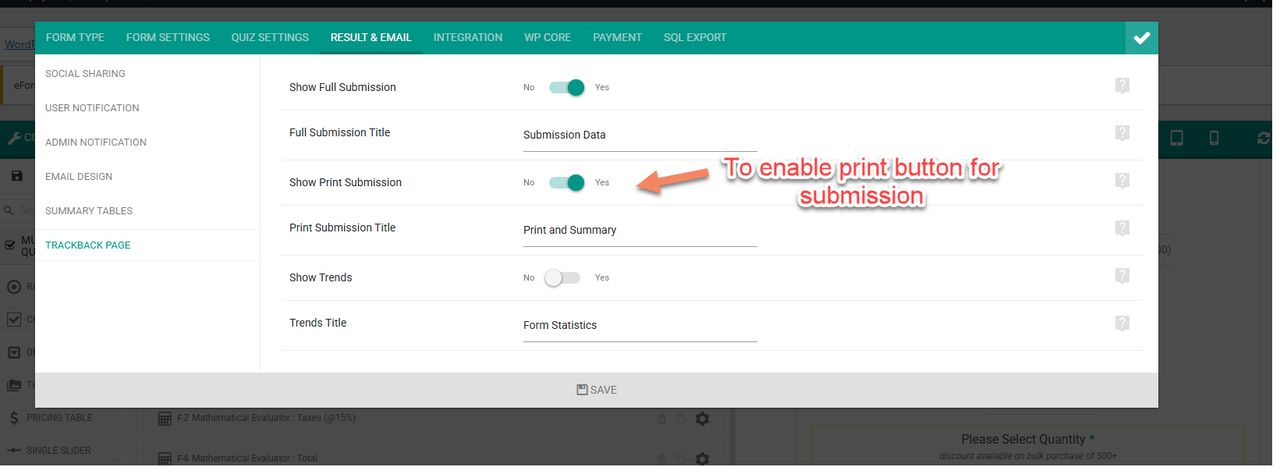
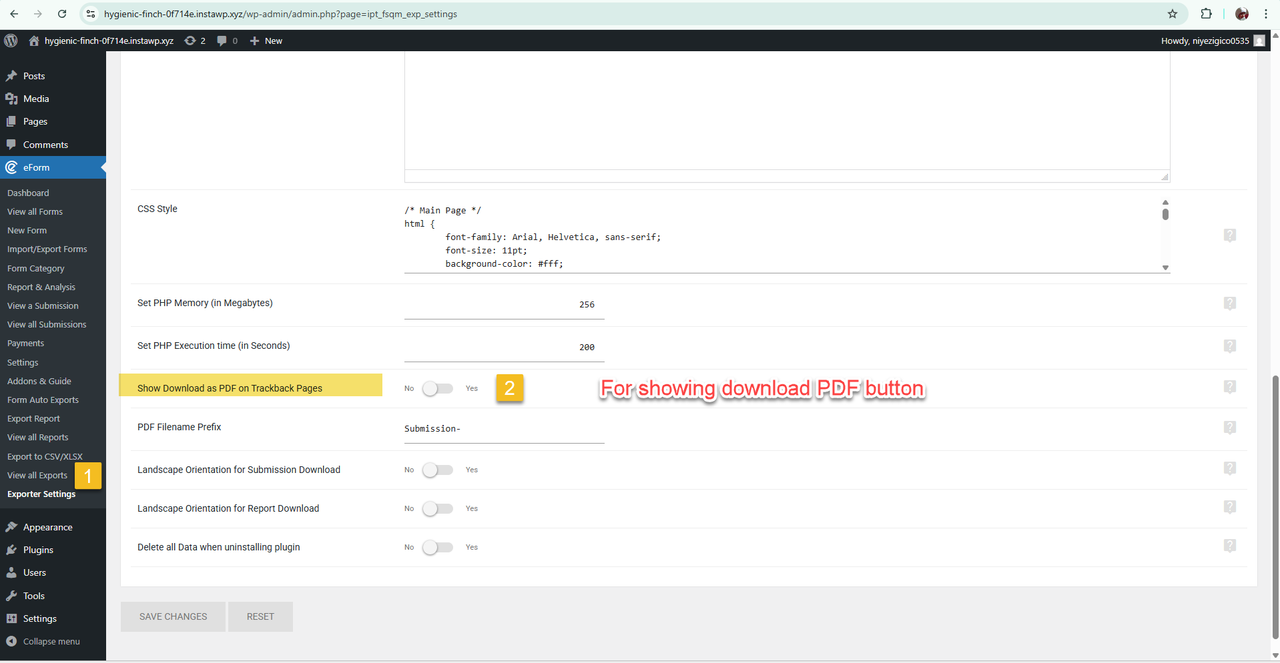
The Download PDF button (to download the submission in PDF format) can be enabled from the settings and will appear on the submission confirmation page.
For reference:
- Print button screenshot: https://i.postimg.cc/Yq4YM4MG/image.png
- PDF download screenshot: https://i.postimg.cc/T1KLdSMY/image.png
Please let me know if you were referring to something different.
I’m asking if users who answer the questionnaires can download their responses directly, with a simple button?
I’m asking if this can work as a quoting system for offering service
Hello,
Yes, user can download their responses as a PDF. Please see option to enable PDF download in this screenshot: https://i.postimg.cc/T1KLdSMY/image.png
Let me know if you have further queries.
Thank you!
My suppor expired 2 days agt, but I need to ask a last question on my last ticket: Private Ticket #4500890
Hello ?
Hi there,
If a user fills in a form that includes for example a delivery address for a package…is there a way for a user that wants to send another package at the same address to have the info at hand? Somehow be able to skip the part of filling all the same details again and again?
Hello,
This can be achieved by saving the details as user meta data; however, it requires making user registration mandatory. Here’s what we can do:
1. Require users to log in before submitting the form – You can enable this using the settings here: Limiting eForm submissions .
2. Save user details as user meta data – Refer to this guide: Update/Add User Meta in eForm .
3. Prefill user data – You can use the User Meta Values option as described here: Default Prefill & Readonly Values .
Please let me know if you have any further questions.
When forms come in they do not come in with the correct reply email, “from” comes in as wordpress@mydomain. I have all settings correct. : https://www.awesomescreenshot.com/image/56990277?key=296b0a729f78c143add17f80b68d9724 and https://www.awesomescreenshot.com/image/56990278?key=4e4f06aa3b18f7c78736a7f175f1ebf1
Hello,
To ensure proper email delivery, we use the “From” address based on your settings, but a “Sender” header is also added, which defaults to wordpress@yourdomain.com.
Depending on the email client (Gmail, Yahoo, Outlook, etc.), either the “From” or “Sender” header may be displayed.
Please try SMTP plugin (for example: Post SMTP) to configure the “From” address globally for your WordPress installation. This will automatically reflect in eForm email notifications as well.
Let me know if you have further queries.
Thank you!
My issue is that is works just fine with some forms but this one for some reason doesn’t. Meaning your logic of needing a plugin doesn’t make any sense when lets say for 14 comes in fine.
Hello,
Could you please share the form export code where it’s working, or provide the login details on our support forum?
Hey i finally dealing with this again and i no longer have support. However to be honest this is something i addressed years ago as a problem and i dont think it ever been resolved. Private Ticket #2775479 and Private Ticket #2754814 i really dont think i need to keep paying over and over just to get a reply to something that isnt working properly.
I understand how frustrating it can feel to revisit an issue like this.
Just to clarify, this behavior isn’t entirely within our control. The way the “From” and “Sender” headers are handled depends heavily on the email service provider and the receiving email client (like Gmail, Outlook, etc.), which can choose how to display or prioritize those headers.
While our system provides the available settings, the final outcome can vary based on these external factors. That’s why using an SMTP service is generally recommended, as it gives more consistent and reliable control over email delivery and headers across different providers.
I completely understand your hesitation about adding extra plugins, but in this case it’s the most dependable way to ensure things work as expected.
Please let me know if you’d like guidance on setting this up — I’d be happy to help. You can mail me at mahesh[at]wpquark[dot]com.
Thank you!
Sent an email on the 8th, still waiting for a reply.
Hi, i just wanned to report a bug, that in Chrome and Safari under macOS the typing (for example a title) seems to be strange: it takes very long and each character appears single after a second or so. Could be specific to this one device, as i could not reproduce the bug on my win 11. Also in firefox its working normally. Just wanned to let you know about this.
Kind regards
Hello,
Thank you for reporting the issue. We haven’t encountered this type of issue before. Could you please share a short video demonstrating the problem so we can review it on our end?
Please advise, thank you
Version 4.19.0
did you actually get back to me on this?
Hello,
Apologize for the delay. Please download latest plugin 4.19.1 from Envato and replace with Version 4.19.0
Is there some where that explains webhooks? In particular the field values, i need to send stuff like phone number and some extra fields. I am doing some tests and seems it is not sending, i am assuming i am doing it wrong https://tinyurl.com/2dgjjceq
Hello,
A custom URL integration is the preferred approach for sending submitted data to third-party systems. Please check https://eform.live/fsqm/fsqm-integration/zapier-custom-url-based-integration-eform/
Let me know if you have further queries.
Thank you!
Hello,
I am using Eform – WordPress Form Builder and I would like to achieve the following:
I have a giveaway form.
Each time the form is submitted, the user should automatically receive a unique sequential number (e.g. 1, 2, 3, ...).
It is important that I can later reset the numbering for a new giveaway (so numbering starts again from 1).
My questions:
Is it possible to implement this with the built-in features of Eform (for example, using submission IDs or hidden fields)?
Or do I need to use hooks/custom code? If so, could you please advise which hooks or API functions are best to assign sequential numbers to users and allow resetting the counter for a new campaign?
Thank you!
Hello,
Unfortunately, this functionality isn’t supported without implementing custom code. You would need to write code. You can create your own custom code snippet to send the submitted data to the desired URL where your code is hosted.
Please check following tutorial for implementation -
https://eform.live/fsqm/fsqm-integration/zapier-custom-url-based-integration-eform/Other APIs – https://eform.live/fsqm/fsqm-api/examples-some-snippets-for-using-fsqm-apis/
Please let me know if you have any further questions.
Hi How can i reply directly to user who submited form ? What i mean, i have a form where i collect various data, and users should add their name and email. When email reply i see all data and thats ok but i would like to immidiately reply to user and at this moment i need to copy paste his email from body to email field. What am i missing?
EDIT: Found solution on your documentation 
Also, reminder to move https://wpquark.com.com/kb/fsqm/ from your support pages here on envato, seems like domain is out and some other stuff is there ;]

This item was featured on CodeCanyon

Elite Author
Contact the Envato Market Help Team