

513 comments found.

How does the Extended License work?
1. Does it work like SaaS where I can sell to other company and they can use same way I am using it? 2. Or I can only sell to individual users?
Extender license is applicable everywhere that our product is applied and a copy of it (or the CRM itself) is being sold to a third party customer, no matter if its one time fee or a recurring one (SaaS type)
I don’t understand. Let’s say I bought the Extended License, install it on my server and offer the Application as a service to end user on my server. Will my user have access to all the features I can access (except of super admin interface ofcouse) and able to add their employees to use the software? or I will only be able to sell to one user per registration?
Yes, extended license will be fine for this case.
hello good day is it possible to convert to proposal?
We havent included such a feature, due to its low volume of requests.
How does this software work?
1. Must I have the Perfex CRM installed and working before I can use it? 2. Can I use only this software with SMPT, e.g AWS SES alone?
Yes, you need Perfex CRM, its a module for it.
Our module inherits Smtp options from Perfex CRM – and you can use AWS Ses in Perfex.
Okay. Thank you.
Organizing emails is a very important thing nowadays. We saw that email services like Gmail, Outlook, etc. have the option of creating personalized labels to organize them, is there any possibility of implementing this option?
We are already working on a tagging system that will be out in the next version.
Can you create a module like this for worksuite saas CRM?
Thank you – we will evaluate your request and update this comment in case it gets added to our backlog.
You haven’t responded to me for 2 days, is this normal?
Hello.
Support turnaround time for this item can be found in the Support Tab. Please check the current TAT.
email suggestion options available ?
We havent implemented an email suggestion feature, but in case a big volume of identical requests arises, we will do that.
Hello,
I am using your this script and also your advance email, and we set SMTP for staff and mail is going throw when we sending email to lead but when client reply back then client email not coming in the mailbox – Inbox why?
Can you please guide what missing why email not coming in side the mailbox?
As its sales here, we are not able to answer at your technical question.
Details regarding this item’s support can be found at the “Support” tab of its sales page.
Please raise a New Support Ticket request for the technical issue you are facing at your local instance, through item’s secure support portal.
Thank you.
Hello,
Is there a way that admin can see all staff inbox mail, sent email , received email from their admin panel?
This is very important feature as admin want to monitor all staff inbox so admin will have idea what are the email sent by which user inbox. etc..
If you do not have then MUST include this feature in your next update. Now tell me when you updating with this feature?
— Let me clear you more how you can do it, As admin user you give right to select the user/staff mail box and selected staff mail box will show to admin so admin can track staff email what and how many sent and what are the email received? like that. I hope you got it,
Lets start working on this and do update in within a week, its just 2 to 3 days task.
Unfortunately, thats not something included in our backlog, as we consider privacy between each account.
What do you mean by PRIVACY? Its company want to see and company own the all staff and belongs to all the email to them, and company must have ability to do so. just make it and update soon.
forgot the privacy. its not private personal email that I am talking about.
As i mentioned in my previous reply, this is not something included in the scope of this module and thus said, not currently in our backlog. I just explained the logic behind this.
In case this feature receives a high volume of requests, our team will more likely implement it.
I have followed all the necessary steps to configure the Mailbox Module in Perfex CRM, including:
Correct IMAP settings (Host, Port, Username, Password) as per documentation. Verified that outgoing emails are working fine. Successfully added the Cron Job for incoming emails, ensuring it runs as required. However, incoming emails are still not being received. I have also tested the IMAP connection outside of Perfex CRM, and it works correctly, confirming that this is an issue within the system.
This is a critical issue for my business, and I need an immediate resolution. Please escalate this matter and provide a fix as soon as possible. If needed, I can provide temporary access for troubleshooting, but I expect a prompt and effective solution.
Looking forward to your urgent response.
Please raise a support ticket – our engineers will get back to you asap!
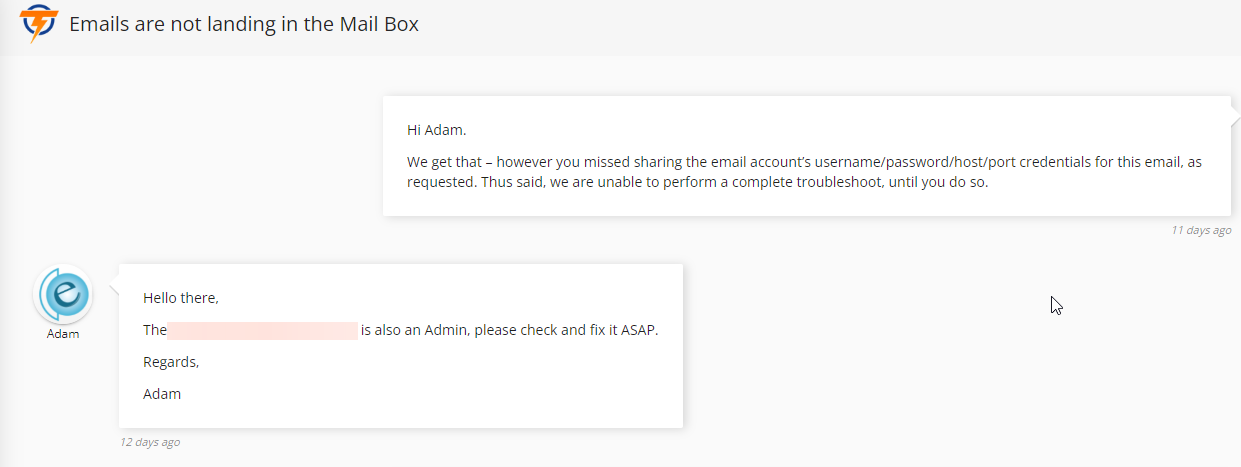
why you are not replying ? this is not working !!!! we can not get emails into the CRM …. Look into it again and do not just close the ticket
We called you to share the needed credentials and offered you a free installation service, something that is not included in your support plan.
Instead, you are accusing us for closing your ticket and leaving untruthful, negative reviews, claiming untruthful facts. Its a pity.
Here is the proof:
Good morning, I have a question regarding the email system. Does the module retrieve messages from the mail server and save them somewhere in the CRM, or does it simply fetch the message from the server, and then when we send an email, the message is saved on the mail server?
Our module downloads and saves local copies of Emails, from your IMAP server.
Hello,
I see you have upgraded the Mailbox. then Why I do not see in in CRM module section here to upgrade option?
Mailbox
Deactivate Mailbox is a webmail client for Perfex’s dashboard.
Version 2.0.3 | By Themesic Interactive?
you see upgrade button not showing?
Modules are not upgradable through Perfex CRM – its only database migrations which are managed from there.
You need to deactivate your copy and download/apply the last version, activating it back.
So every time you will upgrade then we have to also upgrade manually?
Yes. Like it happens with every Perfex CRM module.
what php version your module works because on 8.3 he give 500 error no matter what I do
Hello.
Our module works just fine on 8.3 – Please raise a support ticket within support portal, so our engineers can help you.
it is ok,i reparit the script it was not compatible whit some PHP version. And have some minor error. Thx for this great script
I am going to buy this today and your advance email system as well.
And As you said that by using Advance email system admin can configure per staff wise SMTP and that going to work with the user mail box. so my staff staff will have their own mailbox through their IMAP inbox and their own SMTP to send email by inheriting the Advance email system that admin set the SMTP separately for every staff.
1, and last question your both extension work with the PerfexCRM latest version, correct?
Yes, both modules are working fine with the last version of Perfex CRM.
I have a question: is this module capable of handling multiple email accounts? For example, if each employee has their own email, is it possible to link a specific employee to their mailbox, or does it only work based on the main address?
Yes – employees are only able to browse their own email inboxes and obviously, multiple inboxes are handled.
Mailbox is tied to their email address used for logging into admin area.
Great, in that case, I’ve decided to make the purchase.
Good to hear. Thank you.
Do all staff members have access to same inbox but reply with separate email id?
Each staff member has access to his/her email’s inbox and sent emails are using Perfex CRM’s outgoing SMTP settings.
Hello; I have made IMAP settings. Mails are coming but not going. There are special characters in the header texts of the incoming mails. I created a ticket. Can you help? Ticket id: #48171
Support team will handle your ticket – please bare with the support team for a reply.
PHP Error was encountered Severity: User Notice
Message: app_tabs->add_settings_tab is deprecated since version 3.2.0! Use app->add_settings_section instead.
Filename: helpers/deprecated_helper.php
While installing
Line Number: 25
Backtrace:
Hello.
Please raise a support ticket within support area so our engineers can answer it accurately.
Its sales here.
any plans for AI integration?
This is not currently in our plans but we will consider the feature – thanks for your valuable suggestion.
If I will buy this and admin will configure only one email SMTP then same SMTP will used to send every staff email mail box mail from their account/panel?
SMTP account used is supposed to be the company’s one. IMAP account of each staff member account will be a different one.
We can use same admin email for each staff for IMAP setting, is fine? I mean for every staff same email and password we going to use. is this will work?
IMAP email used in Mailbox is the one that you use to log in, in Perfex CRM.


