6659 comments found.

Hello, I implemented a field calculation using a guide, but when I check the received content in mail or dashboard, the value does not appear. How can I save it?
Hi
Add a Hidden field to the form to store the calculated total, then populate it with JavaScript when the calculation is complete.
See Step 3, line 56 on the calculations guide for an example.
Regards, TC
Thank you, ThemeCatcher!
Hello, i get this Error Message since last night: The response parameter is invalid or malformed Have you an idea? Best regards
Hi
This is coming from the reCAPTCHA element (or hCaptcha/Turnstile). If it’s still happening can you double check that the keys are correct, on the Forms – Settings – reCAPCHA page?
You might also want to try it in an incognito window, or a different browser with browser extensions deactivated, in case a browser extension is interfering with it.
Regards, TC
- Once created i want to display the data in front end in “Table Format”. But each page should reflect each row, while export to excel it should do the same.
- And I have multiple same fields in a form. means I collect same field data multiple time in same form. Please advise asap
- A separate tab to view entries of forms & export that data to excel or csv format
- And I have multiple same fields in a form. means I collect same field data multiple time in same form. Please advise asap
Hi
I think this will be too advanced for Quform to handle, it would require a lot of custom development.
If you wanted to use Quform for this, you’d probably want to use custom code to save the form data to a custom database table or tables, see the “Using custom code” section on this page.
There isn’t anything built-into Quform to display the submitted data on the front end, so you would need to write queries for your database table(s) and display the data in the table, and the export to Excel would require custom development as well, since Quform only supports one row per entry in the built-in Excel export.
Regards, TC
Hello, I just want a form builder that can load a form according to page wise or page break. And each page should be in row wise when i export into excel Please advise if only this is possible.?
Hi
You can create a multi-page form in Quform easily by adding pages, but the data from all pages would be on a single row in the Excel file.
If you need the data spread over multiple rows, it would require custom development.
Regards, TC
Okay, can you able to provide custom script for this function
Iam okay with custom development function. Just a toggle of switch in the export page, so that if i switch on toggle it should export pages row wise. If i switch off toggle it should work as normal
Hi
Unfortunately we are not available for custom work. You might want to consider looking for a developer on Codeable.io
Regards, TC
Hi. Is it possible to automatically create a new WordPress user account if someone submits a form submission using this form builder?
Is QuForm a good form for Hotel Booking or Room Reservation? I don’t see the date picker configured to select number of days, for example, from 1 – 7 days of the month.
Hi
It’s not well suited for this type of form if you need to have reserved “slots” that prevent double bookings and so on, you’d be better off with a booking plugin for that. If you don’t need that, you can have a Start Date and End Date fields in Quform.
Regards, TC
Hi TC, Thanks for the response. I was hoping that the dev team to read between the lines and take this as a recommendation for feature add.
Hello,
I’m getting too much spam even though I have reCAPTCHA set up. Any help, please?
Thank you!
Hi
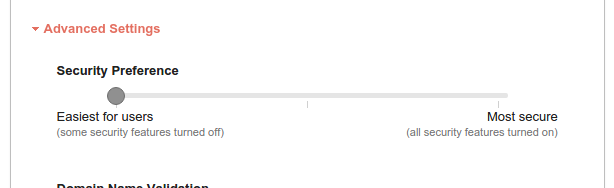
Can you try increasing the security of the field in the reCAPTCHA admin console? On this slider, set it to “Most secure”.
If you’re using reCATPCHA v3, you can increase the threshold in the reCAPTCHA field settings (in Quform).
Regards, TC
Hello, but i dont see “Advanced Settings” in Quform. Where is this located?
Hello, is it possible to read out, for example open positions, to put on a wordpress page, list or any sort of a list that quform reads out so that the customer simply can add a new open position and dont has to handle the quform-form?
Hi
If I’m understanding this correctly, it isn’t possible to do this with Quform. There isn’t a way to list out or read out positions without custom development.
Regards, TC
I have 2 Pre-Sales-Questions: 1.) Is there a way to include automated UTM parameters when sending the form? 2.) Is there a way to send the data from the form to a webhook?
Hi
1. See this comment for how to store UTM parameter values into hidden fields which will be sent with the form data.
2. You can use our free plugin Quform Zapier which can be configured to send the form data to any webhook URL (not just Zapier).
Regards, TC
How to fix error “Please enable JavaScript to submit this form.”
Hi
The error means that JavaScript is disabled in the browser. It could be disabled by a browser extension like NoScript, or in the browser dev tools settings.
It’s the reCAPTCHA field that requires JavaScript. If you want the form to work without needing JS, you’d need to remove the reCAPTCHA field.
Regards, TC
Hello how can i achieve that after answering a question it automatically goes to the next page without clicking next? please dont tell me to open a code i bought 5 licences already!  many thx
Hi
For the Select Menu and Radio Buttons fields, you can go to the field settings then go to the Data tab and enable the option “Submit on choice”.
Regards, TC
amazing worked! thank you
Halo selamat siang, Mau tanya, bagaimana saya bisa mendapatkan untuk “Signature Field” di form saya tidak ada icon nya untuk menambahkan fungsi tersebut, dan juga bagaimana untuk perhitungan matematika, seperti diskon, dan perhitungan persen, saya mohon bantuannya
salam hangat
Hi
The Signature Field is not yet a built-in feature of the plugin, we have a guide here for how to implement it though.
The same is true for Calculations, we have a guide here. You may need a developer though.
Regards, TC
Hi can we have user logins? and also is it possible to assign the forms based on the user logged in?
Hi
We have a guide here for creating a user from the form submission (registration form).
I’m not sure what you mean with the second question, can you provide more detail?
Regards, TC
Ok second question is for example i have 2 users and 5 forms. User 1 should have access to form 1 & form 3 only. Is this possible?
Hi
If this is for the front-end, viewing the form to submit it, you could use the User Access Shortcodes plugin. Just put the Quform form shortcode inside it, and you can restrict it to specific user IDs.
If this is for within the WP Admin, unfortunately it’s not possible to restrict managing a specific form, or the entries for a specific form, down to a specific user. You can only give a role the capability to edit all forms, or view/edit all entries (see the Permissions tab in the plugin settings).
Regards, TC
Why can’t I migrate forms and entries it says “Migration is not possible because no forms from Quform 1.x were found in the database.”
Thanks
Hi
In Quform 1.x the forms were stored in the database table wp_iphorm_forms, the message means that there are no rows in that table, therefore there are no forms that can be migrated. Let me know if this is not correct.
Regards, TC
I’m creating a new website for my client. He bought your plugin years ago when it was version 1. Now I’m building him a new website and I need to transfer all forms and entries to his new website and we are using version 2 now. It is very important to migrate everything from old website to a new one but we can’t. Can somebody help me with this?
Hi
The v1 to v2 migrator needs Quform v1 installed on the same site as v2.
If you don’t need the entries copied to the new site, you can move all of forms over by going to Quform – Export – Export Form, copy the v1 form export data, then on the other site go to Forms – Tools – Migrate – Import a single Quform 1.x form (repeat this for each form).
If you need the entries migrated as well, you’d need to copy the database tables for Quform v1 to the new site, then you can run the migrator tool. To do that you can use a tool like phpMyAdmin, export all of the database tables starting with wp_iphorm_ and import them into the database on the new site. Then, the Quform v2 migrator should detect the v1 forms and you should be able to run the migrator.
Regards, TC
Where can I find Quform v1? I send an email to info@themecatcher.net requesting Quform v1 so I can install it.
I sent you a reply with the download link.
Regards, TC
Hi there. I like to. create an online petition form. Is there an option to include a Signature field for the sender to sign the form with their mouse cursor, etc?
Hi
It’s possible, but this currently requires adding some additional code, please see our guide here.
Regards, TC
Thanks, that’s a lot of codes and steps to follow. It says This type of signature field is not yet built into the Quform plugin but will be added in a future version. When do you think this feature will be added to this plugin so it’ll be easier for customers to set up? Thanks.
Hi
Unfortunately I can’t give an ETA for when this feature will be included with the plugin.
Regards, TC
Hello, Is it possible to set in the form a conditional information when the form is submitted depending on the option that is selected?
Option 1. online course participant - Go to the link … Option 2. stationary course participant - Take the course of the day ….
For example, notifications after submitting a form. Thank you, you have signed up as [online stationary participant]. Go to the link …
Hi
For both the notification emails and the confirmation (success message) that’s shown when submitting the form, you can add conditional logic to determine which email to send or which message to display.
For example, if you go to Edit Form – Settings – Notifications, click Add Notification, then in the notification settings click “Enable conditional logic” and set the rules that should send this email, e.g. Option 2. stationary course participant. Then you could either have the default notification configured for Option 1. online course participant – Go to the link, or add a new notification for that Option 1. If no other notification has a matching logic rule, the default one will be sent.
Regards, TC
First time since you added Bulk options setting up a new form. LOVE the idea of that feature, as I have used functions to create large number of options on previous forms. Has anyone cited a performance issue with them?
I added 423 schools to an element. Three things happened after. It caused a latency issue in the control panel. It also didn’t recognize the Select Item option (which I do need). It may not recognize a Logic trigger too.
Saving changes didn’t actually save.
On the Select Item and Logic issue, I have a list of 423 high schools in Indiana. However, if you don’t live in Indiana or you’re homeschooled, I have a ‘school name’ element that appears to capture that school name. Right from the start, that element shows up, despite not being triggered.
I was able to get it to work.
What I did the first time was add the 423 schools, then go back in and add two additional options. The second time I added the two additional options to the initial list.
Hi
Glad you were able to get it to work.
I just tested it with a large number of options and can confirm that there are performance issues with it. It doesn’t seem to happen when I deactivate the LastPass browser extension though. If you are using that, you could temporarily deactivate it to manage options in the meantime until we implement a fix, we’ll look into it!
Regards, TC
I don’t use the LastPass browser extension. I don’t use any browser extension. The biggest latency issue was adding options after the fact. I haven’t tested it live yet though, just in the control panel.
Hello, I understand that after clicking the “Contact form” button, the form may appear in a popup window. Is it also possible to make the form appear for selected products or a selected product category and then make the “Add to cart” button invisible (WooCoommerce)?
Hi
You can use the hook woocommerce_after_add_to_cart_form to display a form on the WooCommerce product page, for example:
add_action('woocommerce_after_add_to_cart_form', function () {
    if (has_term('your_category_slug', 'product_cat')) {
        echo do_shortcode('[quform_popup id="1"]Ask for price[/quform_popup]');
    }
});
Replace your_category_slug with the category slug and the number 1 with the form ID.
You can make the products in the category not purchasable using this code snippet:
add_filter('woocommerce_is_purchasable', function ($is_purchasable, $product) {
    if (has_term('your_category_slug', 'product_cat', $product->get_id())) {
        $is_purchasable = false;
    }

    return $is_purchasable;
}, 10, 2);
Regards, TC
Thank you for your answer.
Hello. Will AMP be ever supported? Thank you.
Hi
I’ve added this feature request for us to look at implementing in the future, unfortunately I can’t give an ETA.
Regards, TC
Ok. Thank you!
I have a pre-sales question. Can I make a form in which I provide a email(with a .doc file attached) to the customer after the payment is successful. The email should not be sent if the payment fails. Can I achieve this functionality using quform?
Hello, I’m getting this error but I’m not sure why. I’ve refreshed it, etc. Any help, please? An error occurred Refresh the page and try again.
Hi
Please see our help guide here for this issue, and let me know if you need any further help.
Regards, TC
This issue was solved when I turned off CSRF protection. Thanks.