8955 comments found.

Hi, I purchased your pro plugin and I would like to make the Special Pop-up Filters Widget available also for the desktop and not just for mobile. I use Elementor and Woocommerce on my site. it’s possible? Thank you
Hi AngeloKjana
Thank you for choosing Filter Everything PRO.
You can change the breakpoint with this code, you can place it in your code snippet plugin:
add_filter( 'wpc_mobile_width', 'my_custom_wpc_mobile_width' );
function my_custom_wpc_mobile_width( $width )
{
    $width = 1920; // new desired breakpoint in px
    return $width;
}
Best Regards,
- Victor
Thanks! Where exactly should I put it? Thank you
We recommend using this plugin – https://wordpress.org/plugins/code-snippets/ just to place our code as a code snippet there without any issues.
Best Regards,
- Victor
Good afternoon. I have a pre-sale question. Tell me, please, will your plugin work with the Oxygen builder? The nuance is that Oxygen does not use the functionality of the WordPress theme, I am building site from scratch.
Hi vesd
Thank you for your interest in the Filter Everything plugin.
Yes, this should work. As long as the posts that you want to filter use WP_Query to display, our filter will filter them all.
Best Regards,
- Victor
Hi,
I have some question on setting up filters
1. For the step-by-step filtering, any documentation on setting up? and how to mark some filter as required?
2. How to show brands icon/images in filters, like in https://demo.filtereverything.pro/step-by-step-filtering/?
3. I have vehicle part custom taxonomy that in parent-child hierarchy, Year>Manufactor>Model, works like product categories and sub-categorys, how to set the filter set like images below that child drop-down options depends and filtered by parent selected? https://drive.google.com/file/d/15PYVgKviEMDLdGmcliT8saYwggEPKgWS/view?usp=drive_link4. On your experience, how to work or config cache plugins, (e.g. WP-Rocket, LiteSpeed Cache) to work with Filter Everything plugin that can cache and speedup for each visitors but not affect each others? If A user filter with some options and the cached result will not affect others users? Each users can have their own cached filter result?
many thanks
Hi chris_yks
1)The step-by-step filtering works in this way:
a. You create your main filter.
b. then create another filter and from “more options” choose as a parent your main filter. Also, you can choose to make a child filter hidden, only when selecting any filter term makes it visible.
2) Brands were created by the – Perfect Brands WooCommerce plugin. More information on it and color swatches can be found here – https://filtereverything.pro/resources/brands-and-color-swatches/
3) Make them all separate. If you are using Woo then add them as separate attributes, instead of pushing it all in categories. Then you will have the ability to create a filter by each of those attributes separately. Also, would require using “AND” logic, to show only connected filter terms that are chosen in the first filter.
4) Unfortunately, we cannot help with this. We are responsible only for the plugin functionality, how to work with cache plugins, and how to configure them better make a request to the cache plugins support. So for example, exclude filtered pages from caching, the plugin itself, and many more nuances. Optimizations are a very deep and specific thing on each site, depending on what plugins you have, implementations of different features, and so on. We can only recommend hiring a professional in this field so he can make all of the configurations and make sure that everything is working as it should without any issues.
Best Regards,
- Victor
Hi Victor,
For point 3, the terms are taxonomy in parent-child hierarchy not product attribute, how to do? thanks
The terms works like product category
That’s why we said to make them as separate attributes, instead of putting everything together in a category (as chield taxonomy). You can place multiple filter sets on the page now, and use the include exclude functionality to display the needed filters.
Best Regards,
- Victor
If use seperate attributes instead of using taxonomy, attribute do not runs in hierarchy, e.g. the first level select “CPU Manufactor, like Intel/AMD”, second level filter based on parent option the user selected, e.g. user selected “Inte”, then the second level dropdown only shows “i3, i5, i7, i9” and same on in thrid and 4th level in this scenario, how to achieve? thanks
Hi chris_yks
Use “AND” logic. For example, you have a product with such attributes:
CPU Manufacturer: Intel
CPU Model: Core i5
CPU Speed: 4.4 GHz
CPU Socket: LGA
Then if in “CPU Manufacturer” you are using “AND” logic you can choose intel and it will show products that have this attribute on them. Then you choose “Core i5” from the “CPU Model” filter. Now it is showing only products that have in their attributes “Inter” and “Core i5”, not “Inter” or “Core i5”.
The logic you can choose from filter set settings by clicking on the needed filter and then clicking “more options”
Best Regards,
- Victor
Hello,
I’d like to order the terms inside a filter in a custom order. I’ve seen there’s the option to sort terms by “term ID”, but I don’t know how to access nor modify this field (term ID). I’m not using the WooComerce plugin. Is there any way I can do this?
Thank you in advance,
Anna
Hi Anna
Here you can check the hook that you need to use with an small example – https://filtereverything.pro/resources/hooks/#terms-before-display-hook
Alternatively, you can try this code, it works with term names and Case sensitive (but those are all examples and you need to write your own version for it):
// FE SORT FILTER TERMS MANUALLY
add_filter('wpc_terms_before_display', 'wpc_sort_terms_as_needed', 10, 2);

function wpc_sort_terms_as_needed($terms, $filter) {
    // Define custom sorting orders for different meta keys
    $sortingOrders = array(
        'meta_key_goes_here1' => array(
            'Text1',
            'Text2',
            '1',
            '10'
        ),
        'meta_key_goes_here2' => array(
            '8',
            '12',
            '90',
            '8T',
            '8 T',
            '18T',
            '40T'
        ),
        // Add more meta keys and their sorting orders as needed
        // 'another_key' => array('term1', 'term2', 'term3'),
    );

    // Check if the current meta key has a custom sorting order
    if (isset($sortingOrders[$filter['e_name']])) {
        $customOrder = $sortingOrders[$filter['e_name']];

        // Create an associative array to store term objects
        $termMap = array();

        // Populate the term map
        foreach ($terms as $term) {
            $termMap[$term->name] = $term;
        }

        // Sort the terms based on the custom order
        $sortedTerms = array();
        foreach ($customOrder as $name) {
            if (isset($termMap[$name])) {
                $sortedTerms[] = $termMap[$name];
                unset($termMap[$name]);
            }
        }

        // Add any remaining terms to the sorted array
        foreach ($termMap as $term) {
            $sortedTerms[] = $term;
        }

        return $sortedTerms;
    }

    return $terms;
}
Best Regards,
- Victor
Thank you so much, it worked!
Hello, I have a problem with Filter Everything. First of all, thank you for this great plugin.
Problem: I am building a page which has several categories. There are probably 30-40 categories. I have now created individual filtersets for some categories but came to the conclusion that it is very inflexible if I want to include new keywords because I have to insert the keyword individually for all categories.
so i thought about building a super filter that is displayed on all pages and hides the empty tags.
Unfortunately, the filter only works if I select an exact page under “where to filter” and not if I leave it empty “any page page (for general search across all page pages)”.
In the filter set it also tells me this message then No WP queries matching the post type “Product” were found on the page Note: If you change the selected WP_Query on the page, please update this filter set
I don’t know how to get my filter to filter on all pages without creating a separate filter set for each page (which would be very impractical and time consuming)
Translated with DeepL.com (free version)
Hi d_a369
The option “Any page” will work if all of your pages have the same queries (basically takes the first page scans it for queries and then uses it for the rest).
Unfortunately in your case, they do not have the same queries. So at the time, the only solution is to create separate filter sets for each page.
Best Regards,
- Victor
Hello
We bought this Plugin for a client. they have it installed and we have it installed locally to test updates. Recently our local version now reports LOCKED. Can the licence key we have also be used foe a local installation?
Thanks
Hi redactuk
Thank you for choosing Filter Everything PRO.
You can activate the license on two sites, usually it is on stage and second on prod. So yes you need to activate the plugin in order to remove the locked status.
Best Regards,
- Victor
Thanks Victor. So the problem is at one time we have live/staging/dev, and the two licences are being used up for live/staging with dev locked. How do I go about cancelling licence allocation to staging?
From the filters -> settings -> license tab you can deactivate the license and activate it on another site.
Or with buying an additional license, so you will have the ability to activate it on 4 sites.
Best Regards,
- Victor
Can’t do that as staging site no lonher exists. Do you have access to manually deactivate sites? if so it’s the domain with ‘demo’ in the name.
Hi redactuk
You can send via PM your lincse key and we can deactivate it across all of the sites and you can activate it on the needed ones only. PM is here – https://codecanyon.net/user/fe_support
Best Regards,
- Victor
Dear Support! I encountered the Unknown Error issue on licence activation. I’ve sent you the information in PM.
Thanks!
Hi morta
Thank you for choosing Filter Everything PRO.
Please send the license key as well via PM. (please note that CodeCanyon purchase code is not a license key)
Best Regards,
- Victor
Hi Victor, licence key also sent via PM. Thanks!
The license is activated and everything is working well.
Best Regards,
- Victor
Thank you!
Hi,
How to add filter for stock status, in stock/on Backorder/Out of Stock in custom filter set? many thanks
Hi chris_yks
You can check it all from the right side of the filter in the dropdown – https://prnt.sc/n6Pe3NgGfmeL
Best Regards,
- Victor
Hi,
I got issue when adding Filter Set for specify pages. I have a plugin “Vechile Parts Finder” that has thousand custom taxonomies. When I try to add filter set, it keeps loading and the admin page freeze. I have disabled all other plugins and changed max_post_size and execute time on server but still cannot fix.
Is there any way to add filters without load all taxonomies while adding filter set? I have tried others filters plugin while enabling custom taxonomy filter without this issue. e.g. “HUSKY – WooCommerce Products Filter Professional [WOOF Filter]”
Any solution to enhance or speedup or not to load all data of taxonomy while adding custom filter?
I have record the screen, and can I email the link to you privatly not to public?
many thanks
Hi chris_yks
Can you please send the credentials to the wp-admin dashboard following this document so we can check it?
And you can send the screen record link so we can see how to recreate the issue.
You can send it all via PM. In instruction, there is instruction on how to do it.
Best Regards,
- Victor
Hi Victor,
Already sent the credentials, please check with the “Vehicle Parts Filter” filter set. And I want to have the filter divided into Year, Make, Model… for seperate dropdown in parent-child hierarchy, like https://drive.google.com/file/d/15PYVgKviEMDLdGmcliT8saYwggEPKgWS/viewHi chris_yks
This is what we get when we use your link from the credentials – https://prnt.sc/vjN437P9ai4Y
The filter looks like that, as we said, you can either use include/exclude functionality and place a couple of filter sets on the page. To display them you need to use either multiple widgets or shortcodes. In order to separate one category filter on parent and child categories filters.
Best Regards,
- Victor
Hi mimidimi
What do you mean by the “The home page appears again”
And it looks like there are no products on the page that you have sent to us. And shop page has Woo filters. So we are a bit confused about how it was working previously and what you mean by the “The home page appears again”
Please provide more detailed information, so we can fix your issue as soon as possible.
Best Regards,
- Victor
I add filter fields on my homepage, after selecting some values from drop down menu `(for ex. from ДИАМЕТЪР select 18(2)) I am redirecting again to home page, not to the 2 products which have diameter 18. Hope you understand me now. And thank you.
The filter can redirect only to one page which you will specify in the settings. Please check this demo page with redirection filter instructions – https://test.filtereverything.pro/fe_faq_test_mode/redirection-filter/
Best Regards,
- Victor
Hello, we have an issue with the SEO Description of the matched SEO Rule. We use custom PHP code provided by you in the docs to show the SEO Description on the page.
When there’s one match for filter, instead of the desired SEO Description, the content of this filtered post is displayed: https://imgur.com/a/JMlr2np When it should be just text like this: https://imgur.com/a/cbGAsrqAny suggestions on how to fix this?
Hi fittrac
Thank you for choosing Filter Everything PRO.
Can you please provide the link to the page with the issue and the screenshot with the SEO Rule configuration?
Best Regards,
- Victor
Screenshot: https://imgur.com/a/SPavrs0
Does that mean that some SEO rules are working normally and some are not? It looks like you didn’t implement the code correctly.
Best Regards,
- Victor
The problem is SEO Description, not other SEO fields
When using the mentioned get_the_archive_description hook, it produces exactly the same result
Hi fittrac
Can you please send the credentials to the wp-admin dashboard following this document so we can check it?
Best Regards,
- Victor
Done, everything was done according to the instructions, you have access in a personal message
We have checked the site, and our plugin is working correctly, retrieving the correct description – https://prnt.sc/O-mJO96Jho3B
The issue here is more likely in the custom code conflict that you are using somewhere on your site. It looks like the code that brings problems uses the hook ‘the_content’, and with the use of this hook, it is changing the description.
Best Regards,
- Victor
Hello, thanks for checking, but how does that help?
You claim that the plugin is working correctly, yet you don’t provide a hint on how you managed to display the SEO description?
Firstly, we don’t use almost any “custom code” on this website, everything is built primarily via Elementor Pro (including the Loop Grid where the filtered posts are displayed), and you claim your plugin is fully compatible with Elementor. I don’t see it.
Secondly, we’ve disabled any other plugin we have that could interfere + removed almost all blocks from this page, one by one. The issue still remains, so my only guess is that YOUR plugin is faulty in this situation and it’s up to you to change how you display SEO description, so it doesn’t interfere with Elementor or any other plugins, because everything was working smoothly.
Waiting for real support from you and a successful resolution of this bug, thanks in advance.
Hi fittrac
We displayed it via debugging, to check if the description is correctly passed to the page, and everything is correct. After it is placed, it gets modified by some code, and as we said, more likely this code is connected with the “the_content” hook.
You can install clean WP installation, on your dev or localhost with the default themes, install Elementor and Elementor PRO, and install the FE plugin. Create SEO Rules and everything will work correctly.
Do not import anything from your current site to test it, do not use any drop-ins in wp-content, just use clean WP installation and test it. Then you can add all of your modifications like drop-ins and other stuff to understand what exactly causing this issue.
We can set it up on our back with SEO Rules with Elementor so you can see that it is all working as it should.
Best Regards,
- Victor
Why can’t you use another hook in order to display this SEO description? Why it should be up to the customer to find this conflicting hook, and since probably another plugin uses it also (I repeat we use little to no custom code there), I need to contact another support line?
In your opinion, should I also reach out to other plugin developers and ask them to change their code as well (since I obviously can’t customize another plugin’s code)? Seems like you want to pass the responsibility for this implementation to me, customer, or to another plugin devs, not you. This is not going to work, Victor.
I was actually just able to display the correct SEO description by commenting this line of code from your solution:
$seoText = apply_filters( ‘the_content’, wp_kses_post($seoText) );
When I remove this line from the function, everything works as expected. Food for thought.
Hello fittrac.
Thank you for using the plugin and contacting support. We are always happy to help our customers and especially happy to help you.
It should be noted that we do this within the CodeCanyon Support Policy https://codecanyon.net/page/item_support_policy which includes answering questions, fixing errors in our product, but does not include modifications and changes on customer sites.
We would be happy to do that too, but then the plugin would cost not $40, but for example $60 or $80 to cover such extended support.
The ‘the_content’ hook is used when displaying the SEO Description to preserve typical WordPress formatting you do in the text editor of the description and to preserve compatibility with plugins that modifies posts content.
Indeed, when you commented out the ‘the_content’ hook, the problem went away, but from a technical point of view, this is another proof that there is some third-party code on your site that uses this hook and modifies SEO Description on the page.
Unfortunately, within the limits of current support, we cannot spend our resources to find the cause of such a problem and fix it.
I hope for your understanding.
Thank you. Best regards.
Hello, I want to know if there is a different and optimal way to solve the following issue for my website with the plugin.
I have a series of data that should appear when clicking on a dropdown menu. The idea is that they are not visible until clicking on the dropdown menu. It is not necessary to enter the element, just preview the information.
I plan to solve it with blog posts, creating an entry with the data and using custom fields to add all the data, and configuring the appearance with CSS. Currently, I have the filter functionality resolved with blog posts, but when configuring the post type to filter, I have seen that it can be filtered by entries, pages, and pop-ups.
Could I create pop-ups from Elementor by adding the elements and then create a filtering type for these elements? If so, which WordPress module should be used to create them?
This is the page that I’m working on: https://ingrentia.helefantest.com/distribuidores/
This is the design that i’ve to accomplish: https://ingrentia.helefantest.com/wp-content/uploads/Captura-de-pantalla-2024-01-17-a-les-13.40.38.png
Hi helefante
We are a bit confused about what you are trying to create. But here is how we understand it.
You have a page with a filter widget. And when choosing a filter term, your data should appear on the page? Is that what you are looking for? Or it is something absolutely different?
Best Regards,
- Victor
Yes, is what I need.
The idea is something similar to Customization example 1, but with a dropdown and without the tags. It is not necessary to open the page of the data.
You would need to write a custom code in order to make it work like you want.
Here is the function that will help you with it:
/**
 * @return bool true if it is a filtered page and false if not
 */
flrt_is_filter_request();
Usage example:
<?php
if( flrt_is_filter_request() ){
    // Your useful code
} ?>
If you apply any filter term this function will return true and you can run your code if it is true. It can be any JS code or however, you want it to appear.
For example, if you choose any filter term, it returns true and runs the JS code that will make your container with posts “display: block” from “display: none”
Best Regards,
- Victor
Hi, i’m trying to have multiple tag filters in the product collections, but they have to be dependent of one other filter. If i have all filters in one filter set, all works great, but i can’t have the tag filters separated. How can i achieve this using different filter sets?
Also, i assume i need multiple licenses, for multiple websites, correct?
Thanks.
Here is the link to one of my category pages (it is in Portuguese, but i think it should be understandable): https://ferramaq.pt/maquinas/berbequins/
Hi jcosta6
Thank you for choosing Filter Everything PRO.
The best approach here would be instead of tags, to add different product attributes, apply them to your products, and create filters by those attributes so everything will be separated and work nicely as it should.
If you place a couple of filter sets on one page creating the same filter but using include/exclude functionality, then you might need to write a code that will place another filter set inside of the main filter set on the front in order to open them all in a window in mobile mode.
It will make it harder to maintain, and update it, and would require coding. So our recommendations are more product attributes instead of one tag separated by different filter sets.
Best Regards,
- Victor
Hi Victor, thank you for the quick reply and recommendation. We will give it a try with the attributes.
Also, I have a question regarding the license of the plugin. Can we transfer it to a different store? We bought the license to test your plugin in a store that does not have a lot of traffic, so that we could understand all of its capabilities. We now would like to remove the pro version of the plugin from that store (it can work fine with the free version) and move it to our main store.
Is this something that can be done?
Thanks in advance.
You can activate the license on two sites, usually it is prod and stage. If you want to change the domain names, you can deactivate the license and activate it on the new domain.
You can do it from the filters -> settings -> license
Best Regards,
- Victor
Thank you. We have activated the Pro version, but we are unable to edit anything in the filter sets. Are we supposed to do anything else? In the meantime we have deactivated it again, so that we can work on the filters.
Can you please send the credentials to the wp-admin dashboard following this document so we can check it?
Also, send the license key that you are using for activation. Please send it all via PM.
Best Regards,
- Victor
I have created the account and sent the PM with the relevant data. Thanks.
We have checked the site, and there is some conflict. It is either custom code in the theme or a third-party plugin (more likely a security one). The AJAX is deprecated and does not let to update anything and get queries from the pages. Plus to that multiple cache plugins.
We recommend switching to the default theme and checking if everything is working. If not turn off 50% of the plugins, update the filter set, and try it one more time. Then turn off the other plugin so you will have at the end FE and Woo with ACF, just to check if it will start working normally. To find which plugin or theme is causing issues.
Best Regards,
- Victor
Then why does the free plugin work, but not the pro? That is what i find the strangest…
Because the free version by default uses the main query, it doesn’t have the ability to choose the needed query from the “Where to filter”, and this functionality is working with AJAX.
Best Regards,
- Victor
Is there a way to go around this? Like some development or custom code? Because in the other store we tested, the pro version works fine.
Hi jcosta6
No, unfortunately, this is something that should be fixed on the server-side settings or find the exact plugin or custom code that causing such an issue. It cannot be just ignored and passed by some code.
Best Regards,
- Victor
Hi there. Touching base on this again. We have deactivated all plugins except Woocommerce and the filters, changed to the storefront theme, and the situation remains the same. We cannot do anything in the dashboard. The only way we have to edit the filter sets is to disable the pro version, do all the changes and then reactivate the pro version. But the filters do not behave correctly. So how can this be related to the plugins or the theme?
Hi jcosta6
In that case, those are some server settings that don’t allow it to work. Can you please provide credentials one more time, so we fully can check it all on our own with your permission to change themes and deactivate the plugins?
Best Regards,
- Victor
I have sent the PM with the access data. Thanks again.
We have checked it one more time, and this time we decided to delete the plugin and install it by ourselves, and everything is working fine. If you are updating the PRO plugin, delete the old version having your free version turned on, and then upload the new version from the plugins -> Add new plugin -> Upload plugin.
Best Regards,
- Victor
When i enter the plugin dashboard, i still cannot edit anything. Also, where can i find the new version? Thanks.
Oh we did it on this site – ferramaq.pt
You can download it from this site (CodeCanyon).
Best Regards,
- Victor
No problem. We checked and everything is working fine. Thank you so much for the support.
We are glad to hear that everything is working fine.
Best Regards,
- Victor
Hi, As i can see your demo, applying the filter returns a quick result without reloading the page, but on my website, the filter reloads the whole page and make time to show the filter result, please how can i setup this option like on your demo? Thanks
Hi TidMed
By using the AJAX option in the filters -> settings -> general. The speed of filtering fully depends on your server hardware and optimizations.
Instruction about setting up AJAX can be found here – https://filtereverything.pro/resources/plugin-settings/#ajax
Best Regards,
- Victor
Hello, I added this search bar: https://prnt.sc/rNsOFo-8mvwd and want to make the search by tag as key word, but the search result didn’t give anything. I see on the filter setting that the search by product tag is possible by using checkbox, dropdown,.... but in my case i want to make search by the search bar and tags will be used as key word. Please how can fix that?.
Regards.
Hi TidMed
The search bar filter is doing a search by the title, description, and product SKU. But with future updates, we want to extend its abilities in order to search by other parameters.
Best Regards,
- Victor
It looks like a combination of your dropdown and checkbox filters which allows the user to both search for features but also select more than one.
Would you be able to add a filter like this to the plugin? If not, then do you offer customization services? Or is it possible at all to customize the filters in this way?
Hi kayseventeen
Thank you for your interest in the Filter Everything plugin.
Yes, absolutely, you can create this type of filter.
It is a folding filter with checkboxes. You can check it on the demo page at the bottom of the filters on the sidebar – https://demo.filtereverything.pro/product-category/clothing/women/
Here is the screen of it – https://prnt.sc/qIj6opS0XsRF
Best Regards,
- Victor
Hi Victor, much thanks for your response! There is one more feature I’m unable to configure. I’d like to be able to set a limit for the number of selections a user can make. If the user tries to make more than N selections, then the widget is disabled. Is this currently possible?
Hi kayseventeen
Unfortunately, there are no such options. That can be made only with a custom code. And it would be harder than it might look.
Best Regards,
- Victor
Ok, thanks for your feedback. I also noticed that the chips disappear in mobile view. Is this supposed to happen? Is there anything I can do to make them show up?
Hi kayseventeen
It depends on how you set up the plugin. Can you send the link to the page with the issue so we can check it?
Best Regards,
- Victor
Hi there,
We run into different issue with the plugin.
Created a new set of filters for woocormce products and works as expected for the admin user, but we needs to use woocomerce memberships extension https://woo.com/products/woocommerce-memberships/, and the second we login as a member(not admin) we are experiencing issues with filters, it doesn’t filter any products, switching back to admin – works as expected, Can you please advise?
Hi webhelp2
Our plugin does not have any user role restrictions. So in this case it would be best to make a request to the WooCommerce Memberships support team. So they can help you out with this, perhaps they apply some type of restrictions on their side and do not allow you to run certain things. Because the plugin works without logging in at all.
Best Regards,
- Victor
Hi, the filter can combine with categories – subcategory and attribute thanks
Hi yacineamotech
Thank you for your interest in the Filter Everything plugin.
Can you please specify your question? Or it is the statement? Or what do you mean by ” can combine with categories – subcategory and attribute”
You can create a filter by categories, and attributes. If you want to separate categories on subcategories you need to place two filter sets on the page and use include/exclude functionality.
Best Regards,
- Victor
Please show an example, of what you want to achieve with this combined with categories – subcategory and attribute.
The more information you provide in your question the faster we provide an answer.
Best Regards,
- Victor
Hi, category part ( categories ) – subcategory auto part ( categories ) – brand vehicle (attribute ) – model (attribute ) – years (attribute ) Thanks
You can create a filter like here – https://demo.filtereverything.pro/step-by-step-filtering/
Which is:
category (prod taxonomy) – brand (brand taxonomy) – color (attribute) – size (attribute)
But for this “subcategory auto part ( categories )” in order to separate it as another filter, you can create another attribute, so you can create a separate filter from that attribute.
In another case, if you place two filter sets to separate them, your redirection filter might not work correctly together with the second filter set when you hit apply.
Best Regards,
- Victor
I am looking for something like this, but for prestashop. Will you know something like this? 
Hi pablof
Thank you for your interest in the Filter Everything plugin.
Can you specify your question? Because we are absolutely confused about what are you talking about.
Best Regards,
- Victor
Do you plan to, or know of any plugin that works like yours (because it’s great!) but on Prestashop?
Ah, now it is understandable. Not at the moment, but perhaps in the future we might extend platforms, so it will be available not only for WordPress.
Best Regards,
- Victor
Hi, I have a problem with the plugin. I want to filter products by tag on product archive page. The problem is that the code printed in the products archive page is empty.
<div class="wpc-custom-selected-terms">
<ul class="wpc-filter-chips-list wpc-filter-chips--1 wpc-filter-chips- wpc-empty-chips-container" data-set="" data-setcount="-1">
</ul></div>
Can you tell me why? Thank you.
Hi timmytag
Thank you for choosing Filter Everything PRO.
Can you please send the credentials to the wp-admin dashboard following this document so we can check it?
Also, please send the link to the page with the issue, so we can check it right away.
Best Regards,
- Victor
Hi, I have already sent the credentials. I wait for your reply.
Hi timmytag
We have checked the site and you have problems with your site settings or some plugin conflicts. In general, the console shows a 502 error when AJAX tries to make a request to the server and get the list of available queries on your page – https://prnt.sc/eCUvcvPlxI5s
You need to fix this issue, and then everything should work normally.
Best Regards,
- Victor
Hi, Error 502 occurs when the “Query Monitor” plugin is activated. I installed that plugin because you recommended it in your document. If the plugin is not active the error does not occur. Even without the error the tag filter doesn’t work. Can you verify please?
Hi timmytag
Pretty weird behavior, usually this plugin does not cause any issues. In any case, we placed the filter widget on your shop page via the widget area. From customization settings. And everything is working. You just didn’t place any widget pr shotcode in order to display a filter set on your pages.
Best Regards,
- Victor
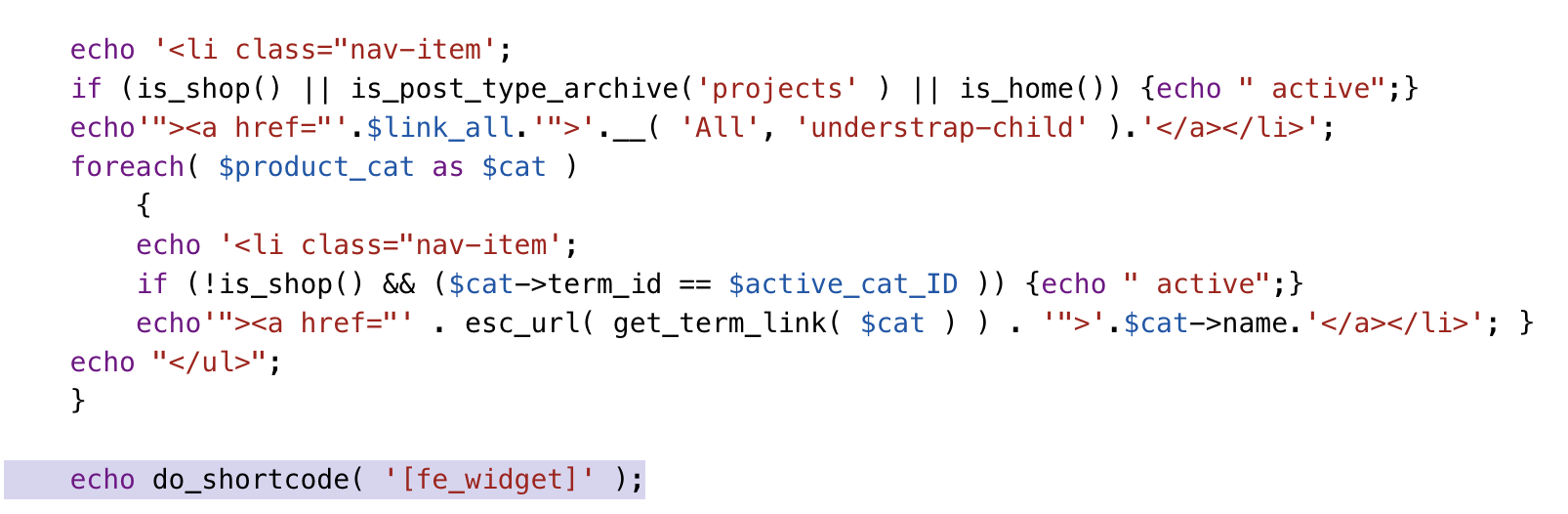
Hi, thanks for the support. I have another problem. I inserted the shortcode echo do_shortcode( '[fe_widget]' );
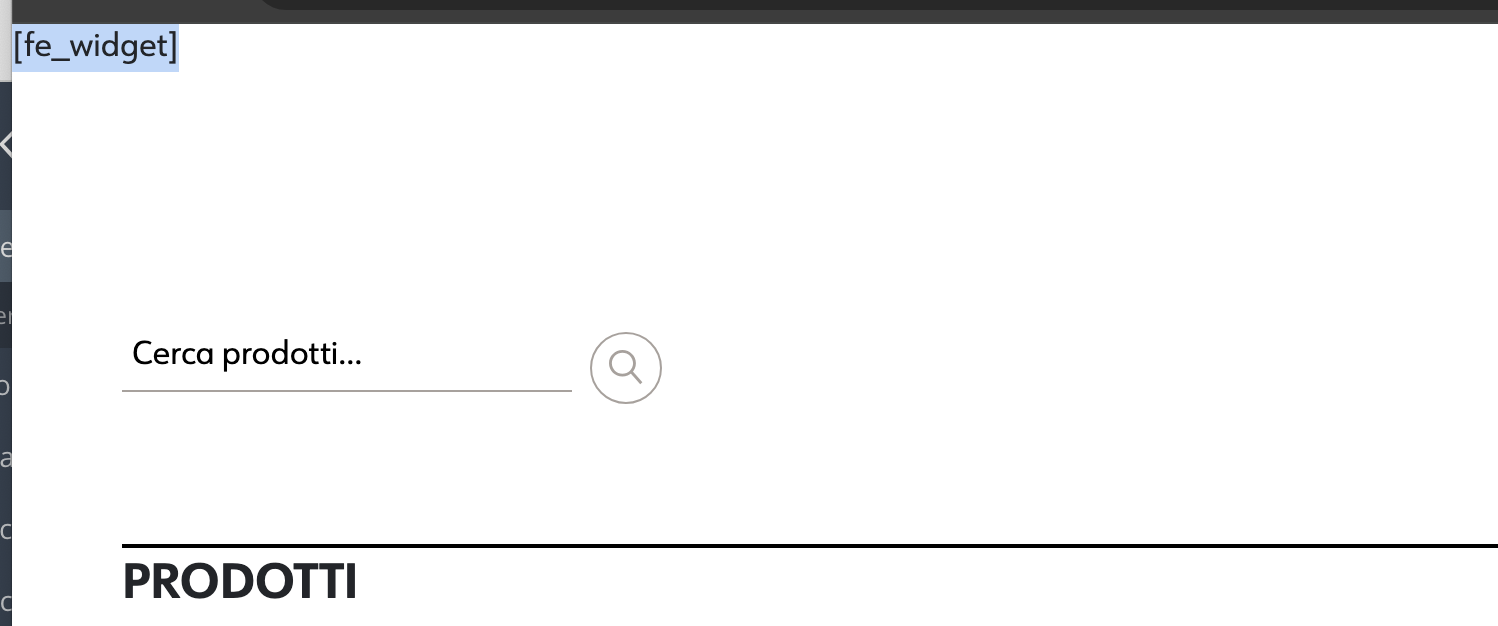
into the custom php page. But it doesn’t work. The following string is printed in the front end [fe_widget]. Can you tell me why? Thank you.
Hi timmytag
The code:
echo do_shortcode('[fe_widget]');
should work fine and display the filter widget, maybe you turned off the filter everything plugin? Can you send the link to the page with the issue so we can check it?
Best Regards,
- Victor
Hi, the plugin is active. You can see the issue in these images. Active plugin: https://www.timmytag.it/img/plugin.png Php code: https://www.timmytag.it/img/shortcode.png Front end: https://www.timmytag.it/img/front-end.png
Can you help me please?
Hi timmytag
Maybe this template does not have a footer() or scripts are not loading on it. The pictures won’t give us any information, we need to have a link to the page so we can check it, and if it won’t help then we need credentials to the wp-admin dashboard following this document so we can check it.
Best Regards,
- Victor
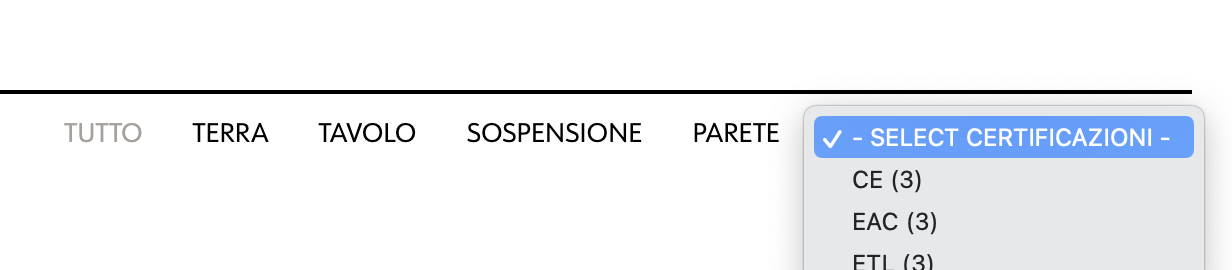
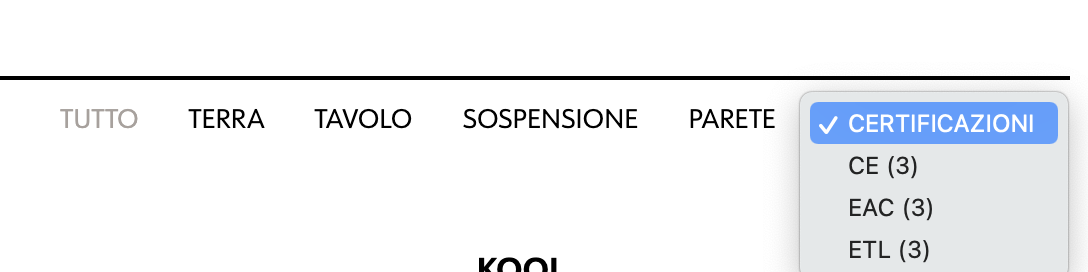
Hi thanks for the support. I solved the problem with the shortcode. A last question. Can you tell me how to remove the default ”-” and “select” characters from the drop-down menu? I would like to display only the filter title (in this case “Certificazioni”). See attached images please.
I currently have this result: https://www.timmytag.it/img/current-result.png I would like to get this: https://www.timmytag.it/img/desired-result.pngI’m waiting for a response. Tnahks
Hi timmytag
You can check instructions for that on this demo FAQ page – https://test.filtereverything.pro/fe_faq_test_mode/5403/
Best Regards,
- Victor

This item was featured on CodeCanyon

Elite Author
Contact the Envato Market Help Team