8473 comments found.
Hi, I’d like to use your plugin but just wondered if it’s possible to have images open up in a lightbox style pop-up with a magnification option to allow for further zooming in? Thanks!
Yes, this built-in lightbox supports zooming in: https://justifiedgrid.com/lightboxes/photoswipe/
That’s great thanks.

LOAD MORE BUTTON CSS – could you provide an example of how you would make the “Load More” button a down arrow instead of displaying text? Is this super easy and I’m just missing something?
Well, you can use HTML in the “Load more text” setting, so if you got a suitable SVG image you can embed it there. For example:
I got it from: https://iconmonstr.com/arrow/
For the “Load more count text” setting either clear the field in the plugin settings, or enter the word none if you are editing a single grid.
For “Load More CSS” in the plugin settings you might want to replace it with something that just gives a boundary for the arrow but doesn’t look like a box. For example:
  padding: 10px;
  margin: 5px auto 15px;
  cursor: pointer;
  width: 50px;
  text-align: center;
And nothing for the “Load more hover CSS” setting.
At https://www.christchurchheadshotphotographer.co.nz there is a delay loading the grid and on occasion I see red text with a java script error briefly pop up prior to it loading. I don’t have this issue on the other sites I have using this plugin- it’s exclusive to this domain.
I worry it fails to load for some visitors which is not the result I want being a commercial site that generates me income. Any ideas on how to test this more and see these errors? Also why is there a considerable delay for it to even load? Thanks!
The caching plugin “defers” the script of the plugin. jQuery is correctly not deferred. I don’t see any errors in the console or see anything else besides the yellow placeholders briefly during loading. If the deferred script takes too long to arrive, that might cause the inline init script of JIG think that it’s not coming. But it wasn’t so in my test as everything is fast (page loads in around 1s). Even when I throttle the speed, there is nothing out of the ordinary, just the thumbnails take longer to arrive.
OK thanks. I’ll keep an eye on it.
I would like to find a compatible third-party plug-in that will provide a simple method to build a form to upload images with title, excerpt, description fields, but also expose JIG Link, JIG Target, and Folder fields. You have this support FAQ on your website, but the suggested plug-in hasn’t been active for over two-years: https://justifiedgrid.com/support/faq/is-it-possible-to-have-frontend-upload-for-visitors/ – could you provide an update and suggest a possible solution that is active/supported? I would think this would be a popular need. I’m familiar with the Flickr option, but would prefer web users not need to sign up for an account with a third-party to simply submit an image to appear in a JIG gallery with appropriate JIG custom fields.
How about those plugins that create fields? Not necessarily for even more fields but WCK pro has this article: https://www.cozmoslabs.com/docs/wordpress-creation-kit-documentation/frontend-posting/
A plugin that hasn’t been updated in 2 years can still work, I use some of those. This frontend upload need is not so popular among JIG support requests so I haven’t been keeping up to date about it. I’d probably approach the issue with a custom solution. Perhaps I could help with that if you can’t find a suitable/free solution. But do look for something that is “close enough” and we could bridge the gap.
I am using JIG Links om media images to open a YouTube link in a lightbox upon click. Works marvelously. Now I have installed WPML to translate our website into 15+ languages (education website). Via the WPML media translation tool, I’m able to edit name, caption, alt text, description. However the fields for “JIG Link” and “JIG Target” are not available under the WPML media translation fields. Is it possible to translate the JIG Link and JIG Target fields attached to images? This is the only “feature” that is missing that is keeping us from using JIG from pretty much all our gallery needs.
If you follow their guide, do you see these JIG fields in the table, so you could mark them as translatable? https://wpml.org/documentation/getting-started-guide/translating-custom-fields/
It didn’t occur to me that links should be translated but it makes sense if they point to different language content. If the above is not viable I’ll solve it by code.
No, I only have eight fields in that table: ast-site-content-layout astra-migrate-meta-layouts footnotes origin site-content-styles site-sidebar-layout site-sidebar-style theme-transparent-header-meta
I don’t believe any of these have anything to do with JIG. Could you possibly code this? It would be really helpful for our project as we could then use JIG for just about all our needs.
I tried this and it works fine without a change on my end.
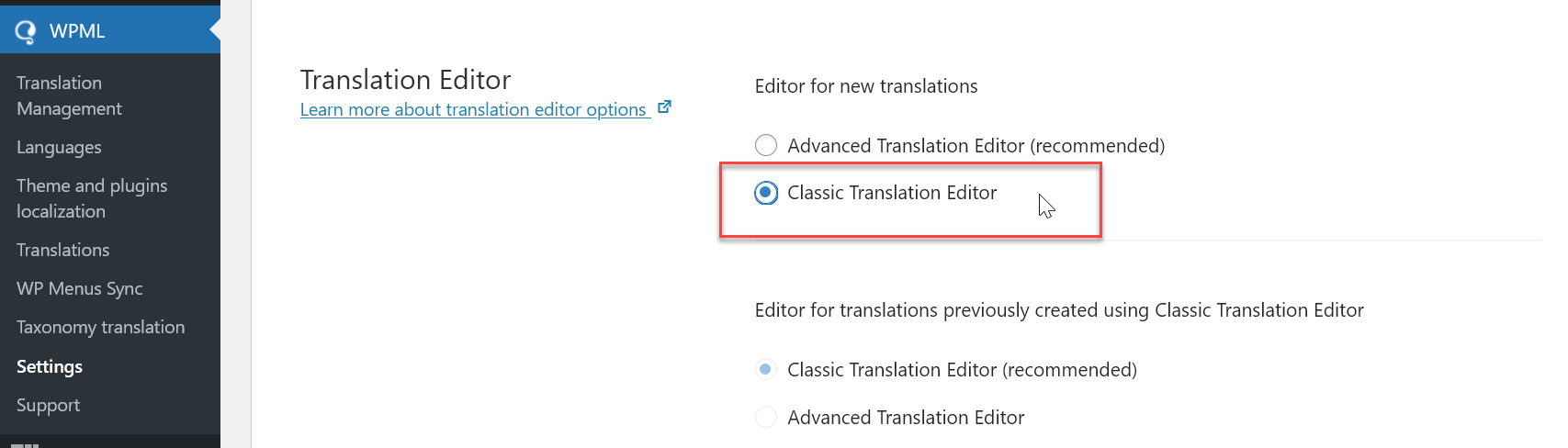
1. Enable the classic editor: https://i.justifiedgrid.com/s244lc.png
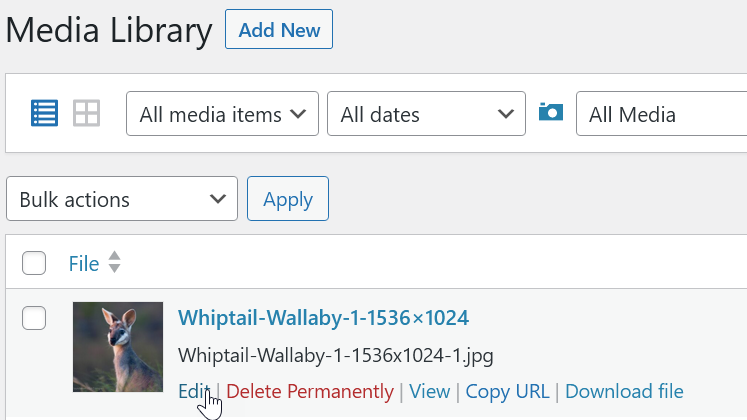
2. Go to the edit page of a single image like this https://i.justifiedgrid.com/s244kt.png
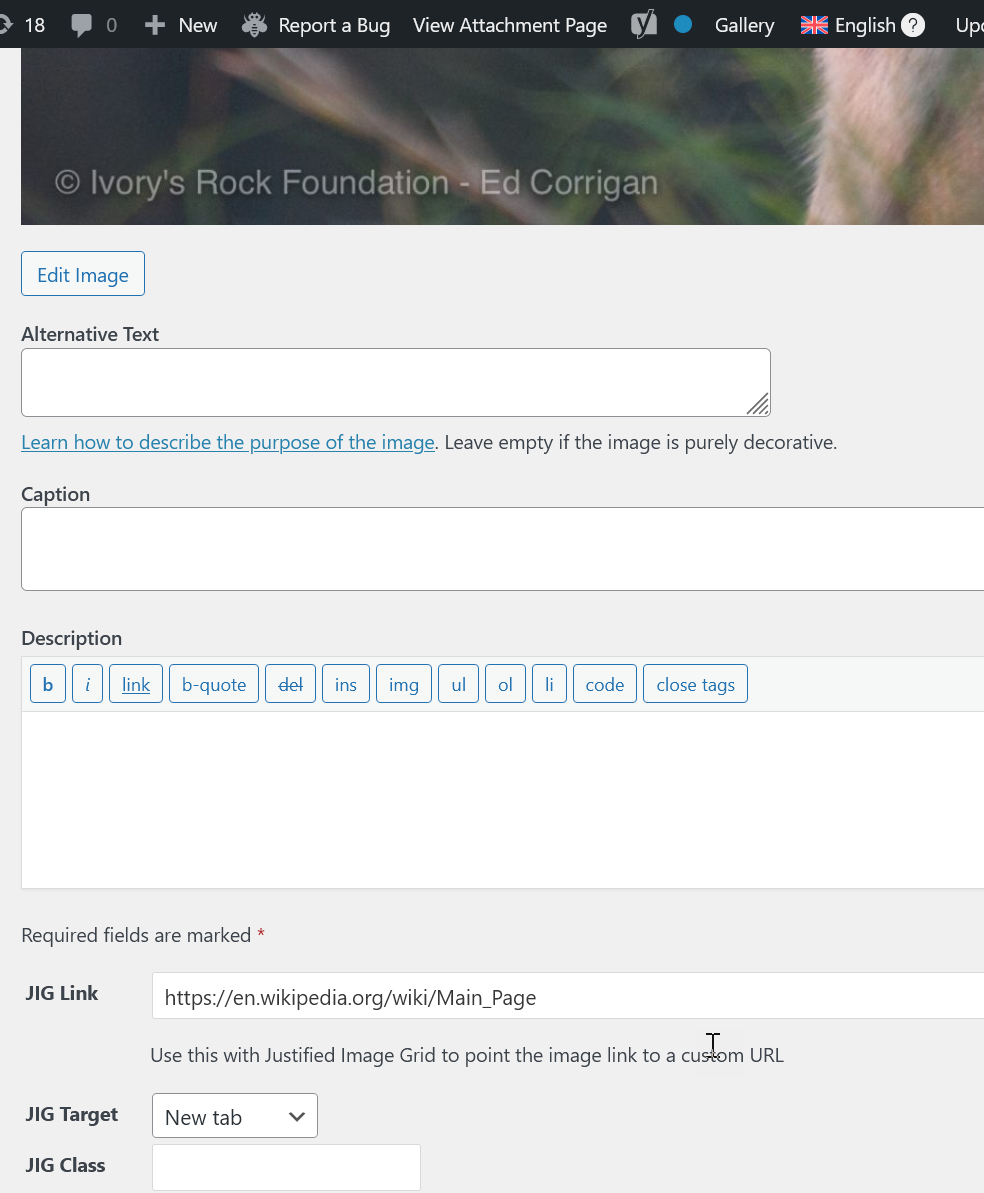
3. Fill the field in one language and “Update”: https://i.justifiedgrid.com/s244t3.png
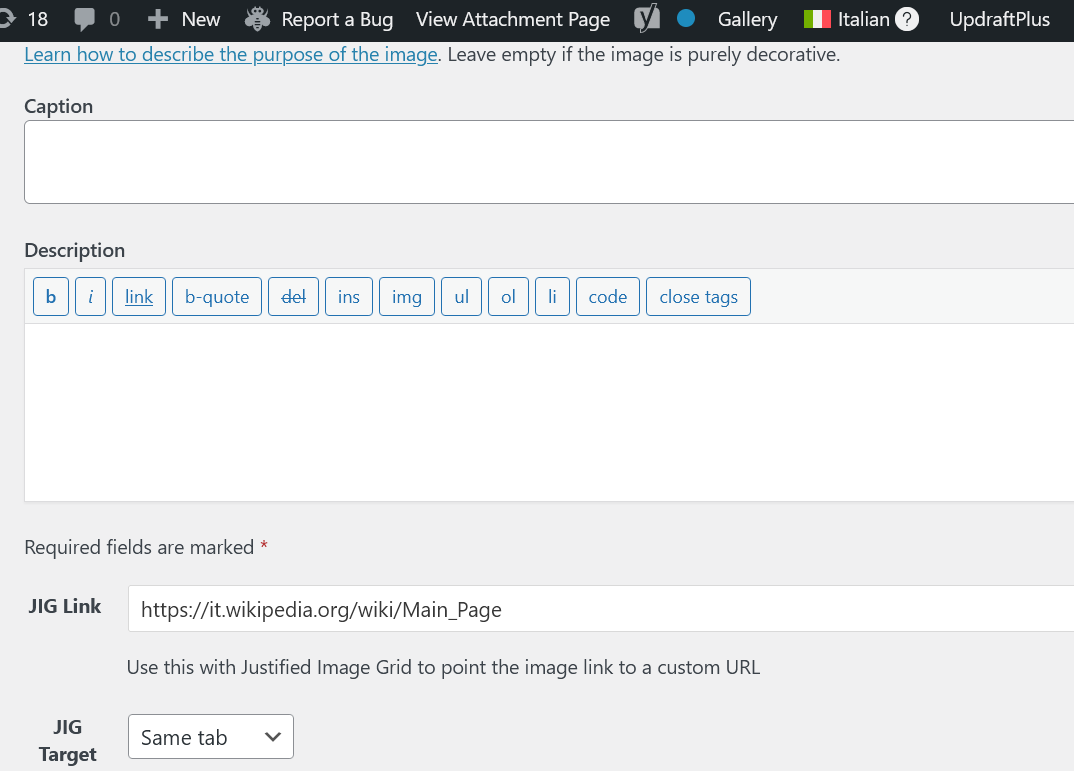
4. Switch to the other from the bar: https://i.justifiedgrid.com/s244uh.png
5. Fill in the fields using the other language: https://i.justifiedgrid.com/s244wb.png
You can verify the values stick by switching between languages back and forth. If you put the same JIG gallery into a post/page that is translated into both languages, you’ll see the changes happen as you switch languages (they’ll point to a different address).
Tested with WPML 4.6.6, WP 6.3.1, beta JIG.
Efficient manual use of WPML requires a meticulous process, always knowing which language you are on in the admin, especially when creating new content, what is the translation of what. Unfortunately I’ve seen and had to untangle multilanguage sites that weren’t set up cautiously, it’s very easy to make mistakes and get lost in that plugin as it’s very powerful and there are multiple ways to do the same thing, even now with automation and AI.
Also you might not even need the Media Translation add-on: https://wpml.org/documentation/getting-started-guide/media-translation/ In my test I didn’t have it at all. Normal WPML can do just fine if you use the same images in all languages, just their captions and links need to be different.
Another question. Can you add video to the gallery as well as images?
Yes, but they won’t be among the thumbnails, only in the lightbox: https://justifiedgrid.com/features/video-gallery-support/
oh ok. That’s disappointing. Any plans to add this feature?
Well, since I’ve dropped “image” from my domain name, yeah I’m open to making this a Justified Grid of anything. But that kind of capability would naturally come as part of a rewrite, which is still a long way out, but I’m learning new or more modern ways to solve these things.
That sounds great. I really admire and appreciate your dedication to this plugin. Thanks very much
I’ve never had any problems with JIG Gallery. Now for the first time there is the problem that my last album(flickr) is not found under JIG? It is displayed on flickr. Are there any changes at the moment?
Was it a caching problem or does the issue still persist?
There is a built-in caching which causes a delay. So if you’ve just created a gallery and then check it on your site, it’ll take like an hour (configurable). Furthermore, caching plugins’ page cache can further delay this but you generally only see stale content while being logged out.
Hello, Can I have Photos and Self hosted Videos in the same Gallery?
Yep, them and the video thumbnails would all come from the media library.
Does the plugin have a row & column limit, a size restriction in any way, and/or a limit in other ways?
You set the limit for row heights. There is no limit on the amount of rows. JIG doesn’t use the concept of columns, you can have any number of thumbnails per row, but it’s automatic and is not a setting. Size restriction is not enforced but it’s good practice to not serve print resolution images. Customers have been known to stuff 1000+ images in a single gallery (relying heavily on filters and load more, not expecting customers to view/load all that at once of course). Mind you that there is no pagination or search yet.
Is it possible to create a JIG gallery out of auto-playing videos? I don’t mean thumbnail images or GIFs that link to videos, but actual embedded videos.
Nope, for now as the name says it’s an image grid  But I have plans to make a grid out of anything even text. For now, it must be an image format that is recognized by the WP media library with dimensions detected.
Hi There
I have owned this pluging for years and play with it from time to time and then end up forgettig about it and then deleting it from the website of my choice at the time.
My questio is not related to support but more features. I wat to use the plugin for SEO purposes by naming all my pictures correctly with decriptions, alt ats etc as one does ad then have these pictures found via my sitemap.
So far so good
My sitemap shows my JIG picture page no problem as you can see here. https://okinawarentalcar.com/pictures-from-okinawa/
However the site map does not expand from that point and show the images with their names as per say a post etc or even an image in a post.
Also if I right click the image for download the image title name is the name of the image I uploaded ad not the new name I provided i the media upload.
For exaple this image that you cat see as there is no link was named “Sesoko Island Bridge” but when I right click for download the name is this “A11F26DD-9663-4C29-A584-F4E6EE19341F-Copy-1024×576”
My question is this: Is there a setting I can click to show these new descriptions so that Google sees them and will show them.
Do I need additional support from you to achieve this?
Is it impossible to show desciptions at titles etc to Google via this plugin?
This plugin is great but its only half as great without SEO and I want to leave some positive feed back.
Please advise me on this simple question
By the way I use Rankmath, XML Sitemap Generator for Google
I appreciate your answer to this
The name of the file doesn’t change normally in the WP media library with title changes, and it’s not the plugin’s responsibility to alter that. There are other plugins that take care of this such as Jordy’s https://wordpress.org/plugins/media-file-renamer/
If you meaningfully fill out the images’ Media Library fields, you need to select them as img alt or link title on JIG’s Lightobxes tab (since these fields are also used by the lightboxes) even if you don’t intend to use a lightbox or show the text (they could be hidden via Custom CSS if they really serve no purpose other than for search engines).
Since JIG display is heavily JS-based, JS-less user agents and search engine bots often just see the HTML version which is dumbed down, doesn’t look as good, but still receives all the texts associated with the gallery (that you choose to display as caption on the thumbnails, and in the lightbox). Because of this structure existing the noscript tag, and generated as a shortcode output, not all SEO plugins pick up as image links to be included in the sitemap. Official support is there for Yoast SEO plugin’s XML sitemap only at the moment. I see that Rankmath may be superior, but I’m yet to add compatibility. In case of Yoast, there is a process that walks all the content on the site, but that just looks at the content. I needed to enable shortcode processing and then output a list of images in a simplified way for the SEO plugin to properly find the images so they would end up in the sitemap when inspecting the xml source of it.
This takes some digesting. Thank you for the comprehensive answer all the same. I am not really sure what you have told me ultimately
Short story is that I haven’t yet worked with Rankmath and the sitemap feature works with a different plugin. Media file names are not JIG’s responsibility and I hinted at a good free plugin that can help. Google sees a different, simpler version of the gallery. The text you wish to use for SEO on the images coincides with the text to show in the lightbox.
hello. what about SEO and sitemap? does all images will have their own links so we increase SEO ranks?
WordPress has a great concept called attachment pages but almost nobody makes good use of them. It’s a page for every image in the library. JIG can link to these pages intead of the lightbox, but unless they look great an useful, they are not of much use. Most people just use the lightbox.
Yoast SEO plugin’s Sitemap feature is connected to JIG, I don’t know of another setup where the plugins would find images embedded with JIG. I’ll probably add Rankmath compatibility in an update.
Hi, I tried to add exif as caption under picture, based on your instruction (from few years ago…), so I installed and activated exifography plugin, added to child theme lines:
function jig_show_exif($metadata, $object_id, $meta_key, $single) { if(isset($meta_key) && $meta_key == ‘jig_exif’){ return exifography_display_exif(‘aperture,shutter,iso’,$object_id); } // Return original if the check does not pass return $metadata; } add_filter(‘get_post_metadata’, ‘jig_show_exif’, 10, 4);
changed Exifography options and in section What text to show inside the lightbox I selected Custom field and in the Lightbox custom field set jig_show_exif
It does not work. What I did wrong?
If your meta key in the code is jig_exif then set that as the custom field too, so jig_exif not jig_show_exif.
In your case jig_show_exif is the function name, not the label of the virtual custom field.
Thanks! It works!
I love this plugin and one of my favs for displaying content.
Question: I see someone else has asked something similar. I run a photography website and want to display the most recent x photo uploads in member uploads folders based on date. It uses WP RML.
Under General settings > Settings that affect the entire grid Order By = The order of images (only for images/posts from WP, or NextGEN, except Random).
Is there any way to display the last x images in the WP RML folder structure based on date?
https://ruapehuphotographygroup.com Scroll down to most recent.Thanks
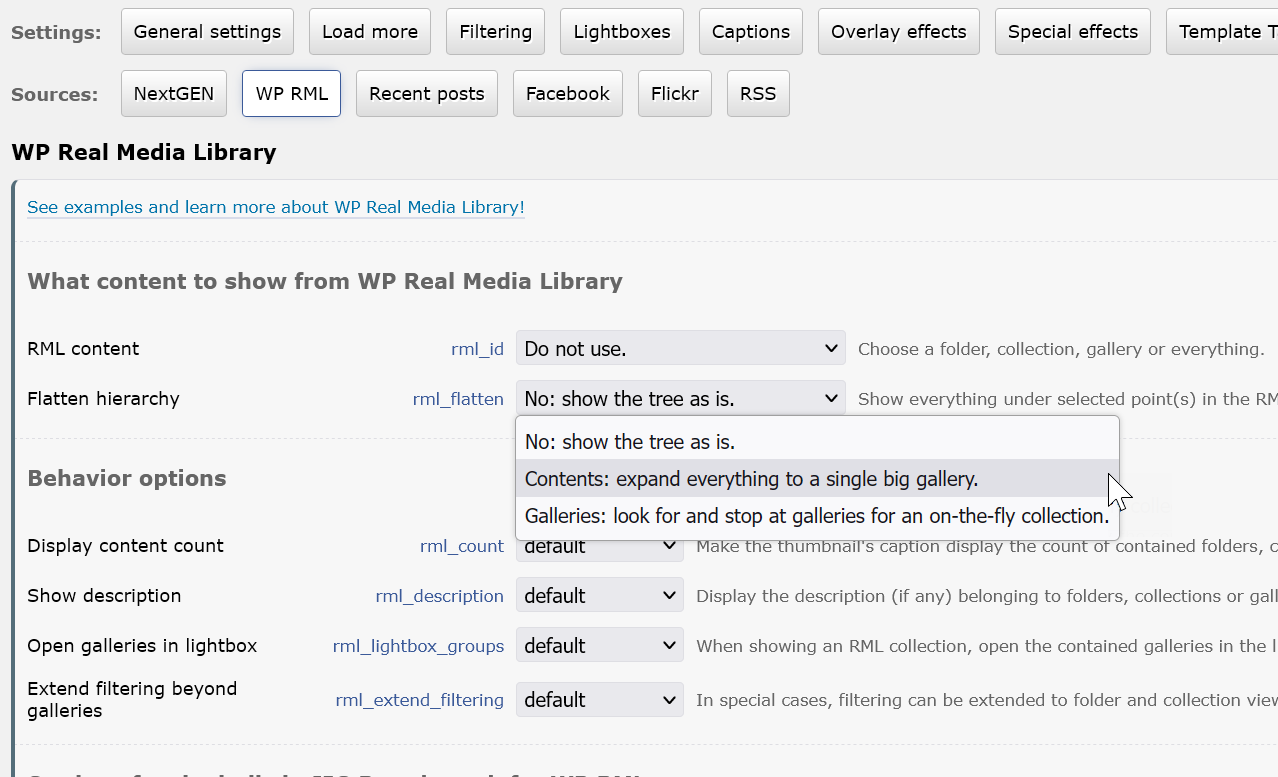
Well, there is this: https://i.justifiedgrid.com/rycb8a.png So any point in the tree you pick becomes a flattened gallery. Then, set the order by to date descending. If the images are not combed together the way you expect, I can make changes to make it more usable but it should work the way you describe.
Finally back looking at this and double checked settings as mentioned above. Still not displaying as expected. I made some more notes here:
https://ruapehuphotographygroup.com/grid-sorting/It just lays out your galleries one after the other, no? The images are in the right order within each gallery, but not merged into a big pool. I’d like to work with you to make this flattening feature more useful. Not many people use this option, and when the flattening stops at the gallery level (not their contents), then the order is fine as they are manually positioned and the “one after the other” is the expected. But in your case you want all of the images put in a pool together, then have the order applied, then the limit. Is that right?
Does it auto scroll? I need a banner of 4 images autoscrolling through a gallery
Nope, sorry
Hi, I have some questions about the plugin
- Is it possible to add the functions to like, favorite or save the grid posts? Where could the user see the list of posts he liked/favourite/saved?
- Is there a way to add custom icons to the navigation?
Example: https://imgur.com/a/dnaCTKA
With custom coding only. For the heart button to work, the ID of the content is generally available in the class of each tile. But how that is saved and listed would be up to those that code this functionality in.
Custom icons is a very nice idea and I might incporporate something like that into the plugin eventually. Now it would need custom code (probably just CSS) to assign each filter button a disctinct icon like that.
Can your grid be customized to mimic this one? (Discover Your New Neighborhood row) https://southernmarinliving.com/
That is more of a “handcrafted” grid, with some tiles spanning two rows. The tiles are not irregular either, they seem to follow a multiple of a unit length or height. This plugin does an automatic irregular grid with strict rows, and no image spans over two rows. So while they may look similar at first sight, they are different approaches so no unfortunately it can’t mimic that one.
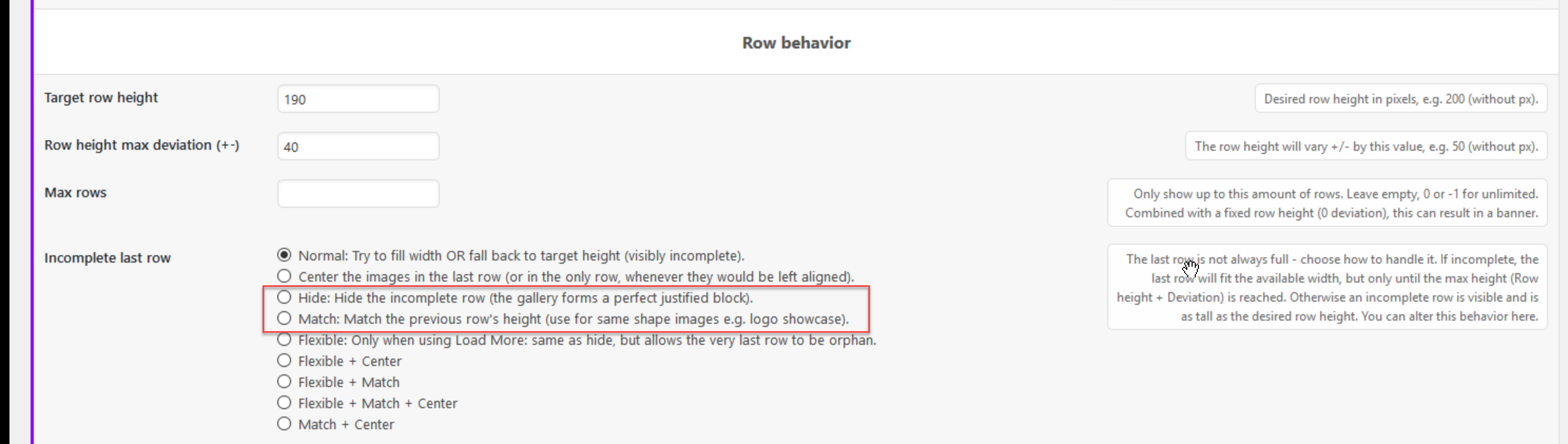
If your source images are strictly 1:1 or 2:1 ratio and limit row height deviation in JIG, and use “disable cropping”, and do something with an incomplete last row (most likely autohide it with an option) https://i.justifiedgrid.com/ry3brm.png then it could look somewhat like this.
But having to prepare images to have a certain aspect ratio just for the layout to work is probably too much work from the site maintainer’s side.
Sometimes sacrificing the last few images just to form a complete block in the page is also not viable if this is used as a form of navigation or index page. The “Match” option doesn’t handle varied aspect ratio images well, but this is something I’ll re-visit because that sounds like an unnecessary limitation.
Thanks for checking it out. I think it might be easier to use Beaver Builder’s columns and nested columns to create this instead of a gallery plugin.Then I will test at each breakpoint and adjust settings so it looks good. I can hand-code the hover effect using CSS. The only thing I lose is the image randomizer.
My client never updates this site, so extensibility is not an issue – just responsiveness. I was able to get a similar grid to behave across devices on this page with this approach and ensuring that the images were sized using multiples as you observed: https://achuckzech.brightbirdcreative.com/our-team/ (toward the bottom).
Thanks anyway. I’ll keep your plugin in mind for future builds.
Here are some hover effects to be useful (the demo looked like it was taken from here or at least inspired by): https://tympanus.net/Development/HoverEffectIdeas/index.html
Source: https://github.com/codrops/HoverEffectIdeas
I’m eyeing with implementing some of these to the plugin one day, perhaps as an addon.
Columns and nested columns of builders can be a bit cumbersome since they correspond to wrappers and things will fall apart or get really simplified as screen width narrows, to a point where the creative grid is only seen on desktop (and just a single column on mobile).
FYI if you know code but still want to use a builder, Oxygen is closer to what you are used to and basically uses an UI for flex with less wrappers and DOM elements outputted. Perhaps for your next project: https://oxygenbuilder.com/
Hello,
The following error has appeared on the front-end:
Justified Image Grid: The Facebook content cannot be displayed, the error from Facebook: Generic Facebook error.
The below error is in Apache Error log:
Undefined array key “time_remaining” in /home/**/public_html/wp-content/plugins/justified-image-grid/justified-image-grid-core.php on line 16662; PHP message: PHP Warning: Undefined array key “owner_type” in /home/**/public_html/wp-content/plugins/justified-image-grid/justified-image-grid-core.php on line 16665’, referer: https://www.*****.com/wp-admin/options-general.php?page=justified-image-grid
I am using PHP FPM Version 8.2.7 and JIG version 4.4
Can you assist? Thanks!
I’ll create an update that addresses this.
Thanks, update applied and PHP errors have disappeared. But the below error still exists in WP (upon admin login):
Justified Image Grid: The Facebook content cannot be displayed, the error from Facebook: Generic Facebook error.
When and where does that appear and in what context? Are you freshly reauthorized with your profile by clicking “add current user” again? The above errors that I got rid of, appeared for me when my registration was months old.
Hi again Firsh, sorry for the delay in responding. I sent you a message with the relevant info, so that you can take a look. I would like to note that I have clicked on “Add current Facebook User” under settings, went through the process and clicked Save. Result is the same as above. Thanks!
Thanks I’ll check it out. I have a new beta for changed Facebook stuff.
Dear Firsh hi, I was wondering if you have an update on this issue after your investigation?
Is the page you see in the admin the only one you have and wish to use? If so, I see the error appears in the specific “overview” options only. If I choose all your albums manually, everything shows. So in the meantime it’s a good workaround but it won’t auto-pull new ones. So the /media/photo-gallery/ page works now until I figure out why the automatic overview option doesn’t work with your page.
I upgraded the shortcode in your page to use the wpbakery block so you can edit it more conveniently.
Thanks Firsh, much appreciate it! Your solution will suffice for now. I will be monitoring the changelog for any updates.Enjoy the summer holidays!
Hi, I’ve released an update, in which each page uses its own page token and not your user token (after a re-auth). It’s been known to cause some errors like you experienced, I’ve encountered with the “feeds” for example. Please check if all is back to normal.
Is it possible to make the gallery layout like the photo attached which is 2 photos in the upper row and 3 in the lower row , the other photos will be included in the right corner.
https://i.ibb.co/xDtznP2/gallery.jpgThank you very much.
The “other photos” button is not a thumbnail in this kind of grid but a separate load more button below the grid. Clicking it spawns more thumbnails.
However, you can cut off the gallery after a number of thumbnails (“hidden limit” feature), and the rest will be discoverable inside the lightbox only. There is no special indication for this, though, but if you add a + to the caption of the last one you can kinda get what I see on the screenshot.
The 2 and 3 per row layout is not guaranteed as the layout is automatic, it can end up different depending on the device and resolution and more importantly, on the shape of the thumbnails.
Hello
I have a theme that is conflicting with JIG at the moment.
This is how i would like the display to look: https://bx200.com/portfolio/manuel-acevedo/ (standard JIG PrettyPhoto display for the gallery images)
This is how the display looks with the new theme: https://news.bx200.com/artists/manuel-acevedo/ (gallery display is being overridden by the theme settings, no title or caption/description is showing)
What would be my best option to have JIG work normally in this case please. Thank you.
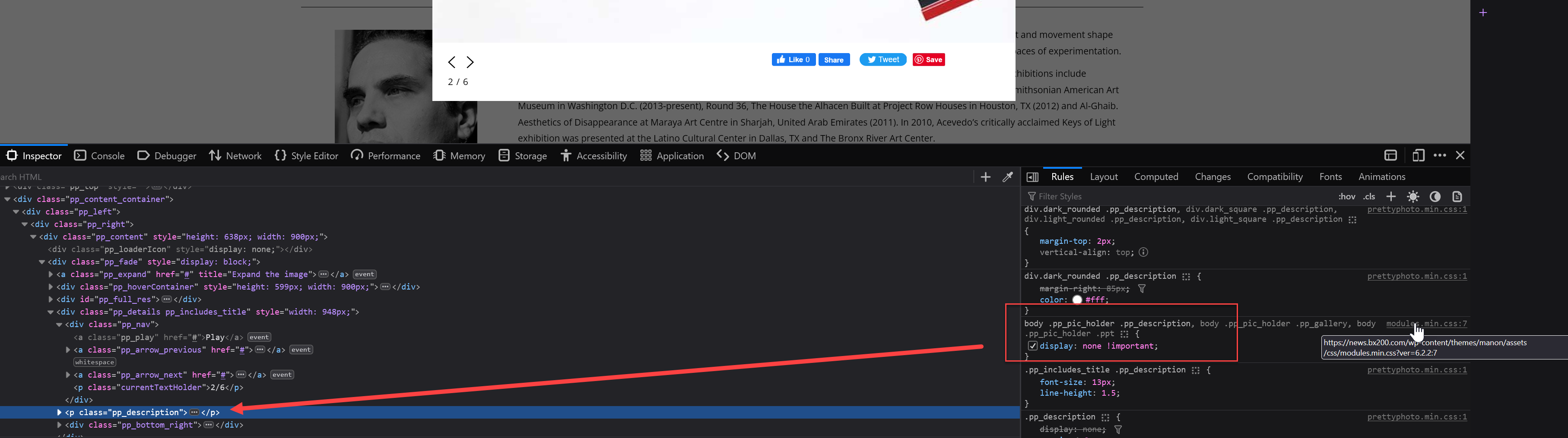
Hi, it’s not theme “settings” but the CSS of the theme itself, a file which is ~25k lines long has rules targeting this particular lightbox, unfortunately. https://news.bx200.com/wp-content/themes/manon/assets/css/modules.min.css?ver=6.2.2
I don’t think it’s feasible to clean the theme of these so JIG’s styles would apply, but possible. The rules are pretty aggressive: https://i.justifiedgrid.com/rwjexd.png what would be useful is to surgically remove .pp* rules from this file, but then you can’t update it anymore. And it’s a minified tome (they have unminified source next to it though). I doubt the theme has options for not including these styles even if you instruct it to skip the lightbox in some way.
I advise picking another lightbox that the theme didn’t come with, perhaps PhotoSwipe. Or if you are adventurous, /* comment */ or remove line range 12347-12717 from https://news.bx200.com/wp-content/themes/manon/assets/css/modules.css?ver=6.2.2 then minify the file with a random online tool and save it as modules.min.css and make backups along the way. And remember to redo this if you update the theme, but the line numbers will be different.
I decided to be adventurous and the solution worked perfectly. Much appreciated and have a great day!