9150 comments found.

Hi, how to set the “Folding” option true only for the mobile but not for the desktop?
Best regards
Hi lesdessouschicsinfo
There is hook ‘wpc_filter_options_before_display’ that allows you to modify a filter options on the fly.$filter = apply_filters( 'wpc_filter_options_before_display', $filter, $set );
The option that determines wheither to make a filter collapsible or not is $filter array element with key ‘collapse’ and possible values are ‘yes’ and ‘no’. You can modify this value in dependency from the device is currently used to browse page with filters – mobile or desktop.
Of course thies expects that you a familiar a bit with PHP and WordPress or you have ask a developer to help you.
Thank you. Regards.
Dear All,
I am really trying hard to get something to work, but I just cannot get it running. Please, can you help?
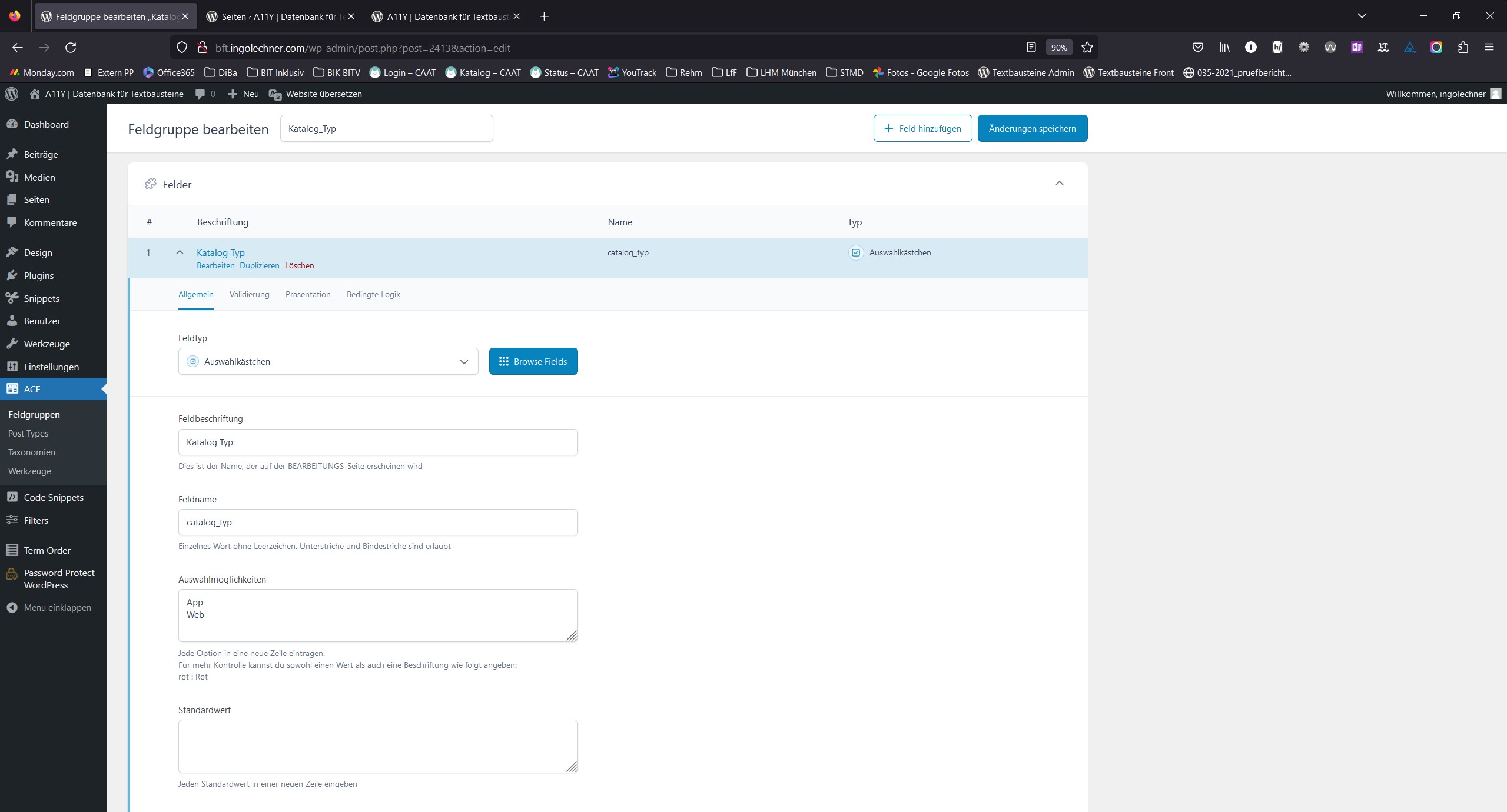
I have several categories in Wordpress. The categories need two extra checkboxes to filter them, Checkbox1 is App, checkbox 2 is web. I am using ACF to get this done, they are field groups, one for Web (checkbox) and one for App (checkbox). I can see them within a category and I am able to click them and save it.
Now I want to use Filter everything to make this selection visible and available on a site or on the blog, but I just cannot get it to work. Can you please tell me how to do this?
Thank you so much!
Best regards Ingo
Hello Ingo
Thank you for using Filter Everything PRO.
I would like to help you with this, but unfortunately I do not understand what is your goal at all. Please, provide me with example how it should work or maybe with screenshot that explains the goal you are trying to achieve.
Thank you. Regards.
Hi everybody, Thanks for getting back!! Of course, I’ll try to explain more details:
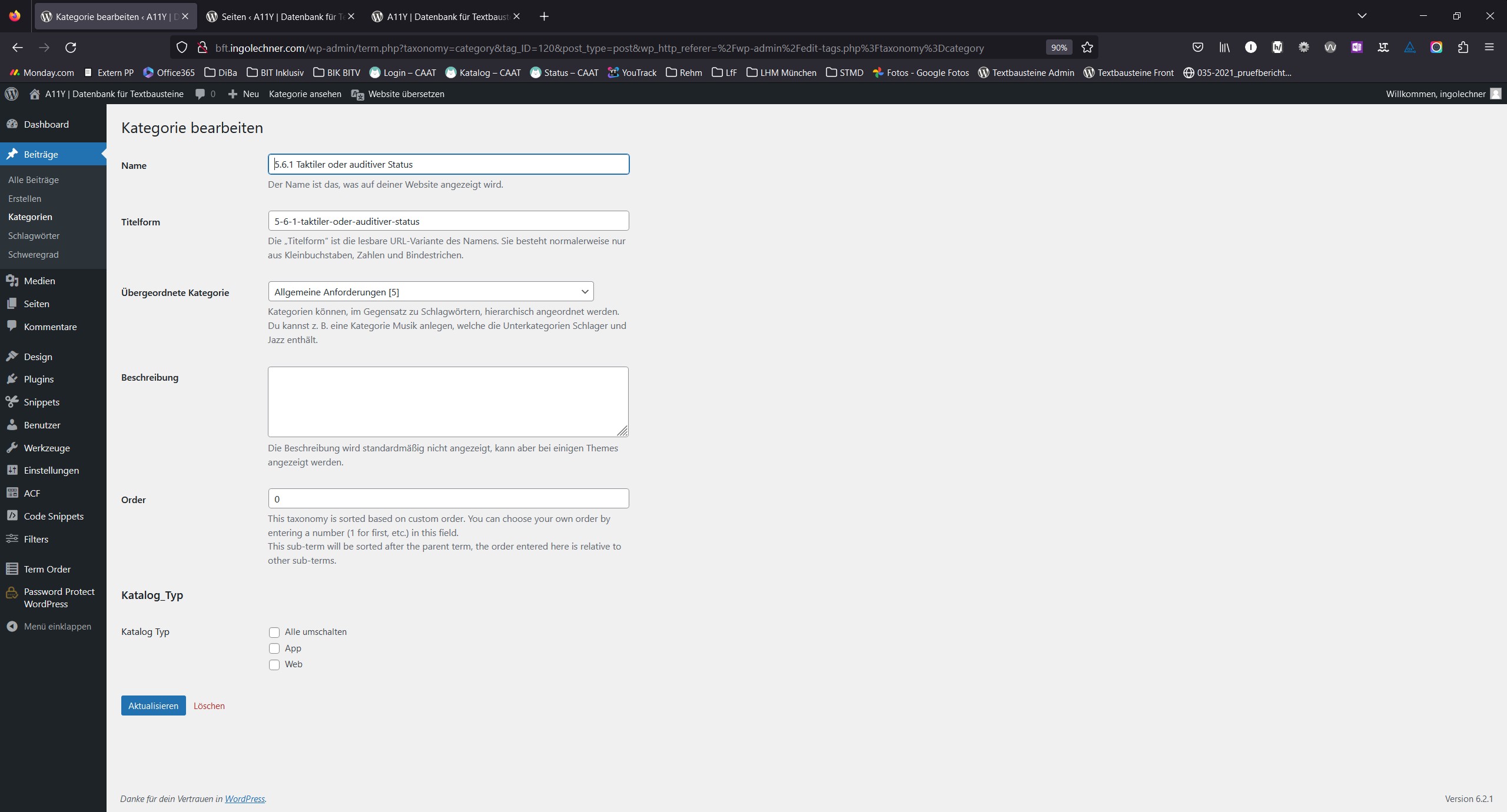
With ACF, I have created a field group (checkboxes) for categories. There are 2 checkboxes (checkbox 1 is labelled “Web”, checkbox 2 is labelled “App”). http://bft.ingolechner.com/wp-content/uploads/2023/05/acf_fieldgroup_config.jpg I can see the two checkboxes within the categories and I am able to cklick them and to save the setting. http://bft.ingolechner.com/wp-content/uploads/2023/05/acf_fieldgroups_visible_in_categories.jpgEach category contains a different amount of posts.
Now, on the front end, I want to use Filter Evereything and I want to be able to have a radio button selection between “Web” and “App”. Once you chose one of them, I want only the categories to be shown that have the respective checkbox active. The posts must then still be reachable when clicking on the category. I can’t get this thing to work, can you please help?
Thank you, your help is highly appreciated.
Cheers Ingo
Hello Ingo
Thank you for your clear explanation.
Now I understood what is you goal. But I have to say that you are trying to filter posts by meta values that stored in your category terms, but not in posts. It is impossible because it is second level relation.
The Filter Everything plugin filters posts by their native meta values and not by meta values stored in categories that are related with posts. And I think there is no such plugin that allows you to do that.
Instead of that you can just add similar ACF field to your posts and set them values Web or App and create filter by this Custom Field.
Regards.
Hi all, Thank you very much for getting back to me, I understood and I have tried to set things up just like you mentioned, using custom fields at the posts directly. But, when I visit the page using [fe_widget] shortcode, I am not able to filter anything as the plugin seems to not recognize the posts. All amounts are 0. You can have a look here on the test page: http://bft.ingolechner.com/de/test/ I have no diea what I am doing wrong. Can you please help once again? Best regards Ingo
Hi ingolechner
Thank you for the link you provided.
I tried to check the page, but I don’t see there neither Filters widget, nor posts grid.
Usually if you see 0 in each filter it means you didn’t select right WP_Query in the “And what to filter?” field of the Filter Set. Or even you didn’t select any WP_Query because there is no WP_Queries at all. If it is the last case, please display your posts grid first and after try to configure Filter Set. Because if you do not show any posts on a page, there is nothing to filter on the page.
I hope this will help you to setup filters. Regards.
Can I hide the category description if more than 2 filters are selected? and in general, the category description does not disappear even if you add an SEO description. two descriptions appear.
Hello spacetheme
You have to know what exactly hook is used in your theme to display the original Category description and disable it via remove_filter(); WordPress function.
Usually it is 'get_the_archive_description' hook or 'woocommerce_after_shop_loop' if you use WooCommerce.
/**
 * @return array|false all selected filters or false
 */
flrt_selected_filter_terms();
that returns selected filter terms if they exist.
Of course all these requires to be a bit familiar with PHP and WordPress hooks or you have to ask a developer to help you with this task.
Thank you. Regards.
Так і зробив. Дякую. Забув написати що вирішив проблему))
Great.
Thank you for your report.
If it is possible I would be thankful for a positive review about the plugin here on CodeCanyon – https://codecanyon.net/item/filter-everything-wordpress-woocommerce-filter/reviews/31634508
Thank you in advance!
Just curious, is there a way to have the pop-up filter widget show on all devices and not just the mobile version?
Hello SRUKen
Sure, it is possible. You can change the mobile view breakpoint value via the next custom code:
add_filter( 'wpc_mobile_width', 'wpc_set_mobile_width' );
function wpc_set_mobile_width( $mobile_width ){
    $mobile_width = 1920; // Screen width in px
    return $mobile_width;
}
You have to add it for example in the functions.php of your active theme.
Regards.
Great. It works perfectly. Thank you.
Hi for filter with range can we add our own placeholders text within the input range boxes Thanks
Hi beauosun
Sure, it is possible via the Templates Overriden feature – https://filtereverything.pro/resources/templates-overriding/
You can override existing Range filter view template with your own and put there desired placeholders.
Regards.
Hi, How do we add a “reset” button to the filters in case people want to reset back to default on the page where the filters are
Hi beauosun
Thank you for choosing Filter Everything PRO.
For this goal it would be better to add Chips on the page that will allow to reset all filters or unselect some of them if needed. Please, look on this documentation page about how to insert Chips on a page – https://filtereverything.pro/resources/chips-widget/
But in case you need exactly “Reset” button and no other chips, you can use next trick – to place Chips widget or shortcode[fe_chips] wherever you need and to add the next CSS code snippet:
#wpc_chips_widget-2 .wpc-filter-chip:not(.wpc-chip-reset-all){
    display: none;
}
Where #wpc_chips_widget-2 is the chips widget wrapper and it may be different in your case. You can find it in the Chips HTML code.
Also you can add this CSS on your site via Filters -> Settings -> Experimental -> Custom CSS.
Regards.
Pre-sale question.
Problems that i have with other filters plugins:
I have multiple values for a variation, ex: Strength with values: 1kg , 2kg , 500g , 200kg, 1g,
The main problem is the sorting of values, in my wordpress backend i manually arranged them : 1g, 500g, 1kg, 2kg, 200kg but in frontend still displaying random, ex. 200kg, 1g, 2kg, 500g, 1kg.
Is there a way to keep the original sorting from wordpress backend of the values?
Hello okarimasu
Thank you for your interest in Filter Everything PRO.
If you mean to sort filter terms in a Filter, my answer is “yes, it is possible”.
There are two ways to sort filter terms in a Filter:
1. To sort them via sorting option in the Filter
2. If sorting option will not sort them as you want, you always can do it via the hook ‘wpc_terms_before_display’
Please, see example here – https://filtereverything.pro/resources/hooks/#terms-before-display-hook
Regards.
Hello This message is to tell you I have to delete my Local wordpress website since there’s has been a critical error while testing your plugin wih Elementor.
Can I install this on another local? Thanks Natalie
Hello Natalie
Thank you for using Filter Everything PRO.
Sure, you can install the plugin on your other server. But why do you ask about this? Do you have any issues with that?
Please, let me know.
Unfortunately I am unable to activate my license. It displays an “unknown error” every time I try byusing the provided keys. Hope to hear from you soon.
Hello Natalie
We can help you to activate the license on our side.
Please, send us two things:
1. The License key you got after click on the “Get your License key” button in the plugin Settings.
2. Credentials to your /wp-admin in accordance with this document.
Thank you. Regards.
Hi,
I’m having an issue which is my product categories have multiple subcategories. However, the filter only show one or none subcategories. I’m not sure is there any setting I have missed out? OR any setting i must tick?
Hope to get your reply soon.
Thank you.
Hi,
Everything is fine now. Just found out there is the setting missed out.
Thank you.
Hi JessyLim
Thank you for the report. I’m glad that your issue was successfully solved.
Regards.
Hello friend, it seems the update has disrupted custom checkbox code….
this doesn’t work on latest…..
any ideas on how to fix, im not a coder
thanks
cant type code here
this doesn’t work now…..
/* Let’s add Apple logo for ‘apple’ brand term */
add_filter( ‘wpc_filters_checkbox_term_html’, ‘wpc_term_brand_logo’, 10, 4 );
function wpc_term_brand_logo($html, $link_attributes, $term, $filter){
if( $term->slug === ‘apple’ ){
$img = ‘FILE).’/img/apple.svg” alt=”Apple logo” width=”15” height=”15” />’;
$html = ‘’.$img . ’ ’. $term->name.’’;
}
return $html;
}
Hello friend, I have sorted my problem out…......thanks anyways
Hello mrChristo
Thank you for the report. I’m glad that your issue was successfully solved 
Regards.
Hi,
I wrote to you a week ago on https://codecanyon.net/user/stepasyuk but haven’t heard back — not sure you got my message. In case you didn’t, I included it below:
I have a license to your Filter Everything Pro plugin. I just renamed my staging site from “https://292f17b2d0.nxcli.net” to “https://staging.mplusw.art”.
When the latest update to your plugin failed I thought maybe I’d have to reactivate the license with the new name. So, I hit the deactivate button. I got the message that there was no site associated with this and the plugin was deactivated. But when I tried to reactivate the plugin, I got the message that there are already two sites activated.
Obviously, something went wrong. Could you help me by either deactivating the connection to “https://292f17b2d0.nxcli.net” or simply resetting the original license.
Sorry for the inconvenience, and thanks for your help.
Best regards, Wolfgang
Hello Wolfgang
The domain “292f17b2d0.nxcli.net” is already deactivated. Please, try to activate the key on the production site.
Regards.
Hi, yes, this time it worked. Thank you.
Hi, I was able to activate the license on “staging.mplusw.art” but when I try to activate it on the main site it still says: the license is already used for 2 sites. But that’s not the case as far as I know. Would you please be so kind to disable it for whatever it thinks the second site is (not “staging.mplusw.art”). Thanks
Hi w_bbc,
It appears that the License was previously activated on a localhost. However, I have already deactivated it. Please try activating the key on the main site.
Best Regards,
- Victor
I just activated it successfully on the main site. Thanks again for your assistance.
Hi, I try to contact you one more time purchase code 12de127f-039a-4c07-8793-bf468c96357a
This plugin did not work with woodmart theme.
Iam waiting long time for new updates, and today I installed all but still get fatal error. I really like you product, But i dont want to change theme, can i get a refund?
Hi marc_hello
You always can create a refund request via the appropriate form in your account here on CodeCanyon.
But in general I have to say that Filter Everything is compatible and works with Woodmart theme. Please, see this temporary example with Woodmart – https://dev.filtereverything.pro/product-category/clothing/women/color-black/?max_price=250
Also you reached the support here https://codecanyon.net/comments/29365707 with another issue – you had some issues with the WP All Import plugin. But you have never said that you have any issues with the Woodmart theme. If you still have questions related with the Woodmart theme, we can check this and try to help you.
Thank you. Regards.
Hello,
First of all, congratulations for the app. I’m a huge fan of the mobile version. Especially for the button at the top of the page!
We have placed it above the widget via the custom code.
This works perfectly, but the filter button is now at the bottom of the page.
We would like to get this one at the top, but we didn’t manage to do this through the settings. How else can this be done?
Have sent a screenshot and a login code for the site in a personal message.
Thank you in advance!
Hello GoLokaal
Thank you for choosing Filter Everything PRO.
The open Filters button for mobile can be inserted on a page in two ways:
1. Automatically via popular hooks used in WordPress themes.
2. Manually via shortcode [fe_open_button] . Please, see more about the shortcode – https://filtereverything.pro/resources/shortcodes/#open-button
If the current button place is not ok for you, you can disable this automatical button displaying in Filters -> Settings -> Experimental -> Hide opening widget buttons and insert the button via the shortcode.
Thank you. Regards.
Hi,
When using the filter it displays the same post for each result.
Additionally, I would like to filter by custom post type, but it doesn’t allow me to select multiple post types to filter.
The site is https://dev.anhinternational.org/discover/
Hi Tribalo
Usually if filter does not affect on the filtered post list, it means that you have to select correct WP_Query in the “And what to filter?” field of the Filter Set. Please, try to experiment with different values in that field and to find correct value.
For the moment Filter Everything PRO does not allow you to filter WP_Query with multiple post types simulteneously. Perhaps such a feature will be added in future plugin updates and if so, we will let you know about it here in this comment thread.
Thank you. Regards.
Hi,
I performed tests with your plugin in free version. Unfortunately, I don’t have access to all the options to see if my tests are conclusive. I wish to acquire the plugin in its paid version.
Can you tell me if this plugin works with Avada Theme? With Avada Post Cards? Can you tell me if a refund is possible if the plugin does not meet my expectations?
Thanks,
Hi pierre174
Thank you for your interest in Filter Everything PRO.
1. Yes, sure. It works with Avada and its post cards. Here is temporary live example with Avada and Woo products – https://dev.filtereverything.pro/shop/brand-calvin-klein-or-hm/
2. Refunds are possible in accordance with the CodeCanyon Refund Policy Rules https://codecanyon.net/page/customer_refund_policy In general Rules here does not allow to promise refunds in comments, but you may not worry that if you will not be able to use the plugin on your site for any technical reasons we will resolve the situation.
Thank you. Regards.
Hello spacetheme
After you made Filter Set translatable post type, you have ability to create individual Filter Set for you second language. Please, create Filter Set that will be translation for your original Filter Set and you can add there any translated filter titles (names)
Thank you. Regards.
Hi, i want to filter in a text input field. Is that possible? Or filtering via the name of the post plus a dropdown custom field.
Hi sokin100
Thank you for purchasing the plugin.
Sure, it is possible. Just enable the Search Field option in the Filter Set and you will be able to search by text in addition to filters in your Filter Set. You have to use the latest plugin version 1.7.8 for that.
Regards.
Hi Team, do you support filtering of tags in groups? For example I have posts with tags Blue, Green, Black. Can I group them under Colors so that they are more organized? Currently they are all over the place. Thanks!
Hi freefallapps
For the moment such feature that allows you to combine several filter terms into group is only planned to be developed in the future plugin updates. We will inform you when it will be added to the plugin here in this comments thread.
Thank you. Regards.
I was just looking at your demo page here https://demo.filtereverything.pro/product-category/clothing/women/
How did you add the different filters by brand, color, price, size? Are they multiple different filter sets? What you have on the demo is what I want to achieve.
Hi freefallapps,
To achieve the same filter as shown in the “Demo,” create a “Filter Set” and add the required “Filters” such as “Product Color,” “Product Size,” “Brand” etc. To add product attributes in “WooCommerce,” you can navigate to “Products” -> “Attributes” -> “Add attribute” or edit and apply them to your products.
Best Regards,
- Victor
Hi, I have problem with obtaining the License Key. Item ID: 31634508, Purchase Date: 2023-05-10 09:08:35 UTC. When I try with “Get your License Key”, appear the next message “There is no Filter Everything PRO plugin among your purchased items”. Somme how license is connected with our firm account hvitltd ( https://www.hvit-bg.com/ ), but I purchased it from my personal account. When I log in with the personal account, there is no license or even chance to be generated. How to proceed? Thanks in advance.
Hello hristiyanh
Thank you for purchasing the plugin.
In general you have to click on the “Get your license key” button and log in with Envato account that is related with CodeCanyon purchase code for the plugin.
I’m not sure because we faced such issue at first time, but I can say that the License activation process checks if the current license is related with current Envato user. And if Envato says they are not related, activation process stops. As option you have to try to activate it from your personal account and from your company account. At least one of them should work.
Thank you. Regards.
Hello,
When i want to use the ‘Apply button’, this button isn’t displayed…
Any tips ?
Thanks !
Hello Commaker45
Thank you for choosing Filter Everything PRO.
Please, let me know:
- did you enabled Apply button in the Filter Set?
- what is button positions if Filters list? (first, last or so)
- did you try to change the button position? Maybe it appers on some position, but does not appear on other?
As option you can send us link to the page with this problem, it would be helpful. Optionally you can do it via PM.
Thank you. Regards.

This item was featured on CodeCanyon

Elite Author
Contact the Envato Market Help Team