9161 comments found.

Hi,
is there a possibility to show the count of products also in the “Apply button mode”. It is shown in the button with the class “wpc-filters-widget-controls-wrapper” but not in “wpc-filter-layout-submit-button”.
That would be really nice. Or do u have a workaround of inserting it also there?
Thx a lot.
Hi hwvaubel
You can use the Templates Overriding feature for that and modify the apply-button.php template as you need. Also you can insert there function/** * @return int|null number of posts found */ flrt_posts_found_quantity( $filter_set_id )
that returns you filtered posts count inside the Apply button and it will show this count.
Regards.
Hi,
thx, I modified everything and it´s working now.
Regards
Hi hwvaubel
I’m glad to hear this 
Hi,
there´s a conflict between “Custom Field Exist” “_sale_price” and the “«Apply Button» mode”.
After adding the filter “Custom Field Exist” with meta key “_sale_price” the Apply button disappeared. I double checked it with my second filter set. There the same issue appeared after inserting it.
Removing the added filter for sales didn´t bring back the Apply button.
I found in CSS that .wpc-filters-widget-controls-container is set to display: none and that the child (where the appy button sits) .wpc-filters-section.wpc-filters-section-1054.wpc-filter-layout-submit-button is also set to display: none.
I think u can reproduce this issue. I can get it back with CSS but I think its better when it´s fixed.
Thanks for your help!
Hello hwvaubel
Thank you for the report.
It looks like this bug appeared after adding the Search field to the plugin. We have already fixed it and I’ve sent you the intermediary plugin version with this bug fixed. Please, replace your current instance with this new version and let me know if the bug is fixed on your side.
Thank you. Regards.
Hi,
The “Apply button” is showing up again. This issue seems fixed.
Thx a lot!
Amazing
Hi, I added a filter Filter by: Étiquettes Produit (product tags) Filter title: Promotion Prefix for URL: prx
Some product have “promotion” as tag. when I visit the shop (named boutique) page with .../boutique/prx-promotion/ I get a page not found and QueryMonitor tell “Undefined index: used_for_variations”
Best regard
Hi lesdessouschicsinfo
Try please to use another prefix for this filter. You can edit it in the Filters -> Settings -> URL Prefixes. Also if you have any Filter Set in Trash, please clear this Trash.
If this will help you it means that the prefix “prx” matches to some of your slugs – taxonomy terms slug, post slug or so and you can not use this prefix simultaneously with another slug.
Regards.
Hi, I have no filter in Trash and the “prx” prefixe is not used elsewhere. For the sake of conscience I changed the prefix of this filter and I still have a page not found with the Query Monitor plugin which indicates: “Undefined index: used_for_variations” for “wp-content/plugins/filter-everything-pro/pro/wpc-utility-functions.php:70” and “wp-content/plugins/filter-everything-pro/pro/PluginPro.php:716”
I add that in the filter by “Product Tags”, there is no checkbox “Use for Variations” (which seems normal) but which is a priori expected in the code of the scripts above regarding the error.
Best regards
Hi lesdessouschicsinfo
Please, send us credentials to your /wp-admin in accordance with this document and we will check this.
Also provide us with example of the problem.
Thank you. Regards.
Hi, I just sent to you the credentials by PM. The filter sets is “Boutique”, the filter is “Promo”. The URL with issue: https://www.lesdessouschics.com/boutique/promoted-promotion/?min_promo=1 It is supposed to return all products that have the “promotion” tag.
Best regards
Hi lesdessouschicsinfo
Thank you for the credentials.
I checked your site and realized that the reason of the problem is the code you attached to the hook ‘wpc_filter_path_segments’. If yo disable this code, all works fine and 404 error disappears.
Also this is the reason, why you see in the Query Monitor notice “Undefined index: used_for_variations”.
But in the current plugin verison you don’t need to use your code to select “In stock” products by default. You can add these codes in the functions.php of your active theme or somewhere else – https://gist.github.com/wpserve/6bb6d1c7141f23b058a1ca726ca57372
Please, disable your old code and try to use from example on Github.
Regards.
Hi! Thank you for this amazing plugin. Everything is like a clockwork except one thing. I have 2 different custom post types “authors” and “books” and they have ACF bidirectional relationship. Both of these have different archive pages and can be filtered by various things including relationship. Now, when I want to have dropdown filter in books archive page by related authors, then I see books and authors in the dropdown. How I can remove CPT books from that list and only display related authors? 
I understand that it happens because they use same acf key, but if I use different one, then these cant be bidirectional.
Hi kairikene
Thank you for choosing the plugin.
There are several ways to achieve that:
1. You can manually exclude extra filter terms in the “Include/Exclude” field under Filter’s More options section.
2. Or you can use hook ‘wpc_terms_before_display’ https://filtereverything.pro/resources/hooks/#terms-before-display-hook to exclude extra terms dynamically in the code.
Regards.
Hello, I’ve sent you an email for support. Can you answer me please? Thank you
Hello giessedati
To achieve such horizontal layout please use Dropdown view for your filters in horizontal layout and enable in Filters -> Settings -> Experimental -> Improved dropdowns
Regards.
Hi, thank you for your reply. However the dropdown view only allows for one selection. Is there a way to make the a foldable checkbox filter looking like the adwanced dropdown? If not, can you implement it? Thank you
Hi giessedati
You can try to use solution from this comment – https://codecanyon.net/comments/29259808 It allows you to create dropdowns with checkboxes as in this demo example – https://demo.filtereverything.pro/horizontal-views/#3-columns
But also there is additional JS and CSS codes that provides auto closing such “dropdowns” by click outside of them – https://codecanyon.net/comments/29329297
I think it is solution close to your goal.
Regards.
Hi, thank you for your help, however this is not exactly what I want to achieve, I’m using improved dropdowns but they don’t support multiple selection.
Hi giessedati
Unfortunately the Dropdown view does not support multiple term selection for the moment. This feature will be added later to the plugin. For the moment such multiple selections are possible only in the way I described above.
Regards.
Is there an ETA for this feature?
Hi giessedati
Unfortunately, there is no exact ETA for it. But we let you know right away when we start working on it in this comments thread.
Best Regards,
- Victor
Good day, tell me with your plugin can be realized by the structure of filters that will be dynamically displayed depending on the choice of product category.
https://prnt.sc/l_g81YdHbsEnПривіт Maxtymosh
Дякую за користування плагіном. Надалі продовжу англійською, щоб було зрозуміло решті користувачів.
You can achieve your goal via custom coding:
- You can use function flrt_selected_filter_terms(); that allows you to detect what exactly filter terms were selected (or no one was selected). Please, see more about the function here – https://filtereverything.pro/resources/functions/
- You can use the hook ‘wpc_view_include_filename’ to determine what exactly file should be included for particular filter in dependency from the filter terms are currently selected. As option you can create all desired filters and use empty.php file that displays nothing and skip unnecessary filters in dependency from the selection in the category filter.
- Also you can use hook ‘wpc_terms_before_display’ https://filtereverything.pro/resources/hooks/#terms-before-display-hook to set what exactly filter terms should be included in a filter in dependency from the selection in the category filter.
Of course it requires to be familiar a bit with PHP and WordPress or you have ask a developer to help you with this.
Regards.
Thank you very much, I will look into it.
Hi there, I have function which should change tittle of filters set to post sidebar into dynamics, but i cant find any hook to add filter in function i tried with add_filter( ‘widget_title’, ’....’) and works fine for a widget titles but unfortunately does not do the job with an actual filter names in filter set. Any idea on what to hook? Thanks in advance. And by the way, awesome plugin!
Best regards, Stevan
*That same issue applies to “Search Field Title” and “Search Field Placeholder” also
Hi mate, i have created several filter sets and deploy them where they belong. Home page side bar, Post category, post tags, post store sidebars . Filter on Homepage and Tag sidebar work fine. However i have problem with category and post store filters which i can make to work properly. Category filter is set in post sidebar same as filter set for tags ,Tag filter works fine category filter does not. Filter set for affiliate stores and filter set for home page are set into affiliate store archive sidebar, home page set works fine, again affiliate store archive does not. So how is manifested : Both filters have similar issue , I fund query which gets correct values but does not filter , when is set different query, it filters but data values are not correct ( eg. incorrect number of posts, incorrect tags, incorrect brands… things which do not belong to that store or in case of Affiliate store archive do not exist except acf numeric fields) Any ideas how to fix that problem?
**Main Query/post query pick up correct data but does not filter -posts are same but both when switched to query#1 filter something-posts are changed… and they match selected filter if it offers some tag which exist under that category, but all values in filter such as tags, colors, shipping… and all counts are faulty inside filter.However when you can find something which match desired criteria for that category, filter will lists those posts there.
*this is url with category archive https://www.temporary-url.com/B287 query#1 shop archive https://www.temporary-url.com/EDCD query#1
FE_support ?!? Any support here guys?
Hello seebeer
Thank you for choosing the plugin. I’m glad to meet here person who is familiar with coding
$filter = apply_filters(' wpc_filter_options_before_display', $filter, $set );
Where $filter is array with a filter options and a title is element with key ‘label’.
Regarding the issue with queries, please, send us credentials to your /wp-admin in accordance with this document and we will check this.
Regards.
Thanks mate it worked  I created you admin acc you asked ,and there is little note in pm. Cheers !
FE_support Im not sure did i send you message or not i can’t see it here.. Anyhow… Thanks bro ,that ”$filter” worked. I created you acc and send you note in pm ,please read it. Best regards,Stevan
Hi mate, any updates?
Hi seebeer
Thank you for your credentials and I’m sorry for the late response.
I checked your site and Filter Set. The problem is that when you set “Any Affiliate Store (for common query across all Affiliate Store pages)” the WP_Query on the page /best-deals-for-discount-codes-for/360totalsecurity/ does not request any posts and in fact it is not the same common query accross all similar pages
This problem is similar to the problem with Bricks Builder which templates for taxonomy archive pages do similar query and it is already solved by the next code inslide the plugin:
// Bricks Builder fix for Any Category Filter Set
add_action( 'wpc_all_set_wp_queried_posts', 'flrt_bricks_builder_category_compat', 10, 2 );
function flrt_bricks_builder_category_compat( $set_wp_query, $setId ){

    //to check if there is Bricks Builder
    if ( defined( 'BRICKS_VERSION' ) && BRICKS_VERSION ) {
        $filterSet  = \FilterEverything\Filter\Container::instance()->getFilterSetService();
        $the_set    = $filterSet->getSet( $setId );

        if ( isset( $the_set['wp_page_type']['value'] ) && isset( $the_set['post_name']['value'] ) ){
            if ( strpos( $the_set['wp_page_type']['value'], 'taxonomy_' ) !== false ) {
                if ( strpos( $the_set['post_name']['value'], '-1' ) !== false ) {
                    $queried_object = get_queried_object();
                    if ( property_exists( $queried_object, 'taxonomy' ) ){
                        $set_wp_query->set( $queried_object->taxonomy, $queried_object->slug );
                    }
                }
            }
        }
    }

    return $set_wp_query;
}
You can solve it if you add almost the same code with only one changed string – condition that matches to your Affilate store pages. I mean this string
if ( defined( 'BRICKS_VERSION' ) && BRICKS_VERSION ) {
Should be changed to
if ( %is your affilate store page% ) {
Of course it should be second function for the same hook but with modified this string.
I think you are enough experienced to write such code
Regards.
:)) Thanks you believe in me mate, but I’m a self-thought economist … I can pick up quickly bits and pieces and figure out things from examples. I think this is out of my domain Any chance you can do it, or guide me step by step … I think would be faster for you to do it because i have a tendency to ask a lot of questions ( What to say, i like to go deep :)) ) and as I remember tag taxonomy had the same issue too?
In general it is not provided under CodeCanyon item support, but I can do it for you as it requires 5-10 mins. Please, allow my user to edit plugins code on your site. And also install please Query Monitor plugin.
Thank you.
Thanks bro. Send me your paypal to buy you a beer or coffee All ready for you , i sent you link on pm.
Hi seebeer
I tried, but got this – https://prnt.sc/QM2s3aLZ00Q7 Maybe file permissions does not allow or my user permissions do not allow to edit plugins. Please try to enable editing plugin files and to login with my username and check if it works. And after that let me know.
Thank you. Regards.
Its multisite … I will write you in PM
Sorry mate , I’m quite sure that I left you message here, but for some reason envato… Anyhow , everything is ready for you, i sent you info in PM regarding direct links. Best Regards and thank you one more time
Hi seebeer
Thank you for your efforts. Now I can edit plugin files and I added some changes in the plugin’s code and now it works as expected. But to save these changes after the next plugin update, please put in the end if the functions.php fie of your active theme next code (I still can’t edit functions.php)
function couponica_category_compat( $set_wp_query, $setId ) {
        $queried_object = get_queried_object();

        if ( ! is_null( $queried_object ) && property_exists( $queried_object, 'taxonomy' ) && $queried_object->taxonomy === 'dealstore' ) {
            $filterSet  = \FilterEverything\Filter\Container::instance()->getFilterSetService();
            $the_set    = $filterSet->getSet( $setId );

            if ( isset( $the_set['wp_page_type']['value'] ) && isset( $the_set['post_name']['value'] ) ){
                if ( strpos( $the_set['wp_page_type']['value'], 'taxonomy_' ) !== false ) {
                    if ( strpos( $the_set['post_name']['value'], '-1' ) !== false ) {
                        $set_wp_query->set( 'tax_query', '' );
                    }
                }
            }
        }

        return $set_wp_query;
    }
Please, let me know if it works for you as expected.
Thank you. Regards.
Thanks, man, unfortunately :/ still doesn’t work, Category or Dealstore(Affilation stores) Post Query.Main Query finds appropriate data but doesn’t filter them in the container. And when I try to add a function you sent me in theme function.php it returns the error ” Your PHP code changes were rolled back due to an error on line 176 of file wp-content/themes/rehub-blankchild/functions.php. Please fix and try saving again.
Cannot redeclare couponica_category_compat() (previously declared in wp-content/plugins/filter-everything-pro/src/wpc-default-hooks.php:351)” which cause site critical error if saved
And please take my apology you said that you are unable to write function.php, but neither do I. Its limitation of multisite neither the super admin has that permission which is a bit weird… Has to be done through sftp or file manager. By the way, I tried to swap those changes you made in wpc-default-hooks.php to function.php didn’t work :/
Any ideas for solution Stepasyuk?
Stepasyuk, buddy, can we patch the problem or not?
Hi seebeer
It seems you updated the plugin or for some reason my code I added before was gone.
But okay, I’ve added it again and I would ask you to add this code to the functions.php
if ( ! function_exists( 'couponica_category_compat_fix' ) ) {
    add_action( 'wpc_all_set_wp_queried_posts', 'couponica_category_compat_fix', 10, 2 );
    function couponica_category_compat_fix( $set_wp_query, $setId ) {
        $queried_object = get_queried_object();

        if ( ! is_null( $queried_object ) && property_exists( $queried_object, 'taxonomy' ) && $queried_object->taxonomy === 'dealstore' ) {
            $filterSet  = \FilterEverything\Filter\Container::instance()->getFilterSetService();
            $the_set    = $filterSet->getSet( $setId );

            if ( isset( $the_set['wp_page_type']['value'] ) && isset( $the_set['post_name']['value'] ) ){
                if ( strpos( $the_set['wp_page_type']['value'], 'taxonomy_' ) !== false ) {
                    if ( strpos( $the_set['post_name']['value'], '-1' ) !== false ) {
                        $set_wp_query->set( 'tax_query', '' );
                    }
                }
            }
        }

        return $set_wp_query;
    }

}
What this code does? It makes that on your pages like /best-deals-for-discount-codes-for/boutiquefeel/filter-by-brand-banggood/ filter works fine and filters products. Please, see screenshot – https://prnt.sc/k7yjEqtDpnlD
Pay attention that this page with selected filter contains 5 products, but you also have Infinite scroll feature, that is not compatible with Fitler Everything URLs and it loads next products that are not filtered, but are regular products for this Store Archive page.
I also saved a DB backup with all current settings via Updraft Plus.
BTW, we are in Kyiv time zone and we don’t work on weekend.
Regards.
- Andrii.
Thanks Andrii, that worked for dealstore taxonomy, but there is still problem with native post category, filters tags ok, but with categories does not work?!? You can check it on this one for example https://www.temporary-url.com/F93B
And yes you were right, code disappeared after plugin update :/ Just to clarify few things , With that code you gave me in theme child function.php , filter be able to work even after plugin update, right? Any chance you can send me in pm after you resolve that category problem what codes you added and where ,in what files . So i can keep that somewhere if something happens so we avoid potentially going to same process again and again just please if you comment that snippet somehow /*Couponica changes/ or something so i know its part of that code. Cheers guys , thank you so much.
Hey Andrii , i just checked that dealstore taxonomy again, and realised that you set in “Filter set for Store Archive pages” Post Quert#1 , which is not correct, query has to be set “Post query.MainQuery.” Only that query collects correct data for filtering. If Post Query#1 is selected, filter collects all posts, all taxonomies,all brands which they do not belong to that store ,that is why you had listed Bangood posts inside Boutiquefull . Even before your code iteration, when selected post query #1 filter filtered in that container, problem was that data query didn’t match filter. Exactly the same problem has “Filter set for CATEGORY pages” when selected Post query #1 or #2 it filters in container things you selected but selecting options are not matching the category you can see it here https://postimg.cc/sBSp6rj7 (same category from the link before) when Post query#1 selected filter will filter things but check what it offered for selection.. but when you go and select main post Query than shows you correct options but does not filter
Andrii?Any Updates?
Andrii mate , i need your support here man .I’m experiencing new problems and old one are not fixed either . Its been almost a month man. New problem ” On this page https://www.temporary-url.com/C36 When let say some shop is selected, for example cotosen, where filter as it should shows only three coupons because that is correct query , when filter is selected it lists all posts attached to that shop. not just 3 coupons as it should it lists all …discounts, deals,coupons! Check settings for that query on same page there is no deals or discounts only coupons . Can you please solve those problems man , i do not want to build all site layouts on something which cant be used! Best regards
Hi seebeer
Unfortunately, we’ve found ourselves in a situation where you expect more from support than CodeCanyon’s item support policy provides. I would love to help you with setting up all the filters on your site, but support here is only for fixing problems with the plugin you purchased. However, we are not responsible for the data on your site and how exactly you set up the plugin, what types of posts you use and try to filter.
Filtering itself is a complex process to understand and it’s easy to get confused, especially if you use many filters based on different criteria and try to filter different types of posts and also use both regular WP_Query and custom ones. It is already difficult to understand even an experienced developer.
From our side, we can only confidently say that from the technical side the plugin works correctly and the problem you described in the first messages has been fixed. If you are unable to configure the plugin to work specifically with your posts and criteria, you can ask a more experienced developer to help you.
If you believe that the plugin contains bugs, please provide all the details – a link to the specific page where you think the filtering is not working correctly and, if necessary, describe in detail the steps to reproduce the error. At this point, the examples you described do not contain enough information, or are not clear enough, to detect the error.
Alternatively, you can also submit a refund request if you believe that the plugin does not do what it promises and it will definitely be processed.
Please, let us know.
Best regards.
- Andrii.
Man i can t make it work with native taxonomy = category… Dont take me wrong , i think you did amazing job with addon, but unfortunately it is not compatible with my theme or maybe multisite in general … Anyhow i will have to submit refund request. All the best and maybe our paths cross again down the road on some other future projects.
Hi Filter Everything PRO
We have a problem regarding your plugin, when the filter tries to receive information from ACF. The total amount of products found is correct, but the products shown in the archive is not.
You can see the problem using this link: https://psc.dk/product-selector/filter-base-material-acrylic-pmma/
Acrylic (PMMA) is selected. 19 products are found, but only 1 product is shown.
The product archive Elementer widget is using ”Posts” with “Products as its custom post type”
Please get back as soon as possible.
Hi okang1
Thank you for choosing the plugin.
This may depend from the template that display posts. For example Filter Everything receives from the DB correct number of posts (let’s say 19) but your template contains loop that skip some of them and displays another number as result.
This can be checked with Query Monitor plugin. Please, install it, open your filtered page again and find there Queries section and find there filtered SQL query. This query contains phrase:/* Current SQL Query is filtered by Filter Everything plugin */
Please, provide this SQL query here in comments and also make screenshot with this query in the Query monitor panel with number of selected posts.
Thank you. Regards.
Hi
I can’t seem to find the phrase “Current SQL. Query is filtered by Filter Everything plugin”. I can however show the main query. See image below: https://aveosupport.zendesk.com/attachments/token/ulwYqZyQOnLYw9EbkSDstCmRZ/?name=image.pngSELECT wp_posts.*
FROM wp_posts JOIN wp_icl_translations wpml_translations
ON wp_posts.ID = wpml_translations.element_id
AND wpml_translations.element_type = CONCAT
WHERE 1=1
AND (wp_posts.ID = ‘8276’)
AND wp_posts.post_type = ‘page’
AND ( ( ( wpml_translations.language_code = ‘en’
OR ( wpml_translations.language_code = ‘en’
AND wp_posts.post_type IN ( ‘elementor_library’ )
AND ( ( (
SELECT COUNT
FROM wp_icl_translations
WHERE trid = wpml_translations.trid
AND language_code = ‘en’ ) = 0 )
OR ( (
SELECT COUNT
FROM wp_icl_translations t2 JOIN wp_posts p
ON p.id = t2.element_id
WHERE t2.trid = wpml_translations.trid
AND t2.language_code = ‘en’
AND ( p.post_status = ‘publish’
OR p.post_status = ‘private’
OR ( p.post_type=’attachment’
AND p.post_status = ‘inherit’ ) ) ) = 0 ) ) ) )
AND wp_posts.post_type IN (‘post’,’page’,’attachment’,’wp_block’,’wp_template’,’wp_template_part’,’wp_navigation’,’elemen tor_library’,’cases’,’products’,’refinements’,’employee’,’applications’,’filter-set’,’jet-smart-filters’ ) )
OR wp_posts.post_type NOT IN (‘post’,’page’,’attachment’,’wp_block’,’wp_template’,’wp_template_part’,’wp_navigation’,’elementor_library’,’cases’,’products’,’refinements’,’employee’,’applications’,’filter-set’,’jet-smart-filters’ ) )
ORDER BY wp_posts.post_date DESC
There are in total 47 DB queries when I filter your plugin in the DB queries when filtering. Please let me know if you need some of the other queries.
Thanks in advance.
Hi okang1
Thank you for the details you provided.
It seems SQL query is correct and the plugin filtered correct number of posts. But initial counter is wrong. Maybe it is a bug or conflict with some of your plugin.
Please, send us credentials to your /wp-admin in accordance with this document and we will check this.
Thank you. Regards.
Hi
I have created a new user with admin permissions and sent them to the user specified in the docs. I haven’t installed UpdraftPlus Backup plugin, since we have an external backup system running. If need be, we can roll back the site using this system.
Thanks in advance.
Hi okang1
Thank you for the credentials.
I checked your site and realized that for the moment username you created for us has no admin permissions – https://prnt.sc/A1f19tEuBkYE Please, change his permissions and let me know here in this comments thread about that.
Regards.
- Andrii.
Hi Andrii
Apologies, didn’t notice that it wasn’t set as ‘Administrator’. You should have admin rights when logging in with the abovementioned login info now.
Please let me know if you need anything else from me.
Best Regards, Okan
Hi Okan
Thank you for the access.
The reason of the problem is that you Custom Field contains data in two different formats – raw data and serialized. Please, see – https://prnt.sc/8tv3Gaxf3gFS
Usually it is consequence of that fact that your Custom Field was changed. For example you changed its type or format or so.
To make all things right, you have to make all data in these fields in the same format – either serialized (red line) or raw (blue line). As option you can remove this field and create it from scratch and fill your posts with data from this field.
Please, make this data in one format and all will start to work properly.
Thank you. Regards.
- Andrii.
Hi Andrii
Our marketing bureau has just let me know that I should give you guys access to our website again. After doing what you said in the last comment, they are telling me that the filters still don’t work. When I choose ‘Acrylic (PMMA)’, for example, it is still not filtering correctly.
Please let me know if you need more information, and I will do my best to answer it myself or relay any questions to you.
If not, please let me know what I can do to resolve this issue. It has been a long-standing problem now.
Hi Okan,
In the “ACF -> Product selector -> Material” we have changed the: “Acrylic (PMMA)” to “acrylycpmmatest : Acrylic (PMMA)” and updated one product and everything is working, we suggest not using in ACF just “Acrylic (PMMA)” as it may cause issues (the ones that you are facing right now).
And if you need to display ACF field labels instead of values (instead of “acrylycpmmatest” you want to see “Acrylic (PMMA)” ), you can add to the functions.php of your active theme appropriate code from the examples below. You also have to edit this code in accordance with your ACF field meta key(s). Below are these codes:
1. ACF field is Taxonomy object – https://gist.github.com/wpserve/0634299bcc67d03bef77119dd20c86e7
2. ACF field is a field with choices – https://gist.github.com/wpserve/48277fc0320239d05b1d6e2c4da3db20
3. ACF field is post object – https://gist.github.com/wpserve/a9a58cb8a37be1472ded53296147cc56
Best Regards.
- Victor
Best Regards.
- Victor
Hi I would like to use the sorting widget with a block theme (twentytwentythree). For this, I need the shortcode [fe_sort] with an id.
In your documentation, you write:
“How can I find widget id? It’s a bit inconvenient, but to use this shortcode you must to create a WordPress widget first.”
Do you know how I can create this widget with a block theme?
Many thanks and best regards. Daniel.
Hi microteq
Unfortunately it is impossible to use the Sorting widget in themes that does not support widgets at all. Because this widget requires custom created sorting options and shortcode does not provide possibility to create and configure these options.
So the only one way is to try to use theme that supports widget or if it is possible to try to add this support manually as WordPress recommends https://codex.wordpress.org/Widgetizing_Themes
Thank you. Regards.
Hello!
I am having a problem when filtering custom fields created with ACF. The changes I make to the list of options in my field group in ACF are not being recognized by your plugin. I determined a list with a certain order in ACF (see screenshot: https://up.stratto.com.bo/wp-content/uploads/2023/05/Screenshot-1.png), and in the ACF backend everything is working correctly, but when I display those fields in your plugin’s options, the order that I established in ACF is not maintained. (see screenshot where PISO 4 is missing and is placed in the wrong place further down the list: https://up.stratto.com.bo/wp-content/uploads/2023/05/Screenshot-2.png)
I have tried updating the plugin but that didn't help, it just made the following error appear on top of the filters:Notice: Undefined index: cols_count in /home/rfrxvmqd/public_html/sites/up/wp-content/plugins/filter-everything-pro/src/Admin/Widgets/FiltersWidget.php on line 537
Could you please help us with this issue? We have tried checking for plugin or theme conflicts but the problem has persisted.
Thank you and best regards.
Hello lootcl.
Thank you for using Filter Everything PRO.
1. The order in ACF field is not related with terms order in a Filter. Filter Everything orders terms in frontend in accordance with the option “Sort term by” value. Also Filter Everything gets terms not from ACF field, but from posts custom fields. Even you will add new value to the ACF field, it will not appear in the Filter, until you update any post with this new value selected.
Notice: Undefined index: cols_count in /home/rfrxvmqd/public_html/sites/up/wp-content/plugins/filter-everything-pro/src/Admin/Widgets/FiltersWidget.php on line 537Please, just re-save Filters widget settings and the error will disappear.
FYI Your support period is expired and if you will need our help, please extend it i accordance with the CodeCanyon rules.
Thank you. Regards
is it possible to replac e the mobile filter in a filter or hook?
nevermind i founc the solutions.
Ok, great.
Thank you for the report about that.
Regards.
Hi, how to set the “Folding” option true only for the mobile but not for the desktop?
Best regards
Hi lesdessouschicsinfo
There is hook ‘wpc_filter_options_before_display’ that allows you to modify a filter options on the fly.$filter = apply_filters( 'wpc_filter_options_before_display', $filter, $set );
The option that determines wheither to make a filter collapsible or not is $filter array element with key ‘collapse’ and possible values are ‘yes’ and ‘no’. You can modify this value in dependency from the device is currently used to browse page with filters – mobile or desktop.
Of course thies expects that you a familiar a bit with PHP and WordPress or you have ask a developer to help you.
Thank you. Regards.
Dear All,
I am really trying hard to get something to work, but I just cannot get it running. Please, can you help?
I have several categories in Wordpress. The categories need two extra checkboxes to filter them, Checkbox1 is App, checkbox 2 is web. I am using ACF to get this done, they are field groups, one for Web (checkbox) and one for App (checkbox). I can see them within a category and I am able to click them and save it.
Now I want to use Filter everything to make this selection visible and available on a site or on the blog, but I just cannot get it to work. Can you please tell me how to do this?
Thank you so much!
Best regards Ingo
Hello Ingo
Thank you for using Filter Everything PRO.
I would like to help you with this, but unfortunately I do not understand what is your goal at all. Please, provide me with example how it should work or maybe with screenshot that explains the goal you are trying to achieve.
Thank you. Regards.
Hi everybody, Thanks for getting back!! Of course, I’ll try to explain more details:
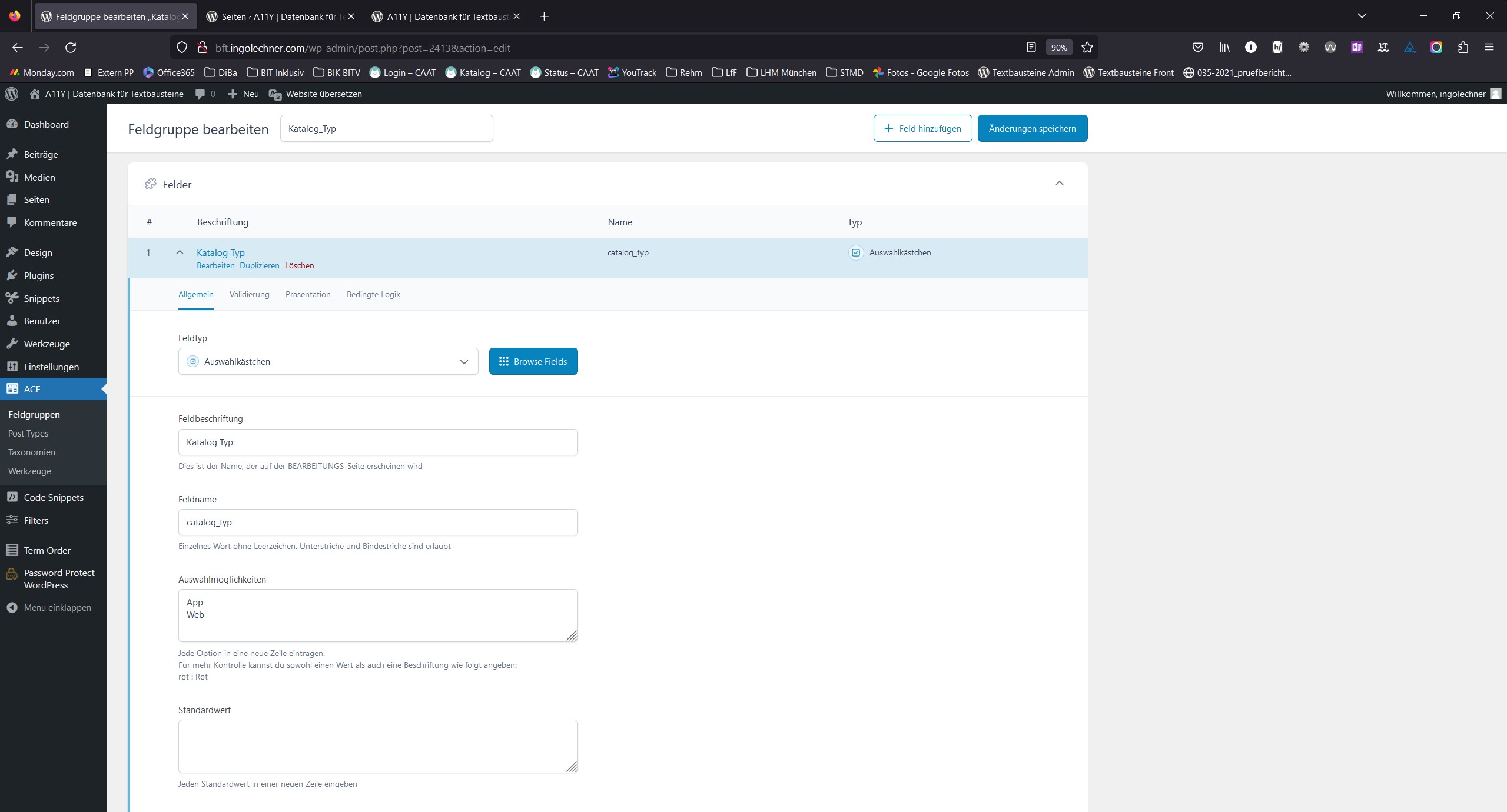
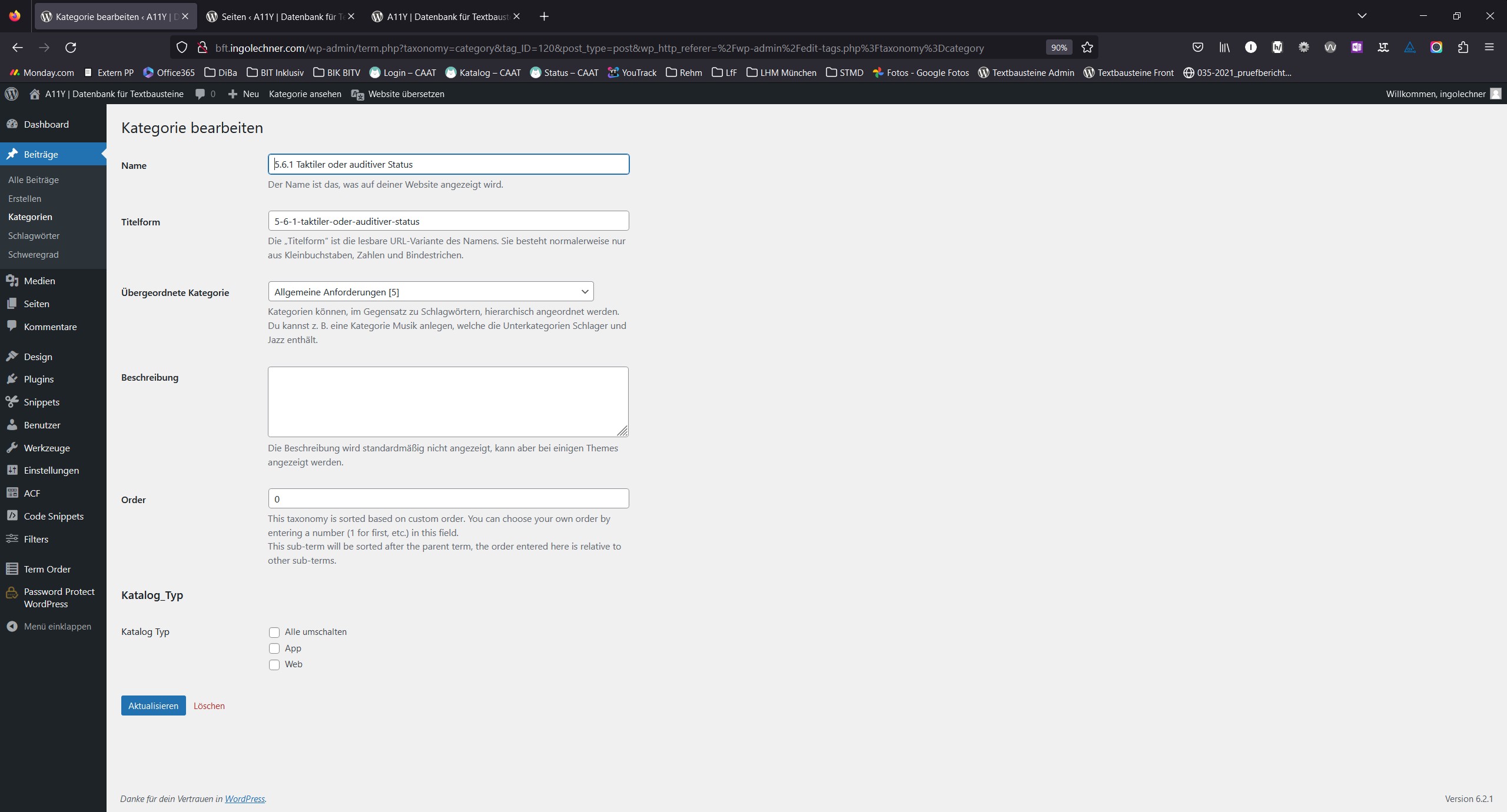
With ACF, I have created a field group (checkboxes) for categories. There are 2 checkboxes (checkbox 1 is labelled “Web”, checkbox 2 is labelled “App”). http://bft.ingolechner.com/wp-content/uploads/2023/05/acf_fieldgroup_config.jpg I can see the two checkboxes within the categories and I am able to cklick them and to save the setting. http://bft.ingolechner.com/wp-content/uploads/2023/05/acf_fieldgroups_visible_in_categories.jpgEach category contains a different amount of posts.
Now, on the front end, I want to use Filter Evereything and I want to be able to have a radio button selection between “Web” and “App”. Once you chose one of them, I want only the categories to be shown that have the respective checkbox active. The posts must then still be reachable when clicking on the category. I can’t get this thing to work, can you please help?
Thank you, your help is highly appreciated.
Cheers Ingo
Hello Ingo
Thank you for your clear explanation.
Now I understood what is you goal. But I have to say that you are trying to filter posts by meta values that stored in your category terms, but not in posts. It is impossible because it is second level relation.
The Filter Everything plugin filters posts by their native meta values and not by meta values stored in categories that are related with posts. And I think there is no such plugin that allows you to do that.
Instead of that you can just add similar ACF field to your posts and set them values Web or App and create filter by this Custom Field.
Regards.
Hi all, Thank you very much for getting back to me, I understood and I have tried to set things up just like you mentioned, using custom fields at the posts directly. But, when I visit the page using [fe_widget] shortcode, I am not able to filter anything as the plugin seems to not recognize the posts. All amounts are 0. You can have a look here on the test page: http://bft.ingolechner.com/de/test/ I have no diea what I am doing wrong. Can you please help once again? Best regards Ingo
Hi ingolechner
Thank you for the link you provided.
I tried to check the page, but I don’t see there neither Filters widget, nor posts grid.
Usually if you see 0 in each filter it means you didn’t select right WP_Query in the “And what to filter?” field of the Filter Set. Or even you didn’t select any WP_Query because there is no WP_Queries at all. If it is the last case, please display your posts grid first and after try to configure Filter Set. Because if you do not show any posts on a page, there is nothing to filter on the page.
I hope this will help you to setup filters. Regards.
Can I hide the category description if more than 2 filters are selected? and in general, the category description does not disappear even if you add an SEO description. two descriptions appear.
Hello spacetheme
You have to know what exactly hook is used in your theme to display the original Category description and disable it via remove_filter(); WordPress function.
Usually it is 'get_the_archive_description' hook or 'woocommerce_after_shop_loop' if you use WooCommerce.
/**
 * @return array|false all selected filters or false
 */
flrt_selected_filter_terms();
that returns selected filter terms if they exist.
Of course all these requires to be a bit familiar with PHP and WordPress hooks or you have to ask a developer to help you with this task.
Thank you. Regards.
Так і зробив. Дякую. Забув написати що вирішив проблему))
Great.
Thank you for your report.
If it is possible I would be thankful for a positive review about the plugin here on CodeCanyon – https://codecanyon.net/item/filter-everything-wordpress-woocommerce-filter/reviews/31634508
Thank you in advance!
Just curious, is there a way to have the pop-up filter widget show on all devices and not just the mobile version?
Hello SRUKen
Sure, it is possible. You can change the mobile view breakpoint value via the next custom code:
add_filter( 'wpc_mobile_width', 'wpc_set_mobile_width' );
function wpc_set_mobile_width( $mobile_width ){
    $mobile_width = 1920; // Screen width in px
    return $mobile_width;
}
You have to add it for example in the functions.php of your active theme.
Regards.
Great. It works perfectly. Thank you.
Hi for filter with range can we add our own placeholders text within the input range boxes Thanks
Hi beauosun
Sure, it is possible via the Templates Overriden feature – https://filtereverything.pro/resources/templates-overriding/
You can override existing Range filter view template with your own and put there desired placeholders.
Regards.
Hi, How do we add a “reset” button to the filters in case people want to reset back to default on the page where the filters are
Hi beauosun
Thank you for choosing Filter Everything PRO.
For this goal it would be better to add Chips on the page that will allow to reset all filters or unselect some of them if needed. Please, look on this documentation page about how to insert Chips on a page – https://filtereverything.pro/resources/chips-widget/
But in case you need exactly “Reset” button and no other chips, you can use next trick – to place Chips widget or shortcode[fe_chips] wherever you need and to add the next CSS code snippet:
#wpc_chips_widget-2 .wpc-filter-chip:not(.wpc-chip-reset-all){
    display: none;
}
Where #wpc_chips_widget-2 is the chips widget wrapper and it may be different in your case. You can find it in the Chips HTML code.
Also you can add this CSS on your site via Filters -> Settings -> Experimental -> Custom CSS.
Regards.
Pre-sale question.
Problems that i have with other filters plugins:
I have multiple values for a variation, ex: Strength with values: 1kg , 2kg , 500g , 200kg, 1g,
The main problem is the sorting of values, in my wordpress backend i manually arranged them : 1g, 500g, 1kg, 2kg, 200kg but in frontend still displaying random, ex. 200kg, 1g, 2kg, 500g, 1kg.
Is there a way to keep the original sorting from wordpress backend of the values?
Hello okarimasu
Thank you for your interest in Filter Everything PRO.
If you mean to sort filter terms in a Filter, my answer is “yes, it is possible”.
There are two ways to sort filter terms in a Filter:
1. To sort them via sorting option in the Filter
2. If sorting option will not sort them as you want, you always can do it via the hook ‘wpc_terms_before_display’
Please, see example here – https://filtereverything.pro/resources/hooks/#terms-before-display-hook
Regards.
Hello This message is to tell you I have to delete my Local wordpress website since there’s has been a critical error while testing your plugin wih Elementor.
Can I install this on another local? Thanks Natalie
Hello Natalie
Thank you for using Filter Everything PRO.
Sure, you can install the plugin on your other server. But why do you ask about this? Do you have any issues with that?
Please, let me know.
Unfortunately I am unable to activate my license. It displays an “unknown error” every time I try byusing the provided keys. Hope to hear from you soon.
Hello Natalie
We can help you to activate the license on our side.
Please, send us two things:
1. The License key you got after click on the “Get your License key” button in the plugin Settings.
2. Credentials to your /wp-admin in accordance with this document.
Thank you. Regards.
Hi,
I’m having an issue which is my product categories have multiple subcategories. However, the filter only show one or none subcategories. I’m not sure is there any setting I have missed out? OR any setting i must tick?
Hope to get your reply soon.
Thank you.
Hi,
Everything is fine now. Just found out there is the setting missed out.
Thank you.
Hi JessyLim
Thank you for the report. I’m glad that your issue was successfully solved.
Regards.

This item was featured on CodeCanyon

Elite Author
Contact the Envato Market Help Team




,)
)