8473 comments found.

Hi. I would like to report a bug. JIG doesnt display a part of the galery data folders names.
See here an example https://www.socializeazacunoi.ro/poze/rml-content/2022/
The are 6 galley data folders there. 2 show up with the names, 4 dont.
I see the galery data folders in the wordpress dashboard, but somehow JIG doesnt display them in the front end. I dont understand why
The gallery data folders which names dont show up(the first 3 on the page) are
29.10.2022 Ciucas în Culori de Toamna 15.10.2022 Postăvaru în Culori de Toamnă 30.09.2022 Excursie de două zile Explorăm Vestul Bucegilor 24.02.2022 Iarna cu de Toate în Țara Branului – 4 zile
They are located în the 2022 collection
The short code that displays the photo galery is located here https://www.socializeazacunoi.ro/poze/
And is [justified_image_grid preset=20 rml_id=7 rml_bc_top_level=yes]
What is the solution?
It is a peculiarity of preset 20 or any usage where the caption is instructed to show below captions. If you have too much text to fit into that area, they either get chopped with … or in worse cases entire lines can disappear. That would happen if their font size and line height design make not even a single line fit (its height). That can come from the preexisting design on the page, so my default caption height might not always be useful. Try increasing the caption height setting to 60 or 80 and see with what values the text starts to show up. In your case I see lots of line breaks (new lines), is that something you remember including in the description texts?
Thank you for the reply.
I am a little bit lost.
What does the data gallery description have to do with the name of the gallery being displayed below the thumbnail? Yes. I have line breaks in the descriptions of the data galleries. Its like a small story of the trip. The line breaks make the text easy to read.
I did a test: I removed the description of the first data gallery and when I did that its name showed up on the front end. But I dont want to remove the descriptions of the albums. Without the text they become some random photos on the internet.
I tried to increase the caption height in the JIG dashboard but without any result.
What should I do next?
Ok. Problem solved. Thank you! I have removed the lines the breaks and now everything works. Would be nice thought to be able to put line breaks in the description.
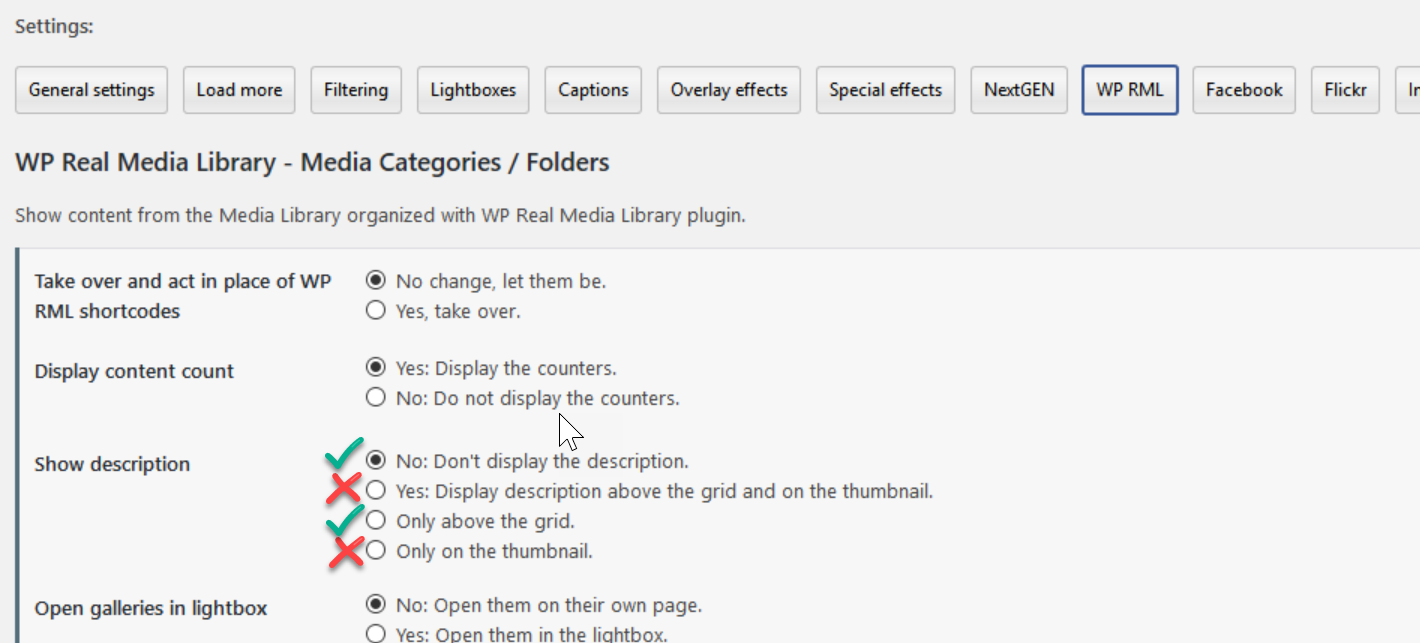
The gallery description can be shown above the grid, well outside of thumbnails, there you can show them with any kind of line breaks. But the description (which could be a wall of text) CAN also be shown on (or below) the thumbnails. In that case a long and multiline text does cause problems. If you have a small space for it, instruct the plugin to not show the description. https://i.justifiedgrid.com/rwjfe3.png
The name of the gallery is a separate slot. I think the name and the content count is enough to differentiate this view from the content photos inside.
What’s also feasible is to use larger thumbnails, have captions ON the thumbnails, and have them (their bottom line) shown (slide up or fade in) upon interacting with the thumbnail, so they are out of the way most of the time. Then have more area to work with and text only gets cropped if it already covers the entire thumbnail.
Hello, I have a question: Does the plugin also work with the Novo – Photography Theme?
I don’t see why not
To show Facebook photos from the timeline, do we need access token or a Facebook app?
Hi. I’m trying to work out if something is possible. Maybe you could let me know.
I’m trying to set up a little art club with friends and colleagues. Ideally I’d like the users to be able to upload their art via a form and have it be automatically displayed in a JIG gallery. But then I’d also like people to be able to click on an image and add comments below.
Do you know if there is a way to set up something like that?
I don’t know if there is a way to make a form add a tag that could be used by JIG. I also don’t know if there is a way to get comments to appear under images without individually setting JIG links on the media to a page/post with the media already added.
I’m basically trying to make the whole process automatic. But it may just not be possible so I thought I should just ask. Thanks for any help.
JIG is just a display, you’ll need another plugin or custom code to handle the community features (upload and commenting). As long as images end up in the media library as if an admin had uploaded them, there is always a way to make JIG find them. Commenting could be done if you don’t use a lightbox but the “attachment page” (JIG thumbnails could link to those). Or a mix of both: show a lightbox but lead visitors from it to the conversation on a separate page for each image.
For some reason even though I set no Lightbox on mobile it still pops up on mobile. Any idea why? I have it installed on multiple sites and all set to no Lightbox on mobile but they all pop up.
site is www.paulpetch.com
Do you use a caching solution/plugin? What kind of device are you testing with?
Litespeed cache. Turning it off does not fix the issue. It’s a pain in the ass! Turning off Lightbox for mobile is OK but as mentioned the ability to click an image on desktop for Lightbox is random.
What we could do is to enable lightbox everywhere, but use CSS to disable clickability on the thumbnails if the screen width is under a certain value. That survives any kind of server caching and does not use server side mobile detection. Would that work for you?
Custom CSS:
@media screen and (max-width: 768px) { a.jig-link{pointer-events: none;} }
Brilliant. That seems to have fixed it!
Unfortunately, this product does not seem to be supported. My questions have gone unanswered for one week.
Please send your question again (here if not sensitive) as I see no trace of your message in my inbox.
If you have used the old support email address, that’s no longer in operation. Use the one with justifiedgrid.com or gmail.com domain.
I’ll try again when I have time. I honestly don’t remember what email I used. It was one of the linked forms in Envato. Thanks for responding.
I’m trying to update from 1.7.1. This is the error I get when trying to delete the plugin: Deletion failed: TypeError throwncall_user_func_array(): Argument #1 ($callback) must be a valid callback, non-static method JustifiedImageGrid::on_uninstall() cannot be called statically
Delete the folder of the plugin via FTP (or your hosting’s file manager, or via this free plugin https://wordpress.org/plugins/wp-file-manager/ ), then install fresh from the downloaded installable from CodeCanyon. 1.7.1 is probably too old (10 years) for modern servers to do anything with.
Understand. Will my settings be retained?
Yes, but since it’s a long gap, some may have been discontinued (rare). I don’t usually rename settings variables so backward compatibility should be good for those that exist though. Also the use of the plugin has changed significantly since then, so while grids will likely continue to work, you’ll need to relearn how to edit or create them or access the shortcode editor like in old times (that still exists but new users don’t copypaste shortcode anymore).
Very happy to say everything worked on the first try! Thanks for everything. Sorry about being in a bad mood before.
No problem!
Hey Firsch – Having a bit of a problem. I made a grid of images and I have it set up where if the images are clicked the user is taken to the attachment page, in this case a post where the image resides. It works fine – if I’m logged in to the backend. If I’m not logged in, I’m taken back to the main page. As far as I can tell, I have everything set right – the grid is set to access the attachment page, I have the grid set a preset that has this set as well. Any ideas?
Could it be due to caching? Can you please send me a link to where this happens? Are those pages published? If the public has no permission to view them, they won’t work.
hmmmm…. maybe that was it because it seems to be working now. Of course. I guess you fixed it, thanks.
I’m very interested in using this plugin, but I am unsure if it can conflict with my theme. Out of curiosity, here is my website: https://vlanderon.com Does this plugin align with my theme?
I don’t see why it couldn’t align with your theme  If there is any technical problem let me know. Designise it’s mostly unopinionated by default, but can be tailored to look more seamless via the settings.
Hi, can i create several different galleries in several pages Thanks
Yes of course
Puzzled why the plugin on my home page no longer finds images. It’s working on photos.albj.net but not on the root albj.net – I even tried just slimming down to zero options and just pulling [justified_image_grid flickr_search_user=55455788@N00] which results in a message “There are no photos with those IDs or the post 17 does not have any attached images! Source selection is missing from this grid.”
Okay, I revised the code to [justified_image_grid flickr_user=55455788@N00 flickr_collection=complete-overview] and it works, but the original code still says no photos match my search criteria even though it used to produce results. The code I’m trying to use is:
[justified_image_grid row_height=100 caption=slide mobile_caption=same caption_match_width=no caption_title_size=10px caption_desc_size=10px caption_align=center gradient_caption_bg=no orderby=rand filter_orderby=random max_rows=3 disable_cropping=no flickr_search_tags_m=all flickr_search_user=55455788@N00 flickr_description=no]
It’s starting to look like the search function has broken, which explains why photos.albj.net works (I don’t use a search query for my tag there).
Well, rescind the above comments. I can only assume Flickr was having a momentary massage and not processing API search queries. It’s working now.
I see now that in the JIG admin, it’s not clear that you need to give it more inputs to work with than just your ID. It looks like it had missing, for example, a search query to trigger “Flickr mode” for the gallery.
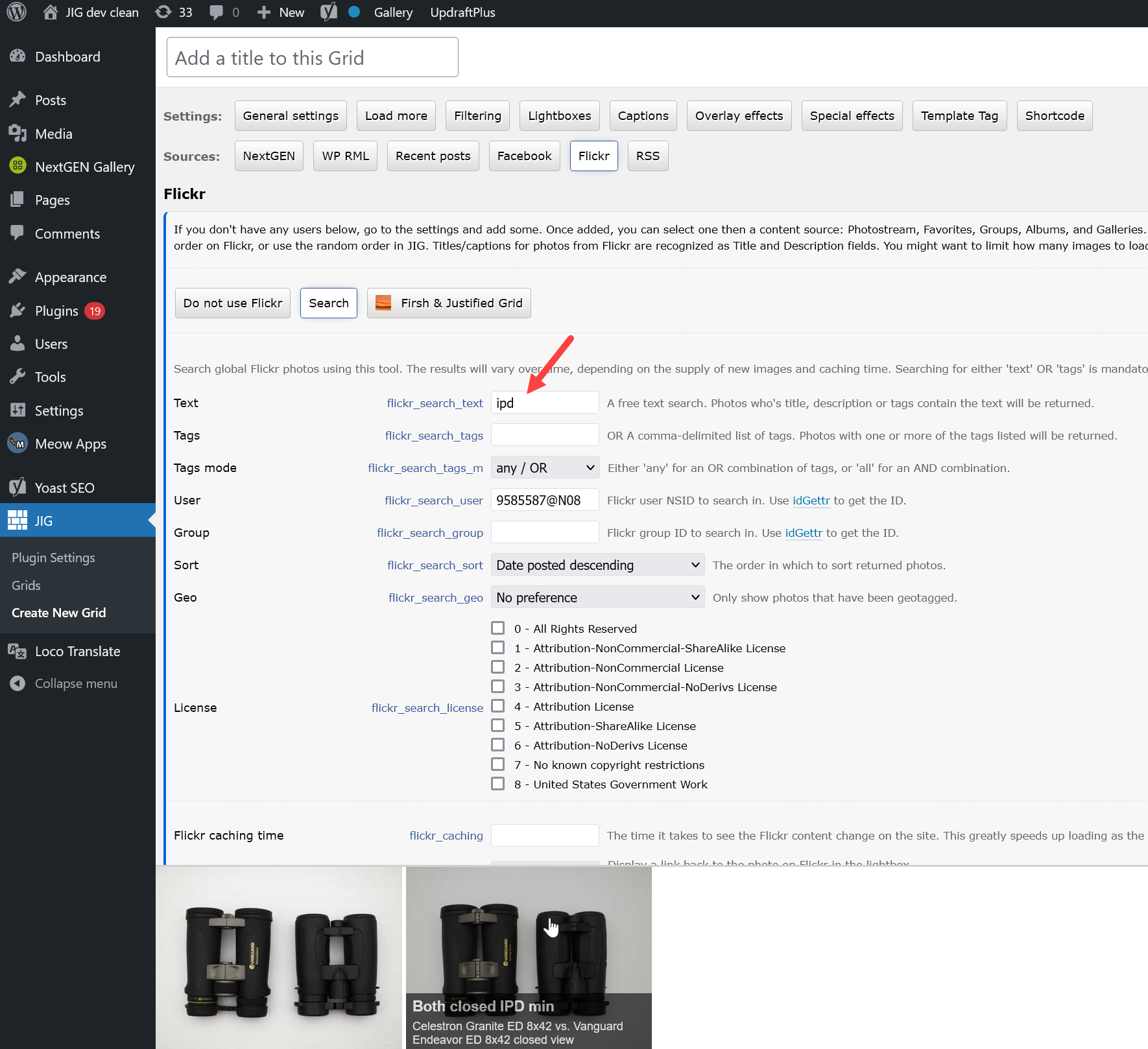
https://i.justifiedgrid.com/s0pla1.pngIn this test, unless I specified a text, I also got that message, but it’s normal.
The longer shortcode you posted also has this issue. It has 3 relevant flickr_* attributes but no query:
flickr_search_tags_m=all Sets the tags match mode to any/all but there is still no tag query specified so it doesn’t search by anything.
flickr_search_user=55455788@N00 This narrows the search to your profile.
flickr_description=no This is just a cosmetic, turning off text for a collection or set, probably doesn’t do anything for search either way.
Sorry for the inexcusable “delay”.
Says I need to Update but, also says it isn’t compatible with latest version of WordPress – What am I supposed to do?
Update anyway, it shouldn’t be a problem, it’s being developed on the latest beta. Updating the latest compatibility version number is just a technicality. If anything ever comes up I can send older versions after purchase verification.
Hello, this is a presale question.
I am looking for a grid that can be used in this website (it is a jcomposer built website): https://eyeslicepictures.com.
In the static state, each grid item must shown a picture. When hover, a coloured veil must appear, as well as a title and description and two icons. One of the icon is for a custom link, another one for a youtube video or for a lightbox image.
Does your plugin have this features?
Thanks in advance.
Alf.
In this plugin, the thumbnails themeselves are already links (to the lightbox or custom link), so to avoid a link in a link scenario, the single icon that can be displayed on the thumbnail is already part of the larger link. So it won’t carry a different link. But from the lightbox it’s possible to link to further pages or videos.
Color veil and title and description: yes.
Do you guys have this kind of photography editing application source code: https://l.linklyhq.com/l/1iaQI
Please if you have let me know
Nope
Just received an e-mail from Flickr about updates to the API requiring a User-Agent header on all API calls. Is JIG set up for this or perhaps releasing an update soon to be in compliance?
Well, I guess this is moot. Flickr did a mea culpa and rescinded the API changes.
Flickr integration is an important part of JIG so if they bring changes that can be adapted to on my part you can rest assured I’ll keep up with it. Yup they seemed to roll back, but it wouldn’t have been a problem if they went along with it, it’s not like they pulled what Instagram did.
JIG & Flickr. I can get the photos to show up in either “latest first” or random (orderby=rand). The instructions don’t seem to up-to-date. How can I change the order to “oldest first”?
Hi, only random order option is implemented to re-sort what is received from Flickr. Other than that, the order is set at the source (on Flickr). The previous comment mentions the API way has a problem and it’s known to skip instuctions. So the best bet for now, is to change the order of your content on Flickr itself with the UI.
Any chance you can troubleshoot the Flickr sorting problems?
The Flickr API shows what sort options are possible but they are not working JIG. I am most concerned with date-taken-asc and desc.
sort (Optional) The order in which to sort returned photos. Defaults to date-posted-desc (unless you are doing a radial geo query, in which case the default sorting is by ascending distance from the point specified). The possible values are: date-posted-asc, date-posted-desc, date-taken-asc, date-taken-desc, interestingness-desc, interestingness-asc, and relevance
I’ve just tested this and it works for me. Is it working for you too?
Hi! Recently I´m seeing a bug in my Facebook´s grids: the name of the last file appears at the end of the grid. Is there any bug or missconfiguration about this? Thanks in advance.
Can you please send me a link to where this happens? That’s unusual.
Yes, here you go: https://www.cinecritico.net/pelicula/del-reves-inside-out/
It’s likely the a3-lazy-load plugin’s doing, it’s pulling out images/text from the HTML version of JIG that is there only for Google and people without javascript. Try disabling that plugin or put this into Custom CSS as workaround:
.jig-HTMLdescription{display:none;}
One more problem, maybe firsh or someone else has an idea. I sort my Gallerys inside Album by hand (newest first, oldest last). Inside the gallerys i would like to sort pictures by default to filename (as my filenames are numbered). I can do this by clicking inside every gallery on sort, change that. If i left it to default its sorted by something else. Nextgen Gally support told be to change setting inside nextgen to default sort order “Filename”, but if i do so, also the jig gallery page where all the gallerys are shown is sorted wrong to.
IIRC JIG respects that order if you keep’s JIG’s Order by on the default. You can override that with the General tab’s Order by and chooing something else. It’s also possible to use developer hooks to re-order the image set displayed in JIG, either on the client side with JS or at server side with PHP.
On a side note, a customer used special characters like !! to “pin” certain images at the top when sorted by A-Z, then I wrote custom script to remove such characters from the beginning of the titles.
Hi Firsh
I have setup this up, https://justifiedgrid.com/sources/wp-real-media-library/folders-and-top-level/. Working fine with counters etc. I would like the thumbnail galleries at the end of the sequence, to open in their own windows. Instead of on the same page. Is this possible?
Thanks Snapper
The “open galleries in lightbox” setting on the RML tab should do that.
If you meant new tab, then that’s only possible with custom code into developer hooks, but it wouldn’t do much else other than clicking with middle mouse on their thumbnails.
I should have made it clearer, what I’m trying to achieve.
I would like multiple Albums to be displayed but instead of opening the Gallery on the same page, open on a fresh page.
I can do this for Single Album by using the General Settings / Custom Link Override. I can’t find a way to get Multiple Albums to open each individual Gallery in a fresh page (RML Collection of Albums only has an option to add one Custom Link in JIG).
Hope that makes sense?
I think via custom script it’s possible. With this hook https://justifiedgrid.com/support/faq/jig-images/ I’ve been able to achieve some interesting things that have no settings. I’ll need to see your usage to better advise, please share a link.
Custom links can be included with code where otherwise unsupported. The _blank target, if you need it on a new tab can also be included. But it’s still a little hazy without seeing your setup.
Would you create manual pages for each gallery, and want to put a custom link on them in the “index” JIG’s galleries? So it’s not new tab, but pointing their handcrafted page instead of JIG changing itself in place?
Hi Firsh
I’ve found a solution, I have placed each individual album into Row Layout / Section, on my homepage and used the custom link setting, to connect each Album to a Gallery page
All working fine, now have various Albums with Title, Image Count and Preview Photo, that link individually to my JIG gallery pages
Thanks for your suggestions
But did that require you to create multiple singlle album grids? If you have too many or that ever becomes tedious, let me know and I’ll cook some code for you. Perhaps something that uses a shortcode-like marker from the description field from RML to pass as custom link.
Hi Firsh
Yes, I created multiple single album grids, not too bad as only four. Copy and pasted Shortcode into Grid Editor, only had to change URL, RML ID and add Preview Photo in RML
Thanks for the offer of custom code
Will let you know, if this method becomes a problem
Hello, does it allow bulk image uploads? does it have image grabber? can user share images via social media?
Hi,
There are no uploads (bulk or single) as JIG doesn’t manage a library, it attaches to already-existing solutions (sources). For bulk, NextGEN can be a good choice.
I don’t know what do you mean by image grabber but it probably doesn’t have it.
It depends on the lightbox you use, but two of the built-in ones have individual social sharing.