2004 comments found.

Hi, I have received an answer! Will you help me on the auction issue? Thank you in advance
I answered you on the forum
Hi, I purchased the woocommerce-currency-switcher. Now, I need a help to enable it for Auction Products. I am using woocommerce-Simple-Auctions
Hello
Please read this – https://currency-switcher.com/woocs-labs
I already read that. Can you please provide solution for the auction. As the auction price does not change when I change the currency.
I have supplied site credentials on your support forum
hello
I answered you on the forum
Hello this is a pre sale question is your plugin work with
dynamic pricing by rightpress https://currency-switcher.com/woocommerce-dynamic-pricing-discounts-rightpress/
i have check the plugin with your free version but i’m not success
Hello
Unfortunately, our plugin works only with the old version of this third-party plugin.
Could you please explain how different is “FOX Session” from other storage options?
Hello
FOX Session – This is a custom class that stores temporary data in the woocommerce_session table
PHP Session – https://www.w3schools.com/php/php_sessions.asp
Transient – https://wpengine.com/resources/guide-to-transients-in-wordpress/
Hi,
Could you let me know how to use this new feature?
- new function 'convert_from_to_currency' which allows to convert money amount from one currency to another one https://currency-switcher.com/function/woocs-convert_from_to_currency/Or, is there any document regarding it?
Thanks.
Hello
This is not feature, this is function. You can use in your custom business code which usually created in file functions.php of the current WordPress theme. Just an example (place it in file functions.php):
add_shortcode('my_convert_from_to_currency', function($atts){
    global $WOOCS;

    $atts = shortcode_atts( array(
        'amount' => 100,
        'from' => 'USD',
        'to' => 'EUR'
    ), $atts, 'my_convert_from_to_currency');

    return $WOOCS->convert_from_to_currency($atts['amount'], $atts['from'], $atts['to']);
});
In site content: [my_convert_from_to_currency amount=277 from=GBP to=UAH]
Sure this function can be used in more complex logic
After installing the plugin my website not showing currency, how to fix it ?
Hello
Please describe it in more detail
Have you watched this video – https://currency-switcher.com/video#video_1
if you mean the currency setting in the “general” tab – This is the correct behavior, all settings are in the “currency” tab
Hello,
I fill field ”+ interest” value, but the price does not change. I want to increase the price of only one currency by 20%. I tried, they wrote 20, but it didn’t work. I tried to write 20%, but it didn’t work.
What could be the reason for not raising prices?
Hello
. I want to increase the price – This field is not for prices, this is a field for changing the exchange rate.
That is, you changed the exchange rate by 20% but not the price
hi sir, I have raised a query on 21st jan and again today i have raised query regarding the problem: In cart the currency switches to default currency to usd. I have given all details , pls give me solution, Need help urgently
Hello
The support doesn work on Saturdays and Sundays, so some Friday requests can be answered on Monday
Ok sir, Thanks, Pls do the needful,
Hello
I answered you on the forum
hi sir i have given you yesterday the ftp access details, pls give us solution sir, waiting
Great! our developer will definitely check it and get back to you
hi sir you have changed to php session , but in that case geolocation doent work , i mean correct currency will not show for the countries, it doesnt geolocate. Also in Transient option geolocate it doesnt work. Also in php session, it gives two critical error regardin php ssession is not closed and rest api error: A PHP session was created by a session_start() function call. This interferes with REST API and loopback requests. The session should be closed by session_write_close() before making any HTTP requests. I have tried with Transient option also. All these things i had written in previous support request. How many times i should write all these thins. I have also given you all details and ftp access details to you etc….
i have written in the support,, pls help, we are struggling
The geolocation worked perfectly only when the radis option is enabled, and i am using cache plugin disabled and geolocate in woocommerce, In this setting only the geolocate works perfectly and shows correct Currency for countries in geoip ,, I mean it shows correct currency for correct country, All the pages shows correct currency but after adding a product to Cart the currency changes to default currency to Usd and payment also get changed to default currency USD, Pls solve this issue, I have written again these all things in detail in support forum, Plssssss help
Hi,
It’s Pre Question -
Current we are using free version and it’s not showing the cents so do i need to purchase the premium or is there any issue with free plugin ?
Hello
Please try these options – https://share.stackovergo.com/image/i20230118132729.png
Hello,
We have just purchased the plugin but unable to download. It is showing Virus Detected. Please Check on priority.
Thanks.
Hello
You downloaded the plugin archive from envato. All files here are verified and safe.
Please help, there is malware in the downloaded file. Its not even getting attached to google drive or gmail. My developer is unabel to download malware free files from the portal itself.
Hello
Give me please screen what do you mean. On Envato servers all files are scanned
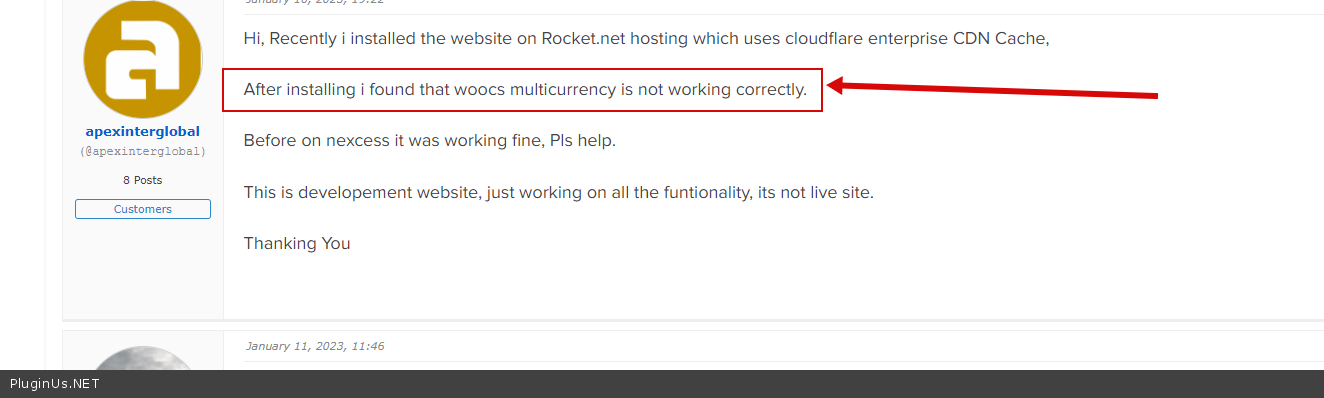
Hi, I have written my problem regarding that woocs / Fox multicurrency is not working with cloudflare? But the author keeps on sending links to read and to paste license key everytime, Even though they may be knowing our Licnce key valid or not. Next he knows the problem about cloudflare and woocs?fox multicurrency not working but he keeps on asking that we should write the problem in detail. What as a author you dont understand that if woocs multicurrency not working with cloudflare is well understood that currency is not changing as per country currency which is set in geoip rules. I gave him my website login details and also gave him the license key and also created a seperate page to test it but he still doent give proper solution, i dont know why. He want us to keep on writing several time for the same proble and lastly when we get fedup then we will not write. This way you as a author killing your own bussiness.
I am sure that any website which is using cloudflare caching is facing the same problem that with cloudflare enabled the woocs multicurrency doent work and if we disable the cloudflare then woocs currency switcher works perfectly. For this wghat you want me to explain you the problem in detail. As a author you may be knowing all these problems but since you have no solution so you keep on diverting us to other pages several time. I know you are very busy and even we also dont have time to write to you or even we dont want to comment here but we are fedup by the way you respond and you dont give any solution. Try to help your customer so that you can survive in this competitive world
Hello
I answered you here – https://pluginus.net/support/topic/woocs-currency-doent-work-with-cloudflare-caching/
https://c2n.me/4hAUKQE.png – Of course, I ask you to explain the problem in more detail because you did not give me information and I cannot imagine what difficulties you encounteredI asked for a license key because it needs to be added to the topic you created. And unfortunately I can’t remember every user. Therefore, please follow the recommendations when creating a topic on the support forum.
Next he knows the problem about cloudflare and woocs? - Fox multicurrency
works with cloudflare.
And as soon as you described what the problem is, I made a test of your site and gave a link to an article with a solution
Hello,
Does this plugin convert currency automatically? Eg – when people visiting from USA, does this show prices in $ or people have to manually switch to $?
Thank you
Hello
Yes, the plugin has this functionality. on the first visit of the user, the plugin enable the currency according to your settings. But it is very important that woocommerce correctly determines the user’s location
You can try a free version – https://wordpress.org/plugins/woocommerce-currency-switcher/
Woocs currency is not working with cloudflare cdn , i tested woocs currency switcher on cloudflare cdn cache and it doesnt work , the geo location doesnt work, whats the solution ?// Need help
Hello
Please write me here – https://pluginus.net/support/forum/woocs-woocommerce-currency-switcher-multi-currency-and-multi-pay-for-woocommerce/
paste your license key here – https://share.stackovergo.com/image/i20210618130558.png -> https://share.stackovergo.com/image/i20210618130614.png and wp-admin access – https://share.stackovergo.com/image/i20210618130637.png
Read this – https://currency-switcher.com/using-geolocation-causes-problems-doesnt-seem-to-work-for-me
Hello – I see there has been a name change and wanted to check, does this support WP-Rocket for caching yet or WooCommerce Dynamic Pricing & Discounts (or another plugin – as unable to apply pricing discounts apart from default currency)?
Thanks
Hello
Please read this – https://currency-switcher.com/woocs-labs
Hi – did that last time and was deemed too difficult from memory, I would have to double check, was ages ago – you also had an old add this line of code to an older version of it, which no longer worked anymore at the time I think I mentioned it being a very popular plugin on codecanyon, etc – but it didnt go anywhere
Thanks
Hello
The plugin works with  WP-Rocket.
WooCommerce Dynamic Pricing & Discounts - Unfortunately, the adaptation code must be inserted into this third-party plugin and we cannot influence this.Hello we are enable to add country in euro currency
Hello
Please write me here – https://pluginus.net/support/forum/woocs-woocommerce-currency-switcher-multi-currency-and-multi-pay-for-woocommerce/
Please paste your license key here – https://share.stackovergo.com/image/i20210618130558.png -> https://share.stackovergo.com/image/i20210618130614.png and wp-admin access – https://share.stackovergo.com/image/i20210618130637.png – I will check it
Hello, we are interested in buying this currency switcher plugin. May I ask two questions please before?
1. is it possible to show the side switcher only on particular pages of the website (only on product related pages)?
2. my local currency is CHF (Swiss Francs) in which I have to do the accounting. When people order with other foreign currencies like for example USD, will the CHF amount still be available somewhere in woocommerce (in order to have the local currency CHF when downloading the orders for accounting)?
Thanks a lot for your answer, have a nice day,
Wolfgang
Hello
1 Yes. This setting is to control the display of the side switcher – https://share.stackovergo.com/image/i20221228122918.png
2 On the side of orders, the conversion rate at the time of purchase is stored. And you can calculate the amount of the order in the base currency. Or you can recalculate the order so that it is stored in any currency – https://share.stackovergo.com/image/i20221228123311.png
Please try a free version – https://wordpress.org/plugins/woocommerce-currency-switcher/
Wow, you really thought about everything when creating this plugin, fantastic! And thanks for your answer. I will definitely buy the Pro version.
For accounting purposes, it would be great (just as a hint for the future versions), if the amount in base currency is also automatically stored in orders, because that’s at the end always the value where every shop must recongnize the sales in accounting.
Thanks again, and HAPPY NEW YEAR soon!
Hello
if the amount in base currency is also automatically stored in orders - it is in woocommerce analytics sectionThank you and Welcome;)
URGENT ISSUE
When you add a different price for a country.
Then, if customer of that country add to cart and applies disocunt coupon code, the coupon gets applied to default price (and not the price of that country)
Please check and fix this.
Hello
Please write me here – https://pluginus.net/support/forum/woocs-woocommerce-currency-switcher-multi-currency-and-multi-pay-for-woocommerce/
Please paste your license key here – https://share.stackovergo.com/image/i20210618130558.png -> https://share.stackovergo.com/image/i20210618130614.png and FTP+ wp-admin access – https://share.stackovergo.com/image/i20210618130637.png
Hello,
One interesting find with details, in addition –
1. I tried to replicate the same issue on our staging site, and found that it is working correctly on staging site. Means, it is correctly showing USD currency by default to all other visitors from the World (except India) and INR to Indian users, when using WOOCS
We then set the option in WooCommerce settings -> General -> Default customer location to Shop Country instead of Geolocation. And found that it sill works.
PS: We test with different browsers and through VPN App (on mobiles) with New connection always.
We further removed the MaxMind Key also and saved it. Then also it was working and correctly showing the currencies according to the visitors location.
Then we find that, on staging site we are using WOOCS version 1.3.8 while on Live site it is 1.3.9.4
And the same I informed earlier also, that we updated WOOS on live site recently
Both the sites are having same set of plugins with same versions. The Woocommerce version is 7.1.x on both the sites. And are hosted on same Hosting provider.
If it is working on Staging site, that means, there is no issue with our Hosting provider as well and with the Theme. Also, it does not even requires MaxMind key to be added too. Working without that as well on the staging site.
The only difference in the two sites, is the version of WOOCS plugin
And as I informed earlier, that it happened only after updating the WOOCS, which I did updated on the Live site recently.
I think this surely needs to be checked thoroughly.
Regards
Hello
in WooCommerce settings -> General -> Default customer location to Shop Country instead of Geolocation – You just turned off geolocation
I think your problem is cache related.
To get support, please write here – https://pluginus.net/support/forum/woocs-woocommerce-currency-switcher-multi-currency-and-multi-pay-for-woocommerce/
Hello,
I think you might have misunderstood my queries or might not have read my points and concerns thoroughly otherwise, you would not have responded this way.
First of all, I am not using any Cache Plugin on Live site. Not at all.
Also, what I am saying is that even though I am using Shop Country under WooCommerce settings -> General -> Default customer location, then also it is working correctly on Staging site. And switching currency to USD for visitors outside India.
That means, on Staging site, it is still not required to have MaxMind key to be integrated as well as not required to set the customer location to Geolocation.
As we are using WOOCS 1.3.8 version on staging site. And on Live site we are using 1.3.9.4
If it is working on Staging site, that means, there is no issue with our Hosting provider as well and with the Theme
Can you please check with the previous version on your own test site and then vwith 1.3.9.4
If after that, you still require, then please let me know, I will raise a ticket on support forum, as you requested.
Regards
hello
I understood you perfectly. So please read my message – https://share.stackovergo.com/image/i20221226151103.png
If you have disabled geolocation – geo rules will not work
please write here – https://pluginus.net/support/forum/woocs-woocommerce-currency-switcher-multi-currency-and-multi-pay-for-woocommerce/ – and paste a link to your test page with shortcodes https://currency-switcher.com/shortcode/woocs_geo_hello AND https://currency-switcher.com/shortcode/woocs_show_current_currency
1. I had already created ticket on your support forum, here below –
https://pluginus.net/support/topic/plugin-stopped-working-currency-not-auto-switching-according-to-visitor-of-country-since-last-2updates/
2. I think you still might not get my point properly. On Staging site, the Default Customer Location is set to Shop Country, and is still WORKING on staging site. As shown below –
https://i.paste.pics/97112c8942e8fa87e4a17160c02e0797.png
That means, Geolocation is NOT mandatory to set in settings. I think, Geolocation may only require to find or match exact location.
3 .On LIVE site, Geolocation is already enabled under WooCommerce settings -> General -> Default customer location
https://i.paste.pics/fa8d22c997179c0707e34b750eff1ff5.png
And to our surprise, it is still NOT working and currency NOT changing automatically based on Country.
This is exactly opposite of what you are suggesting.
4. As per your suggestions, I had created a Test page and added shortcodes too. Below is the URL of that page
https://www.vasangini.com/test-for-woocs-and-geolocations-auto-currency-switcher/
Below is what exactly it shows on mobile when tested using VPN and set the Country to USA. It can be seen from below that Currency did not changed –
https://i.paste.pics/a4b95d5f065336f9a133308d263e2050.png
Can you please check further and help to resolve
Regards
Hello
I answered you on the support forum
Hello,
Bit Important:
I encounter one serious issue after recently updating the plugin to one of the latest version.
The current version of the Free plugin we are using is 1.3.9.4
The currency that is now getting visible to International visitors (customers from outside India) is INR (Indian Rupees) by default, instead of USD.
(INR is actually Our Store’s default currency. We are from India)
However, that was not the case until we update the Plugin in past few days.
Prior to update whenever any visitor used to come from USA, UK, Europe, Australia (any Country other than India), they were able to see the prices in USD, as we had set that in plugin settings.
https://i.paste.pics/6873c3f55c21f07c81b5c289088af798.png
However, that stopped working since last few days or so.
And unfortunately, we STOPPED getting Sales too, due to this. As visitors from outside India are now seeing the prices in INR.
And practically if the user sees prices in some other currency, at first Instance, they may leave the site or feels uncomfortable to make a purchase, and may face issues during checkout also.
To verify further, we tried to check out site using Proxy (set Location Country to USA in proxy), and check from mobile. We found that when we open the site, the default visible Currency still is showing INR (and Not USD), even the viewing location is USA
However, when we had used the VPN app earlier, we were able to see the default currency in USD (when viewing location Country is set to USA in proxy).
https://i.paste.pics/980184ab8e6d0ab70a0584422d2a57b1.png
Earlier, till 17th Dec 22 or so, it was correctly showing USD currency for All of the visitors from outside India. And INR currency for Indian users only, as shown below –
https://i.paste.pics/7459ab37efc61ff945de076f8f468b8a.png
This seems a serious concern and we are getting really afraid of
I think this glitch or issue needs some prompt attention. Can you please check and resolve this issue.
Regards
Hello
Please read this – https://currency-switcher.com/using-geolocation-causes-problems-doesnt-seem-to-work-for-me
I think, this should be the case, in our situation, as it was written in the very first line of the link that you shared –
“from WooCommerce v.3.9 for geolocation functionality maxmind key required in woocommerce”
But to our surprise, we were already using Woocommerce 6.x + version since long alongwith WOOCS and were not facing this currency mismatch related issue ever.
We only started facing this issue (just few days back) only when we updated WOOCS plugin recently. Alongiwth Woocommerce from 6.5x+ to 7.0
And it can be seen from the previous screenshots that I shared earlier, (specially dates), that I was NOT having this issue till 17 Dec 2022, but started facing thereafter only.
https://i.paste.pics/7459ab37efc61ff945de076f8f468b8a.png
https://i.paste.pics/980184ab8e6d0ab70a0584422d2a57b1.png
So, I assume, there might be something else. Can you please check again thoroughly. As this is really driving us crazy.
2. As per your link and below image, It says – “Any way WOOCS uses woocommerce functionality.”
Just wanted to know what does it means here. What functionality it is referring to.
Does it mean by Geolocation option in WooCommerce settings -> General -> Default customer location or something else. Can you please clarify
And in that case also, does it still requires to Add the Key for MaxMind and enable it.
Please suggest and resolve
Regards
In addition to my above message, attaching screenshot for your kind reference for 2nd point (posted above, just now) for “Any way WOOCS uses woocommerce functionality.” –
https://i.paste.pics/ca5a2f2175f6d8036fdaa02af32bb7c9.png
Just wanted to know what does it means here. What functionality it is referring to. Does it mean by Geolocation option in WooCommerce settings -> General -> Default customer location or something else. Can you please clarify
And in that case also, does it still requires to Add the Key for MaxMind and enable it
Regards
hello
To get support, please write here – https://pluginus.net/support/forum/woocs-woocommerce-currency-switcher-multi-currency-and-multi-pay-for-woocommerce/
Does it mean by Geolocation option in WooCommerce settings -> General -> Default customer location - yes my plugin uses this functionalityThe article has a description of how to make a functional test
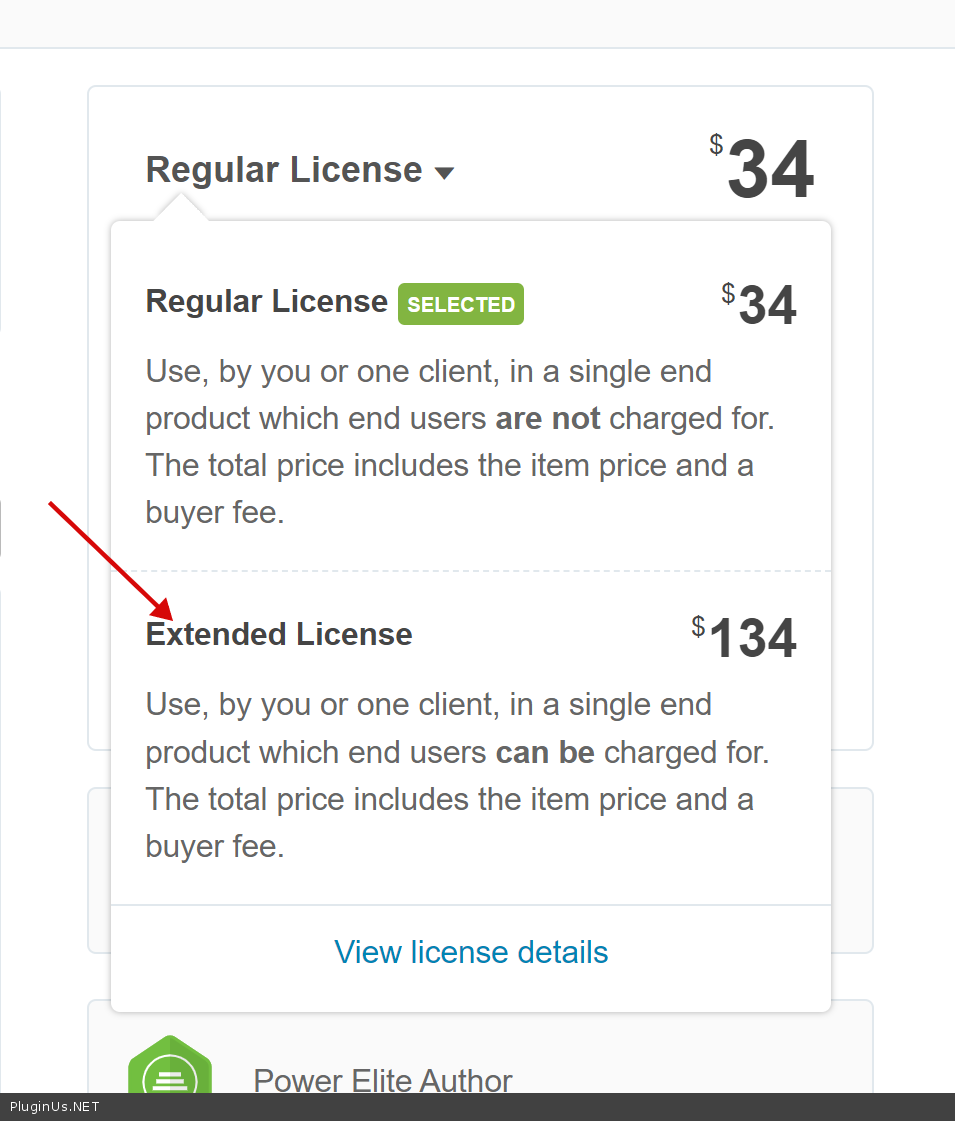
Hello, Does this plugin support GLP license? Can I include it in my theme? Then my customer can use it without buying a standalone version. Thanks
Hello
Please read this – https://codecanyon.net/licenses/standard and https://codecanyon.net/licenses/terms/extended
You need – Extended License

This item was featured on CodeCanyon

Power Elite Author
Contact the Envato Market Help Team