8473 comments found.

I really like the style/formatting of JIG but have a pre-sale question. I have a need for a WHITE background (vs the typical blacked out or darkened background on most lightboxes) on the lightbox view. Can that be accomplished with JIG and its bundled lightboxes? TIA
Yes look at the wedding-themed (last) example of this lightbox: https://justifiedgrid.com/lightboxes/photoswipe/ the JIG implementation includes a light skin!
PERFECT… !!! Thank you for your excellent support!
With no recent changes, my use of the JIG plugin on my site is suddenly causing “critical error” on my WordPress site.
For now, I moved the plugin off my home page and onto a test page: albj.net/test – the page password is simply “password”
My plugin code is: [justified_image_grid row_height=100 caption=slide mobile_caption=same caption_match_width=no caption_title_size=10px caption_desc_size=10px caption_align=center gradient_caption_bg=no orderby=rand filter_orderby=random max_rows=8 disable_cropping=no flickr_search_tags=-license,-plate,-custom,-vanity,-tag,-MDG flickr_search_tags_m=all flickr_search_user=55455788@N00 flickr_description=no]
The WP version and all plugins are fully up to date. There was a recent JIG update that I just installed a moment ago, and the problem remains.
I use a different codeset of the same plugin at photos.albj.net which is still working fine. But on my main site, it simply started with the critical error. Any advice?
Well, lovely how technology can make a liar out of me. With absolutely no intervention on my part, it’s now working again.
It would be helpful to see the nature of the error, did you receive an email with more verbose explanation or does something appear in the error log? It could have been a memory issue or something else masked by WP’s simplifaction of error messages.
I should’ve screenshot it, but it showed the minimal core of my WP theme (but must not have fully loaded the CSS because the fonts were wrong). Below the usual header, there was a simple DIV container with a message about the site suffering a critical error and a generic link for troubleshooting this sort of problem. That really was pretty much all there was to it. I didn’t get any e-mails. I was just randomly visiting my own site as I do from time to time to make sure all is well, and realized the problem. My quick Google-foo tells me the wp-content folder should have a debug.log file that might have info to share with you, but it’s not there. Only a bunch of 0-byte “temp-write-test” files. I found error-log file in wp-admin folder but nothing helpful in that file. I suppose it’s entirely possible my hosting provider had a momentary problem.
That’s interesting, usually an error like that breaks the entire site (WP white screen of death, with or without an error message). It’s quite oldschool for it to break in the middle. I believe you can use some free monitoring services that check the site for you periodically. If you suspect the load is too high for your site, you can use CloudFlare to at least serve the static assets from their CDN for free. Also, a caching plugin can help preserve a working state of the pages and until something changes in the content, the site is less likely to break.
Hello. Using woocommerce, I’m looking at having a link to the product in the lightbox (photoswipe) displayed as an icon rather than text, and positioned alongside the other buttons. I know I can link to it with recents_link but was wondering if this kind of styling is possible?
Hi, by other buttons you mean a link back to the product page from the the top right toolbar of the lightbox?
The problem is that recents_link puts things into the caption, but breaking out of that and making it appear as if it were in the top right corner takes some CSS wizardry and it would not look very native. The lightbox code itself is not my creation, I wrote an adaptor script to integrate it with JIG. I guess the source could be modified to include anything you need.
So far I only influenced the sharing menu items but that is a dropdown from a button that is already there.
Yeah that’s right, here’s an image to make it clear. https://imgur.com/CCAQIrb Do you know where I can modify the code for photoswipe? It looks fairly simple to add a button next to the others with that, but I’m unsure how I would get the link to the product page from there.
First, I’d need to send you the unminified edition for developers. Then in photoswipe4.js line 4000 https://i.justifiedgrid.com/roj1v4.png the ui elements are set up (the on tap actions applied to them). Around 4450 https://i.justifiedgrid.com/roj1tz.png my adaptor script adds the actual HTML layout to the body that the JS makes use of. How the link from the caption gets moved to your button is yet another story. Not that simple 
Ah thanks for letting me know. I figured I would try a different approach and move the product link to a new line by changing it to display:block. One minor issue I’m having is the little dash after the description https://imgur.com/4Lc94RQ Any idea how to hide/disable that?
With a little PHP, you can change the text/html of the caption with search and replace https://justifiedgrid.com/support/faq/jig-images/
Hi, Sorry I’m not very experienced with PHP. I tried putting the ‘influencing captions’ code snippet on your link into my functions.php and updated the custom class but It wasn’t doing anything. I’m not sure if I’m going about it the correct way.
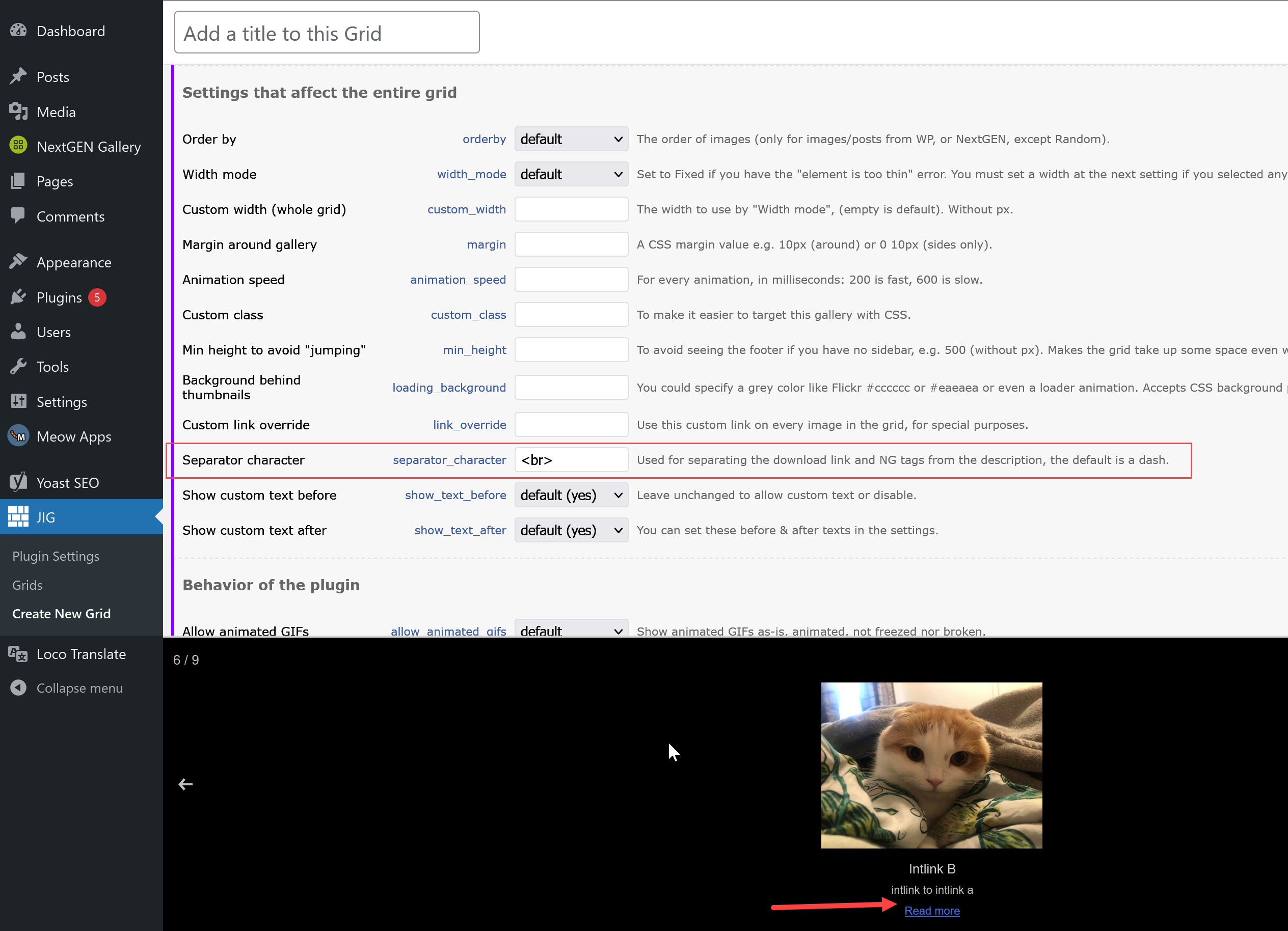
Sorry for the delay, found the setting for you! https://i.justifiedgrid.com/rop2we.png Don’t need to change the link to display block, but add <br /> to the General tab -> Separator character setting. It’s used in some other places too, that’s why it’s consolidated to the General tab.
Thanks mate, that makes it easier haha. Figured I’d put this here if anyone else was curious, I did manage to get the link to display as an icon using a fontawesome unicode as the content and changing it to a fixed position to sit alongside the other icons. Not perfect but it works! https://imgur.com/iBSDlNP
That’s neat! I guess it doesn’t fade out with the rest of the UI, though.
Yep. I did have it fade away when the mouse hadn’t moved for a couple seconds via javascript, but it never quite synced up with the photoswipe buttons, so I just compromised and made the buttons always visible. Like i said not perfect but still happy with it
Firsh, is it possible for JIG to access images on a Cloud server like AWS or BackBlaze?
Presently not, but these are interesting for future features. I use AWS (S3) myself. If you use AWS CloudFront as a CDN then yes that’s possible. But as an image source to auto-create a gallery based on what’s there: not yet.
Isn’t BackBlaze a backup provider? Or you can now expose content to the web? DigitalOcean, Azure, Google Drive and similar are also interesting, but might need to change the inner workings of the plugin to allow these as addons as not everyone want to use them all and don’t want to create bloat.
They do offer backup options but I’m using Backblaze for an imagehost I set up for a small forum. I checked with a representative to make sure they were OK with it. The program I use provides embed codes for any images uploaded so they can be shared elsewhere, just like any normal image host I suppose. From what little I understand BackBlaze is much less expensive than AWS. I’ve been using the Free option for the last couple of years (the forum is pretty small) so I can’t really say what the costs actually are.
Is that forum WordPress-based? If you use a cloud provider with a publicly accessible URL with at least a predictable structure that mirrors how they are in WP, then it’s essentially a CDN. Image URLs can be re-written prior to creating the grid (with custom code) to pull from the cloud instead. But images must be registered in the WP Media Library first.
No. That forum is a Pro Boards forum – so no image uploads. I set up the image host to provide the forum members a place to upload images that are shared on the forum so, the image host is completely independent of the forum. I was just thinking that since I already have the cloud hosting I might be able to use it for images on my site with JIG.
Ok. As long as you use it for images of your WP site by the way of syncing them there, there are ways to rewrite the image URLs in question. I use a software called syncovery to put files of the wp-content/uploads folder on the cloud then change the URLs on the site in question. Perhaps there are WP plugins that make use of the cloud. JIG out of the box would likely not be aware of your mirror, but PHP (and now JS) filter can change URLs if they are predictably different. https://justifiedgrid.com/support/faq/jig-images/ I can help write a little function that does this once you’ve established images on the cloud that (even manually) mirror your site’s files.
Alright, I’ll get back with you when I get around to trying it out.
Hello, I guess it’s common to upload the original photo data (e.g. 4 MB of JPG), and resize it to show in the gallery to shorten the loading time. While I was looking for a way to enable visitors download the original file not the resized data shown on the lightbox (in my case PhotoSwipe), I encountered below discussion.
https://wordpress.org/support/topic/download-image-in-full-size-not-scaled/
This method worked for the JIG version of PhotoSwipe, I found. after line 1769 of “photoswipe4.min.js”, I added a line like this “t=t.replace(“-scaled”,”“),” Then the download is done for the original file e.g. “IMG0000.jpg” not resized “IMG0000-scaled.jpg”. This is not very clean method and works only for the specific naming files, though.
Here are my questions. I now wonder if this modification cause serious issues on other JIG functionality, I hope not. Hopefully you can confirm it. And it would be nice when I can rename the file from the original file name stored on the server to a new name during the download.
Hi,
If you want to modify core files I have a development version with unminified files if you need. I don’t recommend it though. On the server side I can get the link to the resized as well as the original. I’ll make an update where the download functionality doesn’t just pass through what’s visible in the lightbox to a download.php script but the full size image to a link with the download attribute set. It’s on the to-do.
With some custom script you can catch the server side things and modify all the data based on which the JS works. You have there the image ID, and you can get the full size URL from WP. It’s not perfect but this is way more aligned to how people should modify how the plugin works with code: https://justifiedgrid.com/support/faq/jig-images/
thank you for your reply. I expected that you don’t recommend modifying the code. Thanks anyway for the offer of unminified files, but it’s not necessary as I could manage to edit the minified file already. Just adding one line wasn’t that difficult. That’s good to hear you also have this option in your to-do-list, to enable downloading file selection.
Unfortunately, I can’t follow your explanation about the image ID. The link you attached isn’t really helpful to me since I don’t understand how the JS and those parameters from WP work. That’s OK, I will wait for your official update, and for the time being, the non-clean hack I applied still works, with my own risk.
Ok, I added your name to this task so I’ll let you know when this feature is improved. It makes perfect sense, and I hope to leave the download.php behind.
Thanks!
Hello. For the life of me I cannot get 4 images in the gallery to sit 100% in a post.
https://forever1995.com/exploring-self-with-portraits/If I add another image it spans 100% like;
https://forever1995.com/recent-work/Ive looked at the settings and no luck. Is there something I need to add to the gallery code that is;
[gallery columns=”4” link=”file” size=”full” ids=”11370,11369,11368,11367”]
thank you
Hi,
What do you mean by sitting 100%?
I can see that on wide enough desktop they sit 4 in a single row. But on smaller screen they start to break down 3 to 1. You can use “incomplete last row” on the “match” setting so the orphan will match the full row’s height (same size as long as they are the same aspect ratio).
The Recent Work gallery seems fine. If you are bothered by a single orphan at the end and don’t mind “sacrificing” it, you can use “incomplete last row” on “hide”. I’ll likely come up with more flexible algorithms that override your row height in favor of forming perfect blocks without sacrificing anything.
Thanks. Sorry I have no idea what your explanation is Is there code to add or a setting I tick? Yes on large desktop they are small and span 50% while small 100% – I want them 100% on larger screens. Not fussed about small devices and two rows.
Any update in this please? Thanks
Sorry for the delay. By looking at it everything functions normally according to the automatic layout rules. If I zoom out or disable scaling of my 4K TV then yes they don’t fill the full row and align to the left. But that is governed by row height rules, so if you increase row height, that gives them a chance to be larger, but there always be someone out there with some superwide monitor for whom they will never fill a row. You can center them with “incomplete last row” I believe that’s the best way to handle this, among allowing a larger row height to begin with.
For example, 800 row height and 600 deviation, let’s see what it does. If they are too big, decrease the number. Since all of them are portrait oriented, JIG will try to go 800-1400 range first, before going for 200-600.
Note that operating systems implement a default scaling on high res monitors such as 4K. So while it might be 3840 wide, the browser viewport reported numbers could be 2560. On my 27” monitor that is certainly the case as it’s too small for 4K, text is too small so I use 150% scaling so text is as big as on 1440p without actually lowering the resolution. If you target 1440p or 150%-scaled 4K then the row height should reach about 950 maximum. Try 575 row height with 375 deviation in that case.
Hey Firsh, Hope your Holidays are going well. I would really like to try using a completely different Lightbox with JIG but I’m not really sure just how to do it. Could you give me an idea how to go about this? And I’m sure the scope of this is beyond what you could respond here so if you’re aware of resouce or tutorial that might help, that would would be just as helpful.
It’s easier if you let me know which lightbox specifically. They are activated in different ways. Some expect images (the thumbnail links) to have a certain class. Some need data attributes. Some need to be explicitly activated by a function call (especially if you use load more or filtering since those change the set of images after page load). JIG has settings to facilitate any of these combinations so the chance of success is high.
Well really I’ve just been looking around and I don’t have anything particular to try out, I guess I assumed that they would all be added the same way. I have been able to activate a couple via plugins but I really wanted to try something not installed via a plugin. Let me at least ask you this – how much more is there than just adding the necessary javascript to my site’s child theme?
Not much. The plugins are often built upon the freely available JS and may be paid because they make it easy and integrate settings into an admin panel. If you can load their JS directly that’s best. Their documentation should list how they are activated and you can bring that information to JIG. The setting is “Custom lightbox JS call” on JIG’s Lightboxes tab.
Yes, I got that far with a lightbox that was installed with a plugin and it seemed to work using that setting. The problem I’m having now is the lightbox I’m trying ( I just picked one to try) is not installed with a plug-in. I got it off Git Hub. I need to figure out how to get into Wordpress first. Let me get that squared away and if I’m still having problems I’ll get back with you. Thanks – have a good Christmas!
Pick the built and minified js and css and include them using WP best practices https://developer.wordpress.org/reference/hooks/wp_enqueue_scripts/#usage (hooks). PHP code is according to this post: https://letswp.justifiedgrid.com/php-code-snippets-wordpress/ I recommend the your-own-plugin way. That way it’s independent of the theme and you can put the js in the plugin folder as well.
Will do! Thanks again!
Hi. I’m thinking of using a comments plugin called wpDiscuz which allows users to upload images. These items can be identified in the Wordpress media library by using the dropdown filter for “wpDiscuz Media Items” I was wondering if Justified Image Gallery would be able to automatically display these images on a page. I asked a similar question on the wpDiscuz support forum and they suggested a Meta Key could be used to identify them. “meta_key =_wmu_comment_id”
I’m not sure if that could work. Any ideas?
The alternative might be to use something like Real Media Library plugin to manually move the wpDiscuz items into an identifiable folder. But I’d prefer it to be automatic.
I thought I should ask before I buy the plugin.
Thanks
Sure, first example: https://justifiedgrid.com/support/faq/media-library-query-args/
Create a single grid (design it in the admin), and note the ID. Place the gallery as template tag along with the custom code in the page template of the page (or via PHP code block of your builder). You need to get the current meta_value which would be that comment id (they just gave you the key, but a value is likely needed as well).
Thanks. I’ll look into that. Very helpful.
Updating from old version 2.9 to latest Can you advise how this can be done in a good manner
Backup your entire site with UpdraftPlus free backup plugin, just in case, it’s also good practice. I’m not aware of any breaking changes but the UI did change a lot, including how you create galleries. The changes followed the path WordPress and its ecosystem took, such as the introduction of builders instead of standard themes and a new editor (Gutenberg) instead of TinyMCE. So things will be in different places. Grids have a live preview now and can be centrally created and you don’t need to fiddle with shortcodes anymore. The old galleries should continue to work as-is.
Great, thank you for the explantion. I could do the update with out any problems
I’ve got two licences for JIG, cannot automatic update. Support has been finished. What’s going on?
Your licenses are now released from the previously bound hosts. https://justifiedgrid.com/support/faq/your-license-has-been-reset-what-does-it-mean/
Can I add shortcodes of other gallery, created by another plugin into the this gallery? So, it will be a shortcode instead of the image, but will show up as an image. I have a plugin that has tooltips on images and I need those tooltips once you open the image from your gallery. Thank you.
In some cases yes, but other plugins’ galleries might not use the “attached to this” way of creating galleries. If so, that would be [justified_image_grid id=123] where 123 is the ID of custom post that another gallery plugin is using under the hood to register images to that particular gallery.
Other plugins’ treatment of images (such as pinterest sharing overlay, ratings, or tooltips) are not known to apply to JIG at all.
If the tooltips are bound to the lightbox (or after clicking an image), that could work since 3rd-party lightboxes tend to work well.
Feel free to try though, if it doesn’t work your way I’ll approve a refund. (Sorry there is no demo version.)
Ok, thanks for the explanation.
I’m confused – is the price $18 normally or is that just the cyber sale? If it’s $18 normally that would be wonderful and I may purchase several licenses once I have a time to make sure it will suit our needs.
It’s just during the sale it is unlikely to be repeated as with new features/updates and due to inflation I’ll need to raise the base price eventually (haven’t raised in years). You have until the end of Dec 4 to use the discount. I’ll think of a way to cater for customers who need unlimited license because of several sites, but currently CodeCanyon doesn’t offer that kind licensing. I’m thinking of an off-marketplace version/offering that doesn’t break exclusivity rules, perhaps features sold separately.
Thanks for getting back to me. I bought a copy as you probably know. I may need volume licensing at some point in the future. If you come up with that, please let me know. It looks like a great plugin. I’m eager to try it, but I’m caught up in another project currently. I hope you do well on the sale!
I used your documentation to enable search in NGG: https://justifiedgrid.com/support/faq/show-search-results-justified-image-grid/
however there is some bug, that i could not solve.
On the main page where i added the search it works.
On that page the search form is:
<input type=”search” class=”search-field” placeholder=”Search pictures…” name=”s”>
on the search result page where your php code from search.php shows another search field the field is however only
<input type=”search” class=”search-field” placeholder=”Search pictures…”>
the name=”s” is missing. So a second search on the result page does not work an the search query in only ?jig_custom_search=nextgen missing ?s=word in front.
Any idea for this?
See our email threads for my ideas!
Regarding this, find the source of the buggy input field and change it to match the other field’s code.
The WP native way of including the search for doesn’t offer any customization that’s why I resort to searching and replacing in my code.
https://developer.wordpress.org/reference/functions/get_search_form/If that outputs something that’s missing, additional processing is required. Perhaps this:
$form = str_replace( 'input type="search" class="search-field"', 'input type="search" class="search-field" name="s"', $form );
Hi Firsh, sorry i could not find out where to put the name=”s” in. I am using your code from the example page. For displaying a Searchfield for JIG (there it adds the ?s=searchword) even it is not standing anywhere in the code.
function jig_custom_search_form($atts, $content = "") {
    if(empty($atts['source'])){
        return "Please specify the source.";
    }
    $form = get_search_form(false);
    $form = preg_replace( "/placeholder=\"(.\S)*\"/", 'placeholder="Suchbegriff..."', $form );
    $form = str_replace( '</form>', '<input type="hidden" name="jig_custom_search" value="'.$atts['source'].'" /></form>', $form );
    return $form;
}
add_shortcode( 'jig_custom_search_form', 'jig_custom_search_form' );

function add_jig_custom_search_query_var($vars) {
    $vars[] = 'jig_custom_search';
    return $vars;
}
add_filter('query_vars', 'add_jig_custom_search_query_var');
And i am using this shortcode (from your example, just modified not to put it inside search.php but inside a shortcode on the search result page) there the ?s=searchword is missing, so if i use the searchbox again on the resultpage it does not work. As i unserstood (i am a too bad coder) this function uses the same code jig_custom_search as the one above in line: [jig_custom_search_form source=”.$jig_custom_search.”] – it shows the code from above? right? But there the ?s=searchterm is missing then
function wpc_elementor_shortcode( $atts ) {

    global $wp_query, $query_string;

    if(!empty($wp_query->query_vars['jig_custom_search'])){
        $jig_custom_search = $wp_query->query_vars['jig_custom_search'];
        $search_value = $wp_query->query_vars['s'];
        echo do_shortcode("<center>Nicht das richtige gefunden? Versuche einfach eine neue Suche.<br /><br /><b>Zurück zum <a href="fotos">Fotoalbum</a></b><br />[jig_custom_search_form source=".$jig_custom_search."]<br /></center>");
        switch ($jig_custom_search) {
            case 'nextgen':
                get_jig(array('thumbs_spacing' => '10', 'row_height' => '350', ' height_deviation' => '50', 'orderby' => 'date_desc', 'caption' => 'fade', 'ng_search_query' => $search_value));
                break;

            case 'flickr':
                get_jig(array('limit' => '200', 'flickr_search_text' => $search_value, 'flickr_search_user' => '9563763@N08'));
                break;

            default:
                break;
        }

        echo '<style type="text/css">
                .post-content{
                    display: none;
                }
                .elementor-posts-nothing-found{
                    display: none;
                }
                <br />
            </style>
            <script type="text/javascript">
                jQuery(".jigErrorMessage").text("Leider keine passenden Bilder gefunden.")
            </script>';

        $wp_query = new WP_Query();
        $query_string = '';
}
}
add_shortcode( 'my_elementor_php_output', 'wpc_elementor_shortcode');
Bottom snippet is fine. Replace top snippet with:
function jig_custom_search_form($atts, $content = "") {
    if(empty($atts['source'])){
        return "Please specify the source.";
    }
    $form = get_search_form(false);
    $form = preg_replace( "/placeholder=\"(.\S)*\"/", 'placeholder="Suchbegriff..."', $form );
    $form = str_replace( '</form>', '<input type="hidden" name="jig_custom_search" value="'.$atts['source'].'" /></form>', $form );
    $form = str_replace( 'input type="search" class="search-field"', 'input type="search" class="search-field" name="s"', $form );

    return $form;
}
add_shortcode( 'jig_custom_search_form', 'jig_custom_search_form' );

function add_jig_custom_search_query_var($vars) {
    $vars[] = 'jig_custom_search';
    return $vars;
}
add_filter('query_vars', 'add_jig_custom_search_query_var');
Maybe something strips the second search box from its ability to act as a proper search input. But without seeing it live I can only guess.
Great! With the new snippet it works! Just one more thing. As i understood, searching for Gallerys (Names of the Galleries, not of the Picures) is not possible, but thats fine, but is it maybe possible to change that code so that people can also use more than one word? For example our filenames are like festival-berlin-2022-49.jpg – searching for Berlin gives a result, seareching for 2022 also, but using “Berlin 2022” inside the search box shows 0 results. I guess this is too much work, right?
What if you search directly for berlin-2022 or use the “multiple query” way: berlin,2022
If any of that produces usable results I can add a line that converts spaces to dashes or commas so while the user originally entered a space, it could get converted on the fly to something that better brings results.
The problem with the search feature that it’s originally meant to be for you as the admin to create a gallery based on some keywords in the way that you control it. The front-end search is already a custom thing. I have no intention of coming up with better search algorithms manually, but am interested in connecting with a SaaS search provider like Algolia when it comes to frontend search.
I believe I have replied via email regarding searching in gallery names.
berlin-2022 works, berlin,2022 does not work it shows the latest pictures with berlin in name, berlin-2022 shows pictures with berlin_2022 in name. so translate berlin 2022 to berlin-2022 would be better than nothing for the moment. Thank you so much for your great support! This is not the matter of course – thanks so much.
I did not forget you, I just tested it locally using the latest versions of these snippets and when using both words, the result seems satisfactory: https://www.youtube.com/watch?v=w4FHU3YoIcs I have one image that is only a match for 2022, another for Berlin, and another that matches both. Results are as expected without any modification, is this not the case for you?
No this is completly other at my place, if i do gloria it works if i do 2022 it works (showing gloria first as they are some of the latest) but together it shows no results: https://www.partyamigo.de/fotos/
That’s interesting but I’m unsure of the different behavior. Anyway, updated snippet with the search and replace of spaces to commas (the dash didn’t work for me on your site but comma did).
The changed line is:
$search_value = str_replace([' ', '+'], ',', $search_value);
Full code:
function custom_search_sc($atts)
{
    global $wp_query, $query_string;

    if(!empty($wp_query->query_vars['jig_custom_search'])) {
        $jig_custom_search = $wp_query->query_vars['jig_custom_search'];
        $search_value = $wp_query->query_vars['s'];
        $search_value = str_replace([' ', '+'], ',', $search_value);
        echo do_shortcode("<center>Nicht das richtige gefunden? Versuche einfach eine neue Suche.<br /><br /><b>Zurück zum <a href="\"fotos\"">Fotoalbum</a></b><br />[jig_custom_search_form source=".$jig_custom_search."]<br /></center>");
        switch ($jig_custom_search) {
            case 'nextgen':
                get_jig(array('thumbs_spacing' => '10', 'row_height' => '350', ' height_deviation' => '50', 'orderby' => 'date_desc', 'caption' => 'fade', 'ng_search_query' => $search_value));
                break;

            case 'flickr':
                get_jig(array('limit' => '200', 'flickr_search_text' => $search_value, 'flickr_search_user' => '9563763@N08'));
                break;

            default:
                break;
        }

        echo '<style type="text/css">
                .post-content{
                    display: none;
                }
                .elementor-posts-nothing-found{
                    display: none;
                }
                <br />
            </style>
            <script type="text/javascript">
                jQuery(".jigErrorMessage").text("Leider keine passenden Bilder gefunden.")
            </script>';

        $wp_query = new WP_Query();
        $query_string = '';
    }
}
add_shortcode('custom_search_sc', 'custom_search_sc');
hi thanks so lot, working now (somewhere inside the code is a typo, coping it inside snipped makes an error. I just replaced the 1 old line with
$search_value = $wp_query->query_vars[’s’]; $search_value = str_replace([’ ’, ’+’], ’,’, $search_value);
and now it works!
Last thing, is it maybe somehow possible to sort the results so newest pictures are shown first? For example if i do https://www.partyamigo.de/?s=2023&jig_custom_search=nextgen it shows pictures from 20230101 before from 20230204
Ok @firsh sorry, was happy to early, does not work. does the order of search words must be in a special order inside filename? because “royal” finds all files with like laura_luca_royal_waldshut_glowup_20221210_047.jpg laura_luca_royal_waldshut_glowup_20221210_023.jpg
ans so on. But “Royal black” does show the same files (searching for royal only for example) finding but showing first
laura_luca_royal_waldshut_glowup_20221210_047.jpg laura_luca_royal_waldshut_glowup_20221210_023.jpg
before it shows files with (black) in name.
aleksej-gerter_tiengen_royal-black-party_20221105_063
Doing “Royal 2022” does show files with 2022 but without royal inside filename. Strange 
Sorry the search is just this basic, a better algorithm was planned but I ultimately canceled it. The plan is now to support cloud search that uses an index based on your content. If search is important on your site, I could help as a custom job to integrate Algolia, but it’s not a small task. Sample with JIG+Algolia: https://balvanyoshuba.hu/kereso/?angyal/huba-alkotasok/kepek/ Algolia itself: https://www.algolia.com/
The plugin will not auto-update. I am using on the below domain that is listed. Please advise how to auto-update?
Thank you, Salvatore
There is a new version of Justified Image Grid available. View version 4.3 details. Automatic update is unavailable for this plugin. Add your license key to JIG settings for automatic updates! Automatic update error! This purchase code is in use on: www.imperfectlyperfect.org! You need one regular license for each production site, except staging sites. Contact JIG support to reset your license (only the username is needed).
Your license is now released from the previously bound host!
Learn more at https://justifiedgrid.com/support/faq/your-license-has-been-reset-what-does-it-mean
Hello. I have two licences on two sites and one updates to the new version with no issues. The second has this error “An error occurred while updating Justified Image Grid: Update package not available.”
Hi, does it say in the yellow update note box on the all plugins list something about your license?
I think I know what’s up. It’s now updating. Thanks!
Great!
Hello, I’m using filters for my gallery and have styled them for desktop but can’t seem to change it for a mobile view. Using ’@media only screen’ to define the breakpoints in the custom css field (in the Filtering tab of the plugin) doesn’t work. Do you know how I would achieve this?
Hi, the CSS settings on the Filtering tab relay those values to be declarations in CSS (meaning they are already between curlies). Use the Custom CSS on the General tab of in the WP Customizer if you want to include breakpoints.
the youtube video galleries have stopped working. I tried using your own examples on your site and they don’t work on the site either. My guess is Google has changed something
Thanks for the notice, I’ll investigate why and circle back!
I found out that it works with lists but not channels
Yeah I noticed too. I found the problem, it was due to a YouTube change. The fix is coming in the next update!
Very much appreciated. Keep up the good work!
Just chiming in to let you know that the update is out that restores channels!
You’re a star. Much appreciated
I added the grid to my homepage and its pulling from facebook. I added the account like a week or two ago. It gallery appeared the first couple of days, but now its not showing anything? The shortcode is on the homepage. I even created a separate page named “my work” with the grid on there and it still does not show.
We continued in the email thread.
Two-time buyer here. When using JIG, I get error messages from ahrefs due to the double slashes it creates in the links to the images files in the jig1-html container, for examples on
https://peterthompson.ca/2545-rue-du-bourgogne/Hi,
How come thumbnail generation is off? While they still work, it could be caused by NextGEN, what is the version of that plugin?
Thanks for coming back Firsh. The problem occured before and after I turned thumbnail creation off. I created a new post for our discussion where I turned thumbnails back on:
https://peterthompson.ca/jig-gallery-example/JIG version: 4.2.1 NG version: 3.30
I was able to remove the first problematic double slash //wp-content by removing the slash within NG’s Other Options> https://imgur.com/a/yVBHX2Q
But the second double slash remains, as it’s being re-added after saving, e.g here:
https://peterthompson.ca/wp-content/gallery/2545-rue-du-bourgogne-saint-lazare//2545-rue-du-bourgogne_01.webpIt also doesn’t affect the actual thumbnails, but the noscript container “jig1-html” below:
https://imgur.com/a/2n9DVI1Thanks, I was able to locate the problem and the fix will appear in the next version. While it does originate from NextGEN, I’m applying anti-double-slash treatment for image URLs where they appear encoded (such as with the default thumbnail creation mechanism). It other cases and as seen in the HTML source, this treatment was skipped (not anymore).
I appreciate your quality of work and your immediate, helpful and dedicated customer support!
The update is out! Thanks for the bug report.
Amazing news. Works great! Ahrefs is happy again! Thank you Firsh!
Hi, I try to “add current user” to Facebook (me) I get this message – “Sorry, something went wrong. We’re working on getting this fixed as soon as we can”. Is there another alternative?
Just tested, it works on my side. Did you save changes after adding the App ID and Secret (and please double check they have been copy pasted correctly)? Do you have the latest version of JIG? Do you have privacy/adblock browser extensions?
Thank you for the quick reply. I have had jig in operation on this website for several years. I stopped being able to reauthorize it. I did install the latest version of jig. The app ID and app secret is correct. What am I missing?
Ok I had no way to see for how long you are a user. It probably means the FB App is old. Don’t delete it but create a new one, according to the new instructions in the plugin’s Facebook tab. They changed a few things since then, especially if your app is a few years old. For example, the API version number is most likely very different now. If you switched on https vs http, changed the domain (even if it’s just www vs non-www) that means the redirect URI changed as well. Their error is not very descriptive.
Okay thank you, I will try that
Thanks! That worked.
Good morning. The plugin was working, but now its preventing other pages from loading. I updated it to the current version this morning. Now I cant get the app to add the FB page. I am at a loss. Can you help?
Sure, send me temporary wp-admin via the contact form on my profile.