8473 comments found.

I am using JIG to display Flickr searches. The sort by ” date taken descending” does not change the order of photos. I used the sort by “date posted descending” to ensure my search text is correct. I need to sort by date taken for my application. This sorting order did work before. I am not sure at which time it changed because I just noticed. Please look into this.
I checked the current API documentation https://www.flickr.com/services/api/flickr.photos.search.html and nothing has changed since JIG implemented this feature. I looked at the raw results from Flickr, just changing the sort between date posted asc/desc and the result is the same, Flickr is not re-ordering anymore.
JIG is currently not requesting date_upload,date_taken extras, but it could (for display in caption or to be used with custom sorting). I’m eyeing with extending the “Order by” in JIG settings General tab to any source that carries meaningful date information, but in this case JIG would be responsible for the order and only among the result set.
There would been a benefit of sorting at the source (Facebook, Flickr), as they could have more advanced methods (relevance, interestingness), but I agree it doesn’t seem to work when searching among my own uploaded photos. Don’t want to jump to conclusions but this seems like a bug or limitation by their API.
However, when not limited by a user ID (e.g. public photos), it all seems to work fine.
Thank you for such a detailed reply. I believe it is a bug with the Flickr API. They seem to often have random bugs. Recently they had an API bug that caused searches to be case sensitive when they had not been in the past. I had to change all my Grids to have both terms for each case.
I would prefer that JIG does the sorting. The display of the JIG can vary from the sorting of an album on Flickr. Different Grids can have the same search terms but different sorting. The less JIG is dependent on the Flickr API the better.
I hope the sorting feature is implemented in JIG so I can fix all the Grids on my site. I have 104 Grids currently.
It would be great if there was a way to make the sorting option dynamic on the front end of the site. This way a visitor could choose how to sort the photos being displayed. I have had to create multiple Grids to accomplish this. I would need to define custom sort, or search, terms that the front end user would be able to choose from. See my page, https://maconhockey.photos .
Sorting by JIG server side would only make sense if you already get all the needed photos in the grid. But for those where there are thousands of results but you intend to show the “top 10 most interesting” out of the larger result set, it would not work. It would cut the first 10 Flickr shows, and only sort among those 10.
Frontend sort already implies this and just reversing a direction by the visitor would not result in more photos being loaded that were previously undiscoverable even by scrolling to the bottom.
I’ll look at that order by setting for Flickr for an update!
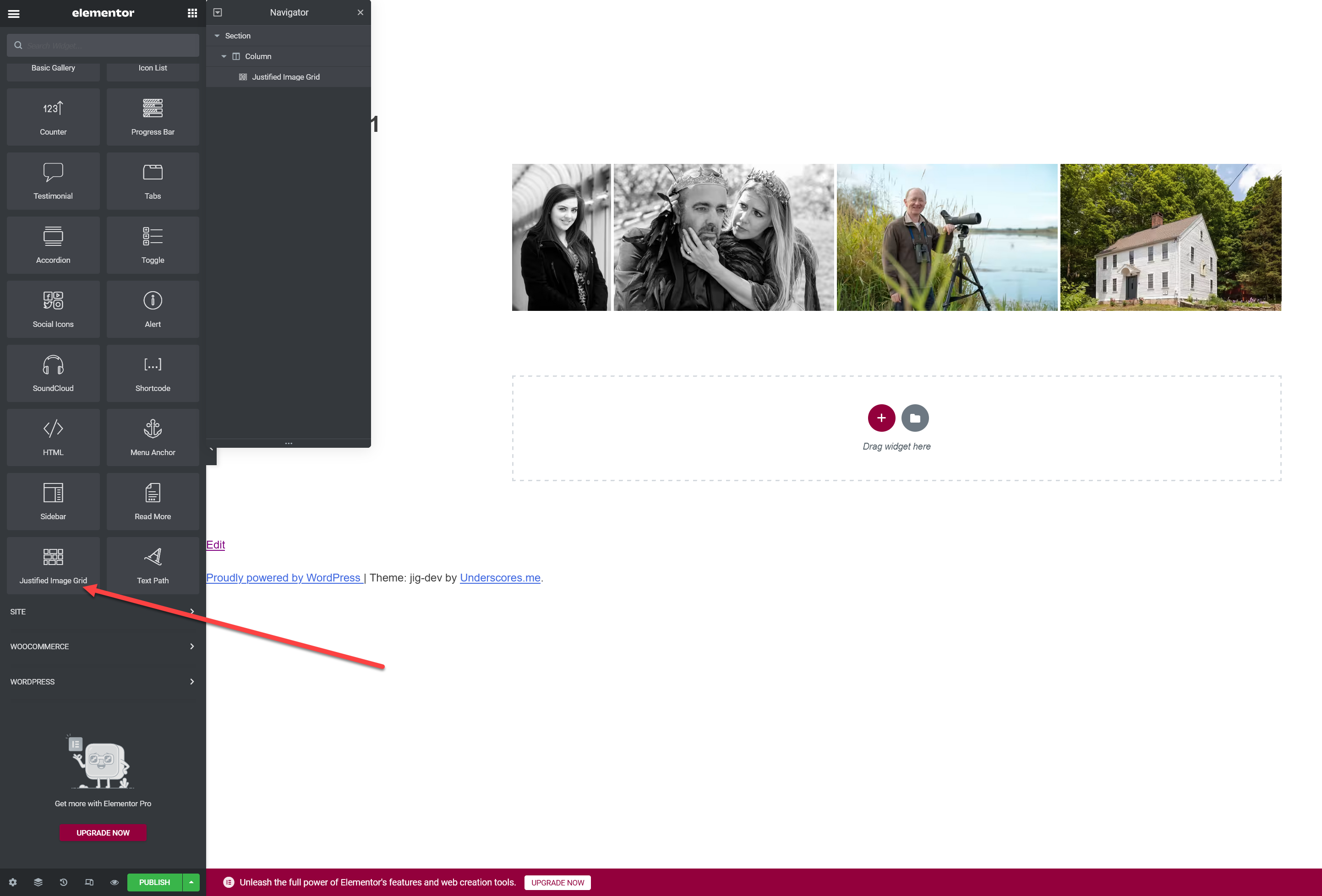
have just purchased the plugin and not able to find any JIG block in elementor. where can I find it?
Under the General section, scroll down the elements all the way to the bottom. Or type the letter j into the search box. Just tested on the latest Elementor Free version. https://i.justifiedgrid.com/rjpm8i.png
its not there. Screenshot is sent to you on mail
please reply
Replied via email requesting admin login to see why it’s not showing up for you.
Hello. How do you add a 30px gap to the bottom off the image grid? I need some more spacing as on mobile it sits right against the bottom. Thanks.
There is a margin around gallery setting on the general tab.
I know thanks. I specifically want to add padding/ margin to bottom of gallery as I mentioned.
Then the value would be
0 0 30px 0
as it’s the css shorthad of top right bottom left. The thumbnail spacing value gets added to the bottom, expecting another row, so if you are precise, substract that from 30.
is there is a download button on each photo ?
Hi, the feature can be activated, which helps users download the size that is currently displayed in the lightbox. PhotoSwipe has it in the menu but it can also be shown in the captions.
so they’ll download the resized photos not the original ones ?
Yes unless you opt to show full size in the lightbox. I aim to change this so the download link should always have access to the original (even make it appear for logged in users only, as an option).
When I add new images to my flickr, it does not add those to the JIG gallery. How do I have it automatically grab those new images I uploaded?
There is a built-in customizable cache of one hour to avoid reaching your API rate limits. So after a delay they’ll show up unless you have further caching (plugins). In the Plugin Settings, Flickr tab you can temporarily change the Flickr caching time to something shorter or purge if you just want to see the new additions right away.
Hello Firsh, Hope you are doing well. Tell me, is there a way to create a copy of an existing grid?
With this yes: https://wordpress.org/plugins/duplicate-page/
I decided not to replicate functionality that already exists. Those that like to put cloning into their workflow usually have a plugin like this installed. An alternative is also good, but in the settings of this, the feature needs to be enabled for grids: https://wordpress.org/plugins/duplicate-post/
Ok, I didn’t realize a plugin would exist for something like this. I’ll check it out.
Is it possible, to import an large, existing “Wordpress Gutenberg block gallery” into a JIG or RML gallery? If yes, how this is done?
If you install the the plugin those will be displayed via JIG automatically, out of the box. If you don’t like it, it can be disabled. JIG does not modify the content, so if you uninstall, your site will be exactly as before. Improvements for and compatibility with the latest Gutenberg are coming in the next update.
“Choose a Grid” – on the block, never displays a list of galleries (new or old). Not able to drop down and choose a gallery. Any thoughts?
Please send a mail from my profile, I’ll need to log in with temporary wp-admin access and check it out.
Just sent you a message…I’ll need your email to give you temporary access. Thanks!
Been using JIG forever, but was wondering if it’s possible to link directly to a lightbox (like prettyphoto) from one image or one link? Then the lightbox would hold multiple images that weren’t previously viewed.
Hi,
There are multiple ways to do that, depending on what you need exactly.
The only exception is that random single images in the content won’t be touched by JIG or its lightboxes (currently).
The easiest way is to create a grid like normal but use the hidden limit setting on something like 50, while the limit is 1. The result is 1 thumbnail but 50 images in the lightbox in total (if you got that many).
Text links: You need to have a grid in the page, but hidden by CSS. A piece of Custom JS can redirect click on your text link to act as if the visitor clicked on the first thumbnail in JIG.
Multiple lightbox groups in a single grid (called straight to lightbox): https://justifiedgrid.com/sources/facebook/straight-to-lightbox-albums/ (this is available for RML and NextGEN too). You can have just 1 album, therefore 1 thumbnail in total. This is the most automatic way.
There are also ways to show “latest one” album, but it depends on your content source.
oh great thank you. I should’ve described what I’m looking for more but I think the first way will work best using 1 thumbnail. Straight to lightbox would work but I dont have facebook, RML or Nextgen…will it work with the default wordpress media library?
Ideally I would be using a modal (with Xtheme Cornerstone Builder) and the content area would have code for the gallery and a lightbox so that when you click the modal the first photo comes up in the lightbox, not a grid of photos.
Straight to lightbox with wp media library doesn’t work since there is no concept of albums. I’ll think of something to extend this feature somehow to what WordPress offers natively.
The first option will work well though.
The solution is without any 3rd party modals. Just place a single grid in your content with the hidden limit feature and you’ll see 1 thumbnail that will act as the launcher of the entire lightbox gallery.
Hello, just wondering how I can change the text properties in the Photoswipe lightbox? (eg. text size, font and padding) I know it uses the default body text style but I would like to modify it further.
With Custom CSS only. The selectors are
.pswp__caption .pswp__caption__center
and
.pswp__caption .pswp__caption__center small
Default styles are like:
.pswp__caption__center {
    text-align: left;
    max-width: 420px;
    margin: 0 auto;
    font-size: 13px;
    padding: 10px;
    line-height: 20px;
    color: #ccc;
}
But the images only load when I am logged in as admin. There are some errors visible in console
I use the Autoptimize plugin and Breeze plugin for caching. I allready disabled caching on that page, but that doesn’t help.
I found what plugin breaks justified image script : https://rapidload.io/ . I disabled the URL https://www.lazertag.be/lasershooting-fotos/ in Rapidload, but still have problems.
I see in the console that you have an autoptimize plugin doing something to the scripts. Caching plugins are fine but you need to be carefule how they reorder and modify script loading. That’s why lightbox is not working at the moment. I prefer W3TC plugin.
Thanks for your reply. The Autoptimize plugin has more then 1 million users. I can understand that you personally prefer another plugin. But the chance that a JIG customer also uses Autoptimize is pretty high.
Do you have an idea / suggestion which scripts or CSS I should exclude in Autoptimize in order to get it working? Or a setting in JIG to get it working?
JIG puts its scripts at the bottom of the page. By that time the dependencies need to be loaded. Default configurations of caching plugins might bundle up all js scripts and defer/async them. Currently JIG breaks because of that. At the very least jQuery should be left alone and be loaded wherever WordPress usually places it. I’ll work on JIG’s initialization method to be more resilient to caching plugin interference or even be jQuery-free eventually. I never worked with Autoptimize so can’t give specific advice on how to configure it. You can of course keep using it, but the automatic settings are usually not effective (same goes with W3TC).
This is the solution for this problem: https://wordpress.org/support/topic/best-way-to-disable-autoptimize-or-some-functions-on-certain-page/#post-15924260 (disable JS optimizing for the page)
Sounds good! Hoping that one day you’ll not need the exclusion.
Hi Firsh
WP Real Media Library collections
https://justifiedgrid.com/sources/wp-real-media-library/collections/rml-content/animals/Where are the terms at the top being picked from, ALL , green, sheep, cat etc?
Do I add them to Images, RML or JIG?
Thanks
Stephen
Hi, you add them to images directly. JIG has a minimal option to enable this capability in WP (just a category and a tag field in the media library), but if you want batch editing the free plugin media library assistant can coexist with RML.
A special case is there for RML, if you show images that belong to more than one folder, the containing/parent RML folders can become filter buttons. It’ll be more useful in the next version where multi-select from RML tree and “show everything under selected point in the tree” are going to become available.
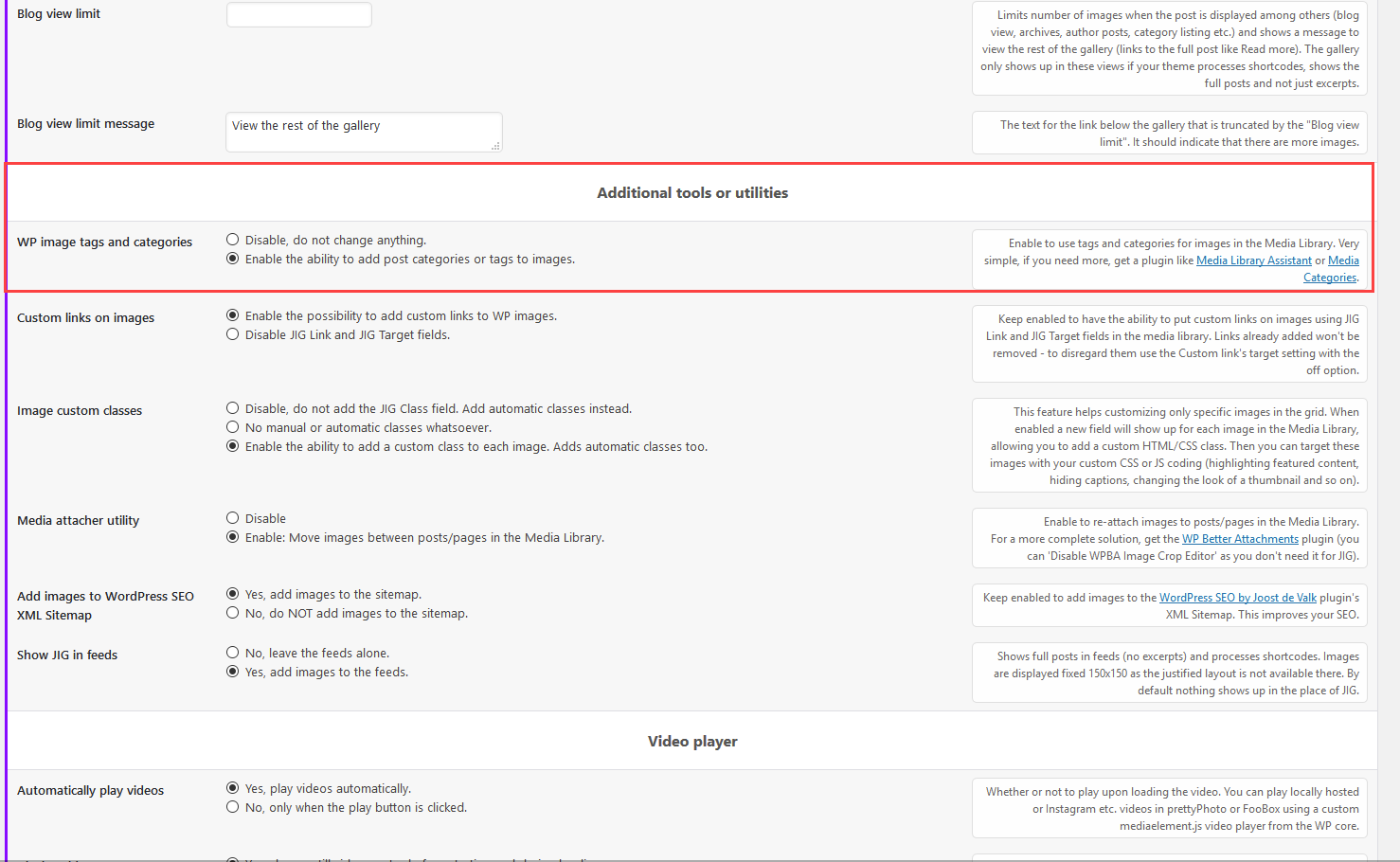
You say that “JIG has a minimal option to enable this capability in WP (just a category and a tag field in the media library)”, that would be suffice, as that is all I would require at this moment. Where is this option enabled?
Its good that you intend to extend this feature in the next version of JIG
Thanks
The Plugin Settings, General tab: https://i.justifiedgrid.com/rgcgcs.png
The multi-pick is already developed, the tree flattening needs some tweaking to show sensible results to avoid bluntly repeating what’s on multiple levels.
Thanks Firsh…Got it, ticked and now implemented. Look forward to seeing the development with JIG and RML.
Hi Firsh
Is there a way of making “ALL, green, sheep, cat, etc” into buttons or have font, all uppercase and bold?
Thanks Stephen
In the plugin settings, Filtering tab you’ll find the CSS settings for the buttons and the tags style, there you can change the looks. What you’ll need are:
text-transform: uppercase;
font-weight: bold;
The buttons style already looks like buttons, the example shows the tags style.
Thankyou Firsh
I’m posting this here as well as private. I have a few questions about Flickr Collections.
(1) Can I put one collection on a wp page, a second collection on a second page, and so on? To explain, I do school sports photography with pages for each school being School A, Sport 1, Collection a Sport 2, Collection b, etc. Each school will have 15 sports (collection pages) with each sport page showing a collection of albums (games) for just that school/sport. Can your plugin do this? You can see our old page at goflashwin(dot)com. (Our site is slow which is why we are moving to WordPress.)
(2) Can all the albums or collections display in square thumbnails like what you see in the link above?
(3) Will our high resolution images be reduced to display quickly?
(4) Lastly, we want site visitors to be able to download original images straight from the lightbox. Can this be done as well?
Thanks! Tim
4 is very important to us. The sooner we can get an answer the faster we can make our decision. Thanks!
Replied in the email thread!
Hello. Is it possible to add a grid layout that each square image links to a specific page? I have multiple projects on my website that are growing and the way to visit/ see them is an ugly drop down menu.
I’d like to add a square layout on the front page with text underneath that tells you what the gallery is the you are going to visit.
You can see what I mean over at https://forever1995.com where I use your plugin.
Update. Ive had a look around and even if I could make a grid layout that KEPT IT’S DIMENSIONS on images added – and add a description below- that would work. Looked at the code and got dizzy. Any chance you might be able to help?
THANK YOU.
Do you mean locking the aspect ratio to 1:1? There is a setting for that. You can put custom links on any image or use the project itself in recent posts mode for automatic linking. Perhaps if the projects have a custom post type or are in a category. In that case the grid will show their featured images. To turn off varying sizes in the grid you can set the “incomplete last row” to “match” in conjunction with the 1:1 aspect lock.
Eventually I’ll have face recognition assisted cropzones in some way so the square crop will become more useful.
No sorry that’s not what I’m after at all. Please view this image – I want a grid with the name of project underneath that links to its corresponding page.
Basically I want a uniform grid that shares a page of my projects. Like this…. (obviously images and descriptive text will all be unique) Its will also be 100% width and work on mobile.
https://forever1995.com/10654-2/Yeah my reply is still applicable to this use case. The text under the thumbnail is normally separate from the link area of the thumbnail. They can be connected with a bit of custom code. https://justifiedgrid.com/support/faq/is-it-possible-to-make-the-caption-clickable-when-its-under-the-thumbnails/
100% width comes from your theme/builder, JIG takes all the space it can but will not force itself to be full width.
The generous thumbnail spacing might be a bit problematic, I recommend a somewhat reduced value especially for mobile.
I have just set up a number of pages using JIG, bringing in Flickr albums. I’ve been successful and you can see the albums display on my WP pages. I’m using prettyPhoto for my lightboxes. However, my Flickr photo titles are not showing up in my lightbox images. In my global JIG settings, I’ve also set “Link to Photo on Flickr” to “yes, link title (default position).” Since the title isn’t showing up, there’s no way to see if the link is working. Is there something more I need to do, either on the global settings page or each individual grid settings page.
I want all my grids to look and operate the same way. Does that mean that all settings should be on the global settings page or must I customize certain fields on each individual grid settings page?
I’ve checked the documentation, FAQs, and troubleshooting but can’t find anything that addresses my problem.
Should “WP field for link title (anchor tag’s title attribute)” be set to Title? (I tried that but it still didn’t show up. Also, where is the setting for the position of the title? In prettyPhoto JS settings, I have “show_title: true,”
I also have FT set for my social media in prettyPhotos but only the Twitter icon is showing up. Not Facebook.
Here is a sample page: https://www.chamomileteaparty.com/posters/2017-post-truth-reaches-new-heights/. I also just noticed that all the thumbnails aren’t loading. They were loading yesterday just fine.
Thanks!
Hi,
The backlink should show up regardless of a title present on a photo at Flickr or not, and even if you disabled routing a field to the lightbox. Inspecting the source reveals img alt is empty, but link title includes a backlink (without image titles). The reason it’s not showing anything is because you have a modified prettyPhoto which disables the text display within the lightbox, using CSS.
This file (stylesheet of the bridge theme): https://www.chamomileteaparty.com/wp-content/themes/bridge/css/stylesheet.min.css
Has an aggressive rule of hiding the text from the lightbox:
body div.pp_default .pp_description { display: none!important; }
As soon as I disable this, your backlink starts to show up. This custom CSS attempts to counter it:
.pp_details.pp_includes_title .pp_description { display: inline-block !important; }
But at this point we are fighting the theme. Since the text normally appears on a white background and the theme makes it transparent, the dark text will be unreadable. You might try switching to the dark prettyPhoto theme in JIG settings Lightboxes tab – or I’ll write you more CSS. But overall you might be better off with PhotoSwipe lightbox.
There is no need to change anything in prettyPhoto JS settings. Its visuals are taken over by your theme unfortunately.
Both FB and Twitter buttons show up for me even with the theme’s design. Check if you have adblock or privacy protection addons in your browser.
If you want JIGs to look the same, only include the source (what album to show) in grid settings, and don’t touch the styling or preset settings. Then the “global” plugin settings will take effect regarding the styling.
Since your source is not WP, JIG assigns/routes data from Flickr in place of the first two WP fields, those are Title and Description. Lightboxes traditionally take text to display from either the thumbnail image tag’s alt attribute, or the wrapping link’s title attribute. That’s why it’s possible to control what field ends up where, because there are many lightboxes with many possible text slots.
PrettyPhoto has two. The top line (bolder) comes from img alt, and the bottom line (smaller thinner) comes from link title. Same is true for PhotoSwipe. PhotoSwipe has more robust but subtle sharers in its top-right menu.
The source JS (what JIG uses to build the gallery) does include all your textual data from Flickr: https://gist.github.com/Firsh/48e344c69e4ddc6329359314bd49272f However, all caption display is explicitly disabled in the settings (set to OFF) for some reason:
"linkTitleField": "off","imgAltField": "off","caption": "off","titleField": "off","captionField": "off",This pretty much guarantees no caption will show up on the thumbnails nor in the lightbox. So return the link title and img alt settings to their default state and things will start to show up in the lightbox only (given we counter the theme’s CSS or you change the lightbox). Img alt should be Title, and link title should be Description. However, you were right to turn off the captions because the descriptions are long (but that happened on the captions tab, that affects just the thumbnails).
BTW, The site has a major performance issue from the jquery.appear and ot scrolltoplugin javascript plugin that comes from the bridge theme. Perhaps it’s used for forced smooth scrolling, if there is an option to disable that, use it. Upon scrolling it executes a lot of javascript, making interaction with the site slow (even after loading) and it’s causing long repaints.
I turned off smooth scrolling. Does that help? I still noticing that not all my thumbnails are loading.
I switched to PhotoSwipe and that seemed to do the trick. I would like to increase the size of the left and right arrows. But adding custom css doesn’t change the sizes. The css is: .pswp__button-arrow-left .pswp__button-arrow-right {width: 300px !important; height: 500px !important;} (these sizes were only for testing; I’d probably make them smaller than that but I would like to make them bigger than they are now).
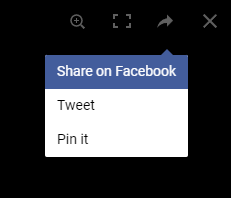
Now that I’m using PhotoSwipe, I don’t see either my Facebook or Twitter social icons. I do have an adblocker on my default browser (Firefox). But I looked at the page in Chrome, which has no adblocker, and they’re still not showing.
Thanks for your help!
In PhotoSwipe, you’ll find the sharing buttons in the sharing menu in the corner: https://i.justifiedgrid.com/rfu8hq.png
Its author chose not to have the counter buttons because it’s more performant this way.
Scaling up the arrows with Custom CSS:
.pswp--svg .pswp__button,
.pswp--svg .pswp__button--arrow--left:before,
.pswp--svg .pswp__button--arrow--right:before {
    background-image: url(/wp-content/plugins/justified-image-grid/images/photoswipe4/default-skin.svg);
}

.pswp--svg .pswp__button--arrow--left,
.pswp--svg .pswp__button--arrow--right {
    background: none;
}

.pswp--svg .pswp__button--arrow--left:before,
.pswp--svg .pswp__button--arrow--right:before {
    transform: scale(2);
}

.pswp--svg .pswp__button--arrow--left:before {
    transform-origin: left;
}

.pswp--svg .pswp__button--arrow--right:before {
    transform-origin: right;
}
I see the social media sharing now. Thanks. The css you posted above for changing the size of the left and right arrows isn’t doing anything. The arrows remain the same size as before.
Interestingly, I see this css when I inspect the page:
.pswp__button--arrow--left, .pswp__button--arrow--right {
  background: 0 0;
  top: 50%;
  margin-top: -50px;
  width: 70px;
  height: 100px;
  position: absolute;
}
It looks like changing the width and height would change the arrows’ sizes. But it doesn’t.
Also, regarding some of the thumbnails not loading, I have a couple of questions: As I mentioned earlier, sometimes, some of the images in the grid don’t load. Just taking one thumbnail grid image as an example, looking at the html it says it’s the width of the thumbnail is 204px x 274px. Is that image just downsizing the original full size image that’s on Flickr and displaying the original very high res image? If so, my Flickr images are very large and run from about 20MB to 50MB. And loading all those high res grid images could be the loading problem. Some of my grids have 30+ images. I can’t seem to download an actual thumbnail by right-clicking on it to see what the file size is of those grid images.
If that is the cause of the loading problem, is there a way to display smaller file images in the grid? Do you understand what I’m saying? If it’s not the cause, what could be causing the delay. (BTW, during development, I’ve set the grid image cache to 0, so it isn’t caching the images.)
Yup, it’s loading the originals but that’s not default behavior. On the TimThumb tab of JIG settings make sure NOT to disable TimThumb so it has a chance of creating the thumbnails. But working with such large remote images, the server might suffer a bit.
This middle option in JIG settings, Flickr Tab, “Look for and allow hi-res photos” https://i.justifiedgrid.com/rfxizq.png will help regulate the lightbox image size (and that is used as the input for thumbnail generation so it reduces server load).
If all is setup correctly the thumbnail files will be as tall as your row height setting + deviation.
What kind of grid image cache? Don’t disable Flickr API cache else you’ll hit limits and nothing will load for a day, especially if your refresh often during development. That cache is just storing the response from Flickr, not the images. The TimThumb tab’s “remote image caching time” has nothing to do with Flickr, it’s for sources where the image size is now known and has to be measured by JIG.
The arrow width and height doesn’t do anything since the arrow itself comes from a background image, png at desktop sizes and SVG on retina.
I made the CSS a bit mor specific:
body .pswp--svg .pswp__button,
body .pswp--svg .pswp__button--arrow--left:before,
body .pswp--svg .pswp__button--arrow--right:before {
    background-image: url(/wp-content/plugins/justified-image-grid/images/photoswipe4/default-skin.svg);
}

body .pswp--svg .pswp__button--arrow--left,
body .pswp--svg .pswp__button--arrow--right {
    background: none;
}

body .pswp--svg .pswp__button--arrow--left:before,
body .pswp--svg .pswp__button--arrow--right:before {
    transform: scale(2);
}

body .pswp--svg .pswp__button--arrow--left:before {
    transform-origin: left;
}

body .pswp--svg .pswp__button--arrow--right:before {
    transform-origin: right;
}
Yes, the new css does change the arrows. Thanks.
As to the thumbnails, I had to turn off TimThumb because I was getting 403s. When I turned it back on, as per your instructions, I got 403s again. I went down your list of ways to fix this. None of them worked:
1. I use none of the security plugins you list. 2. In the .htaccess I added this snippet but it didn’t fix the problem (so I removed it):
<IfModule mod_security.c>
  SecFilterEngine Off
  SecFilterScanPOST Off
</IfModule>
I also did a search in my .htaccess file for these two lines. They are not there.
php_value mbstring.func_overload 2
RewriteRule wp-content/plugins/(.*\.php)$ - [R=404,L]
3. My permissions are set correctly. 4. I added my CDN hostname. 5. I added the path to the timthumb.php file. 6. I selected the middle option in: “Look for and allow hi-res photos”
None of these got rid of the 403s.
7. The only thing I haven’t done is to enable Photon on Jetpack. I have the plugin installed but can’t find the place to enable it.
This morning, I took a look at your timthumb.php file. I found that you have a limit of processing external images to 10MB on this line:
if(! defined('MAX_FILE_SIZE') ) define ('MAX_FILE_SIZE', 10485760); // 10 Megs is 10485760. This is the max internal or external file size that we'll process.
As I mentioned to you, most of my uploaded Flickr images are much larger than that (up to 50MB, but most in the 25-30MB). Is this a possible reason that I’m getting 403 errors?
Okay, I think I fixed the thumbnail load issue by using Jetpack. You should know that they no longer use “Photon” to describe this CDN alternative. They now call it “Site Accelerator.” Their tech support clued me into this. Here’s their page that explains how to turn it on: https://jetpack.com/support/site-accelerator/#how-to-activate-the-site-accelerator You might want to update your troubleshooting page.
I turned it on and it seems to be working now. If you could take a look to confirm, I’d appreciate it. Here’s one of my JIG pages: https://www.chamomileteaparty.com/posters/2017-post-truth-reaches-new-heights/
Thanks.
The thumbnail script is 3rd party though I’m taking over parts of it. The 10MB limit, I didn’t recall. If you use the normal sized versions from Flickr (screenshot earlier) then this would not hit the limit. 403s could be regardless happening due to a number of things.
Jetpack keeps changing and renaming their stuff, I’ll update it thanks.
Yes your site correctly loads small 340 tall thumbnail files from their CDN. If you prefer the originals in the lightbox, this is the best setup confirmed.
Hello, I was wondering how to set up a gallery with tabs as in the example here https://justifiedgrid.com/features/responsive-gallery/ Couldn’t find any information on it.
Hi, your theme/builder should bring the tabs, and then place individual JIGs inside each of them. Traditionally it’s been a tricky subject since JIG depends on being visible on page load for its layout to work. After a while I began supporting AJAX and tabs where some grids are not visible on page load.
What you see in the example is the tabs of the Avada theme.
Pre-sale Questions please: Is it possible to set the source as a custom post type, for example portfolio? Is it possible to put the filters at the bottom of the gallery? Thanks
Yes you can use any post type as long as they have featured images. You can move the filters via custom JS only.
Good Day, Can users upload photos and videos from to galleries from the front end with this plugin?
Nope, but check this out: https://justifiedgrid.com/support/faq/is-it-possible-to-have-frontend-upload-for-visitors/
Edit: it seems like that frontend upload plugin is discontinued. Perhaps another will do the trick.
Hi, 1st of all, awesome work and a real nice and versatile add-on/plugin for WP \../ – I see you have support for NextGEN and WP RML. Since WP RML is somewhat quite similar to Filebird, Filebird also comes chipped with AVADA Theme, and since so will you consider to make support for Filebird sometime in the feature as well(?) that would be rad. Anyways keep up the good work folks, appreciate your time and effort put into this script 
I barely know that plugin but am definitely interested in adding more sources. However, I focus more on bettering what’s already offered and to create a more solid foundation for future features/addons. Not many ask for Filebird specifically, but there exists a snippet that might help you in the time being: https://gist.github.com/Firsh/3195fa2e2878bcfb7fb38993cf195321
The reason why I “push” RML is because I know its devs and they are good people with excellent code quality and work ethics. Also I personally use the RML-JIG combo on my father’s site with over 8000 media library elements and they work quite well together.
Thank’s for the reply and hones answers. I might consider RML in the feature as well. It looks neat and tidy. As for the filebird-code snippet – that’s awesome \../
We’re getting “YouTube scraping failed” messages and an empty gallery on our Youtube gallery that worked like a charm before. Newest update installed. Here’s the shortcode we’re using. [justified_image_grid row_height=200 overlay=others mobile_overlay=same overlay_icon_opacity=1 overlay_icon_url=https://www.arjes.de/wp-content/uploads/2021/01/icon_play_56px.png overlay_icon_retina=https://www.arjes.de/wp-content/uploads/2021/01/icon_play_112px.png overlay_opacity=0 aspect_ratio=16:9 link_target=video rss_url=https://www.youtube.com/playlist?list=PLGWm92MxsyhsBdtyXjkSHkBFprRfoygcE]
It seems to only work with the channel url – [justified_image_grid rss_url=https://www.youtube.com/user/arjes2009]
But doesn’t work with individual playlists anymore?!?
The shortcode with the playlist seems to work for me (it shows 1 video). Is your server located in Germany? YT may be serving different source for different countries or be A/B testing something that breaks the scraping for you.