1138 comments found.

Hello, is the whole script translatable?
Hello,
The front end strings will be automatically translated to your WP install language and you can also customize labels through the schedule builder. If you want to translate the back end strings, you can do it through the language file. All the best.
Hello, is there and option to show past events in the same calendar? Or create a calendar that shows only past events.
Thanks
Hello,
Yes, you can activate Show Past events to show them in the same calendar and set the schedule to show only a day in the future to show just past events. All the best.
Hi there,
Just a couple of pre sale questions. We run a Movies & Series review site. Would this plugin work for a Movie releases schedule?
And is it possible to add URL into the text if we use it for a Movie release date schedule? As we could maybe link the Movie name to the listing already on our website.
Many thanks.
Hello,
For a movie release schedule, the Plain List style should be quite suitable. Yes, you can add URLs in the event description. You can also use the action button to link to a custom URL. All the best.
Hi,
I’m interested in something similar to your “COMPACT LIST” view. We do a 3 day event but with multiple entries on a day summarized in a section by day.
https://www.linkpicture.com/q/multi-day-schedule.png
We’re doing it in a table now but am looking for something responsive and your plugin may be able to help.
Question: - Is it possible for entries to have no end time? We don’t awlays want to timebox entries as shown in my screenshot.
Thanks!
Hello,
The end time can be very easily hidden through the schedule builder options. You will need to set up an ending time when creating the event, but you can simply not display it anywhere on the front end. All the best.
Can you show or hide the end time per line item? Would you have a screen shot available to show those options?
The show/hide ending time option is global, but you can use a line of CSS to hide it just for particular events. Events with a particular Type, Location or Instructor can be targeted with CSS, so you can assign them a particular taxonomy and hide it just for those events. You can see the schedule builder options in our dedicated documentation chapter: https://curlythemes.com/support/docs/events-schedule-wp-plugin/#schedule-builder All the best.
Looks interesting. What about notification? SMS? QR?
Hello,
Our plugin has a basic integration of WooCommerce for bookings: http://curlythemes.com/support/docs/events-schedule-wp-plugin/#booking So we have the default WooCommerce emails. We do not have an SMS alert functionality. Most likely you will be able to integrate QR in the confirmation mail with a WooCommerce extension. All the best.
Hi, what is the latest version, please? Why don’t you show a changelog like others do?
Hello,
The latest version of Events Schedule is 2.5.17. We do have realese notes for important changes in our live documentation, but we haven’t release a new version in a while. All the best.
Sadly the plugins is still NOT compatible with Impreza theme. I see now that others have had this same issue many months ago, with no resolve.
Hello,
We sent a reply to your support ticket. There is a conflict between our WooCommerce integration and their core plugin, hopefully a workaround is possible. Please keep us updated through your open ticket. All the best.
Hi,
I’m interested in this style of your plugin. Deciding to buy. I want to know. - Can I create a Scrollbar? Because my daily events are every hour. I don’t want the show to be long. - Does it support Responsive?
https://demo.curlythemes.com/timetable-wordpress-plugin/examples/radio-schedule-daily-agenda/ https://nimb.ws/6fqKzSHello,
Yes, the schedules are responsive, they should look fine on any screen size. We do not have an option to add a scrollbar in the container, its size will be extended to the length of all events. You would need some custom work for a scrollbar in the events container. All the best.
Hi there, great plugin. Have a pre-sale question: is it possible to submit event from the front-end? Many thanks.
Hello,
No, we do not have front end submission at the moment. Events can be created only through the admin backend, by users who have the privileges to create WP posts. All the best.
Hi, just got the plugin and works great. Just one minor issue on mobile the letters of the week look like this (MMon, TTue, WWed, TThu, FFri) when using the calendar view: https://prnt.sc/fDvwaq9cF2ZZ. It shows properly on desktop but not on mobile. Tried using your demo on mobile and works well as the letters are shown properly. The site is on wp bakery. Is there anyway to fix or style it properly on mobile? Thanks so much!
This should be related to a local rule doubling the day display. Please try using a line of css like this .wcs-timetable—monthly-calendar .wcs-day::before {display:none;} If this does not help, please open a ticket on our support platform. All the best.
Dear People
I am looking for a Plugin, to show daily and weekend workshops (events).
Those workshops are running more than once a day – always around one hour. We don’t need a booking part – but should be able to link to a booking website (external website) – or internal.
A workshop could be running on following times: Weekdays: 10:00 / 12:00 and 14:00 Weekends: 10:00 / 11:00 / 12:00 / 14:00 / 15:00 So recurring timeslots should be easy to get done.
Is Your plugin able to do it? Right now we do use another Event Plugin, but I am not happy with it, as the recurring part isn’t that easy.
Also, additional question – is your plugin compatible to the latest WordPress version?
Regards,
Simon
Hi Simon,
We’ve sent a reply to your pre sale ticket. Yes, the plugin works fine with the current WP version. All the best.
Hello! I use this plugin within the WP Theater theme and I noticed more recently that in the link I also see (?wcs_timestamp=1645984800) although I don’t want that. But the most important aspect is that the image of that event is cached and at other events that I view it will be the first image seen. Sounds like a cache, but I don’t know where. Do you have a solution in this regard? Thanks!
Hello,
An event page will have a URL like this if you access it from the schedule, because of the timestamp. When accessed from the schedule, it is not the main event page, but an instance of that page with a particular starting time. As for your second question, yes this should be related to a strong caching on your platform. We did encounter a similar issue a few times and it was related to object caching, so please check settings related to it on your platform. All the best.
Hi, in the past, the plug in worked great. Now we have a problem with Vue.
Cannot find element: #wcs-vue-modal
Cannot find element: #wcs_templates_modal
Template element not found or is empty: #wcs_templates_modal
(found in <Root>) You are using the runtime-only build of Vue where the template compiler is not available. Either pre-compile the templates into render functions, or use the compiler-included build.
(found in <Root>) Download the Vue Devtools extension for a better development experience: https://github.com/vuejs/vue-devtools You are running Vue in development mode. Make sure to turn on production mode when deploying for production. See more tips at https://vuejs.org/guide/deployment.htmlHello,
Please make sure you are using the current version of the plugin, 2.5.17. If you are encountering compatibility issues with the current version, please open a ticket on our support platform with this and we will investigate further. All the best.
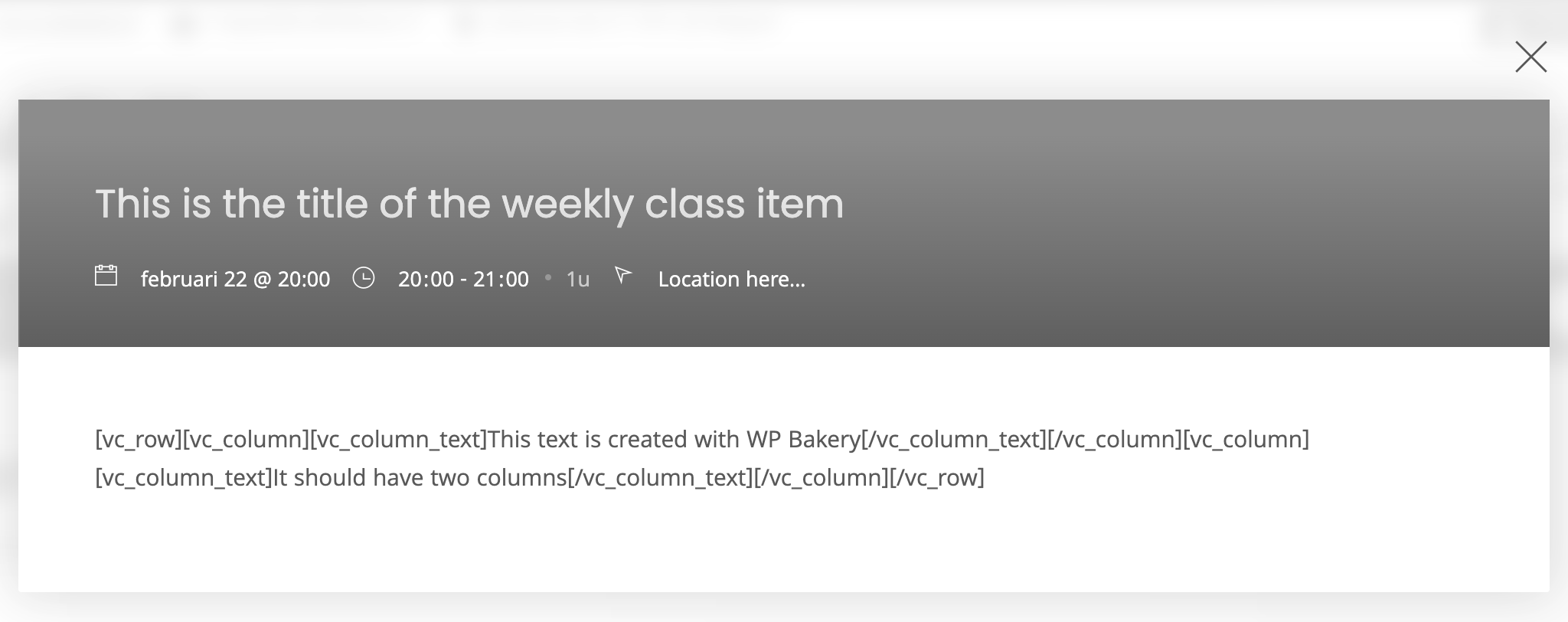
Hi, we’ve been using the plugin for quite some time now and are happy with it. One thing we’ve now noticed though is that WP Bakery Visual Composer shortcodes do not compile in the frontend, showing the [vc_row] shortcodes on the frontend. Which filter can we use to wrap the content in a [do_shortcode]?
Hello,
We are not aware of such an issue, but if you are using WP Bakery you can add schedules with the custom element. For this builder, the plugin has a custom element Weekly Class Schedule, there is no need to use shortcodes. All the best.
Hi AlexPeter, I might have explained it wrong. This is the isuue we’re having: https://res.cloudinary.com/comsi-rtv/image/upload/v1645514265/CodeCanyon/no-do_shortcode.png
When we create a new item we can use the WP Bakery page builder to add columns and content elements. But when viewed on the frontpage, we only see the actual shortcodes.
Thank you for the screenshot, I understand now. The modal window does not support scripts or builder elements. If you need advanced content in the description, please use the single event page. All the best.
Is this great plugin still supported? Long time since last update. Is it OK to be used with WP 5.9?
Hello,
Yes, the plugin is still fully supported, the current version is compatible with WP 5.9, there are no issues reported. All the best.
Hello, is it possible to have some restriction based on gender ? we have a dance school, and we need to manage reservation based on gender. Like : we have 10 places for boys, 10 for girls. If more boys are reserving, then we can have more girls.
Hello,
Currently, it is not possible to add variable prices to the event ticket. A workaround would be to create an event for each ticket price or you can use the action button to send to a WooCommerce product with variable prices. Still, it is not an ideal solution for your case. All the best.
Hi, this plug-in is avaible for multisite installation?
Hello,
Yes, you can use Events Schedule on a multi-site, our demo is actually a multi-site. All the best.
Sometimes the shortcode doesnt display the schedule. Purging cache seems to work but get reports that it still doesnt appear for some users. Is there something I’m missing?
Hello,
It’s hard to identify the source of the issue just from this description, but it might be related to local settings affecting JS. Please check if the schedule page has any transition effects or animations that could cause a conflict, especially if they are using AJAX. Also, please check settings related to optimization and minifying. Activating Lazy Load option at Classes > Settings can also help in such cases. If you open a ticket on our support platform with this issue, we can investigate it further. All the best.
First of all, great plugin! I would like to import classes via csv file. is that possible? There is no import from google calender or so, right?
Hello,
Thank you. The classes are custom posts, so you can import them through CSV. We can recommend WP All Import as a solution many of our clients used successfully, to import their events and even make mass changes by re-uploading the CSV file. All the best.
Thx. I have tried it and it works. But one of the most important part, the start date, doesn’t work. There is no field where i can import the parameter with that data example: 2022-01-30T08:30:00+00:00
The date is stored in the wcs_timestamp value in UNIX format. Please take a look in the developers documentation chapter: https://curlythemes.com/support/docs/events-schedule-wp-plugin/#developers-documentation under Class Object. If this does not help, please open a ticket on our support platform. All the best.
Thx. Now it works fine! :) It was _wcs_timestamp :) I opened a ticket some days ago (Request (18567)) but unfortunately i have not yet received a reply to my reply mail – it’s regarding the instructor_image topic.
We are glad to hear it works fine now. We did receive your ticket on support on 20th January and we replied after a few hours. Please check if the mail you used to open the ticket is correct and also your spam folder. You can also open a new ticket and we will try to help you with the instructor issue. All the best.
Yes, you responded to my ticket very quickly. Thank you very much. But then I replied to their reply directly by mail and I have not received any response. Anyway, I have just created a new ticket 
I tried upload a data test file and there is a warning on the website after upload: Warning: Undefined array key “_wcs_interval”
We just sent a reply to your support ticket. All the best.
I saw it, thx. But this is another topic (regarding csv Import) The Import works but i get an error message in the Header: Warning: Undefined array key “_wcs_interval”
Please use the support ticket for this issue and any other that might appear. It will make things simpler. All the best.
Hello,
thank you for the plug-in it is useful and easy to use, however I recently noticed that some reservations were duplicated, can you please provide me with an answer to solve this problem?
Hello,
Please check if there are any errors with payment processing, which might cause such an issue. If you open a ticket with WP login info on our support platform, we can investigate this issue further. All the best.
Hello, quick question: Is it possible to add an additional toggle/filter option to what comes stock? For example, if I need to add a ‘language’ toggle, in addition to day, time, instructor, location, etc. Thanks.
Hello,
Yes, if you need an additional filter we can send you a custom PHP code from support. All the best.