8473 comments found.

After updating to the latest wordpress 5.9, the lightbox is not loading.
Sample link: https://www.studioflicks.com/movie/mahaan/
Hi, where is JIG on that page? I can’t seem to find it being used there.
If you are using Gutenberg gallery block, there was a change which disables JIG’s autotakeover. I’m working on a solution and the next release will bring it back. If you think this is the case for you, send me a private message and I’ll give you the beta. It’s not yet clear if it affects only new gallery blocks or old ones as well.
You got it right!! Yes, I am using Gutenberg gallery block. It’s affecting the new gallery blocks only. For older posts, if i update the post, it’s getting effected too.
I have already sent you a private message, can you please check it?
Yes I found your mail and sent you the beta, I hope it solves it for you. I’m now testing it on older WP versions since Gutenberg changed so quickly.
Hi Firsh. Since I have updates Wordpress to the latest version 5.9 I have problems with JIG on mobile view. Before my galleries shows 2 images per row, now it´s only one image and additionally I can´t open the images in the lightbox.
Did you know about this problem? I already cleard all my cache, but it doesn´t help. Maybe you can take a look on it if it is a bug? Michael from One-Million-Places.com
I think it´s a confict with WPRocket and the function “Remove unused CSS”
Hi, caching plugins can freeze your desktop state and carry that over to mobile view since for now JIG uses server-side mobile detection. Can you configure that plugin to create a different cache for mobile visitors?
Great plugin with tons of options. I noticed one bug: The random order only works when I am logged in. Is it me or JIG? 
That is likely due to a caching plugin that only works while being logged out. JIG has server-side randomization at the moment. The caching plugin freezes a state in time.
That’s exactly it. Thanks!
Click on all images on this page to see what are we asking here; 1. Single image in a PAGE and on click it opens a LIGHT BOX gallery in fullscreen. 2. Images gallery in a PAGE with FIXED height x VARIABLE width but only in ONE (single) ROW all gallery images could swipe and scroll on buttons click and also clicking on any of these images opens a LIGHT BOX gallery in fullscreen
Hi,
1. A single image will open a single image in the lightbox, multiple single images separated by text on the page will not be grouped together unless you use a 3rd party lightbox.
2. Without entering a lightbox, there is no swiping action left and right when JIG is constrained to a single row.
Hey Firsh, Hope you’re Holidays are going well. I set up a little a little something using filters and buttons and I see it’s possible to edit the text of the “All” button. That’s pretty cool but I was wondering if there’s a way I could edit the text of the other filter buttons as well.
Hi, that text is automatic and mirrors the tags, categories themselves. So if you need to change them, change the terms. It’d add additional complexity to rename and map those back to originals in JIG.
Ok, I was hoping there would have been a simple way to do it. Thanks.
Maybe with this: https://justifiedgrid.com/support/faq/jig-images/
JIG’s JS collects the tags as they are found among the images, for display. So if you manipulate them on a per image basis, consistently (by iterating over all images and changing the wording for a specific tag all the time), it should be possible. Just not as a setting.
Thanks again…. as soon as I Google what “iterating” means I’ll be all set! Have a Good One Buddy!
That’s custom coding, you don’t need to know, I can help out with a quick one. Do you have a list in mind what terms you wish to rename?
OK, without getting into a lot of details – Using Media Library Assistant I give all my most recently added images a custom taxonomy of “Pic” so when I create a gallery with filters “Pic” shows up as a button. I thought it would be cool to change the text “Pic” to something else like “Latest Packers Images” or “Recently Added Colts Pictures” depending on what the respective gallery is about. Am I making sense?
I checked and for now the PHP filters can’t be used to change filters at that point of setting up the Grid. However, if you only have one of these special galleries on a given page, this Custom CSS might work:
.page-id-2331 .jig-filterButtons .jig-filterButton[data-filter-slug=pic]:after {
    content: "Recently Added Colts Pictures";
    font-size: 1rem;
}

.page-id-2331 .jig-filterButtons .jig-filterButton[data-filter-slug=pic] {
    font-size: 0;
}
Where you’d change 2331 to the ID of your page the gallery is on. WP has other different body classes to identify certain pages. Change 1rem to your desired font size if it doesn’t match the “All” button.
Well Thanks! I’ll give that a try.
I’m in need of some help here… I using this on a photography site with multiple users that create native grids. I just found out that people with the WP user role “author” can’t edit or even view the “grids” page in order to edit their own grids or add photos to another users grid (when we have several photographer on the same live event). Is there a way to make this possible?
If you are using a consistent look all around the site, you only ever need to set up a global look once, skip the grids interface, and just create the JIGs as standard WP galleries for example in Gutenberg, they will be taken over by JIG.
Until a fine-grained control arrives that controls who can see JIG in the menu, of course. Thanks for noticing this.
Thanks for a quick reply!
We’ll be looking forward to that future control feature!
Do you think the current control that just affects the shortcode editor button’s visibility being tied to a role, should double down and control this as well? Or would it only make sense as a separate setting. Considering that less and less people actually see that button since the classic editor might not be that popular anymore (and I’m working on adding blocks to the popular builders/themes).
Hello again. I’m still having issues with this plugin killing my websites and maxing out the CPU’s. As mentioned previously the hosting has high resources that are being maxed out. Last nights email from host after site halted with 20 seconds to load images.
“I understand and do apologize that you’re experiencing these issues. Is there any alternative plugin to the justified-image-grid plugin that you can test with? Since this plugin is being used across multiple sites and is being reported as the culprit for different users’ CPU limits being hit, I’d advise testing with a different plugin with similar functionality to see if the same errors result. “
I’ve got 4 sites using your plugin with the same issues and now facing the huge task of starting all over again with another plugin. Weeks of work. Can you please advise a fix that does not involve turning off TimThumb? As previously mentioned if that’s turned off the site barley loads. I’m very very annoyed that I invested in your plugin to now be in this situation.
I’ll explore other options such as paid cloud image CDNs that do the same thing as timthumb but take the load off your server. They are even more aggressive and can serve images in the exact dimensions, probably a new image for each visitor if they use different resolution mobile devices, local scripts can’t achieve that result unfortunately. But that’s what Google does with its photos, etc.
For now you can install Jetpack Plugin and enable the image enhancement / photon module which will offload the thumbnail generation and image serving entirely from your server, it’s a good middle ground between turning off TT and keeping it on.
If you do disable it, and most importantly choose a WP-based image size, it should absolutely not result in “barely loads”.
If the served images are large, but static, the only (real) downside would be that the visitors need to download a lot of data. Less than ideal, but the server should not care, it’s just a bit larger static asset delivery. If it fails to do that (TimThumb off mind you), then it’s the hosting that limits you behind the scenes. Proper hostings have no problem with that. If you have tens of thousands of visitors daily then you use a load balancer, CDN and/or static sites, that’s a different story.
If the served image is properly-sized AND static, and the server still has an issue then it would have the same issue with or without JIG on a page with a gallery that has dozens of photos. In that case it’s the concurrent connection limit set up by the hosting company, to avoid overwhelming their server when hundreds of customers share their sites on a single machine.
In my production use I do disable timthumb unless I implement something better, but:
I define custom image sizes that are suited for my theme, AND have a little plugin to regenerate those for the entire library (in the quality that I want, even webp if it comes to that). https://soliloquywp.com/beginners-guide-to-add-custom-image-sizes-in-wordpress/ Then JIG will just use those and I combine it with lazy loading / scrolling load more that is limited to 10-25 for the initial load.
I’d host the images on S3 + CloudFront and no longer use regular hostings so the site itself is static. If you take the hostings out of the equation, and the slowing effect of various themes + builders, a non-empty looking media-rich site that only uses JIG as a frontend plugin can achieve even 100% + 100% on gtmetrix scoring, but at least grade A.
Going forward, next year, I’ll allocate more resources toward performance of the plugin (and its site will use the method I described above).
Thanks. I’ve turned off Timthumb and activated Photon. Set image Thumbnail size that’s approx 500px smaller in dimension to native images. Lazy load activated too. Hopefully this resolves my ongoing issues. Cheers
The only downside to Photon vs TimThumb is that it doesn’t decrease the quality when it’s serving larger res images to mobile devices, thus increasing the size of the page for retina. It’s normal, but these images could be compressed without a visible loss to ~ the same filesize as the ones normal resolution screens. Paid image CDNs will offer the full control, once JIG supports them, that will be the preferred way.
If you keep thumbnail generation on and pick a thumbnail size, it helps the generator (either timthumb or jetpack photon) by not starting out from an oversize source image. However it can limit the version they can generate for retina, if there is not enough resolution in this new “source”, since it’s smaller than the native.
If you send me a link to your site I can check if everything is working correctly according to what you describe.
Thanks. This plugin is working at www.forever1995.com and www.paulpetch.co.nz Just a heads up with another problem that was resolved by turning off timthumb.
For a about a week now I was getting an error when uploading images to the gallery or even adding into a new page.
“Post-processing of the image failed likely because the server is busy or does not have enough resources.”
Today with timthumb off- this error has disappeared.
Have you checked if the settings are as recommended?
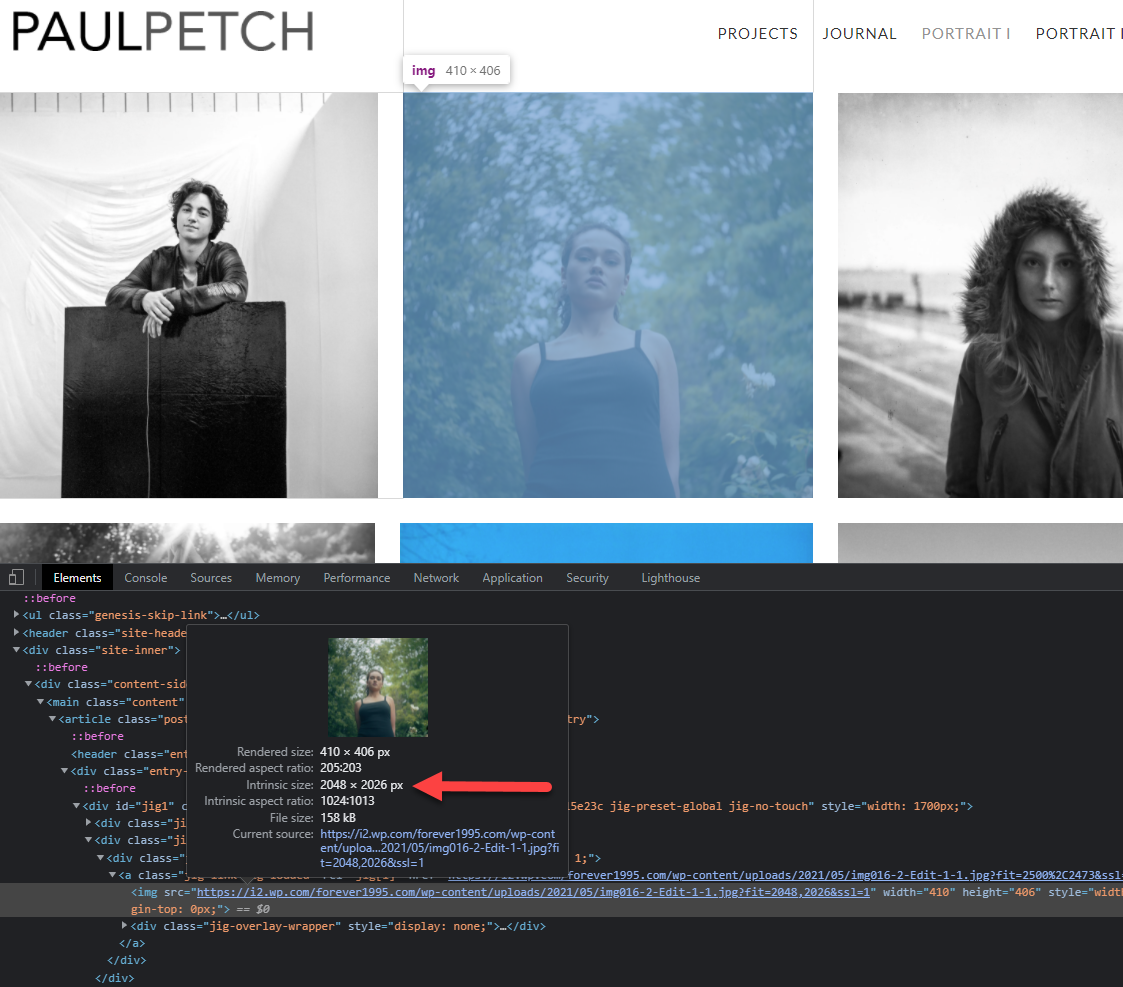
Hi, yes and your thumbnails have too large intrinsic sizes: https://i.justifiedgrid.com/2t42kdm1.png
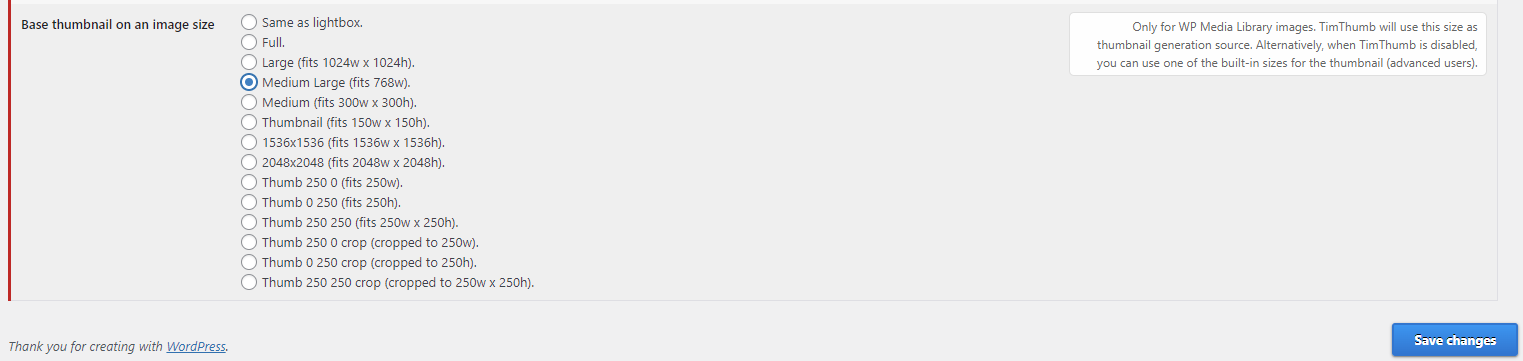
While it does not generate any load on your server due to Jetpack Photon, it’s wasted data for visitors. Can you choose a smaller size in this setting? https://i.justifiedgrid.com/2t42kdrd.png
The error you mention disappeared because your server’s resources weren’t drained anymore. Your upload and subsequent postprocessing of the images were impaired by a concurrent visitor for whom the thumbnails had to be generated, but the event had nothing to do with your freshly-uploaded images at that time.
More info on the Jetpack thing: https://jetpack.com/support/site-accelerator/ It’s meant to replace TimThumb as it acts the same way. I can’t test at the moment but iirc the TimThumb setting itself should stay on even when you use Photon from JetPack, (TimThumb will not be used anyway), as that setting tells JIG to use some kind of thumbnail creation.
HI just a quick pre-sale question , does it support multi albums ?
Hi, do you mean something like this? https://justifiedgrid.com/sources/flickr/collections-multi-level/
Hi, Does anyone know if this supports galleries and photos stored on azure blob storage? Given the uncertainty of 3rd Party providers, the client is preferring a more robust and stable solution.
Currently not, but thanks for the idea I’ll check it out. I’m only familiar with AWS, and there is a workflow that syncs or offloads wp media library content to S3, then you put CloudFront in front of it. Do you imagine the azure workflow as images still managed in the wp media library but hosted on azure, or using it as a remote source as if it were some kind of FTP folder?
Their plan is to use it as remote source.
Hi guys, this is the functionality we are looking for for our galleries. Please take a look.
1. Images in the grid should have the same height but different width (as shown in the example https://500px.com/popular )
2. The gallery should be able to take full width of the browser page
3. The spacing between images should be able to be adjusted.
4. At the hover over the image a little description can be shown
5. Infinite Scroll option should be enabled for the gallery
6. We should be able to set how many images appear on scroll
Please let us know if it is configurable
Yes all of that.
1 Yes it’s the same look.
Note, for #2, it’ll take up as much space as anything else can. Drop long text in the space that you will place it in to see. So it will not go above boundaries set by CSS.
Points 3, 4, 5, 6 of course.
Thank you. Client asked me to double check the following before we buy it: “Lets say we have 100 images in the gallery, but only 20 are displayed on the page due to infinite scrolling settings. Client clicks on the first image and the lightbox is opened – will he be able to browse all 100 images in the lightbox, or only 20 ones that are currently displayed on the page? “
Yes they can browse all 100 through the lightbox even if they did not scroll down one bit. The list of all images is prepared, and only the image loading is delayed by the lazy loading. There is no further list of images to fetch on scroll that would prevent someone from seeing all of them in the lightbox. So you are all good.
Hello, I want to buy plagin, but I need to inform is it possible to setup video gallery to autoplay on mobile when video is in the midddle of the screan, and to stop playing when scroll up and play another video(like on instagram) . On desktop view need to play on hover?
Hi, the video only plays when you click/tap the thumbnail (and it goes into the lightbox). The thumbnail is just an image which does not move or become a video by scrolling. Thanks for the suggestion, I’ll consider it when building better video gallery support!
Error 500 on some images in 2 galleries but only one page. And it depends, seems like if I clear the cache it happens, but not always, and not always the same images or the same number of images. It’s pretty random when it happens, but it happens often. If I get 500 on some images just refreshing the browser always fixes it.
I’ve read some other comments you made about it being a server issue, but this seems to isolated to one page. I also recreated a new gallery from scratch, but using pretty much all default settings except for row height, still happens.
This is the page: https://chrisborgmanphoto.com/about-contact/ There’s (actually 2) galleries in the right column, they are in tabs. And the gallery below that called “My Work”. The My Work gallery is the one that seems worse, and it’s more important than silly photos of me.
https://drive.google.com/file/d/1fPaW3UfsGwWiysBrUwuQfrpzMUQEPmIq/view?usp=sharing, https://drive.google.com/file/d/1h11ZQ8-gAvvgGqdgRm56R8YOG7KpHkWX/view?usp=sharingAny ideas?
Update: something else buggy that I forgot about, because it’s the backend, but maybe same issue. When I open a grid and click to Edit Gallery almost always some of the images don’t load, random white boxes. I had the network tab open, Chrome inspector, and watched all the error 500s show up.
https://drive.google.com/file/d/1ptXleCyQUaQn0NtvjlsgrxHlnZWRAgBF/view?usp=sharingDamn, so close to launching! Thanks!
500 is an internal server error, about which not much information is available just by looking at the site. Try disabling timthumb and choosing a WordPress-generated image size in its place.
I think it has to do with concurrent connections, this page might load more images than usual. Browser refresh with enabled cache can fix it as your browser will not request already-encountered images again on subsequent page loads.
Activating Jetpack “unfreezes” GIFs, overriding the “Freeze” option in the grid settings. I’m using WP Fastest Cache and tried Cloudflare, I always got everything BUT “HIT” So Installed Jetpack thinking it was needed to use WPFC’s CDN “Photon” option. That’s when I discovered all GIFs were animated in the GIF only grid, although the size did NOT change. I deactivated Jetpack and they went back to “frozen”. If you are unable to repeat this I will dig further and see what else I can find, or I could temporarily activate Jetpack for you.
Freezing the GIF relies on JIG’s own thumbnail creation as it alters the source image (actually just breaks the animation). Unfreezing makes it use the original image as-is. I was not aware that Jetpack can do something with the GIFs so they don’t appear frozen, regardless if their resize was successful. So this freezing was only tested or meant to be used without Jetpack. I’ll support more cloud resizers/CDNs but I likely have no control over what they do with animated GIFs, unfortunately. What could be better if the freeze functionality didn’t rely on thumbnail creation actually breaking the image, but if the first frame was extracted somehow so the freeze could be guaranteed, and optionally play the GIF on mouse over or tap (perhaps even avoiding the lightbox). Do you agree?
Actually resizing or modifying the GIF while retaining all the frames is akin to video transcoding.
I would imaging since “Photon” is creating and delivering thumbs to the browser it’s “bypassing” JIG’s animation break. It’s being sent to the CDN as “broken” but still sending the entire GIF so what comes back is the unbroken GIF. Does that sound plausible?
As a still photographer for many many years the days of large print jobs are less and less, it’s all about online. So, GIFs have gone from kittens playing to an actual valuable media form. I don’t have many GIFs on my site yet so haven’t seen an issue, but, selecting the first frame as the thumb would probably leave some people a little flustered. Agan, for kittens it’s OK but showing a product is different.
If it’s possible, the way youtube does it would be great, might even be a little easier with GIFs. Open any GIF in Photoshop and you can see all the frames, and, GIFs are usually pretty short so pulling 2 frames a second from a long 5 second GIF would only be 10 frames and give a good selection to choose from as the thumbnail. Also, probably don’t need to add the “upload thumb” feature since the extraction process would yield frames from start to finish. OR, .... keep it as is but allow a thumb version to be uploaded using a naming convention similar to retina images: logo.png = logo@2x.png | silly-kittens.gif = silly-kittens@gif_thumb.gif
GIFs are actually kinda large compared to an image, maybe lazy loading full GIFs after the thumbs load so hover or tap is “instant.” Anyway, something to think about like you don’t have enough. Been using and loving the plugin for years!!! I think I even did a testimonial for you way back then.
Yup! https://justifiedgrid.com/reviews/firsh-you-are-the-man/
Well that goes a bit beyond what a gallery display should do at a first glance, but perhaps as a module/plugin for enhanced GIF galleries I could implement something like that. The images should and can be processed upon upload to take only a few frames, but what if a customer already has them uploaded and then install the plugin later? That brings up more questions WP supports setting a featured image for content that normaly doesn’t have, like PDFs or videos, but GIFs are treated as just images. So I presume the GIF excerpt creation should be just an automatic process by a subfeature of JIG. Good talk.
Thank you in advance, Bob
Hi, I see 3 grids on the page and all have working slide up animation for the captions. What device/browser are you using?
Hello Firsh, thank you for your quick reply. I’m using Edge from PC but I also tried Chrome and I can’t see any caption. I emptied the browsers cache but the problem still remains. I think there’s something wrong on my visualization but I can’t understand what.
Ok, captions work again using Chrome. But they still don’t appear using Edge. Maybe there’s a problem just with it.
I could not reproduce the problem in any of my browsers with your site. Has this been resolved by any chance?
Hello Fresh, I finally fixed it. The problem was due to an Edge extension. Thank you for your help.
Hello! I’ve been using the plugin for several years now and I am more than satisficed. I just need to add a specific color effect on image hover like: “mix-blend-mode: darken;”. It works with custom css but, I don’t wont the hover transition effect to kick in because it makes a hiccup at the end of the transition. How can I disable the fade to color animation? Thanks!
JIG, Overlay effects, first few settings control that color layer. A hiccup when combined with pure CSS stuff can happen because of the JS-based animation in JIG plays the entire animation from off/on/off even when briefly crossing an item with the mouse. With CSS the transitions immediately return toward off state. JIG’s is a bit more playful and resemble the classic Flash sites’ mouse effects.
Yellow is that CSS does: http://www.2meter3.de/code/hoverFlow/ Orange is what JIG has.
Hello,
I purchased the plugin and everything is working fine except for the special effects. Images do not get processed whatsoever. Overlay works alright. I’m running WordPress 5.8.1 running Astra theme. Already disabled anything JavaScript related in WP Rocket and nothing changed.
Is there anything that can be done to solve the issue?
Thank you.
Do you by any chance use a CDN, Jetpack image service, or are your images from another host? Since the special effects are applied via JS, crossdomain images are not supported. I’ll introduce CSS-based versions of the effects for browsers that support it. I can help with custom CSS if this is the case for you, some effects are easy to replicate with a few lines and will work for remote images.
Thank you for your reply!
I installed the WP RML plugin and I am managing the files that way (uploading pictures directly in wordpress). Are there other reasons why this might be happening?
Send me the link to a page where the effects are not working and I’ll investigate. Perhaps it’s something simple.
There you go! Thank you!
Hi, your images do come from a CDN, the host is like i0.wp.com which means Jetpack plugin’s image module (Photon) is active. It’s probably better than TimThumb the default thumbnail creation, but it does mean the special effects are not working because of a remote origin. There are workarounds but they are not implemented in the plugin.
What effect would you like to use? Perhaps they can be replacicated with CSS.
Hi, sorry for the late reply. You were right, I didn’t realize Jetpack image optimization was on and turning the option off solved the problem. I was trying to get the images to desaturate and show colors only on hover by the way. Is there an easy way to get that effect with CSS?
Thank you!
A quick something, Custom CSS:
.justified-image-grid img {
    filter: grayscale(1);
    transition: filter 1s;
}
.justified-image-grid .jig-imageContainer:hover img {
    filter: none;
}
Hello! I’ve been using the plugin for a while now and love it but I’ve recently noticed that the plugin (in its latest version) ignores the height I specify for captions underneath images and cuts them all off after one line. I’ve contacted my theme’s developer to make sure it’s not a problem with the theme and he pointed to a bit of js code which he suspects is a bug. I hope you can help. Thank you!
Caption under thumbs is a tricky subject, I’ll likely make it more flexible and ditch the dotdotdot plugin eventually. The fact that a setting is not applying for you could be as simple as a configuration problem. Preset settings vs global / grid settings. The value is without px for that input, etc. What did the developer point out?
Thanks for replying! I’ve checked the settings, there’s no conflict there. The developer just pointed to a piece of JS code which trims the caption which he thinks might be buggy (I don’t know JS). The problem is that regardless if I specify the height of the caption to be 90 or 900, it still displays only one line and trims the rest, and in Chrome’s DevTools I can’t even see the height. It used to work fine in the past so I’ve no idea what the problem might be…
Can you please show me the page this happens on?
Sure! For example here: https://malwinart.com/blog/to-paint-is-to-love-again-part-7-ingress-violin/ There are a few galleries with a couple of photos in each one
Try adding a value to the caption background, don’t leave it empty. Use the word transparent at least
Its absence seems to invalidate the 120 height you set.
What I meant by changing the behavior is to allow your value to be a max height, not a fixed height, so rows where you don’t have as much text won’t create unnecessary whitespace. For now though, you need to find a value that works for most rows, but clips too long captions with the …
Thank you so much for your help, setting background-color solved it! I had changed .jig-caption-wrapper height because I didn’t want so much whitespace under the captions with little text, but I’ve set it now to 90px as a compromise so that it doesn’t look too bad and longer captions are visible (to reduce whitespace I’ve also decreased margin-bottom). But yes, it would be great to have a max height instead of fixed!
Since JIG for now uses floats, if there were uneven caption heights, things would fall apart so it’s not as easy as tweaking a few CSS properties. Furthermore, since everything is or will be positioned by knowing the dimensions of elements, adding the measurement of text in to the mix is another complexity, but I’ll figure something out.
Yes, you’re absolutely right, this does seem like a very difficult thing to implement. In its current form JIG is still the best gallery plugin out there in my opinion so thanks a lot for your hard work. Any other functionalities will be a cool bonus but I love it the way it is!
Can I use this without WorPress? Do you have that version available
Hi, there is no non-WP version available. What is your platform?
That’s great. I’m more used to php , html, where can I find the other versions? I just wanna stay away from Wordpress
Sorry I didn’t see the “no” there..
At the core it’s a JS thing, but it needs to get the image dimensions from somewhere before they begin loading, that’s where WP helps out. If you really like the plugin you can take the JS out of it, I can show you the init script (how the config looks like) that you could craft yourself with PHP, but it expects the image dimensions for aspect ratio calculations which can be a problem.
Hello Firsch, Hope You’re doing well. I’m trying a little something and having some trouble. Using Real Media Library & Media Library Assistant with JIG – Tell me, is it possible to apply the filtering features of JIG (specifically by the custom taxonomies created by MLA) to an individual gallery data folder that is created with RML? I want to display images from data folder but only ones with a specific Attachment Category. Is it possible or should I try something else?
So you would like to combine an RML folder ID and a category at the gallery creation? I believe that’s only possible with query modification custom code: https://justifiedgrid.com/support/faq/media-library-query-args/ But I haven’t explored this before. RML uses non standard ways (not a taxonomy) to mark images that belong together.
If you’d just like to show the filter buttons above the grid, they’ll work regardless of RML.
I didn’t want filter buttons for this and that query mod seems to be a bit of overkill for what I want to do. Now I don’t know a whole lot about custom taxonomies but would that be an option? And I might have the wrong idea about how it works but could I just assign custom taxonomies to the images and filter them using a combination of that custom taxonomy and the Attachment category assigned with MLA?
You have 3 fields: tags, categories, and custom taxonomy. The first two are automatically looking for their “attachment tags” and “attachment categories” version if MLA is active. If you have additional custom taxonomy on top of that, you can combine that with these. The only thing that may be unexpected is the AND/OR relationship between the specified terms and the combination of these fields, but that’s what query mods are for – I didn’t want to stuff more settings in the plugin unless I have a fully-featured query builder just for these scenarios.
If MLA is inactive, the tags are just post tags, categories are just post categories enabled over images (attachments) by a setting in JIG or by another plugin.
I managed to accomplish what I wanted – and it turned out to actually be pretty simple. Just used the custom taxonomy I created with the Attachment_Category of MLA in the following format: [justified_image_grid image_taxonomy=THE_CUSTOM_TAX image_tax_term=”THE_CUSTOM_TAX,THE_MLA_ATTACHMENT_CATAGORY“]
Works great. And no, I couldn’t do it with the settings. Had to just play with the shortcode. I’ve never used the query mods. I might have to look at that. And I know I’ve told you this before but that Grids creation tool was extremely helpful.
Thanks for the feedback. Without inspecting your usage closer I don’t know why and how your solution works for you, but if you get the result you need then it’s all good! Yeah I plan to take the Grids interface to the next level, because it started out from the Shortcode Editor, just with more visual space for it. Now it became the core since people use Gutenberg or other builders and they just pick the JIG they created earlier.
Looking forward to it.
Hi, why do some jig galleries use a div as the image element and some use a list item? Our shortcode looks the same but the gallery source code sometimes has divs and sometimes has ‘li’s Thanks!
Hi,
Divs are used in the JS-generated output. Lis are in the noscript tag pure HTML version that Google sees. You are not supposed to see the list unless you view the source.
THanks millions Firsh