2002 comments found.

Hi I had a pre-purchase question. Is it possible to set a fixed exchange rate between 2 currencies?
Hello
Yes. Just disable “Rate auto update”
Try a free version – https://wordpress.org/plugins/woocommerce-currency-switcher/
Hello, Is there anyway to add additional payment gateway charges, like if paid via paypal 10% extra, if via cash 5% extra etc?
Hello
Unfortunately the plugin does not have this feature. You should find a third party plugin for this functionality.
Sure, no problem.
Is there a way to restrict payment gateway based on geo IP?
Hello
No, only restriction of payment systems by currency
I created a profile called XYZ which has 7 countries.
Now can i define a formula like price for XYZ profile countries will be 20% above base price?
Hello
Unfortunately the plugin does not have this feature. This is a conversion plugin
How to set purchasing power parity based pricing?
Hello
Perhaps this option will help you – https://currency-switcher.com/video#video_PZugTH80-Eo
HI, I am asking for help, an error pops up when turning on the plugin
Fatal error: Uncaught Error: Class ‘WOOCS’ not found in /home/webcode/ftp/strony_www/15_MY_MINI_HOME/wp-content/plugins/woocommerce-currency-switcher/index.php:145 Stack trace: # 0 / home / webcode /ftp/strony_www/15_MY_MINI_HOME/wp-content/plugins/woocommerce-currency-switcher/index.php(166): WOOCS_STARTER-> get_actual_obj () # 1 / home / webcode / ftp / stron_www / 15_MY_HOME_WP-admin_HOME /plugin.php(2286): include_once (’/ home / webcode / f …’) # 2 /home/webcode/ftp/strony_www/15_MY_MINI_HOME/wp-admin/plugins.php(191): plugin_sandbox_scrape (‘woocommerce -cur … ‘) # 3 {main} thrown in /home/webcode/ftp/strony_www/15_MY_MINI_HOME/wp-content/plugins/woocommerce-currency-switcher/index.php on line 145
The website has the latest updates and WP 5.8.2 https://myminihome.pl/Hello
What version of woocommerce are you using?
Version 5,9,0
Ok! Please write me here – https://pluginus.net/support/forum/woocs-woocommerce-currency-switcher-multi-currency-and-multi-pay-for-woocommerce/
Please paste your license key here – https://share.stackovergo.com/image/i20210618130558.png -> https://share.stackovergo.com/image/i20210618130614.png and FTP+wp-admin access – https://share.stackovergo.com/image/i20210618130637.png I will fix it
ok message sent
Hello
Ok! I answered you on the forum
Hi, I get a site health performance alert from Wordpress:
‘A PHP session was created by a session_start() function call. This interferes with REST API and loopback requests. The session should be closed by session_write_close() before making any HTTP request’
I noticed that the problem depends on currency switcher plugin. In fact, when I turn it off the problem disappears. How can I be fix it?
www.robertorizzoart.net
Thanks in advance, Bob
Hello Bob
Please check option – https://share.stackovergo.com/image/i20211115172017.png – and do a test
Hello, thank you for the reply. I’m not sure I correctly understand. I enabled memcached on my website but the problem isn’t solved.
The plugin is generating different conflicts into my website. It’s impossible to cache it correctly and above all into my health site screen I get several critical alerts that disappear as soon as I disable the plugin. Please help me to fix it, because I purchased this plugin and I really love with it, it is essential for my website.
Hello Bob
Please write me here – https://pluginus.net/support/forum/woocs-woocommerce-currency-switcher-multi-currency-and-multi-pay-for-woocommerce/
Paste your license key here – https://share.stackovergo.com/image/i20210618130558.png -> https://share.stackovergo.com/image/i20210618130614.png and wp-admin access – https://share.stackovergo.com/image/i20210618130637.png I will check it
Is plugin with latest WPRocket?
Hello
It shouldn’t have a problem. Check options please – https://share.stackovergo.com/image/i20211111151223.png AND https://share.stackovergo.com/image/i20211111151306.png
You can test it with the free version – https://wordpress.org/plugins/woocommerce-currency-switcher/
Hello
Few Quick Pre-Sales
1. Is your Plugin compatible with the latest version of Woo commerce, that is 5.8.0
As well as WPBakery Page Builder
i did not find that in the computability section (showing 5.7.x so far). If not, Can you please update it. If so, can you please update the Compatibility section.
2. Is your theme Fully compatible with Porto Wordpress ecommerce theme (On themeforest
3. I see that you have not updated the Plugin since last few months. Are you planning to make some bigger changes or updates, in the coming days.
Is there any major change or update that you are coming up with and that we can expect
Or any sort of change in recent upcoming days
4. What are ALL the limitations in FREE version, that is available on Wordpress Plugin section
Can you please list All those limitations, with details.
5. With this Plugin is it True that we can Only have 2 currencies at a time.
Say, if we set base currency in INR (Indian Rupees). And set 2 more currencies in your Plugin. Can we have ALL these 3 currencies, in the FREE version.
6. Is there any discount to purchase it from Codecanyon, that you can share. Or any affiliate person, who can share the Discount code or coupon on their site or somewhere else
Regards
Hello
1) Yes it is compatible
2) Do you mean my plugin/ We do not have such information. We have a free version of the test plugin – https://wordpress.org/plugins/woocommerce-currency-switcher/
3) We do not plan to update this plugin any time soon.
4) Only two currencies are available in the free version
5) no
6)Unfortunately there are no discounts
Hello,
Thank you for your response. But your answers seems too small with minimum information. Expecting some more inputs on each query.
Would appreciate, if you could please clarify on these-
1. You suggested Plugin is compatible with Woo vesion 5.8
However, i did not find that in the computability section (still showing 5.7.x so far). If not, Can you please update it. Can you please clarify on it.
2. Yes, I meant by Plugin. Sorry for typo error.
4. Is there any other limitation with FREE version, other than having only 2 currencies, at a time.
5. I was asking about Free Plugin version.
You suggested – NO. whereas, in point 4, you suggested 2 currencies are available.
Can you please elaborate on this Point
Regards
Hello
1) This platform does not allow developers to choose this version. It’s just that there is no such option and it does not depend on us.
4)No other restrictions
5) Only two currencies are available! Base and second currency
Hi, Does it auto-detect the customer’s country and switch currencies?
Hello
Yes, but you need to set it up
Please watch this video – https://currency-switcher.com/video#video_1
Try a free version – https://wordpress.org/plugins/woocommerce-currency-switcher/
Hi is this plugin compatible with WCFM plugin – https://wordpress.org/plugins/wc-multivendor-marketplace/ . If not can you please make it compatible. they also have a list of compatible plugins – https://wclovers.com/wcfm-compatible-plugins/
Hello
Please read this – https://currency-switcher.com/woocs-labs
And as described in the article, you can create an adaptation request
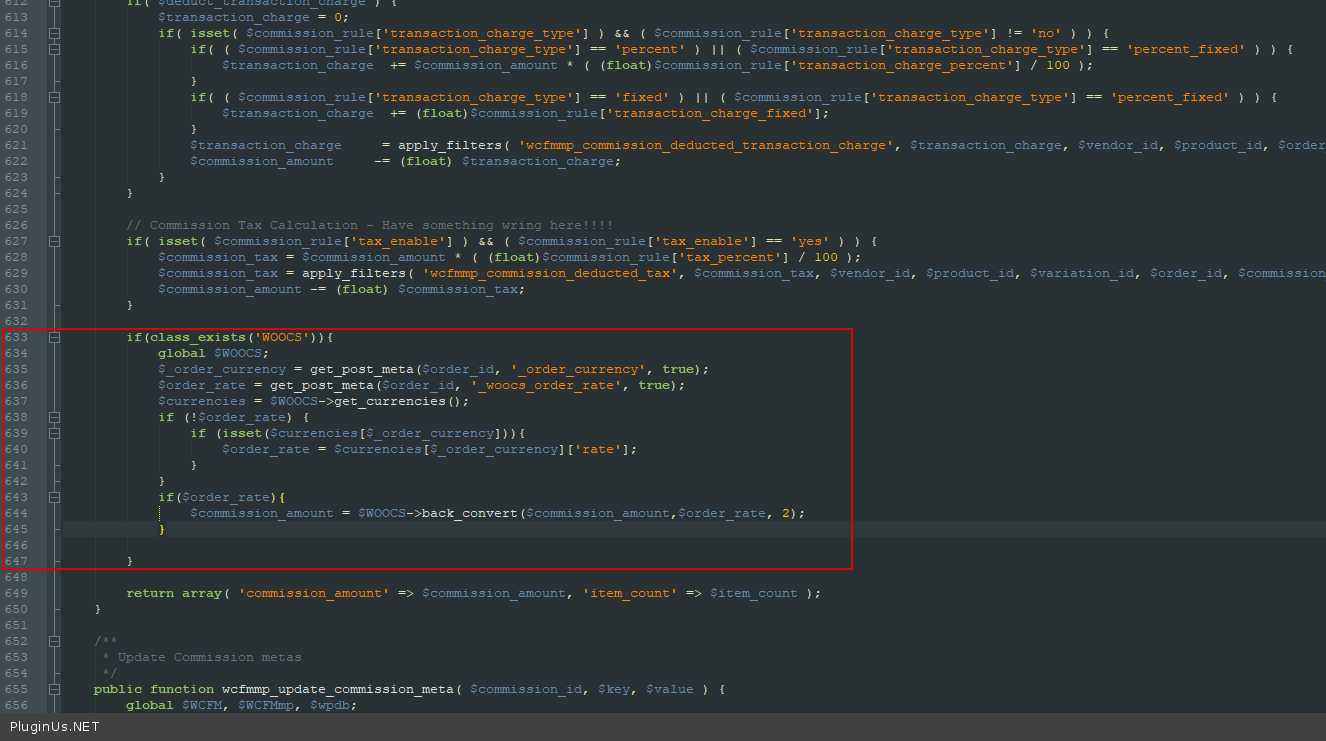
Some time ago we did an adaptation with this plugin. This code should help:
Try in file /wp-content/plugins/wc-multivendor-marketplace\core\class-wcfmmp-commission.php -add code – https://c2n.me/4b1zGzk.png
if(class_exists(‘WOOCS’)){ global $WOOCS; $_order_currency = get_post_meta($order_id, ‘_order_currency’, true); $order_rate = get_post_meta($order_id, ‘_woocs_order_rate’, true); $currencies = $WOOCS->get_currencies(); if (!$order_rate) { if (isset($currencies[$_order_currency])){ $order_rate = $currencies$_order_currency; } } if($order_rate){ $commission_amount = $WOOCS->back_convert($commission_amount,$order_rate, 2); }
}
hello. i have tried the plugin, but it doesn’t change the coins. you set everything as in the videos, and the second coin does not appear. only the default currency remains
Hello
Please drop me exact link to the issue
We have purchased this plugin but we have issue with some currency change it showing with comma and decimal with different currecny so can you please check is that issue is through any plugin confict or may be this is plugin bug (http://prntscr.com/1uqfwu9)
Site URL: http://joellep1.sg-host.com/?currency=DZD
Waitting for your postitive responce.
Thanks
Hello
Please write me here – https://pluginus.net/support/forum/woocs-woocommerce-currency-switcher-multi-currency-and-multi-pay-for-woocommerce/
Paste your license key here – https://share.stackovergo.com/image/i20210618130558.png -> https://share.stackovergo.com/image/i20210618130614.png and wp-admin access – https://share.stackovergo.com/image/i20210618130637.png
Can you describe the problem in more detail? it showing with comma and decimal with different currecny – it depends on the settings – https://share.stackovergo.com/image/i20211004163907.png
Please write me here – https://pluginus.net/support/forum/woocs-woocommerce-currency-switcher-multi-currency-and-multi-pay-for-woocommerce/
Please let us know on above link which username or password we need for login. Becuase we have checked and its not working with Envato details. or we need to register with this. please let us know.(http://prntscr.com/1uuwrfc)
Yes we have checked with plugin setting and not showing seprator like you share screenshot.(http://prntscr.com/1uuwxtg)
Hello
You should register on the support forum
Yes we have checked with plugin setting and not showing seprator like you share screenshot – Please update the plugin to latest version – https://currency-switcher.com/how-to-make-auto-update-for-wordpress-plugins-and-themes-bought-on-envato
Please support Arabic language to add My site is in Arabic and when I change the currency the site gets out of control
Hello
Please drop me exact link to the issue
This plugin should work well in any language
Your plugin caused me two serious problems with the site:
1. An active PHP session was detected: The PHP session was created by calling the session_start () function. This interferes with REST API and loopback requests. The session should be terminated with session_write_close () before any HTTP request.
2. REST API encountered an error: REST API is one of the ways WordPress and other applications communicate with the server. One example is the (block) article editor, which relies on the REST API to display and store your posts and pages.
The REST API request failed due to an error. Error: cURL error 28: Operation timed out after 10001 milliseconds with 0 bytes received (http_request_failed)
how do i solve this problem.
well thank you
Alica
Hello Alica
Please check this option – https://share.stackovergo.com/image/i20211001143641.png
it is ok. well thank you for your help
welcome;)
Hello, this is a nice plugin! I am wondering if the switcher works with listing prices or any items in WordPress other than WooCommerce.
Hello
this plugin is designed for woocommerce.
plugin can convert Custom prices only with shortcode – https://currency-switcher.com/shortcode/woocs_show_custom_price
Hi, im having a problem lately, when page is cached it shows wrong currency on some products, its very weird. My main currency is Euro, im based in EU but it shows me some prices in pounds. I tried some settings but wasnt able to fix this issue and i think it will scare off customers. Can i have some help please?
Site url: https://cheapestgamestore.com/
hello
Please write me here – https://pluginus.net/support/forum/woocs-woocommerce-currency-switcher-multi-currency-and-multi-pay-for-woocommerce/
Paste your license key here – https://share.stackovergo.com/image/i20210618130558.png -> https://share.stackovergo.com/image/i20210618130614.png and wp-admin access – https://share.stackovergo.com/image/i20210618130637.png
I will check it
Hi, thank you for a great plugin, it works very well, however is there a way to get the flag images into the mobile dropdown menu? Many Thanks.
Ah… the flags are appearing on mobile on some pages but not others. The Flags are in the drop down menu on some shop pages but not the home page, do you have an idea why this would be happening?
Hello
Please drop me exact link to the issue
I will check it
Hi, this only happens on the wSelect dropdown menu style in mobile view (which is the best looking menu imo).. the desktop view displays perfect, the CSS just doesnt load in on a mobile.
All the other styles of dropdown styles load in fine.
I’m using this shortcode: [woocs show_flags=1 width=’200px’ flag_position=’left’ txt_type=’desc’]
The link is here: https://www.eyeconicmakeup.com/
I’ve even tried copying all the wSelect CSS and pasting it into my theme’s Custom CSS code section, I still can’t get the styling to appear on mobile.
Thank you for checking, Chris
Forget it I’ve used the ddslick dropdown instead. Thanks for a great plugin.
Hello
Ok! Great!
Hello, presale questions. Take into account that what we need is: - prices in dollars in our DB; - prices in euros on the whole frontend; 1) is it possibile to force one currency in frontend (the user cant’ change currency) to show prices in euros for everyone even if we have them in dollars in our backoffice? 2) If the user see prices in euros, when checking out in paypal will he keep seeing the transaction in euros? 3) Is it possible to see on the order list of woocommerce the prices in euros if the user completed the transaction in euros? Thanks
Hello
1) Add in functions.php this code:
add_filter(‘wp_head’,function(){ if(class_exists(‘WOOCS’)){ global $WOOCS; $WOOCS->set_currency(‘EUR’); } });
2/3) Yes
Try a free version – https://wordpress.org/plugins/woocommerce-currency-switcher/
Ok, I tried the free version and I can confirm that it works as expected. Is there any way to read a log of the Rate Auto Updates to verify is this feature it’s working?
Hello
Unfortunately no. But you can receive reports by email – https://share.stackovergo.com/image/i20210921133035.png
Hello, we’re not able to auto-update the rates. We set auto update to “twice daily”, but our rates are always the same. If we manually click on “Update alla rates” button, it works. Do you have any clue on how to make the auto update work? Please take a look at this screenshot:
https://imageshack.com/i/pmBNIK1GpThanks
Hello
Possibly third party script conflicts with WP cron
did you receive email – https://share.stackovergo.com/image/i20210921133035.png
Hi, We are using your plugin and using GEO location option. Currency types are Sri Lanka Rupee and USD. The issue is, when customer visited the website from Sri lanka the prices converted to USD sometimes. How can I fix it? Please assist us to fix it.
Many thanks!
Hello
Please read tris – https://currency-switcher.com/using-geolocation-causes-problems-doesnt-seem-to-work-for-me
Hi, we have followed this guide and configured settings. but some time it’s not working properly. When I visit the website from USA showing another country currency.
Hello
Did you do the tests as described in the article?
Please write me here – https://pluginus.net/support/forum/woocs-woocommerce-currency-switcher-multi-currency-and-multi-pay-for-woocommerce/
Paste your license key here – https://share.stackovergo.com/image/i20210618130558.png -> https://share.stackovergo.com/image/i20210618130614.png and wp-admin access – https://share.stackovergo.com/image/i20210618130637.png
Hi! Is it possible to get Gold prices?
Hello
It depends on the aggregator
At the moment, the plugin does not have such an aggregator.
but you can create a custom aggregator – https://currency-switcher.com/how-to-add-its-own-custom-currency-aggregator
Hi, may i know can i set the currency for checkout? for example my website got usd to euro, the main currency is usd, but when euro customer come to checkout they will choose to euro if like that during the checkout after the place the order redirect to payment gateway page it will direct display euro price instead of usd price so customer can pay directly using euro dollar
Hello
Yes/ please check this option – https://c2n.me/4djBHf7.png

This item was featured on CodeCanyon

Power Elite Author
Contact the Envato Market Help Team