8473 comments found.

Recent posts not appearing correctly on mobile. I’ve had to set them to display:none on mobile: https://smart-web-tech.com/sega-mega-drive-arduino/
Please can you tell me how to show the recent posts stacked as columns?
Does this help? https://justifiedgrid.com/support/faq/one-image-per-row-one-column-possible/
It should make no difference that you are showing recent posts vs any other gallery mode. There is some weird scaling going on at mobile sizes, but I’m not sure how your theme is interacting with the gallery.
Hello again. I’m having more issues with the plugin and mostly in PARSE errors on my sites using this plugin.
The most recent crash was while visiting https://outdoorphotography.co.nz/blog/
And it also happens at https://forever1995.com
There are also intermittent slowness when logged in as admin and editing galleries. Sometimes the images just fail to load in the media browser.
I’ve spoken to host and this is their response.
Hi Paul,
The account “outdoorphotography.co.nz” has been hitting the LVE limits within the last 30 minutes which could have probably happened around the time you saw the error. It was hitting the CPU limit but all accounts are configured with maximum limit for this semi-dedicated hosting already. Were you editing or making any changes in the website?
Logs from the time of the issue:
2021-09-10 01:38:15.978523 INFO T0 Abort request processing by PID:6341, kill: 1, begin time: 1, sent time: 1, req processed: 2 2021-09-10 01:38:15.979419 INFO T0 Abort request processing by PID:6348, kill: 1, begin time: 1, sent time: 1, req processed: 2 2021-09-10 01:38:15.979603 INFO T0 Abort request processing by PID:6345, kill: 1, begin time: 0, sent time: 0, req processed: 3 2021-09-10 01:38:15.979687 INFO T0 Abort request processing by PID:6347, kill: 1, begin time: 0, sent time: 0, req processed: 2 2021-09-10 01:38:15.981056 INFO T0 Abort request processing by PID:6349, kill: 1, begin time: 1, sent time: 1, req processed: 2 2021-09-10 01:38:15.992361 INFO T0 Abort request processing by PID:6342, kill: 1, begin time: 0, sent time: 0, req processed: 3 2021-09-10 01:38:15.993362 INFO T0 Abort request processing by PID:6346, kill: 1, begin time: 1, sent time: 1, req processed: 3 2021-09-10 01:38:15.994648 INFO T0 Abort request processing by PID:6344, kill: 1, begin time: 0, sent time: 0, req processed: 4 2021-09-10 01:38:15.995300 INFO T0 Abort request processing by PID:6340, kill: 1, begin time: 1, sent time: 1, req processed: 2 2021-09-10 01:38:15.995495 INFO T0 Abort request processing by PID:6343, kill: 1, begin time: 1, sent time: 1, req processed: 2
$ date Fri Sep 10 01:56:03 CDT 2021
The plugin seems to be causing issues with resources. Clearly this is a major issue as my sites all generate my living as a photographer. Sorry but these issues are not acceptable. What is your advice? I see others are starting to report the same or similar problems.
Paul
I’ve heard about the images failing to load in the media dialog from a few other customers but so far I have been unable to blame it on JIG. It just uses the standard WP dialog, nothing custom about that. It seems that some server can’t take the load of so many thumbnails at once (either admin or frontend). I use it in production on a site with thousands of images in the media library and manage galleries with up to 500 pics each, never had any problems with it (and it relies on JIG, RML). The log unfortunately doesn’t show anything usable.
For frontend, try disabling timthumb and just use a WP-generated thumbnail, to see if your server needs less resources in that case.
I’ve had multiple PARSE errors since and upped my CPU resources on the site. One particular issue is PARSE errors when I connect to my site on a mobile device. What can be done to minimise server side resources for mobile please. I know you state its not a global issue but my sites have a very highly resourced with amazing customer service and every issue we see is related to this plugin.
Have you tried disabling TimThumb? On mobile devices, it may generate completely new thumbnails that don’t exist yet since they respond to the visitor’s phone’s pixel density which is not just 2 anymore, there are various values between 1 and up to around 4. So if a new phone comes out with even greater density and it’s used to visit your site, it might generate a new set of thumbs just for that. This won’t explain the media browser (not sure what’s up with that, JIG doesn’t alter it), but disabling timthumb would help the resources against mobile.
Disabling Timthumb causes the site to basically ground to a halt. The images are so slow to load its as bad as the page not loading at all. I’ve noticed the issue is more of an issue on the pages that are blogs with multiple JIG’s to load.
For example https://forever1995.com/blog/
For example https://outdoorphotography.co.nz/blog/
Try using Jetpack plugin with its image enhancement module (Photon). Otherwise if you disable TimThumb you need to choose an appropriately small, already existing WP-generated thumbnail size (adjacent setting), then it should be faster (but less beautiful on mobile) than TimThumb.
Hello,
How can i make the pictures here bigger? https://vvwernhout.nl/fotos/i can not find it in the settings…
Use the row height and deviation settings on the first tab. Currently there is no way to style the album view differently from the gallery view, they are controlled by the same shortcode, how did you do that?
Hidden Limit has stopped working on my in progress site. It’s not JIG directly because it works on a fresh install. I did something, although I’ve removed all the CSS I added and deactivated all plugins, no luck. It’s weird because it also does NOT work in the plugin options/setup page when Preview is clicked.
Any idea of what would kill the hidden limit feature? I can still “limit” the images, but nothing more loads. Thanks!
Load more or Max rows could interfere with it. Try choosing a preset, then enabling the hidden limit on top of that, since the preset choice acts as a soft reset. Also, a limit value that is higher than the hidden limit could render it useless. I believe some settings got mixed in with your intention to use hidden limit.
Yes, it was the Load More feature. When turned OFF I get the Limit/Hidden feature back. I can see the confusion, Load More is set to 20 initial but Limit is set to 6. Maybe that’s why in the plugin’s Preview it was not loading/showing my whole gallery of 39. But in the gallery page all the thumbs were showing. I guess for now it’s one or the other, OK with me. Thanks for the fast reply!
I’ve always known (and have not had issue) with the amount of time it used to take to load my site using JIG. More recently, though, it feels like it takes much longer. https://photos.albj.net/ All the main page does is pull a list of my 25-ish Collection thumbnails. Loading a page of the albums in one collection or the images in one album has very acceptable speed, just not the home page with the collections. Any advice?
They use different API endpoints, but as long as Flickr cache in JIG is used, they should be equal. What is your cache time setting at? Also, you might want to use a caching plugin on top of it, as putting together a list of covers from a collection can be an expensive operation behind the scenes. Flickr used to generate a small but usable grid/mosaic for all collections, they switched that to a gray grid. Now JIG has to find the first image from a set. The full story of that: https://justifiedgrid.com/support/faq/where-are-my-flickr-collection-mosaic-thumbnails/ Afaik this resulted in more API hits.
webP and timthumb problems Hi Firsh,
WP offers now native webP handling. So I transformed (reimported) the pictures displayed by JIG from PNG to webP. The images are saved in the same upload_dir as the originals, same name, different extension. To do so, I call wp_insert_attachment in update mode.
Unfortunately, JIG stopped displaying images. If I disable timthumb, they show up again. I was wondering if regenerating the timthumbs would solve the issue. So I went to the cache folder and moved the timthumb.txt files into another dir to see if they would be regenerated. I have left the empty index.html file there. I see now a .touch file and one .txt file, but nothing else.
This is the link where the anomaly happens https://dev.syrian-heritage.de/gallery/Here is what it looks like with timthumb off https://pasteboard.co/KizxbSs.png Here it is with timthumb on https://pasteboard.co/KizxRTe.png
I’ll leave the timthumb functionality on so that you can have a look…. thanks for any advice (including the correct and best way to re-import images in a JIG-friendly way)
By looking at the timthumb.php that is included in the JIG distribution (4.1.1), apparently it will not process webp (but it’s unclear to me what is the expected behavior when webp’s are fed to it. by what I see on my website, the overall result seems to be the broken images)
protected function processImageAndWriteToCache($localImage){
    $sData = getimagesize($localImage);
    $origType = $sData[2];
    $mimeType = $sData['mime'];
$this->debug(3, "Mime type of image is $mimeType");
if(! preg_match('/^image\/(?:gif|jpg|jpeg|png)$/i', $mimeType)){
return $this->error("The image being resized is not a valid gif, jpg or png.");
}If you know what you are doing you don’t need TimThumb, so keep it disabled. The best is always to serve up “handcrafted” images. Not sure how WP handles webp or if it offers a fallback, but if you disable TT, JIG will just use what WP has as thumbnail for an image. You should make sure to use a row height + deviation value in the grids that don’t exceed the height of the thumbnails you have, to avoid upscaling.
Hi Firsh, thanks, understood. To understand better how to improve the thumbnails in case there is the need, what format does timthumb output for JIG and do you pass anything dynamic to it?
It outputs at a compressed JPG, but I plan to change how the thumbnail system works. Not sure if I can ever get rid of TT completely, but I want to support cloud-based image resizer/CDN services. In my personal use (not the demo site) I let WP create the thumbs and serve them from S3+CloudFront, no TT at all. But this way the Retina functionality is lost. So I’ll likely add a setting to define another WP-based thumbnail for the 2x resolution. Less optimal than cloud resizers – those are the real alternative but I understand I can’t make those default since they are paid options.
With a filter you can influence WordPress’ JPG compression too. It’s a setting in JIG’s TimThumb. Not sure about webp, haven’t investigated that yet.
Do you think we could drop IE11 and just use webp without fallback to legacy formats? I’m definitely interested in supporting that natively so thanks for the changed code, I’ll play with it. Seems too easy to achive this with those few lines.
Fix this:
} else {
} else if(
There is also something related to formats on 1182: protected function openImage
Thanks for the bug heads up. Yes I now can see the logs and I see that I need to fix something else in TT too, maybe the bit you pointed out. Well, IE in general has a 0,71% market share as of last statistics I have read, so yes. It’s been sunsetted by MS too. The only places where IE is still going strong are where a different browser cannot be downloaded, thinking places with really old computers and / or no admin privileges. I worked at a school where some PCs still ran Win XP, but they did have firefox installed.
I would say it is time to bring webP on and if you really want to cover all bases, leave room a hook or an option for retrocompatibility.
On a different matter, I am having trouble trying to debug JIG on my website. The default-language gallery works now (TT off): https://dev.syrian-heritage.org/gallery/ but the other languages do not show any picture anymore. https://dev.syrian-heritage.org/de/bilder-2/ I am sure that something went wrong with the import – together with the multi language quirks – but I do not see where. Is there a way to have a better insight of what JIG is trying to load, maybe both in php and in the browser JS … some way to write what image (ID, filepath) is trying to load so that I can figure out where the issue is? WP(ML) is rather unhelpful, it just says “WPML makes an attachment object per each language, but it reuses the same file”. I’m looking in the object metadata right now …Ok, I’ll bring webp then  Regarding WPML here is my guide: https://justifiedgrid.com/support/faq/how-to-translate-galleries-with-wpml-and-justified-image-grid/
You can check the IDs if you view source. JIG uses the media library IDs for lightbox deeplinking so they are in the source, search for the string jig-contentID- and you’ll see.
with TT off, it appears it is using the “medium” resolution for the webp, 1024×667 instead of a smaller size (thumbnail is 150×150, too small, but there are other intermediate sizes), so pics do show up but it takes quite a long time to show.
oh, one thing re webp, it has only become native in wp since last 5.8 release! You can still use it by adding a plugin like webp converter for media which works splendidly but does not touch the original pictures which are still in the media library. So, in this case, this might be the main point to consider when making webp the default choice for JIG
It might benefit from some polishing, but atm it does the job. In general, timthumb has aa big problem – it is synchronous. This is no longer a good choice, especially with big big galleries. some cron or deferred / batch processing & stale cache handling is needed especially when a big chunk of cache is invalidated.
I have one last bug to hunt and I think I need your help as now timthumb is working but JIG complains about one specific image with “all images failed to load” but the image does exist and the timthumb called by jig does return a 200, and if you open up the timthumb.php which is called, the image is there. but I need to share a password to see a protected page. are you up for a check?
Yes and thank you! Let’s continue via email.
Did I ever thank you?
Hi Firsh,
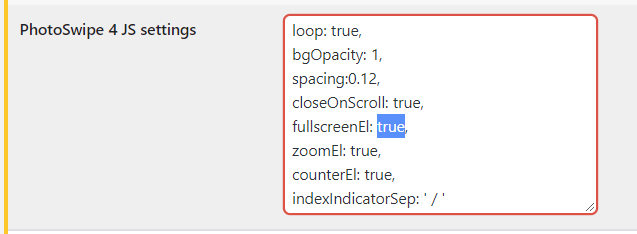
1. How do we disable FULLSCREEN option for Photoswipe Lightbox? Previously, we could add shortcodes. But, new version seems to be working differently.
2. is there any way we can SPOTLIGHT/BIG 1st image and then the remaining images will be like thumbnails/smaller.
Thank You, Sha
Hi,
1. There was no change regarding that. https://i.justifiedgrid.com/2oupn8fo.png Set this to false in JIG plugin settings, Lightboxes tab.
2. Nope, unless you “glue” 2 JIGs together, one set up to show 1 image at max width, and show the rest in the second JIG at small size.
Hi, I have pre-sale question.
I really like your plugin but my concern is how efficiently it’s coded in regards to storing data in a database? I’m currently using NexGen Gallery Pro but it started to show signs of slow behavior. So when there are many images to handle (around 45,000) how good is your plugin? Do you have all the required indexes added?
Thank you.
If you use NextGEN as a source in JIG, it uses its own functions to access the tables of NextGEN directly, which are faster than NextGEN’s (less queries). JIG itself doesn’t store anything in the database about the pictures (besides caching measured image dimensions of external sources like RSS), as it isn’t a source in itself.
Thank you for explaining. So does it mean that NextGen Gallery should remain installed for JIG to use it’s albums/galleries as source, or it only needs to be done once? If NextGen remains installed it defeats the purpose of me trying to switch from it to an alternative solution.
It’s just an option, it’s created this way so you can modernize its looks. It will still be responsible for managing album/galleries. But if it’s fast on the backend but slow on the frontend, JIG can help. For a complete alternative solution try Real Media Library. JIG needs a source, but it doesn’t have to be NextGEN.
Bonjour, Justified Image Grid est-il compatible avec DIVI ? Merci
Yes, but its dedicated compatibility (divi block) is under construction.
My photo’s are taking forever to download when you try and Edit gallery – what can be the problem ?
If you create a similarly sized standard wordpress gallery without JIG in a post/page, does the same thing happen? JIG just uses the media dialog as normal. The only thing I could think of is missing standard wordpress-generated 300 pixel thumbnails so it might load larger versions.
Hi – Noticing ithemes plugin is getting in the way of the images. All options uncheck in System Tweaks
Hi, could you please describe how the ithemes is getting in the way of the images or how it interacts with JIG?
Having an issue when trying to edit a Wordpress media by ID gallery. Many calls to admin-ajax.php, a bunch fail with 503, CPU and Memory usage spikes to 100%. On a decent server, too. Works fine on small galleries (15-20 or so images), front end is perfect. So, unable to make galleries with a decent amount of images. Any help would be greatly appreciated. Thank you
Actually managed to get the same error on the local server today. Albeit once out of many tries.
I’ll need to take a look at your theme and its wpbakery builder customization as it’s not working as intended. Sent you a mail with a google drive folder link.
does your plugin support “webp” images format, like the new wordpress? thanks
It does not create thumbnails in that format yet but can work with it yes. You can disable thumbnail creation so the WordPress-generated or your custom format images get used everywhere.
Now JIG supports WebP! Check the changelog: https://justifiedgrid.com/support/changelog-update-history/#v4_3
how to handle gallery when using ads like popunder to avoid getting full image link but not JIG gallery lightbox…
regards
sorry?
Sorry I don’t understand your question.
On the WP Dashboard: Justified Image Grid: Facebook authorization for * has EXPIRED. You have to re-authorize!
FB-Settings of JIG .. LOG: [16:11:32] The authentication of current user: * is valid. You can choose from 64 albums. It will expire in expired which is on 15.6.2021 (22:29:20).
Just in case re-add yourself, it’s a much faster process this time than initially. The validity hold for 2 months but it’s subject to change. I’ll aim to make it so that you can still work with expired auth if you prefer.
Okay. Thanks for the answer. Any news about the “EXIF-Wish” ??
No problem. No news on the exif front.
Hi! I would like to know if I can avoid loading all my image grid images at full size. I have 2000px long-edge images and it takes a long time to load the grid. Is it possible to have reduced-detail images in the grid. Many thanks
Hi, it doesn’t load those large versions as thumbnails by default. If you disabled TimThumb you can still choose a WordPress-generated thumbnail size. I could take a look at your usage to check what’s it doing.
prettyPhoto facebook sharing icon no longer works – just shows a sad face icon – even on your own site https://justifiedgrid.com/lightboxes/prettyphoto/#!
Seems to work fine, are you using any privacy extensions or adblocker? Are you logged in to FB on that browser?
No I’m not logged in to FB on this browser (Chrome) and neither using any privacy extensions. But I get the sad face icon as here – https://bit.ly/2SYM6E0
Hi, I tried and see what you mean. When logged out, there are no like buttons. Not just on JIG, anywhere else, on random blogs. Maybe not sad face, but they seem to be missing (just empty space). Do you experience the same thing on other sites? Unless you are logged in, there is no like button.
Yes, I’m getting pretty much what you just summarised. Do you have any idea why this might be happening?
I can only guess, maybe due to privacy laws, Facebook is not supposed to track you (with the like buttons) unles you gave consent. You do that by creating the account, and can perform the tracking while you are logged in.
On a technical side, I was checking blogs that use the iframe way of embedding, if you find a site where the button works even while logged out, I can investigate, maybe they use the non-iframe way. If that is the case I could change it in JIG.
Another thing I could think of, is that FB prefers that you supply an APP ID when generating the like button. Historically it has worked without one, but for various purposes they want to you have an app. To have a verified app is an ordeal and I doubt they would require people to have apps for such a simple thing as a like button.
Generally I see a move towards not using their official button but just a “share button image” (without a counter). That may show no social proof, but it is faster in every way, causes no 3rd party tracking of your visitors, and less prone to errors from a 3rd party (FB itself), when evaluating a site.
It only works if you’re currently signed in to FB. Seems crazy.
This is what I see at the top of the JIG “Lightboxes” settings panel – https://bit.ly/3xy2JVQ
Yes I have a FB like button there, but its embedding method is nothing fancy, pretty standard. Not sure why the sad face vs emptiness in other places, there is nothing Firsh-specific in the way I add these buttons as far as I know.
How do I turn off automatic update?
It doesn’t update automatically, just checks. To update you need to click manually in the dashboard (unless some 3rd party solution does it for you). The checking cannot be disabled.
I was trying this shortcode
[justified_image_grid image_taxonomy=shap_time image_tax_term=year_1999_en max_rows=1 height_deviation=0]
on this page
https://dev.syrian-heritage.org/afamiya-columns-in-the-ruins/trying to achieve a “banner” visualization. however, it seems that the max_rows and/or height_deviation have no effect. Any thoughts? Version of plugin is current
It’s probably the load more feature coming from the global settings that is overriding your max rows. That’s incompatible with rowcount-based limiting.
Hi, that was it. adding load_more=off made it appear like a “strip”. thanks.