8473 comments found.
Please reset my license.
Your license is now released from the previously bound host. https://justifiedgrid.com/support/faq/your-license-has-been-reset-what-does-it-mean/
Hello! I love your plugin and have purchased a few copies it for clients!
I have setup the Facebook option, added the page I manage but it does not apply. Added myself as the manager for pages and profiles which is successful! However, the facebook page I manage is not displaying.
Message Log states: The page may be age or country restricted or contain alcohol related content. First, add a user who can see that content then try again.
So I selected the Shortcode editor and Select my personal profile manager (because that is the only option) and it pulls up all of my albums but not the page I manage.
I removed myself as Authorization manager for pages and saved. Then added myself again and tried the Page full facebook url without the trailing slash but still no page displaying.
We fixed it in the email thread.

Ok, I’m having trouble with Facebook again. Trying to re-authorize myself and I’m getting this message – “Invalid Scopes: user_photos, user_posts, user_videos.” I’m also getting this in my message log – “Access token acquisition wasn’t successful. Please authorize yourself on Facebook then click ‘Manually load Facebook data’. If you already closed the Facebook dialog, click ‘Add current Facebook user’ again.” Please tell me how to re-authorize myself.
How can we add filtering for external images displayed via an RSS feed on our website?
Unfortunately that’s not possible since they don’t carry a concept of tags/categories or other terms. If for some reason your feed does, let us know how.
I have this error on my wordpress for the JIG plugin update”Automatic update error! This purchase code is in use on: [my website of 5-12 years ago which I stopped paying for this summer]! You need one regular license for each production site, except staging sites. Contact JIG support to reset your license (only the username is needed).” This is for the website that replaced my old one (so there was no overlap in licensing and I never had this problem before). How do I go about this?
What is the site URL of that site or the user you purchased it with? This account is new and shows no purchases. Alternatively, share the purchase code you wish to reset via the contact form on our profile.
my old url was annewrightphotography.com ; it was replaced by my current one which is annelaureautin.com
Your license is now released from the previously bound host. https://justifiedgrid.com/support/faq/your-license-has-been-reset-what-does-it-mean/
When using JIG with Nextgen Gallery, is it possible to show the gallery description text above the gallery images?
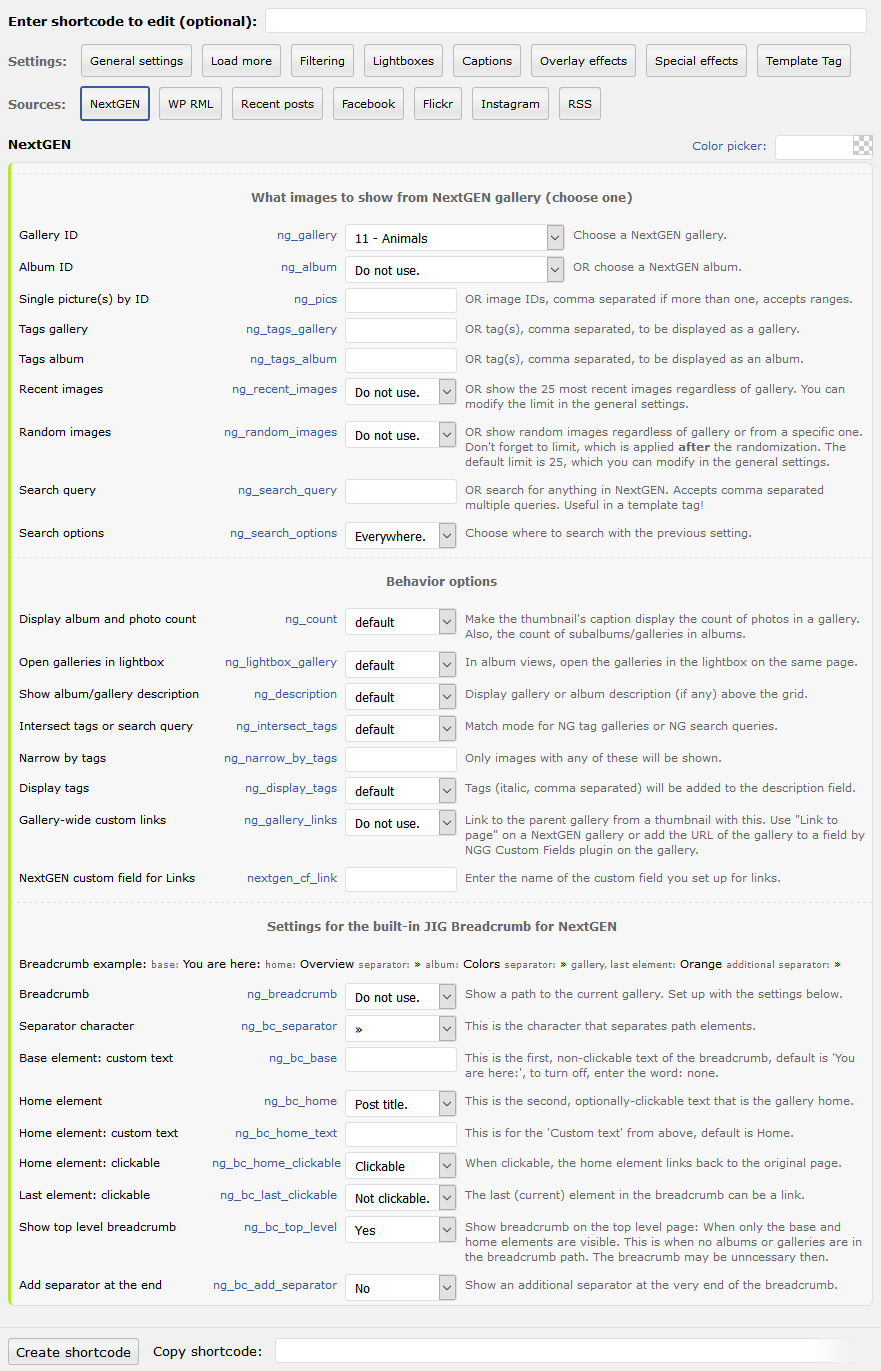
Yes 3rd setting in nextgen/behavior: https://justifiedgrid.com/wp-content/uploads/NextGEN-1.png
Hi, I have a lot of text in the ligthbox caption coming from the WP image description. So the lightbox grows vertically. See screenshot here: https://imgur.com/a/97uHHm5 But I want it fixed (responsive) width, to get all the text in the box. Is that possible? Thanks!
UX-wise, the best lightbox would be something that puts the text on the side, currently no such lightbox is known/available to JIG, but if you find one we can help connect to it. A custom one is under consideration, but no ETA. PrettyPhoto (what you have now) is not the best for lots of text. Try the others (PhotoSwipe or Magnific) to see how they handle your amount of text. If this is WordPress-based content, you can try ” Carousel without Jetpack” plugin, that puts the text under the image in a way that doesn’t decreate the image size, but makes you scroll.
Thanks, that has pointed me in the right direction. I am using magnific now and have aligned the lightbox to the top with “alignTop: true”.
Nice!
Hi. Im trying to add a border radius to the thumbnails. But when i add it i see a part of the white background behind the thumbnails. Its changed to black in the settings but this seems to be causing it to stay white: #jig1 .jig-imageContainer img { max-width: none !important; background-color: white !important; }
How can i change this to the color i want?
Thanks!
Try this:
.jig-overflow { border-radius: 10px; }
Love the look of this plugin, exactly what I was looking for – can it also have a gallery menu ?
Thanks  What is a gallery menu?
Its a menu at the top of the images – for example ” All, Family, holidays, hobbies” – and when you click Family- you see all the family photos – etc
Ah, Filtering: https://justifiedgrid.com/features/filtering/
Suggestion:
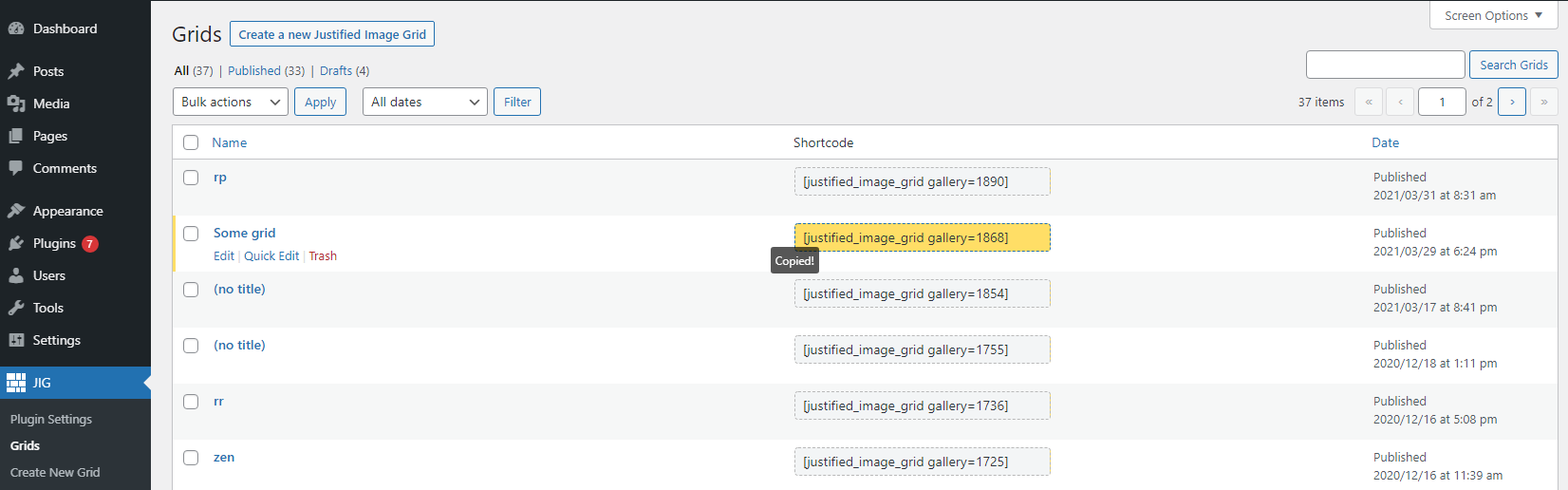
To get short-code of any particular JIG grid, we have to open that grid. Instead grid short-code should be on Grid List itself to get and copy quickly.
Valid point, thank you for your feedback, added to the todo. The Grids feature and its list is a new concept to the plugin, only been added recently. You can expect some improvements to it down the road.
Thank you for considering this suggestion. Grid feature recently added is an awesome feature. JIG itself is an amazing plugin loaded with tons of useful features. Thank you.
Sneak peek: https://i.justifiedgrid.com/2onnfb2f.png
Hey, Thank you for this update. I am highly impressed that you worked on the suggestion quickly. Keep it up team. JIG is an amazing plugin and so your team is too.
Thank you! It’s just me now, by the way.
Wow. That’s even more impressive indeed. You are awesome. Keep it up.
Just want to let you know that I’ve finally gotten around to using that “Grids” feature you added to JIG awhile back and I love it! Makes it so much easier to create and edit existing grids and galleries.
Cool! Thank you for the feedback, it means a lot. That paved the way for many interesting features (within the live preview). An idea is to modularize features so you could disable what you don’t use (for more speed and lighter interface). If someone uses the Grids way of creating JIGs, the system could advise of unused features to disable.
We cannot get the prev/next arrows or the top right icons to display using photoswipe lightbox. We’ve tried the Lightboxes tab > Link rel setting, revert it tojig[instance] according to the troubleshooting page, but nothing seems to work: https://bigfoot1.com/
We’ve narrowed the issue down with missing previous/next arrows on photoswipe lightbox. The theme itself seems to be causing this. If we revert to a default wordpress theme the arrows return as normal and display fine. We are using latest version of The7 theme which is pretty solid. Surprised it causes this issue. Is there any known fix?
Your site currently uses Magnific so we can’t see the issue live. Normally the lightbox scripts in the theme are bundled together with the rest of their js/css so it’s not so easy to remove or disable them. Yes, the best bet is to use a diferent lightbox which is not already included in the theme. Or let the theme’s version take precedence and don’t set JIG up with any lightbox, that’s always an option.
I just discovered that the Facebook album galleries are only working on desktop, not mobile or tablet, for ALL of my pages (over on RetreaTours.com). Not sure if anyone else has found this.
nevermind. found the problem!
Sent you a response via email.
wondering if in fact you can automatically load VIMEO Showcase’s videos in a grid format…i get an error using the below shortcode: [justified_image_grid rss_url=https://vimeo.com/showcase/xxxxxxx]
We don’t want to have to keep adding our weekly videos into the site.
Error is: “The requested RSS feed cannot be loaded at this time. JIG loaded your feed URL trying to find out more about the problem. URL #1 (https://vimeo.com/showcase/xxxxxxx) seemed OK.”
It doesn’t seem possible, they don’t have RSS version of it. https://vimeo.com/showcase/mill_experientials_bts/rss
We’ll explore the possibiltiy of creating a separate Vimeo source with its API instead of relying on RSS.
Thank you for the feedback…I suspected. They’ve killed channels and playlist…all wrapped into ‘showcase’. Our videos are also grouped into folders, could we rss those folders? Thank you again for your plugin, I’ve used it in the past for my clients music video galleries and worked so well!
That’s unfortunate. Their RSS capability isn’t that great, if you look closely even how the file begins is invalid (blankspace): https://vimeo.com/simonchristen/videos/rss We reported this but got sent off. The only way a good Vimeo source for JIG is able to sustain itself is through the API. We can let you know if/when that ability is about to arrive, either built-in or as an addon (you are welcome to beta test). Their policy as far as we know is to not charge for the App we are creating. So it could end up as a free addon or something like that. No promises or ETA on this, but after seeing the RSS struggle, it’s definitely something we are interested in to make life easier for everyone.
By API we mean a level of integration that’s presently available for Flickr and Facebook. A more dedicated thing, without any RSS.
Thank you. Yes, I was actually surprised that an API key still wasn’t required…I figured they would have mandated that by now…like all the other social platforms. Definitely hope you guys can be compensated for your efforts! Besides, your def not overcharging by any means. Keep us posted, cheers!!
It’s not required because JIG is not using their API (yet). Instagram notoriously closed its API for plugins like this, so developers resort to scraping or using the public API that your browser uses, but it’s not supposed to be used in plugins, oh well. Also, Facebook keeps changing their API rules, making it harded every year to meaningfully and easily connect the content to WP. So even using an API is not a guarantee that it’ll be stable forever.
1. I understand the gallery shortcode from WP has to be changed in order to have your plugin work. But what if i want to change it back to the native WP code? is it easy? or would this mean a search/replace in all posts?
2. Can I have the thumbs with their actual alt tag, the alt which is set at the individual image in the media library?
You don’t need to change anything, there is automatic takeover that affects them on the fly (regular gallery shortcode and also Gutenberg), this can be disabled any time and it won’t actually change your existing shortcodes. You can continue creating galleries the traditional way.
Yes, you can choose any of the fields in the media library in any of the 4 slots (link title, img alt, +2 captions visible on the thumbnails).
Edit: Nevermind, it all works great
I wonder if it is possible somehow to link the big image in the lightbox (not the thumb) to a costum url?
The lightbox content image doesn’t have any clickable area, and is often covered by other functionality layers like prev/next or zoom. You can put a clickable link in its captions, though, that accepts HTML. In some cases it’s possible to automatically place a link there: Recent Posts can open the featured image (or product image) and link back to the original post/product from under it.
Hi!
I love this plugin, it’s the best. When I created a new Grid with section “create new grid”, The result is a little reduction of the resolution of the photos. Why?
thanks!
It generates thumbnails on the fly but you shouldn’t see any upscaling. Downscaling, yes, because a gallery should not load the lightbox-size image files in place of the thumbnails (unless in some retina cases). Try disabling the thumbnail creation at the bottom of the general tab (at the use timthumb setting) to see if it makes any difference.
It’s Works!
Thanks!!
HOW CAN I REMOVE THAT MESSAGE ?
I just found the shortcode [justified_image_grid] instead of [gallery] and it is pretty funny how it works. Love it. But unfortunately there is an error message showing up “There are no photos with those IDs or the post 43758 does not have any attached images! Source selection is missing from this grid.”
[update] I have inserted the images with a default Gutenberg Block Gallery. I have not attached them explicitely,
Then the JIG shortcode won’t pick anything up, it simply needs to know what you want to show. Behind the scenes the Gutenberg gallery adds a bunch of image ids. You can replicate the same thing if you “create new grid” and use the button in the “ids” setting where you can pick the images you wish to see. If you prefer the Gutenberg way, then it only works by automatic takeover.
That message should not show up for your vistors by the way, only while you are logged in. It leaves an empty space.
It’s a great way to give users who are not IT-minded a simple way to add a gallery to a post and to use the shortcode to provide specific function to a gallery by using a specific hook (& caption & function jig_change_meta_on_the_fly) . I found a individual solution by using the same font color as for the background. Actually I am quite happy with it. Thanks for your answer
Hi there,
I am looking for a Wordpress Gallery plugin which has the following functionalities: 1) Gallery uses lazyload 2) Gallery sort images by category 3) Ability to set a link for each image (so when the users clicks on an image, they get send to a specific page) 4) Import images, categories and outbound links using a xls/csv/… file.
Could you tell me if your plugin has these functionalities?
Kind regards, Dirk
1. Yes via load more / infinite scroll
2. By sort you mean filter button above the grid? Then yes.
3. Yes, either manually or automatically via recent posts mode.
4. Nope, never seen anything like that. It probably requires a freelancer’s time to import content based on that into WP. JIG has RSS which is basically an XML, but those never have categories or other taxonomies in them.
Hi,
Please, I have a WordPress blog I want to import articles and news of “Affiliate”, is this possible through your plugin? What is required exactly? I really appreciate your patience and help Thank you
Sorry it’s not clear what you need. This is a gallery display, not sure what it has to do with news of affiliates.
Recently every post with a gallery has begun displaying the following message: Warning: A non-numeric value encountered in /home/xxx/public_html/xxx/wp-content/plugins/justified-image-grid/justified-image-grid-core.php on line 7936.
How do I fix that?
If it’s JIG v4.1 then in JIG Plugin Settings, General tab, check the values for “target row height” and “row height max deviation”. These should have a number. Row height must be a meaningful value such as 200, and if you want no deviation enter a 0 (just zero) there.
Thank you – that fixed it!