2001 comments found.

I can not add more than 3 currencies, after I removed the fourth currencies I can not add it back. Please how do I fix this.
Hello
Please write me here – https://pluginus.net/support/forum/woocs-woocommerce-currency-switcher-multi-currency-and-multi-pay-for-woocommerce/
Paste your license key here – https://c2n.me/43SC6rb.png -> https://c2n.me/42HBIt7.png and wp-admin access – https://c2n.me/42BAoj4.png I will check it
Hello, the payment method defined on our website is Turkish Lira. With GeoIP, you cannot go to the payment screen because of an “invalid currency code” error when you want to pay in Euros or dollars.
Hello
Please check currency codes – https://en.wikipedia.org/wiki/ISO_4217#Active_codes
Are you sure that your payment system supports these currencies
If no luck please write here – https://pluginus.net/support/forum/woocs-woocommerce-currency-switcher-multi-currency-and-multi-pay-for-woocommerce/
Paste your license key here – https://c2n.me/43SC6rb.png -> https://c2n.me/42HBIt7.png and wp-admin access – https://c2n.me/42BAoj4.png
Hello, It looks a great plugin when reading some of the comments here. Good job! I have a pre-buy questions. 1) Is there a way to use this plugin between USD and Turkish Lira. I mean, ın the woocommerce product panel, the price will be set as dollar and the website visitor will see it in Turkish lira. 2) The rate update won’t be applied manually but automatically like for the other 7 curriencies. which are pre-set by you. Is it possible? 3) If the answer for 2. question yes, which online source will give the rate update?
Hello
Please watch a video – https://currency-switcher.com/video-tutorials/#video_1
Try a free version – https://wordpress.org/plugins/woocommerce-currency-switcher/
1) Yes/ 2) I’m not sure if I understood you correctly. If you mean switching currencies depending on the country – yes. if you mean updating rates – yes, but it does not depend on the country
hi i recently purchase a theme wich has your plugin integrated, and after installing the theme and testing the checkout, it is giving me “Currency code invalid” this is happening after placing order. Thanks
Hello
Please check your currency codes – http://en.wikipedia.org/wiki/ISO_4217#Active_codes
Are you sure that your payment system supports your currencies?
URGENT! Your plugin is causing our product prices to become hugely increased. We’re using the WP theme called ‘Basel’ it’s here on Themeforest, and we have variable prices for our products. Can you pls tell us how to fix this fast? What is causing this? Pls reply here because it’s very urgent. We were forced to go offline for this! Pls treat as urgent. Thanks!
Hello
I answeren you here – https://pluginus.net/support/topic/urgent-your-plugin-is-causing-prices-to-shoot-up-when-using-variable-prices/
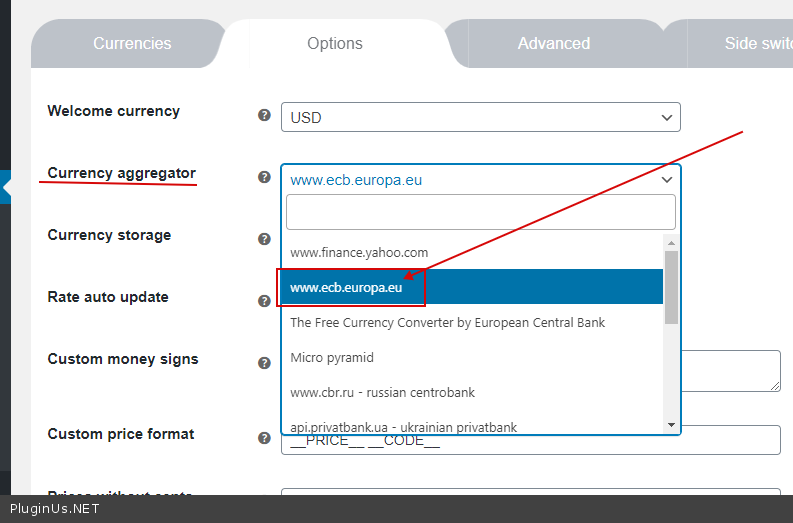
Can you please tell me if you use ECB exchange rates for USD to EUR conversion?
Hello
Yes, an option – https://c2n.me/4am4EnK.png
Try a free version – https://wordpress.org/plugins/woocommerce-currency-switcher/
Hello i have the free version, and i would like to know if the PRO version works with Learndash? before buying the pro version, thanks
Hello
Paid and free versions have the same code. If it doesn’t work with the free version it won’t work with the paid version
Please read this – https://currency-switcher.com/woocs-labs/
Hello,
I am interested in purchasing your plugin as I have a dropshipping website on wordpress using woo-commerce but I have a couple of questions to get started:
I want that the currency will change automatically based on user’s location or IP. I also want that the currency will convert automatically, I am not interested in putting the currency rates.
Can I get all this wiht your plugin?
Do let me know. Many Thanks
Hello
Yes. Please watch a video – https://currency-switcher.com/video-tutorials/#video_1
Try a free version – https://wordpress.org/plugins/woocommerce-currency-switcher/
Hi, Any suggestions on how to get multicurrency to work togheter with the WooCommerce Free Shipping Bar by villatheme?
Hello
Please read this – https://currency-switcher.com/woocs-labs/
I just purchased the plugin and added and checnged the storage to redis and now site is crashed , the plugin is not getting enabled its showing error
Hello
Please write me here – https://pluginus.net/support/forum/woocs-woocommerce-currency-switcher-multi-currency-and-multi-pay-for-woocommerce/
Paste your license key here – https://c2n.me/43SC6rb.png -> https://c2n.me/42HBIt7.png and FTP+ wp-admin access – https://c2n.me/42BAoj4.png I will fix it
Hi , I’m having issue when I was trying to The product fixed prices rules. When I set a price like(RM240) in the setting , the front-end show the price RM0. Any one facing the same issue?
Hello
Please write me here – https://pluginus.net/support/forum/woocs-woocommerce-currency-switcher-multi-currency-and-multi-pay-for-woocommerce/
Paste your license key here – https://c2n.me/43SC6rb.png -> https://c2n.me/42HBIt7.png and wp-admin access – https://c2n.me/42BAoj4.png I will check it
I am running woocomerce store with redis cache enabled, does your plugin support cache for geo location auto currency switch, or it adds a seperate query string in the url ? Also if i buy the plugin and the plugin does not work the way i want is the amount refundable ?
Hello
Please watch a video – https://currency-switcher.com/video-tutorials#video_1
You should have done a test with the free version – https://wordpress.org/plugins/woocommerce-currency-switcher/
If you have problem with GeoIP rules – https://currency-switcher.com/using-geolocation-causes-problems-doesnt-seem-to-work-for-me/
Usefully, well GUI but Not working with Dokan Multivendor Plugin > wholesaler price no changes, only the symbol changes – please solve this errors. thanks best Regard
Hello
Please read this – https://wordpress.org/plugins/woocommerce-currency-switcher/
Sory! I gave an incorrect link. Please read this – https://currency-switcher.com/woocs-labs/
Hi again
I got Error currency code. Can you help about this too please
Error: Invalid currency code
thanks
fixed
Ok! Great!
Hi,
can you help me about calculation please? I have uploaded a jpg file can you check
https://prnt.sc/w14b8hThanks
fixed
Hello
Ok! Great!
Hi, quick question – is there a WOOCS key that I can put into redis ignored group settings? When enabling redis, it causes some odd issues with the currencies – have tried sessions, transients and redis storage – no difference.
Trying to work out the entry myself, but unfortunately no such luck.
Thanks
Hello
Please write me here – https://pluginus.net/support/forum/woocs-woocommerce-currency-switcher-multi-currency-and-multi-pay-for-woocommerce/
Paste your license key here – https://c2n.me/43SC6rb.png -> https://c2n.me/42HBIt7.png and FTP+ wp-admin access – https://c2n.me/42BAoj4.png I will check it
Hello
According to your description, it looks like everything is working correctly. keep in mind that GeoIP rules only work for the first visit
Hello. Default plugin shortcode show some different currency switch (euro and us dollars). But not currency from my option page. How to fix it? Thanks
Upd. I found, there are two settings for WooComm Currency Switcher, and Currency Switcher.
So last question solved, new question: Do usage of this two plugins on one site, cause any conflicts? Or it can works well together
Hello
no! Better use only one plugin(WOOCS).
Hi, Id like to ask about woocommerce stat. Is there any way to see in the stats separate currencies? WC Analytics just ignores WOOCS (ignores currency) and count all as one. (10 EUR + 15 USD = 25 EUR) which is wrong.
Hello
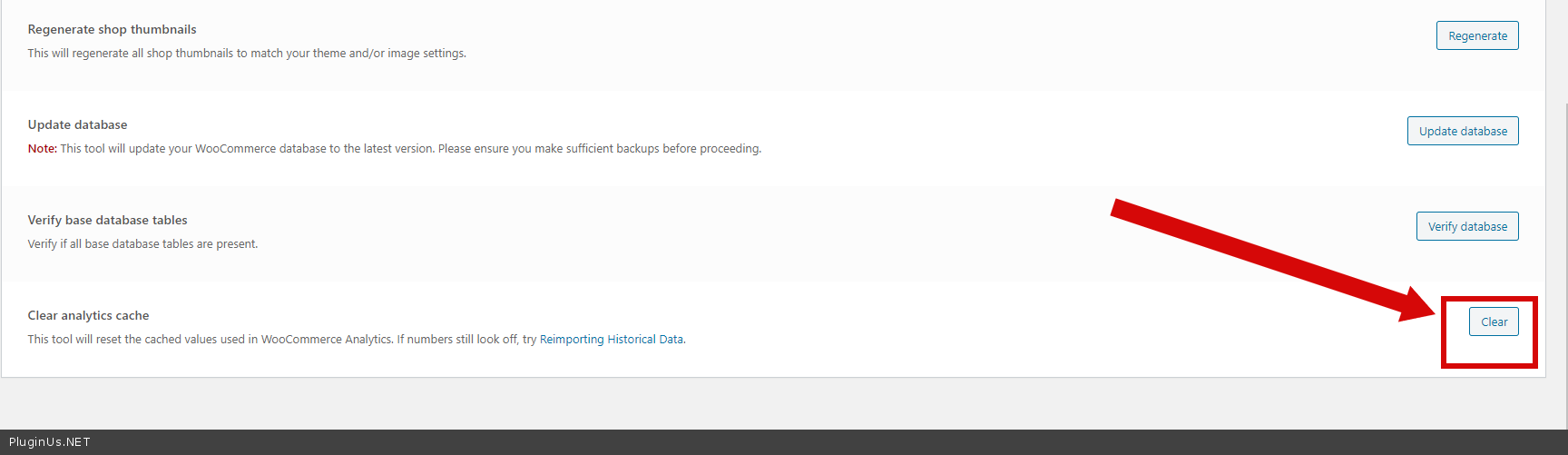
Please update plugin to latest version. Clear all cache – https://c2n.me/4a3YgG5.png
this is just a kind of waste of time and money, I purchased this plugin a month ago, from the moment I installed it on my website so many problems appeared. I contacted the support team and they told me it is a kind of conflicting with other plugins, so instead of fixing the problem they asked me to delete other plugins which are very important for me. during this month I noticed that I didn’t get orders on my website. after that I discovered that because of this messy plugin, the shipping value for my products were huge when you change to any currency form USD. so I lost a lot of customers, because they thought that we sell products with very high shipping fees. I wrote to supporting team but when I saw the same problem with someone who was asking them to solve the problem, and they told him to inactivate some other conflicted plugins I knew that they would tell me the same stupid answer. so it is all about that this plugin is great and others are conflicting. I decided to purchase another currency converter and now I am happy with no such assumed conflicts.
Hello
Drop me link to support request please

This item was featured on CodeCanyon

Power Elite Author
Contact the Envato Market Help Team