2001 comments found.

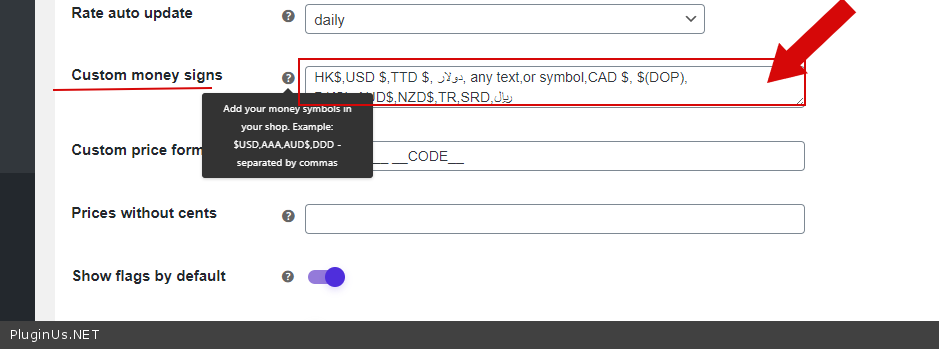
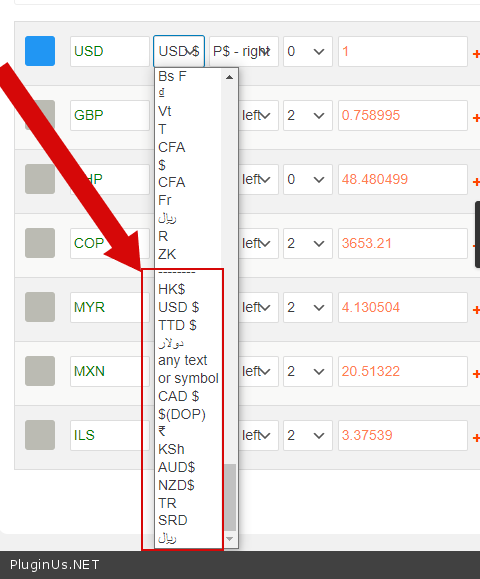
Hello Just let me know? I need change money symbol 1,000₩(KRW) -> 1,000원 Thanks
OK DONE
Hello
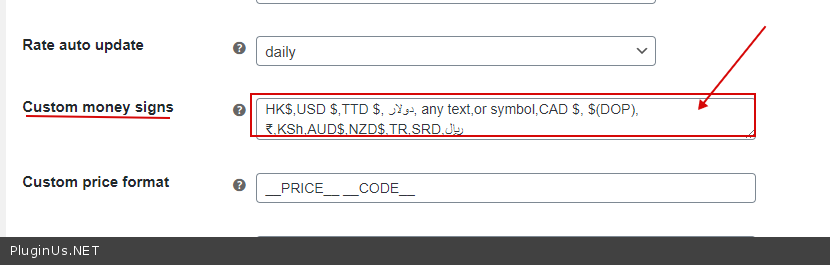
You can add any symbol – https://c2n.me/4a2VydH.png
Issue with switcher when there are anchors / bookmarks and using shortcode: [woocs show_flags=1 width=’100%’ flag_position=’right’ txt_type=’code’]
Notice here: https://www.ourfingertips.com/solutions/1-dance-school-website/#pricing – using currency switcher drop down does not work – instead goes to home page (404 error redirects to my home page). Without anchor / bookmark it does work : https://www.ourfingertips.com/solutions/1-dance-school-website/ – is there a way to re-code the shortcode drop-down selections so the links are before anchor / bookmark – or maybe drop-down selection links can ignore anchor / bookmark?
Hello
Ok! Please write me here – https://pluginus.net/support/forum/woocs-woocommerce-currency-switcher-multi-currency-and-multi-pay-for-woocommerce/
Paste your license key here – https://c2n.me/43SC6rb.png -> https://c2n.me/42HBIt7.png and FTP+wp-admin access – https://c2n.me/42BAoj4.png
I created an account and new ticket and provided hidden license key. I don’t think you will need admin or FTP to my website – in this case you will need to correct your code for everyone so anchors / bookmarks are ignored or moved to end of your coded links.
https://pluginus.net/support/topic/issue-with-switcher-when-there-are-anchors-bookmarks-and-using-shortcode/Hello
Thank you for cooperation! But your hint has nothing to do with this problem
Is it posible to receive a priority support for my ticket, as I am trying to get correct answer help for like 6 days. I will pay additionaly for some super fast resolving support, as problem is crucial to webshop works as it should. My ticket is open, but answers are just arround subject, and last explanation is waiting from this mornning. Thanks in advance.
Hello
Drop here link please to the support request
Hello
I gave you information to resolve this issue. Please read the articles I gave you.
You don’t need to create incorrect currencies. So that each country has its own price. Use it – https://currency-switcher.com/video-tutorials#video_PZugTH80-Eo In base currency, you can assign prices for each country.
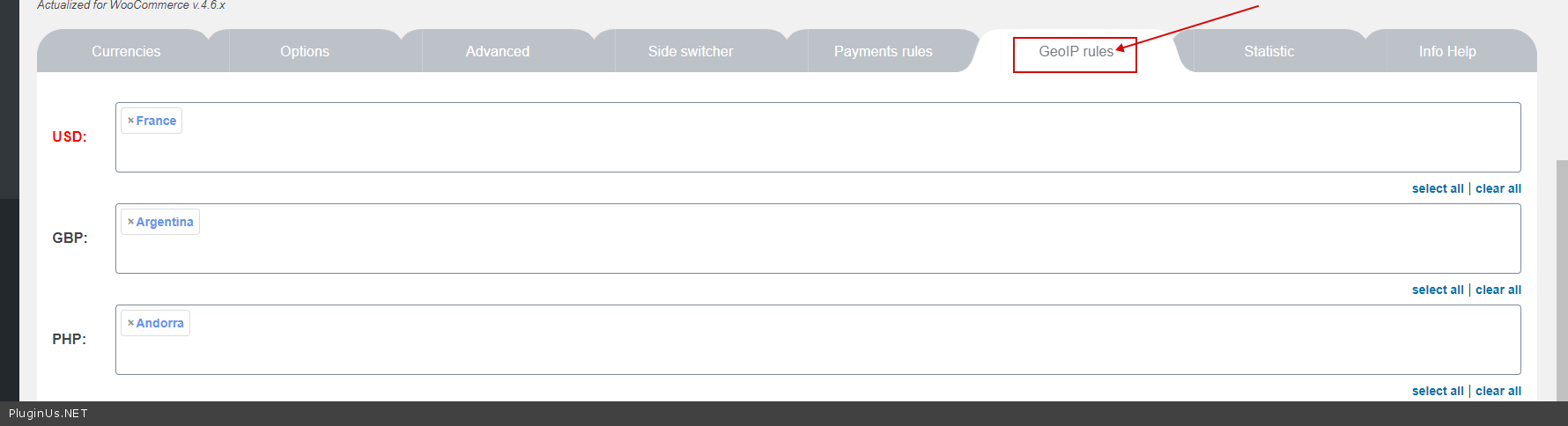
To switch currency for different countries use GeoIP rules.
Yes, crucial is what you said. ” In base currencie” , so that means that I canot use EURO for multiple countries? I dont want to use their base currencies, just euro for 4 countries and Serbian dinar for fifth.
So direct question is, can I use EURO for 4 countries with individual pricesand how?
Hello
I just wrote on the forum a way for your case, test it please …
First thing in the morning I will test it. I will reach in case of success or oposit. Thanks a lot
Welcome! Write here please about results
I just updated my ticket, please check. Like it is almost there, but not quite. Please help me with this.
I just update it again, with more info, please take a look. Thanks in advance
Last updated there, in the end, I really need help.
Hello BrankoSB
I answered you – https://pluginus.net/support/topic/5-countries-5-difderent-prices-without-logic/?part=2#postid-19772
Good day
i want to keep a log of all changes in currency in the wp-admin, can i do that
the manual change log
Hello Unfortunately, the plugin does not have this feature.
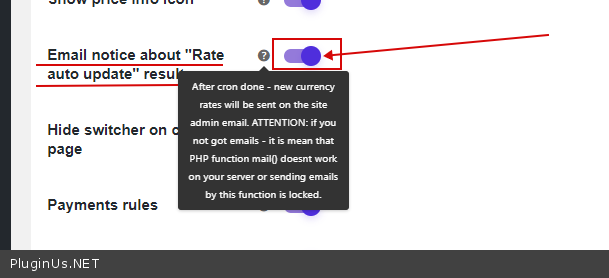
but you can receive information by email – https://c2n.me/4a25Yfh.png
I have 3 currencies in my store. And 2 of them are basic start prices from which the conversion countdown begins. I need to indicate price once for one product in USD and the currency conversion should start from a dollar only for that item, and for another I need same thing with EUR.
How to do it so that for some goods the 1st conversion count starts with either the dollar or the euro? I already bought this plugin but dont find such an opportunity in the settings. Is this possible?
Hello
Unfortunately, the plugin does not have this feature. for the plugin to work correctly, all prices must be stored in only one currency
Hello
Basic currency is one only for the shop, but in your case to display also price in another currency you should create your custom shortcode, and using https://currency-switcher.com/function/woocs-back_convert/ recount and show value in another currency
To insert your price-shortcode use please woocommerce hooks, for example info https://www.businessbloomer.com/woocommerce-visual-hook-guide-archiveshopcat-page/
Hi,
I get free API keys from Fixer and The Free Currency Converter. I tried both Aggregator with API keys. I am trying 1 default 3 addditional total 4 currencies. When I click “Update all rates” button it says for 3 currencies : no data for USD – no data for EURO – no data for Pound. Any idea?
Thanks
Hello
Please read the conditions for the free API keys
This will only work if the base currency is EUR
try to use another Aggregator
And use correct currency codes – http://en.wikipedia.org/wiki/ISO_4217#Active_codes
Hi,
I had to use the correct currency code.  Now it is working.
Thanks
Hi,
There is one problem left. It is really major. When you first time visit a category page or a product page, your plugin duplicates postfix notation near by the currency. It does not load it at first then suddenly changes. The original is ”$4 per cm”. It makes this ”$4 per cm per cm”. What could be the reason?
https://ibb.co/RCMfqTXThanks
Hello
Please write here – https://pluginus.net/support/forum/woocs-woocommerce-currency-switcher-multi-currency-and-multi-pay-for-woocommerce/
Paste your license key here – https://c2n.me/43SC6rb.png -> https://c2n.me/42HBIt7.png and wp-admin+ exact link to the issue access – https://c2n.me/42BAoj4.png
Presale question:
Hi, I have variable products that some are in USD and others in EUR, is possible to only show 1 currency by product, with configuration by category, tag or something, without using GEOip?
Hello
Unfortunately no! All prices must be stored in only one currency for the plugin to work correctly
Hi!
So, all products store the price for example:
Product 1 – USD 10 Product 2 – USD 20
When i will show in front end the price for Product 1 is USD 10 BUT Product 2 will be EUR 9?
Is that correct?
Hello
All products should have only one currency on backend
But you can switch currency depending on the current product on frontend
An Example:
add_action(‘wp_head’, function(){ global $product; $id = $product->get_id(); if($id == 283){ global $WOOCS; $WOOCS->set_currency(‘EUR’); } });
bought the plugin but still shows free version limited to 2 currencies?!??
sorted.
Hello
Ok! Great!
Hello are you planning to make discounts on this plugin for cyber monday?
Hello, yes, today will be
Tomorrow morning
Hello, campaign is started
Got it already Thank you)
Welcome
I’ve a pre-sale question. I don’t want to display any currency switcher in frontend but I want show the currency based on the user location. example: The base currency is EUR, its fine to show this EUR currency in European countries, but when the website accessed in USA, I want to show the currency in USD exchanged with EUR and till the user completes the order. -Thank You.
Hello
In this case, please, set up GeoIP rules and paste this code in functions.php
add_action(‘wp_head’,function(){
global $WOOCS;
$country = $WOOCS >storage>get_val(‘woocs_user_country’);
$user_currency = $WOOCS ->get_currency_by_country($country);
if (!empty($user_currency)) {
//$user_currency is empty its mean that current country is not in geo ip rules
$WOOCS ->set_currency($user_currency);
}
});
Better get code here – https://gist.github.com/PavloBorysenko/3257245000e5c77c98fba754eccd0337
Hi, thanks for you reply, I purchased it, after using the above function, it still showing Base currency in checkout page and in payment gateway.
Hello
Please check options – https://c2n.me/49Ydth2.png
If no luck – write me here – https://pluginus.net/support/forum/woocs-woocommerce-currency-switcher-multi-currency-and-multi-pay-for-woocommerce/
Paste your license key here – https://c2n.me/43SC6rb.png -> https://c2n.me/42HBIt7.png and wp-admin access – https://c2n.me/42BAoj4.png
I’m really interested in buying this plugin, but unfortunately after testing the free version it seems it’s not compatible with Uni CPO (https://wordpress.org/plugins/uni-woo-custom-product-options/). Would it be possible to support that plugin?
Hello
Please read this – https://currency-switcher.com/woocs-labs/
Awesome, thanks!
Hello Welcome;)
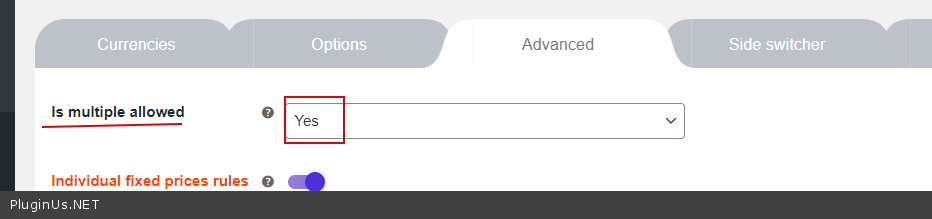
Hi, I have discovered a problem. I use fixed price, with multiple price allowed. I have 2 prices: the first EUR for Italy and second EUR for the rest of Europe. How I Can add this? I can’t add same EUR to both currency to specify different GEOIP states.
The problem is use multiple Currency but also Multiple EUR for different states. GBP for UK (fixed price) USD for USA (fixed price) EUR for Italy (fixed price) EUR for Russian (fixed price) EUR for China (fixed price)
Hello
To set currency by country use GeoIP rules – https://c2n.me/49U7KrS.png
To set different prices for by country – https://currency-switcher.com/video-tutorials#video_PZugTH80-Eo
Hi,
I have is a pre-purchase question. Does this plugin compatible with https://codecanyon.net/item/woocommerce-product-addons-custom-product-options-plugin/20810733 ?
Thanks before!
Hello
You can test it with a free version – https://wordpress.org/plugins/woocommerce-currency-switcher/
And read this please – https://currency-switcher.com/woocs-labs/
Hi,
I need a filter plugin which is compatible with a currency plugin. I installed your free filter plugin to try it on a staged site there are some issues but learning that and asked some questions in that page. I also need a currency switcher and installed the plugin below. I added a shortcode on top of the menu but it is not working. It is not changing the currency at all. Which one should I install? This plugin or the plugin below. Because below is not working at all.
https://codecanyon.net/item/wordpress-currency-switcher/17450674Thanks
Update..
Instead of that plugin (17450674) I installed this one. It is working but 3 questions I want to ask.
1-) I have used it on top of the menu using [woocs] as shortcode. Normally it is there and it is working. However, below the link if you click, there is a php function I have to add. I did not do that. Does your plugin natively support this now. So we do not need to put this code then? Is that so?
https://currency-switcher.com/how-to-drop-woocommerce-currency-switcher-in-menu/2-) Let’s say that you add 2 items and they are in the card in Euro. You can see this on top of the menu as Euro. Then you change currency but the currency on the top does not change. However when you go to the card page actually you see the change. Cache is not active but. What could be the reason? I does not affect the currency in the top menu.
3-) Do you have GDPR statement about the plugin. The cookies, the data transfers between third parties like yahoo, how the secure the transaction is etc. We have to put these informations to sell internationally.
Thanks
Hello
To get support write here – https://pluginus.net/support/forum/woocs-woocommerce-currency-switcher-multi-currency-and-multi-pay-for-woocommerce/
1) do not
2) Drop me exact link to the issue
3) The plugin does not collect any information about users and does not use cookies
Hi,
There is actually not any problem with the multi currency. However, when you add the products in the card the cart on the top of the menu in avada does not change after currency change. I have checked that even the products in the cart page changes but this problem is just for the top menu. It is not changing.
It is a staged site. Closed. It is not open yet.
https://imghub.io/i/YSKZu https://imghub.io/i/YSjPeThanks
Hello
To get support please write here – https://pluginus.net/support/forum/woocs-woocommerce-currency-switcher-multi-currency-and-multi-pay-for-woocommerce/
To find the reason I need to see the site
Just a question – but is it possible that transient and PHP session options are around the wrong way?
I use to have transients enabled, no problems, all good – but recently have noticed (unsure if related to updates) that if choosing transient, the checkout changes to welcome currency and therefore its no longer USD pricing, but is welcome currency. Cart is ok and shows correct price – mini cart and checkout page isnt – if I refresh the page, it quickly shows the correct price in checkout, before reverting to welcome currency.
If I change to PHP sessions, no problems, functions as normal and goes back to how transient use to work for me and the USD stays USD…no swapping to welcome currency on the checkout page. Mini cart, cart and checkout all correct.
Hello
Try to delete this version of the plugin and install new version from envato
And do a test
Thanks for the reply, unfortunately deleting (was the latest version already) and downloading/reinstalling has not resolved the issue. Going to check if its anything related to SlickStack install/config as I dont think anyone else has reported this issue. I’ll spin up another test AWS box with a different nginx config
Hello
Ok! I will wait for your answer! Better write here -https://pluginus.net/support/forum/woocs-woocommerce-currency-switcher-multi-currency-and-multi-pay-for-woocommerce/
hi there, i see in ur demo that for woocommerce subscription it will shows USDxxx/month /month which means showing month twice. is there a way to fix this pls?
Hello
Please read this – https://currency-switcher.com/woocommerce-subscriptions-by-woocommerce/
hi there the need to set each of the currency and add ‘profile’ for each of the currency takes a lot of time is there default currency preset can import? further, if i set this for one site, how to migrate the settings to another one to save time pls?
Hello
Unfortunately the plugin does not have this feature.
Hello
Good idea! I see it as one-click operation will set 5-7 basic world currencies with their settings. Added to dev list
Hi, how to add new symbols. thanks best regard
Thanks for your supporting.
Welcome;)
Hi, presales questions:
1. Does it automatically display the prices based on the ip address of the visitor to the site and how are the IP addresses updated if the country changes or adds new IP addresss? 2. Can the prices in currencies in GBP (British Pound) and EUR (Euros) be set manually in woocommerce? Instead of one currency being multiplied by a rate. E.g. in woocommerce product settings page I put in a price manually for GBP and Euros.
Thank you for your time. Andrew
Hello Andrew
1) Yes. Please watch a video – https://currency-switcher.com/video-tutorials#video_1
2) Yes, a video – https://currency-switcher.com/video-tutorials#video_YHDQZG8GS6w
Try a free version – https://wordpress.org/plugins/woocommerce-currency-switcher/
Hi, I’ve been using your plugin for a while and it was working perfectly, then all of a sudden over the last week it’s not working properly. I’ve literally not made a single change to settings on website and there’s no obvious reason why it’d stop….What can I do to troubleshoot issue?
Hello
Please write me here – https://pluginus.net/support/forum/woocs-woocommerce-currency-switcher-multi-currency-and-multi-pay-for-woocommerce/
Paste your license key here – https://c2n.me/43SC6rb.png -> https://c2n.me/42HBIt7.png and wp-admin access – https://c2n.me/42BAoj4.png
I will check it

This item was featured on CodeCanyon

Power Elite Author
Contact the Envato Market Help Team