8473 comments found.

- update * the problem fixed itself when I tried a different plugin that combines Javascript files. Seems like it works fine now. I am having an issue where the image does not load in photo swipe only when viewing on mobile (it loads fine on desktop). It gives the error the image can not be loaded. I have tried disabling all cache and cloudflare. Before I was able to fix the issue by turning off Combine JavaScript Files but now it is not working with any setup I try.
W3TC can create different caches for desktops and for mobile devices. Its minify cache can be influenced manually, or let JIG load both desktop and mobile lightbox’s script (disable conditional script loading), then ask for the caching plugin to minify everything.
Hi, Kindly release license starting with e3fc* which is bound to www.know*.in Thank you in advance.
Your license is now released from the previously bound host. https://justifiedgrid.com/support/faq/your-license-has-been-reset-what-does-it-mean/
so still no instagram feed?
No, it has been even been removed a while back to avoid confusion.
I asked earlier for an opportunity to change the image caption and got this advice https://justifiedgrid.com/support/faq/can-use-text-captions/ . Can I use this or a similar approach when displaying nextgen galleries with JIG? Thank you in advance.
Yes, see last example https://justifiedgrid.com/support/faq/jig-images/
With the new filter you can filter among other things, the captions from any source including NextGEN. Depending on what you need the function could be much simpler
I’ve added the last example to the function.php of my child theme but there is no result. I would like to see the “inquiry” link both in the lightbox as in the captions of the gallery in the post itself. Do you have any idea? Cheers.
[update] with some echo code. I cna see that everything seems to be fine but there is no output.
Good Morning. I could manage this issue. So I can see the inquiry Link right now by tweaking the settings ‘What text to show’.
I need to use these settings on my webpage for 2 kinds of galleries: 1) Standard WP. ‘What text to show’ is based on caption custom fields. 2) Nextgen Gallery. ‘What text to show’ is based on ‘Description’.
How to fiddle this out?
Hi, captions over thumbnails shouldn’t contain links, since the whole thumbnail is already a link. If you show captions below the thumbnails, that’s viable. This look: https://justifiedgrid.com/presets/preset-20-caption-thumbs/
It should be similar for NextGEN. You can see what’s already coming from JIG if your var_dump($image);
In the extra_class:
jig-contentID-NG is for NextGEN
jig-contentID-ML is for Media Library
Hi. I am thinking about using max rows attribute for general row behaviour. 1, Can I give the user an visual indicator if there are more pics to look at.
Max rows is an absolute cutoff. You can use load more (not in conjunction with max rows), that has an indicator that there are more. However in that case you set a limit by a number of thumbnails and JIG will automatically figure out a suitable row count that shows up to your desired amount of thumbs. The “incomplete last row” setting can influence how the limited gallery looks like.
Thanks, much better for my needs than max rows. Thank you.
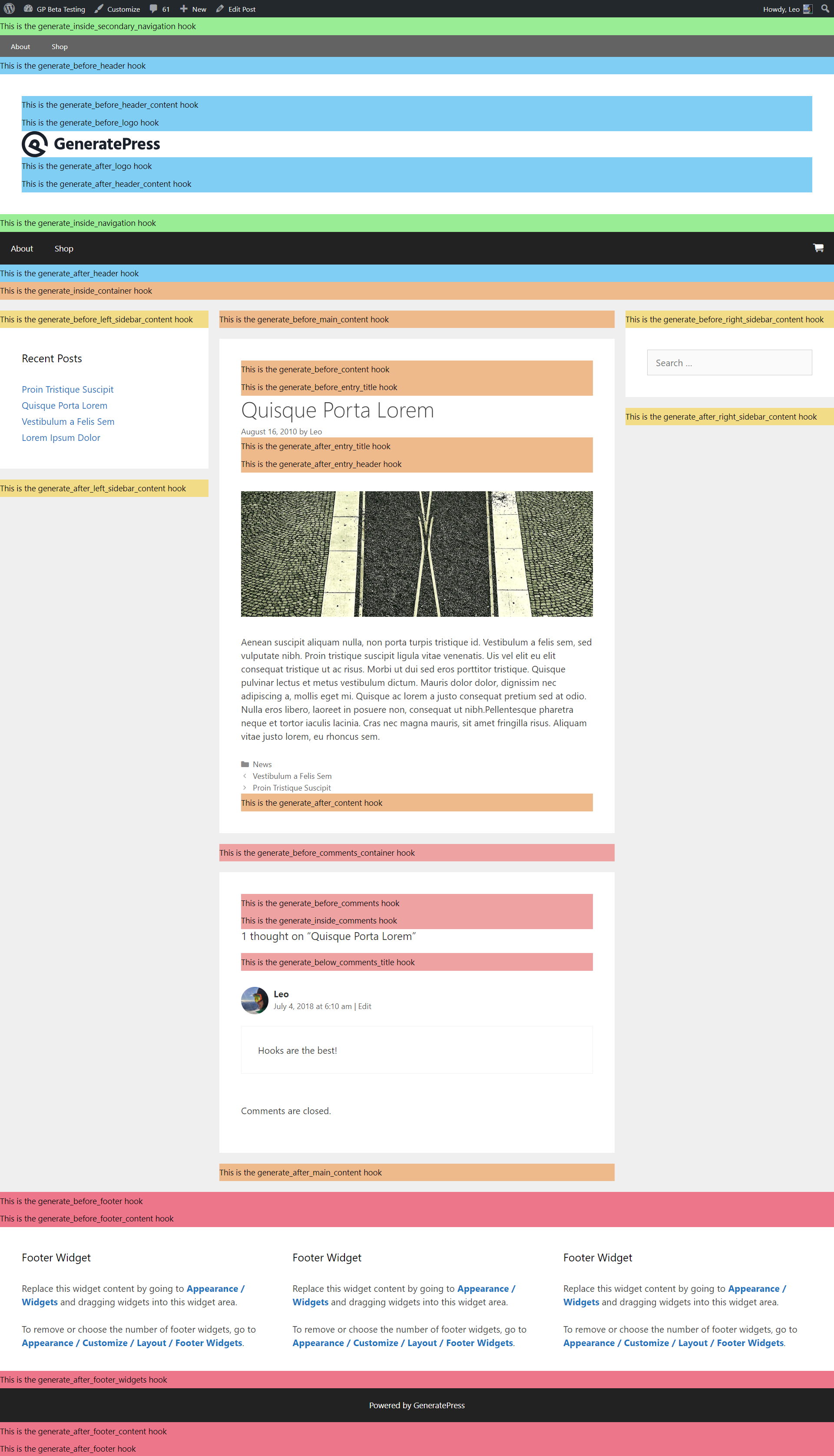
I have a question and I don’t now wether you can help. I am using generatepress as a theme and this allows me to display a [jig] shortcode via a hook “generate_after_entry_header”. This is for me very convenient cause I can use jig presets depending on user roles. Saying this, I can give a subscriber a download button and no download to a non-registered user.
The issue here is using the auto-take over for a standard wp makes the gallery appearing twice. for each of the 3 options on the section “Take over and replace [gallery] WordPress gallery shortcodes”. As I said, not sure.
For your info https://docs.generatepress.com/wp-content/uploads/2018/07/hooks-singlepost.png
If you are using shortcodes and manually adding JIGs to hooks, how come you are using the auto take over feature? That can be sometimes too powerful as it takes over anything in its path. If you disable it, how come it still happens? Perhaps your custom code creates both logged out and logged in JIG at the same time but is trying to hide one, instead of never creating one of them in the first place?
Hello, I want to use a Flickr gallery, but when I save settings, Album Selection doesn’t get saved. It always go back to default settings 
Do you have v4.1, released a few days ago? There was a saving issue before that, this could be it.
Okay thanks. We’ll try that.
Could you please reset my license? Licensee = Aphrodite Studios. At this moment still licensed at kalymnos.holiday but that was a test site and moved to production at aphroditestudios.info
Your license is now released from the previously bound host. https://justifiedgrid.com/support/faq/your-license-has-been-reset-what-does-it-mean/
Thanks !
Hi …
we moved the Webseite www.spezialistfueraussenborder.de to www.aussenborder-hamburg.de .
Would you please change the License.
Thank you so much!
Best, Frank
Your license is now released from the previously bound host. https://justifiedgrid.com/support/faq/your-license-has-been-reset-what-does-it-mean/ It was purchased by a user called selkon
BTW, do you have 27 licenses?
Hello, please i need to change my license domain from old domain gianlucapartengo.photography to gianlucapartengo.art.
Thanks
Your license is now released from the previously bound host. https://justifiedgrid.com/support/faq/your-license-has-been-reset-what-does-it-mean/
Many thanks!
Went to Re-Authorize my Facebook sources and now I’m getting this error -
“URL Blocked: This redirect failed because the redirect URI is not whitelisted in the app’s Client OAuth Settings. Make sure Client and Web OAuth Login are on and add all your app domains as Valid OAuth Redirect URIs.”
Never had this notice before – I have recently installed Cloudflare on the site. Would this be causing it?
Re-check the “how to create an app” steps in the plugin (after updating to v4.1 from the autoupdate system), regarding just the steps with oauth URLs. Re-copy those that JIG shows in the admin, to the App, in the right fields. Any kind of host change, http vs https, subdomains, different-language version of the site, domain changes, will throw this off. Look at the top of the Facebook App on FB developers, you should not see “app type” or “app type: consumer” (if so, you need to click it and remove any app type). Update API version to 9 in the app settings while you are at it. If necessary, re-create the app. If you have no luck we can create a new app for you and transfer admin ownership after we verified it works, but this is a last resort.
Yep! That was it! Been having trouble on my site and changed the address to “www.—-” to do some trouble shooting and forgot to change it back. Thanks!
Yeah then it’s a simple hostname change. Great that it’s working again for you now! By the way, we are assisting your case with MLA developer David, you are in good hands. 
That’s what I hear! Thanks so much! All support departments should take notes from you and David. You guys are great!
Hi, RSS Feeds(youtube) suddenly stopped working. We are facing this issue is 3 different websites. Though I copied exact rss feeds from sources, then also it is showing “The requested RSS feed is empty.”
Is there any bug in this. Please reply
Yes it has a problem, contact us from the profile so we can immediately send you the fix in form of the latest beta.
We have three different sites. Will you please mail the fix. Where can I find profile or Please provide your support mail-id. I couldn’t find.
The update is out now! v4.1 – no need to mail betas directly. Btw, our email is not public but the contact form is always usable on our profile. Use the automatic update system on each site as it’s still in queue here.
Thanks for the Update, now it works fine.
Thanks for the feedback!
Hi, how can I transfer the galleries I currently have in the FREE Justified gallery plugin (e.g. pan-prom.hr) to Justified image grid PRO plugin?
There is no free Justified Image Grid plugin created by us, that’s likely a copycat or a different developer’s product. JIG is not its own source so there is no galleries to transfer in that sense. The “grids” interface just uses the pictures but does not hold them.
I bougt this to work with ACF, does it not work with that ?
Which aspect of ACF do you need to work with JIG? Generally you create custom fields to either show their value as captions, or create galleries based on custom field data. The former is possible already, the latter will be possible via developer hooks and short custom code (examples will be provided) as an advanced use, in the next version coming soon.
WP 5.6 + DIVI
Since WP 5.6 there is a conflict with the Themebuilder DIVI and your plugin When JIG is enabled it is not possible to use the DIVI pagebuilder When JIG is disabled it is possible to use the DIVI pagebuilder
Please check what is the problem on your side!
Cheers.
Let’s continue communication in our email thread.
JIG plugin causes All In One SEO plugin to show “Plugin not found” on Plugin “View details”.
This, the free version? https://wordpress.org/plugins/all-in-one-seo-pack/
Thanks we’ll check it out.
It’s the Pro version in this case.
Normally, the view details link pulls info for free plugins from the https://wordpress.org/plugins/ site. Paid plugins can either have a free version and tell WP to pull the free one’s info (like Real Media Library does afaik), or fake this data. I you disable both JIG and AIO SEO Pro, and check the view details of either, you get plugin not found. This is because when a plugin is disabled (and there is an update available), it can’t deliver custom data to you. So that part is normal. You might notice that there is no “View details” link on this kind of plugins if there is no update available.
We were only able to reproduce the issue with the Pro version. Upon inspecting our autoupdate scripts, we found that we were accidentally impairing other paid plugins’ autoupdate trickery. AIO SEO uses pretty much the same solution, but we were able to fix the problem by aligning how we do things with their solution, so there should be no more conflicts. Thank you for the valuable bug report. The next version will include a fix for this, but if you are bothered by it right now, contact us for the latest beta.
Hi there, just trying to set a different “Spacing between the thumbnails” for desktop and mobile. I’ve tried with CSS (uing @media queries on ”#jig1 .jig-imageContainer”), but it shifts the thumbs over and created extra gaps on the right… Is there a way to set this without breaking the grid? Or a way to trigger JS to resize the images after changing the margins? Thanks 
JIG uses server side mobile detection, so either check on an actual device or spoof the user agent. Do not use media queries they are not compatible since JIG uses JS math for the layout. If you influence that externally, the grid will break. You can use an entirely different preset for mobiles, so any setting can become mobile-only.
Oh fantastic. I’ll have another look at the preset options. Also, all I could find on this topic on the website was this, which says to use custom CSS: https://justifiedgrid.com/support/faq/can-change-spacing-thumbnails-rows/ Thanks nonetheless!
Hm, perhaps it was meant to be horizontal spacing via plugin settings and vertical spacing (between rows) via Custom CSS. But we edited that out to avoid confusion.
Hello, my installed JIG galleries have stopped saving the changes made in the grids. As soon as I save the grid all the changes disappear. I looked at the JIG on my other sites and the saved grids have reverted to the basic grid and not showing the grids I developed.
Please send a mail from our profile, we’ll need to log in with temporary wp-admin access and check it out.
The issue is fixed and the beta is ready for sending to you. Public new version is coming this week.
The problem was it didn’t load saved values (possibly due to new WP), so after installing the new version all your previous values will be loaded properly (if you didn’t save an empty JIG upon them). Even then, using revisions you’ll be able to revert to the last working grid.
Since the update to wordpress 5.6 JIG g doesn’t overwrite the wordpress gallery anymore on a new post or if i save an old post. Is that a common problem?
Thank you for the bug report, we’ve addressed the problem and we can send you the latest beta if you contact us via the contact form on our profile. The next version will be released this week, including this fix.
It’s fixed, get the v4.1 from the autoupdate system. Thank you for the report!
YouTube Gallery isn’t working anymore (even on your Demo Page: https://justifiedgrid.com/sources/rss-feeds/youtube-gallery/) Is there a fix for that? All the best, Daniel
Yes, there is a beta, contact us from the profile. It’ll arrive as a new update once it’s finalized.
Hello, I see that all galleries that use a feed as video source are down. Also in you site
Can you help me please this is a big problem for my clients.
Thanks regards Vincenzo Barilà
Thank you for the report, we’ll investigate. Contact us from the profile so we can send you the fixed version early, once it’s solved.
Hi, I am having two licenses under this username. You are kindly requested to reset both of these licenses as we are facing update and other issues. We have completely forgot which licenses was using on which websites. Previously we were using them on development websites. Thank you in advance.
Your licenses are now released from the previously bound hosts.
https://justifiedgrid.com/support/faq/your-license-has-been-reset-what-does-it-mean/