352 comments found.

Hello,
I discovered that the preloader works when clicking an internal < a > link. However, on my site there is a particular dropdown menu that’s top level is an < a > link. I do not want the preloader to initiate when clicking this link.
Is it possible to stop this from happening, and exclude certain < a >’s from triggering the loader?
Thanks!
Might I add that this relates to the Smooth Page Transition feature
Just found the answer in your documentation here: https://loftocean.com/doc/loftloader/smooth-page-transition/exclude-specific-internal-links/?from_search=1
Thanks! 
Thank you for letting us know that you have found the answer.
Hello Loftloader Team.
I just purchased the plugin and activated the Smooth Page Transition. but the Ajax ( Load more ) conflict with your plugin, so I want to exclude it:
https://www.healthatech.com/activity/i added ( li.load-more a ) in the Links excluded from the Smooth Page Transition section.
Unfortunately, it did not exclude the transition when the load more start working and get a new post, it excludes the transition from working on the whole website!?
so the question is how to exclude the transition action from working once load more is working and not from the whole site.
Regards, Loay Bdair.
Hi Loay,
Thank you for contacting us.
We just replied to your email, please check your email inbox for the detailed answer to your question. If the email is not in your email inbox please don’t forget to check your spam/junk/bulk folder.
Thank you!
Best regards,
The Loft.Ocean Team
Hello,
We have the Pro version of Loftloader installed in our website. After migrating the web to another domain, we are having now an issue with the plugin and we don’t know how we can solve it. Now, we can’t save any setting changes we do in the plugin settings.
We tried to delete the plugin and reinstall it but the issue remains.
Our website is www.alumser.com, and we are using the lastest version of the plugin and the lastest version of Wordpress.
Please, answer us as soon as possible. We can send you screenshots and give you the password and username of our website to allow you check the issue.
Thank you!
Hi,
Thank you for contacting us.
Please email the following information to general@loftocean.com and our developer will look into the problem for you.
- Your website URL
- Your website’s temporary administrator login credentials
- Some screenshots of the problem
- Any other information that you find may be useful.
Thank you very much.
Best regards,
The Loft.Ocean Team
Does the plugin loads the CSS background images automatically or are there any settings to fine tune this?
Hi,
Thank you for contacting us.
LoftLoader Pro can check loading for different elements, including background images. Users can change this setting. You may like to check the online documentation for more details about this feature: Detect Elements.
But please note: If the website enables the “lazy loading” feature, and the images (or background images) are loaded only when the screen scrolls to the image, then LoftLoader cannot detect these elements.
Thank you very much.
Best regards,
The Loft.Ocean Team
Hi, I tried using the lite version which worked great on my site and did not conflict with anything but i needed to be able to adjust the minimum time so I purchased pro. Now with pro it all looks great BUT it is conflicting with some code on my site, I am using some code to add a 3D tilt effect when the user mouse their mouse around on the page, and now that is not working when the plugin is activated, any idea why?
Hi,
Thank you for contacting us.
In order to find the exact cause of the problem, could you please email your website URL to general@loftocean.com so that we can take a look at the problem?
Looking forward to your reply. Thank you very much.
Best regards,
The Loft.Ocean Team
Hi, how do I turn off horizontal/vertical direction loading on the loader? I need the loader to be a solid colour, not have any fading effect.
Thanks
Ive just figued this out, not to worry.
Glad to hear that you have figured it out. Thanks for letting us know.
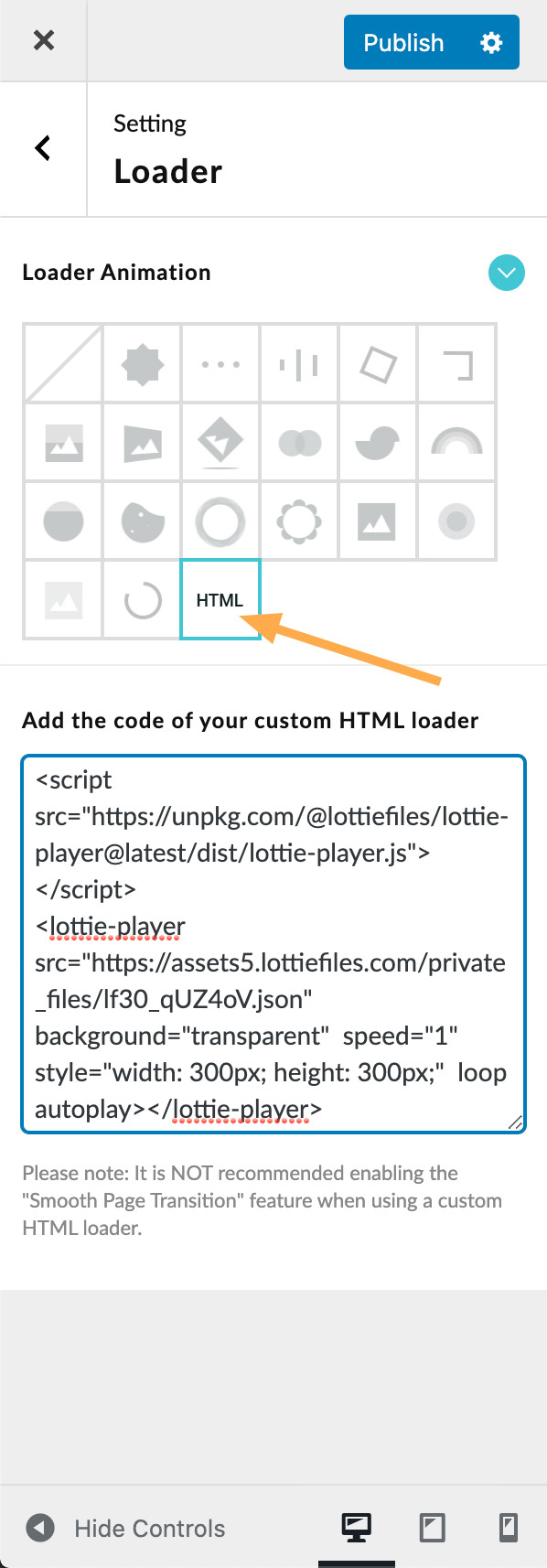
1. I built a custom svg animation in svgator.com I want to use this as is without a progress fill, bounce, or roll. Just the animation as is.
2. Can the javascript animation type be used?
3. Can there be a minimum time set for the preloader? If my animation is 3 seconds long, I want to make sure the animation fully plays then opens the page.
Hi,
Thank you for your interest in the plugin.
1. The animation effects of progress filling, bouncing or rolling can only be applied to custom images. Therefore, if you use a custom SVG animation as the peloader (by adding SVG code instead of uploading it as an image in .svg format), these animations will not be applied to the SVG.
2. Yes, you can add your own HTML loader. To add your custom SVG/JavaScript animation, when setting up your preloader, please select “Custom HTML Loader” and add the HTML code. Please refer to this screenshot. And you may like to check the documentation for more details: Custom HTML Loader.
3. Yes, you can set a minimum load time for the preloader. Please refer to the documentation: Control Minimum Load Time.
Thank you very much.
Best regards,
The Loft.Ocean Team
Is it possible to activate “LoftLoader Pro” when the user clicks on a link?
Hi,
Thank you for contacting us.
Yes, you can enable the ”Smooth Page Transition” feature, and then the preloader will be displayed when the user clicks on an internal link (a link to another page in the same website).
Please note: this feature only works when clicking on an internal < a > link. This feature cannot be triggered when clicking on a JavaScript-driven < button >.
You may like to read the documentation for more details about this feature: Enable Smooth Page Transition.
Thank you very much.
Best regards,
The Loft.Ocean Team
Thanks.
Could you help me put LoftLoader behind my main menu? Which paths via “z-index” should I follow for this?
Hi,
To change the “z-index” of LoftLoader, please add code to this element: ”#loftloader-wrapper”.
However, we recommend that it is best to change the “z-index” of the main menu to ensure that other elements on the page are still covered by the preloader.
If you need our further help, please send us your website URL so that we can check the HTML structure of your website. You can leave your website URL here, or send it via email to general@loftocean.com .
Thank you very much.
Best regards,
The Loft.Ocean Team
Thank you. I sent an email.
Hi,
first, I love you product!
I searched the docs but couldn’t find anything, so:
Is it possible to exclude the main menu bar from the loft loader? TIt ususally loads pretty quickly and the user can already do something by looking at the menu items, while the preloader is running.
Thank you for your help Best regards Aron
Hi Aron,
Thank you for your interest in our plugin.
Actually, it depends on your website HTML structure. When LoftLoader is activated, a full-screen loading screen will be added to the page. If the container of the main menu bar and the loading screen are at the same level in the page structure, you can simply modify the z-index value of the main menu bar to achieve the effect you need.
If you are not sure, you can send us your site URL (by email to general@loftocean.com ) so that we can take a look at your website structure.
Thank you very much.
Best regards,
The Loft.Ocean Team
Can you have two different loaders for different pages on the same website?
Hi,
Thank you for contacting us.
Yes, you can display different loaders on different pages, just like we did on our demo site. Please check the documentation for detailed instructions: Display different loaders on different pages.
Thank you very much.
Best regards,
The Loft.Ocean Team
The loader is showing the animation only when the page almoust finished loading. Adjust to start the “loading” animation the moment I press the link (so the user knows is loading). If it can’t be adjusted like that, it’s just annoying the user an extra second of loading.
Hi,
Thank you for contacting us.
By default, the loader only appears when the page is opened or refreshed. Please enable the “Smooth Page Transition” Feature. After enabling this feature, when you click an internal link and leave the current page, the loader will appear with animation again, to fulfil the blank between pages.
And please note: By default, when using this feature, only the background of the loading screen will be displayed immediately when you click on internal links. If you want to display other elements (loader/message/progress bar) at the same time, please also enable “Show all elements when leaving the current page” option. Please refer to this screenshot.
For more details about this feature, please check the plugin documentation: Enable Smooth Page Transition.
If you have trouble using this feature, or if we misunderstood your question, please feel free to let us know. Please email your website URL and screenshots of the problem to general@loftocean.com so that we can better understand your problem and check it for you.
Thank you very much.
Best regards,
The Loft.Ocean Team
Hi, I can make a smooth transition between pages like here https://lincorwatches.com/en/ ???? No loading screens, just a smooth appearance?
Hi,
Thank you for your interest in our plugin.
Currently, the “Smooth Page Transition” feature cannot be used alone, so the loading screen will still appear when the page is opened or refreshed. But this feature will be very useful. We have added it to the “Feature Request List” and will consider adding it to this plugin in the future.
Thank you very much for your suggestion.
Best regards,
The Loft.Ocean Team
Hello! I wanted to use the “Display different loaders on different pages” function for the first time, but it does not work. Before that, of course, I read the instructions.
Hi,
Thank you for contacting us.
Please kindly note that your support license has expired. According to the Envato Item Support Policy, we can only provide support services to customers who have a valid support license.
For more information about Item Support Renewals, please see Extending and Renewing Item Support.
Thank you very much.
Best regards,
The Loft.Ocean Team
In the admin area of WP I’m getting a Page Not Found Error. Would you mind letting me know via the comment how to fix this? It would benefit all of us.
Hi,
Since we have not received any reports of the same or similar issues, currently we cannot determine the exact cause of the problem.
Please email your site URL and a temporary login credentials to general@loftocean.com , so our developer can check that for you.
You can use this plugin to create a Temporary Login Without Password.
Looking forward to your reply. Thank you very much.
Best regards,
The Loft.Ocean Team
Never mind. It was an issue of a different sort. Had to do with HTTPS vs. HTTP. Thanks.
Thank you very much for letting us know.
I’ve already read through the comments pertaining to this, but can’t find a way to have a different message for different pages. The shortcode doesn’t allow plain text, so we can’t change it there.
Hi,
Thank you for contacting us.
Do you mean: After generating the shortcode of a preloader and adding it to a page, you tried to edit the “custom message” part of the shortcode directly? If so, no, the text of “custom message” cannot be changed directly in the shortcode.
This is because when the shortcode is generated, the text of the “custom message” will be compiled (via the php base64_encode function). Please refer to this screenshot: https://d.pr/i/BuRhqt . Because when the user enters a custom message, it may contain spaces, special symbols, html code, and texts in different languages. These factors will cause the shortcode to not be parsed correctly, so the text must be compiled.
Therefore, if you want to change the text of “Custom Message”, please re-enter the text through the settings panel and regenerate the shortcode. Then please add the new shortcode to the corresponding page.
Related documentation: Display different loaders on different pages.
Thank you very much.
Best regards,
The Loft.Ocean Team
I found a workaround. I just added text to the preloader graphic.
Brilliant! Thank you for sharing the solution.
1/ I want to ask you is it possible to align text messages [or maybe added in next release] to left with bar (f.ex. if i have 30% bar width text should be aligned to left at the begining of bar).
2/ Is it possible to set Exit Animations to none (i know now it’s not possible, but maybe in next release)
Hi,
Thank you for contacting us. Please see below:
1. Align text messages:
Since each element in the loading screen can be individually enabled/disabled and set, for example, a loading screen may not have a progress bar but only a loader and message. Therefore, in the current version of the plugin, there is no direct relationship between the various elements.
We have added this feature request to the “Feature Request List”, and will consider adding more options for each element in future updates, so that users can change the position of each element more flexibly.
Currently, for your website, you can adjust the width and alignment of the message by adding simple custom CSS code. Please add the following CSS code to your website (via the WordPress customizer > “Additional CSS” section, or you can use a third-party plugin to add custom CSS code):
#loftloader-wrapper .loader-message {
    width: 30vw;
    text-align: left;
    padding: 0;
}

@media screen and (max-width: 500px) {
    #loftloader-wrapper .loader-message {
        min-width: 220px;
    }
}
If you read this comment in email instead of on the CodeCanyon comment page, you may see the CSS code wrapped in ”< pre >”. The ”< pre >” code are only used to display the CSS code correctly on the comment page. When copying CSS code, please do not copy them. To make sure you get the correct CSS code, please refer to this screenshot: https://d.pr/i/AhQD1o .
You may need to clear your site cache and browser cache after adding custom CSS code.
2. Set Exit Animations to none
Thank you for your suggestion. This feature request is already in the “Feature Request List” of LoftLoader Pro. Like all other feature requests we receive, the priority of adding a new feature will depend on the number of same or similar feature requests we receive.
I will forward your feature request to the development team. When we update the plugin next time, we will check the priority of this feature to see if it will be included in the next update.
Thank you very much.
Best regards,
The Loft.Ocean Team
1/ Works like a charm
2/ Thanks a lot for take into concideration.
Cheers bro.
Thank you very much for your kind feedback!
Hi, we are noticing that Loftloader seems to load each page from scratch each time. We are using WPRocket for caching. Without Loftloader, pages that were already loaded will load instantly upon re-visiting that page. But not so with Loftloader. Each time someone re-visits a page, it takes quite awhile, as if the entire page is now being loaded again anew. Please see our site at ojaya.com. Thanks.
Hi Lucas,
Thank you for contacting us.
Regarding all the problems you have reported so far:
LoftLoader Pro has more than 1500 users, many of our users are using WP Rocket, but we have not received reports of the same or similar issues. And we have tested on multiple test sites, but cannot reproduce the problems you mentioned.
Please understand: the site environment of each website is different. From the clues we have so far, the problems you mentioned only occur on your site. This is a special case and not some common problems. Therefore, to find the cause of the problem, we must go to the environment where the problem occurs to check all the settings one by one.
Therefore, we recommend:
1. As we mentioned before, please create a staging site, and then please check this staging site to ensure that all the problems that occur on your live site exist on this staging site. Then please provide us with the URL and login information of this staging site so that our developers can log in to the staging site to check problems and debug. (You may like to read our documentation to find more details about Debugging on your staging site & Creating a Temp Admin User.)
2. If you are still unwilling to provide a staging site, then we are sorry, we have no way to provide further support services, because we cannot rely on guessing to debug the problems. You can choose to submit a refund request and stop using the plugin.
Thank you very much for your understanding.
Best regards,
The Loft.Ocean Team
Hello,
Thank you for your plugin, it works like a charm out of the box! I am encountering however a small issue: my website (https://www.jtmartelli.com/) has a night mode (plugin WP Night Mode) that can be activated using a toggle in the topbar.
When night mode is on and when LoftLoader Pro is activated, returning to the home page triggers the day mode page to load temporarily before reloading a second time the night mode page. This re-loading is problematic as the home page should display in night mode in the first place. Without LoftLoader Pro activated, the home page loads in nigh mode straight away if the previous page visited is also in night mode.
In order to solve this, I tried to block the display of the plugin loading screen in CSS but to no avail: .home.wp-night-mode-on .LoftLoader_Pro { display: none !important; }
Could you tell me if there is a function I can use to prevent this to happen (I guess by preventing LoftLoader Pro to be loaded if the class .wp-night-mode-on is active)? Any other fix is also good.
Thank you in advance for your kind assistance.
All the best,
Jean-Thomas
register_activation_hook( FILE, ‘activate_wp_night_mode’ ); register_deactivation_hook( FILE, ‘deactivate_wp_night_mode’ );
769526d8-ceaa-42b4-ad73-74b001dd0e91
Hi Jean-Thomas,
Thank you for contacting us.
We have received your email and responded. Please check our email for the detailed information. (If the email is not in your email inbox please don’t forget to check your spam/junk/bulk folder.)
Thank you very much.
Best regards,
The Loft.Ocean Team
Hello,
i have a problem. I put my animated logo animation into background (gif). but it only loads after the loader hits 100% and then its to fast to play it completly. how can the background been shown at the first second?
it works in chrome, but not in safari.
Hi,
Thank you for contacting us. Sorry to hear that you encountered a problem when using LoftLoader Pro.
In order to get more clues of this problem, could you please email your website URL and some screenshots of the problem to general@loftocean.com , so that our developer can check it for you.
Looking forward to your reply. Thank you very much.
Best regards,
The Loft.Ocean Team
Hi, Today we found that Loftloader does not go to the proper anchor links on our site, so we had to disable it.
On when clicking this link: ojaya.com/enroll/#refund Loftloader would go to that exact anchor briefly, then go immediately to the top of the page. We had smooth page transitions enabled, and we need that, but we also absolutely need the anchors to work, so we have disabled the plugin until we hear from you. Thanks!
Hi Lucas,
Thank you for contacting us.
We have not received any reports of the same or similar issues. We just ran several tests on our test site, but we couldn’t reproduce the same problem.
Could you please reactivate LoftLoader Pro on your website so that we can see the problem on your website? Alternatively, you can create a staging site and activate LoftLoader Pro on it, so that we can see how it works on the staging site.
Thank you very much.
Best regards,
The Loft.Ocean Team
Please go to this page, and click the link there: www.ojaya.com/preloader You will see how Loftloader does not work with our Wordpress anchors. Please advise, thanks.
Thank you for your reply. Yes, we see the problem. Since we could not reproduce this issue on our test site, please refer to the suggestions we provided in response to another comment you posted today. Thanks!