8472 comments found.

Could you please reset my license from 2014? I’ve reinstalled the site.
Done
Hi,
i’m using jig with nextgen gallery.Recently they add backend and frontend search, Will it possible to use with JIG ?
Thanks
There are certain ways you can do that already.
https://justifiedgrid.com/sources/nextgen-gallery/nextgen-search/.
https://justifiedgrid.com/support/faq/show-search-results-justified-image-grid/Hello Belcovio, I purchased a standard license about a year ago. 23. May 2019. Do I need to renew yearly to receive plugin updates? Or does the standard license provide life time updates? Thanks & greetings Becki
You don’t need to renew anything, updates are continued to be given for free. Check v3.9.7 out now.
Nice  Lifetime subscription. Just updated to version 3.9.7 … Thanks!
Cheers!
Having some trouble with the Pre-sets. Is it possible apply a custom pre-set to an individual gallery that is different from the Global Pre-set? In other words have galleries with different custom presets on a site?
Yes in the shortcode editor you can choose the custom preset. That workflow assumes that you abundantly use presets in shortcodes, so changes int he JIG settings won’t affect galleries. Only those that have no preset choice in them.
This way you can use global settings in JIG (and playing with presets there) as a sandbox, and go back and forth between editing and saving to custom presets. You should only see the results of your choices on JIGs with that specific custom preset, or those without any preset selection.
Ok, Maybe I’m just doing something wrong but it seems I can’t edit a custom preset without loading it and then applying it to override whatever current preset I have. Let me try to explain – I have a custom preset applied as my default global preset. I have another preset I want to apply to a certain gallery. I create it and save it and apply it to that gallery. Ok, after some time I want to edit that individual preset. My problem is I can’t load that individual preset to edit it. It seems the only way I can edit it is to load it in the settings, apply it and make that the default global preset. Otherwise the settings for the individual preset never display so I can edit it. After I make my edits I can save it to the selected preset and then load and apply the original preset again but it just seems like extra unnecessary steps. Am i doing something wrong or is this the only way to do it?
Agree it’s a bit cumbersome. What would be best is to create a custom preset called “global” and you store the settings in that before you edit something else, which you’ll later load back. You can use that in shortcodes too.
So you can use the global JIG settings as purely a preset-editing interface.
Again, this workflow requires to choose a preset in every shortcode. Unless you do that, the presetless JIGs will reflect the one you are currently “editing”.
Using preset 15 and I like it, but the images are at full size. Is it possible to show them smaller?
I’ve been searching through the documentation but can’t seem to find what I’m looking for (not sure if it’s possible).
I have a photo blog that images get posted to in Posts (naturally). When that happens of course, WP knows that an image “belongs” to a post from the “Uploaded to” field which is viewable when viewing the image in the Media Library.
I have JIG showing a “photostream” of all images that auto-updates as new posts are made (so slick!), but what I would like is for the caption to reference this “Uploaded to” field so the viewer can link from this photostream back to the Post the image originated from. Is this possible?
There’s an option in the settings, Lightbox > What text to show inside the lightbox >Custom field, but I am unsure how to format the request.
If there is a link on the picture that links to the parent post, you can disable that link on the galleries themselves but keep enabled on the index, thus creating what you need.
General settings -> Custom link’s target -> Disregard https://i.snipboard.io/1zwd6A.jpgIt should be Disregard by default (so it will apply to most of your galleries).
Then on the photostream index you DO want the links. The links will be created automatically using this code you should add to your site. https://letswp.io/php-code-snippets-wordpress
function jig_change_meta_on_the_fly($metadata, $object_id, $meta_key, $single) {
    if(isset($meta_key) && $meta_key == '_jig_image_link' && $object_id->post_parent !== 0){
        return get_permalink(get_post($object_id)->post_parent);
    }
    // Return original if the check does not pass
    return $metadata;
}
add_filter('get_post_metadata', 'jig_change_meta_on_the_fly', 10, 4);
Thank you so much for the reply! I’ll give this a shot!
Hi, so I finally got a chance to try this and it KIND OF worked. I set the “Custom link’s target” to Off and added the code you generously provided into my child theme’s functions.php
What happened was the images in JIG appear in the grid as usual, but now when clicking an image, it never loads the lightbox & caption and instead takes you straight to the Parent Post.
(One thing I wanted to clarify from my original comment is that this ‘photostream’ appears on a separate page to the posts that it’s pulling its images from. Don’t know if I explained it properly the first time or if it matters to how JIG works)
One additional thing I noticed is that JIG will currently populate with any images tagged with my custom ‘photostream’ tag, even if the status of the post where I uploaded them is set to Draft or Scheduled. Is there a way to limit the results to only Published posts (and then within those, any that I’ve tagged with ‘photostream’)?
I’ve tried shortcodes for post_status=published and post_status_exclude=draft but neither has worked and can’t seem to find anything in Documentation or searching comments here.
Thank you again for your time and advice!
Kind regards!
Hi. Sorry for the delay. It appears I misunderstood you. So you do want a lightbox gallery as usual on the index (of all pics). But inside the lightbox caption, you need to have a link that takes the visitor to the parent page right? That’s also possible with similar code, and even easier as we will no longer mess with the custom link system on the thumbnails. So how about this:
function jig_change_meta_on_the_fly($metadata, $object_id, $meta_key, $single) {
    if(isset($meta_key) && $meta_key == 'gallerylink' && $object_id->post_parent !== 0){
        return '<a href="'.get_permalink(get_post($object_id)->post_parent).'">Go to the gallery of this picture!</a>';
    }
    // Return original if the check does not pass
    return $metadata;
}
add_filter('get_post_metadata', 'jig_change_meta_on_the_fly', 10, 4);
Then in the Shortcode Editor -> What text to show inside the lightbox -> Lightbox custom field -> type the word gallerylink
Then choose “Custom” for either “WP field for link title” or “WP field for img alt”.
Regarding the 2nd problem. JIG has a fixed ‘post_status’ => [‘publish’], in its Recent Posts query. Or you mean you are pulling images from the media library using a tag or category? That query has nothing to do with the status of their parent posts!
Not posts since they aren’t hierarchical, but if you were using “pages” for your galleries… You could put them under a parent page (an index or whatever). Then, JIG has this “Parent ID” setting that takes that single parent page and will “Show all of the photos from each child page of certain parent page.”
If some of those pages are draft or not published, it won’t pull their pics.
If you are not ready to “convert” your posts to pages (there is no such thing so probably manual copypaste).. The next update coming in a few days will have an “exclude by taxonomy term” setting for the wp media libary content. Using that you could hide pics you want by tagging them with something like “hide for now” (in addition to photostream) or regardless their post’s publish status.
Currently you could just not tag them with photostream until you are ready to publish.
SUCCESS! Thank you, the new code worked exactly as I was hoping! My apologies for not describing it properly the first time.
Ahhh, I think I understand regarding the second issue. It looks like there’s currently no way distinguish the images as coming from a published or non-published post. Which is fine, I can manually tag them when ready to publish as you suggested.
Thank you again for your time and dedication! It’s truly appreciated! 
Always happy to help! Check out today’s update, hope you like it.
I’m wanting to know if it is possible to use the plugin to make a custom grid of either WooCommerce categories or products like this layout – https://pasteboard.co/J9a9GAD.jpg.
Please let me know urgently.
Yeah of course, WC products are basically posts, so JIG’s recent posts mode can pull them and display a price. The layout is same in JIG for all sources, can be slightly randomized if your product photos are all the same aspect ratio.
I need to have specific the layout as per the first 2 columns in the uploaded image – they will have the same height just different widths. Can the plugin do that?
Note that it’s an automatic layout: https://justifiedgrid.com/features/automatic-justified-layout/
But if you place the images in that particular order, set a fixed height, and they have the intrinsic AR shown on the picture, then at this width (desktop) the gallery will look like that, yes. On tablets and phones, things will be rearranged to best fit.
Thanks for the assistance. If I purchase the plugin and it doesn’t do what I need it to do, will I be able to get a refund?
Sure!
Hi!
I have purchased 3 licenses and would like to use on the following sites: chrisleary.photography, chrislearyportraits.com and hudsonheightsres.com
currently one of the licenses says it’s active on chrislearyweddings.com. This site has been closed for the past 2 years, so please remove it from the active licenses.
Many thanks.
Chris
Your licenses are now released from the previously bound hosts. https://justifiedgrid.com/support/faq/your-license-has-been-reset-what-does-it-mean/
haven´t you resolved the INSTAGRAM´s hashtag problem? can I pull a hashtag in my feed?
The API no longer allowing this usage is not up to resolvement unfortunately. With scraping it would be possible (that’s what other plugins do).
Ok I know IG removed its API, but your plugin scrap the hashtag then?
Nope, sorry.
Hi!
I use your plugin on all 3 sites of this customer. One of the sites is a member site. Therefor we use subdomains for personal links. Your Plugin sets itself always to the first URL used after reset which is a pain in the a* for auto updating the plugin. Would you please set license XXX-01c4040467bd (now blog.c1526.cellreset.com) to www.cellreset.com? You already reseted the license a while ago but it doesn’t do the trick for me cause of the subdomains…
Thx for your effort.
Best regards, Benjamin
Added an exception for your domain to the autoupate system so all of your subdomain sites could update the same way, please try.
Hello there, would it be possible to implement a feature like ‘send photo ID / link via email’?
A client is using the gallery as showcase for the customer and instead of manually writing an email: 5th row, 3rd pic from the left … there would be an option like the existing ‘share’ option. e.g. a mail icon and once the user clicks he/ she fills in name & email address and the picture ID gets send to the website owner.
See here: https://gardomo.de/sehenswert/
Wouldn’t that be a nice needy feature?
thanks & greetings Becki
If you open an image in the lightbox, the default ones (photoswip/prettyphoto) have the media library / content ID in the URL.
Yes, I’m aware of that. But some end users don’t know what an URL is. And also have no understanding of an address bar in a web browser. I though of it more as a convenient feature for end users
I see, but how would that work? Should a contact form like thingy open that sends to the email you specified from the wordpress email? It’s not allowed to send am email on behalf of the visitor so if you were to send to a friend, they could not see it coming from you. That’s a bit beyond the scope of the gallery, considering that even the lightboxes are 3rd party additions, and this is one layer behind them. Or a mailto link? That usually doesn’t work unless you have an email client.
Hello Belcovio, thanks a lot for your reply. Yes, some sort of pop-up where you can insert your name and email address and then send an email to the wordpress admin email with the photo ID / picture link. So a visitor can let the site owner know which photo he / she likes. I’m aware that it’s not an easy thing to implement because of the 3rd party additions. perhaps lightboxes provide an API to add things to it? I think also a CAPTCHA would be necessary to prevent SPAM being send? thanks & greetings Becki
Sounds like a niche thing, but noted something like this on the to-do. We are collecting interesting features that are helpful to photographers.
thanks! Good to know that it made its way on the to-do list
your plugin have option to select by category? I mean something lithe that option to select button and live filter:
https://pasteboard.co/J8RUf8E.jpg
Hello, It looks like that I need to reset my key as I never noticed that it was still on my old domain. Could I please have it reset? Thank You
Done!
Hi, We have two licence of JIG. Kindly reset license starting with c2fc* as we are unable to update the license on production site. Perhaps this is because we have used the license key on our staging website before. Kindly reset the same as our staging site no longer exists. Thank you.
Done!
Hello, per the FAQ on your website I’d like to request that .test domains be added to the list of approved development sites.
https://justifiedgrid.com/support/faq/#your-license-has-been-reset-what-does-it-meanDone, try it please.
Works perfectly! Thank you very much for the speedy support!
Always happy to help.
I just discovered a small problem with one of my JIG galleries. If you go to this pagehttps://tableauxgrilles.com/design-library/ then filter by clicking any filter …you’ll notice the thumbnails on the last row are displaying smaller than the rest.
What is causing that, and how can I fix it? All of the images in the gallery are the same exact size.
Here’s my shortcode…
[justified_image_grid allow_transp_pngs=yes initial_load=16 load_more_limit=16 img_alt_field=caption load_more=hybrid orderby=title_asc download_link=yes title_field=title caption_title_size=12px caption_field=off caption=below mobile_caption=same caption_bg_color=transparent caption_match_width=no caption_text_color=#333333 caption_height=30 filterby=attachment_tag filter_style=buttons filter_min_count=1 filter_all_button=yes filter_orderby=custom filter_custom_order=”Classic,Traditional,Contemporary,Modern,Industrial/Urban,Natural,Organic,Faux Iron,Veneer,Elements, Recently Added” image_tags=”Classic,Traditional,Contemporary,Modern,Industrial/Urban,Natural,Organic,Faux Iron,Veneer,Elements, Recently Added”]
Find the general tab’s incomplete last row setting and set it to match, especially if you have images with the same aspect ratio. Normally, a filled row behaves slightly differently from the orphan row so what you see is normal but likely can be adjusted.
Perfect, that worked! Thank you!
Good!
Hi we are trying to reference directly WP/LR media collections
The shortcode works with our native Wordpress gallery
[gallery wplr-collection="4"]
However when enabling the JIG takeover only the first image is displayed.
any ideas how to reference a WPLR collection using a JIG grid shortcode correctly?
We are working on fixing WPLR-RML-JIG connection. Also, the direct access to WPLR tree without RML could become a possiblity. Would you need a full tree support exactly the same way the RML works? Straight to lightbox galleries, virtual pages when you enter a folder, counters on the thumbnails (how many photos or subfolders inside), etc?
Or for starters, a “show single Lightroom Collection by picking it in a WPLR-style dropdown” would suffice?
A collapse/flatten subtree option is also considered for the next update (coming soon).
Did you create this shortcode by hand? [gallery wplr-collection=”4”] It it a WPLR official way of creating a gallery for display?
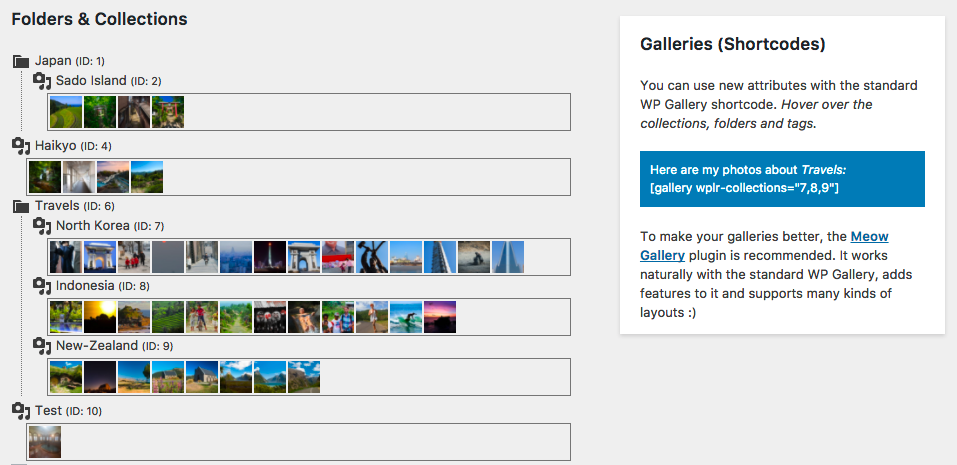
WP/LR Sync provides a gallery overview in the backend which lists the collections imported from lightroom and associated shortcodes:
https://meowapps.com/wp-content/uploads/wplr-sync-galleries.png (screenshot from WP/LR documentation)A simple support for the WPLR-Collection specification in JIG would be fine – it already works with the native wordpress gallery and JIG could take over from the there. It is not 100% essential to have a tree view in JIG – but that could be a gamechanger.
A possible fronted integration JIG could include dropdown that you could quickly search through folders by typing the first few characters of a collection name. Now that would be fantastic.
Thanks again for your all your help.
Would you be interested in beta testing this? We’d like to issue the update for the fixes that are urgent then make WPLR direct in a nonrushed way.
Hey! I bought this plugin and wanted to start working with it but I couldn’t find any icon or possibility in Gutenberg to use it. Could You help?
O.k, what this means: JIG can automatically take over the regular Gutenberg gallery block? Doesn’t look like it’s doing it
Also, it isn’t visible in classic block
Isn’t it like this for you? https://i.snipboard.io/8lXnwo.jpg
The pictures block is just a regular gutenber-based gallery.
Nope, can’t see that icon.
Please send a mail from our profile, we’ll need to log in with temporary wp-admin access and check it out.
O.k sent
Replied with a solution
Thanks! Fast support and problem fixed
Hello, in hope you are well and safe. I recently updated my website and the link to the product page has disappeared and i have no idea where it has gone or what has changed and where to start troubleshooting it.
this is the shortcode that i have been using. [justified_image_grid lightbox=photoswipe recent_posts=yes recents_post_type=product caption=fade caption_opacity=1 caption_bg_color=transparent caption_text_color=black v_center_captions=yes thumbs_spacing=0 last_row=center recents_link_to=image recents_link=yes recents_link_text=”View details and add to cart” recents_custom_links=yes filter_style=buttons filter_all_text=”View all” filter_all_button=yes orderby=title_asc filterby=product_cat]
The shortcode looks okay, could you please link to the page in question?
Request: direct integration with WP/LR
Hi we are a long-time user of JIG
After the last few updates with WP/LR and Real Media Library we have gotten increasingly frustrated with the folder synchronization between the two – and syncing processes which take days to complete with thousands of images.
Do you have any plans to link directly to the WP/LR collections in the future?
It would save a lot of headaches of syncing and re-syncing through WPRML and be a great solution to create live galleries from inside lightroom that can be easily integrated into wordpress.
Several other gallery plugins do this like FooGallery and Envira Gallery. We would much prefer to have the functionality of JIG vs the others.
Thanks!
Yes we plan that for the next update (after today’s v3.9.6) along with collapsible tree options. Send a mail from our profile to sign up for beta testing as we are interested in working with you on the WP/LR direct feature.
Wouldn’t this speed up your resyncs btw? https://i.snipboard.io/bXta5m.jpg
Just installed the update – 3.9.6 first one since july 2019! I am amazed at your quick work on this.
Noticing that in the WP Real Media Library Section there is now a “WPLR OK” message and dropdown that shows our Lightroom collections directly. – it is nonfunctional meaning it does not create a gallery.
I am assuming that this will work a future update? We are more than happy to help with beta testing on this. You guys rock.
Yeah we’ve been trying things and it was left in. Sorry it’s a hiccup, will remove it asap. Will send you beta versions via email that will include working WPLR, it’s and interesting and common sense approach for photographers to use Lightroom with WordPress this way!
Sent you a mail. Thankfully that only appears for WPLR users and those that upgraded while it was faulty, so that might only be you, and you noticed it!
WP/LR direct: not yet but close. I’ve just found out that if you use Meow Gallery, (which is by the same developer of WP/LR sync) it is taken over by JIG by default. It’s because they use native WP gallery shortcode behind the scenes. The trick is that Meow Gallery directly integrates with their WP/LR sync solution, so it’s essentially another way for Lightroom to JIG to exist (without WP RML). Meow is free.