6659 comments found.

Hello… do you offer admin fields so that a user can submit a form, the admin receives the form, fills in specific fields that in turn gets sent back to the sender. Do you offer such functionality and what is the name of this feature (admin only fields that get sent back to the submitter)
Hi
Sorry about the delay. You can mark any element as “admin only” by going to the element settings – Advanced – Visibility. Then you can fill in these fields by editing the entry.
You could set up an autoreply email that is not Enabled in the notification settings, so that it’s not sent when the form is submitted. On the View Entry page there is an envelope icon in the bottom right corner of the page, click this then select the autoreply to send it.
Regards, Ally
Hi there,
Few questions,
1. If I buy this, no need to buy add ons to work all of this functions / features right?
All of these, Template, Elements, Themes, Functionality, Logic, Layouts, Playgrounds.
2. How many site can I use this?
3. This a wordpress plugin right?
4. Is there a way to upload a picture right from the camera, I mean taking selfie not uploading picture.
Best,
Hi
1. Yes, no add-ons are needed for these features.
2. You can use the plugin on one site at a time. It’s a one time fee for lifetime updates.
3. Yes.
4. You can use the File Upload element for this. On mobile devices when the user taps on the field they will be given the choice to use the camera or select from the gallery.
Regards, Ally
Hi ThemeCatcher AUTHOR
Thanks for the answer and also the time, will buy sooner…. =D
Hi,
Is there also a search elements? Example I want to browse records?
Is that possible?
Thank’s
And also a signature pad? If they have?
Thank’s
Hi
There isn’t a search element in the plugin, I wouldn’t recommend using Quform for a search form. There is a search field in the Entries page in the admin section to search submissions (entries).
Currently it requires some custom code for a signature field, we have a guide here but you might need a developer.
Regards, Ally
-
Hello,
Great plugin, one of my favorites here….
I am struggling to make the default input lines thinner. They are currently 2px, and trying to change this value but couldn’t find anything in the documentation in regards to making them thinner.
Could you kindly provide a clue or link? That would be greatly appreciated.
Thanks a lot and congrats for the great plugin!
Hi
The field border width is set by the form theme – it looks like you’ve changed to a different one already.
You can change it to 1px by going to Edit Form – Settings – Style – Global, at the bottom click “Add global style” and choose the selector “Text input fields” and add the following CSS:
border-width: 1px;
Repeat this for the selectors “Textarea fields” and “Select fields”.
Regards, Ally
Hi Ally, Many thanks for your kind assistance and response. Wishing you all the best of success with your plugin! Best,
May I know can support capture utm parameters?
Hi
Yes, you can add Hidden fields to the form to capture these. In the field settings enable the Dynamic default value option and set the “Parameter name” to the UTM parameter name.
See this guide for more information about this feature.
Regards, Ally
Possible to limit submission once per logged-in users?
And limit submission to logged-in users only?
And limit total number of submissions?
And will I get to display the number of submissions left in the frontend?
Hi
There is nothing built into the plugin for these yet, so it will require some custom code or a workaround.
See this guide for limiting submissions to one per logged-in user.
To allow only logged in users to use the form, see this guide.
To limit the number of submissions, you can visit this page and click Download ZIP to get an installable WordPress plugin. Activate the plugin then edit the form and add a new Hidden field. Set the Label to max_number_of_submissions and on the Data tab set the “Default value” to the number of allowed submissions.
With this plugin you can also show the number of remaining entries, using this shortcode:
[quform_remaining_entries id="1"]
Replace the number 1 with the form ID.
Regards, Ally
I would like to suggest being able to email the form submitter directly from the entry Submitted form data page. Thank you, Kimberly
Hi
Thank you for the suggestion, I’ve added it to our development list.
Regards, Ally
Thank you very much.
Hi! I cant see our Quform form in WPML string translation and any other places. You wrote here 7 years ago, “Full WPML support is planned for the future.”
When or Where can i translate it?
Hi
It’s still in our plans but unfortunately we haven’t got around to implementing it yet. I don’t yet have an ETA for this feature, for now you can use this guide to integrate with WPML.
Regards, Ally
hi I bought yesterday 2 licences instead of one by mystake, HOw could I get one of them refund or recredited into my account ? I sent a ticket to your support team but I did not have any answer so far. I need it urgently as my web site is in “production mode”
thanks for your help
Hi
I sent you an email earlier. If you can complete this form I can approve the refund for you: https://codecanyon.net/refund_requests/new
Regards, Ally
hello, can this form create fronted form to allow anyone to publish post?
it’s okay,
this plugin support repeated field / loop?
or in easy way user can create post (‘post_content’ => $content) content like this one. I want to create food recipes form for my wp user
Ingredients Group Title (textfield)
— ingredients (textfield) + amount (number)
— ingredients (textfield) + amount (number)
[add ingredients] (button)
Ingredients Group Title 2 (textfield)
— ingredients (textfield) + amount (number)
— ingredients (textfield) + amount (number)
— ingredients (textfield) + amount (number)
[add ingredients] (button)
[ADD INGREDIENTS GROUP] (button)
thx
Hi
The plugin doesn’t currently support infinitely repeatable groups, however you can add support for a certain number of groups by following this guide.
With a bit of custom JavaScript you could have a button to increment the value of the “How many?” select menu, and you can hide the menu with CSS. You may need a developer for this part.
Regards, Ally
Hİ again 
im using save for later button (https://support.themecatcher.net/quform-wordpress-v2/guides/customization/saving-form-data-for-later)
this my form https://youthfoundation.az/regngo this form configured Repeatable groups and page tabs (next) but save button saved data only 1 page and 1 Repeatable group
how can i fix this Thank u very much
Hi
Sorry about the delay. I tested a multi page form with repeatable groups + save for later button and it worked for me.
There is a limit to the size of the data that can be stored in a cookie. With a form as big as yours you are very close to going over this limit, even with an almost empty form. It seems that once you go over the limit the cookie fails to save.
The solution is not to use cookies for this, the best alternative would be to send the form data via Ajax, along with a unique identifier for the user, save the unique identifier in a cookie and also in the database along with the form data.
In the quform_pre_display hook function check for existence of this cookie then populate the form data from the database. There is nothing built into the plugin for this, so you may need a developer.
Regards, Ally
Hello there. I want to ask something. I want to use a single form. checkbox will be your choice. I would like to send different email content by choice.Is it possible to do so?
example: 1,2,3,4 have options.If 1 selects different content will be sent. If 2 selects different content will be sent.
Hi
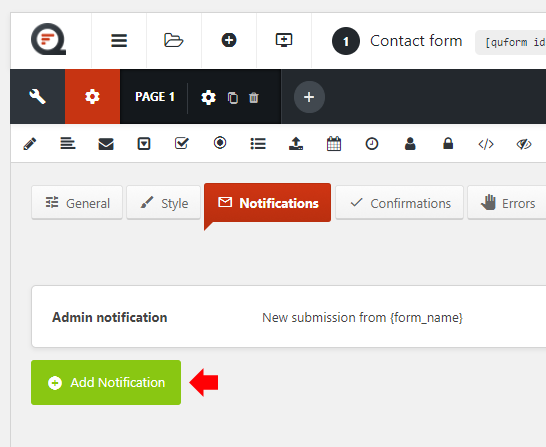
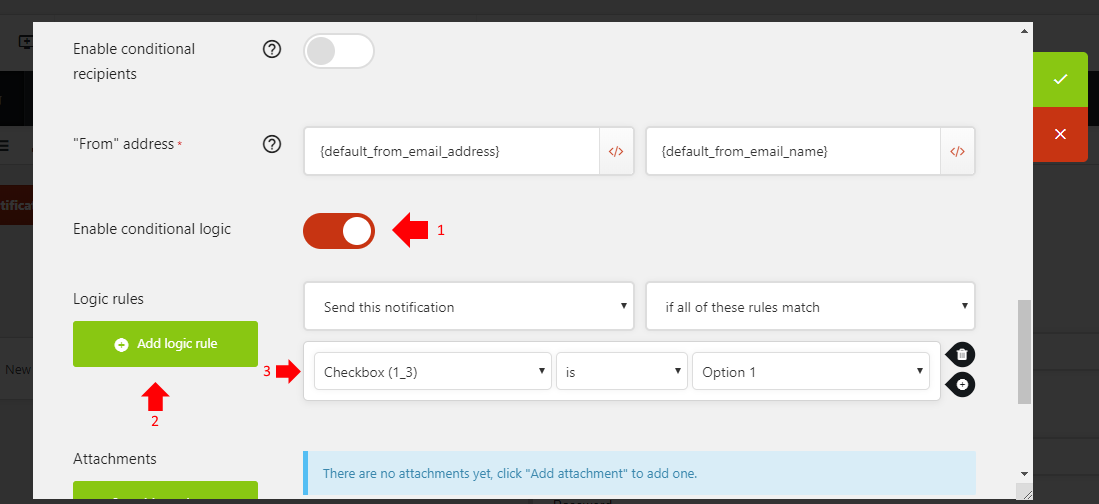
Yes, it’s possible. If you go to Edit Form – Settings – Notifications, and click Add Notification for each different email content you need. In each notification settings, configure the email content and other settings, then click “Enable conditional logic” and set the logic rules that will trigger this notification to send.
Regards, Ally
I can’t do it on demo. I don’t know what to do. where part of the notifications. share a screenshot?
Hi
Here is a screenshot of where to add notifications.
Here is a screenshot of how to configure the logic rules for a notification.
Regards, Ally
No anwser no help!
Hi
Sorry about the delay. I’ve replied to your previous comment.
Regards, Ally
Is this plugin integrated with MailChimp? Can the form information sync directly to MailChimp so we can do email marketing back to these people who submitted the form?
One more question. Can I do popup form with steps? And can I add an image or text on each step? e.g. customer review or an image of our team.
Hi
Yes, we have a free Mailchimp add-on available here.
You can choose to make it a popup form when inserting the form. The popup form can contain multiple steps. You can add text/images and shortcodes by adding a HTML element to the form.
Regards, Ally
Hi,
I have 2 forms on my site and I have just updated Quform to the latest version 2.9.1, however now one of my forms will not show the preview in the backend when editing, whenever I load the form to edit the preview side shows the following error:
An error occurred loading the preview (Ajax error)
I tried the other form and that works just fine with no errors and displays the preview ok, both forms also work fine and submit with no problems, it’s just one form now will not show the preview when editing?
Cheers, AJ.
Hi
By any chance does this form contain a Select Menu, while the working form does not? If so, it’s most likely due to the ModSecurity Apache module – it’s blocking the request to preview the form because it contains the string ‘select’ which is being wrongly detected as an attack. If you have cPanel access on the server you can check if this is the problem by going to Security – ModSecurity and turning it off for the domain (video), then wait a minute and test the form again.
If this fixes the problem and you want to keep ModSecurity enabled you will need to find the rule that is causing the problem and disable this rule. You should be able to find the rule ID in the web server error log at the time that the Ajax error occurred. You can ask your host to do this if you are unsure.
If this isn’t the issue, can you try checking for plugin/theme conflicts using this method.
Regards, Ally
Hi Ally, thanks for your reply. 
The problem form actually has no Select Menu fields at all, in fact, it’s just a very basic contact form with the following fields:
Name
Email Address
Text Area
Recaptcha
The form that works ok does have select menus and a lot of other fields.
I will check for theme/plugin conflicts later tonight when the traffic to the site is low and will report back my findings, I did, however, disable my Wordfence plugin in as a test in case it may have been causing the problem, but this didn’t make any difference.
Cheers, AJ.
Hi Ally,
I have just used the method you suggested to check for plugin/theme conflicts and it still showed the Ajax error on the preview of the basic form with all plugins deactivated (except for Quform) and using the default Wordpress Theme, so unfortunately that doesn’t look to be what is causing the issue.
What else can I try or do?
Cheers, AJ.
Hi
If you want, I can take a look at your site to find out why this is happening. Could you please send over administrator login details and your admin URL to the contact form on my profile page. If you’d prefer not to send us the main account login, you can create a temporary user account just for us with the “Administrator” role, which you can then delete when the issue is resolved.
Regards, Ally
Hi Ally,
I have sent you a message with the requested details, many thanks!
Cheers, AJ.
Hi Ally,
Just wondering how you got on with this or if you have any updates on what the problem might be?
Cheers, AJ.
Hi
I sent you a reply email before about this, did you not get it?
Regards, Ally
Hi Ally,
No sorry I have not received any email from you? , I even checked my spam folder and nothing there either.
Cheers, AJ.
Hi
This is what I said:
I can’t see anything unusual in the form settings. The server is responding with the message 403 – Forbidden – Access to this resource on the server is denied!
I don’t believe this is an issue with the Quform plugin. The reason that this is happening is probably logged in the web server error log. Please check there if you have access, or ask your host to do so.
Regards, Ally
Hi Ally,
I have checked the server error log and the last entry was on the 11/06 but was nothing to do with Quform, so I’m at a loss as to what is going on.
It seems really strange that the complex form is working ok yet the very basic one is showing the error, I would have thought it would have been the other way around, or if it was a server error then both would display the same symptoms?
Anyway, I will log a ticket with my Host to see if they can shed any light on what’s going on from their end, other than that I will just have to make do without a preview of that form, and as it’s just a contact form it will very rarely, if at all, change from what it currently is, and any future edits will need to be checked live instead.
Thanks for looking into it anyway, I appreciate it.
Cheers, AJ.
Hi Ally,
I just wanted to let you know I think I may have found the problem!
I made a brand new form identical to the problem form, same fields, same settings, it was a complete copy but done from scratch, and the whole time I was designing it the preview display was working fine and no Ajax errors, however I then saved the form and closed the window down, then clicked on Forms again, I then clicked on the new form to edit it again and, it too now showed the same Ajax error and no preview??
So I slowly went backward undoing everything I had done but in reverse order, and strangely when I deleted the AutoReply under Notifications, the preview started working again!
I’m not sure exactly why the AutoReply is causing the Ajax error yet, only that if I remove it the preview works, if I add it back it doesn’t, however, I will keep investigating to try and find the significance of this one setting and why it’s producing the Ajax error, unless you might be able to shed some light on why that may be causing it to fail if it’s present?
Cheers, AJ.
Hi again,
Further to my last, I have now found the exact issue, it is to do with the Recipient Address, if I try and use it normally like {element|id:4|Email address}, which is the email address field the person filling out the form puts their email address into (Submitted Form Value), then it produces the Ajax error, however as a test I tried {user|user_email} (under User) and the preview then works fine?
Cheers, AJ.
Hi AJ
Good job with the investigation. I still believe it is an issue with the web server, as the 403 Forbidden error is happening before the request even reaches the Quform code. It has the symptoms of ModSecurity blocking the request as a security measure (false positive), though I would expect there to be an entry in the error log when this happens. The string {element|id:4|Email address} must be triggering something on the server. Can you check if ModSecurity is enabled on the web server? If it is enabled, please try disabling it temporarily then check the form again to see if this is indeed the cause.
You could also try temporarily enabling debug logging to check for any PHP related issues.
Have you had any luck with your host?
Regards, Ally
Hi Ally, apologies for the late reply but I have been away.
For some reason or another, the problem seems to have now resolved itself! , I was in the middle of logging a support ticket with my Host and decided I would log in and check just once more and also be sure I had all the needed info/screenshots to supply them, and when I went to edit the form strangely the preview is now showing again and seems to be working fine!?
I have not changed or done anything since I last spoke with you so I reckon you were right and it may have been a server side issue which has now, mysteriously, righted itself and is now ok.
However, I can confirm mod_security is enabled but unfortunately I do not have direct access to it and it can only be managed by my Host, but I will keep an eye on things and if it happens again I will contact my Host first and give them all the info I have, as it does now seem to point towards a server-side problem.
Thank you so much for all your help and support with this though, it really is appreciated and just goes to show why this Plugin is rated so high, fantastic support as always!
Cheers, AJ.
How do we find out which domains are assigned to each license? You hide the license key once it is confirmed. I am trying to move a license from one domain to another.
Man, your policy of forcing us to use your forum and then not allowing us to create a new topic really blows. I have 8 licenses with you and I guess I need to use another solution. I am trying to get a list of which domains are assigned to which licenses. Very uncool how your manage your customer support.
Hi
Sorry about that, you can always contact us here on CodeCanyon.
You can find out which domain a license key is associated with at this URL:
https://api.quform.com/wp-json/quform/v1/lookup?purchase_code=xxxxxReplace xxxxx with the purchase code.
Regards, Ally
In the receive email of Qform is the title of the email the template name, so for me “AVADA PROMOTE”. How can I edit this? Thank you
Hi
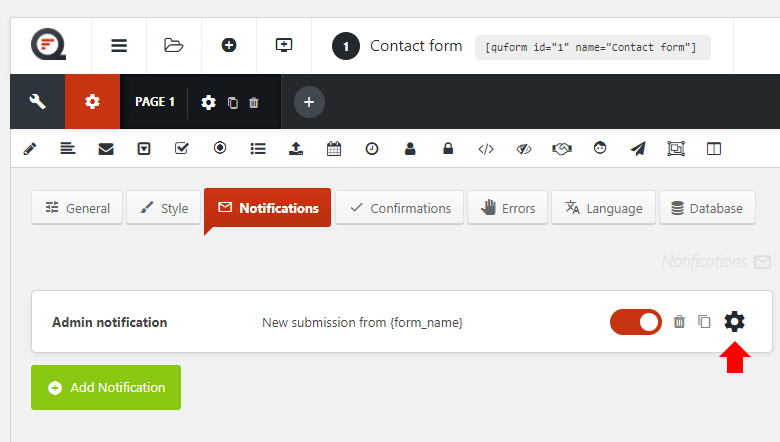
Please go to Edit Form – Settings – Notifications, then go to the settings for the “Admin notification” (see this image) where you can edit the Subject field.
Regards, Ally
Hello
Quform can handle the points below ?
How many points is practicly possible with your plugin ?
1) Hiring a interpreter from 12:00 to 14:00
2) The calendar should only make available unoccupied days
3) For example, the reservation of an interpreter for the month of May 2,3,4,5,20,30 (6 days)
4) Display Price for user
5) Sending a request without online payment
6) In the case when the order gets (by me) the status of “confirmed” (paid) reserved days become unavailable.
7) And Notification is sent to client that reservation #098098 is done (we will contact you shortly)
 Client can cancel reservations via email or sms or via website
9) Automatic reminders via email or SMS
Thank you very much
Client can cancel reservations via email or sms or via website
9) Automatic reminders via email or SMS
Thank you very much
Hi
Points 2, 6, 8 and 9 are not possible with Quform (without custom development). The form would have to be edited manually to mark days as reserved. Perhaps you’d be better off with a booking plugin.
Regards, Ally
Hi, I´m searching for a Wordpress Form Builder, but I need to have a custom field in a registration form called “Referred” this field should have autocomplete feature and should autocomplete with already registered user´s names. It´s possible with this plugin?
Hi
There is nothing built into the plugin for this currently, but it is possible with custom development.
You can implement any autocomplete script onto the Quform Text field, and have an Ajax handler to search the registered user’s names and return the results, but you might need a developer for this.
Regards, Ally
Hello. I try to bring my users information thru a hidden field in my forms, but it only shows display_name? What i want is to bring name, country and store fields from the form the user used to register in my website, in that way i know who is sending which information.
Hi
You can use the {user|_} tag to get column data from the wp_users table. E.g.
{user|user_email}
{user|user_login}
You can use the {user_meta|_} tag to get user meta data from the wp_usermeta table. E.g.
{user_meta|first_name}
{user_meta|last_name}
Regards, Ally
Thank you for a great plugin! Currently installed plugin version 2.80
From time to time I receive customer complaints not being able to send messages via the QuForm because of “Ajax error”.
I also receive this kind of error but it is quite random: if i do repeat the steps, the forms submits the information well. Or might not submit well.
I have checked the Concsole for errors:
quform.js:22 POST /late/ 503 i quform.js:22 setTimeout (async) c quform.js:22 e.fn.ajaxSubmit quform.js:22 d.submit quform.js:49 (anonymous) quform.js:49 dispatch jquery.js:3 r.handle @ jquery.js:3
In the network panel:
Name-Status-Type-Initiator-Size-Time
late/ 503 document quform.js:22 749B 582ms
Could it be because of slow server and timeout problem? How can this be solved?
Many thanks!
Hi
It appears that the server is responding with a 503 error when submitting the form, I’ve never encountered it with Quform before. It’s possible that the server is overloaded.
If you have access to the web server error logs (Apache, nginx), the cause of the error is most likely logged in there. You can ask your host how to access this if you don’t know how. It’s also worth checking the PHP error log (see enabling debug logging).
You could also try checking for plugin/theme conflicts.
Regards, Ally