4571 comments found.

Hi,
Unfortunately, displaying posts in a time line list is not an option in the plugin.
Thank you
Bug report.
When you search for a specific address on a map, and then enlarge the map for the full screen mode, the search result gets cleared and the map shows a map based on user’s current location.
Ideally, the search results should be kept even on the full screen mode.
Hi,
I’m afraid this is not the case. Can you please confirm that this happened in the latest version of the plugin 3.9.2?
You can try this yourself in the demo page https://codespacing.com/wordpress-plugins/progress-map/
Thank you
How can I let my users manually enable geolocation? I need to keep the geo icon on top of the map all time time, but when I set the geolocation feature off from the setting, the icon also disappears.
Hi,
This is not an option in the plugin. The user will always have the possibility to activate/deactivate the geolocalization from the browser. I suggesst you enable the geolocalization option and let the user decide if they’ll use it or not.
Thank you
Hi there, I need help please. I whant to use nearbyplace list on the bottom and the map on the top, and my question is i need to use 2 shortcodes? one for map and one for nearby places? if not how can i do that? if yes how can i make that working.
thanks for the help
Hi,
For support, please contact me from the account you’ve used to purchase the plugin.
Thank you
Hello, I’ve been trying to figure out how to incorporate an ACF field to the map carousel description or tooltip. Is this possible?
ACF says to reference their fields as such: [acf field=”name”]
Your examples show: [CUSTOM_FIELD_NAME]
Can you please guide me on this? Thank you!
Hi,
You simply need to provide the name of the ACF custom field. For example, if your ACF custum field name is “address_field”, simply use the shortcode [address_field]. Note that ACF adds a hidden prefix to the custom fields and you need to add it to the name. In this case our example will look something like [acf_address_field].
Anything you want to know about this can be found at https://codespacing.com/wordpress-plugins/progress-map/documentation/user-guide/#build-a-custom-content-from-custom-fields-andor-categories-for-the-carousel-items
Thank you
What API do I need to make Search feature work? It just keeps returning the address can’t be searched. I’m guessing this is because missing API, but not exactly sure which one.
Hi,
Please check this post for more info about the required APIs. https://codespacing.com/wordpress-plugins/progress-map/documentation/user-guide/#activating-the-required-gmaps-apis
Thank you
Thanks, this solved the problem.
Hi there, we installed your powerful plugin to use for a client. We got about 4.500 markers, already deactivated the carousel. You can find desired functionality on dev.broedl.de/map3/ – is there a way to get more speed? We have a page load time with about 30-40 seconds. Clustering ist not practical, is there a way to cache it? Best, Martin
Hi,
I tried your map 6 times and each time it loads in about 11 seconds. I highly recommend to use the clustering feature. This will significantly increase the map’s loading speed.
Thank you
Hi there, is it possible to do some map like http://clifi.eu/en/ an to have some turbines as svg or gif, so that the turbine are roteted. thanks
Hi the turbine should look like this one. https://www.svidget.io/examples/windturbine
Hi,
Yes you can use the plugin to build a map like the one in your example. You can use animated GIF images for your markers. SVG icons can be used in the next version 4.0. Animated SVG icons will not be supported.
Thank you
Hi, I’m trying to use the ‘Posts to retrieve’ field and I’m just getting never ending loading icon. Same goes with the ‘posts to ignore’ field.
I’ve seen a comment from a few months ago saying this would be resolved but I’ve installed the plugin a couple of days ago on the latest version of wordpress and am getting this issue.
Thanks
Hi,
I’ll fix that issue ASAP.
Thank you for your patience
how to contact you personally by call. Actually i’m in need of Progress map plugin but i cant filter certain places in canada through your demo data of search filter option.
Hi, I just updated from 2.8. to the current version. I followed your Guideline step by step. With the new version installed, I find no old maps under “all maps” though. Also, also my settings are gone when I create a new map.
I set the installation back to 2.8. for the time being.
Please help so I can do the Update.
Regards, Oliver
Hi,
Let me do that for you. Please send me the login of your site to plugin.progressmap@gmail.com and please mention your username (ohasse) in your message.
Thank you
Hi – client wishes to move their existing install over to Squarespace. Does your Progress Map product port over to Squarespace by any chance?
Thanks!
Hi,
Sorry but i don’t have any idea.
Thank you
Hi, the problem with the map buttons with retina display iOS (iphone 6 7 etc..) how do you solve it?
Hi,
Please provide more details about this problem.
Thank you
Hi. How can I make a search by category on the map? My map is here http://luxdachy.tomaszow.pl/realizacje/ I would like to have these options on my map https://codespacing.com/wordpress-plugins/progress-map-list-and-filter/ I have purchased the Progress Map, List & Filter plugin. Please help me. Thanks
Hi,
The add a category to your search filter, please follow these steps:
1. Edit your map
2. In the widget “List & filter”, click on the menu “Search filter settings”.
3. Scroll down to the section “Taxonomies Parameters”.
4. Click on the button “Add new taxonomy”.
5. Select a taxonomy from the select list “Taxonomy name”.
6. In the field “Label/Title”, enter the title to be displayed in the filter.
For more info about filtering posts by publish date an other search settings, please check the user guide https://codespacing.com/wordpress-plugins/progress-map-list-and-filter/documentation/user-guide/#search-filter-settings
Thank you
Dear Codespacing,
I recently bought your plugin (from a other account though) and have some issues with getting the plugin to work. I’ve spent several hours with trying to get this work, but I’m not able to get the individual items (posts) to be displayed; when I try to give them latitude and longitude geocoordinates, nothing happens. If I try it with the Search + Pinpoint, still nothing.
Can you please advise? I don’t get an error message nor anything that would indicate what the issue is.
Kind regards,
Balázs
Hi, I’m using your plugin, but it breaks my page html. It should be a full row but something goes wrong.
Real page: https://sitowebprofessionale.it/demo/tarquinia2/look-at-the-map/ Only map: https://sitowebprofessionale.it/demo/tarquinia2/map/With row width “In container”, the map looks ok (left and right margin are correct), but it breaks footer any case.
Could you help me?
Thanks
Hi, I’m still waiting an answer. I need to put my website online.
Can you help me?
Thanks
Hi,
It’s a CSS conflict with your theme. I added the fixes to your site. Please check again if everything looks fine.
Thank you
Sorry, but I don’t see difference, page is still broken. Where did you add css? Because it’s not working.
Hi,
I’ve added the fixes directly in the plugin’s CSS file and added another CSS code in the field “Progress Map => Troubleshooting & configs => Custom CSS”. Please clear your website’s & browser cache and try again. I’m sure it works fine.
Thank you
I purged cache before and I did again now. I’ve also copied that css in theme settings to be sure and I used 4 different browsers, but it doesn’t work. The page is broken. Please check printscreen: https://prnt.sc/k0l4ro
Hi, is it possible to fix the problem? I need to deploy it online.
Hi,
Please bear with me. I’m currently working on an update that will fix your problem. The update will be available in 2 or 3 days.
Thank you for your patience
Ok, don’t worry. I’ll be waiting.
Thank you
I’ve updated to last version but problem is still there 
Hi,
You didn’t update the main plugin “Progress Map” to the version 3.9.2. I just updated the plugin in your website and evrything seems fine. Can you please confirm?
Thank you
Yes, it works. I had updated both, but the zip file contained 3.9 version. I’ve tried to download again and it corrected now, maybe I was too fast… Thanks
Nice 
There’s a new BIG problem. On map I can select only article post, other custom post type (neither page) aren’t in the combo. I was changing something on map and I saved without look at that. Now map is empty because I use portfolio post.
There’s no problem at all. You just had to select your Portfolio post type in “Progress Map => Plugin settings => Post types”, then, you had to edit your map and select the Portfolio post type in the field “Main post type”.
Check your map it works fine now.
I hadn’t removed portfolio in plugin settings. You saw markers on map before. Anyway, thanks
Hello,
after your 3.9 update that had promiss to work fast with no slow loading …. It really happened !  well done Codespacing . Great job ! my whole websit become faster, rank higher and even integration with ArForms is possible now as it deosnt cause slow loading anymore.
Question: would be possible to add product prices to/over/under infoboxes
cheers
Hi,
I’ll see what i can do about this. I was also thinking about adding this feature to the plugin.
Thank you
Is pagination broken? See https://usahasosial.com/community/map/ and check that clicking next pages does not refresh the list.
Hi,
Please send me the login of your site to plugin.progressmap@gmail.com to check this. Please mention your username (qriouslad) in your message.
Thank you
Thanks. I avoid handing over admin login unless absolutely necessary. I hope you understand. That said, I have additional info to share that might help troubleshoot the issue:
1. When I change the sort option, e.g. to “Title A to Z”, the pagination works. Including changing it back to “Default” will make pagination work on the “Default” sort. Note that pagination doesn’t work when loading the map page the first time with the “Default” sort option.
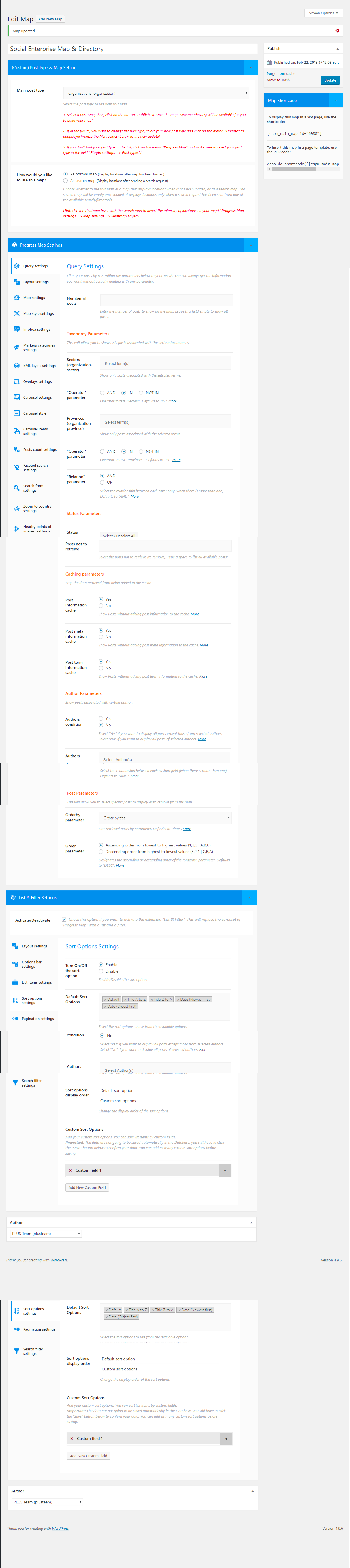
2. Please find attached a screenshot of the settings for the map at https://usahasosial.com/wp-content/uploads/2018/02/PLUS_se_map_settings.png
Let me know if this is useful info to troubleshoot, and if you’d like me to try out a few things in the settings. I’ve also tried turning of caching and changing query parameters to no avail.
Thanks!
Hi,
The settings seems ok. Please try this:
1. In your administration, click on the menu “Settings => Permalink”.
2. Check the option “Plan” and save your changes.
3. Clear your cache.
4. Go to your map and check if the pagination works fine.
5. Go back to “Settings => Permalink” and select the previous option “Post name”.
6. Clear you cache again.
7. Go to your map and check if the pagination works fine.
Please let me know what you notice.
Thank you
Thanks. I tried that and at step 4, pagination works, but at step 7, it is not working again. Any further clues?
Any further clue please?... pagination is still not working…
Hi,
Sorry for the delay. There must be a PHP error somewhere. Please edit the file “wp-config.php” that you can find in the root of your website and do the following changes:
1. Change the line
define('WP_DEBUG', false);
to
define('WP_DEBUG', true);
2. Add the following code right after the line: define(’WP_DEBUG’, true);
if ( WP_DEBUG ) {
    error_reporting( -1 );
    @ini_set( 'log_errors', true );
    @ini_set( 'log_errors_max_len', '0' );
    @ini_set( 'display_errors', 1 );

    define( 'WP_DEBUG_LOG', true );
    define('WP_DEBUG_DISPLAY', true);
    define( 'CONCATENATE_SCRIPTS', false );
    define( 'SAVEQUERIES', true );
    define( 'SCRIPT_DEBUG', true );
}
These changes allows to find any PHP error. It would be helpful if you do these changes and send me the login of your site to check the errors myself but you can do this yourself and tell me what you find.
Thank you
Hi,
I tried what you suggested. Nothing related to progress map was recorded in debug.log during the pagination event/click when it’s not working. This is after disabling Autoptimize’s JS and CSS optimizations as well. I’ve also tried installing Query Monitor to see if anything is recorded there. Nothing as well.
I even went as far as disabling W3 Total Cache and Autoptimize. Pagination still doesn’t work until I choose a sort option other than “Default” on the map. Could it be that some code related to the “Default” settings is faulty?... UX-wise, “Default” also does not mean anything to the user don’t you think?
So, perhaps, a solution is to allow site admin to choose which sorting method is the default use upon map load?... as opposed to showing “Default” on the map sort option. Interestingly, even removing ‘Default’ from the settings does not really remove it from the front-end sort option dropdown menu. At least until I select one of the other sort option (e.g. Title A to Z), only then will the ‘Default’ option disappear.
Hopefully some clue there for a potential fix.
Thank you.
Hi,
I’m still trying to reproduce the same issue in my test site and trying to find out what could be the problem.
Thank you for your patience
Thanks. Could it has anything to do with beta support for WPML?... the CPTs on the map mostly are “duplicated via WPML” (not independently translated via WMPL). I appreciate your continued effort to replicate this issue and fix. Thank you.
Hi,
No clue. I wasn’t able to reproduce this issue on my test site. I’m sure this has nothing to do with WPML or the default sort option. Please think about sending me the login of your site, i need to see all your map settings, check the list of installed plugins and other settings in your administration. This could be a conflict with another plugin. I’m afarid this is the only option left to understand this problem.
Please send me the login of your site to plugin.progressmap@gmail.com and mention your username (qriouslad) in your message.
Thank you
hi, I can not update via ftp. despite not disabling the front memory insert. what should I do? Soner
Hi,
To update the plugin, remove the old version from your plugin’s page on your website and upload the latest version from the same page.
Thank you
Hello, I just purchased your WP Progressmap and Progress Map, List & Filter – Plugins. All works fine except: the Toggle Fullscreen view is not visible on the map.
My theme DIVI is responsive and it allows the Fullscreen with another plugin (Advanced Google Maps Plugin for Wordpress) I tried to read all your documentation, comments and tried a ton of things before contacting your support. Please Help Best Regards
Testing ProgressMap URL : allianz.moving-africa.com Testing Advanced Google Maps URL : allianz2.interactive-africa.com
Hi,
The fullscreen button will be automatically displayed on the top right corner of your map. If you’re asking about using the map tools (search, geolocalization, etc…) on fullscreen mode, please note that this option is not yet available on the plugin.
Thank you