8471 comments found.

where can i find more recent video tutorials? all i see are videos from 2013.
Sorry there are no other videos yet.
looks like most recent are from 2013? any chance of making a couple updated 5-10 min tutorial primers on basic use for those of us that aren’t super technically inclined?
Yes unfortunately these take a lot of time to create in that quality. I could do some quick ones but I’m not comfortable with that end result. I’m developing new products at the moment instead.
I do create videos on one on one basis to screencast as part of support. What would you like to know? Easiest way to get started and to use the plugin… or?
HI Can you reset the license for Justified Image grid, user ralphonz. My host changed servers and now it won’t update! Cheers
I’ve reset your license. http://justifiedgrid.com/support/faq/your-license-has-been-reset-what-does-it-mean/
It was bound to: http://rasta****ies.co.uk
That is where I was trying to update it but it wouldn’t work (http://rasta****ies.co.uk). The reset has fixed it though. Updated successfully now. Thanks.
I’ve recently started having a problem with JIG adding images to the sitemap. I was getting this error Warning: Illegal string offset ‘for_xml_sitemap’ in /wp-content/plugins/justified-image-grid/justified-image-grid-core.php on line 8655
Warning: Illegal string offset ‘id’ in /wp-content/plugins/justified-image-grid/justified-image-grid-core.php on line 8656
I disabled and then enabled the sitemap option in JIG, now I’m no longer getting a sitemap error, but the images in the gallery is not being added to the sitemap. I’m not sure what the issue is it worked fine before, thanks!
Please contact me from my profile, I’ll need to log in with temporary wp-admin access and check it out.
Hi , I have an problem :
When I try to share an picture wit faceboo it shows/shares only the featured picture of the post…
see/try for example her : https://wertheimerportal.de/bilder-196-michaelismesse-wertheim-sonntag-01-oktober-2017/#!
at Wertheim24.de it works .. https://wertheim24.de/bildergalerie-wertheimer-weihnachtsmarkt-mit-mittelaltermarkt-und-franzoesischer-markt-09-18-12-2016/#!
.what is/ can be the problem
Best regards Ray
I have 2. Problem within wertheimerPortal.de ...when i create an wp gallery for older gallery pics…. JIG does not work ..ist shos error …. i can create one post and send you again a link….
an 3. Problem . at Wertheim24.de my purcase code from 29 Feb 2016 does not work .. its says its used by another host…... it happened few minutes after when i entered my new purcase Code to wertheimerportal.de ( I tried the old code from wertheim24.de before on wertheimerportal.de )
thanks
Update : Sharing Problem solved I used the facebook APpp ID of wertheim24.de at WertheimerPortal
Links for Problem 2 :
without jig and older wp gallery pictures
https://wertheimerportal.de/schlemmer-express-wertheim-angebot-der-woche-unsere-currywurst-mit-pommes-450-euro/same new Post with jig and older worpress gallery pics :
https://wertheimerportal.de/schlemmer-express-wertheim-angebot-der-woche-unsere-leckere-currywurst-mit-pommes-450-euro/it says : ” There are no photos with those IDs or post 50258 does not have any attached images! “
I’ve reset your license. http://justifiedgrid.com/support/faq/your-license-has-been-reset-what-does-it-mean/
Is the sharing solved then?
Regarding the other issue try: https://justifiedgrid.com/support/fix/get-no-photos-ids/
1.Licence now ok.
2.No / Yes : Sharing at time on new Galeries dont work https://wertheimerportal.de/category/bildergalerien/
This is the last one which works (but it doesnt worked also before) https://wertheimerportal.de/bilder-mittelalterfest-auf-der-wertheimer-burg-samstag-23-09-2017/ From this on ist doesnt work at time : https://wertheimerportal.de/bilder-196-michaelismesse-wertheim-festumzug-samstag-30-09-2017/3.The : ” There are no photos with those IDs or post 50258 does not have any attached images! “ I changed [justified_image_grid] to [justified_image_grid id=50258] “
and doesnt work…
Now it says/said : ” There are no photos with those IDs or post does not have any attached images! “
double
double
Hi,
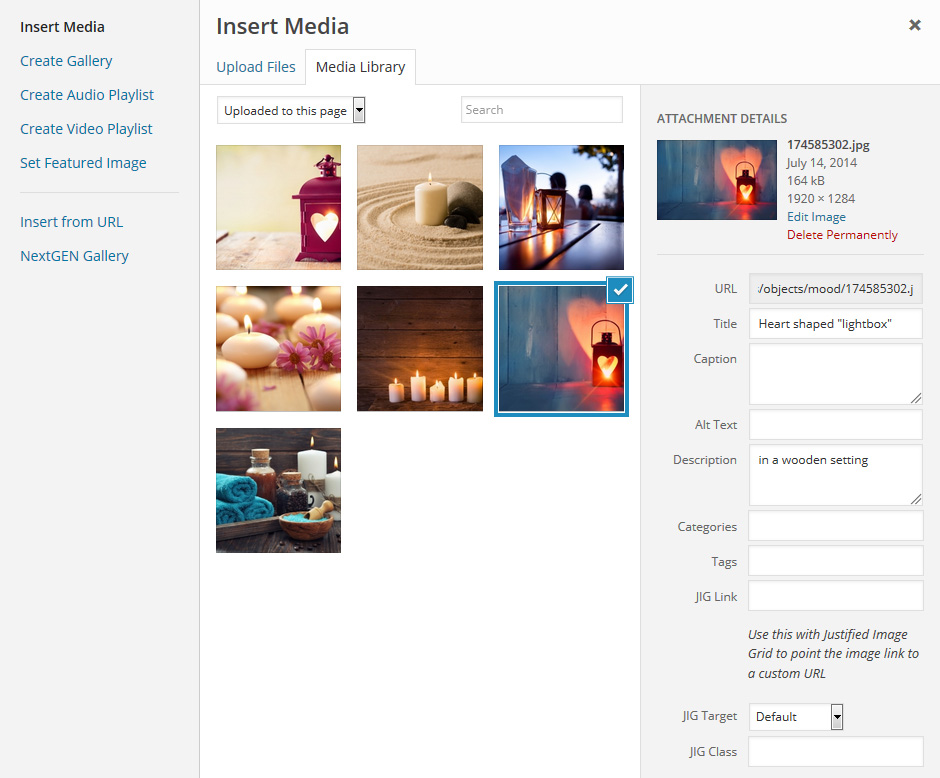
2. Your page (that has the problem: wertheimerportal.de) doesn’t load for me and/or very slow to load. What you can do is open an image (that opens in either prettyPhoto or PhotoSwipe) and copy paste the URL while the photo is open to this tool: https://developers.facebook.com/tools/debug/ It will look like this (this one is working you are right): https://developers.facebook.com/tools/debug/sharing/?q=https%3A%2F%2Fwertheim24.de%2Fbildergalerie-wertheimer-weihnachtsmarkt-mit-mittelaltermarkt-und-franzoesischer-markt-09-18-12-2016%2F%23!jig[1]%2FML%2F22472 Compare the results.3. Id means a post ID, try ids=* or add a bunch of image ids there. To utilize the shortcode without any attributes your media dialog must look like this: https://justifiedgrid.com/wp-content/uploads/uploaded-to-this-page.jpg see the dropdown on “uploaded to this page”. https://justifiedgrid.com/sources/wordpress/post-images-attached-images/
But you are better off using the automatically take over existing galleries. You’d create the galleries on the same screen and never see any JIG shortcode. https://justifiedgrid.com/sources/wordpress/images-by-id/
Hi , yes there was an sever Problem for few days , site was not reachable instantly.
...But back to the problem . 2 :
Yes I know the debug funktion of Facebook and using it very often .So I tried it but the result ist the samen . it debugs the Picture but it doest share this pichture.
my aktually galleries are : https://wertheimerportal.de/bilder-196-michaelismesse-wertheim-fanfaren-umzug-messe-impressionen-sonntag-08-10-2017
and still it doest work.
at Wertheimerforum I installed Foobox version and it works with foobox there , it shares the right picture : https://wertheimerforum.de/bildergalerie-196-michaelismesse-wertheim-tag-der-firmen-donnerstag-05-10-2017/also i bought Social Gallery and tested it here…but it jups out…shows not facebook design …. see here : https://wertheimerportal.de/bildergalerie-tuerkei-faszinierende-naturimpressionen-berglandschaften-seen/
Problen 3 . let us resolve first this problen then I will look for it to try fix and say what happens….
Hi,
I can’t see where it goes wrong.
This is the what FB bot sees view: https://developers.facebook.com/tools/debug/echo/?q=https%3A%2F%2Fwertheimerportal.de%2Fbilder-196-michaelismesse-wertheim-fanfaren-umzug-messe-impressionen-sonntag-08-10-2017%2F%23%21jig%5B1%5D%2FML%2F51200
And you can see here that JIG comments out the post picture (3 guys) and replaces it with the one I clicked share on ( https://wertheimerportal.de/bilder-196-michaelismesse-wertheim-fanfaren-umzug-messe-impressionen-sonntag-08-10-2017/#!jig[1]/ML/51200 ) so in the source it appears so: https://i.snag.gy/ihVa6x.jpg
It’s very interesting because it seems to not work on my home page too, while on the lightbox demos the individual sharing works properly… see sharing from: https://justifiedgrid.com/#!jig[1]/ML/8838 vs https://justifiedgrid.com/lightboxes/photoswipe/#!jig[1]/ML/9114 vs https://justifiedgrid.com/lightboxes/prettyphoto/#!jig[1]/ML/9430While on the debugger it shows what would be the correct sharing dialog preview: https://developers.facebook.com/tools/debug/sharing/?q=https%3A%2F%2Fjustifiedgrid.com%2F%23!jig[1]%2FML%2F8838 meaning that the tags are set/changed correctly.
FooBox uses a different approach that is neither better nor worse. Social Gallery doesn’t make much effor to share individual content I think, their indexed pages don’t seem to work for me.
Hi Firsch, Juste a simple question about titles… I use JIG with RML and I want to display title on folders (e.g. flowers, animals…) but not on the pics in folders (cat 1, Cat 2 …) Is there a way to do this ? Thx
Yes there is.
add this to General > Custom JS:
 if (/rml-content/im.test(window.location.href)) {
        jQuery("<style type='text/css'>.jig-caption-wrapper{display:none;}</style>").appendTo("head");
 }
Hi there,
please reset the licence for user wsrnteam.
thanks
I’ve reset your license. http://justifiedgrid.com/support/faq/your-license-has-been-reset-what-does-it-mean/
It was bound to: http://forever.***.de
Hi, I have this error on my page: https://gwccservices.org/videos/
Warning: Division by zero in /home/gwccserv/public_html/wp-content/plugins/justified-image-grid/justified-image-grid-core.php on line 14293
On Microsoft Edge whenever you click on a photo/video there is a 404 - Not Found Error.
Please let me know how to fix this.
Contact me from my profile, I have a fix for you.
Both are valid problems, the first one was caused by Facebook not sending width and height data for some videos (those that are tall or rectangular). In a sense that’s a bug that’s coming from Facebook API but manifests in JIG that expects the video size being supplied.
The other has to do with how Facebook handles the Video URLs. I updated that in the plugin so it’s more compatible with their new format.
Hi Firsh,
We have been using the JIG plugin perfectly for about a year, and recently the block with the JIG code is giving an error saying:
The requested RSS feed is empty.
The original code we had that was working for a long time was this:
[justified_image_grid row_height=165 prettyphoto_theme=dark_rounded overlay=everything mobile_overlay=same overlay_icon=on overlay_icon_opacity=.3 overlay_icon_url=https://www.ljcommunitychurch.org/wp-content/uploads/2017/03/play_white_sm-1.png overlay_icon_retina=https://www.ljcommunitychurch.org/wp-content/uploads/2017/03/play_white_sm-1.png last_row=hide disable_cropping=yes link_target=_blank rss_url=https://www.youtube.com/channel/UC93W-qi-CMIoI1Nj_jBBLgQ rss_links_to=permalink rss_description=nicetime rss_link=yes rss_caching=60]
We tried to make some changes to the settings, but still not working:
[justified_image_grid row_height=165 prettyphoto_theme=dark_rounded overlay=everything mobile_overlay=same overlay_icon=on overlay_icon_opacity=.3 overlay_icon_url=https://www.ljcommunitychurch.org/wp-content/uploads/2017/03/play_white_sm-1.png overlay_icon_retina=https://www.ljcommunitychurch.org/wp-content/uploads/2017/03/play_white_sm-1.png last_row=hide disable_cropping=yes link_target=_blank rss_url=https://www.youtube.com/channel/UC93W-qi-CMIoI1Nj_jBBLgQ rss_links_to=permalink rss_description=nicetime rss_link=yes rss_caching=60]
Can you please point me in the right direction to fix this?
Please try the latest version, YouTube changed their layout and older than v3.7 cannot read YouTube anymore.
That was the first thing I tried. We updated to 3.7, and we still have the issue.
Ok. Please contact me from my profile, I’ll need to log in with temporary wp-admin access and make a fixed version for you. For some reason it works fine for me when I use the YouTube addresses.
Firsh, sending you access to our backend via contact form to help us get this sorted out. The JIG block is still just showing an error ‘The requested RSS feed is empty.’
Ok, fixed, I updated you to the latest beta.
Firsh, you are amazing. Thank you.
Got this error all of a sudden: Warning: Invalid argument supplied for foreach() in /srv/users/serverpilot/apps/tswbintcom/public/wp-content/plugins/justified-image-grid/justified-image-grid-core.php on line 4009
Moved a domain to a new site on a multisite.
Any idea?
Turned out I had to save a dummy custom configuration and it’s gone!
Perhaps something got messed up during the move. Let me know if it surfaces again.
Hi, I recently switched over to HTTPS and JIG is now refusing to update. Can you please reset my license such that it can be associated with the new URL?
Also i have this messageL: Add your license key to JIG settings for automatic updates! Automatic update error! This purchase code has already been used on another host! You need one regular license for each different site. You can setup your staging area in a subfolder to have autoupdates on both installations. Contact JIG support to reset your license (only the username is needed).
I’ve reset your license. http://justifiedgrid.com/support/faq/your-license-has-been-reset-what-does-it-mean/
Thanks a lot!
Please reset the license for: JUmp Consulting. The staging site was created using the hosts tools and wasn’t in a subfolder.
Please let me know the username it was purchased with or the site URL.
Thanks for the quick reply. I thought that JUmp Consulting was the username, but the site URL is: jumpconsulting.net
It was bought by bellamaria30
I’ve reset your license. http://justifiedgrid.com/support/faq/your-license-has-been-reset-what-does-it-mean/
I’ve switched to SSL and automatic update doesn’t work anymore. I still use plugin in accordance with licence – on only one site (the same as previous, only with change from http to https). May I ask for reseting the licence?
I’ve reset your license. http://justifiedgrid.com/support/faq/your-license-has-been-reset-what-does-it-mean/
It was bound to: http://www.****piotr.**
Thanks! 
Hello,
It is been a long game for me with finding great image gallery. I even purchased Envira and it was such a disappointment. I’m back here now and looking to make this work for me.
In your PhotoSwipe lightbox I’m trying to set lightbox groups, but have no idea how to make one thumbnail which opens gallery in lightbox. It must be something pretty straightforward and I did copy provided shortcode but it displays only one photo 
My current shortcode is
[justified_image_grid preset=19 link_title_field=off img_alt_field=off prettyphoto_social=yes photoswipe_social=yes photoswipe_theme=light title_field=off caption_field=off caption=off mobile_caption=off lightbox=photoswipe mobile_lightbox=photoswipe lightbox_max_size=large last_row=center ng_tags_gallery=”newborns and siblings” ng_count=yes ng_lightbox_gallery=yes]
Thanks, Regards, Armands
Hi,
what is your content source? Pick one from this: https://justifiedgrid.com/sources/ that has “album-gallery” relationship.
Then in the shortcode choose something that doesn’t directly contain images, but galleries.
Such as Facebook overview, NextGEN Albums, RML Folders/Collections, Flickr Collection… normal WP is not capable of this.
Hi, thank you. I managed this to work but now have two more questions. How do you get writing on thumbnail? I seen examples that you can put text in middle of thumbnail. Like image title, but tried all sorts of options, but nothing works or suddenly all images including lightbox has titles on the bottom.
Also wanted to ask if there is an option of photo count in PhotoSwipe lightbox? Like number in right bottom corner. Like 1/60 (first of 60 images) in your sample page, there was none, but wanted to check how I could have one. Thanks.
Hi,
The text on the thumbnail is controlled in a different place from the text in the lighbox. See Captions tab vs. Lightboxes tab in the Shortcode Editor, and on these, the “what text to show” section.
Photo count is supported by default in Photoswipe, look for it in the top left corner. https://justifiedgrid.com/lightboxes/photoswipe/#!jig[NG-cat]/NG/98
Hi, magic. Thanks for this. I noticed that image count diaplays on desktop but not in mobile devices. Is this correct?
Also just checked your link on phone and on black background was fine, mine is white. Does that matter? On white photo swipe i don’t have neither social shares or image count.
Ok I think I found where is the problem. Turns out my mobile menu toggle is permanent and covers the lightbox top bar content. Is there a way to have lightbox top bar content under image rather than on top? I know you don’t do custom orders, but would it be something very complicated to do if I hire developer? Thanks. Regards, Armands
Send me a link to where this happens. Have your PhotoSwipe skin switched to white.
I cannot move the top bar to the bottom, the most I can do as part of support is to make your lightbox cover your theme top menu properly (a line of CSS).
To have the lightbox changed, use the services by Kraken: http://justifiedgrid.com/out/kraken Not sure how complicated it would be as I didn’t personally code PhotoSwipe.
Hello, thank you for this. I managed to brake my mobile menu and currently it is been fixed. Once ready I will let know if there is a problem.
On other hand today new issue showed up. This is a message I get when I try to update JIG.
“Automatic update error! This purchase code has already been used on another host! You need one regular license for each different site. You can setup your staging area in a subfolder to have autoupdates on both installations. Contact JIG support to reset your license (only the username is needed).”
Any ideas?
Hi Firsh,
Managed to fix my menu.
Here is the page where I would like lighbox to overlap mobile menu. Currently lighbox options including numbers are hidden under it. Let me know how could I achieve lighbox covering menu option. https://a-fotografy.co.uk/family-photography/newborn-baby-photography/Thank you.
Add this to Custom CSS:
body .pswp { z-index: 1500000; }
I’ve reset your license. http://justifiedgrid.com/support/faq/your-license-has-been-reset-what-does-it-mean/ I think you switched on https that’s why it senses a site change.
Hi Firsh, Nop nothing happens when I added that code to JIG settings – Custom CSS box.
On mobile my menu is still in front of lightbox options.
It was general settings box. Did you mean maybe I need to paste this in PhotoSwipe settings?
Ok then try:
body .pswp { z-index: 1500000 !important; }
You can add this to any Custom CSS setting (not Custom JS), of JIG, of your theme, or of the Customizer of WP.
Fantastic, This worked.
Now back to thumbnails and how do you get text in middle of thumbnail. I’m still a bit puzzled by that one. After clicking on thumbnail I would like group album to open in lightbox.
Thank you, Regards, Armands
Use these: https://snag.gy/XQtbZA.jpg Center align horizontally and/or vertically.
Hi man, Right, I managed to make these galleries work and really like how it looks like, loads etc, but there is new issue.
I just realised that images don’t have neither title or alt text in source code. I guess this means that google doesn’t see this either. My previous image gallery plugin had these and I’m not sure why there is no proper image title and al tags.
I researched online and seems this problem been around a while. NextGen tried to make so title and alt is the same thing, but that doesn’t work like that really. I’m a photographer so image indexing is super important for me.
I also use Envira galleries and was wondering if there is any way to pull gallery into your plugin from Envira?
Thank you, Regards, Armands
Further update. I purchased Real Media Gallery plugin with hope that title tag and alt tag problem would be solved, but nop. It looks like that JIG might be stripping this information away from images?
I did a test and uploaded little gallery just via Real Media Library and images there had alts and all as it should be. So my guess there is something wrong with connecting galleries with JIG.
Let me know your thoughts. Thank you, Regards, Armands
No, JIG doesn’t strip that. You explicitly control that on the lightboxes tab (as link title and img alt coincides with what the lightbox uses for text inside it). So use image alt and link title settings on the lightboxes tab. Nextgen has 2 fields and you control in JIG which field goes where in the source code.
Hello, is this (wordpress Slideshow with bottom thumbnails) possible with jig https://tribulant.net/slideshowgallery/gallery/ or I don’t need jig at all?
Sorry JIG has nothing to do with that kind of layout. You might want to check out royal slider. https://codecanyon.net/item/royalslider-touch-content-slider-for-wordpress/700256?s_rank=6
Hello. I have a bilingual site, And I keep everything translated both in English and Spanish with Polylang. I understand that your plugin leverages the default WP media handling, so do I think it should play nice with Polylang. Do you know if it is the case? Thanks in advance!
It’s meant to work with WPML. Not sure about Polylang. But buy it and if it doesn’t work the way you need it to I can get you a refund or look into Polylang for you.
Awesome. I will give it a try and keep in touch with you
Hello sir- I believe I need my key reset, I transfered to a new host and now my JIG won’t update.
akahendy@gmail.comI’ve reset your license. http://justifiedgrid.com/support/faq/your-license-has-been-reset-what-does-it-mean/
It was bound to: http://********campfire.net
I’ve reset your license. http://justifiedgrid.com/support/faq/your-license-has-been-reset-what-does-it-mean/
It was bound to: http://********campfire.net
Hi am using your plugin and WP RML to create a straight to lightbox gallery on this page: http://epic.dogstarwebsolutions.com/test-lightbox-groups/
The issue is that when clicking on the images a new page opens up and I am looking for an effect similar to this one: https://justifiedgrid.com/sources/wp-real-media-library/galleries/
My shortcode is: [justified_image_grid preset=20 lightbox=photoswipe mobile_lightbox=photoswipe last_row=center rml_id=5 rml_lightbox_groups=yes]
In the RML plugin I created a folder and 3 sub-folders which hold the categories. Perhaps this is causing the images to not open directly in the lightbox.
Please help me understand how this works, it’s the first time using this functionality.
Thanks.
That feature is only compatible with collections and galleries, avoid folders if possible. You can place folders above collections though. Once you are showing a collection, all contained galleries will open directly in the lightbox.
Folders are too universal, if they were to open in the lightbox, you’d miss out on folders that are contained among pictures.
Hi, your plugin does exactly what I want except I am stumped on one issue. I’m using it in place of the native Wordpress gallery and I want the images to display randomly. It works fine on a desktop, but not on mobile. I’ve tried both the gallery and justified_image_grid shortcodes. Ideas?
Hi,
are you logged in on the desktop browser where you are testing? Does it work on one where you are logged out? Because I assume you are logged out on the mobile device as well. If you are using caching plugins they can cache the state of randomness. But they don’t cache when you are logged in.
Brilliant. I disabled my caching plugin and works! Thank you!
You can configure your caching plugin to only keep the cache for x hours or days. That way every now and then a new random is created.
hi. Hopefully easy question:). If I have the caption on in the gallery what would i use to have the caption ONLY show when you hover over the image so it looks cleaner upfront and also is there a way to have caption content show once you open the thumbnail? Thanks again and great product.
Captions tab > Caption style > Fade in/out or Slide up/down. But it’s the default behavior. https://justifiedgrid.com/features/thumbnail-captions/