8471 comments found.

thanks working now
“Automatic update error! This purchase code has already been used on another host! You need one regular license for each different site. You can setup your staging area in a subfolder to have autoupdates on both installations. Contact JIG support to reset your license (only the username is needed).”
I have 2 licences, can’t understant why I get this error on the 2nd website.
I’ve reset your license. http://justifiedgrid.com/support/faq/your-license-has-been-reset-what-does-it-mean/
They were like this: https://i.snag.gy/UgDJye.jpg
Hi, i was getting the image loading error, after i clicked the TimThumb & CDN button on your plugin I can’t reach my domain!!!! please help. it’s seems like this block my ip cause site is available from my phone.
The block will be something by your hosting (if so, ask their support) or a security plugin being too proactive (look into your .htaccess files maybe there is a block in them somewhere for your IP). Send me a link to your site and will be able to tell you more about the loading problem.
[Display Captions on Galleries, but not Images]
I’m using your plugin for the first time on a site and love it! But like many others over the years, I wish to display the captions on Galleries, but not the individual images within a gallery. (User needs to know what gallery they’re going to click on, but doesn’t need to know (or see) the filename/caption for each image)
I’ve seen your recommended solutions by adding some custom js here
https://codecanyon.net/item/justified-image-grid-premium-wordpress-gallery/2594251/comments?utf8=%E2%9C%93&term=hide+caption&from_buyers_and_authors_only=0 https://codecanyon.net/item/justified-image-grid-premium-wordpress-gallery/2594251/comments?page=282&filter=all#comment_12975201But I can’t get those to work on my page. Maybe the js is dependent on the type of gallery shortcode? I’m using your Real Media Library galleries. The shortcode on mine is:
[justified_image_grid rml_id=10 rml_bc_top_level=yes rml_bc_home_text=”Custom Text Here”]
Can you assist?
Yes it depends on the source type. What this does is that it’ll remove the captions if the URL has rml-content in it.
 if (/rml-content/im.test(window.location.href)) {
        jQuery("<style type='text/css'>.jig-caption-wrapper{display:none;}</style>").appendTo("head");
    }
But if this doesn’t work (just a copy from one of the comments you linked) show me your site and I’ll change it so it will work for your specific situation.
Thank you. I stil couldn’t get it. The page is: https://cutecakes-sd.com/galleries/
That’s because you rewrote the url slug from rml-content to gallery!
Use this instead then:
 if (/gallery/im.test(window.location.href)) {
        jQuery("<style type='text/css'>.jig-caption-wrapper{display:none;}</style>").appendTo("head");
    }
Thank you Firsh. That worked. I didn’t realize the url in the code.
BUT, that removed the labels of off galleries within collections. (I call them sub-galleries) We have a main /galleries/ page with the single shortcode on on it. Within there, there are individual galleries, but there are also Collections that contain additional galleries. Those galleries no longer have description/labels. Is there any way around this?
Now you feel my pain why this is not in the release version. There is no way to know based on the URL if the current view has more levels or if it’s the end of the path and the content is just images. Unless you wish to hardcode each path where the captions should be removed.
Like:
if (/gallery\/Classic-Celebration-Cakes/im.test(window.location.href) || /gallery\/Dessert-Bars\/Cake-Pops/im.test(window.location.href)) {
        jQuery("<style type='text/css'>.jig-caption-wrapper{display:none;}</style>").appendTo("head");
    }
Hello. I have move hosts. Can you please reset my license key for the JIG license I purchased on 2013-06-22? UserID is 4dscs and site is https://www.4dscreativesolutions.com/.
Thanks, Joe
I’ve reset your licenses. http://justifiedgrid.com/support/faq/your-license-has-been-reset-what-does-it-mean/
They were bound to:
http://www.4dscre***vesolutions.com http://www.trea****softheheart.caThank you!
Hi Firsh,
I have been using JIG plugin for more than 2 years. While working on new functionalities on our websites, I thought about two things. I don’t whether it is possible to achieve or not with JIG. You are kindly requested to help us in this.
(1) Is it possible to start particular JIG by click on some button. Lets say, we have some information cards. We want to have button “Start Reading”. When user press this button, first image of gallery starts….....It might be possible if there is someway to integrate JIG short code with button click event.
(2) Is it possible to show photo description/explanation at the right side of photo? We are thinking about imitating facebook/twitter cards like display style where description is visible nicely at right or bottom.
Waiting for response from your side. Thank you.
1. A button or link outside of the gallery? While JIG is present and visible somewhere on the page? It’s possible by detecting click on anything and redirecting the click to a JIG thumbnail via jQuery – but it’s a custom JS.
2. At bottom yes, at right: no good lightbox does that I know of. You can try social gallery though. https://justifiedgrid.com/lightboxes/
Thank you for the response Firsh. Can you help me out with custom JS for that purpose please. It will be a great help for me to implement awesome feature for our website.
Please contact them as I don’t do freelance nowadays: http://justifiedgrid.com/out/kraken
Hello there!
I’ve been using JIG for almost two years now, and usually i update through WP automatic updates, however, today when I tried, I received an error stating that my code is already being used in another host.
Could you please help me reset it? username: iamnyd
Purchase Date: 2016-01-18 18:39:42 UTC
Licensee: CHICSERV SRL
Hi I can’t find you in the database, can you please let me know the site’s url?
Sure, website url is https://amanda.cr
It was bought with the username nayithdiaz.
I’ve reset your license. http://justifiedgrid.com/support/faq/your-license-has-been-reset-what-does-it-mean/
How do we hide the Jig image fail to load message? Even if true it doesnt make sense to link our website visitors to the Jig web page.
It’s to be resolved, if set up correctly you will not see the message again. It’s not possible to remove as it’s vital to resolve in order for the plugin to be woring correctly. Do you tink it would be better if there was a log screen in the settings and there would be no frontent error message whatsoever?
Will I get JIG to work with IMGIX, which works like photon (they got a php client library – api doc here :https://docs.imgix.com/apis/url?_ga=2.19520568.1067066379.1504850367-753015171.1504434872 )
Thanks I noted it. It will only be able to replace parts of the usage (still no perfect substitute for timthumb). Photon also rejects some sites and will not create thumbnails for images that are not in your contol. I don’t think they’ll like creating thumbnails from Facebook, for example.
Hi Firsh,
I am quite happy with your JIG plugin which I bought in January. But right now I am completely stuck. I am trying to remove some pictures, because I replaced a few in my media library. But I couldn’t find a way to remove them from the JIG gallery. Adding new ones make them show up twice, the new and the old ones:
http://underwater-media.com/2017-ibbenbueren-mermaid-daniela-rodler/I saw it already in the comments, that someone else had the same problem, but your answer didn’t apply at all to my setup. Even if I remove ALL of the images completely: as long as I place the shortcode
[justified_image_grid]
in the visual editor (I am using the vantage premium theme) the complete gallery is there. Even if no image links or ID’s are placed with it. Can you give me any hint where to look for it please?
Thank you! Mathias
That shortcode will pull attached images to the post. https://justifiedgrid.com/sources/wordpress/post-images-attached-images/
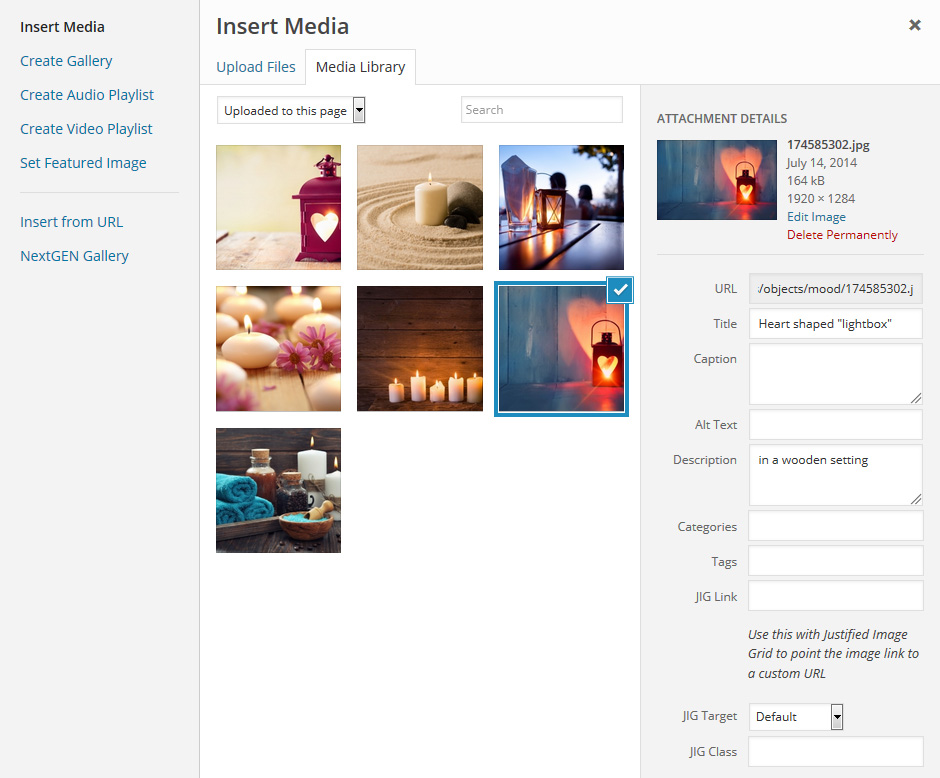
Set the dropdown in the add media dialog to “uploaded to this page” https://justifiedgrid.com/wp-content/uploads/uploaded-to-this-page.jpg and do everything you need on that screen, JIG will reflect the same thing (drag n drop order, etc).
Thank you Firsh for your answer! I finally figured it out. A bit confusing. So for everybody else that might bump into this topic: there is no way in actually REMOVING a picture that is already in a gallery with JIG. Instead of removing the picture, you have to put in the picture ID’s of the ALL the pictures you want to have in that gallery.
Thank you!
Or you can just use the automatic take over of the standard WP gallery.
JIG just shows what it it given or what is in the post. You can always detach an image from the post, so it can be removed from the gallery.
Trying to disable the expand button in prettyphoto, but do not see a toggle for it, where is it? I’m using V1.5.1 of the justified image grid.
Thanks. ad
It’s been a long time since I’ve last seen that button, start by updating to v3.7 first. Anyway, lightboxes tab: https://i.snag.gy/6iY8hR.jpg
Hi there!
I am looking for a way to change individual button colors, is that possible? Or a way to separate buttons in different rows.
For example:
Level 1 filters are: Food & Beverage, Retail, Indoor, Outdoor I would like Food & Beverage/Retail to be one button color Indoor/Outdoor to be a second button color
Or have those parameters to display in different rows: All Food & Beverage Retail Indoor Outdoor
Thanks for your help!
Yes, Custom CSS to target individual filter buttons:
.jig-filterButton[data-filter-slug="slippers"] {
    background: #ffe100;
}
Where you replace slippers with the slug of your button.
I can’t update…
“Automatic update error! This purchase code has already been used on another host! You need one regular license for each different site. You can setup your staging area in a subfolder to have autoupdates on both installations. Contact JIG support to reset your license (only the username is needed).”
I’ve reset your license. http://justifiedgrid.com/support/faq/your-license-has-been-reset-what-does-it-mean/
It was bound to: http://p*****nakanniainen.fi
Thank You!
No problem. Ask me anytime. But there will be a platform where you can manage and see your licenses.
Hi, we have (3) site licenses – We need resets on one live site + (2) staging sites. Our hosting servers recently changes so that may have affected them? Thanks
I’ve reset your licenses. http://justifiedgrid.com/support/faq/your-license-has-been-reset-what-does-it-mean/
They were like this: https://i.snag.gy/gOfvjU.jpg
Thank you for the quick response, though those are not the URL’s needing reset. The live site needing reset is “bo_______en.com” (lic ending in “3585c”) – and the (2) staging sites are “bo_______en.staging.wpengine.com” and “stea____ond.staging.wpengine.com”.
We have now disabled JIG on the old dev1169 site. All of our sites have now been migrated to SSL; maybe that affected things?
I did notice the comment above “You can setup your staging area in a subfolder to have autoupdates on both installations”. Our staging areas are technically separate installs, not subfolders. How do we get around this??
After a reset if there is no change, they’ll just rebind themselves. I’ve reset lic ending in “3585c” again.
Subfolder is also a separate install, just inside your normal site. Like if I had another WP installed at justifiedgrid.com/staging
Hello, i wasn’t using the plugin for a while. I decided to use it again. Everything works fine BUT at mobiles the image gallery doesn’t opens the images properly (small when it is open and on expand very big). How can i make my gallery open on mobiles like you have it on justifiedgrid.com?
I get to see it working properly on mobile only at selection “author’s favorite”...
If you open this page on your device, is it the same? https://justifiedgrid.com/lightboxes/prettyphoto/
If so then you are stuck with prettyPhoto on mobile device which should not happen. It should open like this: https://justifiedgrid.com/lightboxes/photoswipe/
Author’s favorite is using colorbox: https://justifiedgrid.com/lightboxes/colorbox/
Try this if you are sure prettyPhoto is not deliberately chosen for mobile, but you have W3TC caching: https://justifiedgrid.com/support/fix/mobile-specific-settings-have-no-effect/
I am unable to add a Facebook page. I can add my profile page but not a business page. I get the following error:
No albums or SSL certificate problem, verify that the CA cert is OK: check this out for more information or go to the General tab, Advanced section and set SSL verify peer setting to No.
I have disabled SSL Verify and there are albums on the page so this should not be happening. I have also enabled SSL cert on my website.
BTW, having no forum or ticket system with as many sales as you have seems insanely inefficient.
This kind of SSL has nothing to do with your own SSL cert for your domain (whether or not you can use https). It has something to do with server to server communications (between your host and Facebook). What is the facebook page you are trying to add? Is is restricted by age / country? It could have something to do with the page’s settings in particular.
Well I as a buyer judging from my own experience I’m always reluctant to ask for support if I have to register, create a topic, etc. Here you already have an account and it’s faster to request support. If you need it done privately you can always contact me from my profile. From that point on it’s up to me whether I have a ticketing software attached to my email or not, all you’ll see is my replies. Even if I had a forum I’d still need to manage comments as if you look at the comments of topselling themes, they are full of requests even if they have a forum.. Forums are also used to more easily and cheaply outsource support, lessening the quality. If there is just one person replying and that is the developer, it’s worth more (even if slower) than someone who is just paid to be there and support but knows far less about the plugin than its developer. But yeah I agree it’s nicer to have something like zendesk and I’ll look into establishing that nevertheless.
This is the page im trying to add
https://www.facebook.com/Leisure-By-Design-1975467159366391/In the Add new facebook page field, just enter this number: 1975467159366391 and hit enter, that should work. Just adding by URL didn’t work for me (different message though). Perhaps because the page name in the URL is mixed nice name + the ID. It’s usually either just the nice name or the ID. After adding it the shortcode editor recognized all your albums and I was able to create a gallery.
Ok that worked. New problem though, thumbnails don’t show up. i get the following message instead:
JIGAll of the images have failed to load. Please click here to reach the troubleshooting fix.
I did the following.
1. Clicked the link to resolve the issue. 2. Went to TimThumb and CDN settings 3. Clicked Check Permissions 4. Permissions are green (cache is writable) but i get the red error box
My host is liquidweb. Nothing unusual about my config on my server as noted on the help page.
https://leisure-bydesign.com/portfolio/The above page has a shortcode for a facebook album on it.
Hi, your link points to a page under construction
“We are currently working on. Leisure by Design”
Follow the rest of the troubleshooting article, you’ll find that one of your thumbnail links is:
https://leisure-bydesign.com/wp-content/plugins/justified-image-grid/timthumb.php?src=https://leisure-bydesign.com/wp-content/uploads/2017/07/Leisure-By-Design-Primary-Full-Color-2017-300x97.pngThen as it turns out:
The following error(s) occured: GD Library Error: imagecreatetruecolor does not exist – please contact your webhost and ask them to install the GD library
The troubleshooting article mentions this:
“Make sure you have GD library. A possible error is “GD Library Error: imagecreatetruecolor does not exist – please contact your webhost and ask them to install the GD library”.
I can’t seem to understand the filtering. I’m using LR/WP Sync plugin as well as real media library. I’ve read all the support docs I can find and I can’t seem to understand what tags JIG is using for filtering and where than tag can be set in the wordpress media library. I wish they could be filtered by metadata set in Lightroom such as keywords or something. Thanks for the help!
It would use tags and categories on images, which are not enabled by default. the LRWP sync plugin can establish a single taxonomy and map keywords from your lightroom onto that. https://i.snag.gy/fXFq9b.jpg You can have it mapped to anything presently available or just create attachment_keyword. The dropdown list here is similar to JIG’s: https://i.snag.gy/cHE4o9.jpg Just choose the same thing in both. And you tag in lightroom here: https://i.snag.gy/wtNL9U.jpg
There are alternative ways even without WPLR sync to map embedded metadata in JPGs to WP taxonomies on images.
I need my license reset.. not sure why it says its used on another website… i havent changed anything.
I’ve reset your license. http://justifiedgrid.com/support/faq/your-license-has-been-reset-what-does-it-mean/
It was bound to: http://www.re***ll.com/newsCheck for www and https vs http, or that /news subfolder.
Hi. I have two licenses for JIG and auto update will not work on classicscifi.com because I have changed the site to use ssl only. The urls are now https://classicscifi.com instead of http://classicscifi.com. Can you fix this please?
Only one license was bound to a host: http://*****monstermovies.com
I’ve reset your license. http://justifiedgrid.com/support/faq/your-license-has-been-reset-what-does-it-mean/
The license used on http://classicscifi.com was bought by your old alias I12114, I’ve reset that as well (“http://classicscifi.com”, non-ssl).
Ok. Classicscifi.com works now. Is spacemonstermovies.com ok?
Yes but it has no license bound to it now. The one you bought with I12114 is not bound anywhere. classicscifi has the one from bgkx57a
Hi my JIG plugin wont update and says i need to contact you to get it to upgrade. I hope this is not the trend for this plugin.. Either way can you reinstate my license so I can update. Username = loend43
Kindest regards
I’ve reset your license. http://justifiedgrid.com/support/faq/your-license-has-been-reset-what-does-it-mean/
It was bound to: http://****smith.photography
What do you mean by trend? If the address changes, this happens, I can reset it anytime. There will be a tool where you can reset it yourself in the future (limited times to prevent abuse). One site is one regular license as per Envato’s licensing.