118 comments found.
Hi, do you a option where i can set role based wp-admin dashboard and links.

Hello,
I didn’t quite get that – can you please help me with elaborating that?
Thanks 
I have admin role and a instructor. Just wanted to give limited access and hide few links in wp backend to the instructor.
Hello,
Thank you for your response.
Well, this cannot be done with the UserPro plugin or User Dashboard Addon.
Thanks
Good morning,
I would like to get information how I can customize widgets.
I have created some “Custom Widgets” but I do not know what to add on “Content widget” and I really need some examples to know how to include that content information they ask for. I would like to add simply meta data info (the one I created on profile field but if I use [userpro template=”my_interests”] or “my_interests” or [my_interest] any of these works. I also would like to add “mycred_default” (a compatible plugin call MyCred) meta data in a new custom widget but if I put this info on the “Widget content” it does not work. If I am in need of adding a Hook please specify which one and also practical exemples, if I have to add php info please also specifiy the best way to do it to not have problems when “overwriting info in my children theme”
And one more question about UserPro Connections, I would like to know if there is a kind of shortcode to show user connections “friends”, not all members but only the connections of the user.
I look forward to hear from you asap.
Best regards!
Miriam Gonzalez
Hello,
Apologies for the delay in response.
Can you please drop a note via – http://codecanyon.net/user/DeluxeThemes#contact , with some more details about the same, so that our support team can have a look at it and guide you further?
Thanks, have a nice day
Can we have in the dashboard a custom link (or custom links)?
Hello,
Thank you for reaching out to us.
Yes, you can use the shortcode – “[userpro_dashboard]” in any page per your requirement.
Also please note that your support for the UserPro plugin has already been expired. I must request you to renew the same for continued support.
Thanks
hi, work with wp 4.8.x? planed GitHub add-on like vk or planed integration with galaxy funder add-on or integration with WC Vendors Pro add-on?
Hello,
Thank you for reaching out to us.
- Yes, UserPro Dashboard is made compatible with latest version of WordPress.
- We already have an addon for VK Social Login. About Github, I will make a note of this and we will surely see if that can be implemented in our future updates.
- About Galaxy Funder – can you please share some more insights on this, so that it would help me understand the same?
- About WC Vendors – I will make a note of this and we will surely see if that can be implemented in our future updates.
Thanks
From the user manager front end can users add custom posts?
Hello,
Thank you for reaching out to us.
Well, using the UserPro plugin’s frontend publisher feature, users can create posts from the frontend of the website.
Thanks
I have userpro dashboard installed. When I write a post, it forces me to upload a picture. How can I disable this. I do not want to upload a picture with. I can not find an attitude.
Hello,
Thank you for reaching out to us.
I can see your ticket in our support queue and it will be responded soon.
Thanks
Is it possible to add a text editor or use the default editor to the content widget area in the backend when adding new widgets.
Hello,
Thank you for reaching out to us.
I am afraid, but this cannot be done with the current setup of the plugin. However, this can be achieved by customizing the plugin.
Thanks, have a nice day
hi currently i am using https://themeforest.net/item/rehub-directory-multi-vendor-shop-coupon-affiliate-theme/ this plugin will work with it.
also i have following requiement
USER profile page should show social link and user able to customize its page look.
Also any possibility user Instagram feed shows on their page
Hello,
Thank you for reaching out to us.
- Well, I haven’t tried that myself, you can try using the same on your website and let me know if you are facing any issue while using the User Dashboard plugin.
- You can use the User Dashboard addon for UserPro to customize the user profile.
Thanks, have a nice day
I am going to be using UserPro with BuddyPress, will this work ok for users with a BP profile to see their info?
Hello,
Thank you for reaching out to us.
Yes, you can use the UserPro plugin alongside with BuddyPress plugin and sync the BP profiles with UserPro profiles.
Thanks
I am trying to set up a registration form.
I went to the page to the “Fields” tab to add new fields.
When I try to set up a form these new fields do not appear as an option to add them to my form.
Hello,
Thank you for reaching out to us.
Well, can you please let me know if you have already added the fields in the default Registration form?
Thanks, have a nice day
The problem is the fields do not appear so that I can add them.
I figured out the problem. I deleted the original “Register” page and this somehow tied into me being able to add the new fields.
Hello,
Thank you for your response.
Sure – thank you for letting me know that.
Thanks, have a nice day
I am still having the same issues. I add the fields to the form and not all of the fields show up on the form. I continue to have this issue its like there is a glitch or something.
I am adding a field “Background Check” and it does not appear in the list of fields that I can choose from to add on the form. I have tried everything.
Hello, can you send us support ticket using form in our profile? We need to investigate further.
I purchased this plugin last year from Deluxe Themes. It is no longer available in my account download page. How can i get the items i purchased back onto my account.
Hello,
Thank you for reaching out to us.
Well, you will have to contact to CodeCanyon Support for this.
Thanks
Before I purchase, can you briefly describe the 14 widgets available? I don’t see any documentation about those details.
Hello,
Thank you for reaching out to us.
You can have a look at our demo using the following link for the frontend demo of Dashboard Addon – http://userproplugin.com/dashboard/
Thanks, have a nice day
I have looked at your demo. It only displays 2 widgets. The question was about your 14 available widgets used in the sales copy on this page. What are those widgets?
Hello,
Thank you for your response.
Please find the list of addons below –
1. Profile Details
2. My Followers
3. People I follow
4. My Activity
5. Orders (Requires WooCommerce Addon)
6. Purchases (Requires WooCommerce Addon)
7. Bookmarks (Requires Bookmarks Addon)
8. Posts By User
9. Progessbar (Requires Completeness Addon)
10. Send a message (Requires Messaging Addon)
11. Rating (Requires Ratings Addon)
12. Reviews (Requires Ratings Addon)
13. Top rated posts (Requires Ratings Addon)
14. Top rated members (Requires Ratings Addon)
15. Photo Gallery (Requires Media Manager Addon)
16. Music Gallery (Requires Media Manager Addon)
17. Video Gallery (Requires Media Manager Addon)
Thanks, have a nice day
Hi, I could explain how to change the appearance of this plugin, example, buttons, boxes, colors, etc.
Hello,
Thank you for reaching out to us.
Yes, you can change the appearance of the components of Dashboard by applying Custom CSS rules as per your requirements.
Thanks, have a nice day
Hi there! “Plugin could not be activated because it triggered a fatal error.
Parse error: syntax error, unexpected ’=’, expecting ‘)’ in /home4/XXXX/public_html/wp-content/plugins/userpro/addons/userpro-google-map/userpro-google-map.php on line 73”
line 73 in php file: if( userpro_gmap_get_option(‘enable_gmap’) && !empty($key = userpro_gmap_get_option(‘userpro_gmap_key’))) {
Please help me!
Hello,
Thank you for bringing out this to our notice.
I have noted it down and we will surely fix this in our next update. For an interim solution, please visit the below link and follow the instructions – http://userproplugin.com/userpro/docs/#Parse_Error_fix_googlemapThanks, have a nice day
so… how do i get the images from the UserPro GALLERY to show up??? the video tutorial tells me nothing and there is no documentation that i can find… please advise.
i bought this and profile completeness today – anticipating from the descriptions that they would ENHANCE my membership features and thus far they have NOT… why does the dashboard override the global layouts completely? and eliminate custom fields? and not just nicely overlay on what I had already set up?
am i missing something???
Hello,
Thank you for reaching out to us.
Can you please drop a note via – http://codecanyon.net/user/DeluxeThemes#contact , with some more details about the same, so that our support team can have a look at it and guide you further?
Thanks, have a nice day
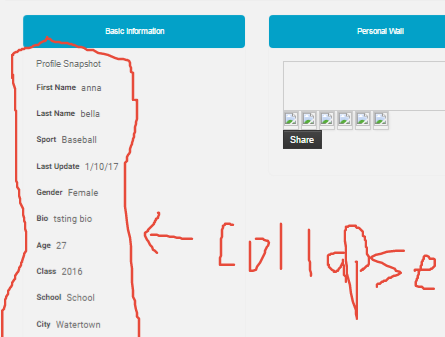
Hi there – just wondering when the ability to make a Section “Collapsed=Yes” “Collapsible Section = Yes” on front end profile view using Dashboard may be available. Works fine without Dashboard.
Hello,
Thank you for letting me know that.
We have this on our to-do list and we will surely try to fix this in our future updates.
Thank you for your patience
Hello there – I was hoping this would be in the last update. When can we expect it to be complete?
Hey I just bought this and the video thumbnail in the users profile is showing up small. Its more than half the size of the pic thumbnails. How to fix?
Sorry please disregard, userpro was in need of an update, looks good!
Hello,
Thank you for reaching out to us.
Great – thank you for letting me know that
Hello , this plugin is not displaying corectly with avada theme http://i.imgur.com/tBnow37.png
Hello,
Thank you for reaching out to us.
Can you please drop a note via – http://codecanyon.net/user/DeluxeThemes#contact , with some more details about the same, so that our support team can have a look at it and guide you further?
Thanks, have a nice day
Hello, I am having difficulties getting your Support to understand an issue with the Dashboard Addon. I have been back and forth with numerous emails and have attached numerous images explaining that the ability to Collapse sections on the backend works fine, but does not work on the frontend view and don’t know how to explain it further. It has been several weeks and I’m getting no where. It is holding up the project which is way over schedule. The ‘Collapse’ fields in sections/groups feature does not work on the frontend display using the Dashboard Addon, whether you use 1, 2 or 3 column display. It does however work if Dashboard is not enabled. If the bug cannot be fixed, please just state this so I can move on and not use Dashboard Addon. Thank you for your attention in this matter. I hope I have explained this clearly enough to be understood. Images showing the issue are in the support email. I have tried viewing in 3 different browsers using default theme and no other plugins enabled. Very much appreciated.
Hello,
Thank you for reaching out to us.
Apologies for the trouble that you are facing, I have forwarded the request to our support team and they are looking into it.
Thank you for your patience.
Have a nice day
Hi there – I submitted a ticket on Feb 26 and hoping you can get the ‘unable to collapse sections’ issue resolved with the Dashboard Add on. The only way you are able to collapse sections is without the Dashboard Add on. Many thanks for your prompt attention. Anna
Hello,
Thank you for reaching out to us.
Our support team is looking into your ticket and it will be responded soon.
Thanks, have a nice day