8471 comments found.
Hi Firsh,
I´ve a problem with your plugin. I´ve some post there isn´t show the content. My theme authoer sasy it comes from a 3rd part plugin. So I disable my plugins and the content is showed when I disable “Justified Image Grid” Plugin. Here you can see the post, that I found:
https://www.overlandtour.de/mit-hyaenen-zum-dinner-und-was-ist-eigentlich-khat/or
https://www.overlandtour.de/ha-giang-und-die-berge-bei-tom-som/Hope you can find out something! Cheers Jens
Hi, I see JIG working in the content and the rest of the content showing up properly as well. What kind of content are you missing? Perhaps the problem has been solved while I was on vacation?
Could it have been a low memory error if you were seing partially blank pages? http://justifiedgrid.com/support/fix/full-or-partial-blank-screen-on-the-frontend-or-dashboard/
Yes I solved it. I imported all my Images (more than 12000) into wp (because I used before the NextGen) and changed the shortcode to the WordPress Real Media Library.
Excellent 
But It takes a Long Long time
Well you can be confident that RML is a very good plugin, much faster and nicer than NextGEN (even though that plugin is very popular and free). It’s a good choice. Whether you combo it with JIG or not, is just icing on the cake. RML is a good foundation for all your media library management needs. You can be sure that JIG-RML combatibility will keep going strong as I communicate with its developer weekly or semi-weekly.
Thx

Good Day, please reset my license. The plugin should work for www.sailingnations.com
Many thanks Jan
I’ve reset your license. http://justifiedgrid.com/support/faq/your-license-has-been-reset-what-does-it-mean/
I need my license reset. I have removed it from one site and installed it on another and it won’t update to the latest version
I’ve reset your license. http://justifiedgrid.com/support/faq/your-license-has-been-reset-what-does-it-mean/
special effects, on your page is an example with 2 pictures where you can go to > to see next picture how can i create that
Sorry which page do you mean? Can you send me a link? I see nothing like that here: http://justifiedgrid.com/features/special-effects/
Perhaps you mean load more? http://justifiedgrid.com/features/load-more/
can i send you an printscreen
Yeah just paste it to http://snag.gy/
Hello,
I dont want to show the images in a grid. I just want you to be able to select the highest level folder of RML and have it display the folders within the highest level folder and have each folder clickable to get to the content within whether it be folders or galleries. When the galleries are displayed I only want the first image loaded and visible and they must click on it to start the lightbox. How do I achieve this? Thanks
That’s called straight to lightbox feature and it’s only available on galleries and collections, not folders. So make sure your top level is a collection, which has subcollections then eventually galleries. https://i.snag.gy/tUupHC.jpg
Folders are excluded from this feature for technical reasons.
http://justifiedgrid.com/sources/wp-real-media-library/galleries/Please reset my license. Thanks
I’ve reset your license. http://justifiedgrid.com/support/faq/your-license-has-been-reset-what-does-it-mean/
Hi, I cannot seem to get JIG to update, I’ve the purchase code added, but updating does not seem to happen. The reset license seems to be the same numbers, is that correct?
I’ve reset it again. It was on:
http://www.ba*****ldns.comVery bad and not user friendly interface and documentation. Its not for humans. I buy it but don`t wont use. All others gallery plugins ( i have all top plugins ) is very easy and nice.
Sorry you see it that way. Request a refund.
Hi Firsh, the problem with the custom presets is done. The last hurdle is the filter / categorie. I would like to show 5 categories. The means, limit image count = 12 pictures (Hidden limit = 32) / 4 rows. 1-level filtering, no tab “all” or “any”, for example tab “House”, “Bath”, “Cellar”, “Roof” and “Living Room” left aligned as text over the thumbnails. This looks easy, but I do not get it. In your examples, copy the shortcode into the shortcodecode editor and change the content source. I’m doing something wrong. It is never displayed a register over the thumnails. I bought the RML and installed the MLA. With the MLA I have created a main folder, including five subfolders named “House”, “Bath”, ..... In these subfolders I copied the related images and created with MLA from it categories. I have now tried several hours to find a solution, but there is in your plugin so many settings the pure test is hopeless. I have no idea anymore. I need a concrete example with the special settings for my requirements. I think you’ll configure such a filter in two minutes. Maybe you have an idea?
best regards
If you have tags or categories on the images it’s really 1 setting that’ll enable filtering. Shortcode editor > Filtering tab, Filter by and choose attachment_tag or attachment_category (whichever you used in MLA).
Note that RML is fine for managing the galleries, but there is currently no option to filter images by their parent gallery. So you need to have tags or categories on the images for filtering. I’ll add “parent RML gallery” to filtering options in the future.
In the beginning don’t use any limit / max rows / hidden limit.
You can disable “all” button on the filtering tab. The first filter button will be activated by default.
On my example shortcodes I might use different taxonomy than you. It might not exist on your system the same way.
Not sure what’s not working for you. I’ll be on vacation next week, sorry.
Please reset my license. I didn’t delete the license code in the staging site before i had you reset it last time. sorry. Thanks for your help!!
I’ve reset your license. http://justifiedgrid.com/support/faq/your-license-has-been-reset-what-does-it-mean/
hey. I want to use this on multiple sites. how do I go about doing this?
Hi, you need a license for every separate site: http://justifiedgrid.com/support/license/ There is no multi license offered by CodeCanyon, unfortunately.
in the lightbox a page should be loaded up. It works fine on desktop but not on mobile.
Hi, you are opening HTML content in the lightbox, which prettyPhoto supports (desktop lightbox) but PhotoSwipe doesn’t. Switch the mobile lightbox to Magnific Popup instead, that supports loading HTML in it.
Hello Firsh, I bought RML. Is really a very super combination with JIG. This makes it easy to handle galleries. Now, it makes me a lot of fun to work with JIG, but it is very extensive. For this reason, I have to ask a few things. I make a custom preset and create several galleries on various sites. If I set a different preset will be changed automatically all the galleries, even on this I have changed manuel on the page. It is certainly possible to display different galleries with different presets? Then I have not understood how to create filter / categories. Can I define categories by different titles or captions, and which settings are necessary? These are the basic elements I need to know. If that is done you have rest in front of me.
best regards
Read this http://justifiedgrid.com/features/custom-presets-and-authority/ here I tried to put it concisely what presets are about.
Basically if you plan on utilizing presets instead of many individual settings in the shortcodes, then use the preset selection in the shortcode, always. Custom or built-in.
Mind which settings belong to presets and which are global.
If you have a preset select in each and every gallery, you are free to tweak them in the global settings however you wish. Any shortcode where you didn’t choose a preset will reflect your tweakings and working with the global JIG settings.
Customers either don’t use presets at all and just use a combination of global vs. shortcode settings. OR they use the preset system everywhere.
Hi so far so good with your product, but I need when clicking an image to have the light box description to be in the right and not in the bottom as default.. see
https://db.tt/Gx5LY33MTzis there a setting on this or a parameter not in the visual gui that does this? if not can you suggest anything to acomplish this?
our descriptions are long and having them on the bottom reducces the image. need to have more space for description with out making image smaller.
tks
Hi, none of the supported lightboxes have side area for captions, as far as I know (except Social Gallery, but that has limited caption in another way). But if you find a 3rd party lightbox that has side captions instead of bottom captions, let me know and I’ll help you set that up.
This seems simple, but JIG is so complex I can’t figure it out.
I want to use JIG to display a post’s Featured Image inside the post itself.
I do not want a gallery of multiple images (i.e. every featured image from every post in a category).
I simply want to use JIG to display that post’s single featured image, without any additional work (i.e. tagging each image with a unique identifier, knowing the feature image’s ID, etc.)
I want the image to link to a custom URL (external site) pulled from a custom field in the post itself.
My ultimate goal is to create lots of posts that have a JIG shortcode in every post that programmatically pulls the image into the post and links it.
This is stupidly hard to achieve with any other existing plugins. I’m not interested in using a theme that has this functionality… I use Beaver Builder to control my pages, and I don’t want page design governed at the theme level.
Can JIG do it?
Thanks!
Well there exists a “featured” and “current” word to ID mapping in JIG, it’s only available for excluding. Perhaps I can add it to the next version to make your life easier.
If you know (or willing to enter) the current post’s ID then you can do this:
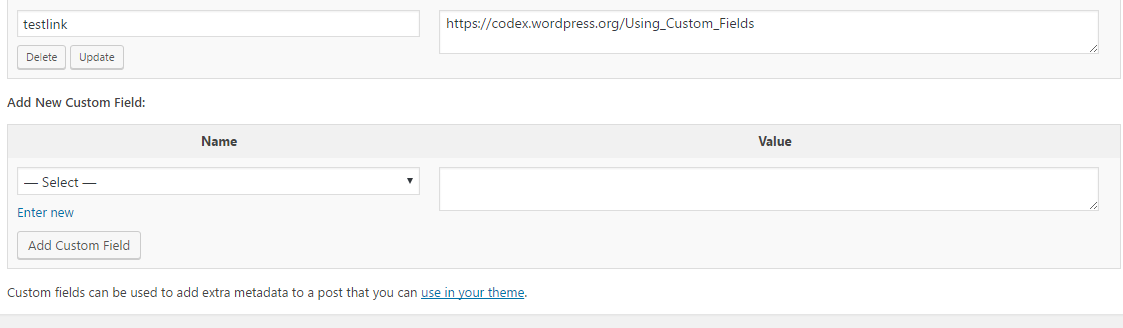
[justified_image_grid recent_posts=yes recents_post_type=page post_ids=19405 recents_custom_links=yes recents_link_field=testlink]
I tested it on a page.
Custom field: https://i.snag.gy/TX6hO1.jpgPeople usually wanted to use what you wish to do with a template tag, in the appropriate page/post/archive template .php file (using a PHP template tag), where automatically getting the current post ID is easy. Featured image ID is not needed.
I’m building post layouts with Beaver Builder, and want to keep my layout independent of my theme.
As for knowing the post ID, the whole point is that I want to build lots of posts and automate the layout to apply to all the posts (via Beaver Builder). I would need to insert the variable Post IDs into your JIG code using a script, and I’d prefer to stay away from coding.
If you might consider adding this in a future release, I’d be thankful. It’s remarkably hard to find a reliable, code-less way to insert a featured image into a post, and link the image to a custom URL. Seems like a great use of JIG to me.
Yeah it’s a simple change, just mapping a word you enter to the respective field to the known ID (which is available in the code of JIG). Contact me from my profile so I can add these for you (free), you help me test them, then I’ll pack it in the next version. So everybody benefits + you don’t need to keep the then-old customized version.
Cool! I sent you a superadmin login and password through the site.
Replied there with the changes!
Please confirm that your plugin is php7 compatible or not. Thank you.
It’s compatible with it, it’s actually a recommended version. Be prepared for notices from other plugins and themes. If you run into any issue let me know I’ll fix it.
Thanks, I appreciate the fast response – might be worth adding this to your FAQ.
Am currently going through all plugins, checking each one individually.
Ok. I’ll consider adding a system requirements info somewhere. It works on PHP 5.3-7
Hi,
I want to use your Plugin in combination with the Real Media Library: http://neu.weddingdreams-salzburg.at/gallerietest/Unfortunately when I click on a gallery in the overview, the right permalink is generated, but inside the gallery I only see the overview again.
Can you tell me, why?
Thanks Andy
Try refreshing your permalink structure by saving the page once (without any changes) in the WP dashboard > Permalink settings screen.
Thanks for your fast reply. I’ve allready tried to refresh the structure but it doesn’t make any difference. 
The Permalinks are working, but it always shows the the overview: http://neu.weddingdreams-salzburg.at/gallerietest/rml-content/andrea-amp-klaus-02.08.2014-schloss-hellbrunn/
Interesting. Please contact me from my profile, I’ll need to log in with temporary wp-admin access and check it out.
Hi, we have a problem with images not showing up on iphones. It seems to work on other phones. Pages that have the images are http://dev.thecastleclub.com/reservations & the photo gallery there is linked to our facebook albums too and thats not showing correctly on iphones either.
Hi, how do they show? Can you send me a screenshot? What aspect of them is not showing correctly? I fail to have the gallery fail on any device, though I don’t have an iPhone.
I’ve replied there with a possible solution. I’m having your email address removed from this comment to prevent spam.
Thanks, will keep replying through mail and leave this. Thank you
hi i am finding that the thumbnail image quality is quite bad for my galleries; i have the quality set to 100 and it does not improve much. I am viewing the galleries on a 5k monitor and have tried tweaking the retina settings; all to no avail; the only way i have found to improve the quality is to diable the thumbnails ; this works but there are many formatting problems with the galleries
Hi, is it bad as in “blurry” or as in “false/dull color”? Can you send me a link to where you have JIG? How does disabling the thumbnail generation change the formatting problem for you? It should not have any effect on the layout. Or is the layout problemful even with thumbnail creation On?
Are the images the correct resolution and uncropped when you open them in the lightbox?
the images look both “blurry” and lack in contrast with some de-saturation; it seems that when i tweak the settings to get it to look good on high-res screens it looks blurry on screens with 1080p resolution; disabling thumbs prevents 1:1 ratios; images look perfect in lightbox
Ok I can only tell you more about this if I see it on your site. Normally there should not be any noticeable degradation of generated thumbs vs not using thumbs. It could appear crisper without thumbnail generation but usually not worth the bandwidth cost that comses with it nor people notice it. Do you notice the problem on the demo site? http://justifiedgrid.com/presets/preset-1-out-of-the-box/
How can I use iLightBox for Justified image gallery?
Set lightbox in JIG to “Custom”. Find the ililightbox documentation on how to call it on elements. Add that JS code to JIG settings, lightboxes tab: Custom lightbox JS call using the examples there. It’ll be something like this:
$(JIG_selector).iLightbox();
It could be that the lightbox requires a custom class on the image link to activate, and/or a custom data-attribute, both can be added in the same place in JIG, as the Custom lightbox JS setting.
How can I get support to reset licenses per site? Thanks in advance
I’ve reset your licenses. http://justifiedgrid.com/support/faq/your-license-has-been-reset-what-does-it-mean/