1930 comments found.

Hi, this is a great application and love the fact that you keep making updates, thank you, I have one request thou, please creat a report for Tax (VAT), so the user knows exactly how much tax was generated from the invoices that included it, it would help a lot. Thanks
Hi, This idea is great. I will definitely consider to add this in upcoming versions.
In php 7 script not send mails to clients  in php 5.5 mails is sending OK
Hi, it should be working fine. May be server is mis configured for email in PHP 7.
Hi
My suggest to new features – URL rewriting.
When I enable this one, system create htaccess file right?
And this is problem for me and I think more users.
I set in htaccess my php version and enabled URL rewriting repleace my htaccess with new htaccess and php version settings go out and I see parse syntax error (because default php in my server is 5.3, that in functions.php (in vendor/guzzlehttp/promisses/src/ ).
I suggest that script could check if htaccess exist and not replease it ok?
This will be good solution for many peoples I think
Or system could enable rewrite and show message with few lines to add to htaccess?
Regards
Jacek
Hi Jacek, You are correct. I have added this for next version. The system will check .htaccess file if exist before creating one. Thanks.
You added customer login area, as I can see the demo for client access?
http://tryib.com/client/login
User: customer@example.com
Password: 123456
try to understand : is thsi supports – i need to make invoice to send my client (in invoice which amount mention that amount i need send to client bank accunt) ..
in invoice calculation i need to add – option too
I apologize, I didn’t get you.
I need to call Company Name in email template like : Dear [Client Name] of [Company Name] Please tell me what is the variable for it ?
I need to have “Attach PDF?” check box “UNCHECKED by default” at outgoing email page. Please identify the page for editing.
For Quotes, is it possible to include all data into email’s body instead of sending the web link?
Hi I have updated params for email templates for next version, so that you can add Customer Company Name as {{company}}, for details – http://www.ibilling.io/email-templates/
For default uncheck- sysfrm/controllers/invoices.php Line: 1576 remove- checked from the form field.
Hi, Thanks for updated this script, now this script looks perfect. but i want one more thing to update if it is possible to add in script. when we make custom fields. and then we create new invoice then we choose customer for new invoice, then custom fields show under new invoice by customer , then we can choose with drop down one custom fields which we wanna show in the new invoice cause now if i have two or three custom fields for customer then all showing under invoice but some time we don’t need all to show under invoice. Thanks again to update for us.
Hi, When you create custom field, you can choose Show in View Invoice to “No” so it will not display in invoice.
Hi I want to display in invoice but only one cause for some customers I made 2 or 3 custom fields under one customer account but I wanna show one but different for each invoice. That’s why I said when we create new invoice then all three showing under new invoice and I can choose one which I wanna show in invoice.
I got your question, I will try to get a solution in future version. Thanks.
also when i click to download or view in pdf file then not showing amount just showing CA$
$retval = $currency_code.' '.number_format($amount,$dec_digit,$dec_point,$thousands_sep);
I’m posting an update now.
hi, i just updated 4.2 v , when i change currency from US to CA$ , and then i click on invoice preview then amount now showing , just showing CA$ , please fix this. thanks
$retval = $currency_code.' '.number_format($amount,$dec_digit,$dec_point,$thousands_sep);
Latest update still has a bug. Changing logo doesn’t take effect.
Also PDF is buggy, amount figures doesn’t appear if you preview, print or download. http://prntscr.com/bvxmum
$retval = $currency_code.' '.number_format($amount,$dec_digit,$dec_point,$thousands_sep);
ui/theme/softhash/sections/header_default.tpl replace line 328 with -
<img src="{$user['img']}" class="img-circle" alt="{$user['fullname']}" />
Currently this is the best CRM application I’ve had the chance to demo.
I’ve actually tested all current 67! looking for certain features we can use in a “Live” environment. We love all the features you provide.
Here’s my BIG Question…
> We would like to have the ability to use the Application “offline” and have it (maybe) auto-update once we are back “online”. In other words… we’d like to use the application as a desktop application / without internet connections (or connection to server) on our PC/Mac. Then, once we re-establish an internet connection, be able to update everything back to the our server. —or even export/import data to keep things simple.
Is this possible? and if so, what additional tools and softwares would we need.
Thank you for your prompt reply!
Thanks for your kind words.
At this moment it’s completely based on web / internet. You will be needed an internet connection to login iBilling if you want to use it from multiple location/ device. You may also install this in your local server (e.g. localhost) but you will have to login from localhost only. I can make desktop application with two way sync through custom plugin / api. I will check the possibilities. Thanks, Sadia.
Thanks. We’re still going to purchase this application soon. What is time frame and cost involved to make such an application (Desktop Application)?
Hi, Send me a Personal message using my profile page, so that we can discuss about the pricing.
I have some suggestions
1*
Products and services : There are supposed to be the possibility of adding the form of afforestation in pictures .
2
Supporting mobile browsing is not working well.
3* Install phrases in the bill, such as the start and Signature.
4 The possibility to change the font.
Hi, Thanks for your suggestion. I have noted this & will consider those.
Hi
I found few bugs in script
1. open any URL WITHOUT login, eg: domain.com/?ng=client/quotes/ or other. You see? http://easycaptures.com/fs/uploaded/1001/7200969054.png not redirect to login page, show us blank forms in account.
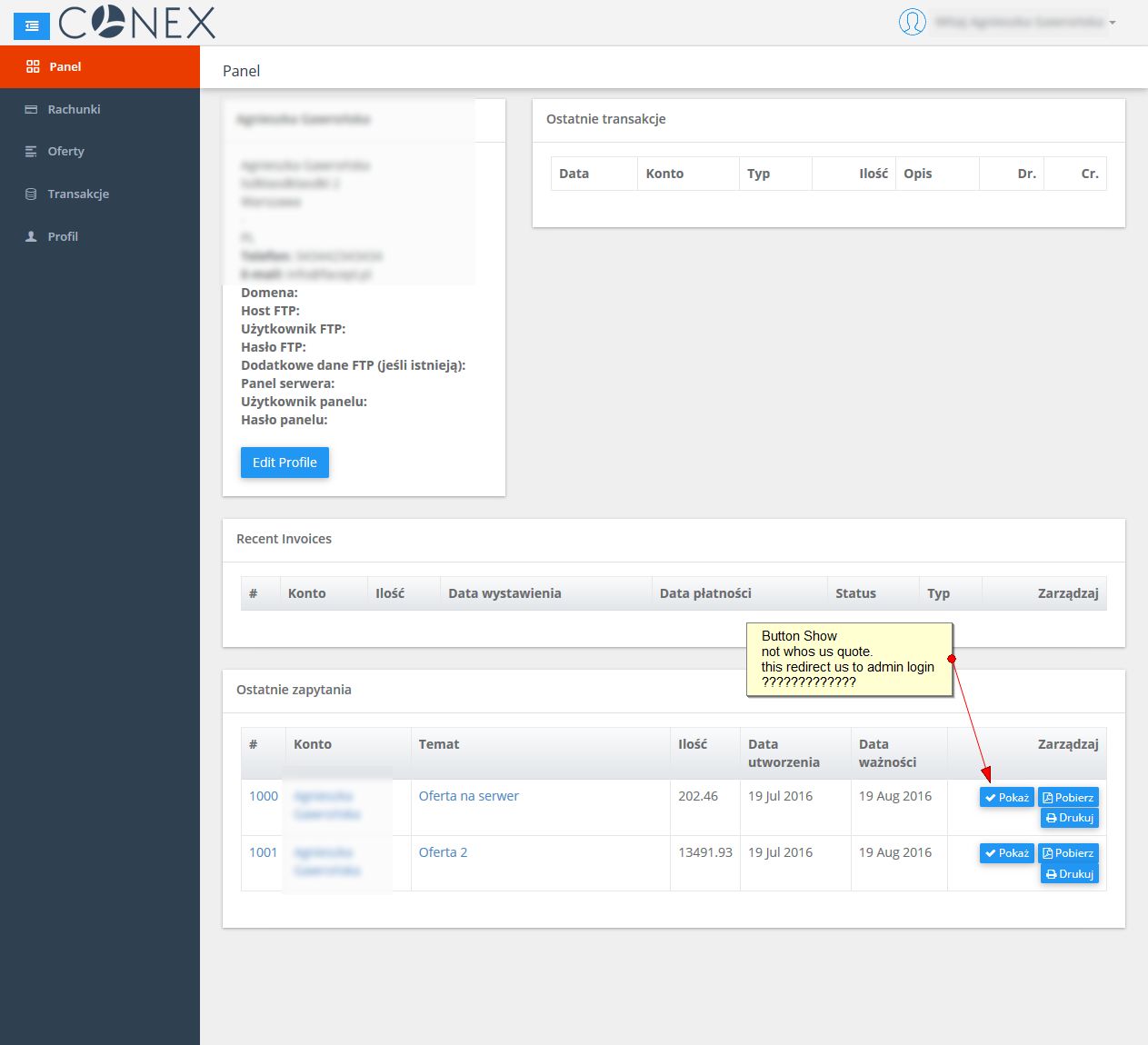
2. when I (as admin) create quote to client and sent him quote, client received mail and link show quote – this is ok, but when client logged in into his panel and see list of quotes, buttons SHOW – not work. here is description: http://easycaptures.com/fs/uploaded/1001/0397268409.jpg
3. I looking for another bugs…
4. I sent you yesterday question about currency position – I need this asap. Will be in next update? – in my country currency symbol is on right.
Regards
Jacek
Hi Jacek,
Thanks for reporting, I will check further about those.
Regarding currency symbol position, yes I have implemented this and will be available in next update.
Sadia.
Thank you Sadia
Maybe in email templates you will add string client_password?
When we create account to our client, he receive email (if we send this one) and in password place he see: password like you entered , but client not entered
pass, we created account for him right?
Jacek
Hi, It’s intentionally removed password from email for security. But you can edit this email template from Settings -> Email Templates.
Hi Sadia
Thank you, I know that here I can add this, but I tried add: {{client_password}} and on message this not replease for password.
which value i can add here to show pass in mail?
$message->set('client_password', $data['password']);
thank you Sadia, but this not work.
I uncommented line 143, replaced with this what you sent, in email templates I entered {{client_password}} and in mail I see: password: (and here is blank)
What I can do else?
Hi, after adding this line, you will also have to edit email template and add this string {{client_password}} did you do this ?
Yes of course, I edited email templates and added this value. And in email I see what I sent: password: and blank here
Hi, I’m testing this now. Will get back to you shortly. Thanks, Sadia.
Hello Sadia,
This script support multi language? How to translate PoEdit ?
Regards
Hi, Yes. You will find more information about translation here – https://github.com/cloudonex/ibilling-language
Hello,
Your provide professional Invoice & Quote PDF Generate File...its possible to add item Serial No… in invoice & Quote..
Hi, No, It’s not possible at this moment. Thanks.
Is it possible to add HRM in it. Like Employee Attendance, payroll, PF, etc…
Hi, Yes, It’s possible to make plugin for HRM.
I have an idea to next update.
I need currency symbol on right and now I have to change few files in script and change currency symbol on the right place.
This will be good on short time – to next update, when files will be overwriten
Then maybe Sadia add this feature to script and in next update script will have this set?
Regards
Conex
Hi Jacek, I have done this as you requested. It will be available from V 4.2.
Hi there, i install the ibilling successfully, but comes a blank page with error 500 browser error. in dev mode comes this message: Parse error: syntax error, unexpected ’$unique_resource_name’ (T_VARIABLE) in /home/httpd/vhosts/*/sysfrm/lib/smarty/libs/sysplugins/smarty_resource.php on line 517
Hi, Can you please send me a ftp info using my profile page.
Thanks
Received your email & it’s fixed. Check your inbox.
You can create a plugin for this app that automatically adds new customers base woocomerce and synchronize the data, at least the name, phones, address, User and Password? If someone create it, could serve as a basis to create other interesting things to interact with WP. What plugins you plan to launch?
Hi, Yes, It can be possible. I will consider to make this plugin in future. Thanks.
Assalam o Alekum Sadia,
Please tell me what is the variable for Company as I need to call it in email template like : Dear [Client Name] of [Company Name]
Current updates are very useful & I really appreciate if you kindly consider the following little things in forthcoming updates:
1- As per my use of iBilling so far I am facing the problem while adding new client having same name name and system does not allow it. It will be much better that a Company name should be unique instead of Client name because human names are usually common & similar. Can you fix it ?
2- Add Filter option to sort columns on Quotes List Page too.
3- Make Invoice description field a text area which support line breaks
4- Add CC, BCC & BCC to Admin in Quote email too.
5- At Invoices List pages, show Columns> Paid Amount & Balance as well.
6- Allow to enter more then 1 email addresses into client’s profile as normally the clients have multiple email addresses and they need to receive emails on them.
7- In Contacts > Summery > Accounting Summary, show Total Invoice Amount, Received Amount & Balance of the client instead of Total Income & Total Expense.
8- In Contacts, at left column, “Invoices” heading should show the number of all invoice inside like: Invoices [3]
For Quotes, is it possible to include all data into email’s body instead of sending the web link?
Hi friend, I have followed your suggestions for V 4.2. Most of your requested suggestions will be available.
That’s great. Thanks for consideration.