1289 comments found.

Can I insert single videos like courses or lectures like we can do with images?, being the questions a quiz for the video content.
Hello,
Including video content is not a feature at the moment.
Best regards,
Pantherius
Thanks for your quick reply. Does this mean that I’d have to embed the video in a WP page and call a “group” or individual questions after it? I would need the plugin to take me to the next page? I don’t think that my use case is very complex: show the video or a link with a lecture, show the questions and continue to the next video and questions (sometimes it with validate a correct answer, most of the time don’t), can the plugin do that?
The only one solution at the moment to create one survey for each question, then you can redirect the browser to the next survey after completing each question (survey).
In this case, you can embed the video and the survey to the same page. Certainly, it is recommended with low number of questions only and you won’t get an overall results since these will be individual surveys.
The plugin provides the option to create conditions (redirection, display message or chart) based on the correct answers or scores.
You’re right, it is not a complex expectation, simply these features has not been developed yet.
Best regards,
Panherius
Thanks for your honest reply. I like all the tool’s features and it does around 80% of what I need so I’ll look forward for this one specifically, I’ve added it to my bookmarks. Thanks.
You’re welcome!
I’m just added this feature to my TODO list. However, I can’t give you an estimation at the moment, but I’ll try to notify you when it will be available.
Best regards,
Pantherius
Is there a way to sync the forms with facebook pages??
Hello,
However, the plugin provides share buttons, I have no idea how would you like to “sync” any forms with Facebook Pages…
Sorry, synchronization with Facebook Pages is not a feature at the moment.
Regards,
Pantherius
Hi, I have a pre-purchase question. I’m hoping to host voting polls like on producthunt or ranker.com. I would need voters to be able to choose their favorite 1-3 options out of a list of 10, and each option would need to have an image and a description as well as a link that I could direct to a portfolio or woocommerce product. It wouldn’t have to integrate directly with woocommerce, just allow a link. Also it would be great if customers could drag and drop to rank options or at least upvote those that were their favorite. Would this be possible? Thank you!
Hello,
Using links in the answers and reorganize the answers on the frontend is not a feature at the moment.
Regards,
Pantherius
Pre-sale Questions:
We have a list of qualifying answers to our questions. 1. Can we block users from submitting the form, unless they choose a set of qualifying answers? (for example, has to be Female, 40+ years old, Have children)
2. Is there a pop-up/bubble function that I can use to explain questions that need additional definition/clarification?
3. Can we enter our own error messages?
4. Can we redirect to a custom page once user pass the “qualifying/correct answers”?
Cheers!
Hello,
1. The survey allows chained questions. That means, you can redirect the survey to a specified question based on the selected answer. Therefore it is just depends on how you build the survey to achieve your goals.
2. No, it is not a feature at the moment.
3. The survey doesn’t display any error messages. If the user doesn’t select any answer, simply it can’t be go to the next question.
4. Yes, you can add a condition that will redirect the browser to a specified page based on the total score / correct answers.
Best regards,
Pantherius
Pre Sales: Can this be used to make a Saas like survey monkey. Can I make this part of my site and allow users to create there own surveys and be the only ones able to view them.
Hello,
No, creating survey on the frontend area is not a feature at the moment.
Best regards,
Pantherius
Hello, can i send a link to a Survey, example : http://www.ddd.com/survey12?name=nameofaperson and export results in Excel (columl with the name of the person) ?
Hello,
The survey can be embed to any page or post, that has it’s own URL. However, exporting the results is also possible to different formats via the admin page (CSV, PDF, XLS, JSON, TXT), the columns doesn’t contains the person name, it has different layout.
You can find export examples on the plugin’s page for the cumulated result export: Survey Export
Certainly, exporting the individual results is also available.
Regards,
Pantherius
Pre Purchase Question: Can the profiles from the survey post into WooCommerce Profile? I see the previous person asked that question about WooCommerce but can the profiles be into one. Thanks!
Hello,
No, the participants details are available under the Modal Survey admin menu only. It doesn’t integrated to the WooCommerce user profiles, works independently.
Regards,
Pantherius
Hi Pantherius,
Would your plugin work with WooCommerce, specifically on the checkout page? Does the plugin have an option to pop up a survey as the user goes to close the browser tab?
Thanks in advance, Phil
Hello Phil,
However, it doesn’t tested on the WooCommerce checkout page yet, the shortcode can be included in the template file as well. That means, it can work on any page / post with adding the survey shortcode to the editor or including it directly to the checkout template file. (with some coding knowledge)
Displaying the survey when the user close the browser is not a feature since it can’t be achieved with all browsers in all cases.
Best regards,
Pantherius
Hey, one pre-purchase question. I want to add poll with some 2-3 questions for my articles if they like my article or not with showing results to viewers after submitting vote. It this possible? I am not able to see such example on your demo website. Additionally If the above is possible, can I show output result in bar more or pie chart or any mode? Can you show me the example of what I want to tell me if this is possible with this plugin and how? Please reply soon.
Hello,
Yes, you can display the result at the completion of the survey. Just created a demo, find it here: http://modalsurvey.pantherius.com/multiple-answers/Regards,
Pantherius
Hi, have managed to set up my survey without too much trouble once I got the hang of it and have included some free answer boxes but have noticed that the font colour on these free answer boxes is very faint on the actual survey itself making them hard to read and even harder to read when someone enters their comments. How can I rectify this please?
Hello,
If you mean the open text answer, then the font color is based on the theme you using. Simply add the following lines to the Custom CSS page under the Modal Survey main admin navigation menu:
.open_text_answer {
    color: blue !important;
}
Replace the blue with your own color definition or HEX color code. The other answers’ text color can be changed on the survey edit screen with the color picker.
If you still have any difficulties, please send me your website URL with login details via my profile page mail sender and I’m happy to check it.
Best regards,
Pantherius
hi there- i’m a web and graphic designer and i’m working on a request from a client who wants to add a “weighted” and scored questionnaire to his website. the two main things i want the form to do are to be able to spit out a score for the visitor at the end (not just on the backend) and to be able to have a “weighted” formula/algorithm. so for instance the answer to one question is a 2 but it has a 4 weighting making the actual answer to that question an 8. does that make sense? thank you. so much for your time.
Hello,
However, it is possible to assign scores to the answers, you can’t set any further “weight” or math formula at the moment.
Best regards,
Pantherius
hi there-i’m really liking you plugin. all is working great so far except that i can’t get the individual answers to be displayed at the end. i have the conditions set to if the final score is higher than 0 to display individual correct answers at the end as a barchart. then i have the end conditions set to enabled with bar chart for individual. i have just been testing the survey but nothing happens at the end. it prompts me to enter my email and then i get a thank you but no results. can you help? tribecaangels.com/survey
thanks!
Hello,
Glad to hear that, you like the plugin.
The problem will be you trying to mix the ‘score based survey’ with ‘rating survey’ and ‘correct answers survey’.
However, the plugin allows you to use few of them at the same time and it can work, mixing all of them will causing some issues.
If you would like to display chart, based on the correct answers, you have to mark the correct answer in the answer options (gear icon next to the answers)
If the chart based on scores, then you need to assign scores to each answers in the answer options as well.
Displaying the individual chart twice (one from the Conditions and one from the End Content accordion) doesn’t make sense. Therefore, please use one of them at the same time. (Since both of them displaying the same)
If the issue still exists, please send me your website URL with login details via my profile page mail sender and I’m happy to check it.
Best regards,
Pantherius
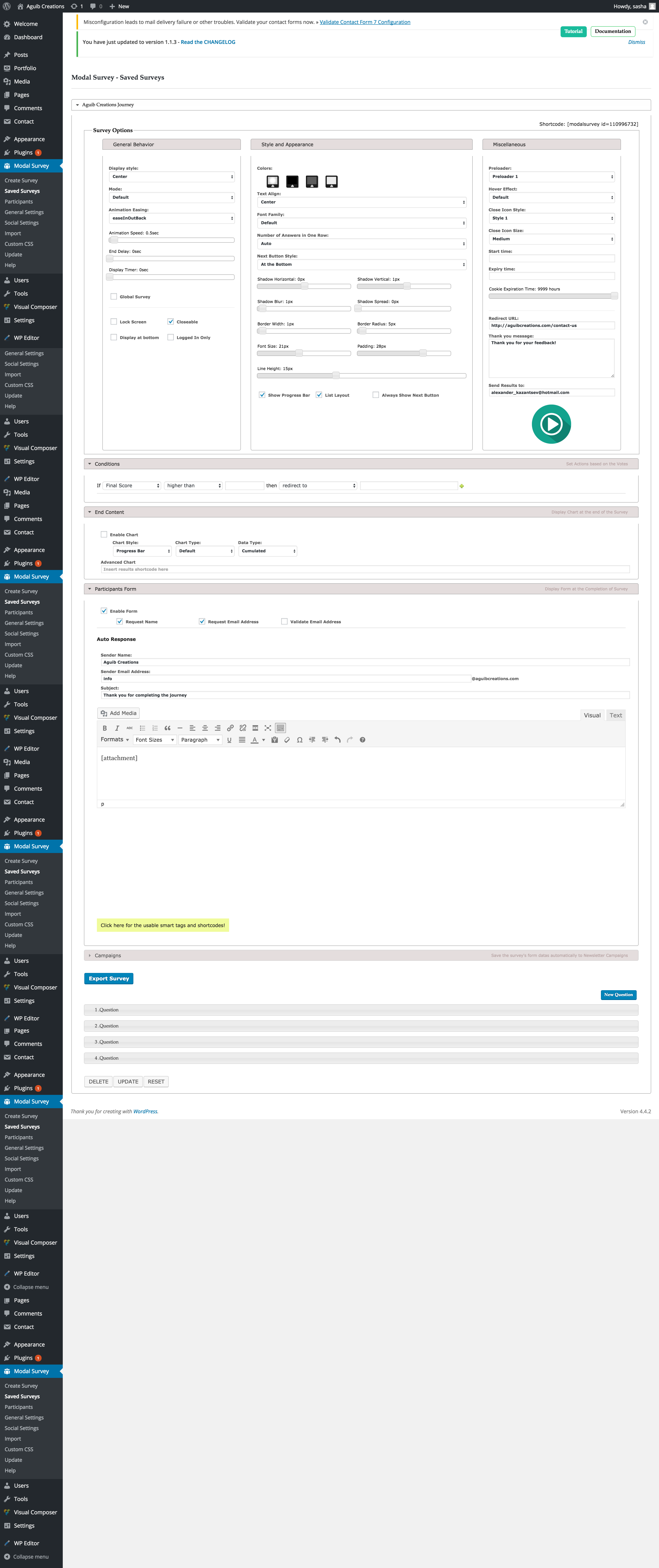
Hi, I have 2 problems: 1) The emails aren’t sent to neither me no the participant at the end of the survey. 2. The person isn’t redirected to the specified page after the last “thank you ” message. Here’s a screenshot of my settings: http://aguibcreations.com/wp-content/uploads/2016/03/screencapture-aguibcreations-com-wp-admin-admin-php-1459455045911.png Please help 
Hello,
1. Adding the [attachment] only to the email body probably isn’t enough, it can be easily marked as SPAM since there is no content in the email just the attachment.
2. The redirection can be done via the Conditions as well. In same cases it is works better than the default redirection option.
If the issues still exists, please send me your website URL with login details via my profile page mail sender and I’m happy to check it.
Best regards,
Pantherius
tested again with condition and it didnt work. Also tried adding text to the message. Just sent you a personal email with the logins. Thanks
Just get the details and checked your website. The issue was caused by the setting Remember Users was set to OFF. That means, each survey will be saved as a new user, therefore the plugin couldn’t recognize the user’s email in the database.
Also set the redirection condition and it is works well.
Best regards,
Pantherius
Hi, builduptechnology is my other account. I bought the plugin , thanks
You’re welcome!
Regards,
Pantherius
Hi, Sorry, 1 last question: is it possible to allow choosing multiple IMAGE ( jpg or png) answers by clicking on them or associating them with a radio button? Also is it possible to use the plugin as just a contact form and not a quiz – no grading no write or wrong answers but just to display the answers to both me and the customer? Thank you!
Hello,
Selecting multiple answers and including images to the answers are available in the plugin. It is not using radio buttons, check out the multiple selection example here: http://modalsurvey.pantherius.com/multiple-answersFind the images in answers example here: http://modalsurvey.pantherius.com/quiz-with-images-and-progress-bar/
Sorry, I do not understand clearly your question about the contact form. If you would like to use it as a contact form what type of answers would you like to display?
If you mean, creating a simple questions and answers type of survey, then yes, it’s possible.
Best regards,
Pantherius
Well I meant like if it’s an image – display the image
If they choose an image as answer, display that image in the PDF
No, sorry, but images only displayed in the survey only at the moment.
Hi, a pre-sales question thanks.
im working on a site that which could give a user a gift, promotional offers, etc. after they completed the survey/quiz.
1. on the profile page, is it possible to pull other details and put into other page? and if ever it can modify like adding additional information of the user? and get all the quiz form the user has compeleted/passed, including the scores etc. currently on the demo it only shows the survey, which the user has voted.
2. can I get all the survey list, and put into one page? also is there a way that you can rate the quiz/survey and display the rate star on the list under each survey title?
3. Is it possible to give a certificate once the user completed/passed the quiz, it is like html, that will get the user name, then will conver to pdf as certificate, then will send to email using plugin auto responder.
thanks again.
Hello,
Sorry, but almost all your requests seems to be requires a custom development.
1. However, the participant’s profile page contains lot of details, it can’t be customized and “put into other page”
2. The overall survey list has been displayed on the admin, but can’t displayed on the frontend area. Rating the survey itself is also not possible.
3. Modal Survey provides Auto-Response feature. The result of the survey can be attached to the auto-reply message as an attachment.
Alternatively, you can also design your own HTML content in the message.
Best regards,
Pantherius
Hi,
Would it be possible for the participants form to be included BEFORE the survey starts?
Best Regards
Hello,
Sorry, it is not a feature at the moment.
Regards,
Pantherius
Hello again. So, I set-up a screening questionnaire for depression using your plug-in. It works like a charm, it was easy to build (even for a guy who knows practically nothing about programming like me) and the end result is great. I can only recommend this plug-in.
I although have one more question. The user is redirected depending on the score of the questionnaire to different pages. I would like to offer (on these result pages) the option to click on a link and export the results (I mean the total score but even the individual questions of the test with the completed answers given by the user) to a PDF file so that it can be saved locally, printed or sent by e-mail. Is this possible? Where can I find instructions? Thank you very much in advance.
Best regards
Hello,
Great to hear that it is works well and easy to use. Thank you!
The PDF can be sent via the Auto-Response feature, that can be find under the Participants Form accordion. Just add [attachment] to the message body to enclose the PDF result to the auto-reply email.
You can find the list of the available parameters on the link below the Auto Response editor.
Regards,
Pantherius
Hello, I purchased the plug-in in order to set-up a depression screening test in my web-site and I think this will work out great. However I wonder if it is possible to customise the looks of the questions by removing the border from the question and just keeping it with the answers? Thank you.
Hello,
Happy to hear that, it is fit to your requirements. Simply add the following lines in the Custom CSS page under the Modal Survey main admin navigation menu:
.survey_question {
border-width: 0px !important;
}
Best regards,
Pantherius
Thank you for your lightning fast reply. My question was however formulated wrongly, I apologise. I meant that I want the question to be removed completely from the button. So, no button for the question, and buttons for the answers. Also, is it possible to have a different font colour for the question and different for the answers? Thank you for your great job once again.
You’re welcome! The solution is the same, it can be customized via the Custom CSS with the following lines:
.survey_question {
border-width: 0px !important;
background: none !important;
box-shadow: 0px 0px 0px !important;
color: #fc0303 !important;
}
Replace the #fc0303 HEX color code for your deserved color code or simply use the color in text format, like blue, green, etc.
Regards,
Pantherius
Thank you. It worked like a charm. Great support. I will most probably come back with more questions Thank you in advance for your patience!
You’re welcome, happy to help you!
Hello,
I bought the plugin earlier today and so far it seems really great, however I’m doing a quiz rather then a survey and I can’t seen to figure out how to get the correct answers displayed for the taker? Ideally I would like the question to be graded (which answer did they pick and which one was the correct one after each question and then end with total score after finished quiz.
Kind regards,
Hello,
At the moment, you can display the number of total correct answers at the end of the survey in the Thank you message field, that is available on the survey edit screen. Simply add [correct] and it will be replaced with the number of total correct answers.
Furthermore, you can also add conditions based on the number of correct answers and redirect the browser to any page or post.
Eg.: You can create a page for 0-5 correct answers, for 6-10 correct answers, etc.
Then redirect to the specified page, that can contains a prewritten content based on the quiz result.
Regards,
Pantherius
Hi again,
Thank you for your quick response! I did see how to display eg. the score, but since its a quiz what i need is the show the participantes not only how many points they scored but the correct answers. For example, question 1. How high is the eiffel tower? A. 300 m B.400 meters C. 500m . ->your answer: A, correct answer C. 500 meter. So people can know what they did right /wrong and what is the actual answers. Is there a way to do this? If not will it be implimented any time soon?
Kind regards,
You’re welcome!
It is possible to redirect the browser to a specific page, that can contains all of the user’s answers. Since you already know the correct answers, those can be diplayed as a static content.
One column for the participant’s answers and one column for the correct answers.
This is the shortcode, that is show the answers in text mode:
[survey_answers id="1422500832" style="plain" data="full" uid="true"]
Wrap it with a HTML DIV element to display it in the half of the page:
<div style="width: 50%;">[survey_answers id="1422500832" style="plain" data="full" uid="true"]</div>
Is it fit to your requirements?
Regards,
Pantherius
When the plugin is installed, a domain name is needed? If yes, Could I change the domain name after the test?
Hello,
No, it is not required.
Regards,
Pantherius