2797 comments found.

Hi there, awesome plugin, nice and straightforward. Just one small issue, after the update to 2.1.3 it doesn’t recognize the colour attribute. Any ideas? Thanks
Sorry, my bad, just realized it was moved to extensions. Keep up the good work mate.
Thank you 
Hi, I have a pre-sale plugin:
I am using the Free version on wordpress.org and find that your plugin suits my need. I like the option to put the filter automatically on top of the product list, so that on mobile view, the filter is shown on top, which is useful for customer to navigate instead of scrolling down to the sidebar way below the page.
Is it possible to customize that auto filter panel on specific category/page ? Currently in the free version, it is applied for all category/shop page.
And does the Pro version has a toggle button to close/expand the filter panel? Currently, it is always expanded. I need it to be always collapsed. Only when customer need to filter something, it will be expanded as someone click on the button.
Hello
Understood you, you can set ‘Set filter automatically’ to No, then open in your wp theme header.php and implement shortcode [woof] and using php code there you can set any conditions using https://docs.woothemes.com/document/conditional-tags/
Toggles: if you mean search form just set in the plugin settings you should use shortcode as [woof autohide=1], but it will dissapers after each searching, but you can open views/woof.php and add condition there for div class=”woof_auto_show woof_overflow_hidden” style=”opacity: 0; height: 1px;” -> opacity: 0; height: 1px; -> wrap do php condition
if(isset($this->is_isset_in_request_data($this->get_swoof_search_slug())))
Hi, Thanks for clear instruction. I find that the toggle option is already in the latest update 1.1.3 (free version on Wordpress.org). But the latest version cause conflict with the variation selection on product page anymore. When I select the variation, the price didn’t show up so the customer cannot place order. Please help to check.
Hello
Its js error, try please this fix: https://wordpress.org/support/topic/upgrade-to-213-stops-the-woocomerce-eway-plugin-from-workings?replies=4
Thanks for great support, even though I didn’t purchase the premium product yet. I am consider between this plugin and another plugin of your: WordPress Meta Data and Taxonomies Filter.
MDTF has more features and also supports Woocommerce & the price difference only $2. Is it possible to configure MDTF to work exactly as Woocommerce Product Filter?
By the way, if you mean WOOF http://codecanyon.net/item/woof-woocommerce-products-filter/11498469 – its my plugin too
Of couse, I know both plugins are yours  I will try to see which one work best for my need and purchase later. Thanks again for quick response
Welcome
Hi. I bought your plugin rescently. There is a problem with validation. your plugin creates this line of code in <head> section: img style=”display: none;” src=”http://velomig.ru/wp-content/plugins/woocommerce-products-filter/img/loading-master/default.svg” alt=”preloader” />” and image shouldn’t be in head of my site. How can I move this preloader image to section?
Hello
Update to v.2.1.3 please, its resolved there …
Is there a way to make the checkboxes exclusive instead of inclusive? For example if a customer wants to see products that are Nike AND Shoes only.
Hello
The plugin works the same way, but as you asked this I think you have NIke and Shoes terms in the same taxonomy. Is it right? Are they in different taxonomy or in the products categories for example?
I was using product tags instead of categories, many products will fit into multiple categories, so I was hoping to have a way to allow customers to find what they are looking for using exclusive tag filters. For example selecting ‘Nike’, ‘Leather’, ‘Junior’ and ‘Footwear’ would only show Nike leather shoes for kids. Is there a way to do that?
Hello
Yes, trouble in one taxonomy for all… I think it can be resolved in one way if you will enable AJAX filtering and then -> http://www.woocommerce-filter.com/documentation/#!/section_6 -> use wp filter woof_products_query where you can set condition AND for terms in the same taxonomy https://codex.wordpress.org/Class_Reference/WP_Query#Taxonomy_Parameters
Without AJAX works woocommerce API and I can do nothing there …
AJAX breaks my entire shop page, is there no better way?
Its not compatible with your theme, only css coder will help you: https://www.fiverr.com/search/gigs?utf8=%E2%9C%93&search_in=category&source=guest-hp&locale=en&query=css&category=10&sub_category=140&page=1&layout=auto – css works for 5$
Hello,
I’m currently evaluating the free version, this an excellent plugin and it works seamlessly with the twentysixteen, however, I am having issues making it work for my custom theme, see the sidebar at:
http://dev.soccermaxx.ca/product-category/footwear/What am I missing?
Hello
http://clip2net.com/s/3sp67Bg – site have js error which terminates the plugin functionality …Okay I fixed the error, but the plugin is still not functional.
Okay I fixed it, <?php wp_footer(); ?> was missing from my footer.php
Why is there a “Yes” field
http://i.imgur.com/KPRJTPt.pngHello
Update please to 2.1.3 I resolved it there + read this please: http://www.woocommerce-filter.com/migration-v-2-1-2-or-1-1-2-and-lower-to-2-1-3-or-1-1-3-and-higher/
Hello,
I want to know if your filter will work with my custom product loop? I have tried the free version a with Visual Composer’s Product Category shortcode and it doesn’t work, so I want to know if I buy this paid version am I going to get support with Visual Composer loop and a custom loop?
Hello. No, they are not compatible now so its doesn work. Visual Composer’s Product Category shortcode has its own wp query so it works in its own way. By the way, drop me link please of the addon for VC you mean – I will think of it if it will be good idea …
Hello! I want to use this plugin with theme http://bit.ly/1CvG4LS. Can you guarantee that the plugin will work and will be compatible with the theme?
Hello. No, but you can test free version of the plugin self: https://wordpress.org/plugins/woocommerce-products-filter/
Hi, the demo looks very nice. I have some questions.
1. is this possible to filter by star ratings? 2. Can I use for each filter different view modes? example categories (select box) and colors ( list). 3.I have a lot of categorys. Can i display example: 10 Categories and under the last category is a link to view more categories? 4. Can I make all the thinks with mdft too?
greetings
Hello
1) I think no as it is meta data and now it is not possible with WOOF
2) yes if to disable chosen and create css for each search form on each if you want
3) No, but you can set block height and customer will be using scroll
4) 1 – yes,all another points the same …
Hi,
Is it possible to create a product categories dropdown only for a category and its children? Can I do this multiple times for different categories?
Thanks, Andre
Hello Andre
No, parent always should be visible, but if routing for products is woo-native – using dynamic recount WOOF will show only subcategories of the current category page:- http://www.demo.woocommerce-filter.com/product-category/clothing/
- http://www.demo.woocommerce-filter.com/product-category/clothing/hoodies/
Look products categories taxonomy …
Prepurchase question. is it possible to make filters with custom names?
If you mean labels for taxonomies – yes, BUT: https://wordpress.org/support/topic/custom-labels-bug-in-112?replies=2
hey can you please check this site www.aussiehealthproducts.com.au can your filter the same way? before i purchase it thankyou
Hello
http://clip2net.com/s/3s6mjeO – if you mean this – no, this is feature will be in future only, but not just now …Hello, Just bought this and
1- the filters doesn’t show up when I set “Show count” to “NO”
2- It doesn’t filter if i set “Try to ajaxify the shop” to “NO”
I use Flatsome theme and both woocommerce and Flatsome is updated to the current version… also i have tried by disabling all the plugins…
Hello
I hope you tested the plugin before bought it… You can send me Pm here http://codecanyon.net/item/woof-woocommerce-products-filter/11498469/support with wp-admin access
I have tried everything and it doesn’t work for me.
You can send me Pm here http://codecanyon.net/item/woof-woocommerce-products-filter/11498469/support with wp-admin access
pm sent
still waiting…
Hello. I answered you, and you sent another data, but its weekend already …
any luck?
yes, login is works
1) http://clip2net.com/s/3slPf36 – here is the reason It is described here: http://www.woocommerce-filter.com/set-no-show-count-filter-elements-disappeared/
2) http://www.woocommerce-filter.com/filtering-by-product-attribute-doesn-work/
+
http://clip2net.com/s/3slPZrC – you have js error which doesn allow autosubmit search form http://evolinks.com/shop/?swoof=1&pa_colour=red – works fine now with colorok, i will try to fix that but why every time i use the filter it goes to the shop page… for example, if i am in necklace category and as soon as i use the filter, it will go to shop page and filter it…i want it to stay at necklace category… the same as your demo… like this http://www.demo.woocommerce-filter.com/product-category/clothing/hoodies/?swoof=1&pa_size=xl&paged=1&really_curr_tax=10-product_cat
Hello
Fix that js error and write me message in the same email chain, now I cant test it normally …
thank you for your support… great plugin, works 100% now.
Welcome
Please let me know if this plugin supports dokan multivendor “filter by store” thanks
Hello
Not tested with that plugin. The plugin works with custom taxonomies, so if that plugin generates it – should work
Kindly let me know once its confirmed since I’m thinking of buying the plugin. Thank you
I cant do that – I have not that plugin
Thanks, will take the risk then!!!
Hello. https://wordpress.org/plugins/dokan-lite/ – try their free version please, maybe that will help, just found it in google …
Hello, i have bought your plugin but it doesn’t work. First i have tried the free version but i have deleted it and when i installed the premium version, then it says that it’s still the free version. And when i activate the filter, i select the radio button but the filter doesn’t work then.
Can you help me?
Thank you. The premium is solved. But the filter doesn’t work. I use Avade as theme. When i check a option, then nothing happens
But you wrote that you tested with free version!? Premium version and free has the same code. Check js errors on front of the site – 99% they are terminated work of the site + clean cache. Theme doesn matter, you can check js errors by: http://www.woocommerce-filter.com/how-to-use-firebug-in-firefox-browser/
Hi… i have the purchase version of this plugin…i am facing issue in search…i have set my product Catalog visibility: to Catalog only but this filter still search the product and show up….can i fix this issue so that it is only visible when i set Catalog visibility: to Catalog/search or search.
Hello
Yes, the plugin doesn work with that settings, I will do it in update, write me request here http://codecanyon.net/item/woof-woocommerce-products-filter/11498469/support and I will send you updated version of the plugin whit changed behavior
I have send you the request…waiting for the update.. Thanks.
Hello
Got it, wait for reply please …
Hi,
Please tell me how to discard your style and apply default theme style?
Thank in advance for quick help!
Especially it concerns the styling of a dropdown. I don’t want this plugin’s styling with rounded corners but my theme default.
Hello
From version 2.1.3 will be special option for it: http://clip2net.com/s/3rMYRcW – just now you can remove all code from css/front.css
Drop-down uses chosen js library and you can in the plugin settings off it: tab Options -> Use chosen -> set No
I have another issue but with the price filter this time. (I’m yousing your paid currency switcher plugin)
When I set the price range in different currency then the main currency of woocommerce, on the results page I get the indication of filtered price range with proper currency name but the amounts are still in a default woocommerce currency.
I had the same with a default woocommerce price filter.
Here is the screen with indication exactly what I mean: https://www.dropbox.com/s/vu5u167s43v65ub/Clipboard01.jpg?dl=0Please advise since the full compatibility of your both plugins and the woocommerce is vital for me before buying the product filter plugin.
Hello. Just did test: http://www.demo.woocommerce-filter.com/?swoof=1¤cy=UAH&min_price=16&max_price=35&paged=1 – all is ok
Drop me link here please …
It looks like sometimes the default price range of Woocommerce plugs instead of your Filter. I do not know why. I did turn off the woocommerce price filter in widgets. Any idea why?
Drop me link here please …
I have sent it to your email via form from your Envato profile.
The only problem I have now is that the function “widget_layered_nav_filters” indicates the price range but indicates it incorrectly. This function is from Woocommerce and I don’t know how to turn it off.
Appreciate your help in advance!
Read my answer in PM please …
Hello , first of all , very good plugin, at the moment I am evaluating the free version .
One question , is there any way that this ONLY IN STOCK checked by default in the shop .
Thank you!
Hola, antes que nada, muy buen plugin,por el momento estoy evaluando la version gratuita.
Una pregunta, hay alguna forma de que el IN STOCK ONLY este marcado por defecto in the shop.
Gracias!
Hello
Yes, but code should be modify here for it:- index.php
- public function __construct()
- add there next code:
$_GET['stock']='instock';
$_GET['swoof']=1;
– and from will be showing only in-stock products
Thank you very much for responding so soon ! I’ve added the code , the tilde appears by default , but the filter is used , the products are normally.
I’ll be doing something wrong?
_-—-——-
Muchas gracias por responder tan pronto! He agregado el codigo, aparece el tilde por defecto, pero no se aplica el filtro, se ven los productos normalmente.
estaré haciendo algo mal?
Hello
Ok, lets do another:- open index.php of WOOF plugin
- find there private function assemble_stock_sales_params
- comment there if (isset($request[‘stock’])) and if ($request[‘stock’] == ‘instock’)
add_action( 'pre_get_posts', 'custom_pre_get_posts_query' );

function custom_pre_get_posts_query( $q ) {

if ( ! $q->is_main_query() ) return;
if ( ! $q->is_post_type_archive() ) return;
if ( ! is_admin() ) {

$q->set( 'meta_query', array(array(
    'key'       => '_stock_status',
    'value'     => 'outofstock',
    'compare'   => 'NOT IN'
)));

}
Hello, I have a question that I am not figuring out on my own.
I have a product that is available in five colors.
When I filter on color, for example ‘black’. I get the picture of the product available in black. But the product picture shown is not the black version of the product. Its the main image.
Is it possible to have the correct filtered color? Thank you.
Hello
Is it possible to have the correct filtered color? – image showing by layout of the theme – WOOF has not influence on it
Hi, first of all, congrats for the plugin, it´s really great!
But I have a problem with it in a website, the filter works ok from a search results page, but it does´t if I filter it from homepage (the price filter does work, but attributes ones don´t)
http://pomponetteshop.com http://pomponetteshop.com/shop/?swoof=1&pa_talla=no-16What could be the problem?
Hello
I hope you tested the plugin before bought it Yes – there is exists some themes which doesn work at all with the WOOF You can send me wp-admin access to test it of course …
http://pomponetteshop.com/shop/?swoof=1&pa_marca=sanmar&paged=1 – one moment – http://pomponetteshop.com/shop/?swoof=1&pa_marca=sanmar&paged=1 – works fine -> http://clip2net.com/s/3rJ2aX6 – but recount doesn – JUST enable please dynamic recount in the plugin settings …Hello Realmag,
I am using the “ActiveWear” theme found at ….
http://themeforest.net/item/activewear-woocommerce-responsive-wordpress-theme/7816453
And I am having some JQuery issues on BOTH the Front and Backend of the plugin.
And yes, I DE-activated all the plugins and got the same issue.
I will send you the login credentials through your CodeCanyon profile page.
Just sent login credentials to your portfolio
Hello Anthony
Source: wp-content/plugins/custom-css-whole-site-and-per-post/js/codemirror.js – http://c2n.me/3rFFTAn
WOOF hasnt any js errors
Thanks for the reply on this wonderful plugin.
I am using v.2.1.2.9.9
On the Front-End….
1) – How do I change the color or the style of the “dragger” when I am using a “Max height of the block” ?
2) – The “In-Sales” and “In-Stock” labels are not inline with the checkboxes
3) – Is there a way to get the “Price Filter” NOT to disappear when the prices for the filtered items are all the same ?
4) – Under “Options”—> “Set filter automatically” makes the filters box dynamically appear at the top of the items, already open, and it has no “close” button.
4b) – Under “Options”—> “Set filter automatically” I ONLY need the filters box to dynamically appear on mobile phone devices.
5) – The “Go” image buttons for the “Search by Text” and the “Search by SKU” text fields do not appear. Even though I uploaded and assigned the image buttons for them within the plugin.
6) – The “show helper” button does not appear even when set to “yes”
7) – What exactly does “Disable swoof influence” affect ?
8 ) – The plugin needs the ability to display a “Multi-Color” swatch.
9) – The Rollover labels are being hidden for the color swatches that are on the far-left and the far-right. How do I modify the Z-Index for the labels ?
10) – If I decide to “turn off” the labels for the colors they still appear anyway.
Concerning Question #3…
Is there a way to get the title for the “Price Filter” to ALSO disappear when the prices for the filtered items are all the same ?
Currently ONLY the horizontal slider disappears, and not the title.
They BOTH should disappear when the prices for the filtered items are all the same.
How do I modify the plugin to do so ?
Hello Anthony
1) There is no max-height for the color, looks like cache. Send me link please where dragger is
2) It is your theme css, you can set them inline using !important css instruction in tab Advanced -> Code -> Custom CSS code
3) It is behavior of the native range-slider, tey set Ion-range slider
4) Looks like cache, OR you forget set Yes in ‘Hide auto filter by default’ of tab Design
4b) The same done in the previous version for you as custom, code not changed http://www.woocommerce-filter.com/manipulate-site-css-depending-device/ , check it please
5) Drop me link please, + clean all your cache, this functionality not changed from the previous 2.1.2
6) really cache, it is primitive functionality and it works
7) In some themes if ‘Disable swoof influence’ is no after searching on category pages uses another woocomerce template file. To avoid this this option should be enabled
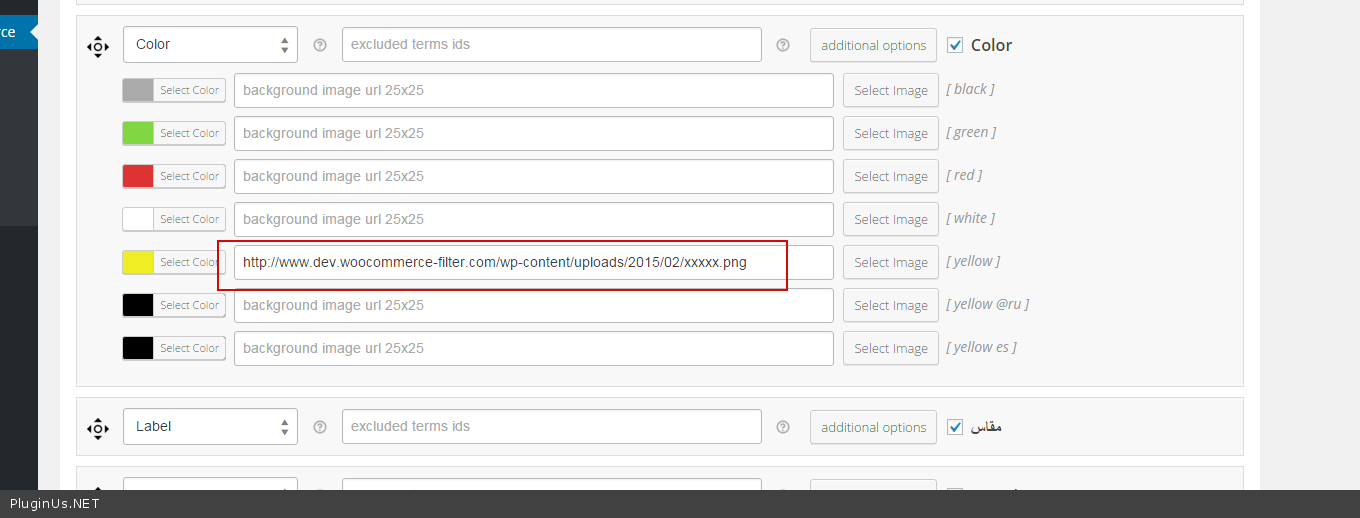
 But it have! Just upload images 25×25 and use them http://c2n.me/3rMX5Mw.png
9) You can see it by firebug https://www.youtube.com/watch?v=igguTa6oZeI – you can by this toll edit any CSS as you want
10) 100% cache
11) There is no title for price slider – by logic its clear what for this slider, so what for this need?
12) Better not modify plugin code, you can use CSS for hiding/showing/margin/padding/float for any elements of the filter only …
You can write me PM with links and screens to clarify troubles, and of course clean cache to avoid non-troubles question ….
I will send login info to both your email and your profile.
Just sent login info to your CodeCanyon profile
Were you able to login to see the issues I mentioned ?
Particularly with questions…
1 , #4, #5, #6, #9 and #10
Hello Anthony
I deep in the WOOF code this days – update must be a week ago, and I will look on site today Login is worked well