

84 comments found.
Hello. I’m having some trouble with the plugin. Upon activating the plug-in, my slider revolution stops showing on my website. Regardless of the preset that I select, the Lighthouse plug-in takes out the slider revolution. Is there any solution to this? Would appreciate some help! Thanks.
Hi, that’s really weird. Even with no options selected.
Please contact me via https://getbutterfly.com/members/support/.
Check out version 4.9.4, bringing together SpeedFactor, Volt and a Persistent Object Caching feature. Read more details here:
https://getbutterfly.com/wordpress-plugins/lighthouse/Hi, this plugin seems great. I am on WP Engine, do you know if there are any issues there or should it work fine on their hosting platform?
Also, I have a ton of plugins that seems to be the main cause of my site being sloooow as hell. My landing page is like 12 seconds  it’s awful. Will your plugin strip all the extra code and stuff that loads on every single page instead of just loading where it is needed?
Thanks
Hi. There is no known conflict with WP Engine, and Lighthouse should help with speed when properly configured. It will not strip ALL of the code, you should work on optimizing your landing page, 12 seconds is unacceptable.
But it will definitely help with pre-optimizing the code for better caching, removing attributes and parameters, trying to move code to the footer and adding browser caching.
Check out version 4.9.4, bringing together SpeedFactor, Volt and a Persistent Object Caching feature. Read more details here:
https://getbutterfly.com/wordpress-plugins/lighthouse/
After you buy and istall it, it places the following credential on your website footer!! “166 queries in 0.473 seconds using Lighthouse”
It does not ask you to place Its credentials on Your Site.
I payed this plugin with 12 month support, so I expect high quality/standards!
Thank you if you come back with support.
The plugin is coded using high quality standards. The next version will use PSR standards. The link in the footer is there to measure the number of queries and loading time and can be disabled from the plugin’s settings. You should have asked before rating.
I hope you agree the plugin should kindly ask before promoting itself on the customer’s website who payed for the plugin. I did not know it will do that.
Now I found and deleted the code.
If you let me know where the setting is to turn off the plugin credentials, I will upgrade the rating.
I do agree, yes, and based on your feedback, I will make the option disabled starting with the next version.
Now, if you go to Theme Tweaks -> Scoring/ranking tweaks -> Display load results and plugin attribution link in the footer and uncheck the option.
I rated the plugin with 5 stars for your flexibility. Thanks. The plugin is good and site speed improved a lot.
All updates will keep your current settings. In addition, the default value will be 0 rather than 1.
Thanks for the updated review.
Site speed is much better now with Lighthouse, especially on mobile. Next year after the plugin licence expires, I will buy/extend it for another year.
Thanks a lot for creating Lighthouse.
 No, thank you.
Check out version 4.9.4, bringing together SpeedFactor, Volt and a Persistent Object Caching feature. Read more details here:
https://getbutterfly.com/wordpress-plugins/lighthouse/Hi! I’m interested! Does it work with W3 Total Cache? And do I need to configure it to suit W3 Total Cache?
Hi! You don’t need to configure it. Lighthouse does other things behind the scenes. In order for the plugin to work with W3 Total Cache, you would have to turn off all 4 caching options.
Also, it would take a bit of tweaking and testing to get the best out of it.
But if I turn off the W3 Total Cache, how would caching works with Lighthouse?
Lighthouse only has basic caching. Lighthouse is a performance plugin not a caching plugin. Some of its options might help a properly configured caching plugin.
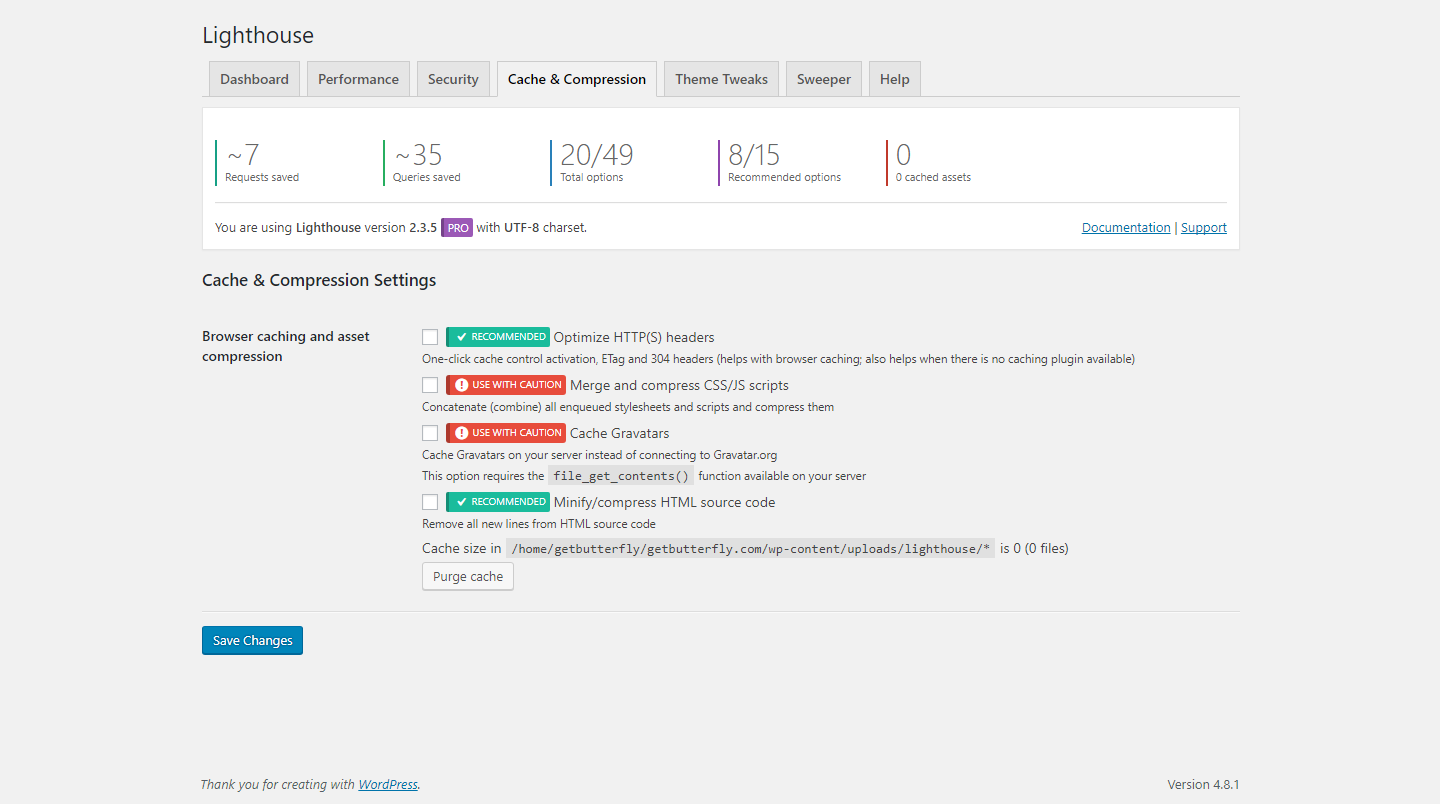
I see. But im using page, minify and browser cache on W3 Total Cache. If I dont want to turn them off can I still use Lighthouse? What will be the best setting for me in Lighthouse.
No, no, you have to turn off the caching options in Lighthouse. So, use W3 Total Cache for caching, and Lighthouse for speed/performance.
I see. I purchased it now. Going to set it up. Do you have documentation for me to read what is what?
Thank you. Unfortunately no, the options should be pretty self-explanatory. I need to right a bit of documentation, though, to explain what each option does.
I will do it for the next version, next week.
Okay! I’ll wait for you to come up with documentation and see if i need to tick anymore settings. Cheers. Documentation helps in sales when people know what they are buying.
I know, that’s why I added those quick settings buttons. To help users who don’t know what the options are. Because most WordPress admins would know a bit about how the system works and they would want the ability to individually enable/disable options.
But yeah, documentation is coming.
Check out version 4.9.4, bringing together SpeedFactor, Volt and a Persistent Object Caching feature. Read more details here:
https://getbutterfly.com/wordpress-plugins/lighthouse/Hi, bought the plugin today but the download contains v2.0.6 not 2.1 ? Regards, Eric
Hi,
Just arrived
Cheers!
Check out version 4.9.4, bringing together SpeedFactor, Volt and a Persistent Object Caching feature. Read more details here:
https://getbutterfly.com/wordpress-plugins/lighthouse/Hi, i bought a license, but the license key is nowhere to fill in, in the wp-backend. an i got a visible message for every site user in the footer of my website “47 queries in 0,716 seconds using Lighthouse”?? can you help me?
You don’t need to enter the license key anywhere, CodeCanyon knows that you purchased the plugin.
Yes, there is a helper message in footer. If you want to remove it, go to Settings -> Lighthouse -> Theme Tweaks and uncheck the “Display load results and plugin attribution link in the footer” option.
OK thx a lot!
You are welcome! Don’t forget to rate the plugin if you find it useful.
is there a german translations of the backend plugin?
No. Have you ever used POEdit? It’s a free app. I can make all the fields translatable, and you can use POEdit to translate everything in German.
ok, no it doesn’t matter
Okay.
Hi, i just activate “disable xml-rpc”, but in html-code there is still this <link rel=”pingback” href=”http://www.yourdomain.com/xmlrpc.php”/>. And when i try to open the xmlrpc.php there comes the normal request: XML-RPC server accepts POST requests only. … i just do it now in the .htaccess to get a 403-error-site… but why doesnt’t it work in your plugin?
It should work, but it’s probably your theme adding that pingback link. Do you have another plugin that might enable it?
mh, no it wasn’t displayed before (before activating lighthouse plugin)… any problems when using hidemywp at the same moment?
No issues with hidemywp. Try to uncheck the XMLRPC option and see if it’s there.
No, still there… there is a “lighthouse-cache” file in wp-content with old data 4 days left… is this relevant? or could i delete? perhaps about this? I sweep my database several times and clear cache in wp and browser
No, the cache is for something else. Let me check the plugin and I’ll update you tonight. It doesn’t happen on my dev server, so it must be something specific. What version of WordPress are you using?
OK, WordPress 4.3.4 … thx for your soon answers!
No worries. It seems a bit outdated, I’ll have to check. I’ll update you tonight.
Quick one, go to Settings -> Discussion and uncheck this: Allow link notifications from other blogs (pingbacks and trackbacks). See if it fixes it.
this is already unchecked.
I have fixed several things in the plugin and updated some options. Contact me via email so I can send you a beta version. See my profile page, lower right.
it’s difficult to find your email-adress… can you please tell me? Neither on this site nor here getbutterfly.com to find?
ok thx for your email… delete the installed plugin in wp and install the new one again?
Yes, all the settings will be preserved.
And you can find a contact form here – https://getbutterfly.com/members/support/
ok fine! now it works (but only after i cleared via sweep the database und cleared my browser-cache … is this normal?)
It’s normal to clear the cache, yes, because the new version physically removes the HTML tag. Usually HTML is aggressively cached by browsers.
Don’t forget to rate it if you’re happy! 
OK thx. Sure, but where can i rate ?
Check the right side, where you see the price, the social icons and the rating stars.
Check out version 4.9.4, bringing together SpeedFactor, Volt and a Persistent Object Caching feature. Read more details here:
https://getbutterfly.com/wordpress-plugins/lighthouse/Just a quick comment and question – Comment: I love your plugin. It’s very usefully. As for the question, is there an option to remove the “lighthouse menu” from the top bar. I don’t want to show that to my BuddyPress users. Thank you and Thumbs up!
Hi. I will remove it from the next version, as I’m not happy with it. It clutters the admin bar and it’s not really necessary.
The next version is coming in 2 days, after WordPress 4.5 goes live.
Thank you!
Check out version 4.9.4, bringing together SpeedFactor, Volt and a Persistent Object Caching feature. Read more details here:
https://getbutterfly.com/wordpress-plugins/lighthouse/Hi! This seems to be a very awesome plugin! I just have two presales questions: Would it work within a Multisite and together with Woocommerce? Thanks
Yes, I am currently using it on two multisite networks and it works with WooCommerce.
Check out version 4.9.4, bringing together SpeedFactor, Volt and a Persistent Object Caching feature. Read more details here:
https://getbutterfly.com/wordpress-plugins/lighthouse/Awesome plugin and great support…BUT…how do we remove the footer “94 queries in x seconds using Lighthouse” – happy to use and promote the plugin but this (especially for client sites) is a no no. Thanks.
Hi, check the “Display load results and plugin attribution link in the footer” option in Theme Tweaks tab.
Check out version 4.9.4, bringing together SpeedFactor, Volt and a Persistent Object Caching feature. Read more details here:
https://getbutterfly.com/wordpress-plugins/lighthouse/Thank you for the recent plugin updates – the option descriptions are definitely helpful. I’m still not sure about a few of them though:
-What is the option “Disable WordPress 4.4 embeds”? Would turning this on stop posts from being posted on Facebook or Twitter? -What does “Protect WordPress against malicious URL requests” actually do? -Under “Theme Tweaks” I am not sure I understand the purpose here. What would the benefit be to remove Widgets or enqueue styles/scripts that would already be called by the Theme?
Thanks!
Hi,
Let me take them one at a time:
1. The embeds option is a new WordPress 4.4 feature. It’s not related to Facebook and Twitter. Read more here – https://make.wordpress.org/core/2015/10/28/new-embeds-feature-in-wordpress-4-4/
2. “Protect WordPress against malicious URL requests” blocks requests if there is no referral or there’s a malformed request containing SQL queries or encoded strings.
3. The benefit to remove widgets would be less queries for WordPress in the long run. You won’t see any immediate benefit, but it would, in some cases, make the admin area faster.
4. The benefit to enqueue those styles and scripts is only useful for theme developers. The enqueuing is optimized for fast loading and insures compatibility with caching plugins.
Check out version 4.9.4, bringing together SpeedFactor, Volt and a Persistent Object Caching feature. Read more details here:
https://getbutterfly.com/wordpress-plugins/lighthouse/Hi, When using it with the Divi template from elegantthemes I get the following error:
Uncaught TypeError: $et_tooltip.live is not a function
It seems to break toggles. For the rest, it’s really an awesome plugin.
Hi and thanks. Can I see your site? That jQuery function does not belong to Lighthouse, but it might be a conflict from removing a certain script.
Hi, I found the issue, it happens if I activate: Remove jQuery Migrate
Thanks for letting me know. I’ll improve the documentation.
Check out version 4.9.4, bringing together SpeedFactor, Volt and a Persistent Object Caching feature. Read more details here:
https://getbutterfly.com/wordpress-plugins/lighthouse/Hi! According to your blog, Lighthouse is up to version 1.4 but I don’t see the 1.4 changes on the Envato page. It also doesn’t look like these options are documented on your site (http://getbutterfly.com/wordpress-plugins/lighthouse/) Any plans to add notes on the new features?
For next release would you consider adding an option for the Sweeper where it will always retain a certain period of data? For example, when deleting page revisions it will delete all but the last 2 weeks’ worth? Thanks!
Hi, I know, next version should be released today or tomorrow.
Regarding the period of data, no, I won’t add that option as it would make Sweeper bulkier with more filters and options. Also, it’s not in the plugin’s scope.
There are lots of plugins out there, doesn’t any of them do that?
No worries, thanks for the reply. Yes, there are other plugins but if Lighthouse has a ‘sweeper’ function it wouldn’t make sense to install a second plugin to clean up the database, just for the one extra option
Version 1.7.0 is now available. Would you purchase the plugin if it had that function?
Hi! I plan on buying the plugin anyway. It is best practice to always backup the database before doing anything so if I ever had to go back I would just revert to a backup.
Your webpage had a great explanation of what each setting does but I can’t find it on the new update. Is this still available somewhere? Thanks.
Hi. I bought your plugin but I still can’t find where these settings are explained – Do you have documentation for this plugin?
Hi, there is no documentation for each option, I will add one in the next version coming in 2 days. I will add a small explanation next to each option or group of options.
Check out version 4.9.4, bringing together SpeedFactor, Volt and a Persistent Object Caching feature. Read more details here:
https://getbutterfly.com/wordpress-plugins/lighthouse/I really like the plugin. I did notice on the Sweeper tab, it attempts to divide by 0 and will throw a warning. Also signed up on your website and it was in clear how to get support there.
Hi, I will add the support section on the site today. Also, can you provide a screenshot of the “division by zero” error?
PHP 7, very nice! I will get it fixed next week. I will also get PHP 7 on my hosting server in January. I would also appreciate any kind of feedback regarding Lighthouse and PHP 7.
Check out version 4.9.4, bringing together SpeedFactor, Volt and a Persistent Object Caching feature. Read more details here:
https://getbutterfly.com/wordpress-plugins/lighthouse/Pre-sale question, will the plugin work on a multisite installation? If yes, am I allowed to use the plugin for all the sites on the installation?
Hi, yes, the plugin will work on a multisite installation and you are allowed to use it. Unless you want to redistribute it, you need to purchase an extended license.
Check out version 4.9.4, bringing together SpeedFactor, Volt and a Persistent Object Caching feature. Read more details here:
https://getbutterfly.com/wordpress-plugins/lighthouse/Do i need to purchase the plug-in for every site i develop? /if i do… is there a way to try it for evaluation purposes, it is hard to explain the clients the benefits so it can be included in the budget
Yes, you need to. There is no testing environment, but you could purchase it yourself and then set up a demo for your clients.
Check out version 4.9.4, bringing together SpeedFactor, Volt and a Persistent Object Caching feature. Read more details here:
https://getbutterfly.com/wordpress-plugins/lighthouse/We installed Lighthouse but with plugin installed, event with ‘Fail safe defaults’ set, we can no longer edit Permalinks, open or close or move metaboxes in admin edit pages. Is this a known bug? or could it be fixed soon? We really like your plugin until this was discovered. Thanks.
Hi, there is, most likely, a jQuery conflict. You can see what the issue is by checking Chrome’s Inspector. That is, while inside your WordPress admin, right-click, select Inspect and click on the last tab – Console. Now reload, and try to change permalinks or move metaboxes. Some errors should appear in the Console.
Thanks, we were getting no errors but finally figured out that if “Disable autosuggest feature for terms” under Admin Tweaks is checked, it breaks the change permalink and prevents dropping and dragging of meta boxes in admin
Interesting, it must be a required script for this behaviour. I’ll check and add more explanations to that option.
Check out version 4.9.4, bringing together SpeedFactor, Volt and a Persistent Object Caching feature. Read more details here:
https://getbutterfly.com/wordpress-plugins/lighthouse/Hello Presale Question:
Will this plugin help me improve my speed of the website? I am having hard time decreasing my page load?
Thanks in advance.
Yes, that’s the purpose of this plugin. Combined with a caching plugin, it will make your site lightning fast.
Check out version 4.9.4, bringing together SpeedFactor, Volt and a Persistent Object Caching feature. Read more details here:
https://getbutterfly.com/wordpress-plugins/lighthouse/Looks like your Lighthouse plugin is a very useful one. I’m sure you that in developing your performance tuning plugin, you’ve quantified the performance gain that it can achieve.
Could you please provide some performance data that demonstrates just how well your plugin improves WordPress site performance? Not looking for exact numbers, just an idea of relative performance improvement, e.g., X% improvement.
Two test cases would be helpful, namely, one with a caching plugin used and one without.
Thank you.
Yes, I will.
Check out version 4.9.4, bringing together SpeedFactor, Volt and a Persistent Object Caching feature. Read more details here:
https://getbutterfly.com/wordpress-plugins/lighthouse/No, the plugin won’t fix that. Why don’t you remove that code from the source?
I see. Im not a developer and scared touching the code myself. Thank you
Have you purchased the plugin?
not yet. just asking questions first before buying. thanks
You are welcome!
Check out version 4.9.4, bringing together SpeedFactor, Volt and a Persistent Object Caching feature. Read more details here:
https://getbutterfly.com/wordpress-plugins/lighthouse/This shows how many queries it took when the pages load for me. I assume this is because I am logged in as admin. Is there an option to turn that function off? It distorts the pages render and I want to see the page as it looks to the visitor without having to login and out each time. Plus, I don’t really need to know the “425 queries in 2.229 seconds using Lighthouse” on every page, every time. The plugin seems to be working well other wise.
There is an option to disable that line. Go to Theme Tweaks tab and uncheck the “Display load results and plugin attribution link in the footer” option.
Thank you, don’t forget to rate it if you like it!
Check out version 4.9.4, bringing together SpeedFactor, Volt and a Persistent Object Caching feature. Read more details here:
https://getbutterfly.com/wordpress-plugins/lighthouse/



